Plyr: Wrong aspect ratio and height in version 3.5.7 and above
Expected behaviour
The player doesnt overlap and has the right aspect ration and height. This is the behavior of version 3.5.6 and below.

Actual behaviour
The player completely pushes all othe elements out of the area and overlaps because the aspect ration and height are wrong. This is the behavior of version 3.5.7 to 3.5.10.

Environment
- Browser: I used Opera but the bug is also in Chrome, Firefox and Edge
- Version: 67.0.3575.137
- Operating System: Windows
- Version: 10
Link to where the bug is happening
 SnGmng
All 7 comments
Thanks. I had noticed this myself locally but couldn't trace the cause. Your info version allowed me to track it down to this:
https://github.com/sampotts/plyr/pull/1679/files#diff-5e4f0b0fceaec73161f6a713ede69511L19
I'll try and get a new version out ASAP with the fix 👍
 sampotts
on 19 Apr 2020
sampotts
on 19 Apr 2020
I am glad i was able to help you! And wow that was a pretty fast bug diagnosis! 👍
SnGmng
on 19 Apr 2020
This should be resolved in the latest version 👍
sampotts
on 28 Apr 2020
The issue is still there in 3.6.1
Codepen
SnGmng
on 29 Apr 2020
I found out how to fix it: https://github.com/sampotts/plyr/blob/ef85cb6195dc07627bd4fd357723c6ee96033ed9/src/sass/base.scss#L15
Removing this line or using height: unset; solves the problem!
You can try this out on the codepen mentioned above. Just add
.plyr
{
    height: unset;
}
into the css section and the aspect ratio goes back to normal
SnGmng
on 27 May 2020
@SnGmng Doesn't seem to work for me. Will this be fixed in plyr?
 dzcpy
on 26 Jun 2020
dzcpy
on 26 Jun 2020
Getting this issue too on 3.6.2 and it seems to be a height: 100% issue. See image below.
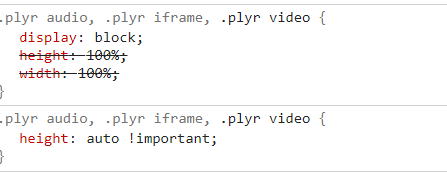
I had to force it to height: auto !important; for the ratio to be normal and have the regular aspect of older versions.
 darkylmnx
on 10 Nov 2020
darkylmnx
on 10 Nov 2020
Related issues
 TheZoker
·
4Comments
TheZoker
·
4Comments
 elliottcoe
·
4Comments
elliottcoe
·
4Comments
 sparkktv
·
4Comments
sparkktv
·
4Comments
 thang-nm
·
4Comments
thang-nm
·
4Comments
 jwjcmw
·
4Comments
jwjcmw
·
4Comments
Most helpful comment
I found out how to fix it: https://github.com/sampotts/plyr/blob/ef85cb6195dc07627bd4fd357723c6ee96033ed9/src/sass/base.scss#L15
Removing this line or using
height: unset;solves the problem!You can try this out on the codepen mentioned above. Just add
into the css section and the aspect ratio goes back to normal