Plyr: Mute and Volume controls should be shown when explicitly listed as controls
Expected behaviour
The Mute and Volume controls should be shown when a specific list of controls is called out, i.e. controls: ['play', 'progress', 'current-time', 'mute', 'volume'].
Actual behaviour
When a list of specific controls is passed in, the Mute and Volume controls are not shown.

Steps to reproduce
const player = new Plyr('#player', {
      controls: ['play', 'progress', 'current-time', 'mute', 'volume'],
  });
https://codepen.io/bseib/pen/wvvddBV
Environment
- Browser: Chrome
- Version: 77.0.3865.120 (Official Build) (64-bit)
- Operating System: Windows
- Version: 10
Console errors (if any)
Link to where the bug is happening
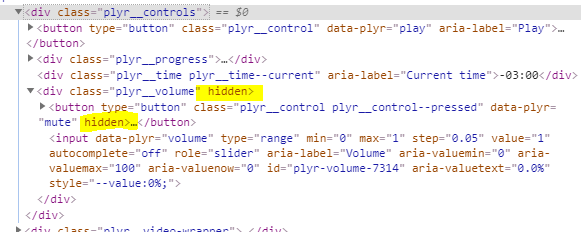
It looks like the hidden attribute is being set unexpectedly on the Mute and Volume controls:
 bseib
bseib
All 7 comments
I'm seeing this too
 jetlej
on 24 Oct 2019
jetlej
on 24 Oct 2019
The same with Ubuntu, Windows 10, Chrome 78 and Chromium 78.
To fix this I have to enable in about://flags: Experimental Web Platform features - then enables, controls show as expected.
Reproducible with 3.5.4, 3.5.6 releases.
 Nickmob
on 6 Nov 2019
Nickmob
on 6 Nov 2019
This is caused by this handler https://github.com/sampotts/plyr/blob/74e3990604698b1f2af3ed51e65b0ca820c1d624/src/js/listeners.js#L382
It seems that by the time of that event, for some reason there are no audio tracks in chrome(in firefox everything is okay), or, at least, plyr.hasAudio method gives such output. I'm not sure how to fix that properly, but this handler can be just deleted as a temp solution.
 ChubbyDuck
on 4 Dec 2019
ChubbyDuck
on 4 Dec 2019
I've been facing this issue for at least 6 months. The volume slider doesn't show up until the user clicks the seekbar.
@ChubbyDuck Could you provide a working example?
 shravan2x
on 16 Dec 2019
shravan2x
on 16 Dec 2019
Facing the same issue. I tried with all versions back to 3.5.3.
 bpeab
on 17 Dec 2019
bpeab
on 17 Dec 2019
This issue is solved overwritting this class:
platform-android media-player .plyr [hidden] {
        display: flex !important;
}
Modifying this classes should solve issue for other platforms
.plyr .plyr__volume[hidden] {
       display: flex !important;
}
.plyr .plyr__volume button[hidden]{
       display: flex !important;
}
Its not the prettiest solution, the problem is the hidden property of DOM element. It should not be appear in elements. At least, this solution works for us.
 dalejandre
on 6 Feb 2020
dalejandre
on 6 Feb 2020
This should be fixed in 3.5.7 👍
 sampotts
on 10 Feb 2020
sampotts
on 10 Feb 2020
Related issues
 frumbert
·
3Comments
frumbert
·
3Comments
 Skwai
·
4Comments
Skwai
·
4Comments
 thang-nm
·
4Comments
thang-nm
·
4Comments
 ahmadshc
·
4Comments
ahmadshc
·
4Comments
 osamay
·
4Comments
osamay
·
4Comments
Most helpful comment
This should be fixed in 3.5.7 👍