Plyr: Exit fullscreen button tooltip says "Enter fullscreen" in Chrome
Using plyr 3.1.0, while in fullscreen mode, the fullscreen toggle button tooltip says "Enter fullscreen" in Chrome.
Can be replicated using the demo https://plyr.io/
Firefox is unaffected, and I haven't tried this in any other browsers.
 friday
All 12 comments
Will look at this tonight 👍 Fullscreen API is dogs breakfast across the browsers.
 sampotts
on 11 Apr 2018
sampotts
on 11 Apr 2018
Yes, It's ridiculous. I'm using a third party library "screenful" only to avoid handling this myself.
friday
on 11 Apr 2018
Hey @friday, this should be resolved now. Feel free to re-open if not...
sampotts
on 17 Apr 2018
It's still happening I'm afraid (can be replicated at https://plyr.io/)
I can't reopen though.
friday
on 17 Apr 2018
Hmm, on Chrome 66 I don't get it ...
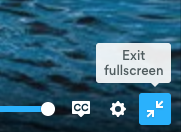
sampotts
on 17 Apr 2018
Chrome 65 windows...
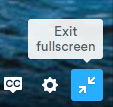
sampotts
on 17 Apr 2018
That's really strange. I'm using Chrome v65.0.3325.181 on os x El capitan, and have force-reloaded Plyr (disabling cache).
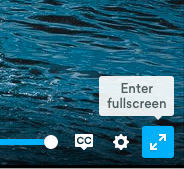
friday
on 17 Apr 2018
I didn't notice until your screenshots that the icon is wrong as well, so not just the tooltip.
friday
on 17 Apr 2018
Ah damn, I don't have El Capitan any more. Literally upgraded the only machine I had running it last night. I'll see if I can find another way to test. Should setup a VM I guess.
It must be something to do with the event as that sets the pressed state of the toggle button.
sampotts
on 17 Apr 2018
I can probably look at it though. If I'm in a minority of users getting this it shouldn't be critical (even more so at these tooltips are disabled by default).
I'm stuck since I have customized my keyboard conf and Sierra broke support for the app, so you have a free tester for El Capitan ;)
If I change aria-pressed to true it works btw, but I guess you figured that wasn't the problem.
friday
on 17 Apr 2018
Ahh Karabiner? I saw they'd changed it to Karabiner Elements that was a little odd... I use it to customize home and end keys to act like a PC.
The event should trigger that aria state change which effects the UI. Something must be going wrong with that.
sampotts
on 17 Apr 2018
Karabiner indeed! I have a complete custom layout (general letter key layout, special chars, combinations, dual role keys, etc). It started off as this "I like vim, but I want to tweak it some, and be able to use the layout everywhere"-idea but It's hard to justify the time I spent on tweaking it, learning it or things like this. I know about Karabiner Elements, but haven't been able to use it.
Seems like I've missed out on some updates recently though, so hopefully I'm wrong and can actually make the switch.
friday
on 17 Apr 2018
Related issues
 tomByrer
·
3Comments
tomByrer
·
3Comments
 TheZoker
·
4Comments
TheZoker
·
4Comments
 ahmadshc
·
4Comments
ahmadshc
·
4Comments
 Antonio-Laguna
·
3Comments
Antonio-Laguna
·
3Comments
 frumbert
·
3Comments
frumbert
·
3Comments