Plumber: Error when receiving json with leading zero
My session info:
─ Session info ───────────────────────────────────────────────────────────────────────────────────────────
 setting  value
 version  R version 3.6.1 (2019-07-05)
 os       Windows 10 x64
 system   x86_64, mingw32
 ui       RStudio
 language (EN)
 collate  Portuguese_Brazil.1252
 ctype    Portuguese_Brazil.1252
 tz       America/Sao_Paulo
 date     2020-01-07

─ Packages ───────────────────────────────────────────────────────────────────────────────────────────────
 package     * version    date       lib source
 assertthat    0.2.1      2019-03-21 [1] CRAN (R 3.6.1)
 cli           2.0.0      2019-12-09 [1] CRAN (R 3.6.1)
 crayon        1.3.4      2017-09-16 [1] CRAN (R 3.6.1)
 data.table    1.12.8     2019-12-09 [1] CRAN (R 3.6.1)
 dplyr         0.8.3      2019-07-04 [1] CRAN (R 3.6.1)
 fansi         0.4.0      2018-10-05 [1] CRAN (R 3.6.1)
 glue          1.3.1      2019-03-12 [1] CRAN (R 3.6.1)
 httpuv        1.5.2      2019-09-11 [1] CRAN (R 3.6.1)
 jsonlite      1.6        2018-12-07 [1] CRAN (R 3.6.1)
 later         1.0.0      2019-10-04 [1] CRAN (R 3.6.1)
 magrittr      1.5        2014-11-22 [1] CRAN (R 3.6.1)
 pillar        1.4.2      2019-06-29 [1] CRAN (R 3.6.1)
 pkgconfig     2.0.3      2019-09-22 [1] CRAN (R 3.6.1)
 plumber     * 0.4.6      2018-06-05 [1] CRAN (R 3.6.1)
 promises      1.1.0      2019-10-04 [1] CRAN (R 3.6.1)
 purrr         0.3.3      2019-10-18 [1] CRAN (R 3.6.1)
 R6            2.4.1      2019-11-12 [1] CRAN (R 3.6.1)
 Rcpp          1.0.3      2019-11-08 [1] CRAN (R 3.6.1)
 rlang         0.4.2      2019-11-23 [1] CRAN (R 3.6.1)
 rstudioapi    0.10       2019-03-19 [1] CRAN (R 3.6.1)
 sessioninfo   1.1.1      2018-11-05 [1] CRAN (R 3.6.1)
 stringi       1.4.3      2019-03-12 [1] CRAN (R 3.6.0)
 stringr       1.4.0      2019-02-10 [1] CRAN (R 3.6.1)
 testeMetodo   0.0.0.9000 2019-12-11 [1] git2r (@680115c)
 tibble        2.1.3      2019-06-06 [1] CRAN (R 3.6.1)
 tidyselect    0.2.5      2018-10-11 [1] CRAN (R 3.6.1)
 withr         2.1.2      2018-03-15 [1] CRAN (R 3.6.1)

[1] C:/Users/leonardo.filgueira/Documents/R/R-3.6.1/library
I want to build an post API and pass to it a JSON. Let's to the example (supose this script is saved as _teste_plumber.R_):
#* @apiTitle json with leading 0

#* @param lista A list

#* @post /test

function(lista){
  unlist(lapply(lista, jsonlite::fromJSON))
}
Then I run:
pr <- plumb('teste_plumber.R')
pr$run(port=4000, host = '0.0.0.0')
In order to test this API, I'm using Postman.
Now I'll pass two JSON. The first will work and the second will return an error:
First JSON

1.1. Result using first JSON
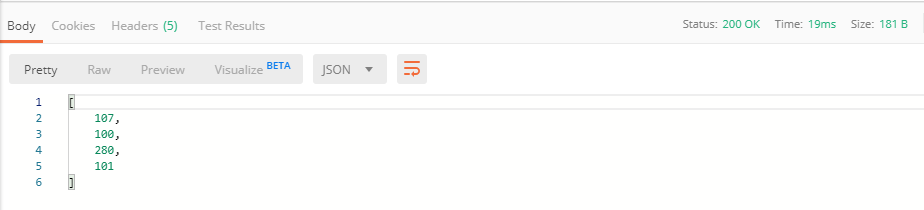
Second JSON (I put a leading zero in the last value)

2.2. Result using second JSON (error)

When I look at R console:
<simpleError: parse error: trailing garbage
                                      001
                     (right here) ------^
I've searched this and I've found this question: https://stackoverflow.com/questions/27361565/why-is-json-invalid-if-an-integer-begins-with-a-leading-zero
The solution given was: do not use leading zero in numbers or pass the number as string in json (if the leading zero is important). In my case this leading zero is important.
 leo-filgueira
All 11 comments
@leo-filgueira Thank you for the great reprex!
I do not believe this is a plumber issue, but an issue with the code. It can be replicated (without plumber) with:
pr_test <- function(lista){
  unlist(lapply(lista, jsonlite::fromJSON))
}
x <- c(
  "107",
  "100",
  "280",
  "101"
)
y <- c(
  "107",
  "100",
  "280",
  "001"
)
pr_test(x)
#> [1] 107 100 280 101
pr_test(y)
#> Error: parse error: trailing garbage
#>                                       001
#>                      (right here) ------^
Created on 2020-01-07 by the reprex package (v0.3.0)
What is your end goal? To turn it into a number? To retrieve the string value?
At the time of the route function, lista has already been processed into a R object, similar to x above and supplied to your route. I believe the code (as is) is behaving properly... even if it is not your intended result.
 schloerke
on 7 Jan 2020
schloerke
on 7 Jan 2020
There's no need to be of type numeric. It can be a string, but inside this string it must be a number. The goal is to check if a document number from Brazil is valid or no and this document number might start with a 0
leo-filgueira
on 7 Jan 2020
I've tried to use other package: rjson::fromJSON, but the error keeps happening. The message is different:
Error in FUN(X[[i]], ...) : hex or octal is not valid json
It seems that even being a string, json can't start with a 0
leo-filgueira
on 7 Jan 2020
I would use regex testing as the object is already been parsed to a string.
pr_test <- function(lista) {
  unlist(lapply(lista, grepl, pattern = "^\\d+$"))
}
x <- c(
  "107",
  "100",
  "280",
  "101"
)
y <- c(
  "107",
  "100",
  "280",
  "001"
)
z <- list(
  "107a",
  "10.0",
  "-280",
  "0-01"
)
pr_test(x)
#> [1] TRUE TRUE TRUE TRUE
pr_test(y)
#> [1] TRUE TRUE TRUE TRUE
pr_test(z)
#> [1] FALSE FALSE FALSE FALSE
Created on 2020-01-07 by the reprex package (v0.3.0)
If you're trying to send objects to be parsed for a second time, you'll need to double encode the values. I don't recommend going down that rabbit hole.
schloerke
on 7 Jan 2020
Sorry, I don't understand why regex testing.
To check if the document number is valid or not, I need to check something else, not if it's just a number.
leo-filgueira
on 7 Jan 2020
I need receive a Json, make it an R object, like a list or vector (where I get this error with leading 0) and after it I have to do some operations in this R object.
leo-filgueira
on 7 Jan 2020
By the time your route is executed, the json payload has already been turned into an R vector (lista). No need for further decoding.
Feel free to use your operations right away.
schloerke
on 7 Jan 2020
So I don't need to use fromJSON function?
leo-filgueira
on 7 Jan 2020
No
schloerke
on 7 Jan 2020
I tested it just now and it worked. So it is more simple than I was thinking. Thank you very much, @schloerke !
leo-filgueira
on 7 Jan 2020
Yay! Glad it works now.
schloerke
on 7 Jan 2020
Related issues
 cbuchacher
·
4Comments
cbuchacher
·
4Comments
 dmenne
·
4Comments
schloerke
·
4Comments
dmenne
·
4Comments
schloerke
·
4Comments
 alexzaytsev-newsroomly
·
6Comments
alexzaytsev-newsroomly
·
6Comments
 trestletech
·
5Comments
trestletech
·
5Comments