Plugins: haproxy multiselect menus messed up after 18.7 update
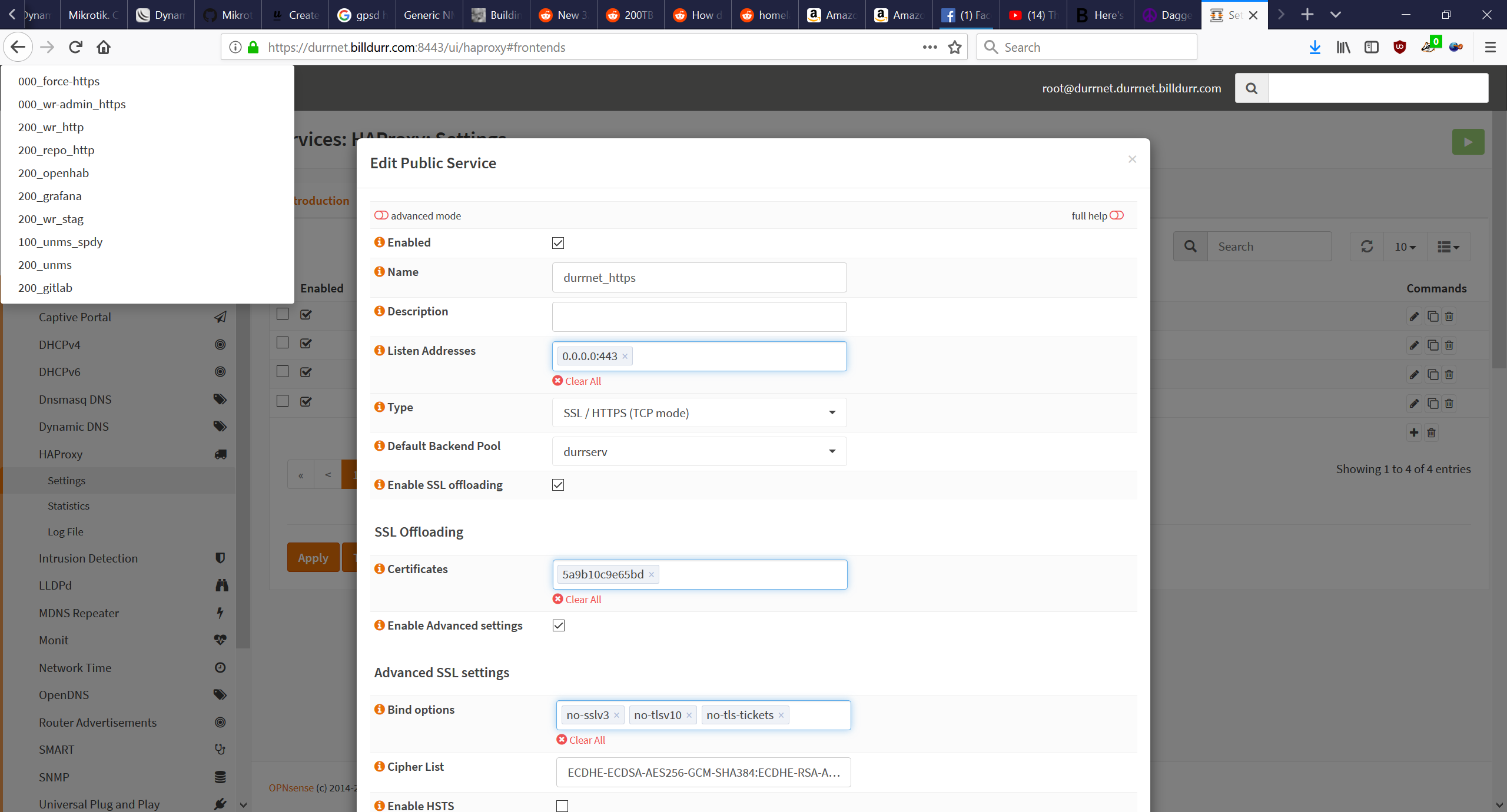
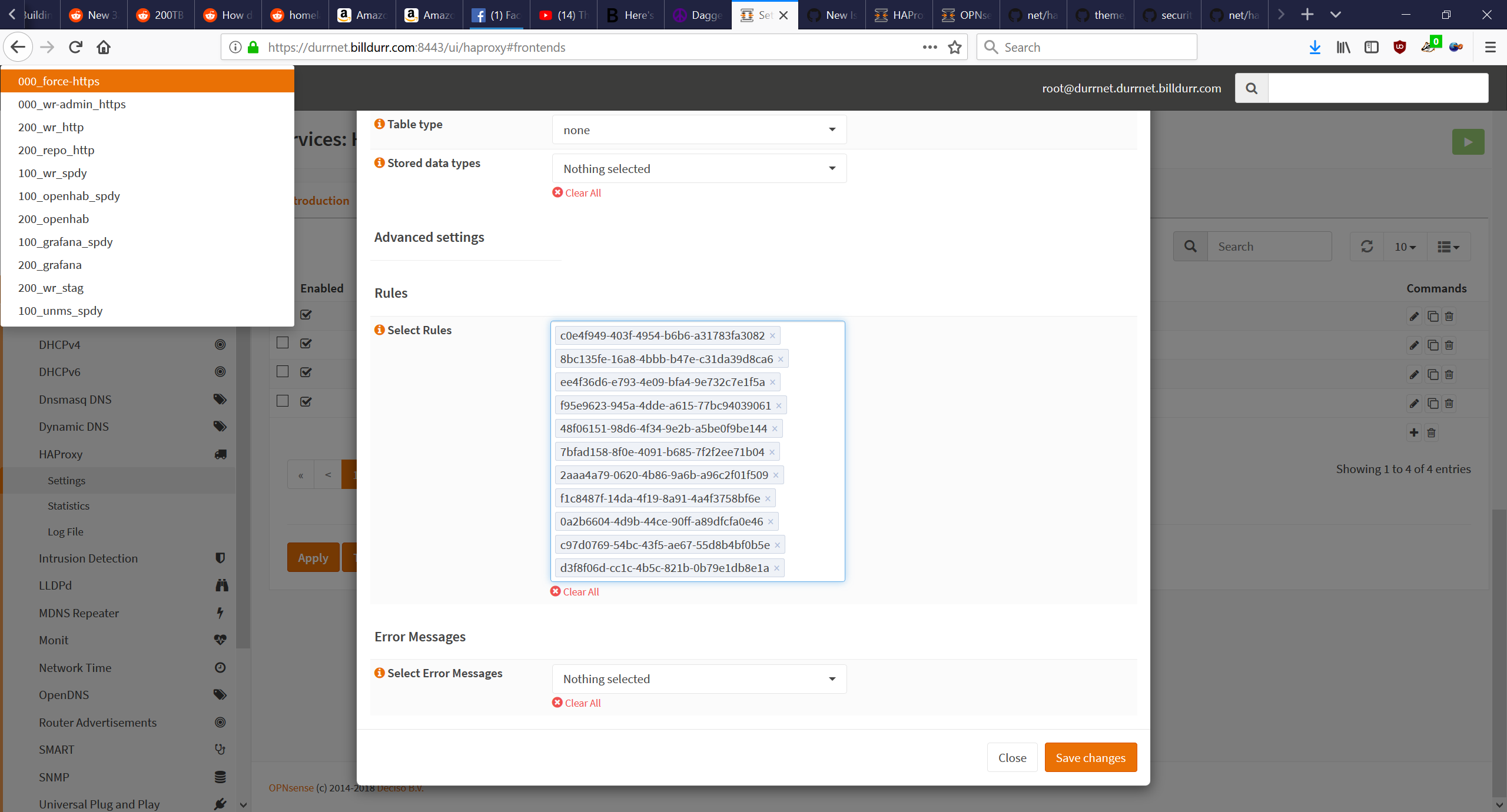
After the update to 18.7 some of the multiselect menus in haproxy are messed up. Randomly displays the rules from one of the public frontends in the top right. Some of the multiselects have uuids instead of text.
 billyburly
All 38 comments
Can you try to clear your browser cache?
 fichtner
on 1 Aug 2018
fichtner
on 1 Aug 2018
persists with cleared cache. same issue in both firefox and chrome
billyburly
on 1 Aug 2018
You're right. This is caused by the haproxy.general.tuning.ssl_bindOptions field where there is an auto-complete which is shown in the upper left corner because it's pushed into an inconvenient place. I'll take a closer look.
fichtner
on 1 Aug 2018
A work in progress is here: https://github.com/opnsense/core/commit/1a915fe8
You can try it from the console:
# opnsense-patch 1a915fe8
@AdSchellevis do you see what's going on here?
fichtner
on 1 Aug 2018
@fichtner not instantly, I've had some small glitches with the new tokeniser when working on the firewall aliases (I think it was this https://github.com/opnsense/core/blob/1a915fe80ca8c2c91cf4c1fcbc30ab630adcecca/src/opnsense/mvc/app/views/OPNsense/Firewall/alias.volt#L103), but I'm not sure 100% what the issue in this case is. I will try to take a look later, using the HAProxy plugin,
 AdSchellevis
on 1 Aug 2018
AdSchellevis
on 1 Aug 2018
looks similar. somehow the autocomplete window is shown, mostly due to bad style dropping it into the body...
fichtner
on 1 Aug 2018
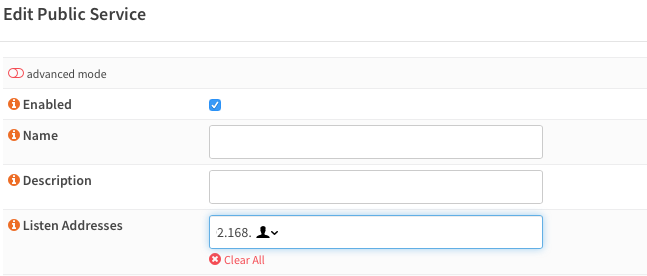
After applying the patch, it's improved in Safari, but I have to click in and out of the field to be able to type anything, and it also seems that Safari wants to offer to complete the field with contact addresses as well. This causes visual issues because of the placement of the menu widget. In the screenshot, what's actually typed into the field is 192.168, but the first two characters get cut off as the autofill menu is placed to the left instead of the right as usual.
 digitalcohesion
on 1 Aug 2018
digitalcohesion
on 1 Aug 2018
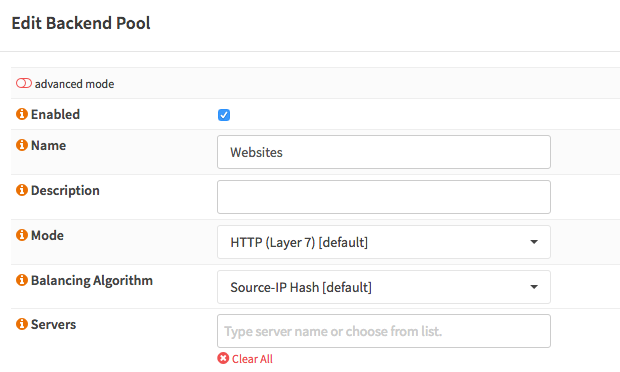
Also I noticed that some of my settings don't show in the interface anymore. For example, the servers field on the Edit Backend page is blank, but I do have a server set for that backend, and it is in the haproxy.conf file when viewed in the shell.
digitalcohesion
on 1 Aug 2018
I also tried this patch. It did not fix it. The extra items menu disappeared from the corner, but now all the certs and rules are missing e.g. from the settings panel of Virtual Services -> Public Services -> Edit.
I tried using both FF and Chrome here. The developer console shows no error. I tried also with private mode,
 ikke-t
on 7 Aug 2018
ikke-t
on 7 Aug 2018
Yes, I ended up reverting to the previous release which is working quite nicely.
digitalcohesion
on 7 Aug 2018
Willing to fix but I don’t have a haproxy setup and are unable to reproduce. 😔
On 7. Aug 2018, at 16:16, Ilkka Tengvall notifications@github.com wrote:
I also tried this. It did not fix it. The extra items menu disappeared from the corner, but now all the certs and rules are missing e.g. from the settings panel of Virtual Services -> Public Services -> Edit.
—
You are receiving this because you were mentioned.
Reply to this email directly, view it on GitHub, or mute the thread.
fichtner
on 7 Aug 2018
likely this https://github.com/zellerda/Tokenize2/pull/38 issue, should be fixed with https://github.com/opnsense/core/commit/542331c93f0b9f6d639f719853c9ac5e8b28303c
to install:
opnsense-patch 542331
and then refresh your browser cache.
AdSchellevis
on 7 Aug 2018
@fichtner @AdSchellevis
The suggested patches do not help.
I can give you access to my test router where the problem is easy to see.
 astrandb
on 7 Aug 2018
astrandb
on 7 Aug 2018
@astrandb I seem to be able to reproduce the same here, but for some odd reason the patch works on the current development branch.
AdSchellevis
on 7 Aug 2018
Tried some different things, the problem seems to be the loading time of the modal in combination with the way Tokenizer2 seems to determine it's z-index. Slight variations cause the issue to vanish, but no concrete fix yet (on my end with safari and the patch installed, the issue doesn't exist).
The zIndexMargin parameter doesn't seem to resolve the issue either.
AdSchellevis
on 7 Aug 2018
@astrandb can you try https://github.com/opnsense/core/commit/31e3f748ad6a6ed2f0329f392ea705351d837d65 ?
opnsense-patch 31e3f7
From here this works better, I can now see the UUID display issue, but not sure what causes it.
fichtner
on 8 Aug 2018
We only push the value here: https://github.com/opnsense/core/blob/master/src/opnsense/www/js/opnsense_ui.js#L249
fichtner
on 8 Aug 2018
@AdSchellevis patch 31e3f7 takes care of the misplaced multiselect menu. The UUID display issue is still there.
Same result with Edge and Chrome
astrandb
on 9 Aug 2018
@AdSchellevis @fichtner Have you tried to remove <style>tokenize</style> from a multiselect field? I know this is just a workaround, but it helped my with the identical problem.
 mimugmail
on 9 Aug 2018
mimugmail
on 9 Aug 2018
yes, but @fraenki insists on tokenize, which is a valid position ;) https://github.com/opnsense/plugins/pull/725
fichtner
on 9 Aug 2018
@astrandb I missed that one, have to look into the token content, it seems to misplace our items here.
AdSchellevis
on 9 Aug 2018
Oh .. sort order, indeed :(
mimugmail
on 9 Aug 2018
@astrandb the uuid issue should be fixed with https://github.com/opnsense/core/commit/6e759fba30093d991071fb57e28130bde28b8eaf , can you try it out?
AdSchellevis
on 9 Aug 2018
@AdSchellevis: Looking good on my test router.
astrandb
on 9 Aug 2018
@astrandb thanks for confirming! I'll close the issue then
AdSchellevis
on 9 Aug 2018
Added to 18.7.1 which hits early next week. Thanks all :)
fichtner
on 9 Aug 2018
Nice. Thanks for fixing this one. I'll try the upgrade again with 18.7.1.
digitalcohesion
on 9 Aug 2018
I can also confirm it seems to work now. I applied patches: 31e3f7 and 6e759fb. The first one fixes the extra menu in the corner, and the second one hides the uuids and puts real names into place.
Thanks a lot for fixing it :)
ikke-t
on 10 Aug 2018
Great, thank you for fixing - was just stumbling over this issue, and it is already fixed! Kudos for OPNsense! 👍
 addy90
on 10 Aug 2018
addy90
on 10 Aug 2018
@AdSchellevis your patches fix the messed up menu, but i think the sort order isn't retained anymore
(my haproxy warns about a http-request rule placed after a use-backend rule in a frontend)
 ghostwheel42
on 14 Aug 2018
ghostwheel42
on 14 Aug 2018
@ghostwheel42 can you open a new ticket for this (in core)? I'm not sure this is related to the selectpicker itself, at a first glance the service seems to be returning the items sorted differently too.
AdSchellevis
on 15 Aug 2018
probably related to https://github.com/opnsense/plugins/commit/701b3812f and https://github.com/opnsense/plugins/commit/c966d83c5954a
fichtner
on 15 Aug 2018
@fichtner I don't expect this is the issue, the tokeniser is there, the service seems to supply the content alphabetically ordered (on my end).
AdSchellevis
on 15 Aug 2018
The first screenshot shows that three fields are highlighted at the same time (and they are not the only "highlighted, but not selected" fields at the "HAproxy" plugin page). The similar thing can be found at the "bind" plugin page.
If click to the "highlighted" field, and after that click to some another field - the first field becomes "normal".
Is this a "known issue" or is it recommended to open a new ticket?
 skynick11
on 15 Aug 2018
skynick11
on 15 Aug 2018
@ghostwheel42 I'm not 100% we're looking at the same case, but I checked "Public Services" and traced the rules there, they use a ModelRelationField which is isn't (and never was) sorted by the order in the selectbox.
So... if we're looking at the same field/type, I'm afraid @fraenki made the false assumption that those are ordered by input and this is actually a bug in the HAProxy plugin. I'm not sure why ordering matters here, but if it does and needs the field type that's in there now, I can't fix it at the moment.
for reference : https://github.com/opnsense/core/blob/18.7.1/src/opnsense/mvc/app/models/OPNsense/Base/FieldTypes/ModelRelationField.php#L196-L203
AdSchellevis
on 15 Aug 2018
@AdSchellevis you are probably right - the "Select Rules" under "Public Service" never were sorted.
So it's a bug/feature request for the HAProxy plugin.
Ordering matters, because the rules are nothing more than "if this then that" and it's easy to have a case rule that matches more than one rule. For example:
a) if path begins with /foo, then redirect to foo.domain.tld
b) if path begins with /foo/bar, then redirect to bar.domain.tld
When a) is before b), then b) will never match.
ghostwheel42
on 15 Aug 2018
maybe a weight on the rule could be an easy fix to achieve the desired behaviour, but that's just a possible solution for the issue. maybe it's better to open a new feature request and discuss with @fraenki
AdSchellevis
on 15 Aug 2018
Related issues
 AndyX90
·
6Comments
AndyX90
·
6Comments
 AmazingBeu
·
9Comments
AmazingBeu
·
9Comments
 dkowis
·
5Comments
astrandb
·
7Comments
dkowis
·
5Comments
astrandb
·
7Comments
 ffries
·
13Comments
ffries
·
13Comments
Most helpful comment
@astrandb thanks for confirming! I'll close the issue then