Plugins: Feature request: Layer2 scanner in diagnostic tools
I'm asking if is it possible to have netdiscover, or arpscan, into OPNsense, it could be helpfull in Interfaces/Diagnostic tools to see which IP are available in a LAN.
I do not have any preferences about netdiscover or arpscan even if I use netdiscover frequently, arpscan is good enough.
I can also develop it by myself and then ask you a pull request, here in github, first I need to know if this feature is needed by others users.
It could be great having also a generic arpping and a arpwatch process, if possibile :)
These could alert when ip collisions happens.
let me know if interested,
bye
 peppelinux
All 81 comments
Installing it in OPNsense isn't difficult at all, I've just typed:
pkg add http://pkg.freebsd.org/freebsd:11:x86:64/latest/All/arp-scan-1.9.txz
Together with arpwatch another good tool, easy to integrate with a plugin interface, could be arpalert.
These tools could be together a minimal but quite good layer2 security system, isn't it?
You know, arp-scan can be used as simple as it come:
root@OPNsense:~ # arp-scan --interface=em0 10.97.49.0/24
Interface: em0, datalink type: EN10MB (Ethernet)
Starting arp-scan 1.9 with 256 hosts (http://www.nta-monitor.com/tools/arp-scan/)
10.97.49.3  00:27:19:d5:16:a2   TP-LINK TECHNOLOGIES CO., LTD.
10.97.49.15 00:00:74:ab:bc:fc   RICOH COMPANY LTD.
10.97.49.20 c4:6e:1f:b9:15:e1   (Unknown)
....
It could be usefull executing arp-scan with a parallel execution of all the RFC 1918 networks (similar to netdiscover behaviour) and, coupled with this, manage via UI another option to navigate vlan tagging. Arp-scan's Vlan tagging native support could be usefull to find networks in tagged interfaces, similary to this tool I also wrote some months ago, but for netdiscover:
https://github.com/peppelinux/802.1q_network_scanner
let me know If help is needed
peppelinux
on 11 Sep 2017
Hi @peppelinux, a pull request would be probably the best option as the time of the developers is limited. For your linked script: Please note that there is no bash on OPNsense.
Here you can find a How To: https://docs.opnsense.org/development/examples/helloworld.html
In your case, I would recommend you to run the tool async (detached) with configd.
You can look at any existing plugin if you like.
 fabianfrz
on 11 Sep 2017
fabianfrz
on 11 Sep 2017
Yes, no bash in OPNsense :)
Actually I installed arp-scan via ssh but when time will permit I could code this plugin and then ask to you a merge.
Thank you Fabianz, OPNsense is a very good product.
peppelinux
on 11 Sep 2017
It would be better if you would ask @fichtner for review and merge.
fabianfrz
on 11 Sep 2017
I read the sourcetree,
It seems to me that I should not replicate "Diagnostic: Packet probe" tool but only the tools with the new UI approach. I'd like to reuse part of Packet probe UI InputFields for example, like the interface selection (select menu).
I also think that Arp scanner could be included in the Core
peppelinux
on 12 Sep 2017
I've found diag_packet_capture.php in /usr/local/www as a legacy component.
I think that this kind of tool is very similar of what I'm going to develop so I think that I will use diag_packet_capture.php like a sort of template and the arp scanner will be, hopefully, coded in the core of OPNsense.
peppelinux
on 12 Sep 2017
@peppelinux please note that diag_packet_capture.php is based on legacy code, better not to use as a template. New tools will likely remain in the package repository, there's no real reason to extend the core system for every install.
 AdSchellevis
on 12 Sep 2017
AdSchellevis
on 12 Sep 2017
You can look at the quagga diagnostics pages if you like. They may behave very similar.
fabianfrz
on 12 Sep 2017
@AdSchellevis ok, so I have to avoid this approach, just code in the new coding style.
Ok, I will, let's code this plugin
@fabianfrz Thank you, I'll start from there
peppelinux
on 12 Sep 2017
system -> diagnostics (top process list) could also be of interest, should be quite easy to read.
Controller + template:
https://github.com/opnsense/core/blob/master/src/opnsense/mvc/app/controllers/OPNsense/Diagnostics/ActivityController.php
https://github.com/opnsense/core/blob/master/src/opnsense/mvc/app/views/OPNsense/Diagnostics/systemactivity.volt
and the link to configd:
https://github.com/opnsense/core/blob/master/src/opnsense/service/conf/actions.d/actions_system.conf#L1-L5
AdSchellevis
on 12 Sep 2017
@AdSchellevis @fabianfrz Thank you, those examples looks very good for my situation, no problem for MVC pattern, I'm a Python Django coder. Just a question, a curiosity, I read that applications are, most of them, simple python scripts that works like a wrapper, managing I/O at the OPN's api/backend.
According to this, could it be more accurate to evaluate the possibility to upgrade python interpreter to 3.6 (at least, time is changing and python is now a very important component) and coupled with this, to install SCAPY python network framework, to do a lot of diagnosys and packet forgery as well, directly in OPNsense framework (through scapy).
Could it be a good approach?
peppelinux
on 12 Sep 2017
@peppelinux sorry, we're stuck on 2.7.x at the moment (which is still supported). 2.7/3.x aren't very compatible unfortunately.
A switch might be something for next year, but it turns out to be quite some work to keep all compatible on both versions and the gain isn't very large unfortunately (I did some performance tests some time ago).
You could use https://pypi.python.org/pypi/netaddr , which is installed by default. Scapy should be compatible with 2.7 too, if you need it, you could ask in the tools repository for a build https://github.com/opnsense/ports/tree/master/net/scapy
(maybe @fichtner can deliver a package when he has some time available)
AdSchellevis
on 12 Sep 2017
Thank you, brilliant support, nothing more to say :)
I'm coding arpscanner according to WOL plugin example (I can easily follow its small code).
Scanner result will be available in the bootstrap dialog, like WOL actually does.
After the first pull request I think that we'll decide how to emprove, as design and usage too.
peppelinux
on 12 Sep 2017
wol is not MVC as well :(
 fichtner
on 12 Sep 2017
fichtner
on 12 Sep 2017
A mini MVC plugin is certainly mdns-repeater
fichtner
on 12 Sep 2017
Thank you @fichtner but I cannot see or install mdns-repeater plugin from OPNsense web UI interface.
I'd like to view it before using it as a template.
Is there any of the default installed application, in the current stable version of OPNsense, that is MVC compliant? I want to use a working example and not write it totally from scratch.
peppelinux
on 13 Sep 2017
If you want to work on plugins you should work with the repository :)
(from the OPNsense box run these)
# opnsense-code plugins
# cd /usr/plugins/net/mdns-repeater
The "official" plugin will be available for OPNsense itself with 17.7.2 later today.
Cheers,
Franco
fichtner
on 13 Sep 2017
@fichtner thank you very much, I'm learning a lot of things with your help.
I'm coding with mdns-repeater I've found in this git repo. You know that arp-scan is a system package dependency.
Makefile, in the root of the plugin folder, should contains the declaration of the system dependencies.
I'm actually starting to code it :)
peppelinux
on 13 Sep 2017
sure, you put your package dependencies on this line:
https://github.com/opnsense/plugins/blob/master/net/mdns-repeater/Makefile#L5
fichtner
on 13 Sep 2017
@fichtner good to hear that my code can be used as a template 👍
fabianfrz
on 13 Sep 2017
Do we have a setup script that put the plugin's files/folder in their /usr/local/opnsense/mvc/app/* tree or we have to put them manually, each by one?
peppelinux
on 13 Sep 2017
make install
fabianfrz
on 13 Sep 2017
This is the wrapper I coded for run, as a system command, the arp-scan tool:
````
!/usr/bin/env python2.7
"""
Copyright (c) 2017 Giuseppe De Marco giuseppe.demarco@unical.it
All rights reserved.
Redistribution and use in source and binary forms, with or without
modification, are permitted provided that the following conditions are met:

1. Redistributions of source code must retain the above copyright notice,
 this list of conditions and the following disclaimer.

2. Redistributions in binary form must reproduce the above copyright
 notice, this list of conditions and the following disclaimer in the
 documentation and/or other materials provided with the distribution.

THIS SOFTWARE IS PROVIDED ``AS IS'' AND ANY EXPRESS OR IMPLIED WARRANTIES,
INCLUDING, BUT NOT LIMITED TO, THE IMPLIED WARRANTIES OF MERCHANTABILITY
AND FITNESS FOR A PARTICULAR PURPOSE ARE DISCLAIMED. IN NO EVENT SHALL THE
AUTHOR BE LIABLE FOR ANY DIRECT, INDIRECT, INCIDENTAL, SPECIAL, EXEMPLARY,
OR CONSEQUENTIAL DAMAGES (INCLUDING, BUT NOT LIMITED TO, PROCUREMENT OF
SUBSTITUTE GOODS OR SERVICES; LOSS OF USE, DATA, OR PROFITS; OR BUSINESS
INTERRUPTION) HOWEVER CAUSED AND ON ANY THEORY OF LIABILITY, WHETHER IN
CONTRACT, STRICT LIABILITY, OR TORT (INCLUDING NEGLIGENCE OR OTHERWISE)
ARISING IN ANY WAY OUT OF THE USE OF THIS SOFTWARE, EVEN IF ADVISED OF THE
POSSIBILITY OF SUCH DAMAGE.
"""
from subprocess import Popen, PIPE
import json
import re
_DEBUG=False
RFC1918_NETWORKS = ["192.168.0.0/16",
"172.16.0.0/16",
"172.26.0.0/16",
"172.27.0.0/16",
"172.17.0.0/16",
"172.18.0.0/16",
"172.19.0.0/16",
"172.20.0.0/16",
"172.21.0.0/16",
"172.22.0.0/16",
"172.23.0.0/16",
"172.24.0.0/16",
"172.25.0.0/16",
"172.28.0.0/16",
"172.29.0.0/16",
"172.30.0.0/16",
"172.31.0.0/16",
"10.0.0.0/8"]
class ArpScanner(object):
def __init__(self, ifname, network_list):
"""
netif='eth0'
network_list=['192.168.0.0/24', ...]
"""
self.ifname = ifname
self.network_list = network_list if network_list else RFC1918_NETWORKS
self.outputs = {} # raw outputs from system command
self.result = {} # filtered output containing only what needed
def start(self):
    # first loop will not block the others
    for net in self.network_list:
        os_command = ["arp-scan", "-I", self.ifname, net]
        self.outputs[net] = Popen(os_command, stdin=PIPE, stdout=PIPE, stderr=PIPE)
        output, err = self.outputs[net].communicate()
        returncode = self.outputs[net].returncode
        if _DEBUG: print(returncode, output, err)
        self.outputs[net] = returncode, output, err

        regexp = re.findall('([0-9\.]+[\t])+([\dA-F]{2}(?:[-:][\dA-F]{2}){5})', output, re.I)
        for netfound in regexp:
            self.result[net] = netfound[0].replace('\t', ''), netfound[1]

def view_outputs(self):
    for res in self.outputs:
        print(res)
        print('return code: {}\n'.format(self.outputs[res][0]))
        print(self.outputs[res][1])

def get_json(self):
    return json.dumps(self.result)
if __name__ == '__main__':
import argparse
parser = argparse.ArgumentParser()
# This is the correct way to handle accepting multiple arguments.
# '+' == 1 or more.
# '*' == 0 or more.
# '?' == 0 or 1.
# An int is an explicit number of arguments to accept.
parser.add_argument('-i', nargs='?', required=True, help="network interface")
parser.add_argument('-r', nargs='+', help="""multiple network ranges,
as: 192.168.1.0/24 172.16.31.0/12
If not specified it will scan all the RFC 1918 local area networks.""")
args = parser.parse_args()

if args.r:
   plural = '' if len(args.i) == 1 else 's'
   print('Network{} to scan: {}'.format(plural, ' '.join(args.r)))
print("On interface: {}".format(args.i))

ap = ArpScanner(args.i, args.r)
ap.start()
print(ap.get_json())
````
It can also return a json object, according to API needs, like this:
{"10.10.17.0/24": ["10.10.17.232", "00:27:19:d5:1e:56"]}
soon as possible I will let you read the code directly on my fork
peppelinux
on 13 Sep 2017
It could be runned as a standalone program as well.
arpscanner_wrapper.py -i wlp2s0 -r 10.10.17.0/24
peppelinux
on 13 Sep 2017
If you want to run it not in parallel, is there something that would be against 172.16.0.0/12 to reduce the invocations?
fabianfrz
on 13 Sep 2017
Good question,
with arp-scan we have a problem, every scan do a sort of lock on the memory/interface/buffer.
At first time, this morning, I coded a distribution in different forks BUT arp-scan works on the first run but the others, in parallel, returns 1 with this message:
ERROR: failed to send packet: No buffer space availablen
Using scapy or someother tool could improve the things but actually arp-scan must be serialized.
Another good strategy could be to store the stdout of scapy on a buffer and read it, in realtime, with "Audit" feature of OPNsense UI, this will prevent to wait for a very long network scan over all the RFC1918 networks. Probably this will be the next use-case that I'd like to expose to you.
peppelinux
on 13 Sep 2017
@fabianfrz the only way could be splitting it in different /CIDR.
The scanner is not parallel, it sequentially probe from .1 ip to .254 for each /24 or configured CIDR. There's no other way to scan multiple, separate and non-continuous, class networks in a unique CIDR notation.
According to the fact that a scan of a /16 or a /8 network could take a lot of time I should have to play with "Audit" feature
peppelinux
on 13 Sep 2017
is there a command to reload OPNsense web definitions, templates and other stuff without restart the entire VM/server?
When I made changements in the src/mvc tree on a working OPNsense installation, do I have to execute a command to flush and reload cache/definitions/stuffs OR at each http request all the things will be reloaded, automatically, as usual in PHP? (I never use falcon and the web internals of OPNsense are unknow to me at the moment)
peppelinux
on 13 Sep 2017
if your plugin is already installed:
# make upgrade
is there a OPNsense SHELL cheatsheet on the wiki?
command = goal in a short format
@fichtner Thank you. I'm looking how many files we are producing for this MVC, they're a lot :)
peppelinux
on 13 Sep 2017
sure :) the initial setup is a bit tedious still, but for the sake of privilege separation and clean coding it's necessary
https://github.com/opnsense/plugins#a-brief-description-of-how-to-use-the-plugins-repository
fichtner
on 13 Sep 2017
@peppelinux
Probably:
- 2 Controllers (1 Frontend, 1 Backend)
- Your worker script
- A config file for configd
- 1 HTML template (volt)
- 1 ACL file (not required but recommended)
- 1 XML File for linking into the menu
- 1 Makefile
fabianfrz
on 13 Sep 2017
Today's small steps:
https://github.com/peppelinux/plugins
Tomorrow I have to check how to set a Select InputFields (not that textfield actually in the form) for select one interface only, not multiple, at time.
I'm not working all the time on this little project 'cause we are developing other things for my job but we are tryng to do some experiments on OPNsense and, actually, it's driving quite well in production (college/academy). Very thanks for all the good work you've done
peppelinux
on 13 Sep 2017
Hi @peppelinux,
Looks good so far. :)
I will add arp-scan to our packages tomorrow so that the plugin can be merged and build in the future.
There is, however, no rush to finish this, take your time and thanks in advance for your efforts and kind feedback!
Cheers,
Franco
fichtner
on 13 Sep 2017
fichtner
on 13 Sep 2017
@fichtner thank you, I'll do my best
peppelinux
on 14 Sep 2017
A lot of things are more clear to me know, tomorrow I will introduce ajax call for selecting interfaces (I've found an example on "Diagnostic: Packet capture") and I would like to implement realtime "audit" from now instead of produce a classic http response. I think that for an euristic scan, like most of them, I need the audit feature because of scanning time on /16 networks.
I do not seen any doc about audit default template, is it hacky or you still have to produce a template either for this?
peppelinux
on 14 Sep 2017
You can store the progress into a file which you can query via the API. If the file exists, you also know that a scan is running.
fabianfrz
on 15 Sep 2017
See the firmware page.
fabianfrz
on 15 Sep 2017
@fabianfrz, thank you. File is always good, I will in this traditional way.
Is there a strategy to avoids concurrent reading/writing on the same file from different http_requests? I think that I will have to deal with it.
Is there any possibility, in the future, to use redis to store concurrent resultset and flush them after a timeout of N minutes/hours?
peppelinux
on 15 Sep 2017
you have no HTTP request which will write that file. What you can do is checking if your script is already running and abort if it is (so the file will not be written again).
fabianfrz
on 15 Sep 2017
@fabianfrz I also dealed in the past with this kind of concurrent executions. This example works with backup schedule, it simply avoids that identic jobs could start in concurrency:
https://github.com/peppelinux/LinuxNotes/blob/master/rsync_storage_flock
I think that putting a file descriptor with a wrapper around it could be a solution if there will be the possibility to develop something to be normalized for all the other similar tasks, without any search in the system processes.
It works in the script wrapper, It assign to the kernel a FD to its lockfile with always the same ID. If another job execution is still present as the same FD in the kernel the scripts will not run its system processes. The lock also cantains PID of running job until it is active and running.
This could introduce me to think about two other features:
- the possibility to share running scan between users (a user can see the current scan, on a interface, running from the click of another user)
- the possibility to STOP a running scan (if it was created with wrong arguments or if it will be decided with another priorities against the older one)
just some thoughts, thank you fabianfrz for your patience, I'll do something that will work as we expect,
any further sharing of knowledge could come back to us in a good way :)
peppelinux
on 15 Sep 2017
We already use flock in the firmware updates to share the progress output of the command line tools and seamless GUI page refresh / auto-attach:
Some other parts use daemon command + pid files to track job progress, that's also easily possible.
fichtner
on 15 Sep 2017
I'm tryng to fetch interfaces from opnsense internal functions/tools (otherwise I should wrap ifconfig command in PHP).
Is there a actions reference documentation for configd?
I need to use it in my model methods, I would like to use configd instead of hardcode something huge :)
peppelinux
on 16 Sep 2017
Everything you need is in the configuration file. If you use a "InterfaceField" in the model, you will get them to the frontend.
fabianfrz
on 16 Sep 2017
@fabianfrz I used "Interface Field" but I can only read "nothing selected" into the select field.
This means that a api call should fill this select, I mean.
So, instead of HelloWorld example that uses getNodes() and returns:
{"result":{"general":{"interfaces":{"lan":{"value":"lan","selected":1}},"networks":[]},"networks":"192.168.1.0\/24"}}
I need something that returns to me the interfaces name (em0, ovpnX, etc.etc.) because one of them will be used by arp-scan.
I'd also like to include and recycle some of the old functions I read into the legacy code, like "get_interface_list() ", but I cannot get them working into Phalcon approach.
peppelinux
on 16 Sep 2017
Yes the box has to be filled using the API request - This is what the mapDataToFormUI call does. https://github.com/opnsense/plugins/blob/master/net/mdns-repeater/src/opnsense/mvc/app/views/OPNsense/MDNSRepeater/index.volt#L32-L36
Please note that the field names between the form and the API result MUST match.
I would recommend you to install the mdns-repeater plugin from the plugins page and then open the page while you are having the network tab of the developer tools of your browser open.
You will see the result of the API requests, which where one will include the list of the interfaces.
fabianfrz
on 16 Sep 2017
Now it works, I can view and select the interfaces names like "lan", when I'll post it to the server I'll have to retrieve into the controller/view the ifname of lan as well (it would be em0) that will be used with arp-scan. Is there any API method to get all interfaces objects with all their attributes?
peppelinux
on 16 Sep 2017
see src/etc/inc/interfaces.inc in core - there is a function called get_real_interface in line 3899. @fichtner can explain you how to load it properly.
fabianfrz
on 16 Sep 2017
we don't load legacy files / functions from the mvc.. if you really must create bounce scripts to be called via the backend to return your required information to the mvc.
there may be some functions in there that support native reading from the library code, but since we largely haven't migrated interface management that side is still underdeveloped.
fichtner
on 16 Sep 2017
@fabianfrz yes I was tryng to use it but includes doesn't works and Phalcon throws to me some exceptions...
@fichtner, I'm now following mdns responder but I cannot run arpscanner with "lan" as argument, I need some internals API calls, or legacy one, or python/shell script to be runned in thearpscanner api controller. I need to forge a good strategy for create this primary build environment for this and some other utility, I'm actually tryng to link the pieces for this
peppelinux
on 16 Sep 2017
you can still access the config directly (https://github.com/opnsense/plugins/pull/266/files#diff-aeb1ac0012d65409cc950908761cd638R51) and load the real interface name from the config.
fabianfrz
on 16 Sep 2017
@fichtner could I use configd and configure my bounce scripts as configd service? I just have to deal with the stdout fetching from a configd call.
For getting interfaces names (as em0) instead that interfaces ZONE name (as lan) I'd use this system command
````
ifconfig -l -u | sed -e "s/lo0//g"
better
netstat -rn | grep -e '^[0-9]' | grep / | sed -e 's/ {1,}/ /g' | cut -d' ' -f 1 -f 4
returns: 10.0.7.0/24 em0
````
Should I develop a custom Field Type to retrieve this information globally in the project? Because if I use custom system command to get informations I will cannot use anymore the phalcon form wizard.
@fabianfrz Do you mean "ProxySSO()"?
peppelinux
on 16 Sep 2017
@peppelinux yes, the configd approach is perfectly fine and recommended :)
fichtner
on 16 Sep 2017
@fichtner please suggest to me a working example, I'm spending too much time on this task :(
peppelinux
on 16 Sep 2017
@peppelinux that's not for you - this is a comment for the author of the pull request I did review.
fabianfrz
on 16 Sep 2017
fabianfrz
on 16 Sep 2017
the magic is "script_output" it returns the stdout of the command
fichtner
on 16 Sep 2017
the output of any script can be json encoded data which can be mapped back to an associative array or object.
fabianfrz
on 16 Sep 2017
@fabianfrz so I'm going to fetch interfaces name (em0) from a custom configd command, taking its stdout and then exploding it to the arpscanner.general.interfaces, in SettingsController, when the first api call will be made, calling /api/arpscanner/settings/get.
Ok ok I will :)
peppelinux
on 16 Sep 2017
Is there any example using confid with async (detach strategy)?
peppelinux
on 16 Sep 2017
from php just add a second parameter true
fabianfrz
on 16 Sep 2017
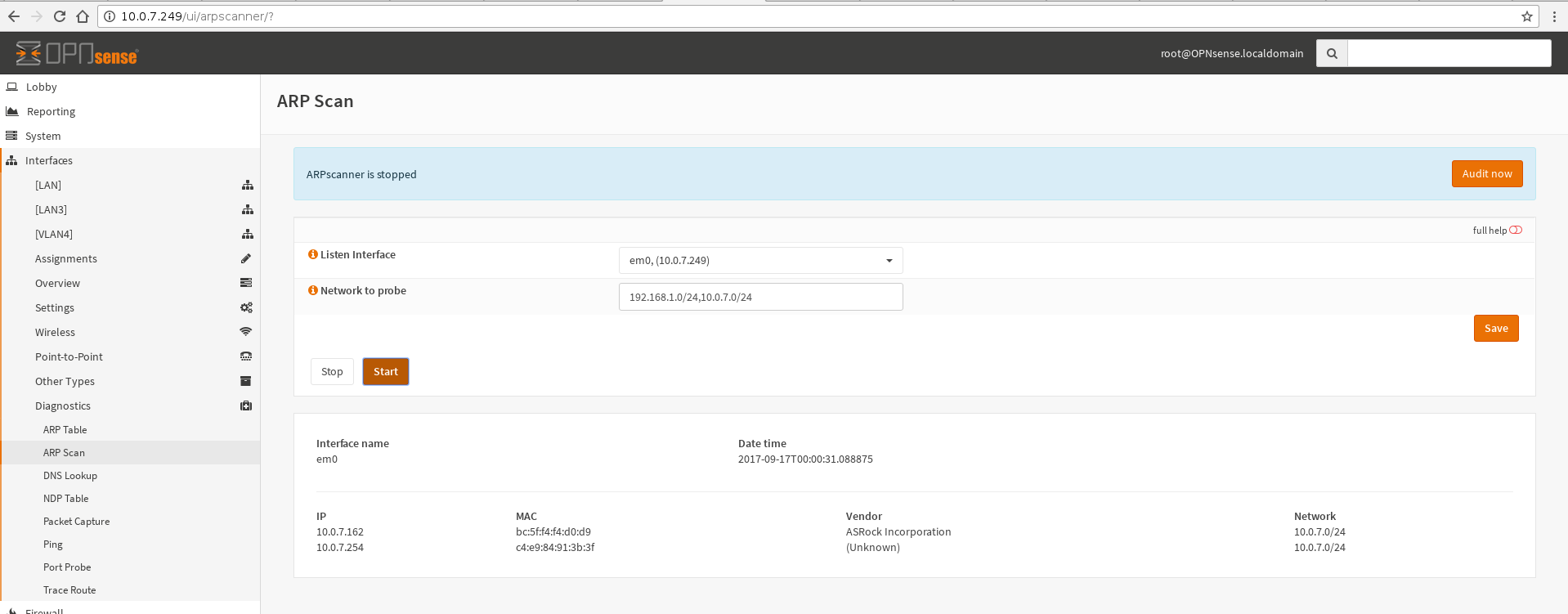
And finally the arp-scan works through configd, with arguments from command line as well. It is usable, it works!
Now I have to develop the realtime audit feature, the lock file and some minor improvements.
I've also a bug, I cannot get to save the values from UI to templates, as helloworld tutorial explains. Soon as possible I will try to fix it.
Once I will complete this plugin, and fully tested with your help, I will develop another similar called "gateway finder", like ARPscanner it will be focused on ipv4 LAN.
peppelinux
on 17 Sep 2017
@peppelinux please create a pull request so the code can be reviewed. Just prefix it with WIP: as long as you don't want it to be merged.
fabianfrz
on 17 Sep 2017
Is it good for my detach/fork this?
https://github.com/opnsense/core/blob/master/src/opnsense/site-python/daemonize.py
I'm asking if could I reuse some of your code
peppelinux
on 17 Sep 2017
@peppelinux not sure what you want to achieve, if you want to build a daemon, yes that's the way, if you just want to wait for a longer lasting proces, no.
AdSchellevis
on 17 Sep 2017
configd calls are forked by default using subprocess (https://github.com/opnsense/core/blob/17.7.1/src/opnsense/service/modules/processhandler.py#L460)
AdSchellevis
on 17 Sep 2017
@AdSchellevis Yes :) I'm looking for a smart way to manage long running process in OPNsense.
I'm going to put all the I/O in files named by the ifname. The API will read these on every ajax polling, having $ifname in _POST. When the arp-scan fork process will end will unlock its usage, if /api/arpscanner/service/stop every arp-scan process will be killed and their file destroyed. This will be a very simple approach, the father process will exit normally and the child process will take so much time as needed to end the job.
If there are not usable classes in the current OPN release I think to use multiprocessing from python stdlib. Will it be good enough? :)
peppelinux
on 17 Sep 2017
like I said, the daemonize wrapper is certainly fine when creating daemons.... if you have a process which takes longer, just detach and wait, nothing magical to do there.
AdSchellevis
on 17 Sep 2017
This works too... daemon(8) is very convenient ;)
and
fichtner
on 17 Sep 2017
Or tracking via pid works, too...
and
fichtner
on 17 Sep 2017
@AdSchellevis thank you, I think that
from subprocess import Popen
it will be good enough, multiprocessing sounds more overkill :)
peppelinux
on 17 Sep 2017
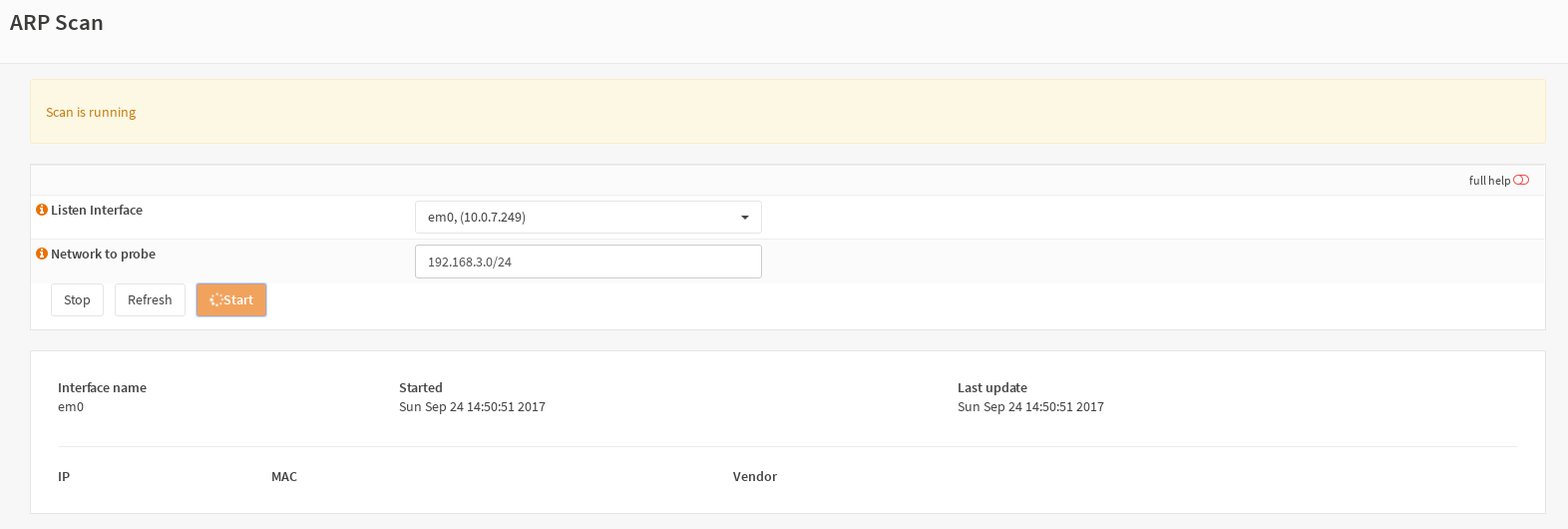
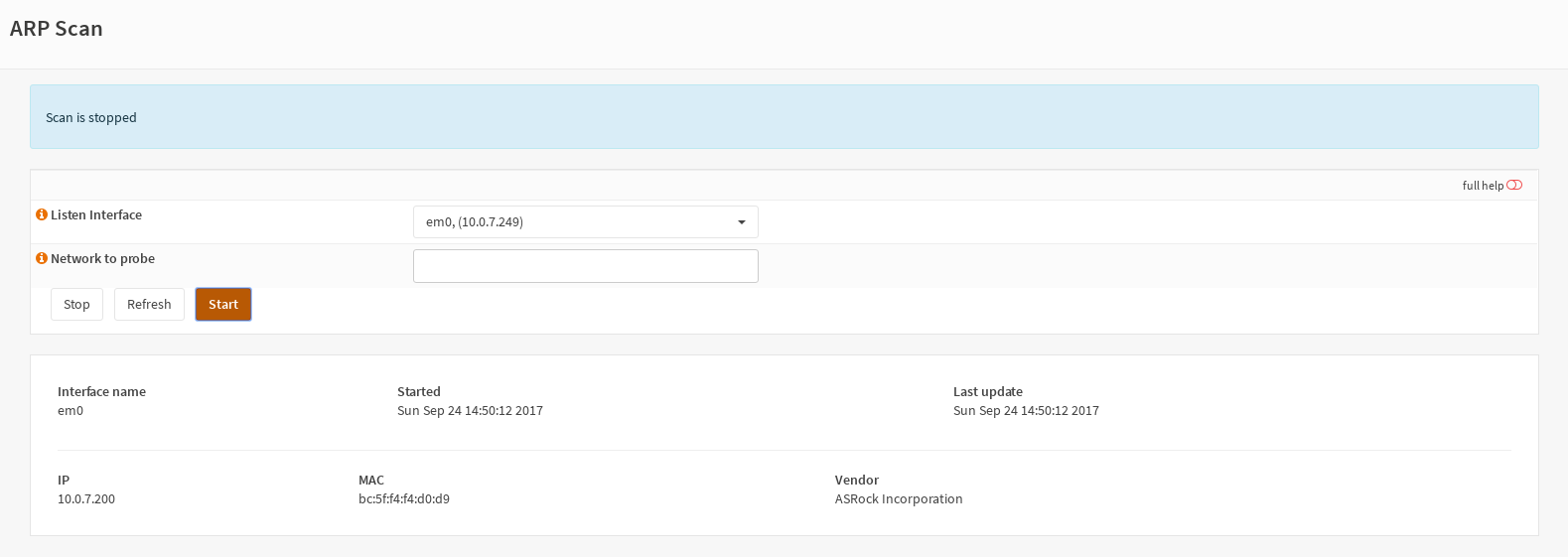
Nothing more to say, the plugin works well with long scan tasks.
The only thing I will improve for next releases (and different plugins) is the problem with the buffered subprocess. Open FileIO.
With python2 the best way is to flush simultaneously, with some python3 options it works as expected. I've tried a different strategy but I'm not fortunate in python2 with that popen configuration. For the result, the user must wait until the end of the subprocess. It just works fine, it would be better with async io, but for now it is still a working and usefull tool.
peppelinux
on 24 Sep 2017
can you add a small distance between the buttons and the form above?
fabianfrz
on 24 Sep 2017
Yes, I've just made 13px between them. You can find it in the last commit
peppelinux
on 24 Sep 2017
should I close this issue.
fabianfrz
on 8 Nov 2017
Yes but I still not seeing the plugin into the last release. Is there something wrong?
peppelinux
on 8 Nov 2017
We need a final statement from you to make a release from the last development version. It’s your plugin so your decision. 😊
fichtner
on 8 Nov 2017
Thank you Franco, excuse me if I missed something.
What I have to do now to give to you this final statement and make the release of the last development version?
peppelinux
on 8 Nov 2017
you just need to tell me, fraenki, ad or franco to make it public visible. Just tell us that it is ready.
fabianfrz
on 8 Nov 2017
arp-scan plugin is now in the next stable release, this issue can be closed now
peppelinux
on 30 Nov 2017
Related issues
 AndyX90
·
6Comments
AndyX90
·
6Comments
 sjorge
·
11Comments
sjorge
·
11Comments
 Stephanowicz
·
6Comments
Stephanowicz
·
6Comments
 astrandb
·
7Comments
astrandb
·
7Comments
 zaggash
·
9Comments
zaggash
·
9Comments
Most helpful comment
https://github.com/opnsense/core/blob/42e8e49b48ef429a7859fd7322252d5081bde42f/src/opnsense/service/conf/actions.d/actions_interface.conf#L87-L90
the magic is "script_output" it returns the stdout of the command