Plugins: net/haproxy: improve GUI usability
UPDATE:
Thanks to the great feedback and suggestions in the comments I was able to implement the following changes in #330:
- [X] diverge from HAProxy's wording, better align with other LB solutions
- [X] restructure and group GUI elements (should be easier to grasp)
- [X] hide unused options in many places with some simple JS code
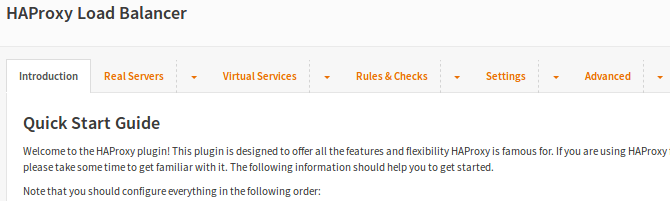
- [X] add a "Quick Start Guide" and multiple smaller help pages
- [X] refactor the model to allow validations for all fields
- [X] while here, add a few missing HAProxy options
- [X] fix bugs in rarely used HAProxy functions (and introduce new bugs, of course)
The new tab/menu structure is as follows:
|-Introduction
|
|-Real Servers
||-Introduction
||-Servers
|
|-Virtual Services
||-Introduction
||-Backend Pools
||-Public Services
|
|-Rules & Checks
||-Introduction
||-Health Monitors
||-Conditions
||-Rules
|
|-Settings
||-Service Settings
||-Global Parameters
||-Default Parameters
||-Logging Parameters
||-Statistics Configuration
|
|-Advanced
||-Introduction
||-Error Messages
||-Lua Scripts
You'll notice that many entries have been rephrased to better align with other Loadbalancer GUIs – this also means that we've diverged more from HAProxy's own wording:
- ACL => Condition
- Action => Rule
- Backend => Backend Pool
- Error Files => Error Messages
- Frontend => Public Service
- Health Check => Health Monitor
Although I was unable to reach all goals, I think it's still an improvement and a first step towards a more user-friendly HAProxy GUI.
ORIGINAL DESCRIPTION
Currently the GUI for HAProxy ACLs and Actions is rather confusing for new users, even if they have some experience with HAProxy. I think there are two major issues:
- Input fields only have generic names like "Value", "Name", and so on. While this makes the code/model less complicated, it's hart to grasp for a user what to enter in those input fields. Furthermore the naming is odd in some cases and does not follow HAProxy's official wording.
- All input fields are always visible. There's no indication for a user which field is required or may be left empty.
My proposal is a major rework of the ACL/Action model to implement specific input fields for every ACL/Action type. And I'm going to add the JS code from our acme plugin to hide input fields that are not required. Besides that this allows us to add input validations for every field. Futhermore I plan to follow HAProxy's official wording more closely to make it easy for veterans to relate to our GUI.
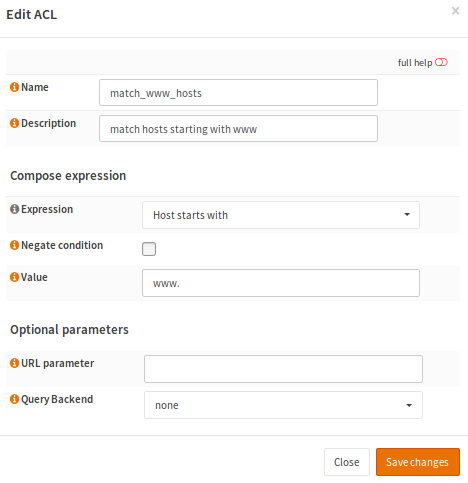
Below is an example for a redesigned ACL page. The Actions page will benefit even more, because it has twice as many input fields.
OLD GUI
NEW GUI
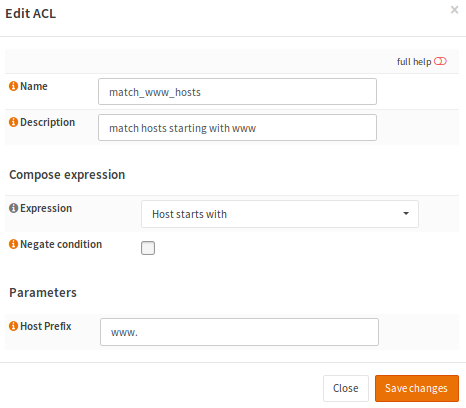
Note that in the new GUI all inapplicable input fields are hidden and the input field has a precise name. It now works very similar to Acme's Validation page.
A LOT code will be changed, so this should become version 2.0 of our HAProxy plugin.
 fraenki
All 22 comments
@fichtner @AdSchellevis Would love to get some more input before working on this, especially if you found other quirks that should be addressed or if suggestions have been made by other users. The ACL/Action stuff is essential in HAProxy, but I think it's not easy to do it the right way (easy _and_ flexible).
fraenki
on 25 Jul 2017
@fraenki it's indeed a bit complicated, quite flexible, but I can imaging people are searching a bit from time to time. Hiding the non usable items in the gui would certainly help, maybe some general help on the first screen could also help understanding the steps you should take. Let me think about this some more.
By the way, I did help a customer lately installing haproxy and the setup went quite smooth from my end :)
 AdSchellevis
on 25 Jul 2017
AdSchellevis
on 25 Jul 2017
@EugenMayer This is loosely inspired by a conversation we had in June. Feel free to suggest specific enhancements here. I plan to follow the official HAProxy wording more closely this time.
fraenki
on 25 Jul 2017
@fraenki I've browsed through haproxy and came up with the following:
If I'm understanding the basics correctly, normally a setup should look something like this
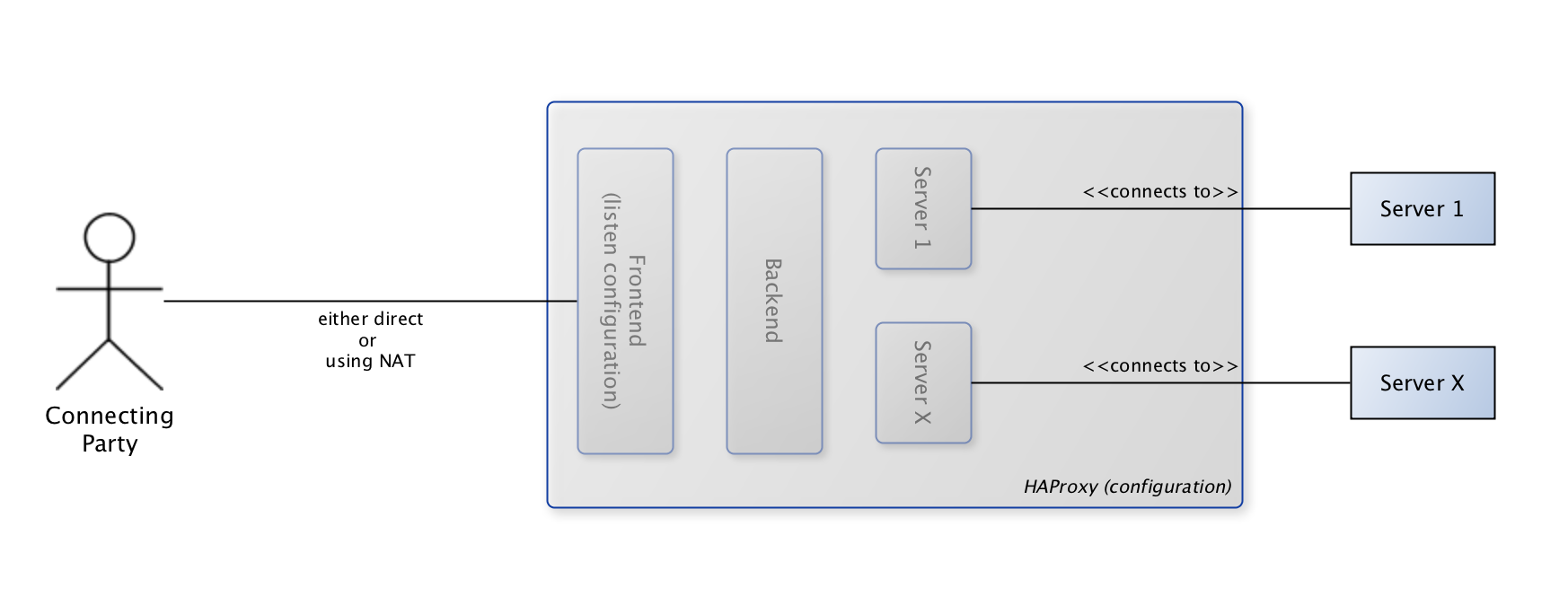
My first idea would be to add an overview such as this to the "general" tab, so a new user can grasp the context of what the solution can do.
Next I would rearrange the tabs in the following order:
[General], [Servers], [Backends], [Frontends], [Actions], [Errors], [Advanced]
The rational for this order is that you need to have servers to setup a backend, then you can connect your default backend to you frontend.
In the actions tab I would combine ACL/Actions (both grids on the same page with some explanation on the page) , because the end result seems to be an action which we can "salt" the backend and frontend with.
Errors would contain the error file serving options, I would add a field for "default" there (initially checked).
Then we have the Lua scripts, this sounds like an "Advanced" option, maybe we should put it on it's own there.
Last and final are the dialog options that should hide when not selectable, that would really help to create simple setups really fast.
AdSchellevis
on 28 Jul 2017
@fraenki i would love to participate here, but first, i would like to set the expectations we have / understand them.
For me, i see 2 different user-types and as equal use cases.
normal user:
Tends to stay in use-case "simple", more or less wires up domains to servers, no fallbacks, no special treatment. All the user is going to do is, set a domain(s)[important) to be forwarded on a specific server ( one server, no balancing ). He decides the port, if the dest server has SSL on or of, never verify. Of course, adding SSL certificates for SNI based offloading is important.
advanced user:
this user tends to use the same use-case above mostly, 99% of his setup has this kind of idea. This user might specifically care about verifying endpoint SSL connection ( server SSL ) in the normal mode.
But this user will also need the "advanced' mode from time to time. Special rules like redirect, special ACLs to match against and / or special balancing settings, several servers and all this. In this mode, this user is mostly no HAproxy beginner or he is at least willing to read documentation. He is mostly even aware of the documentation even and wants to use it ( haproxy docs ).
That set straight, i would actually like to address both users or more, both use-cases. I learned a lot from the use-cases with HAproxy on opnsense as my central ssl offloader, i have special rules, but 99% normal rules.
but also i learned a lot from ranchers HAproxy configurator and one things is clear: they have a great interface which allows you to quickly setup domain->server configuration, with or without SSL offloading while still offer the complete flexibility if needed - but it does not cross your way or makes the setup bloated.
The latter point is one of the biggest issues with opn HAproxy. It is powerful, it is flexible and it does offer a good structure - but it is heavily overloaded when covering the 90% normal usage.
First i started creating the 20 ACLs, 20 Actions, 20 Backends and 20 Servers and then wiring them all using the same rule: frontend 443 if domain X -> server X.
This whole click process, combined with all the glitches the UI has, is such a huge effort, that its not only failing in being structured and therefor offering oversight, it also fails in actually being handy at all.
In the end, in opn haproxy, i do no longer have any ACLs, Actions - all i use is the advanced mode ( text mode ) and backends /servers in the GUI. this drastically reduced the effort adding or adjusting things, it reduced ordering issues ( redirects ), it reduced complexity and gave me even better oversight.
Compared to rancher, where i happily use the UI for exactly the same reason, exactly the same use-case and amount of rules.
Before i start to outline my idea, i wanted to see what your expectations are when redesigning this
- i would like to offer a fast, reliable way to do "when port X with domain X got to ip Y port Z" + adding SSL
- i would like to ensure that the expert mode is still available and gives the user the right flexibility when its needed - but does not slow the usual process down
I would love to share the rancher way of doing this, so we can learn from their ideas, which evolved very well during the last 2 years.
If i am dragging this into the wrong direction, just tell me and i do not try to pull this discussion into something you do not actually plan to, safe your and my time and more or less happily continue to use the text-mode
 EugenMayer
on 28 Jul 2017
EugenMayer
on 28 Jul 2017
Having used HAProxy for the first time and only through OPNsense's GUI, I'd like to add my 2 cents and describe what confused me the most:
- Terminology. ACLs should be more aptly named conditions (more HAProxy's "fault" than OPNsense's)
- Tab order (as already mentioned). For setting up the first time I need servers and backend first and then frontends. Afterwards I pretty much only changed frontend and ACLs because the servers don't change that often. Maybe have a "setup wizard" that asks things in the right order for the first setup?
- Overhead. Pretty much all my actions have a 1:1 relationship to their ACLs. Maybe combine those somehow? As in "if THIS condition (= ACL setup) then do THAT (= action setup)"?
- Not being able to use host and port aliases. Everything was going so well and then I had to look up and enter those IPs again ;) The server tab at least lets me use FQDNs, but in the frontend I have to enter raw IPs.
- No validation on addresses and ports. I accidently entered a wrong IP address in the frontend (typo) and all that happend was the HAProxy service stopping/not starting. Took me a while to find out what happened and why.
- No automatic firewall rule for frontend ports. I guess the NAT auto rule creation spoiled me there, but it still would be nice ;)
- No (visible) automatic config validation - I always have to remember to click "test syntax" before I click "apply".
- Useless validation warnings like
[WARNING] 239/123609 (29929) : parsing [/usr/local/etc/haproxy.conf:54] : a 'http-request' rule placed after a 'use_backend' rule will still be processed before.
Configuration file is valid
when I don't have any control over the rule order (or do I?).
All those generically named and/or extra inputs not needed for a specific ACL or action didn't confuse me that much, to be honest. I just tried to enter the bare minimum that I recognized and it pretty much worked.
All in all I would like to see HAProxy more integrated into core OPNsense (use of aliases, automatic FW rules), and that fatal configuration errors would create a notification and not just a red icon somewhere.
 StrikerTwo
on 28 Aug 2017
StrikerTwo
on 28 Aug 2017
Hi all,
thank you for the great feedback and suggestions! Really appreciated! I've found some time to work on this and updated the description with the current state. I think a new "development" release will follow shortly for you to test.
First of all: Please continue the feedback loop! This plugin will continue to evolve, but this takes time and requires continued feedback. :)
With that said I need to clarify that I was unable to address all suggestions. Many GUI improvements would require an "UI artist" to join and send patches. Other improvements would require extensive code contributions to the plugin framework, which is out-of-scope – at least for now.
I want to address some of the suggestions, because I feel sorry that I wasn't able to fully implement them and I think they should be implemented in a future release:
Overhead in ACLs and Actions
There's overhead, that's true. I still think it was a good decision to separate these concerns in the backend code. That being said, from a user-perspective I agree that it would be desirable to have both in the same GUI. But this would require extensive JS code that I'm unable to provide... patches are welcome!
"Not being able to use host and port aliases"
Truely desirable, but...
- requires a model/framework change to support multiple IP/port pairs for the same frontend
- a workaround in JS might be possible
I'll try if this can be implemented for servers, though.
"No validation on addresses and ports."
The "Test Syntax" button should be able to catch these errors. The upcoming release contains work towards more validations: ACLs and Actions fields are greatly improved.
"No automatic firewall rule for frontend ports"
Unfortunately not on my list for a long time. Patches welcome!
"Useless validation warnings [...] when I don't have any control over the rule order (or do I?)."
Rules are processed in the same order that is visible in the GUI. Currently the order cannot be changed; the rules need to be removed from the list and added in the required order.
Would require some GUI/framework additions to make the entries sortable by dragging and dropping items. Help wanted!
"it is heavily overloaded when covering the 90% normal usage"
I've tried to mitigate this issue by hiding many unused options.
"i would like to ensure that the expert mode"
I don't think we should introduce two separate configuration modes (expert mode/easy mode). But a "Setup Wizard" for some easy tasks would certainly be useful. Needs contributions, I can't provide the required JS code (and there's currently no MVC example for this in OPNsense).
fraenki
on 23 Oct 2017
Thank you for working on this! Period. :)
I will comment briefly later on
EugenMayer
on 23 Oct 2017
+1 Thanks ;)
"No validation on addresses and ports."
The "Test Syntax" button should be able to catch these errors.
Well, it didn't. To clarify: It was a syntactically correct address, I just swapped two digits and HAProxy consequently could not bind to it.
Re: aliases:
requires a model/framework change to support multiple IP/port pairs for the same frontend
Not sure what you mean? I can already configure multiple IPs and ports for the same frontend.
Maybe as a first idea the entered aliases could resolve themselves to IPs and ports on saving the frontend record? Then you wouldn't have to change the backend code itself and I wouldn't have to remember IPs ;)
Dumb question: How can I test the new version?
StrikerTwo
on 23 Oct 2017
@StrikerTwo a very valid question...
This will delete your previous /usr/plugins directory, make sure you have backed up your changes if you have any (or custom plugins):
# opnsense-code -f -a fraenki plugins
# cd /usr/plugins
# git checkout haproxy_model200
# cd net/haproxy
# make upgrade
Cheers,
Franco
 fichtner
on 23 Oct 2017
fichtner
on 23 Oct 2017
@StrikerTwo Oh and please note that the model changes will not be able to revert to the previous config layout so make a copy of your config.xml to restore if needed
fichtner
on 23 Oct 2017
I've tried to mitigate this issue by hiding many unused options.
Thanks for trying this, but i guess, you got me wrong on this. I did not complain about the complexity of the UI, i rather did complain about the effort to do anything. After the 5th time you can safely navigate through the forms having 20 fields you do no need - no hassle with the "complexity of forms".
But the amount of clicks, entities and effort (flow) you need to create a single "if that domain then this backend" is far too much.
So the expert mode was not about hiding fields ( like the advanced mode ), its more a flow where you can set and chose all the options explicitly, requiring you to actually go through those 5 forms . The default mode should put that all on one form and guess / default on all the others.
I think it is like a wizard, but please do not get this like a starter-wizard or a "once done never again" wizard, which is most of the cases those are used. lets call it a proxy form, where e.g. you enter the name, server ip/port and the domain you match against, if its HTTPS and the required certificate if needed. This creates rules, actions, backends servers and adds entries in the frontend. Sounds easy at first, will become hard if you have to find out which frontend to actually modify - you will need machine names for the auto-configured frontends, but then, you will run into the issue that people need to mix modes... and so on. Usually that gets into a dead end technical wise or usability wise.
Would require some GUI/framework additions to make the entries sortable by dragging and dropping items. Help wanted!
Pick jquery drag&drop and sortable, should be fairly easy to implement. You will create a new field in the model "weight" holding the sort value:
https://jqueryui.com/sortable/
https://jqueryui.com/resources/demos/draggable/sortable.html
https://stackoverflow.com/questions/18399543/jquery-ui-combine-sortable-and-draggable
I fully understand that you ask for contributions here and that very valid. Even though i would be able to actually provide this, i am just to involved in other things including the opnsense development stack is horrible overcomplicated, especially for quick contributions.
This said, i would rather sponsor your time working on this then engaging myself - but i guess you are not interested since you never answered on this.
EugenMayer
on 23 Oct 2017
Even though i would be able to actually provide this, i am just to involved in other things including the opnsense development stack is horrible overcomplicated, especially for quick contributions.
Do you mean MVC or legacy code? Sorry, but for me as a non-programmer it's quite easy to read/write/understand this (MVC).
 mimugmail
on 23 Oct 2017
mimugmail
on 23 Oct 2017
@mimugmail no its not the actually MVC framework, it rather running, deploying and testing the opnsense stack during development. Including setting up the freeBSD VM, code sharing but also splitting between "oh thats legacy" and oh thats "not legacy" code. When i was writing https://github.com/EugenMayer/tinc-opnsense i had a lot of fun with https://github.com/EugenMayer/tinc-opnsense/blob/master/security/tinccustom/src/etc/rc.d/routes.addon (nice example about legacy ... ) .. https://github.com/EugenMayer/tinc-opnsense/blob/master/security/tinccustom/src/etc/rc.syshook.d/tinc0_inteface.early and a lot more quirks like https://github.com/EugenMayer/tinc-opnsense/blob/master/security/tinccustom/src/etc/inc/plugins.inc.d/tincdcustom.inc#L20 being all undocumented, guess your way through it and try hard.
I am not at all eager jumping on this again at all. You need huge insight into opnsense, its historical creation and its current status in the components to know how and what you can develop. Beside that, reading what Frank is writing, there seem to be 0 layer between Model and View - what Frank is fighting with ( model representation being 1:1 in the UI ) is the reason MVC died and being replaced by MVVM or MWV - esp. MVVM would help a lot layering the backend Models against the View Models so one can have a total different representation in the UI compared to the backend / technical representation. Being forced to bundle those together leads to bad UI / user experience or to bad technical design or to massive overhead layering this "the manual way".
But that is far off topic here, sorry.
EugenMayer
on 23 Oct 2017
Quick feedback: I like the new UI. Especially the cleaned condition/rule dialogs.
The tabs and their sub-menus look odd, though:

I found myself clicking the wrong sub-menus because the dashed lines seem to separate the tabs themselves and not the sub-menu from the tab label.
Maybe you could add an option to disable all the introduction pages, or at least move them to the end of the sub-menus? They are very helpful for beginners, but just add clicks and UI clutter for experienced users.
IPs are still not validated (in the sense that they actually need to be assigned to an interface) - the service just doesn't start in that case (not even an error log entry).
StrikerTwo
on 23 Oct 2017
Thanks again for your feedback!
"No validation on addresses and ports."
IPs are still not validated (in the sense that they actually need to be assigned to an interface) - the service just doesn't start in that case (not even an error log entry).
This field supports all sorts of different values: FQDNs, IPv4 and IPv6 addresses along with a port number. TBH, I have no idea how to protect this field against all the possible misconfigurations.
I think it is like a wizard, but please do not get this like a starter-wizard or a "once done never again" wizard, which is most of the cases those are used. lets call it a proxy form, where e.g. you enter the name, server ip/port and the domain you match against, if its HTTPS and the required certificate if needed. This creates rules, actions, backends servers and adds entries in the frontend.
Got it. And I like the idea, but unfortunately it's not going to happen anytime soon. :(
The tabs and their sub-menus look odd, though:
Hmm. The tabs are defined in core, so it's not a bug, it's a feature... :) but I will look into it. Maybe it can be improved.
Maybe you could add an option to disable all the introduction pages, or at least move them to the end of the sub-menus? They are very helpful for beginners, but just add clicks and UI clutter for experienced users.
I like the idea. I will open a new ticket to investigate how this could be implemented.
fraenki
on 26 Oct 2017
The next version of the HAProxy plugin will include the new GUI.
fraenki
on 27 Oct 2017
This field supports all sorts of different values: FQDNs, IPv4 and IPv6 addresses along with a port number. TBH, I have no idea how to protect this field against all the possible misconfigurations.
Okay. Maybe at least better error handling for this case then? Push a notification to the OPNsense GUI and/or write an entry to the logfile if the service cannot be started?
StrikerTwo
on 30 Oct 2017
@osnwt: Maybe ask over in the forums. That being said, nothing prevents you from using plain HAProxy – you don't need to install the plugin.
fraenki
on 14 Aug 2018
@osnwt Please stop hijacking this issue. Feel free to open a new issue or post on the forums instead.
fraenki
on 15 Aug 2018
@osnwt beside that the opnsense plug in has the same backend textfield to define both, backends and frontends in text Form. just activate the advanced mode above.
so there is hardly any difference between opnsense and pfsense in this regard
EugenMayer
on 15 Aug 2018
To be fair, we don't struggle with identity and have therefore said numerous times that:
(a) we do not wish for custom code blocks unless strictly necessary (make your case for your missing feature, everyone benefits the correct inclusion)
(b) it's easy to build a custom plugin that only handles advanced inputs. it's not a good idea to mix both. so far there have been no submissions of such skeleton plugins, most likely tied to the fact that in these cases you can use the command line package just as well skipping the process of building a GUI.
(a) and (b) have some leeway in both directions, but the ultimate goal should not be to merge them into one single issue of contention.
fichtner
on 15 Aug 2018
Related issues
 tk-wfischer
·
8Comments
tk-wfischer
·
8Comments
 astrandb
·
7Comments
astrandb
·
7Comments
 siga1975
·
10Comments
siga1975
·
10Comments
 dkowis
·
5Comments
dkowis
·
5Comments
 superwinni2
·
4Comments
superwinni2
·
4Comments
Most helpful comment
To be fair, we don't struggle with identity and have therefore said numerous times that:
(a) we do not wish for custom code blocks unless strictly necessary (make your case for your missing feature, everyone benefits the correct inclusion)
(b) it's easy to build a custom plugin that only handles advanced inputs. it's not a good idea to mix both. so far there have been no submissions of such skeleton plugins, most likely tied to the fact that in these cases you can use the command line package just as well skipping the process of building a GUI.
(a) and (b) have some leeway in both directions, but the ultimate goal should not be to merge them into one single issue of contention.