Plugin.video.themoviedb.helper: Integration with Seren broken
Hi there,
Somehow with this latest update (4.0.14) the integration with Seren seems broken. Seren is setup as my default player for episodes and movies in the tmdb helper addon. When I start an episode from my tmdb helper widget in Auramod it now asks me to select a player and when I choose Seren, kodi crashes.
Any ideas?
 naudski
All 31 comments
That has nothing to do with TMDbHelper.
 drinfernoo
on 26 Oct 2020
drinfernoo
on 26 Oct 2020
Default players need to be set again with v4.
Hard to tell what the source of the crash is without a full debug log with debug logging turned on. Could be TMDbHelper or could be the addon you're calling as a player or could be the skin or could just be a coincidence.
 jurialmunkey
on 26 Oct 2020
jurialmunkey
on 26 Oct 2020
I’m having this issue too. I even tried to set the default player again. But it crashes kodi when I try to select seren as the player. It works okay for Fen. I didn’t have this issue before this latest update. I’m using the official Aura skin.
 LoganWolverineX
on 26 Oct 2020
LoganWolverineX
on 26 Oct 2020
I tried “search with seren” and that works. But kodi crashes when “play with seren” or “play with seren (source select)” is selected.
LoganWolverineX
on 26 Oct 2020
Debug log please!
jurialmunkey
on 26 Oct 2020
Sorry this is the first time trying to do a debug log. How do I create or locate the debug log?
LoganWolverineX
on 26 Oct 2020
Usually in the basedir of the Kodi application data folder and is named kodi.log
On windows it is
%APPDATA%\Kodi\kodi.log
jurialmunkey
on 26 Oct 2020
OS | location
-- | --
Android | Note: The first folder might be different on various devices: /data/org.xbmc.kodi/cache/temp/kodi.log /sdcard/Android/data/org.xbmc.kodi/files/.kodi/temp/kodi.log /storage/emulated/0/Android/data/org.xbmc.kodi/files/.kodi/temp/kodi.log
CoreELEC | storage/.kodi/temp/kodi.log
iOS/ATV2 | /private/var/mobile/Library/Preferences/kodi.log
Linux | $HOME/.kodi/temp/kodi.log
Raspberry Pi | /storage/.kodi/temp/kodi.log
macOS | /Users/
Windows desktop | %APPDATA%\Kodikodi.log
Windows store (UWP) | %LOCALAPPDATA%\Packages\XBMCFoundation.Kodi_4n2hpmxwrvr6p\LocalCache\Roaming\Kodikodi.log
jurialmunkey
on 26 Oct 2020
I hope this helps
kodi.log
LoganWolverineX
on 26 Oct 2020
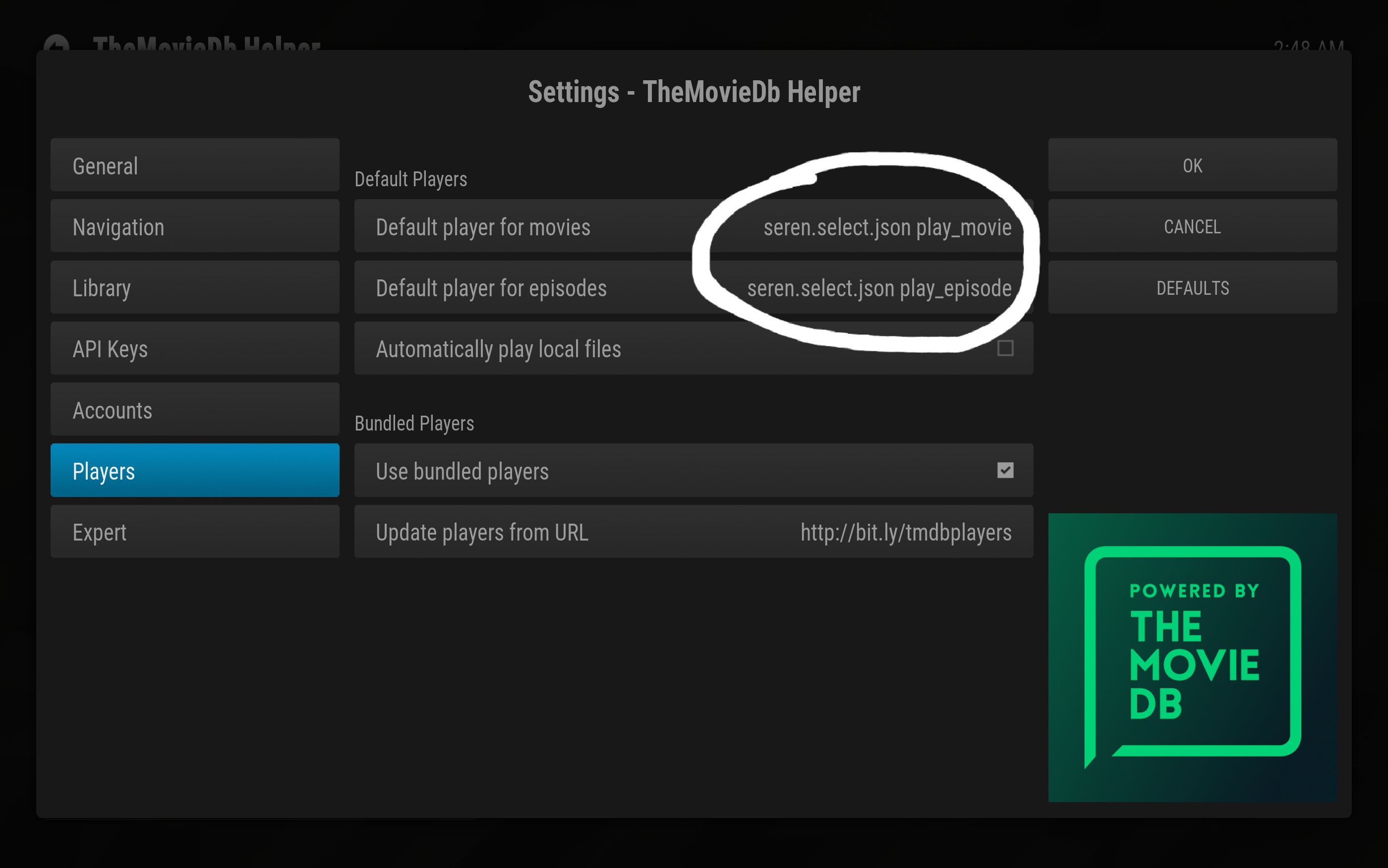
also just wanted to highlight that when i change the option, it displays like this now. should it display the code or should it display the text like, example, "Play with Seren".
LoganWolverineX
on 26 Oct 2020
The displayed name is correct - I decided it was better to show the file name and method so that it is easier to find the correct file to edit if needed.
jurialmunkey
on 26 Oct 2020
Judging from the log it looks like TMDbHelper finishes.
How far along does the player get before the crash? e.g. does Kodi crash immediately after selecting the player, or does the other addon open up?
jurialmunkey
on 26 Oct 2020
Okay. I think I found out what is “not working and what is “working”.
There’s a new player option I noticed called plainly “play with seren”. That definitely works the same way as “play with seren (select source)”.
The options called “play with seren (source select)” and play with seren (smart play w/ source select)” crashes kodi.
Is there a difference between those three?
Play with seren
Vs
Play with seren (source select)
Play with seren (smart play w/ source select)
LoganWolverineX
on 26 Oct 2020
The displayed name is correct - I decided it was better to show the file name and method so that it is easier to find the correct file to edit if needed.
Gotcha! That’s good to know.
LoganWolverineX
on 26 Oct 2020
Okay. I think I found out what is “not working and what is “working”.
There’s a new player option I noticed called plainly “play with seren”. That definitely works the same way as “play with seren (select source)”.
The options called “play with seren (source select)” and play with seren (smart play w/ source select)” crashes kodi.
Is there a difference between those three?
Play with seren
Vs
Play with seren (source select)
Play with seren (smart play w/ source select)
Those player files are all 3rd party so I'm really not sure what the differences are.
jurialmunkey
on 26 Oct 2020
Okay some more additional information.
- i've set the tmdbplayer as "Play with Seren" for movies and episodes.
- from the tmdb helper widget, i select the movie or episode. once i click it, that's when it crashes.
- if i go into the context menu for the movie or episode from the tmdb helper widget, then select "select players" option from the context menu then i click "play with seren". it works find.
It seems like for some reason clicking the movie or episode with the default tmdbplayer option will crash but when i go into "select player", then it won't crash.
LoganWolverineX
on 26 Oct 2020
I also now just tested changing the default tmdbplayer to "play with fen". same thing happens. kodi crashes, when i click on the movie/episode, but if i go to the movie/episode, and select "select player" from the context menu. it won't crash after selecting a player.
LoganWolverineX
on 26 Oct 2020
also not sure if it helps, but i'm also running the newly released Kodi 18.9.
LoganWolverineX
on 26 Oct 2020
Hmmm so strange. Playing using a default player is work fine for me. How exactly are you playing the file? Is it from the play button in the info dialog? A widget? In the plugin? A strm file in the library?
jurialmunkey
on 26 Oct 2020
I'm clicking it from widgets in official Aura skin.
I did test it directly from within the TMDB Helper addon and it works fine.
I've tested it on the "Your Next Episodes" widget and Trending movies widget. it crashes on those. But doing it from within the TMDB helper addon works okay.
LoganWolverineX
on 26 Oct 2020
I'm having the exact same issues. I always use the Play button in the info dialog which normally starts Seren, but now it asks me to select a player and then when I select a player, kodi crashes. No matter which player I choose by the way.
I will try to reselect my default players as well.
Thanks a lot for your support!!!
naudski
on 26 Oct 2020
I'm clicking it from widgets in official Aura skin.
I did test it directly from within the TMDB Helper addon and it works fine.
I've tested it on the "Your Next Episodes" widget and Trending movies widget. it crashes on those. But doing it from within the TMDB helper addon works okay.
Okay we're getting close! I was able to recreate the crash using that widget in Aura.
It might be some weird skin specific issue because it was working fine for me using the same widget in Arctic Horizon. I'll have a dig in the code for Aura (wow, I haven't looked at that code for a _long_ time!) and see if I can get some idea
jurialmunkey
on 26 Oct 2020
@naudski - Are you also using Aura? Or some other skin?
jurialmunkey
on 26 Oct 2020
I'm using Auramod.
naudski
on 26 Oct 2020
I'm clicking it from widgets in official Aura skin.
I did test it directly from within the TMDB Helper addon and it works fine.
I've tested it on the "Your Next Episodes" widget and Trending movies widget. it crashes on those. But doing it from within the TMDB helper addon works okay.Okay we're getting close! I was able to recreate the crash using that widget in Aura.
It might be some weird skin specific issue because it was working fine for me using the same widget in Arctic Horizon. I'll have a dig in the code for Aura (wow, I haven't looked at that code for a _long_ time!) and see if I can get some idea
Thanks!!! Hopefully it won't be too difficult once you dig into the code.
I also love your Arctic Horizon skin. I just wish i'm able to do a pinned category shortcuts similar to Aura. That's the only reason why i'm still like Aura over Horizon. :)
LoganWolverineX
on 26 Oct 2020
I also love your Arctic Horizon skin. I just wish i'm able to do a pinned category shortcuts similar to Aura. That's the only reason why i'm still like Aura over Horizon. :)
Not to get too off-topic but FYI you can - it's called a submenu widget in AH. Very similar to the default categories widget in Aura (though you can't do the smaller square icon only one that's in Aura - only the larger style one).
https://github.com/jurialmunkey/skin.arctic.horizon/wiki/Submenus#submenu-widget
jurialmunkey
on 26 Oct 2020
@naudski @LN13uLL - Can you both try latest version from master (v4.0.16)? Hopefully I've fixed the issue 🤞 - Not crashing for me any more using stock Aura skin from repo.
jurialmunkey
on 26 Oct 2020
Caught me at a good time. I was about to head to bed. But excited you are so quick at fixing it so I just tested build 16. It works!!!!! You rock!! :-)
I can sleep happy :). Thank you soooo much!
LoganWolverineX
on 26 Oct 2020
Excellent! We got there in the end! Thanks so much for testing - it was really helpful in narrowing down the issue.
jurialmunkey
on 26 Oct 2020
You’re very welcome :). Glad I was able to help! Have a good day or night.
LoganWolverineX
on 26 Oct 2020
Thank you very much!!!
naudski
on 26 Oct 2020
Related issues
 Wayoff1
·
6Comments
drinfernoo
·
9Comments
Wayoff1
·
6Comments
drinfernoo
·
9Comments
 dairefagan
·
5Comments
dairefagan
·
5Comments
 alKODIque
·
5Comments
alKODIque
·
5Comments
 SerpentDrago
·
4Comments
SerpentDrago
·
4Comments
Most helpful comment
Okay we're getting close! I was able to recreate the crash using that widget in Aura.
It might be some weird skin specific issue because it was working fine for me using the same widget in Arctic Horizon. I'll have a dig in the code for Aura (wow, I haven't looked at that code for a _long_ time!) and see if I can get some idea