Plugin.video.themoviedb.helper: Episodes not being passed to Aura Mod as Episode media type?
I'm not positive this is the case, but am assuming it's along these lines. When I add a landscape widget pointing to "Your Next Episodes" on my home screen they're not showing with the little red episode number ribbon, and instead show with full TV Show name, episode number, episode name grey textbox under the landscape tile.
Also is there no way to remove the appended episode number to the episode name. In Seren this can be disabled so that it doesn't show twice in Auramod. With TMDB Helper widgets it shows twice.
Screenshots for reference:
TMDB Helper widget
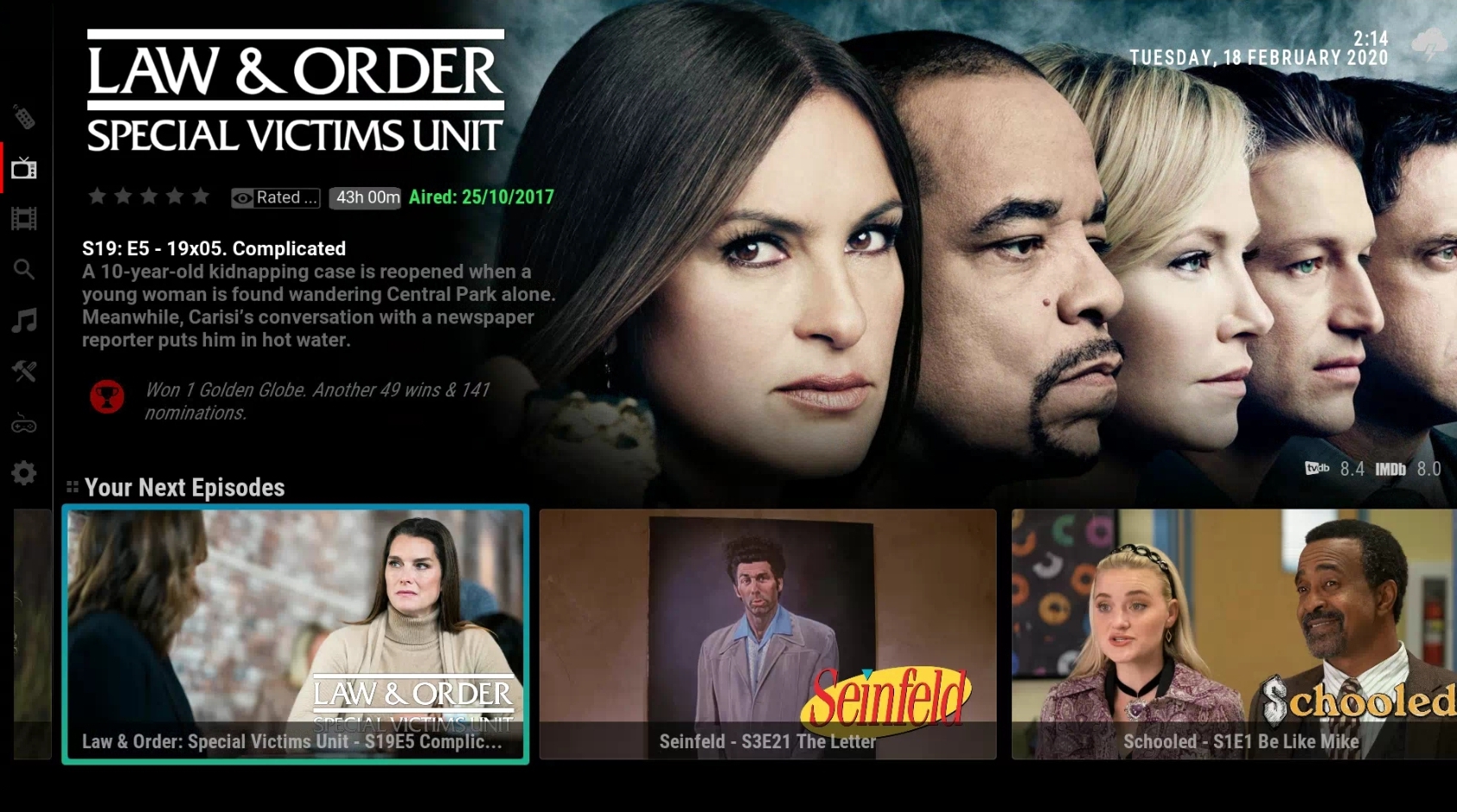
Vs
Seren widget

 abbaskip
All 13 comments
Ask skin author. These are skin issues not plugin issues.
Plugin is setting episode type for this list.
Season and episode can be removed by skins using listitem.title instead of listitem.label
 jurialmunkey
on 18 Feb 2020
jurialmunkey
on 18 Feb 2020
Ask skin author. These are skin issues not plugin issues.
Plugin is setting episode type for this list.
Season and episode can be removed by skins using listitem.title instead of listitem.label
The addon shouldn't pass the episode number by default to remain consistent with how other addons and widgets work, surely? Seems strange that it works with Seren, Venom and Skin Helper Widgets, but not your addon and you're suggesting it's the Skin's issue. I would suggest that shows your addon isn't consistent with the rest of the community?
Obviously happy for you to do whatever you want with your addon, but suggest for more uptake you would hope it worked as other addons in the community do.
abbaskip
on 18 Feb 2020
Venom widget below.
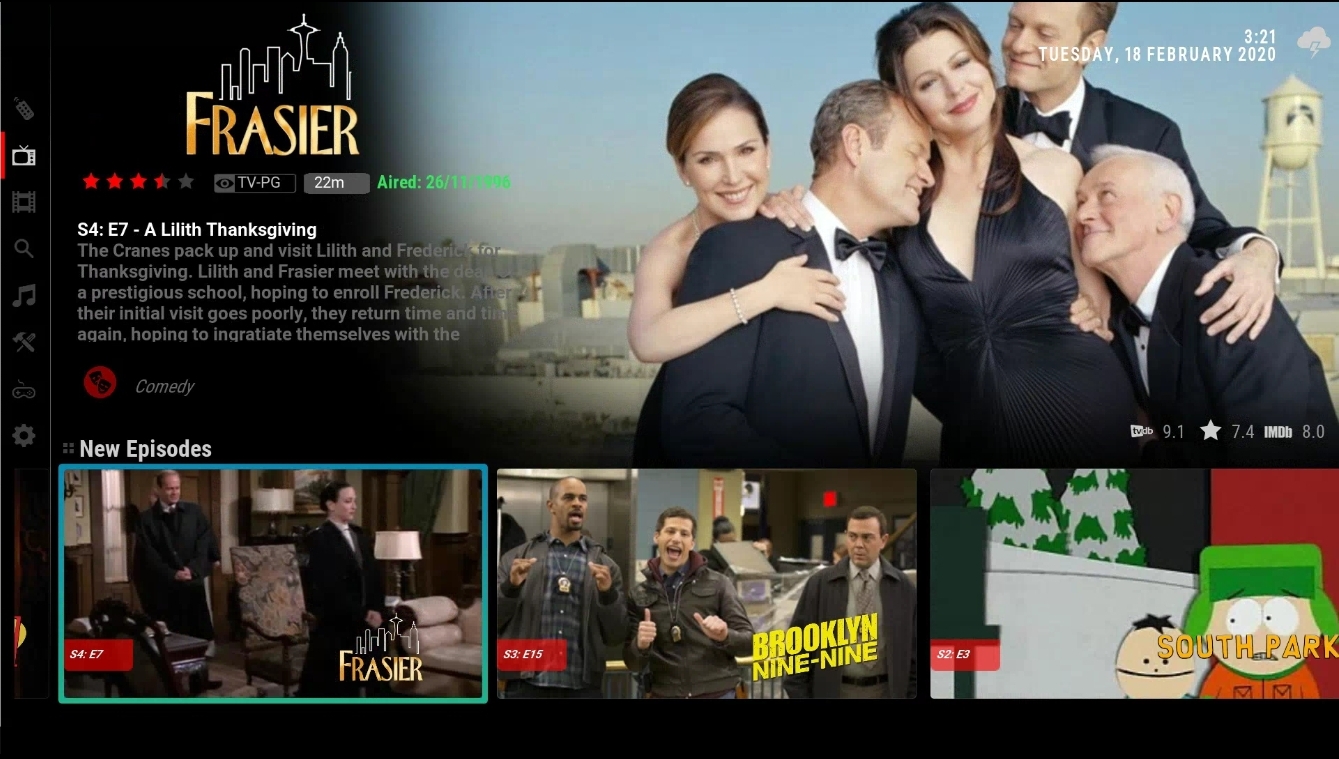
Basically widgets from all addons work, except yours... But it's the Skin's fault?
abbaskip
on 18 Feb 2020
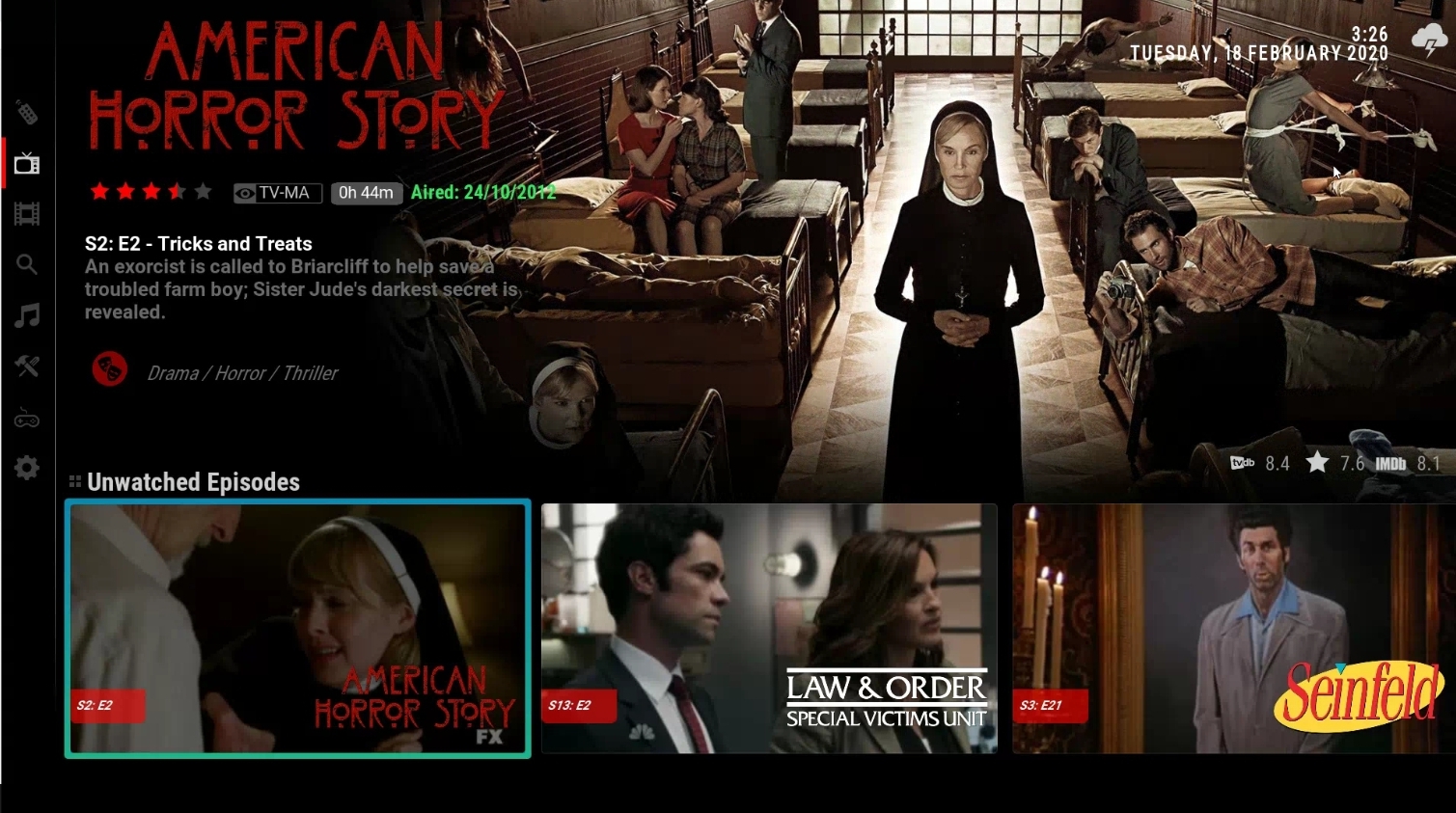
Finally i just checked default Kodi widgets. Regardless of what other addons do, i would hope default Kodi widgets show correctly... And surprise, they do.
Are we still saying it's the skin?
abbaskip
on 18 Feb 2020
@jurialmunkey can you please have a second look at this. I really want to help as i love the addon, and it seems strange that Kodi default widgets, skin Helper widgets, Seren widgets and Venom widgets all show correctly, but yours doesn't.
Unsure if related, but I've also found that TMDB Helper won't play from local library from this list either - but does from Collection etc
abbaskip
on 18 Feb 2020
I've just investigated further and found that your addon works properly if I make the shortcut to: TMDB Helper- Trakt - Your TV calendar - Last Week
So your addon is even passing correct info from there.
However if the shortcut is to TMDB Helper - TV shows - Your Next Episode it shows incorrectly
abbaskip
on 18 Feb 2020
@abbaskip - As you can see in the debug overlay at the top right of this screenshot, the Container.Content() is correctly set to episodes and ListItem.DBType is correctly set to episode. @skyfsza would have more insight into why AuraMod is not treating this path as an episode widget, but I can say with certainty that my addon is setting the correct content type.
You can also see in this screenshot that ListItem.Title provides the episode title without any additions and ListItem.Label adds the season/episode number. It is up to the skinner to decide whether they show ListItem.Label or ListItem.Title, but it is standard practice for Kodi that Title will be the unaltered episode title whereas label can have other additions.
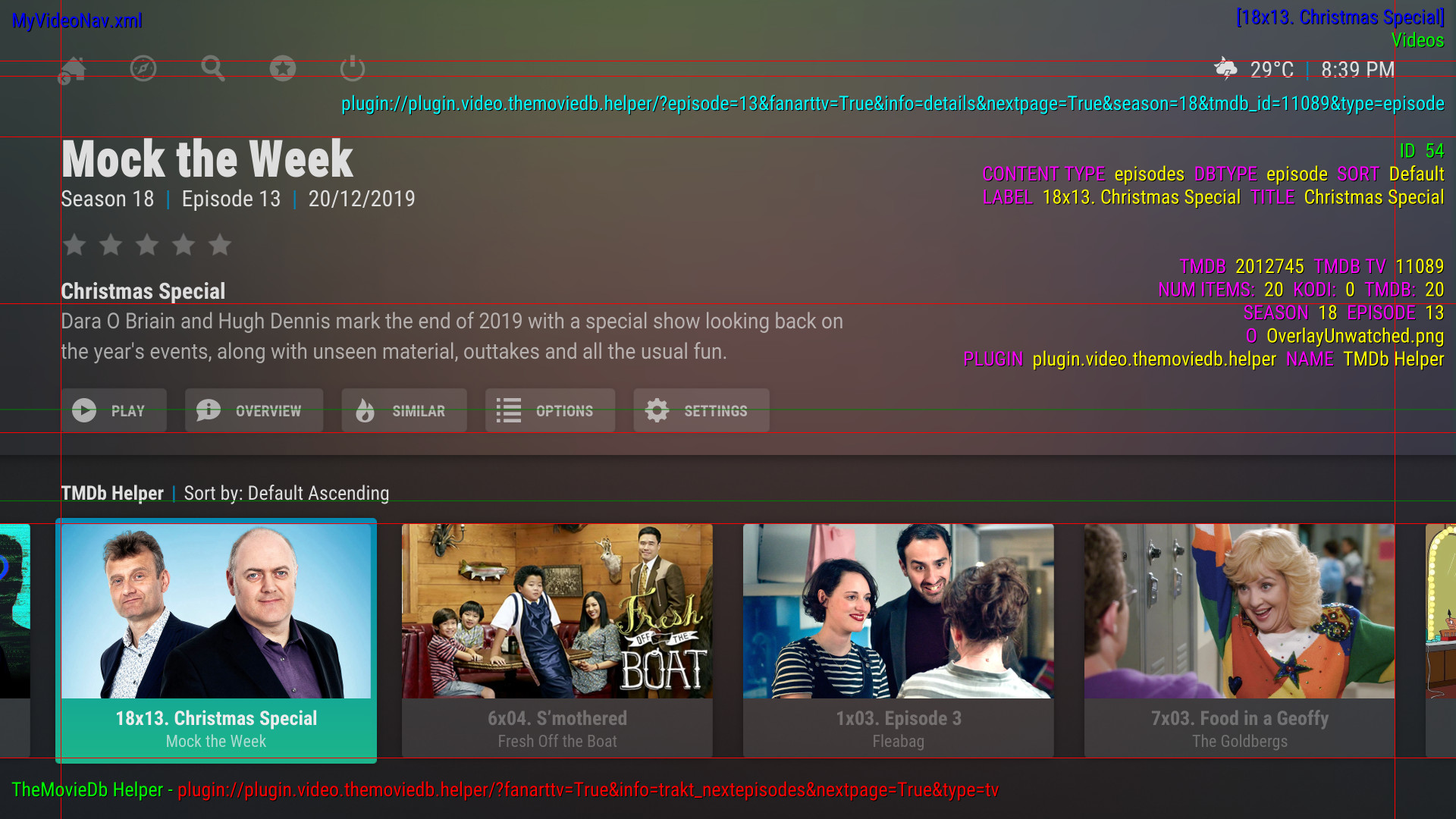
As you can see in this second screenshot from Kodi's recently added episodes library section, Kodi also appends the season and episode number for content which mixes multiple seasons and episodes together. So my addon is actually consistent with the default behaviour of kodi, and those other addons that you listed are not.
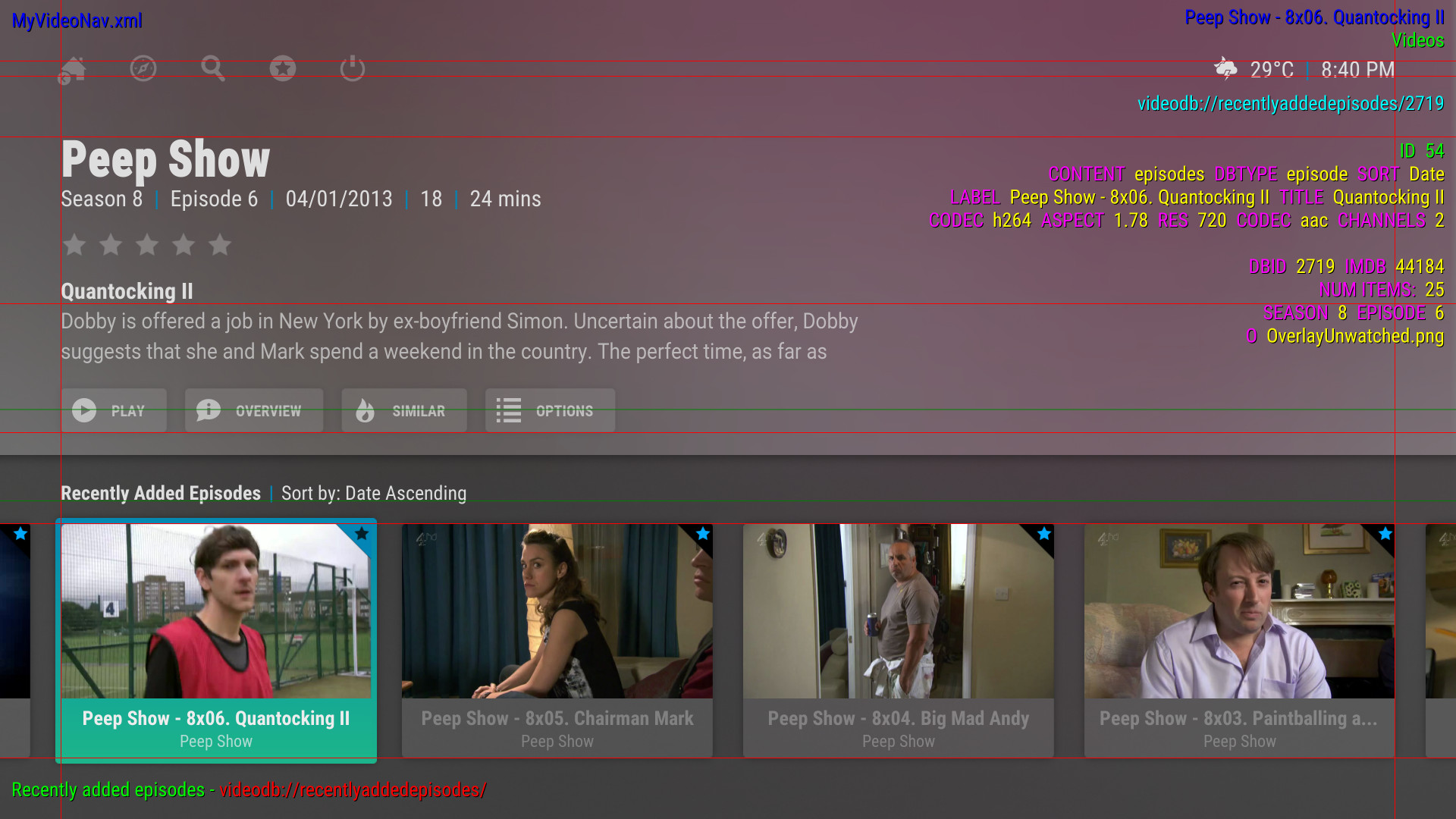
So in summary, yes it is still a skin issue.
jurialmunkey
on 18 Feb 2020
Looking at AuraMod code, my guess it is to do with this visibility condition which incorrectly mixes | and + operators without correct bracketing.
https://github.com/skyfsza/skin.auramod/blob/master/1080i/Includes_WidgetMods.xml#L605
This part of the line is what doesn't have correct bracketing. Also have no idea why DBID would be checked for here, and is probably also causing issues.
[!String.IsEmpty(ListItem.Art(clearlogo)) | !String.IsEmpty(ListItem.DBID) + !String.IsEmpty(ListItem.Art(tvshow.clearlogo))]
So yes, very certain that this is a skin issue.
jurialmunkey
on 18 Feb 2020
@jurialmunkey TMDBHelper is definitely setting the Container correctly in Library view and DBType for widgets, looks like something skin side is causing abbaskips issue.
@abbaskip I dont have the same issue as you posted above with TMDB Helper "Your next episodes". Open an issue on https://github.com/skyfsza/repository.auramod and I will try assist.

Only time the full label will show on a widget is if no Clearlogo exists.
 skyfsza
on 18 Feb 2020
skyfsza
on 18 Feb 2020
@skyfsza - Did you see my secondary comment. I think it might be because you are mixing an AND and a OR operator without bracketing it
i.e. this part of the line:
[!String.IsEmpty(ListItem.Art(clearlogo)) | !String.IsEmpty(ListItem.DBID) + !String.IsEmpty(ListItem.Art(tvshow.clearlogo))]
Needs to be either:
[!String.IsEmpty(ListItem.DBID) + [!String.IsEmpty(ListItem.Art(clearlogo)) | !String.IsEmpty(ListItem.Art(tvshow.clearlogo))]]
or
[!String.IsEmpty(ListItem.Art(clearlogo)) | [!String.IsEmpty(ListItem.DBID) + !String.IsEmpty(ListItem.Art(tvshow.clearlogo))]]
or
[[!String.IsEmpty(ListItem.Art(clearlogo)) | !String.IsEmpty(ListItem.DBID)] + !String.IsEmpty(ListItem.Art(tvshow.clearlogo))]
jurialmunkey
on 18 Feb 2020
No idea why I had the DBID check in either, removing so it just checks for
[!String.IsEmpty(ListItem.Art(clearlogo)) | !String.IsEmpty(ListItem.Art(tvshow.clearlogo))]
Thanks!
skyfsza
on 18 Feb 2020
Thanks loads to both of you. Will install git versions of both addons today and see how it goes
abbaskip
on 18 Feb 2020
The thumbs now work properly, thanks guys. I believe the Episode number being repeated is a skin issue, so will raise that there
abbaskip
on 19 Feb 2020
Related issues
 djnield
·
4Comments
djnield
·
4Comments
 onlytanmoy
·
7Comments
onlytanmoy
·
7Comments
 Blurayx
·
7Comments
Blurayx
·
7Comments
 Wayoff1
·
6Comments
Wayoff1
·
6Comments
 mathu204
·
4Comments
mathu204
·
4Comments