Plugin.video.themoviedb.helper: [Request] Add to library
Is possible to also create function "Add to Library" from context menu?
Thanks :-)
 webmaher
All 42 comments
I'll look into it.
 jurialmunkey
on 16 Jan 2020
jurialmunkey
on 16 Jan 2020
@webmaher - Please test latest version (v2.2.23).
Context menu now has an "Add to Kodi Library" function which adds .strm files to the userdata/addon_data/plugin.video.themoviedb.helper folder.
Movies will be saved as:
{addon_dir}\movies\{title} ({year})\{title} ({year}).strm
Episodes will be saved as:
{addon_dir}\tvshows\{tvshowtitle}\season {season}\S{season}E{episode} - {episodetitle}.strm
You will need to add the movies and tvshows folders as sources to Kodi. After you add items, you will need to manually update the library. I'll add some options for auto-update of library once everything is confirmed to be working correctly.
jurialmunkey
on 18 Jan 2020
I update to your last skin and last TMDhelper and nothing to work:
first i made folders as sources (movies and tvshows) ...userdata\addon_data\plugin.video.themoviedb.helper\
Then I go to TVShows-trending this week i try to add a few series and error appear
Then go to Movies and cant open any folders...
Here is log file:
https://pastebin.com/w6DNiU2X
- error line 402
- error line 434
- error line 1104
- error line 1332
- error line 1511 ...
webmaher
on 18 Jan 2020
I tried the add to library function. It creates both the movie and tvshow folder when you add an item to each. Then I added both sources to the Kodi library, and manually updated and both movies and jtvshows were added to library successfully. The issue I get, which is perhaps an API issue for TVDB, is some tvshows when added are not being identified correctly such as Game of Thrones, The Black List etc. Just seasons show up under the folder, vice in a TV show named folder like the ones that were added successfully. I have had similar issues in OpenMeta with this due to changes on the TMDB/TVDB site, due to API issues. Looking forward to your implementation of auto addd to library. Thanks for the great work, I am really enjoying the plugin. It has awesome potential.
 newf276
on 18 Jan 2020
newf276
on 18 Jan 2020
on which OS...W10 or android or....
Do you try then play from library...which player do use...
webmaher
on 18 Jan 2020
I am doing the testing on my MacBook Pro, OSX Mojave, Kodi 18.5. Yes the shows and movies play. I have noticed that when I add to library, I must be in the second level using browse function, not the initial display of Show, ie.e one more level in where it list the cast etc. However still have some issues with ID info, some shows not tagging correctly, I still suspect TMDB API Issue. I have changed the library to take in form TVDB, similar issues, then changed to TV Maze, similar issues. I run LIBREELEC on my main TV setup, but always test stuff on my MacBook. I find that OSX and LIBREELEC are fairly reliable for testing. When playing from library I also get playlist error, but the items still play through all my adding like, venom, scrubs, FEN etc. I use my own players that I have uploaded to GitHub, and disable using internal YouTube/netflix. I paste int ne url and update from my url, and it works fine.
newf276
on 18 Jan 2020
I update to your last skin and last TMDhelper and nothing to work:
first i made folders as sources (movies and tvshows) ...userdata\addon_data\plugin.video.themoviedb.helper\Then I go to TVShows-trending this week i try to add a few series and error appear
Then go to Movies and cant open any folders...Here is log file:
https://pastebin.com/w6DNiU2X1. error line 402 2. error line 434 3. error line 1104 4. error line 1332 5. error line 1511 ...
@webmaher Can you test latest version I just pushed? It should fix errors 4 & 5 (the other errors are minor and shouldn't affect anything).
BTW, the plugin will automatically create the "tvshows" and "movies" folders. Please delete them and let the plugin create them.
jurialmunkey
on 18 Jan 2020
The issue I get, which is perhaps an API issue for TVDB, is some tvshows when added are not being identified correctly such as Game of Thrones, The Black List etc. Just seasons show up under the folder, vice in a TV show named folder like the ones that were added successfully.
@newf276 What you're describing is an issue with your library scraper settings, not a TMDbHelper issue.
All TMDbHelper Add to Library does is create a folder on your hard drive with the tvshow name. In that folder it creates a folder for each season and in each season folder it creates .strm files named S01E01 - Episode Title.strm for each episode (with relevant season/episode number and title). Inside the strm file is the path to the plugin player function.
For instance, if I add The Witcher I'll get a folder structure like so:
/tvshows
--/The Witcher
----/Season 1
------/S01E01 - The End's Beginning.strm
------/S01E02 - Four Marks.strm
------/S01E03 - Betrayer Moon.strm
------/etc.
Inside each .strm file will be a plugin path to the player function to tell Kodi what to do when you click the item in the library:
plugin://plugin.video.themoviedb.helper/?info=play&season=1&type=episode&episode=1&tmdb_id=71912
And that's it. Scrapers treat .strm files just as if they were any other video file such as .avi or .mkv. It's up to the Library Scraper to read that directory structure and determine what the shows are and add them to the actual library.
So unless my plugin is not naming the folders/files correctly, then it is a scraper issue and you should check that your scraper settings for that source are properly configured.
jurialmunkey
on 18 Jan 2020
we make progress :-)
... i can add first 3 of 5 movies from folder Trending THis Week
... I can add all first 5 series from folder Trending THis Week
this 2 movies error:
2020-01-18 21:57:59.200 T:2504 ERROR: XFILE::CDirectory::Create - Error creating C:\Users\Jan\AppData\Roaming\Kodi\userdata\addon_data\plugin.video.themoviedb.helpermovies\Terminator: Dark Fate (2019)
2020-01-18 21:57:59.200 T:2504 ERROR: XFILE::CDirectory::Create - Error creating special://profile/addon_data/plugin.video.themoviedb.helper/movies/Terminator: Dark Fate (2019)
2020-01-18 21:57:59.200 T:2504 NOTICE: [plugin.video.themoviedb.helper]
ADD LIBRARY -- Failed to create path:
special://profile/addon_data/plugin.video.themoviedb.helper//movies/Terminator: Dark Fate (2019)
2020-01-18 21:58:22.414 T:11348 ERROR: XFILE::CDirectory::Create - Error creating C:\Users\Jan\AppData\Roaming\Kodi\userdata\addon_data\plugin.video.themoviedb.helpermovies\Maleficent: Mistress of Evil (2019)
2020-01-18 21:58:22.414 T:11348 ERROR: XFILE::CDirectory::Create - Error creating special://profile/addon_data/plugin.video.themoviedb.helper/movies/Maleficent: Mistress of Evil (2019)
2020-01-18 21:58:22.414 T:11348 NOTICE: [plugin.video.themoviedb.helper]
ADD LIBRARY -- Failed to create path:
special://profile/addon_data/plugin.video.themoviedb.helper//movies/Maleficent: Mistress of Evil (2019)
when i want to play always get:
2020-01-18 22:08:20.424 T:28332 ERROR: Playlist Player: skipping unplayable item: 0, path [C:\Users\Jan\AppData\Roaming\Kodi\userdata\addon_data\plugin.video.themoviedb.helpermovies\1917 (2019)\1917 (2019).strm]
2020-01-18 22:08:37.657 T:28332 ERROR: Playlist Player: skipping unplayable item: 0, path [C:\Users\Jan\AppData\Roaming\Kodi\userdata\addon_data\plugin.video.themoviedb.helpertvshowsThe Witcher\Season 1\S01E01 - The End's Beginning.strm]
2020-01-18 22:08:51.206 T:28332 NOTICE: Stopping player
My player is plexkodiconnect and I change this in settings.xml file
<setting id="default_player_episodes">plexkodiconnect</setting>
<setting id="default_player_movies">plexkodiconnect</setting>
I have plexkodiconnect player in players folder with other players... i disable bundled players...
webmaher
on 18 Jan 2020
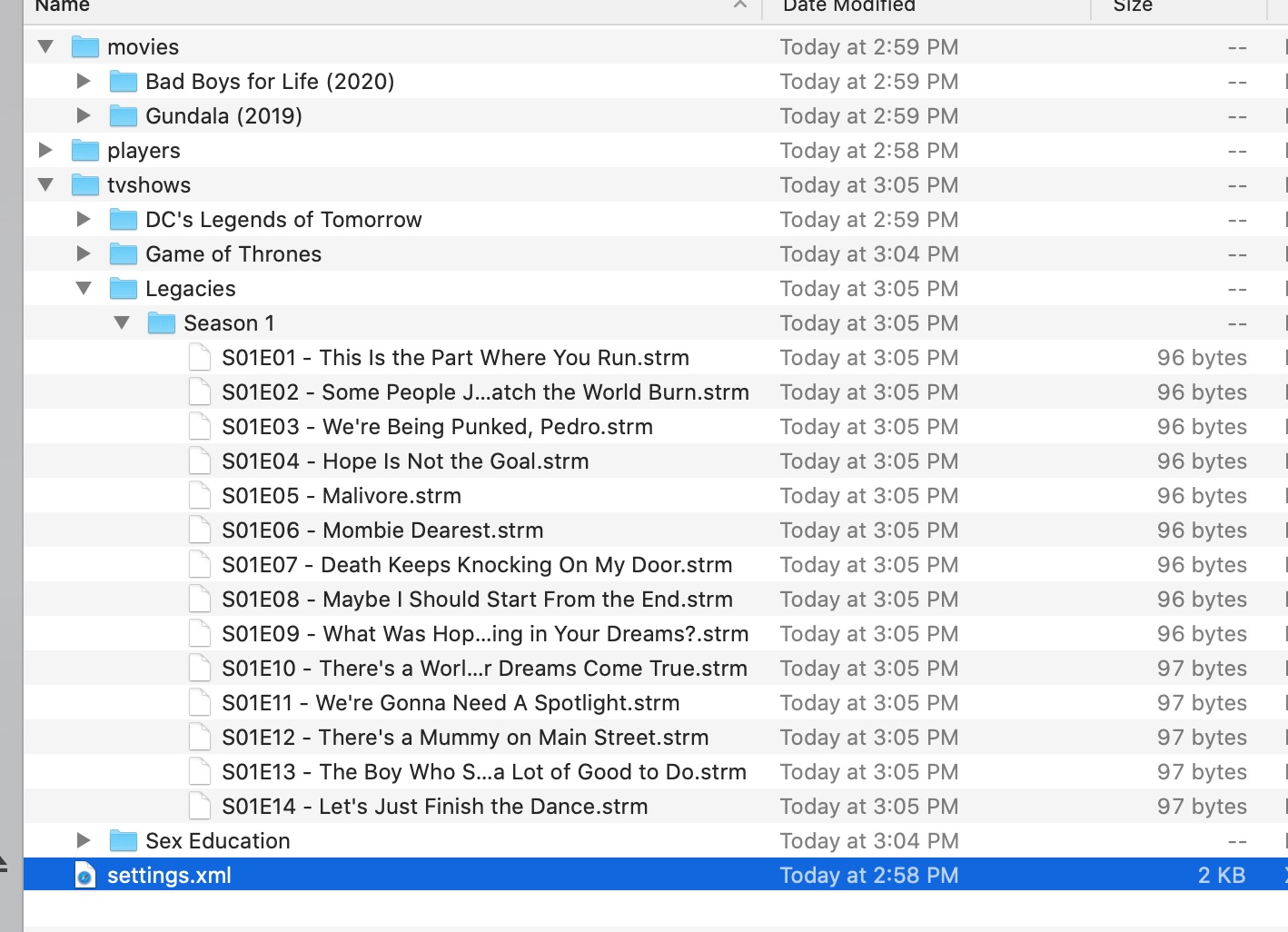
Jurialmunkey, thanks for the response and clarification. Out of 40 shows I added to the library, only four did not get the folder structure correct. One example was Young Sheldon. It stoped at Season one, with only 5 episodes. It did not add the complete folder structure or strm files for the other episodes. Meaning Season2, and Season 3 folders were not added, neither the individual episodes. Two other shows gave me similar results.I started from scratch again, and only added a couple of shows and couple of movies. I attached a image of the plugin data path to show that only one season of legacies was added, not the rest as an example. Hence why I thought it might have been an ID issue from either TVDB or TMDB. I do not think it is your plugin. As far as library scraper being the issue, perhaps you are correct. I am not sure how I would fix that considering every other shows is added correctly, both in the movies and TVShow folder in the plugin path, and in the Kodi library itself. I will read more on the Library scraper function to get better knowledge on how this works. As far as understanding how player files work, and how each strm file tells Kodi which plugin it uses that added the file, I do understand that pretty good. I greatly appreciate the work you're doing, and the time it takes you to answer our newb questions is tremendously appreciated. Thank You.
newf276
on 18 Jan 2020
@newf276 ... Young Sheldon is really problem..i got all 3 season but folder Young Sheldon is not created...I got folder Season 1 (22ep.), Season 2 (22.ep) and also Season 3 with 12 ep.
Can you tell me how can create plexkodiconnect player to work.... i try with original from OpenMeta and also with this but no success:
`{
"name" : "plexkodiconnect",
"plugin" : "plugin.video.plexkodiconnect",
"play_movie" : [
"plugin://plugin.video.plexkodiconnect/directory/search/search/{title}/",
{"title": "{title}", "year": "{year}"}
],
"play_episode" : [
"plugin://plugin.video.plexkodiconnect/directory/search/search/{showname}/",
{"title": "{showname}"},
{"position": "{season}"},
{"season": "{season}", "episode": "{episode}"}
],
"search_movie" : "plugin://plugin.video.plexkodiconnect/directory/search/search/{title}/",
"search_episode" : "plugin://plugin.video.plexkodiconnect/directory/search/search/{showname}/"
}`
webmaher
on 19 Jan 2020
I have never used plexkodiconnect before, so I am unsure how to write the player json for that one. Sorry wish I could be more helpful.
newf276
on 19 Jan 2020
@webmaher @newf276 - Okay, the errors with some episodes/movies not being added appear to all be related to characters in titles that are invalid for filenames (e.g. Terminator Dark Fate has : and episode 6 of Young Sheldon has a ® in the episode name - so script gets to that then errors and doesn't add the rest).
Please test with latest version. I think all these invalid character errors should be fixed. I was able to successfully add Young Sheldon and Terminator Dark Fate.
jurialmunkey
on 19 Jan 2020
@webmaher @newf276 - Okay, the errors with some episodes/movies not being added appear to all be related to characters in titles that are invalid for filenames (e.g. Terminator Dark Fate has
:and episode 6 of Young Sheldon has a ® in the episode name - so script gets to that then errors and doesn't add the rest).Please test with latest version. I think all these invalid character errors should be fixed. I was able to successfully add Young Sheldon and Terminator Dark Fate.
Thanks for the quick fix. I updated to the newest version, and Young Sheldon works fine. I tried another one I had an issue with earlier which is the TV Show Dark. When I add Dark it scans in as "His Dark Materials" I suspect that this must have. weird character also. However the difference with this one is that in the jtvshows folder it is labelled correctly as Dark, with correct seasons and strm files. So perhaps it is the Movie Database TV Scraper V3.40 issue that the Kodi library scraper uses for TV information. So I edited the tvshows source and selected the TV Database Scraper V3.23 vice the Movie database scraper and it scans in correctly as Dark. Hope this helps you understand what might be going wrong with the Library scraper. Not sure if it would help to add the TV Database add-on 3.23 to the Addon.xml file or not?
newf276
on 19 Jan 2020
@newf276 - Dark being scraped with wrong info to the library is an issue with whatever scraper you are using and nothing to do with this plugin. Most likely getting picked up incorrectly due to having a short generic name and also being a foreign language. These types of false positives happen with physical files too.
There's not much I can do from my side of things. Like I said, I'm just creating a directory structure and the strm files - it's up to whatever scraper you are using to determine what the files are.
With that being said, can you test latest version? I've added a .nfo file which might help the scraper locate the correct show. Remove the .strm files and from the library and then re-add Dark and rescan.
Hopefully the scrapers can take TMDb addresses for tvshow.nfo (the nfo will work for movies but I'm not sure if tv needs a TVDB one). If this doesn't help, then you will need to refresh the show in the library from the info dialog and manually select the correct show.
jurialmunkey
on 19 Jan 2020
i tested a lot and add to library works very good.., big thanks @jurialmunkey
but i cant play anything with my plexkodiconnect...
When i try to add default players from settings menu i got this
2020-01-19 12:33:31.804 T:29784   ERROR: EXCEPTION Thrown (PythonToCppException) : -->Python callback/script returned the following error<--
                                             - NOTE: IGNORING THIS CAN LEAD TO MEMORY LEAKS!
                                            Error Type: <type 'exceptions.ValueError'>
                                            Error Contents: Expecting , delimiter: line 3 column 20 (char 135)
                                            Traceback (most recent call last):
                                              File "C:\Users\Jan\AppData\Roaming\Kodi\addons\plugin.video.themoviedb.helper\script.py", line 10, in <module>
                                                TMDbScript.router()
                                              File "C:\Users\Jan\AppData\Roaming\Kodi\addons\plugin.video.themoviedb.helper\resources\lib\script.py", line 371, in router
                                                self.set_defaultplayer()
                                              File "C:\Users\Jan\AppData\Roaming\Kodi\addons\plugin.video.themoviedb.helper\resources\lib\script.py", line 341, in set_defaultplayer
                                                player.setup_players(tmdbtype=tmdbtype, clearsetting=True)
                                              File "C:\Users\Jan\AppData\Roaming\Kodi\addons\plugin.video.themoviedb.helper\resources\lib\player.py", line 36, in setup_players
                                                self.build_players(tmdbtype)
                                              File "C:\Users\Jan\AppData\Roaming\Kodi\addons\plugin.video.themoviedb.helper\resources\lib\player.py", line 195, in build_players
                                                meta = loads(content) or {}
                                              File "C:\Program Files\Kodi\system\python\Lib\json\__init__.py", line 339, in loads
                                                return _default_decoder.decode(s)
                                              File "C:\Program Files\Kodi\system\python\Lib\json\decoder.py", line 364, in decode
                                                obj, end = self.raw_decode(s, idx=_w(s, 0).end())
                                              File "C:\Program Files\Kodi\system\python\Lib\json\decoder.py", line 380, in raw_decode
                                                obj, end = self.scan_once(s, idx)
                                            ValueError: Expecting , delimiter: line 3 column 20 (char 135)
                                            -->End of Python script error report<--
2020-01-19 12:33:46.171 T:30968   ERROR: EXCEPTION Thrown (PythonToCppException) : -->Python callback/script returned the following error<--
                                             - NOTE: IGNORING THIS CAN LEAD TO MEMORY LEAKS!
                                            Error Type: <type 'exceptions.TypeError'>
                                            Error Contents: 'NoneType' object is not callable
                                            Traceback (most recent call last):
                                              File "C:\Users\Jan\AppData\Roaming\Kodi\addons\plugin.video.themoviedb.helper\script.py", line 10, in <module>
                                                TMDbScript.router()
                                              File "C:\Users\Jan\AppData\Roaming\Kodi\addons\plugin.video.themoviedb.helper\resources\lib\script.py", line 371, in router
                                                self.set_defaultplayer()
                                              File "C:\Users\Jan\AppData\Roaming\Kodi\addons\plugin.video.themoviedb.helper\resources\lib\script.py", line 341, in set_defaultplayer
                                                player.setup_players(tmdbtype=tmdbtype, clearsetting=True)
                                              File "C:\Users\Jan\AppData\Roaming\Kodi\addons\plugin.video.themoviedb.helper\resources\lib\player.py", line 36, in setup_players
                                                self.build_players(tmdbtype)
                                              File "C:\Users\Jan\AppData\Roaming\Kodi\addons\plugin.video.themoviedb.helper\resources\lib\player.py", line 195, in build_players
                                                meta = loads(content) or {}
                                              File "C:\Program Files\Kodi\system\python\Lib\json\__init__.py", line 339, in loads
                                                return _default_decoder.decode(s)
                                              File "C:\Program Files\Kodi\system\python\Lib\json\decoder.py", line 364, in decode
                                                obj, end = self.raw_decode(s, idx=_w(s, 0).end())
                                              File "C:\Program Files\Kodi\system\python\Lib\json\decoder.py", line 380, in raw_decode
                                                obj, end = self.scan_once(s, idx)
                                              File "C:\Program Files\Kodi\system\python\Lib\json\decoder.py", line 36, in errmsg
                                                lineno, colno = linecol(doc, pos)
                                            TypeError: 'NoneType' object is not callable
                                            -->End of Python script error report<--
I have this plexkodiconnect.json in players folder:
{
 "name"         : "PlexKodiConnect",
 "plugin"       : "plugin.video.plexkodiconnect",
 "priority"     : 200,
 "id"           : "plexkodiconnect",
 "filters"      : {},
 "postprocess"  : "",
 "movies"       : [
  [
   {
    "link"      : "plugin://plugin.video.plexkodiconnect/?mode=browseplex&key=%2fhubs%2fsearch%3ftype%3d1&prompt=Search+Movie",
    "steps"     : [
     "@keyboard:{realtitle}",
     "{realtitle} .{year}."
     ],
    "action"    : "PLAY"
   },
   {
    "link"      : "plugin://plugin.video.plexkodiconnect/?mode=browseplex&key=%2fhubs%2fsearch%3ftype%3d1&prompt=Search+Movie",
    "steps"     : [
     "@keyboard:{realtitle}",
     "{realtitle}"
     ],
    "action"    : "PLAY"
   }
  ]
 ],
 "tvshows"      : [
  [
   {
    "link"      : "plugin://plugin.video.plexkodiconnect/?mode=browseplex&key=%2fhubs%2fsearch%3ftype%3d2&prompt=Search+TVShow",
    "steps"     : [
     "@keyboard:{realname}",
     "{realname} .{year}.",
     ".* {season}",
     "{title}"
     ],
    "action"    : "PLAY"
   },
   {
    "link"      : "plugin://plugin.video.plexkodiconnect/?mode=browseplex&key=%2fhubs%2fsearch%3ftype%3d2&prompt=Search+TVShow",
    "steps"     : [
     "@keyboard:{realname}",
     "{realname} .{year}.",
     ".* {season}",
     "{season}x{episode}"
     ],
    "action"    : "PLAY"
   },
   {
    "link"      : "plugin://plugin.video.plexkodiconnect/?mode=browseplex&key=%2fhubs%2fsearch%3ftype%3d2&prompt=Search+TVShow",
    "steps"     : [
     "@keyboard:{realname}",
     "{realname}",
     ".* {season}",
     "{title}"
     ],
    "action"    : "PLAY"
   },
   {
    "link"      : "plugin://plugin.video.plexkodiconnect/?mode=browseplex&key=%2fhubs%2fsearch%3ftype%3d2&prompt=Search+TVShow",
    "steps"     : [
     "@keyboard:{realname}",
     "{realname}",
     ".* {season}",
     "{season}x{episode}"
     ],
    "action"    : "PLAY"
   }
  ]
 ]
}
That is NOT a valid TMDbHelper player file. Meta / Open Meta player files are NOT compatible with TMDBHelper. See the wiki about how TMDbHelper player files are constructed:
https://github.com/jurialmunkey/plugin.video.themoviedb.helper/wiki/Player-Function
jurialmunkey
on 19 Jan 2020
@newf276 - Dark being scraped with wrong info to the library is an issue with whatever scraper you are using and nothing to do with this plugin. Most likely getting picked up incorrectly due to having a short generic name and also being a foreign language. These types of false positives happen with physical files too.
There's not much I can do from my side of things. Like I said, I'm just creating a directory structure and the strm files - it's up to whatever scraper you are using to determine what the files are.
With that being said, can you test latest version? I've added a .nfo file which might help the scraper locate the correct show. Remove the .strm files and from the library and then re-add Dark and rescan.
Hopefully the scrapers can take TMDb addresses for
tvshow.nfo(the nfo will work for movies but I'm not sure if tv needs a TVDB one). If this doesn't help, then you will need to refresh the show in the library from the info dialog and manually select the correct show.
Thanks, and completely understand. Will test as requested. Appreciate all that you do for everyone, thank you.
Ian
newf276
on 19 Jan 2020
Yes please let me know how you go. If this way doesn't work, I have a couple of other approaches which might
jurialmunkey
on 20 Jan 2020
Yes please let me know how you go. If this way doesn't work, I have a couple of other approaches which might
Well brother, so far so good. I have tried adding many different shows..over 100, and have yet to have any issues. All problems before have been fine with this tweak. I fully believe that any issues form here in will be a direct result of either TMDB or TVDB and certainly not the plugin or strm folders. Great job, and very much appreciated. How difficult would it be to have the plugin on installation create the two directories in Addon dat, meaning add the movie and TVShow folder on install? Also, after adding a TVSHow or Movie, is it possible to have the plugin autoupdate the Kodi library?
newf276
on 20 Jan 2020
Yes please let me know how you go. If this way doesn't work, I have a couple of other approaches which might
Well brother, so far so good. I have tried adding many different shows..over 100, and have yet to have any issues. All problems before have been fine with this tweak. I fully believe that any issues form here in will be a direct result of either TMDB or TVDB and certainly not the plugin or strm folders. Great job, and very much appreciated. How difficult would it be to have the plugin on installation create the two directories in Addon dat, meaning add the movie and TVShow folder on install? Also, after adding a TVSHow or Movie, is it possible to have the plugin autoupdate the Kodi library?
Excellent! Thanks for testing. I'm glad that the .nfo file is helping to find the correct results.
I don't think it is possible to create the directories on install (at least not in a non-hacky way). However, I've added some options in latest release to choose your own path and also an auto-update option.
jurialmunkey
on 20 Jan 2020
to choose own path for series and movies be very welcome....my providers EON android box have only 8GB ROM and even Sony Android TV have only 16GB... so if we have options to have library somewhere in HTPC and using then for all devices be fantastic ... I also have no problem with add to library so @jurialmunkey you made fantastic job and big thanks for all hard work...
webmaher
on 20 Jan 2020
Yes please let me know how you go. If this way doesn't work, I have a couple of other approaches which might
Well brother, so far so good. I have tried adding many different shows..over 100, and have yet to have any issues. All problems before have been fine with this tweak. I fully believe that any issues form here in will be a direct result of either TMDB or TVDB and certainly not the plugin or strm folders. Great job, and very much appreciated. How difficult would it be to have the plugin on installation create the two directories in Addon dat, meaning add the movie and TVShow folder on install? Also, after adding a TVSHow or Movie, is it possible to have the plugin autoupdate the Kodi library?
Excellent! Thanks for testing. I'm glad that the .nfo file is helping to find the correct results.
I don't think it is possible to create the directories on install (at least not in a non-hacky way). However, I've added some options in latest release to choose your own path and also an auto-update option.
Thanks for the added functionality of Auto Update Library, and the movie/tvshows paths. When adding jtvshows to the library I have encountered zero issues. However not the same for when adding movies. Since the revision you made for autoupdate and adding library paths, I am only able to add one movie successfully at at time. The Movie Folder name is created and as is the strm and info file for the first movie. When I proceed to add another movie, only the movie folder name is created but it does not create the strm or info file. I tried closing out of the plugin, but same results. The only way to successfully add another movie, is to exit Kodi each time. Again this is not an issue while adding jtvshows, only an issue adding consecutive movies, one after the other. I am at a loss as to why this is only the case for movies? Thoughts? Thanks again for all the hard work and extra functionality. (EDIT: I just also tried to add a movie without exiting Kodi, after having tried to add a show first before adding another movie item. It also works if I add a show in between each time I add a movie)
newf276
on 20 Jan 2020
@newf276 - Please make sure that you are using the most recent version. I'm pretty sure I already fixed this issue.
If it is still occurring with latest version, a debug log would be useful.
jurialmunkey
on 20 Jan 2020
@newf276 - Please make sure that you are using the most recent version. I'm pretty sure I already fixed this issue.
If it is still occurring with latest version, a debug log would be useful.
When I posted earlier I was on 2.2.28, so I installed 2.2.29: Same issue when adding movies, first is good, second I get error. Debug log here at: http://paste.kodi.tv/aceluhuhob
You can track from around d line 1400. Thanks for assisting. The first log, was an old one, here is a shorter one, where irishman was added but gemini man was not: http://paste.kodi.tv/jirayakoqa
Also, for another view, I cleaned library deleted alll files, and started fresh, adding a couple of shows, then added some movies: http://paste.kodi.tv/tiyetihaqe
newf276
on 21 Jan 2020
Just for fun, because I do all testing on my MacBook Pro, prior to adding new stuff to my Libreelec system, I started with a fresh Kodi install. I added, Venom, and Seren, Kodi log uploader, and the TMDB Helper plugin. Then added the paths to my library, then added two shows and two movies. Here is the log: http://paste.kodi.tv/parasazige
newf276
on 21 Jan 2020
I went on vacation and came back to this fantastic feature implementation - awesome job, jurialmonkey!
 Demonseeed
on 21 Jan 2020
Demonseeed
on 21 Jan 2020
@newf276 - Ah yep, this error is the same one I thought I had fixed. For some reason Kodi xbmcvfs is reporting that it failed to create the folder even though it created the folder fine.
I'm wondering if there is sometimes a delay between creating the folder and the filesystem reporting it successfully - so I've chucked it in a loop that reattempts a couple of times before failing. Can you test latest and see if this helps?
Otherwise I'm just going to have to skip testing whether the folder was properly created and assume it was.
jurialmunkey
on 21 Jan 2020
@newf276 - Ah yep, this error is the same one I thought I had fixed. For some reason Kodi xbmcvfs is reporting that it failed to create the folder even though it created the folder fine.
I'm wondering if there is sometimes a delay between creating the folder and the filesystem reporting it successfully - so I've chucked it in a loop that reattempts a couple of times before failing. Can you test latest and see if this helps?
Otherwise I'm just going to have to skip testing whether the folder was properly created and assume it was.
I updated to version 2.2.30, cleaned library and unfortunately no difference. Thanks for continuing to work through this. Not sure what else can be done.
newf276
on 21 Jan 2020
@newf276 - Hmm. I can't recreate the issue now but I did experience it previously.
Can you test v.2.2.31 - I've added an option in the TMDbHelper Library Settings to ignore folder creation checking. Please enable that option (i.e. ignore folder creation checks) and test if it is working.
jurialmunkey
on 21 Jan 2020
Has anyone tried adding “the outsider”, it’s a new show. On my machine it just created the season folder in the tv shows folder. It didn’t create a “the outsider” folder in between the two.
 funnypanks
on 22 Jan 2020
funnypanks
on 22 Jan 2020
@newf276 - Hmm. I can't recreate the issue now but I did experience it previously.
Can you test v.2.2.31 - I've added an option in the TMDbHelper Library Settings to ignore folder creation checking. Please enable that option (i.e. ignore folder creation checks) and test if it is working.
EUREKA!!!!!!! updated to v.2.2.31 - Works perfects so far for adding both shows and movies. None of the errors I was getting before. Great work jurialmunkey...I did as you suggested and checked the ignore folder creation and all is good. One minor error I get every time no matter what version you had created, and have at times gotten the same on OpenMeta, and Script.meta by vitor07. Tha being playlist error - can't find next item to play, when I have not selected a next item. I get this every time whether I select either a movie or episode. Debug file here: http://paste.kodi.tv/wakeluciqu
Thanks again..
newf276
on 22 Jan 2020
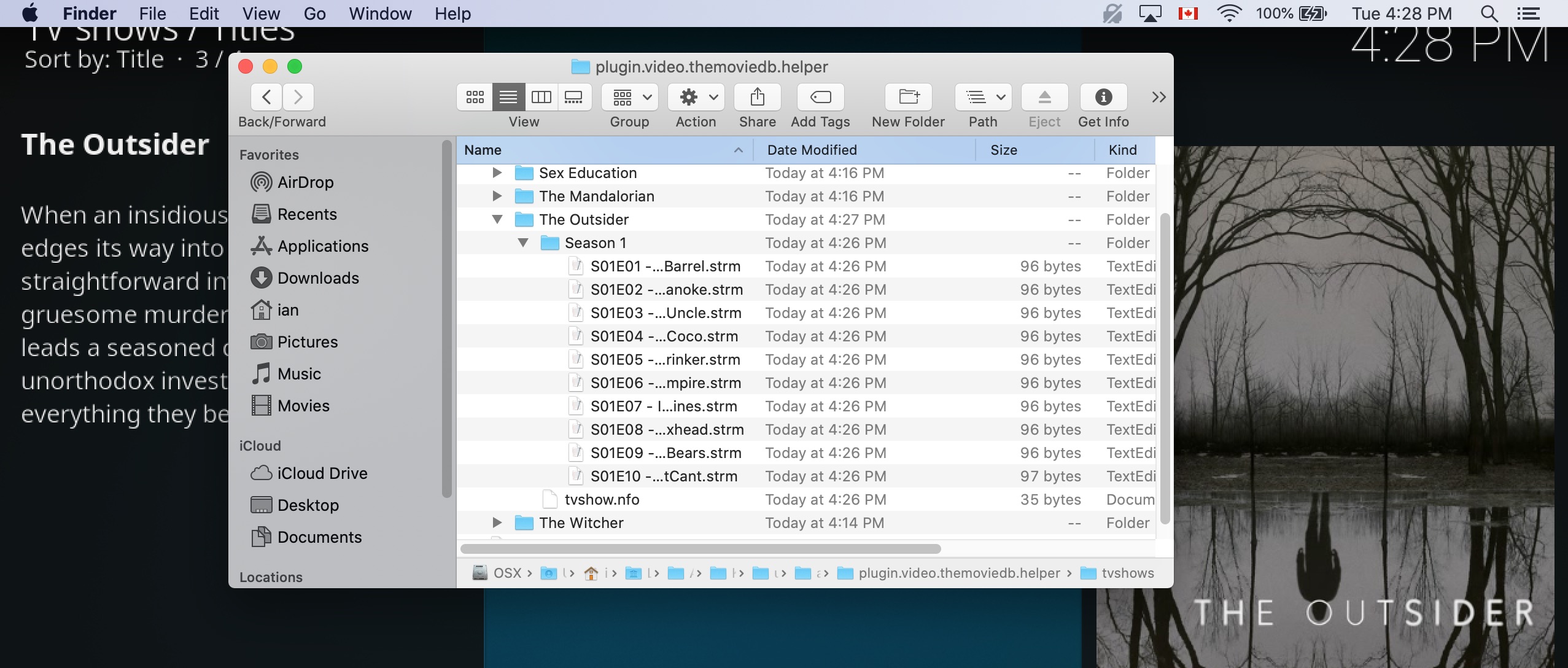
Has anyone tried adding “the outsider”, it’s a new show. On my machine it just created the season folder in the tv shows folder. It didn’t create a “the outsider” folder in between the two.
I juts tested and added this show, and had no error, folder created where it should be with proper structure, using latest version v2.2.31.
newf276
on 22 Jan 2020
Has anyone tried adding “the outsider”, it’s a new show. On my machine it just created the season folder in the tv shows folder. It didn’t create a “the outsider” folder in between the two.
I juts tested and added this show, and had no error, folder created where it should be with proper structure, using latest version v2.2.31.
Tried again with v31, works great! Thanks jurial!
funnypanks
on 22 Jan 2020
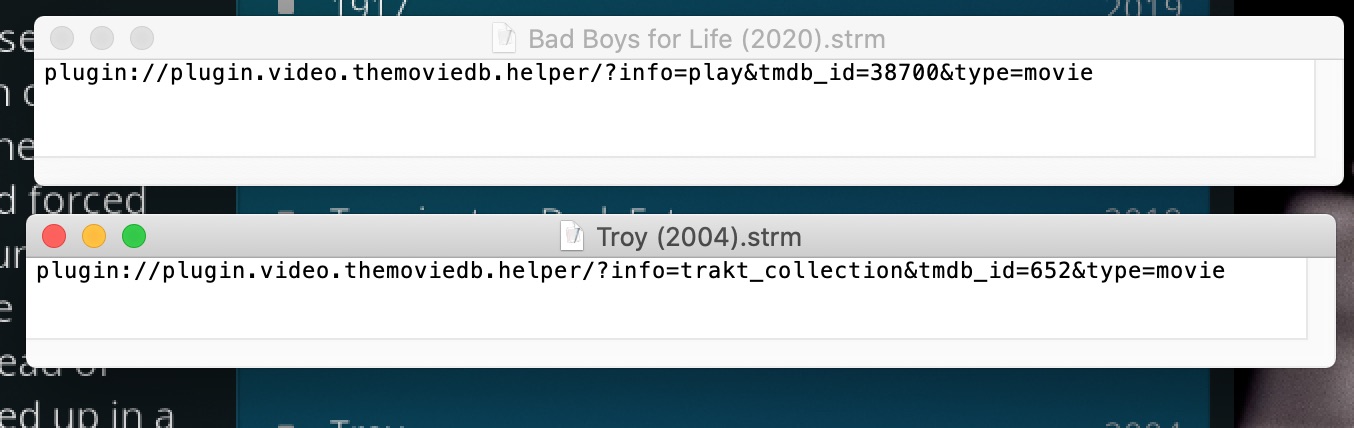
Well, we solve one issue, to find another library issue. So I decided to trying adding some of my trakt movie and tvshows to my library from the trakt section of the plugin and it creates the folder correctly and movie info file correctly, however it does not play the file. Because it does not put the same info in the file as it does when adding from TMDB itself vice trakt. I have pasted in a picture to show you the difference. This is the same for the tvshows. You would need to activate your trakt of course to recreate the issue, and add from the trakt collection section of the add-on.
newf276
on 22 Jan 2020
Well, we solve one issue, to find another library issue. So I decided to trying adding some of my trakt movie and tvshows to my library from the trakt section of the plugin and it creates the folder correctly and movie info file correctly, however it does not play the file. Because it does not put the same info in the file as it does when adding from TMDB itself vice trakt. I have pasted in a picture to show you the difference. This is the same for the tvshows. You would need to activate your trakt of course to recreate the issue, and add from the trakt collection section of the add-on.
Ah, yep - that's a bug with my trakt collection paths not creating the correct folderpath url (you will notice that the onclick action when browsing trakt collection in TMDbHelper doesn't work properly either). Should be fixed in latest. @newf276 can you test and confirm?
Not quite sure what is happening with the other error (can't find next item to play). Seems odd. Sometimes that happens when the skin has a list that displays the folder of an item in another list (e.g. show episodes inside the highlighted season) but the item is playable (i.e. it's not a folder but the other list is trying to open it). However, it looks like you're using stock Estuary from the log, so that is very strange as Estuary doesn't have anything like that in it... I'm a little stumped about that one.
jurialmunkey
on 22 Jan 2020
Well, we solve one issue, to find another library issue. So I decided to trying adding some of my trakt movie and tvshows to my library from the trakt section of the plugin and it creates the folder correctly and movie info file correctly, however it does not play the file. Because it does not put the same info in the file as it does when adding from TMDB itself vice trakt. I have pasted in a picture to show you the difference. This is the same for the tvshows. You would need to activate your trakt of course to recreate the issue, and add from the trakt collection section of the add-on.
Ah, yep - that's a bug with my trakt collection paths not creating the correct folderpath url (you will notice that the onclick action when browsing trakt collection in TMDbHelper doesn't work properly either). Should be fixed in latest. @newf276 can you test and confirm?
Not quite sure what is happening with the other error (can't find next item to play). Seems odd. Sometimes that happens when the skin has a list that displays the folder of an item in another list (e.g. show episodes inside the highlighted season) but the item is playable (i.e. it's not a folder but the other list is trying to open it). However, it looks like you're using stock Estuary from the log, so that is very strange as Estuary doesn't have anything like that in it... I'm a little stumped about that one.
Yup, tried with latest V2.2.32 and it works correctly now. Plays fine, and strm file provides correct info. Another small issue. When I select an item in the library, and then manage and remove it, after confirming to remove, then confirming to delete, it removes from library, but only deletes the strm file, not the movie.info file or the actual movie folder. This is does not happen for jtvshows, it removes all of it. Thanks for all the great work, such a great Addon and relevant.
newf276
on 22 Jan 2020
Another issue my friend. Sorry for creating all this headache for you. I was utilizing the trakt portion of the Addon, and added some more movies to my trakt collection. They add and remove successfully. However for TVshows, they do not add and the ones I tried to remove from my collection did not remove. Here is debug: http://paste.kodi.tv/qesinaqihu
Thanks again...
newf276
on 22 Jan 2020
Well, we solve one issue, to find another library issue. So I decided to trying adding some of my trakt movie and tvshows to my library from the trakt section of the plugin and it creates the folder correctly and movie info file correctly, however it does not play the file. Because it does not put the same info in the file as it does when adding from TMDB itself vice trakt. I have pasted in a picture to show you the difference. This is the same for the tvshows. You would need to activate your trakt of course to recreate the issue, and add from the trakt collection section of the add-on.
Ah, yep - that's a bug with my trakt collection paths not creating the correct folderpath url (you will notice that the onclick action when browsing trakt collection in TMDbHelper doesn't work properly either). Should be fixed in latest. @newf276 can you test and confirm?
Not quite sure what is happening with the other error (can't find next item to play). Seems odd. Sometimes that happens when the skin has a list that displays the folder of an item in another list (e.g. show episodes inside the highlighted season) but the item is playable (i.e. it's not a folder but the other list is trying to open it). However, it looks like you're using stock Estuary from the log, so that is very strange as Estuary doesn't have anything like that in it... I'm a little stumped about that one.Yup, tried with latest V2.2.32 and it works correctly now. Plays fine, and strm file provides correct info. Another small issue. When I select an item in the library, and then manage and remove it, after confirming to remove, then confirming to delete, it removes from library, but only deletes the strm file, not the movie.info file or the actual movie folder. This is does not happen for jtvshows, it removes all of it. Thanks for all the great work, such a great Addon and relevant.
That's not something I can control. Kodi issue - kodi controls the library management
jurialmunkey
on 22 Jan 2020
Another issue my friend. Sorry for creating all this headache for you. I was utilizing the trakt portion of the Addon, and added some more movies to my trakt collection. They add and remove successfully. However for TVshows, they do not add and the ones I tried to remove from my collection did not remove. Here is debug: http://paste.kodi.tv/qesinaqihu
Thanks again...
Can you open a separate issue for this one so it's easier to track. I'll have a look later when I'm back home.
jurialmunkey
on 22 Jan 2020
Another issue my friend. Sorry for creating all this headache for you. I was utilizing the trakt portion of the Addon, and added some more movies to my trakt collection. They add and remove successfully. However for TVshows, they do not add and the ones I tried to remove from my collection did not remove. Here is debug: http://paste.kodi.tv/qesinaqihu
Thanks again...
I could be wrong , but i think the Trakt Addon for kodi could solve this , i think i remember it having the ability to remove stuff from library that is removed on trakt .. warning though It could screw up your library so make backups before messing around !
 SerpentDrago
on 22 Jan 2020
SerpentDrago
on 22 Jan 2020
Another issue my friend. Sorry for creating all this headache for you. I was utilizing the trakt portion of the Addon, and added some more movies to my trakt collection. They add and remove successfully. However for TVshows, they do not add and the ones I tried to remove from my collection did not remove. Here is debug: http://paste.kodi.tv/qesinaqihu
Thanks again...I could be wrong , but i think the Trakt Addon for kodi could solve this , i think i remember it having the ability to remove stuff from library that is removed on trakt .. warning though It could screw up your library so make backups before messing around !
SerpentDrago, you are correct, I tried that, and yes it does screw things up, although not consistently. Thankfully I test on my MacBook, before implementing on my main Libreelec system. Appreciate your advice, cheers brother.
newf276
on 22 Jan 2020
Related issues
 Blurayx
·
7Comments
Blurayx
·
7Comments
 mathu204
·
4Comments
mathu204
·
4Comments
 Kawsiphek
·
8Comments
Kawsiphek
·
8Comments
 prateek33
·
5Comments
prateek33
·
5Comments
 umonkey13
·
3Comments
umonkey13
·
3Comments