Plugin.video.themoviedb.helper: [Request] Genres
Hello jurialmonkey!
I just wanted to throw another request your way that I think would be beneficial.
The ability to select multiple genres at once. Possibly a button above Action & Adventure that says Multi Select (or something similar) that pops up a window dialog slowing you select multiple genres. From there, loading movies/shows that meet the genre requirements of all selected.
Thank you!
Edit: Changed title because I had another request related to the theme. A genre for Anime, and then possibly splitting Anime from the Animation genre.
After looking at TheMovieDb’s website, it seems Anime is all lumped together with Animation. Possibly Anime could pull genre (Animation) + Country of Origin/Original Language (Japan/Japanese). Animation possibly do the opposite (Genre - Country/Language)?
 Demonseeed
All 28 comments
For complex calls, use the Discover method. Discover allows you to combine several rules together.
Discover will translate genre names into TMDb IDs but it is better to use the actual ID if you know it.
Here are the genre IDs for Movies and Tv
Examples
Movies that are Action (28) or Comedy (35)
plugin://plugin.video.themoviedb.helper?info=discover&type=movie&with_id=True&with_separator=OR&with_genres=28 / 35
Movies that are Action (28) and Comedy (35)
plugin://plugin.video.themoviedb.helper?info=discover&type=movie&with_id=True&with_separator=AND&with_genres=28 / 35
Movies that are Action but are NOT Comedy
plugin://plugin.video.themoviedb.helper?info=discover&type=movie&with_id=True&with_separator=AND&with_genres=28&without_genres=35
Comedy Movies by Arnold Schwarzenegger
plugin://plugin.video.themoviedb.helper?info=discover&type=movie&with_separator=AND&with_genres=Comedy&with_cast=Arnold Schwarzenegger
Horror Movies by David Cronenberg
plugin://plugin.video.themoviedb.helper?info=discover&type=movie&with_separator=AND&with_genres=Horror&with_crew=David Cronenberg
Movies that have the Anime (210024) keyword
plugin://plugin.video.themoviedb.helper?info=discover&type=movie&with_id=True&with_keywords=210024
Tv Shows that have the Anime (210024) keyword
plugin://plugin.video.themoviedb.helper?info=discover&type=tv&with_id=True&with_keywords=210024
To get the keyword ID I just googled anime keyword tmdb and and then took the ID from the number in the url: https://www.themoviedb.org/keyword/210024-anime/tv?language=en-US
 jurialmunkey
on 4 Jan 2020
jurialmunkey
on 4 Jan 2020
Wow, that is awesome. I love how powerful this add-on is becoming!
 drinfernoo
on 4 Jan 2020
drinfernoo
on 4 Jan 2020
Wow, that is awesome. I love how powerful this add-on is becoming!
Discover has been there almost from the start. It's just not exposed by the UI so I think most people don't know about it.
jurialmunkey
on 4 Jan 2020
It's super powerful though! I'm thinking of maybe having a folder of pre-built discover lists to showcase it a bit more.
jurialmunkey
on 4 Jan 2020
@jurialmunkey Makes sense... I do feel like it's tough to use these paths for normal users, though, as it seems they're more designed with skinners in mind.
drinfernoo
on 4 Jan 2020
Yeah definitely meant for skinners and so it's not that accessible by normal users. Maybe it might be possible to have a dialog that exposes the parameters a bit like how the filter dialog works in a normal library view - I think I would need to have a custom skinned dialog though, which is something I'm hoping to avoid.
jurialmunkey
on 4 Jan 2020
You're the king of skins! I'm sure you could handle a dialog 😁
Maybe something in your Skin Shortcuts dialog like "Add Parameter", or similar, that would let the user type, and then append it to the end of the shortcut?
drinfernoo
on 4 Jan 2020
You're the king of skins! I'm sure you could handle a dialog 😁
Maybe something in your Skin Shortcuts dialog like "Add Parameter", or similar, that would let the user type, and then append it to the end of the shortcut?
It's more that I don't want to add additional dialogs that other skinners need to deal with in their own skins. One of the big pain points of addons like extended info, global search, next aired, and up next is that they all add multiple additional dialogs that need to be skinned.
I want to keep implementation as simple as possible. That's why I spent a lot of time figuring out a way to provide an extended info type experience using the inbuilt video info dialog.
It provides consistency whilst simultaneously giving a lot more freedom over layout etc.
jurialmunkey
on 4 Jan 2020
Thank you for the information. 🙏 I saw the Discover List, I just wasn’t 100% sure how I’d implement it yet, this is a good example.
As for the exclusion parameter &exclude_key=KEY&exclude_value=VALUE what are the keys? Are these things like people, crew, cast, etc?
For example: if I wanted to exclude movies by Ryan Gosling, I would do:
&exclude_key=people&exclude_value=Ryan Gosling?
Demonseeed
on 4 Jan 2020
Exclusions/filters will work for any TMDb list. They are the key/value pairs that are returned by the API end point.
If you look at the Responses Schema for an end-point, you can see what key/value pairs are returned. For instance, here is the discover end-point: https://developers.themoviedb.org/3/discover/movie-discover
Discover is pretty limited in info it returns: poster_path adult overview release_date genre_ids id original_title original_language title backdrop_path popularity vote_count video vote_average -- So there isn't a lot to filter/exclude against other than title or original language.
Other end points support Append to Response which gives a lot of extra data. Or the person end-points like "credits", have things like character, job, and role which you can filter against.
jurialmunkey
on 4 Jan 2020
Good to know, thanks again!
Demonseeed
on 4 Jan 2020
@Demonseeed @drinfernoo - Please test latest version (2.2.5). I've added a new "Discover" folder in the addon which will allow you to customise the discover call.
It should work fine with skinshortcuts / as a widget, also. It translates whatever parameters you set into a discover url, so you should be able to create multiple discover widgets with different settings.
Let me know your thoughts and if you encounter any bugs.
EDIT: Just noticed it doesn't work with widgets. I know what the issue is and will have a fix shortly.
EDIT2: Fixed! 😁
jurialmunkey
on 5 Jan 2020
Just checked it out. I don’t have the time atm to fully delve into it, but so far this is super cool. It reminds me of the left side bar from Extended Info.
Haven’t ran into any problems with the bit of testing I did, though I will admit it took me longer than it should have to realize the first letter of the genre has to be capitalized 😂
Edit: The option to type in the year now randomly appears. Later I’ll see if I can get it reproducible and get a log for you.
Demonseeed
on 5 Jan 2020
Yep, it's essentially the same principle as the extended info side bar -- which I'm pretty sure also uses discover endpoint.
Any names that you enter (genres, cast, companies etc.) must match TMDb exactly, including case.
jurialmunkey
on 5 Jan 2020
Yeah that’s what I figured once I realized the genre had to be capitalized. This is badass, jurialmonkey!
Demonseeed
on 5 Jan 2020
@Demonseeed - Please test latest version. I've now added search / select dialogs to the discover method, which means that now you don't need to know IDs or have exact actor names etc. Instead, you can type part of a name and you will get a select dialog to choose the correct item. After selecting an item, you will get the option to add more.
jurialmunkey
on 6 Jan 2020
@jurialmunkey That would be great! I quickly tested the previous changes this morning, but found it hard to figure out what I was supposed to be putting 😅
drinfernoo
on 6 Jan 2020
That sounds amazing! I will test it out tomorrow and let you know my thoughts. 👌
Demonseeed
on 6 Jan 2020
I just tested it out, and I gotta say this is pretty cool.
It works completely while doing it within the addon, however, it didn’t work for me as a widget. I am using the current version from github (2.2.10).
When I add it as a widget, it tried to load for a few moments, then pops up the dialog to choose the rules I want to to filter it by (while on the home screen still). Once I do this again on the home screen, the widget loads (the new rules set from the home screen, not the rules set while making the widget).
Here’s what I did to create this:
- Go through the skin and start creating a shortcut to Discover > Discover Movies.
- Added some parameters. In this example I added a “With Genres” > Animation and “Primary Release Year” > 2018.
- Hit “Discover Movies w/ Below Settings” and then “Use as widget”
- Backed out and let the Skin reload, updating Skin Shortcuts. As the widget reloads, I get this screenshot. As you can see this is your dialog on my home screen instead of in the application.
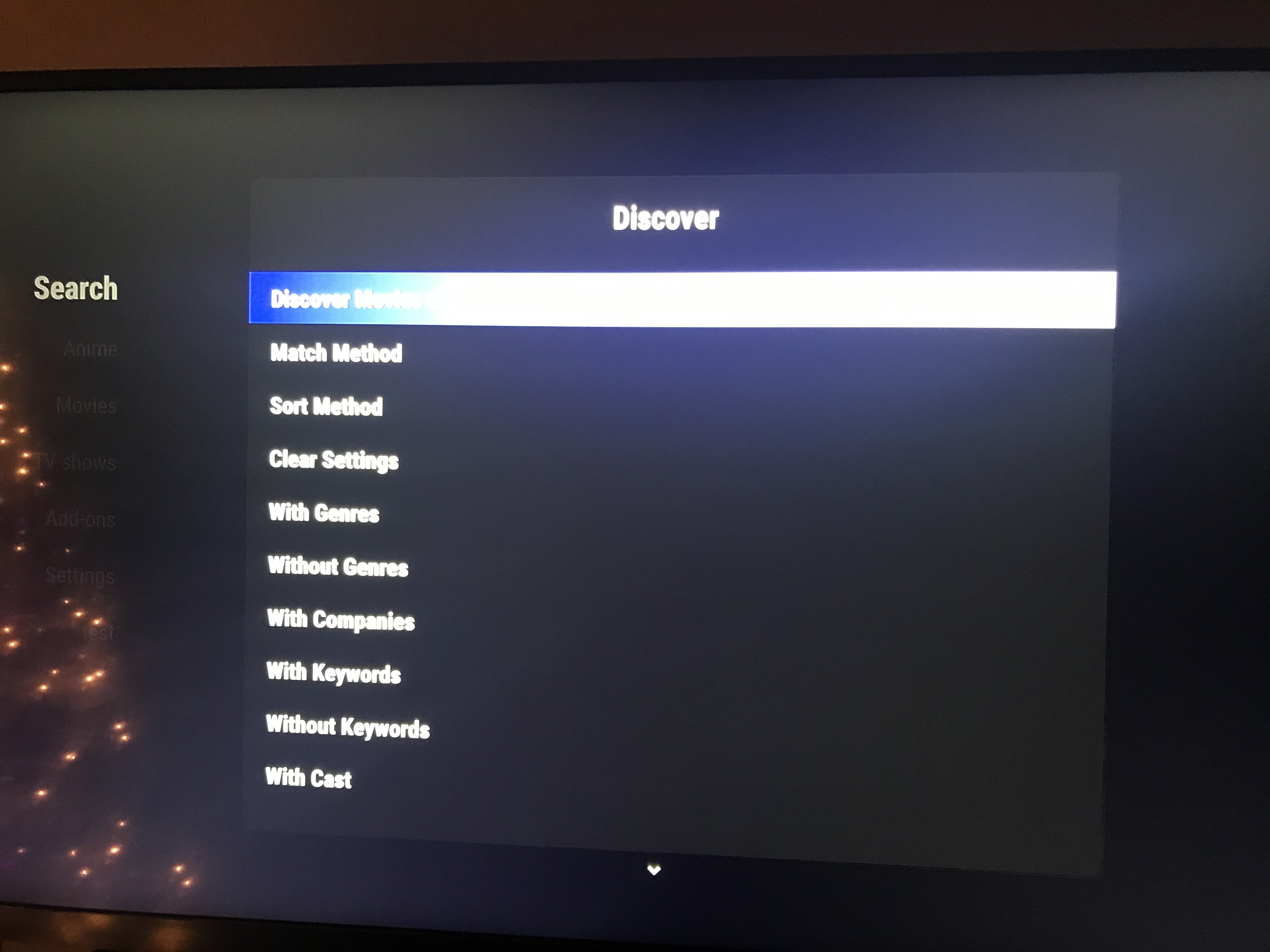
I also wanted to add another potential (maybe not possible though, or maybe a foolish idea) way of implanting this same goal. This would be the way the addon “Library Node Editor” accomplishes something sort of similar. For example:
You could open the addon, click Discover > Discover Movies. From there you are presented with two options:
- Discover Movies w/ Below Settings
- Add Rule
When clicking “Add Rule” you would then be presented with a bunch of different options (Genre, Cast, Year, etc). You could then choose if you want equal to, not equal to, etc, and then have the option to input a value (or in the case of genres, select from the dialog again).
Once adding a rule, hitting the back button brings you back to previous screen with three options:
- “Discover Movies w/ Below Settings
- The rule you set above (Genre equal to Horror)
- Add Rule
Rinse and repeat till desired widget. Clicking the previous rule would allow you to modify or delete the rule.
This may or may not be possible, or a nightmare to code, and may or may not be better than the way you have now though. Idk, thoughts?
Edit: wow my grammar was rough in this post lmao.
Demonseeed
on 7 Jan 2020
Ah yep, you're right. Something gone wrong between updates and it no longer works as a widget. I'm pretty sure I know the issue and will have a fix shortly.
Nice idea on the library node editor type rules. I think it should be possible to implement. I'll have a look.
jurialmunkey
on 7 Jan 2020
Okay that was surprisingly easy to implement.
@Demonseeed - Can you test latest? I've implemented your idea about the node editor approach and I've also fixed the widget issue.
EDIT: I've now added an option to modify or delete when clicking on an existing rule.
jurialmunkey
on 7 Jan 2020
Wow, that was fast!
Yeah I’d love to test it, will do when I get home from work. 👍
Demonseeed
on 7 Jan 2020
Tested it out, works great! No more weird pop ups from the widget either!
Awesome job, @jurialmunkey!
Demonseeed
on 8 Jan 2020
Hello @jurialmunkey
Still loving this feature, but I was wondering if you could add something to it.
The ability to filter for Networks. Something like &with_network would be useful. The reason for this would be the ability to essentially recreate those custom Trakt lists like “Netflix Movies” or “Hulu Movies” without having to rely on another party to have to update - this would update as TheMovieDb updates their database naturally.
I checked through TheMovieDb Helper’s website for Netflix movies, and for some reason if you search for the Company Netflix, it only brings in like 5-6 hits, but if the network is Netflix it brings in everything. Same with Hulu and Disney+ (Well, Hulu is split between EN and JPN).
Thanks again!
Demonseeed
on 10 Jan 2020
@Demonseeed - with_networks is not available as a query string param in the movie's discover endpoint:
https://developers.themoviedb.org/3/discover/movie-discover
It is only available for tvshows. Also, there is no Networks Search endpoint available in the API, so network IDs need to be inputted manually (the network IDs are different to company IDs).
jurialmunkey
on 10 Jan 2020
Ah, darn that TMDb! Thank you for that link, I’ll make sure to double-check that next time I recommend something like this.
As for inputting the Network ID, is that something that I could do or relatively easy to do? I have no clue how.
Edit: removed code I thought it might be. Read it wrong.
Demonseeed
on 10 Jan 2020
You can only use Networks for TvShows Discover.
There is a rule to add networks (With Networks aka &with_networks=ID) in the tvshows section. Just enter the ID into the keyboard that comes up.
jurialmunkey
on 11 Jan 2020
Ahhh, I gotcha, thanks for that clarification!
Demonseeed
on 11 Jan 2020
Related issues
 SerpentDrago
·
4Comments
SerpentDrago
·
4Comments
 Kawsiphek
·
8Comments
Kawsiphek
·
8Comments
 iscriptu
·
4Comments
iscriptu
·
4Comments
 umonkey13
·
3Comments
umonkey13
·
3Comments
 Blurayx
·
7Comments
Blurayx
·
7Comments
Most helpful comment
@Demonseeed - Please test latest version. I've now added search / select dialogs to the discover method, which means that now you don't need to know IDs or have exact actor names etc. Instead, you can type part of a name and you will get a select dialog to choose the correct item. After selecting an item, you will get the option to add more.