Plugin.video.netflix: Help request to NVIDIA SHIELD Users - wrong media flag 1080P / 4K
Tester needed
Several times users have complained about the wrong labels 1080P insead of 4K
I am referring to the resolution flag below right, in the yellow rectangle see image:

I need someone to take this test to see if the problem has been solved
Prerequesite and steps:
1) A NVIDIA Shield with a working 4K
2) Take note of some TV shows/Movies in 4k that have the wrong flag (1080p instead 4K)
3) Install this test: plugin.video.netflix_0.16.3_20200126_test1.zip
4) Important: Go to addon settings, in expert settings perform a Purge cache to memory and HDD
BEFORE do anything else
5) Check if the previous tvshow/movie have the right 4K flag instead of 1080P
 CastagnaIT
All 31 comments
Unfortunatly i dont have a 4k environment yet. Will have in few weeks, but i guess you need testers now.
 timfehr
on 23 Jan 2020
timfehr
on 23 Jan 2020
~i made a mistake, new file soon~ Done
CastagnaIT
on 23 Jan 2020
just tested this release. if the movie (bird box) is started, the play bar shows 4k UltraHD. but in the menu it still sais 1080p.
the series black lightning show in the menus SD540p, which is incorrect, the playbar show 1080p like what it is.
some other series show in the menu 1080p and in the play bar 1080p. where here both is correct.
the movie "the adams family" show in the menu sd540p and dd+ 5.1 - the playbar shows 1080p which is correct, and for me (german default audio) i get this movie only in 2.0 AAC - menu shows it wrong, play bar shows it correct. just tested with manul stream selection, there is DD+ 2.0 available and used by default. with auto stream selection DD+ 2.0 audio streams in german are not available, only AAC
 M2k80
on 25 Jan 2020
M2k80
on 25 Jan 2020
ok, it seems all i said before was a skin related problem. just tested on my other kodi 19 installation (default installation kodi 18 latest nightly and other skin) most menu entries seems to be correct and ex. bird box shows 4k, black lightning shows 1080p, but the adams family still show 540sd.
another question, can you also show if its dolby vision or not?
M2k80
on 25 Jan 2020
the tests must be done with Kodi's official skin, otherwise it's no good
what i'm interested here is just this:
check some wrong 4k flags in the regular version, then verify if are displayed correctly in this modified version so give me some examples
I am not interested in other resolutions
another question, can you also show if its dolby vision or not?
i have all the data info dolby vision/hdr/atmos but kodi not support these flags yet, perhaps in the future final version of Kodi 19 will be supported
CastagnaIT
on 26 Jan 2020
@M2k80 please test with this plugin.video.netflix_0.16.3_20200126_test1.zip
PS. compare with the last release, not the test version in "Request Failed validation during key exchange" issue, because is the same file
CastagnaIT
on 26 Jan 2020
since i use the complete esn with all number i dont have problems anymore. i tested esn on the default version from the repo on 2017 and 2019 pro. i updated to the test version after that
have installed the new plugin, since then i cant see 4k media flag anymore, downgraded to the version before, and there are them missing too. cleaning caches on netflix dont help.
where could this information be saved? idk what else i should delete now to get it back working like yesterday. and i saw there is since i installed your new version codec information for all movies and series now, i think it was missing for the 4k files, but now 4k show only 1080p in the menus, also when i downgrade to the old version.
i did now a complete reinstallaion of kodi and installed the older version again, and 4k information is back. i hope you know how to fix this, because i installed the new version on my main kodi installation and this one would be to much work to reinstall completly xD
something between what happened here, i logged into netflix, and there was a message "could not login, the membership status is None. but its working. logfile sais could not extract...models...etc
M2k80
on 26 Jan 2020
is not needed you test on both nvidia 2017 and 2019, only on 1 device...
make sure you use _"Purge in-memory and on-disk cache"_
and not "Purge in-memory cache" << this is wrong for this scope
the membership status is None.
you have installed the old modified version, download again from this issue post the modified version, i have updated the links
CastagnaIT
on 26 Jan 2020
i tested only complete esn on both shield and old software.
your latest version never show any 4k tag, also after complete new installation of kodi and netflix.
i did this "Purge in-memory and on-disk cache" so many time in the last 2 hours but it changed nothing. and if i downgrade to the first test version not showing 4k tag stay, also after purging and deleting netflix cache folders manually.
M2k80
on 26 Jan 2020
Sorry, but I didn't understand what you wrote...
i summary what i understand on scheme
official release (or daily build) > 4k flag is visible, but sometime are wrong
modified version > 4k flag not visible at all?
CastagnaIT
on 26 Jan 2020
i tested 4k flags only with these both files you uploaded here in this thread
plugin.video.netflix_0.16.3_20200126_test1.zip - this was my first test - 4k flags on default skin are fine - no codec flags for 4k files.
today updated to plugin.video.netflix_0.16.3_20200126_test1.zip - no 4k flags on all movies and series. it is max 1080p - but now codec flags for the series and movies which should have 4k flags.
M2k80
on 26 Jan 2020
on offical version i tested only with complete ESN to get the plugin working again.
M2k80
on 26 Jan 2020
Last test,
in this way the labels will also appear in 4k
unfortunately i'm not sure if it will cause problems with the available audio languages, could you check it out?
~[plugin.video.netflix_0.16.3_20200127_test3.zip]~
CastagnaIT
on 27 Jan 2020
hello
i tested plugin.video.netflix_0.16.3_20200127_test3.zip
on nvidia shiled tv 2017.
4K logo appears.
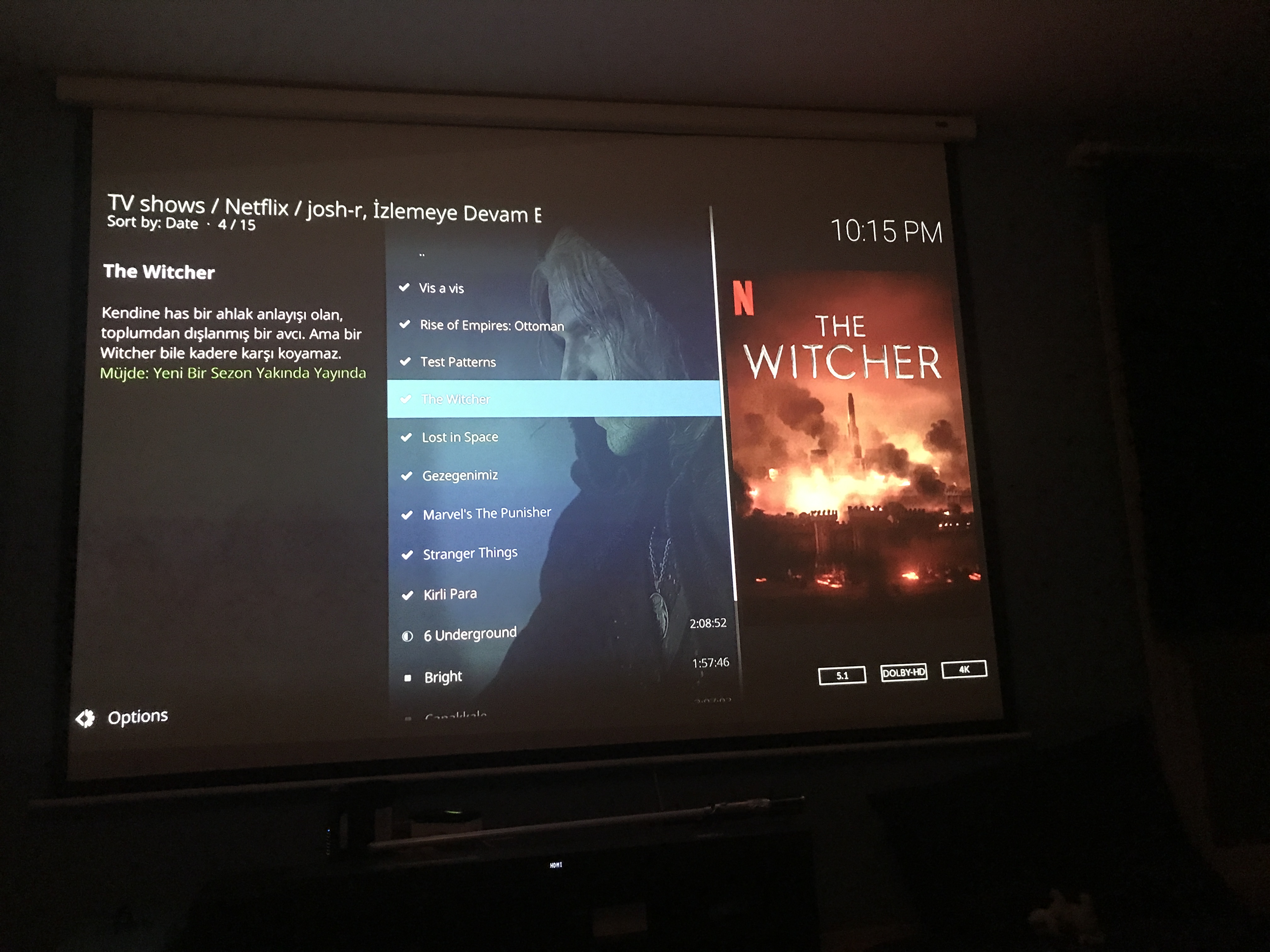
Instead of dolby atmos logo, dolby-hd appears.
but dolby atmos gives sound to the system.
Thank You.
 josh-rr
on 27 Jan 2020
josh-rr
on 27 Jan 2020
for me this seems to work perfect now, i cant see any differences between available audio languages.
its now also working fine in my other skin (estuary mod v2) on my main kodi installation, in the menu all flags are show correctly.
actually it seems the kodi default skin has no h265 icon, thats why there is none on the default skin.
https://imgur.com/a/45VoWcm
looks good!
M2k80
on 27 Jan 2020
before implementing this change you need to fine-tune some things
will be done in the future release
CastagnaIT
on 28 Jan 2020
what do i need to fine-tune?
M2k80
on 28 Jan 2020
being 4k a feature currently available only on android L1 devices
it would be more appropriate to apply this modification only to these devices
then other changes must be made
CastagnaIT
on 28 Jan 2020
done, you can get it on the Daily build
CastagnaIT
on 1 Feb 2020
sry that i am asking, but where can i find the daily builds?
M2k80
on 1 Feb 2020
the link is in the readme to point how install
CastagnaIT
on 3 Feb 2020
Hi,
im not sure i did it right.
I have shield (with 4K via app, so it should be working)
I installed the plugin.video.netflix_0.16.3_20200127_test3.zip
did a: Purge in-memory and on-disk cache
restarted the shield (just to be sure) but i keep getting 1080p where it should be 4k (Locke & key for example)
But when i go back to the app i do have the HDR logo available.
Am i doing something wrong here?
 enrique131
on 12 Feb 2020
enrique131
on 12 Feb 2020
do not use the test file, install the Daily build
HDR mediaflag is not supported by kodi skin
CastagnaIT
on 12 Feb 2020
do not use the test file, install the Daily build
HDR mediaflag is not supported by kodi skin
Will do later in the day, thanks
enrique131
on 12 Feb 2020
Just to inform that after installing:
Purge in-memory and on-disk cache
installing this: plugin.video.netflix_0.16.4_20200206
And accessing again to the addon I got the 4k labels back
thanks for the guidance
enrique131
on 12 Feb 2020
@M2k80 (or others) do you have a chance to run two tests with shield?
I just need to see what's going on only with the original android netflix app (not kodi addon)
SHIELD connected to a 4K tv > See in the original android netflix app what ESN show
SHIELD connected to a 1080P tv/monitor > See in the original android netflix app what ESN show
let me know if the esn change, and in case how first esn part is changed
CastagnaIT
on 19 Feb 2020
@CastagnaIT i can test later at night, i can test both 2017 and 2019 pro if you want
M2k80
on 19 Feb 2020
one device is enough, take the one most convenient for you
CastagnaIT
on 21 Feb 2020
@CastagnaIT I checked with a 4K tv and 1080p tv on Shield 2017 with Netflix app and i see the same ESN
enrique131
on 21 Feb 2020
thanks! I hope this is correct, i have to make a change for the esn generation
CastagnaIT
on 22 Feb 2020
The new release is out, this can be closed
CastagnaIT
on 6 Mar 2020
Related issues
 ezar
·
17Comments
ezar
·
17Comments
 gary9872
·
3Comments
gary9872
·
3Comments
 kjetilk
·
5Comments
kjetilk
·
5Comments
 dagwieers
·
13Comments
dagwieers
·
13Comments
 eyalgm
·
7Comments
eyalgm
·
7Comments