Plugin.video.netflix: Shield v8.0.0 (Pie) killed Kodi Netflix
I'm submitting a ...
- [x] bug report
General information
Pie update on shield killed Kodi Netflix
Addon version used
14.6
Description
Tried re-install no joy. Stalls on loading.
Steps to Reproduce
Upgrade Shield to v8
Context (Environment)
Installation
- [x] I'm using this Netflix Repo
Operating System
- [x] Android
 beardie79
All 246 comments
Hi,
i got the same problem, but it is not a issue from netflix addon.
it is an issue from inputstream i think.
 wintuxx
on 6 Aug 2019
wintuxx
on 6 Aug 2019
Hi,
i got the same problem, but it is not a issue from netflix addon.
it is an issue from inputstream i think.
The Amazon Inputstream addon still works for me after the Shield 8.0 update but like everyone else the Netflix addon no longer works.
 HDGuy
on 6 Aug 2019
HDGuy
on 6 Aug 2019
killed
Stalls on loading
no longer works
That's not a very large description of the problem. Any error message? How does it behave?
How is it broken?
Please can someone install "DRM Info" and tell us what is Windevine CDM Security Level?
Can you provide debug logs with no extra component logged for now?
What's your setup regarding VP9 and HEVC?
Help us so we can help you. Without logs and proper description of the issue, there's no way we can understand the problem!
 Smeulf
on 6 Aug 2019
Smeulf
on 6 Aug 2019
I'm surprised you guys don't have a Shield, as it's probably one of the most used platforms for Kodi.
In any event:
Widevine CDM Security Level- L1
As far as VP9 and HEVC I've tried it every possible combination. Enabled and disabled, same result.
For some reason for 4k content I only get 720x480p, even if I set it to manual I only have the 480p stream available (DD+ w/Atmos still works). For all other content (1080p and lower) it just buffers endlessly. Worked perfectly fine on Oreo before the Pie upgrade.
I will provide a log later.
HDGuy
on 7 Aug 2019
I think this is everyone with Shield and 8.0 starting at post 1399 here: https://forum.kodi.tv/showthread.php?tid=329767&page=94
I also tried every combination of settings, playback just results in endless starting playback symbol (skin dependent). If I set playback steam to manual, the very lowest setting does play(480p). Amazon plugin still works fine.
 xnappo
on 7 Aug 2019
xnappo
on 7 Aug 2019
@xnappo did you try to play a Netflix video on that log? I can't see any call to the play method...
Smeulf
on 7 Aug 2019
I thought the same thing :) I will try again.
xnappo
on 7 Aug 2019
Hi,
i got the same problem, but it is not a issue from netflix addon.
it is an issue from inputstream i think.
@Smeulf please look in my log I posted in the link above.
I have tried everything, but nothing let kodi play the Netflix video stream.
wintuxx
on 7 Aug 2019
@wintuxx is it the log where the busy wheel stays on screen?
In the issue you opened at InputStream, you're referring to hardware acceleration.
Is it OMXPlayer and MMAL ? If so, can you please try disabling OMXPlayer and keep MMAL only?
Also in Kodi settings, player, it seems you have the refresh rate adjustment enabled (I may read the log wrong). Can you try to disable it?
There's no obvious error in the log, so for now pretty hard to tell where the problem is :/
Smeulf
on 7 Aug 2019
Also @wintuxx, did you try disabling HEVC profiles? Enable VP9?
/!\ do not enable both HEVC and VP9 the same time.
Smeulf
on 7 Aug 2019
Also @wintuxx, did you try disabling HEVC profiles? Enable VP9?
/!\ do not enable both HEVC and VP9 the same time.
Shield does not support vp9 ver2 hardware acceleration so that didn't work even before the update
 Dnkhatri
on 7 Aug 2019
Dnkhatri
on 7 Aug 2019
And what about H264?
Smeulf
on 7 Aug 2019
If I understand the question, I do not have H265 enabled, so should be H264.
xnappo
on 7 Aug 2019
@wintuxx is it the log where the busy wheel stays on screen?
In the issue you opened at InputStream, you're referring to hardware acceleration.
Is it OMXPlayer and MMAL ? If so, can you please try disabling OMXPlayer and keep MMAL only?
Also in Kodi settings, player, it seems you have the refresh rate adjustment enabled (I may read the log wrong). Can you try to disable it?
There's no obvious error in the log, so for now pretty hard to tell where the problem is :/
yes
i will provide later new logs ... i will try all above options once with a single log for every option.
wintuxx
on 7 Aug 2019
@Smeulf
Kodi 18.3 fresh install
kodi.log
no settings changed (netflix question 4K: no, because I have only a 1080p TV)
In Kodi 18.3 there are no OMX and MMAL option in the player settings. Only MediaCodece(Surface) and MediaCodec . They both were active.
if i open a netflix video the busy wheel stays on screen.
wintuxx
on 7 Aug 2019
@wintuxx in your fresh install, you have VP9 enabled, I think it can explain the "ERROR: CDVDVideoCodecAndroidMediaCodec::AddData error(-10000)" message.
Smeulf
on 7 Aug 2019
okay. i have a look.
wait i post its log without any other changes than disable vp9
wintuxx
on 7 Aug 2019
@wintuxx no problem :) Thanks for helping and trying for me.
Smeulf
on 7 Aug 2019
it is also in my interest to know why the netflix addon does not work on my shieldtv
here the log
only VP9 deactivated
but no video and the busy wheel stays
wintuxx
on 7 Aug 2019
Ok, I hate that error, 'cause for now I can't understand where it come from.
Can you please try: (don't post logs unless the "ERROR: CDVDVideoCodecAndroidMediaCodec::AddData error(-10000)" has disapear please)
- Enable only MediaCodece(Surface)
- Enable only MediaCodec
- Disable both MediaCodecs (Pretty sure it won't work but worth a try)
If it still don't works, I'd like you to try with Kodi 18.1. Disable Kodi auto update in the PlayStore, and install this APK: http://mirrors.kodi.tv/releases/android/arm64-v8a/kodi-18.1-Leia-arm64-v8a.apk (hopefully it's the right one), same tests with MediaCodecs, all enabled, only one by one, and none.
Can someone lend me a Shield box ? :D kidding but would be so usefull...
Smeulf
on 7 Aug 2019
VP9 in netflix settings disabled
Enable only MediaCodece(Surface) no video, no sound
Enable only MediaCodec no video, no sound
Disable both MediaCodecs no video, but sound
wintuxx
on 7 Aug 2019
a fresh install with 18.1 no changes
wintuxx
on 7 Aug 2019
For the record, the error looks very similar to this one https://github.com/CastagnaIT/plugin.video.netflix/issues/98 where we concluded a firmware issue was the root cause.
Doesn't mean we won't eventually find a way to make it work.
Smeulf
on 7 Aug 2019
I'm tempted to do a factory reset because that seems to have solved people's issues with the Official Netflix app and the Android Pie, but I can live without this add-on in the meantime.
 robofunk
on 7 Aug 2019
robofunk
on 7 Aug 2019
@wintuxx @xnappo can you both please try with a trailer? Use context menu on a popular tv show and select 'trailers'.
I'll explain why later ^^
Smeulf
on 7 Aug 2019
@robofunk I was about to ask someone to do a factory reset. If you try, please keep us posted. But I fear it won't solve the issue... Worth a try, if you don't have much to loose.
Smeulf
on 7 Aug 2019
maybe a logcat can help to see what happens...
i would give one, but actually on my shield when try to play a vid on netflix complete kodi is crashing. this began since i tried the some different setting in the netflix app, before it was like it discribed above here
 M2k80
on 7 Aug 2019
M2k80
on 7 Aug 2019
The Trailers are running.
Tried different series
wintuxx
on 7 Aug 2019
@Smeulf Will try trailers when home - but agree seems the same as #98 - I get the same no video with audio playing seen there with both mediacoders are disabled.
xnappo
on 7 Aug 2019
The Trailers are running.
That makes me think it's a decrypting issue then... Trailers are not DRM protected ^^
So either we don't pass the correct arguments to InputStream, or InputStream is not working correctly here.
Smeulf
on 8 Aug 2019
The Trailers are running.
That makes me think it's a decrypting issue then... Trailers are not DRM protected ^^
So either we don't pass the correct arguments to InputStream, or InputStream is not working correctly here.
That was my first thought too. Because everything works before the Shield-Update.
wintuxx
on 8 Aug 2019
i just reseted my netflix addon, it now says esn is l3 and i can only play sd content lol (NFANDROID2-PRV-T-L3-NVIDIASHIELD=ANDROID=TV)
i checked on settings. this is not my correct esn, i will try now to set it manually
edit: some series work with sd, and another one get this like discribed here
M2k80
on 8 Aug 2019
i just reseted my netflix addon, it now says esn is l3
Can you confirm with the app 'DRM Info' from the playstore?
Section "Windevine CMD"/"Security Level"
Smeulf
on 8 Aug 2019
with drm info i have l1. with local netflix app it works with 4k
the key in the netflix kodi app is complete different to this one which is shown in the android settings.
https://photos.app.goo.gl/WGEKjWEvoMSQGZcH9
M2k80
on 8 Aug 2019
@M2k80 what if you replace the ESN in the settings.xml file with the one from the app?
Smeulf
on 8 Aug 2019
i try no to replace it completely. only change to this NFANDROID2-PRV-SHIELDANDROIDTV-NVIDISHIELD=ANDROID=TV was not working. just entering the complete string. report in 2 minutes
M2k80
on 8 Aug 2019
no sorry, complete esn dont work too.
M2k80
on 8 Aug 2019
no sorry, complete esn dont work too.
Thanks for trying!
Smeulf
on 8 Aug 2019
but i have a logcat now.
and i just showed which resolutions are available, they are only SD but should 4k
M2k80
on 8 Aug 2019
and i just showed which resolutions are available, they are only SD but should 4k
Logs please?
Smeulf
on 8 Aug 2019
https://paste.ubuntu.com/p/bXtbhc7h3f/ this is the logcat - it begin when pressed play on the episode.
i think @peak3d is needed to fix this
M2k80
on 8 Aug 2019
Anything to be learned from Amazon - which is still working?
xnappo
on 8 Aug 2019
i am also wondering, why the plugin now detects wedivine L3 on the shield by default. on old firmware the automatic detection was fine
M2k80
on 8 Aug 2019
As far as we can see (thanks @lrusak) there's some changes in the cryptography under Android Pie. https://developer.android.com/about/versions/pie/android-9.0-changes-all
Might be related, or not... Anyway, I assume both add-ons are not working the exact same way so it's logic they don't behave the same.
Maybe it's just some data we're not handling correctly and we pass wrong to InputStream, I don't know yet.
Question: can you rollback to a previous firmware version? Android Oreo maybe?
If yes, I'd be very interested with something:
On Android O, play a movie, then grab the "manifest.json" file in the addon data folder, and post it.
On Android P, play the exact same movie, on the exact same box, grab the "manifest.json" file and post it too.
I'd like to compare both...
Smeulf
on 8 Aug 2019
Is it okay if it is two different Shields? I have one I did not let update yet..
xnappo
on 8 Aug 2019
Assuming different Shield are okay.
O: https://pastebin.com/pjhN1QFh
P: https://pastebin.com/BcTQF4Js
xnappo
on 8 Aug 2019
I have 2 Shields, a 2015 and 2017, same problem on both with Pie update.
Damnit, this build is having problems with the Logfile uploader. Let me try and figure out what's going on.
HDGuy
on 8 Aug 2019
@xnappo that is ok, not exactly what I wanted but no problem.
The manifest seems to be correct on P too. So an issue on that part seems to be excluded.
Thanks.
Smeulf
on 8 Aug 2019
@HDGuy can you resubmit your logs and fix the link? I can't get them. Thanks.
Smeulf
on 8 Aug 2019
@xnappo
I have one I did not let update yet..
Please do not update it ^^ it might be usefull for some test...
Smeulf
on 8 Aug 2019
Unfortunately rolling back is very difficult, I wouldn't try it if you don't know what you're doing. You could easily brick your Shield.
HDGuy
on 8 Aug 2019
I have instructed the family not to say 'ok' :D
xnappo
on 8 Aug 2019
https://paste.kodi.tv/amofajeguc
Hopefully this works.
HDGuy
on 8 Aug 2019
Hopefully this works.
@HDGuy not in debug but good enough, same error.
I think for now we're good with the logs. We gonna investigate more. Thanks to all.
Smeulf
on 8 Aug 2019
Wouldn't work in debug for some reason.
As long as it's good enough.
HDGuy
on 8 Aug 2019
Funny, I installed it on Kodi on my Fire TV 4k stick last night and everything works just fine. 4k, Atmos, HDR, etc.
Wish Dolby Vision worked tho. :)
HDGuy
on 10 Aug 2019
Funny, I installed it on Kodi on my Fire TV 4k stick last night and everything works just fine
Is it Android Pie too?
Smeulf
on 10 Aug 2019
Funny, I installed it on Kodi on my Fire TV 4k stick last night and everything works just fine
Is it Android Pie too?
The Fire TV runs on a modified version of Android, although what version I can't say.
HDGuy
on 10 Aug 2019
Assuming different Shield are okay.
O: https://pastebin.com/pjhN1QFh
P: https://pastebin.com/BcTQF4Js
@xnappo
in these logs did you use esn set by you or automatic from the plugin?
 CastagnaIT
on 10 Aug 2019
CastagnaIT
on 10 Aug 2019
i have a backup from my netflix settings folder, when it was running on O, there it was set automaticly to NFANDROID2-PRV-SHIELDANDROIDTV-NVIDIASHIELD=ANDROID=TV
and on P its automaticly set to NFANDROID2-PRV-T-L3-NVIDIASHIELD=ANDROID=TV
and this is shown in android system settings on P now - NFANDROID2-PRV-SHIELDANDROIDTV-NVIDISHIELD=ANDROID=TV - can you see the difference to O? one A is missing
M2k80
on 10 Aug 2019
I re-express myself
-and this is shown in android system settings "NFANDROID2-PRV-SHIELDANDROIDTV-NVIDISHIELD=ANDROID=TV"
do you want to say on netflix official app?
CastagnaIT
on 10 Aug 2019
in O it was NFANDROID2-PRV-SHIELDANDROIDTV-NVIDIASHIELD=ANDROID=TV auto set from plugin.
on P it is NFANDROID2-PRV-SHIELDANDROIDTV-NVIDISHIELD=ANDROID=TV - in system settings.
there is now missing an A on NVIDIASHIELD
and its now wrong detected as NFANDROID2-PRV-T-L3-NVIDIASHIELD=ANDROID=TV"
i am not a dev, only trying to help - but it seems to look like there is now a problem to read it out correctly and maybe the same in the other way?
M2k80
on 10 Aug 2019
this is only in the netflix plugin on O NFANDROID2-PRV-T-L3-NVIDIASHIELD=ANDROID=TV
not in system settings
i am talking about your plugin not netflix app
on android you can see netflix esn if you go Settings -> info
M2k80
on 10 Aug 2019
if you set esn manually:
NFANDROID2-PRV-SHIELDANDROIDTV-NVIDIASHIELD=ANDROID=TV
on P, 4k works?
CastagnaIT
on 10 Aug 2019
i tried it yes, but no change
M2k80
on 10 Aug 2019
to understand, on P in the official netflix app esn Settings -> info,
what esn exactly?
CastagnaIT
on 10 Aug 2019
no in android system settings - info
in netflix android app there is no esn shown
M2k80
on 10 Aug 2019
on P in system settings is this NFANDROID2-PRV-SHIELDANDROIDTV-NVIDISHIELD=ANDROID=TV followed by many numbers
M2k80
on 10 Aug 2019
can you put a screenshot?
CastagnaIT
on 10 Aug 2019
is it safe for me to tell everyone my complete ESN? isnt it unique to every device?
M2k80
on 10 Aug 2019
could, i read that at least in TVs can change with a factory reset
if you prefer you can send the screeshot on my personal email indicated on the first page of my github
we need to understand what they have changed
CastagnaIT
on 10 Aug 2019
send it to your email
M2k80
on 10 Aug 2019
@CastagnaIT,
It was automatic, didn't touch it.
xnappo
on 10 Aug 2019
@M2k80 you can see the ESN from android app if you enter the "Get Help" section, after this select Device.
The T3 ESN is definitively wrong detected, but changing the ESN to the one from app does not really help for me.
Beside this I doubt that it was NVIDIASHIELD (with A) on O, because the size of chars is and was limited.
 peak3d
on 10 Aug 2019
peak3d
on 10 Aug 2019
yes you are right, i tested with P all combinations, old esn, new esn, complete long new esn. but nothing helped.
M2k80
on 10 Aug 2019
Issue is, that the returned data from licenseserver does not contain the required license, it contains something else. The .response file on the device (saved from inputstream.adaptive, search with "find /sdcard/ -name *.response" contain on my AFTV a valid license:
{"getWidevineLicenseResponse":{"license":"CAIS7AQKSgogQjI1MDUwRUYyQUQxQzgzMzE0MDEwMDAwMDAwMD ....
On shield with P it contains something completely different (binary stuff). so it seems that we have to figure out what the difference in the request is.
peak3d
on 10 Aug 2019
Sorry, I have been on wrong device when I pulled the aftv .response file. Pulling it from the correct device leads to a .response file which looks similiar to the one currently provided by shield. Nevertheless the widevine DRM on shield / pie does not lead to the expected license workflow.
peak3d
on 10 Aug 2019
we have to figure out what the difference in the request is
I'm not familiar enough with InputStream. So the answer for my question will be obvious for you but... Is it on our side or on yours? I assume we (Netflix addon) pass the url for the license to InputStream then you deal with it?
Smeulf
on 10 Aug 2019
Something is wrong with the shield widewine system after the update many people have problems using the official Netflix and Amazon prime apps as well. Until Nvidia fixes that the only other option is to try resting the shield according to the Nvidia devs on the Nvidia forum
Dnkhatri
on 11 Aug 2019
@Dnkhatri I have resetet my Shield after the Pie Update. The Amazon and Netflix Native Apps are working fine but not the Kodi Addon for Netflix.
 semool
on 11 Aug 2019
semool
on 11 Aug 2019
I have test the addon on my mobile device with android pie. And it worked, movies are playing etc. Everything works like it should.
wintuxx
on 15 Aug 2019
@wintuxx how does your ESN looks on mobile phone (only frist 5 parts are interesting). I want to make sure that your ESN allows HD streams
peak3d
on 15 Aug 2019
NFANDROID1-PRV-T-L3-HUAWEICLT-L29
wintuxx
on 15 Aug 2019
With the ESN above (not correct build from kodi addons) you only get SD streams. Because your device is HD capable (refering to netflix site), pls. change the ESN to the one you can find in the official netflix app (the leading long number sting is not necessary, but you'll have to xchange the T-L3 with that from official app. After changing, try to play a movie, if it fails, restart kodi and try again.
peak3d
on 15 Aug 2019
The ESN I postet is from Kodi Netflix Addon on a Huawei p20 pro
I have enter the ESN from the official app:
NFANDROID1-PRV-P-HUAWEICLT-L29
still 520p ond my Huawei P20 pro
wintuxx
on 15 Aug 2019
Sometimes it is necessary to remove msl_data.json from the device.
- terminate kodi
- using adb:
adb shell
find /sdcard/ -name msl_data.json
rm [found file)
or, alternatively, remove the file using your file browser on android phone.
After starting kodi again (with the -P- esn, the manifest should provide HD conent, would be interesting, if it is playable.
peak3d
on 15 Aug 2019
I have it deleted
gesendet mobil
Markus Pfau notifications@github.com schrieb am Do., 15. Aug. 2019, 16:49:
Sometimes it is necessary to remove msl_data.json from the device.
- terminate kodi
- using adb:
adb shell
find /sdcard/ -name msl_data.json
rm [found file)or, alternatively, remove the file using your file browser on android
phone.—
You are receiving this because you were mentioned.
Reply to this email directly, view it on GitHub
https://github.com/CastagnaIT/plugin.video.netflix/issues/152?email_source=notifications&email_token=AIYSCG27I7T2TCZSDBH6EFTQEVUITA5CNFSM4IJUCTQKYY3PNVWWK3TUL52HS4DFVREXG43VMVBW63LNMVXHJKTDN5WW2ZLOORPWSZGOD4MASTA#issuecomment-521668940,
or mute the thread
https://github.com/notifications/unsubscribe-auth/AIYSCG55DIRNOY3Y5MGHZ43QEVUITANCNFSM4IJUCTQA
.
wintuxx
on 15 Aug 2019
I am now at my way home. I will try it in my wlan.
wintuxx
on 15 Aug 2019
Where can I find the msl_data.json file?
I have ES Explorer but no other way of managing my Shield file system. The search doesn't work, it's total crap. But if you can tell me the exact location I can try deleting it.
I also don't have the hotfix available yet as they are not accepting new devices for the beta programme :-(
I've set the ESN as in my netflix app, but still only seeing 720
Thanks
 GemeenAapje
on 15 Aug 2019
GemeenAapje
on 15 Aug 2019
/android/data/org.xbmc.kodi/files/.kodi/userdata/addon_data/plugin.video.netflix
gesendet mobil
GemeenAapje notifications@github.com schrieb am Do., 15. Aug. 2019, 17:32:
Where can I find the msl_data.json file?
I have ES Explorer but no other way of managing my Shield file system. The
search doesn't work, it's total crap. But if you can tell me the exact
location I can try deleting it.I also don't have the hotfix available yet as they are not accepting new
devices for the beta programme :-(I've set the ESN as in my netflix app, but still only seeing 720
Thanks
—
You are receiving this because you were mentioned.
Reply to this email directly, view it on GitHub
https://github.com/CastagnaIT/plugin.video.netflix/issues/152?email_source=notifications&email_token=AIYSCGYWSMIMLCQ4WLBENNLQEVZJFA5CNFSM4IJUCTQKYY3PNVWWK3TUL52HS4DFVREXG43VMVBW63LNMVXHJKTDN5WW2ZLOORPWSZGOD4MEPUI#issuecomment-521684945,
or mute the thread
https://github.com/notifications/unsubscribe-auth/AIYSCG22VI4C7C2NF7BJIFTQEVZJFANCNFSM4IJUCTQA
.
wintuxx
on 15 Aug 2019
Sometimes it is necessary to remove msl_data.json from the device.
* terminate kodi

* using adb:
  adb shell
  find /sdcard/ -name msl_data.json
  rm [found file)
or, alternatively, remove the file using your file browser on android phone.
After starting kodi again (with the -P- esn, the manifest should provide HD conent, would be interesting, if it is playable.
Video does not start.
wintuxx
on 15 Aug 2019
Select "Stream Selection" manual in inputstream.adaptive settings to force the addon to start with the lowest available stream (SD), it should start. I expect that stream stops playing if you select an > SD stream in kodi settings while stream is playing (click on running movie, select settings icon in bottom video nav, and goto video streams. There you can choose other resolutions)
peak3d
on 15 Aug 2019

wintuxx
on 15 Aug 2019
Pls. disable VP9 codec in netflix addon settings, restart kodi and try again
Beside this it looks that streamselection in inputstream.adaptive settings is still "auto", but it should be manual.
peak3d
on 15 Aug 2019

wintuxx
on 15 Aug 2019

wintuxx
on 15 Aug 2019
Only 720p is not working
wintuxx
on 15 Aug 2019
disable VP9! and enable HEVC
CastagnaIT
on 15 Aug 2019

wintuxx
on 15 Aug 2019
No video are running.


wintuxx
on 15 Aug 2019
I updated my ESN number and deleted the json file and now I see everything up until 4k video.
However, anything 720 or above just gives a black screen. Waiting now for the hotfix for Shield to see if that fixes the issue.
GemeenAapje
on 15 Aug 2019
I updated my ESN number and deleted the json file and now I see everything up until 4k video.
However, anything 720 or above just gives a black screen. Waiting now for the hotfix for Shield to see if that fixes the issue.
It doesn't. :(
HDGuy
on 15 Aug 2019
Unlucky. So where does that leave us now? What else can we try?
GemeenAapje
on 16 Aug 2019
I think we can only wait.
gesendet mobil
GemeenAapje notifications@github.com schrieb am Fr., 16. Aug. 2019, 09:33:
Unlucky. So where does that leave us now? What else can we try?
—
You are receiving this because you were mentioned.
Reply to this email directly, view it on GitHub
https://github.com/CastagnaIT/plugin.video.netflix/issues/152?email_source=notifications&email_token=AIYSCG4XZWEFSYSJQHBB7NTQEZJ6BA5CNFSM4IJUCTQKYY3PNVWWK3TUL52HS4DFVREXG43VMVBW63LNMVXHJKTDN5WW2ZLOORPWSZGOD4N5A7I#issuecomment-521916541,
or mute the thread
https://github.com/notifications/unsubscribe-auth/AIYSCGZIG3MCUXW55HKQLXLQEZJ6BANCNFSM4IJUCTQA
.
wintuxx
on 16 Aug 2019
it seems a issue with android pie. After i disabled vp9 no video would run.
wintuxx
on 17 Aug 2019
So is this add-on now dead for the Shield?
 mattspew
on 22 Aug 2019
mattspew
on 22 Aug 2019
Let's hope not.
Who can help now?
GemeenAapje
on 22 Aug 2019
I'm confident that there will be a solution in the near future.
peak3d
on 22 Aug 2019
@peak3d have you news about this issue?
wintuxx
on 28 Aug 2019
Running Kodi 19.0 on my Nvidia Shield. Dolby Atmos working, but can not get 4K to work. Followed the instructions, and set
"In the addon settings, Expert page: Enable VP9 profiles to OFF Enable HEVC profiles to ON Force support to HDCP 2.2 to ON
In the Inputstream Addon settings, Account page: Override HDCP status to ON"
But still doesnt work. =(
 corb06
on 29 Aug 2019
corb06
on 29 Aug 2019
Any updates?
my nvidia Shield on Android Pie , I'm faced same issue here.
Kodi 18.3 + Netflix addon 0.15.3
 gjm1128
on 1 Sep 2019
gjm1128
on 1 Sep 2019
Any connection to this?
https://www.nvidia.com/en-us/geforce/forums/shield-tv/9/315729/known-4k-playback-issue/
 performation9
on 7 Sep 2019
performation9
on 7 Sep 2019
There was an other hotfix, but it did not work.
gesendet mobil
kentgen notifications@github.com schrieb am Sa., 7. Sep. 2019, 20:34:
Any connection to this?
https://www.nvidia.com/en-us/geforce/forums/shield-tv/9/315729/known-4k-playback-issue/
—
You are receiving this because you were mentioned.
Reply to this email directly, view it on GitHub
https://github.com/CastagnaIT/plugin.video.netflix/issues/152?email_source=notifications&email_token=AIYSCGY6CMA3HMY2QEAAFHDQIPX3ZA5CNFSM4IJUCTQKYY3PNVWWK3TUL52HS4DFVREXG43VMVBW63LNMVXHJKTDN5WW2ZLOORPWSZGOD6E7JZQ#issuecomment-529134822,
or mute the thread
https://github.com/notifications/unsubscribe-auth/AIYSCG5MVWAIOGFOZP72OODQIPX3ZANCNFSM4IJUCTQA
.
wintuxx
on 7 Sep 2019
I'm about ready to uninstall this add-on and just pretend it never existed.
mattspew
on 7 Sep 2019
@mattspew there is no need to uninstall, simply use the official ap until a solution arrives. It seems not to be a technical issue, but the DRM capabilities have been extended and netflix licene server uses them (secure stopps to restrict the number of devices which get HD streams). Only way to solve this, is to investigate how netflix app xchanges all (!!) drm related information.
peak3d
on 7 Sep 2019
@peak3d do you receive the 1080p streams in the manifest sent to InputStream? Or is it already limited to 720p?
Smeulf
on 7 Sep 2019
manifest is Ok (>= 720p), but returned license only allows SD.
There is a secure stop logic in MediaDRM and it is implemented in netflix addon.
I guess the issue we are searching is around it.
peak3d
on 7 Sep 2019
That would mean the issue is on our side, as we're acting as a proxy to retrieve the license... Do you agree with the analysis @peak3d?
Smeulf
on 8 Sep 2019
@Smeulf as long we don't know the issue, its guessing. My gut feeling is that we'll have to pass more DRM related data over the MSL interface before we request the license. Most probably it will be the secure stop metadata.
Secure stops are not yet implemented in inputstream.adaptive, and even if it would, we have no clue when / how to pass it to netflix. This has to be investigated first.
peak3d
on 8 Sep 2019
Doesn't seem like there is a quick solution at hand. This addon is the only way for me to watch netflix in 4k HDR with Atmos, so I really came to like it...
performation9
on 8 Sep 2019
I don't know if it's related or if it gives you information to developers. Even so, here is what I found.
 axelet85
on 9 Sep 2019
axelet85
on 9 Sep 2019
For a large part the problem has been solved by manually entering my complete ESN in the addon. I can now watch the H264 streams again at every resolution. The only problem I have now is that the HEVC streams only play at a low resolution and therefore no 720p, 1080p and 4k HEVC streams are played.
 dacompa
on 19 Sep 2019
dacompa
on 19 Sep 2019
@dacompa do have a nvidia shield tv box with android pie?
wintuxx
on 19 Sep 2019
Yeah I'm on a Shield with Pie.
dacompa
on 19 Sep 2019
For a large part the problem has been solved by manually entering my complete ESN in the addon. I can now watch the H264 streams again at every resolution. The only problem I have now is that the HEVC streams only play at a low resolution and therefore no 720p, 1080p and 4k HEVC streams are played.
Hmm so I should disable hevc playback in input stream addon?
Dnkhatri
on 19 Sep 2019
I'm not sure. Haven't had the time to look into this. Maybe the tech guys
van take a deeper look into this.
Op do 19 sep. 2019 10:53 schreef Dnkhatri notifications@github.com:
For a large part the problem has been solved by manually entering my
complete ESN in the addon. I can now watch the H264 streams again at every
resolution. The only problem I have now is that the HEVC streams only play
at a low resolution and therefore no 720p, 1080p and 4k HEVC streams are
played.Hmm so I should disable hevc playback in input stream addon?
—
You are receiving this because you were mentioned.
Reply to this email directly, view it on GitHub
https://github.com/CastagnaIT/plugin.video.netflix/issues/152?email_source=notifications&email_token=ANHVRMZ53WAUZXOKNEXB2F3QKM4X7A5CNFSM4IJUCTQKYY3PNVWWK3TUL52HS4DFVREXG43VMVBW63LNMVXHJKTDN5WW2ZLOORPWSZGOD7CXPEQ#issuecomment-533034898,
or mute the thread
https://github.com/notifications/unsubscribe-auth/ANHVRM3QYPGNDMTC5QG6IULQKM4X7ANCNFSM4IJUCTQA
.
dacompa
on 19 Sep 2019
@dacompa where did u get the ESN? From the native Netflix App?
wintuxx
on 19 Sep 2019
You can find your Netflix ESN within the Shield settings. I believe it was somewehere in the info tab.
dacompa
on 19 Sep 2019
I tried it with the full ESN: NFANDROID2-PRV-SHIELDANDROIDTV-NVIDISHIELD=ANDROID=TV-XXXX-XXXXXXXXXXXXXXXXXXXXXXXXXXXXXXXXXXXXXXXXXXXXXXXXXXXXXXXXXXXXXXXX but didn't work (msl_data.json and manifest.* deleted, ESN triple checked)
@dacompa: Could you post your full settings.xml?
 Uukrull
on 19 Sep 2019
Uukrull
on 19 Sep 2019
Update: It seems to work with movies but not with TV series.
Uukrull
on 19 Sep 2019
I tried the full ESN also, boy was that was painful to enter in, and it made no difference.
I also triple checked the ESN.
Edit: I also got the same result. Worked for the one movie I tried (1922), but not for the show in currently watching (Weeds).
mattspew
on 19 Sep 2019
It could be that the movies and series you are trying to play are HEVC streams. Those aren't playing for me as well, except at low resolution. At high resolution they are playing, but I can't see the video. Only hearing audio.
Please try Vis-a-Vis ( or Locked Up ). These are H264 streams and should play at 1080P.
dacompa
on 19 Sep 2019
Well, at least I can play movies at 1080p, but it seems that the only real solution for now is a downgrade to Shield Experience 7.2.3
edit: Locked Up didn't work for me (I have Inpustream set to manual and the H264 streams above 480p don't play)
Uukrull
on 19 Sep 2019
I reverted the ESN to the simple one: NFANDROID2-PRV-SHIELDANDROIDTV-NVIDISHIELD=ANDROID=TV and movies play at 1080p, so adding the full ESN doesn't seem to make a difference.
Uukrull
on 19 Sep 2019
Hmm strange it's working for me. Maybe you have some other setting then I have. Can you manually select 1080p in your serie stream or is it not vissible? Of not, try to set the min. bandwith at the inputstream at 8000000.
dacompa
on 19 Sep 2019
I have had the correct ESN entered the whole time (because a few months ago it was required) and still have the same issue. I am very sure this is unrelated.
performation9
on 19 Sep 2019
It wasn't working for me either before I manually entered my ESN, but after that it did. I'm new to this medium. Can I post a video in here to show it?
dacompa
on 19 Sep 2019
I made a video to show a 1080p serie. My Kodi language is in Dutch. Sorry for the lights in the background. Was the best I could do now.
https://www.dropbox.com/s/vtfitp64sdueoi8/VID_20190919_143239.mp4?dl=0
dacompa
on 19 Sep 2019
its maybe not drm encrypted?
M2k80
on 19 Sep 2019
I thought everything on Netflix was drm encrypted? I'll try Weeds later today. I did read in the comments that show didn't play.
dacompa
on 19 Sep 2019
Weeds isn't playing for me at 1080p either. Hmm back to square one I guess.
dacompa
on 19 Sep 2019
Put in my full ESN, turned on manual resolution in inputstream, result is I get all the resolutions up to 4k to pick from when playing a video. However anything over 720*480 results in black screen. Soon as I switch back to 480, video feed comes back on.
 andyktaylor
on 20 Sep 2019
andyktaylor
on 20 Sep 2019
I finally downgraded to 7.2.3 and all is back to normal :)
Uukrull
on 24 Sep 2019
I finally downgraded to 7.2.3 and all is back to normal :)
I have been debating doing the same. I use shield mostly for kodi so the update breaking netflix is a pita. I am hoping with the developer rom out peak3d would be able to find a fix. Otherwise will have to downgrade. Though I think partly it is nvidia shield and android tv 9 problem so I am not sure he will be able to.
Dnkhatri
on 24 Sep 2019
That sucks!
I really don't want to go through the hassle of downgrading.
mattspew
on 24 Sep 2019
I have just installed Android 10 on my smartphone. My phone is equipped with widevine level 1. Even with Android 10 I do not get the streams in the addon played. So if the problem is an Android problem, we will be stuck for the time being.
dacompa
on 24 Sep 2019
i am no dev and i dont know how the problem can be fixed, maybe i found something what devs could help?
if not simply ignore what i just wrote.
could this maybe help ? https://github.com/Netflix/msl/wiki
M2k80
on 28 Sep 2019
someone tried the fourth hotfix?
CastagnaIT
on 28 Sep 2019
Sure, without any luck. 🙁
gesendet mobil
Stefano Gottardo notifications@github.com schrieb am Sa., 28. Sep. 2019,
16:16:
someone tried the fourth hotfix?
—
You are receiving this because you were mentioned.
Reply to this email directly, view it on GitHub
https://github.com/CastagnaIT/plugin.video.netflix/issues/152?email_source=notifications&email_token=AIYSCGY2OYWX3OP7CZE676DQL5RMTA5CNFSM4IJUCTQKYY3PNVWWK3TUL52HS4DFVREXG43VMVBW63LNMVXHJKTDN5WW2ZLOORPWSZGOD722UXI#issuecomment-536193629,
or mute the thread
https://github.com/notifications/unsubscribe-auth/AIYSCG46LRWHQIC4TIE6KH3QL5RMTANCNFSM4IJUCTQA
.
wintuxx
on 28 Sep 2019
yes i tried too, but no changes :(
M2k80
on 28 Sep 2019
After hotfix nummer three Kodi closes whenever I try to play something. The fourth hotfix didn't solve it. So no luck.
dacompa
on 28 Sep 2019
@dacompa if you mean netflix let kodi crash if you want to play something. its maybe esn has again changed, easy way reinstall the plugin.
M2k80
on 28 Sep 2019
@M2k80 Yeah that's what's happening. I'll try the esn later.
dacompa
on 28 Sep 2019
@dacompa only changing the esn will not fix it. reinstall is the easiest way, just cant tell you which files you need to delete
M2k80
on 28 Sep 2019
msl_data.json on the device
peak3d
on 28 Sep 2019
Does the team already have an update on the main issue? It has been a while since last message from the team.
dacompa
on 29 Sep 2019
@peak3d couldnt it be someting like its described here https://forum.xda-developers.com/showpost.php?p=65001865&postcount=12
(i know this is for the default app, but my thought was, the plugin just only detects it now as L3 device, so if we change the esn we can see the streamlist for L1 but we are maybe still disallowed from server side?) Just a thought and maybe i am totaly wrong.
M2k80
on 29 Sep 2019
@dacompa we are working on it
peak3d
on 1 Oct 2019
So it's not dead for Shield? Mate, do I hate the stock Netflix app with all the auto play!
mattspew
on 2 Oct 2019
FYI: nVidia just pushed Shield v.8.0.1 addressing some playback issues in changelog.
 iophobia
on 2 Oct 2019
iophobia
on 2 Oct 2019
V8.0.1 actually made it worse for me; Kodi crashes when attempting to play anything now.
Only line in the log is "Error: AddOnLog: InputStream Adaptive: Key system request: com.widevine.alpha"
That's it. Kodi just crashes out.
mattspew
on 2 Oct 2019
adb logcat will show the stack trace @mattspew
peak3d
on 2 Oct 2019
@peak3d
With the latest shield update 1080p and 4k streams are showing when I select 1080p or higher stream I get a black screen and no audio though the seek bar shows that video is playing. The log is filled with this. The log file is about 10mb so not uploading the whole thing. Let me know what component verbose logs should I select if the whole log is required
2019-10-02 22:29:45.720 T:8326   DEBUG: CDVDVideoCodecAndroidMediaCodec::GetPicture VC_BUFFER
2019-10-02 22:29:45.720 T:8326   DEBUG: CVideoPlayerVideo::CalcDropRequirement - hurry: 0
2019-10-02 22:29:45.721 T:8326   DEBUG: CDVDVideoCodecAndroidMediaCodec::AddData dts:0.00 pts:83416.00 sz:879 indexBuffer:1 current state (3)
2019-10-02 22:29:45.722 T:8326   ERROR: CDVDVideoCodecAndroidMediaCodec::AddData error(-10000)
2019-10-02 22:29:45.733 T:8326   DEBUG: CDVDVideoCodecAndroidMediaCodec::GetPicture VC_BUFFER
2019-10-02 22:29:45.734 T:8326   DEBUG: CVideoPlayerVideo::CalcDropRequirement - hurry: 0
2019-10-02 22:29:45.734 T:8326   DEBUG: CDVDVideoCodecAndroidMediaCodec::AddData dts:0.00 pts:83416.00 sz:879 indexBuffer:1 current state (3)
2019-10-02 22:29:45.736 T:8326   ERROR: CDVDVideoCodecAndroidMediaCodec::AddData error(-10000)
2019-10-02 22:29:45.748 T:8326   DEBUG: CDVDVideoCodecAndroidMediaCodec::GetPicture VC_BUFFER
2019-10-02 22:29:45.748 T:8326   DEBUG: CVideoPlayerVideo::CalcDropRequirement - hurry: 0
2019-10-02 22:29:45.748 T:8326   DEBUG: CDVDVideoCodecAndroidMediaCodec::AddData dts:0.00 pts:83416.00 sz:879 indexBuffer:1 current state (3)
@dnkhatri I guess this had nothing to do with the latest Shield update. I could also see those streams before the update and they player exactly like you described.
dacompa
on 2 Oct 2019
@Dnkhatri I guess this had nothing to do with the latest Shield update. I could also see those streams before the update and they player exactly like you described.
Previously I was not getting the streams to show as a selection either so them showing up is new for me. On the kodi forum someone said they were able to play 1080p files with manual esn I hadn't put it in earlier maybe thats why I was not getting the 1080+ streams.
Dnkhatri
on 2 Oct 2019
@dnkhatri Yeah, I also manually assigned my esn to the addon. Before hotfix 3 I was able to stream some movies and series in 1080p. After that hotfix I couldn't stream the same movies and series in 1080p. But it hasn't anything to do with the Shield software, because I'm having the same problems on my OnePlus 7 Pro.
dacompa
on 2 Oct 2019
this issue will be fixed if the commit on kodi is merged. just tested .
big thanks to @peak3d
M2k80
on 7 Oct 2019
this issue will be fixed if the commit on kodi is merged. just tested .
big thanks to @peak3d
Where did you get the apk you built it yourself?
Dnkhatri
on 7 Oct 2019
this issue will be fixed if the commit on kodi is merged. just tested .
big thanks to @peak3d
Please share with us. We're al waiting to get a working Netflix addon again!
dacompa
on 7 Oct 2019
PR is merged and will be available in tomorrows nightlies. I'll prepare a backport for kodi 18(.5).
B.t.w. I tried the CastagnaIT netflix addon this morning, but was unable to launch it (msl key handshake error). I removed the complete userdata/plugin.video.netflix/ folder but without success.
The outdated addon from asciidisco doesn't show this issue.
peak3d
on 7 Oct 2019
PR is merged and will be available in tomorrows nightlies. I'll prepare a backport for kodi 18(.5).
B.t.w. I tried the CastagnaIT netflix addon this morning, but was unable to launch it (msl key handshake error). I removed the complete userdata/plugin.video.netflix/ folder but without success.
The outdated addon from asciidisco doesn't show this issue.
Okay, great! Do you mean the nightly Netflix addon or nightly adaptive inputstream?
Addon from CastagnaIT is still working fine on my shield BTW.
dacompa
on 7 Oct 2019
Nightly kodi.
peak3d
on 7 Oct 2019
Nightly kodi.
Ah, I forgot that one! Can you tell is what caused the error?
dacompa
on 7 Oct 2019
This is great news!
You mean I'll finally be able to have 4k AND Atmos via my Shield box?
:-D
GemeenAapje
on 7 Oct 2019
@dacompa for android P it seems to be required to set the decoder into decure mode for secure protected DRM streams. In O it seems that secure decoding was activated automatically. Beside this something has changed checking if the codec must be set into secure mode.
This check workes (by luck (??)) in Android O, but must be fixed by the Android NDK team. Until then I switched to JNI for this check.
peak3d
on 7 Oct 2019
@dacompa for android P it seems to be required to set the decoder into decure mode for secure protected DRM streams. In O it seems that secure decoding was activated automatically. Beside this something has changed checking if the codec must be set into secure mode.
This check workes (by luck (??)) in Android O, but must be fixed by the Android NDK team. Until then I switched to JNI for this check.
Great work!
dacompa
on 7 Oct 2019
PR is merged and will be available in tomorrows nightlies. I'll prepare a backport for kodi 18(.5).
B.t.w. I tried the CastagnaIT netflix addon this morning, but was unable to launch it (msl key handshake error). I removed the complete userdata/plugin.video.netflix/ folder but without success.
The outdated addon from asciidisco doesn't show this issue.
@peak3d
this is strange should not happen,
please open an issue and put the log
CastagnaIT
on 7 Oct 2019
Some Series and Movies are running. But some Series like the new season of Carmen Sandiego and Big Mouth are not running.
Tomorrow i will check the new nightly of Kodi.
wintuxx
on 7 Oct 2019
Some Series and Movies are running. But some Series like the new season of Carmen Sandiego and Big Mouth are not running.
Tomorrow i will check the new nightly of Kodi.
The new v18 with this patch failed to build for android so we will probably need to wait longer.
https://github.com/xbmc/xbmc/pull/16733
Dnkhatri
on 8 Oct 2019
The new nightly wasn't working at first. I was finally able to get it to work with the latest nightly by entering the ESN and deleting manifest.json, manifest.mpd and msl_data.json. Not sure what solved my issue with the new nightly, had to be thorough.
robofunk
on 8 Oct 2019
The new nightly wasn't working at first. I was finally able to get it to work with the latest nightly by entering the ESN and deleting manifest.json, manifest.mpd and msl_data.json. Not what solved my issue with the new nightly, had to be thorough.
So it's fully working for you right now? You van play 1080p and 4k again?
I didn't get it to work with the latest nightly. I also put in my ESN manually.
dacompa
on 8 Oct 2019
For me it's also still not getting anything above 720
I've reset/reinstalled everything.
Am I missing some step to fix it?
GemeenAapje
on 8 Oct 2019
@GemeenAapje did you enter your esn manually to settings.xml?
M2k80
on 8 Oct 2019
X265 1080p is working. I don't have a 4K TV, but I'm sure it would work, absolutely no resolutions were working previously, no video just sound. I also deleted the contents of the cdm folder (widevine folder) and restarted a couple times on top of entering the ESN in settings.xml and deleting manifest.json, manifest.mpd and msl_data.json.
robofunk
on 8 Oct 2019
Yes I did.
Can you confirm this is correct?
Thanks
GemeenAapje
on 8 Oct 2019
It's nice to see things moving along. I'll install it on my Shield when it's finished (or almost finished).
A little OT but it would be great if we could get Dolby Vision output working with this add-on on a Fire TV 4k stick. I know Kodi can handle single-layer DV streams on the Fire Stick. I imagine the problem has something to do with the DRM Netflix uses. If that's the case why is there an option for Dolby Vision streams in the add-on?
HDGuy
on 8 Oct 2019
@GemeenAapje idk if there is a difference, i added my complete ESN.
@robofunk which series/movie is not working for you? maybe i can try on my side
M2k80
on 8 Oct 2019
Everything is working for me now. I'm just chiming in to help others if they didn't get Netflix working after the latest nightly.
robofunk
on 8 Oct 2019
ok good to hear :)
M2k80
on 8 Oct 2019
Does it need to be the nightly kodi v19? I thought I read it somewehere in one of the comments, but can't find it anymore.
dacompa
on 8 Oct 2019
yes its just only on kodi 19 nightly...backport is in work
M2k80
on 8 Oct 2019
Ok thanks, it worked! Now watching Peaky Blinders in 4k HEVC!
dacompa
on 8 Oct 2019
Maybe a stupid question (I'm a noob) - but how do I get Kodi 19 to install (and auto update)?
I installed Kodi from the Google Play store.
Currently have 18.4 and I don't want to lose all my settings and configuration
GemeenAapje
on 10 Oct 2019
Last nightly + complete ESN (manual input) is perfectly working for me. FullHD and 2 displays plan. Thanks to the developers for work.
axelet85
on 10 Oct 2019
@GemeenAapje in the official repo you have an addon called "Kodi android installer". With it you will be able to download the necessary apk.
axelet85
on 10 Oct 2019
Thanks, gonna try when I'm home from work. Thanks for your help. Can't wait to get 4k and Atmos running :-D
GemeenAapje
on 10 Oct 2019
Installed nightly 19.x build via APK download.
Changed ESN manually in settings file.
Deleted the json files.
Restarted several times.
Current state:
Full HD + Atmos works fine.
No 4K - picture goes all green and like static. Terrible. I'll add a photo.
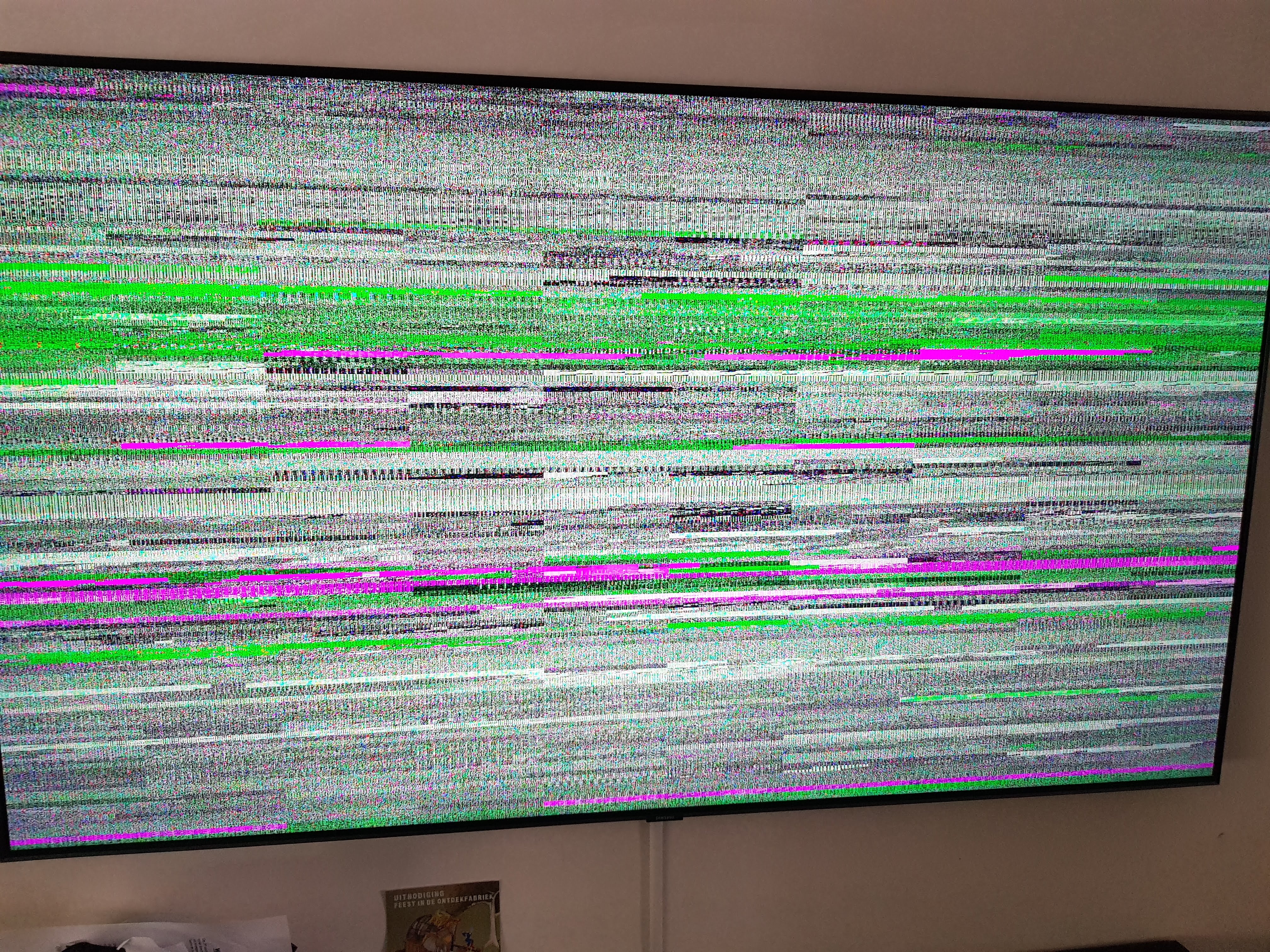
Any tips to get 4k working?
Thanks
GemeenAapje
on 10 Oct 2019
Working for me,but HDR not picking up.
andyktaylor
on 10 Oct 2019
Fixed it! I disabled the Dolby Vision option (Netflix plugin settings) and now I can get 4k HDR + Atmos.
Gonna open a bottle of bubbles :-D
Here's a copy of my settings file (minus my ESN, dunno if that's a secret)....
<settings version="2">
    <setting id="adultpin_enable" default="true">False</setting>
    <setting id="auto_skip_credits" default="true">false</setting>
    <setting id="auto_update" default="true">0</setting>
    <setting id="autologin_enable" default="true">false</setting>
    <setting id="autologin_id" default="true"></setting>
    <setting id="autologin_user" default="true"></setting>
    <setting id="BookmarkManager_enabled">true</setting>
    <setting id="cache_metadata_ttl">30</setting>
    <setting id="cache_ttl">10</setting>
    <setting id="customexportname">true</setting>
    <setting id="customlibraryfolder" default="true">special://profile/addon_data/plugin.video.netflix</setting>
    <setting id="customview" default="true">false</setting>
    <setting id="disable_modal_error_display" default="true">false</setting>
    <setting id="disable_startup_notification" default="true">false</setting>
    <setting id="disable_webvtt_subtitle" default="true">false</setting>
    <setting id="enable_dolby_sound">true</setting>
    <setting id="enable_dolbyvision_profiles" default="true">false</setting>
    <setting id="enable_force_hdcp">true</setting>
    <setting id="enable_hdr_profiles">true</setting>
    <setting id="enable_hevc_profiles">true</setting>
    <setting id="enable_ipc_over_http" default="true">false</setting>
    <setting id="enable_nfo_export" default="true">false</setting>
    <setting id="enable_timing" default="true">false</setting>
    <setting id="enable_vp9_profiles">false</setting>
    <setting id="enablelibraryfolder" default="true">false</setting>
    <setting id="esn">NFANDROID2-PRV-SHIELDANDROIDTV-NVIDISHIELD=ANDROID=TV......LONGSTRING</setting>
    <setting id="export_full_tvshow_nfo" default="true">false</setting>
    <setting id="export_movie_nfo">1</setting>
    <setting id="export_tvshow_nfo">1</setting>
    <setting id="forced_subtitle_workaround">true</setting>
    <setting id="info" default="true"></setting>
    <setting id="initial_mylist_sync" default="true"></setting>
    <setting id="is_settings" default="true"></setting>
    <setting id="is_settings_upnext" default="true"></setting>
    <setting id="logout" default="true"></setting>
    <setting id="menu_sortorder_assistiveaudio" default="true">0</setting>
    <setting id="menu_sortorder_genres" default="true">0</setting>
    <setting id="menu_sortorder_movies" default="true">0</setting>
    <setting id="menu_sortorder_moviesgenres" default="true">0</setting>
    <setting id="menu_sortorder_mylist" default="true">0</setting>
    <setting id="menu_sortorder_netflixoriginals" default="true">0</setting>
    <setting id="menu_sortorder_newrelease" default="true">0</setting>
    <setting id="menu_sortorder_recentlyadded" default="true">0</setting>
    <setting id="menu_sortorder_tvshows" default="true">0</setting>
    <setting id="menu_sortorder_tvshowsgenres" default="true">0</setting>
    <setting id="migrate_library" default="true"></setting>
    <setting id="mylist_library_sync" default="true">false</setting>
    <setting id="mysql_check_auto_update_device" default="true"></setting>
    <setting id="mysql_device_auto_update" default="true"></setting>
    <setting id="mysql_host" default="true">127.0.0.1</setting>
    <setting id="mysql_password" default="true">kodi</setting>
    <setting id="mysql_port">3306</setting>
    <setting id="mysql_test" default="true"></setting>
    <setting id="mysql_username" default="true">kodi</setting>
    <setting id="pause_on_skip" default="true">false</setting>
    <setting id="purge_complete_cache" default="true"></setting>
    <setting id="purge_inmemory_cache" default="true"></setting>
    <setting id="purge_library" default="true"></setting>
    <setting id="ResumeManager_dialog">true</setting>
    <setting id="ResumeManager_enabled">true</setting>
    <setting id="run_init_configuration">false</setting>
    <setting id="SectionSkipper_enabled">true</setting>
    <setting id="show_menu_assistiveaudio">true</setting>
    <setting id="show_menu_chosenforyou">true</setting>
    <setting id="show_menu_continuewatching">true</setting>
    <setting id="show_menu_currenttitles">true</setting>
    <setting id="show_menu_exported">true</setting>
    <setting id="show_menu_genres">true</setting>
    <setting id="show_menu_mostviewed">true</setting>
    <setting id="show_menu_movies">true</setting>
    <setting id="show_menu_moviesgenres">true</setting>
    <setting id="show_menu_mylist">true</setting>
    <setting id="show_menu_netflixoriginals">true</setting>
    <setting id="show_menu_newrelease">true</setting>
    <setting id="show_menu_recentlyadded">true</setting>
    <setting id="show_menu_recommendations">true</setting>
    <setting id="show_menu_search">true</setting>
    <setting id="show_menu_tvshows">true</setting>
    <setting id="show_menu_tvshowsgenres">true</setting>
    <setting id="ssl_verification">true</setting>
    <setting id="stream_max_resolution" default="true">--</setting>
    <setting id="StreamContinuityManager_enabled">true</setting>
    <setting id="update_time" default="true"></setting>
    <setting id="UpNextNotifier_enabled">true</setting>
    <setting id="use_mysql" default="true">false</setting>
    <setting id="viewmodeepisode" default="true">0</setting>
    <setting id="viewmodeepisodeid" default="true">0</setting>
    <setting id="viewmodeexported" default="true">0</setting>
    <setting id="viewmodeexportedid" default="true">0</setting>
    <setting id="viewmodefolder" default="true">0</setting>
    <setting id="viewmodefolderid" default="true">0</setting>
    <setting id="viewmodemainmenu" default="true">0</setting>
    <setting id="viewmodemainmenuid" default="true">0</setting>
    <setting id="viewmodemovie" default="true">0</setting>
    <setting id="viewmodemovieid" default="true">0</setting>
    <setting id="viewmodemylist" default="true">0</setting>
    <setting id="viewmodemylistid" default="true">0</setting>
    <setting id="viewmodeprofiles" default="true">0</setting>
    <setting id="viewmodeprofilesid" default="true">0</setting>
    <setting id="viewmodesearch" default="true">0</setting>
    <setting id="viewmodesearchid" default="true">0</setting>
    <setting id="viewmodeseason" default="true">0</setting>
    <setting id="viewmodeseasonid" default="true">0</setting>
    <setting id="viewmodeshow" default="true">0</setting>
    <setting id="viewmodeshowid" default="true">0</setting>
    <setting id="wait_idle" default="true">false</setting>
</settings>
GemeenAapje
on 10 Oct 2019
Fixed it! I disabled the Dolby Vision option (Netflix plugin settings) and now I can get 4k HDR + Atmos.
Gonna open a bottle of bubbles :-DHere's a copy of my settings file (minus my ESN, dunno if that's a secret)....
<settings version="2"> <setting id="adultpin_enable" default="true">False</setting> <setting id="auto_skip_credits" default="true">false</setting> <setting id="auto_update" default="true">0</setting> <setting id="autologin_enable" default="true">false</setting> <setting id="autologin_id" default="true"></setting> <setting id="autologin_user" default="true"></setting> <setting id="BookmarkManager_enabled">true</setting> <setting id="cache_metadata_ttl">30</setting> <setting id="cache_ttl">10</setting> <setting id="customexportname">true</setting> <setting id="customlibraryfolder" default="true">special://profile/addon_data/plugin.video.netflix</setting> <setting id="customview" default="true">false</setting> <setting id="disable_modal_error_display" default="true">false</setting> <setting id="disable_startup_notification" default="true">false</setting> <setting id="disable_webvtt_subtitle" default="true">false</setting> <setting id="enable_dolby_sound">true</setting> <setting id="enable_dolbyvision_profiles" default="true">false</setting> <setting id="enable_force_hdcp">true</setting> <setting id="enable_hdr_profiles">true</setting> <setting id="enable_hevc_profiles">true</setting> <setting id="enable_ipc_over_http" default="true">false</setting> <setting id="enable_nfo_export" default="true">false</setting> <setting id="enable_timing" default="true">false</setting> <setting id="enable_vp9_profiles">false</setting> <setting id="enablelibraryfolder" default="true">false</setting> <setting id="esn">NFANDROID2-PRV-SHIELDANDROIDTV-NVIDISHIELD=ANDROID=TV......LONGSTRING</setting> <setting id="export_full_tvshow_nfo" default="true">false</setting> <setting id="export_movie_nfo">1</setting> <setting id="export_tvshow_nfo">1</setting> <setting id="forced_subtitle_workaround">true</setting> <setting id="info" default="true"></setting> <setting id="initial_mylist_sync" default="true"></setting> <setting id="is_settings" default="true"></setting> <setting id="is_settings_upnext" default="true"></setting> <setting id="logout" default="true"></setting> <setting id="menu_sortorder_assistiveaudio" default="true">0</setting> <setting id="menu_sortorder_genres" default="true">0</setting> <setting id="menu_sortorder_movies" default="true">0</setting> <setting id="menu_sortorder_moviesgenres" default="true">0</setting> <setting id="menu_sortorder_mylist" default="true">0</setting> <setting id="menu_sortorder_netflixoriginals" default="true">0</setting> <setting id="menu_sortorder_newrelease" default="true">0</setting> <setting id="menu_sortorder_recentlyadded" default="true">0</setting> <setting id="menu_sortorder_tvshows" default="true">0</setting> <setting id="menu_sortorder_tvshowsgenres" default="true">0</setting> <setting id="migrate_library" default="true"></setting> <setting id="mylist_library_sync" default="true">false</setting> <setting id="mysql_check_auto_update_device" default="true"></setting> <setting id="mysql_device_auto_update" default="true"></setting> <setting id="mysql_host" default="true">127.0.0.1</setting> <setting id="mysql_password" default="true">kodi</setting> <setting id="mysql_port">3306</setting> <setting id="mysql_test" default="true"></setting> <setting id="mysql_username" default="true">kodi</setting> <setting id="pause_on_skip" default="true">false</setting> <setting id="purge_complete_cache" default="true"></setting> <setting id="purge_inmemory_cache" default="true"></setting> <setting id="purge_library" default="true"></setting> <setting id="ResumeManager_dialog">true</setting> <setting id="ResumeManager_enabled">true</setting> <setting id="run_init_configuration">false</setting> <setting id="SectionSkipper_enabled">true</setting> <setting id="show_menu_assistiveaudio">true</setting> <setting id="show_menu_chosenforyou">true</setting> <setting id="show_menu_continuewatching">true</setting> <setting id="show_menu_currenttitles">true</setting> <setting id="show_menu_exported">true</setting> <setting id="show_menu_genres">true</setting> <setting id="show_menu_mostviewed">true</setting> <setting id="show_menu_movies">true</setting> <setting id="show_menu_moviesgenres">true</setting> <setting id="show_menu_mylist">true</setting> <setting id="show_menu_netflixoriginals">true</setting> <setting id="show_menu_newrelease">true</setting> <setting id="show_menu_recentlyadded">true</setting> <setting id="show_menu_recommendations">true</setting> <setting id="show_menu_search">true</setting> <setting id="show_menu_tvshows">true</setting> <setting id="show_menu_tvshowsgenres">true</setting> <setting id="ssl_verification">true</setting> <setting id="stream_max_resolution" default="true">--</setting> <setting id="StreamContinuityManager_enabled">true</setting> <setting id="update_time" default="true"></setting> <setting id="UpNextNotifier_enabled">true</setting> <setting id="use_mysql" default="true">false</setting> <setting id="viewmodeepisode" default="true">0</setting> <setting id="viewmodeepisodeid" default="true">0</setting> <setting id="viewmodeexported" default="true">0</setting> <setting id="viewmodeexportedid" default="true">0</setting> <setting id="viewmodefolder" default="true">0</setting> <setting id="viewmodefolderid" default="true">0</setting> <setting id="viewmodemainmenu" default="true">0</setting> <setting id="viewmodemainmenuid" default="true">0</setting> <setting id="viewmodemovie" default="true">0</setting> <setting id="viewmodemovieid" default="true">0</setting> <setting id="viewmodemylist" default="true">0</setting> <setting id="viewmodemylistid" default="true">0</setting> <setting id="viewmodeprofiles" default="true">0</setting> <setting id="viewmodeprofilesid" default="true">0</setting> <setting id="viewmodesearch" default="true">0</setting> <setting id="viewmodesearchid" default="true">0</setting> <setting id="viewmodeseason" default="true">0</setting> <setting id="viewmodeseasonid" default="true">0</setting> <setting id="viewmodeshow" default="true">0</setting> <setting id="viewmodeshowid" default="true">0</setting> <setting id="wait_idle" default="true">false</setting> </settings>
Yeah, the Shield doesn't support Dolby Vision. So that's why the error happend I think.
dacompa
on 10 Oct 2019
btw netflix addon is working with the latest 18 nightly as well
Dnkhatri
on 10 Oct 2019
Nvidia shield, which nightly(18) has working netflix addon? Can I pick latest? My source for nightlies is: https://mirrors.kodi.tv/nightlies/android/arm64-v8a/Leia/
 wieuwzak
on 11 Oct 2019
wieuwzak
on 11 Oct 2019
Nvidia shield, which nightly(18) has working netflix addon? Can I pick latest? My source for nightlies is: https://mirrors.kodi.tv/nightlies/android/arm64-v8a/Leia/
The latest will be fine
Dnkhatri
on 11 Oct 2019
Only 1080p, 5.1 here...no atmos or 4k... I'm using the 18.xx version.
Any ideas , how to make this work?
Thanks
 thiago-ac
on 16 Oct 2019
thiago-ac
on 16 Oct 2019
Make sure you don't have synchronisation to payback in your audio settings.
andyktaylor
on 16 Oct 2019
Its off...
I Will try to reinstall... maybe I have done something wrong.
thiago-ac
on 18 Oct 2019
Its off...
I Will try to reinstall... maybe I have done something wrong.
You have entered the full esn?
Dnkhatri
on 18 Oct 2019
So I'm just getting into this app while these issues are occuring. Following all of these steps I have downloaded the nightly, entered my ESN, setup input stream and add-on as listed and it works....kinda. The app works and video starts with 4k hdr, but then it breaks down. I may be missing other settings that affect this app versus my local vids, but my stream breaks down after a few seconds and freezes. I can restart by skipping ahead, but it happens again. Audio is also broken with DD+ enabled, which works on the Netflix app even though I only have a vanilla DD soundbar. Is this just a case of my Kodi settings dumping the video to software rendering or something else?
 racerbasi
on 19 Oct 2019
racerbasi
on 19 Oct 2019
Yes...
I tried everything here, no success
thiago-ac
on 20 Oct 2019
@thiago-ac you have a shield?if yes whatch my pics and compare to your settings.
those are from german kodi, but i think you can compare it also
netflix settings - https://pasteboard.co/ICTF1mC.png
inputstream settings - https://pasteboard.co/ICTFLlq.png
kodi settings - https://pasteboard.co/ICTGbTM.png
M2k80
on 20 Oct 2019
@M2k80 the links don't work
 Goldsucher
on 20 Oct 2019
Goldsucher
on 20 Oct 2019
for me they work?
just klicked on it here
M2k80
on 20 Oct 2019
okay sorry, with an other browser they work
Goldsucher
on 20 Oct 2019
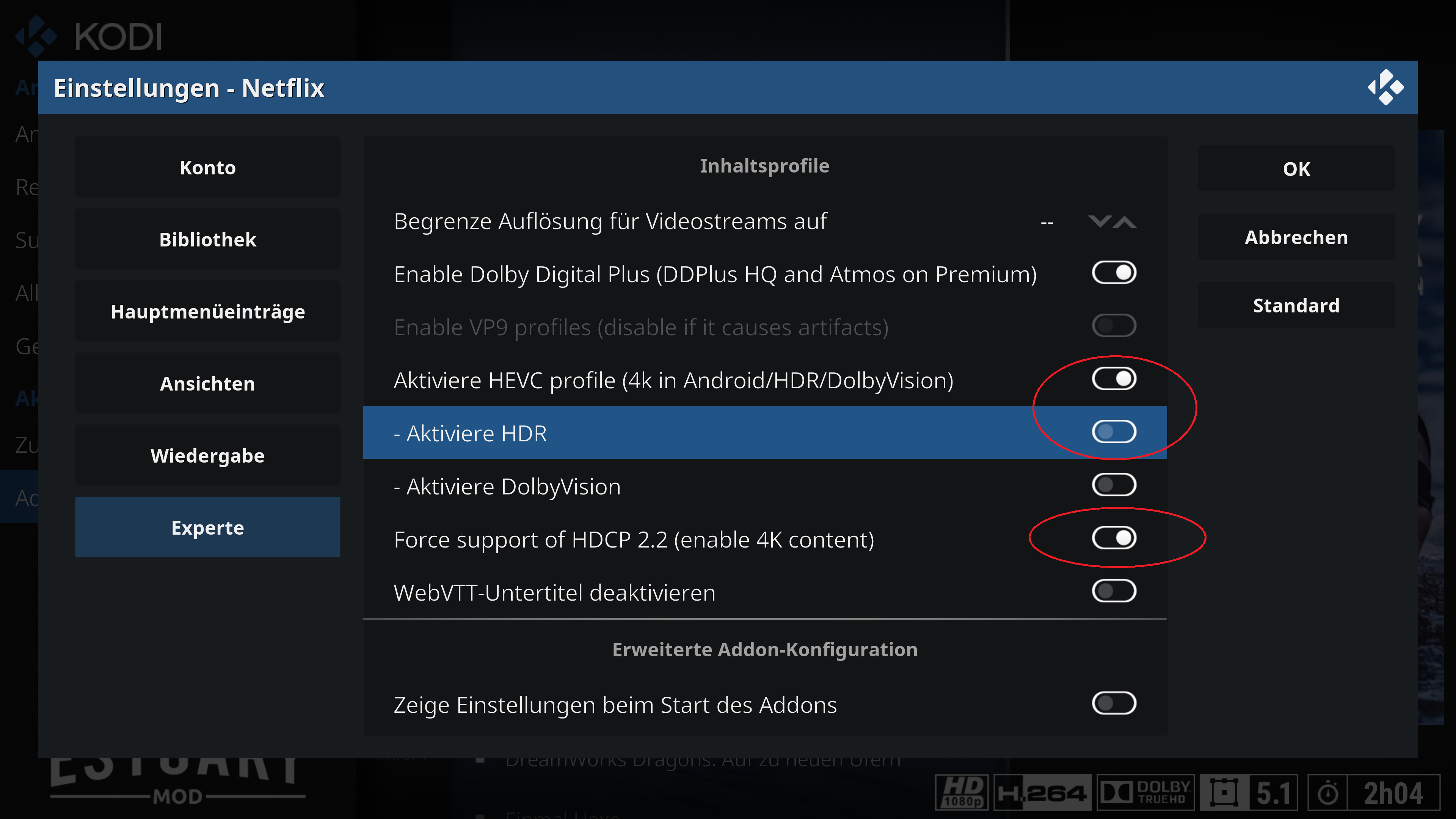
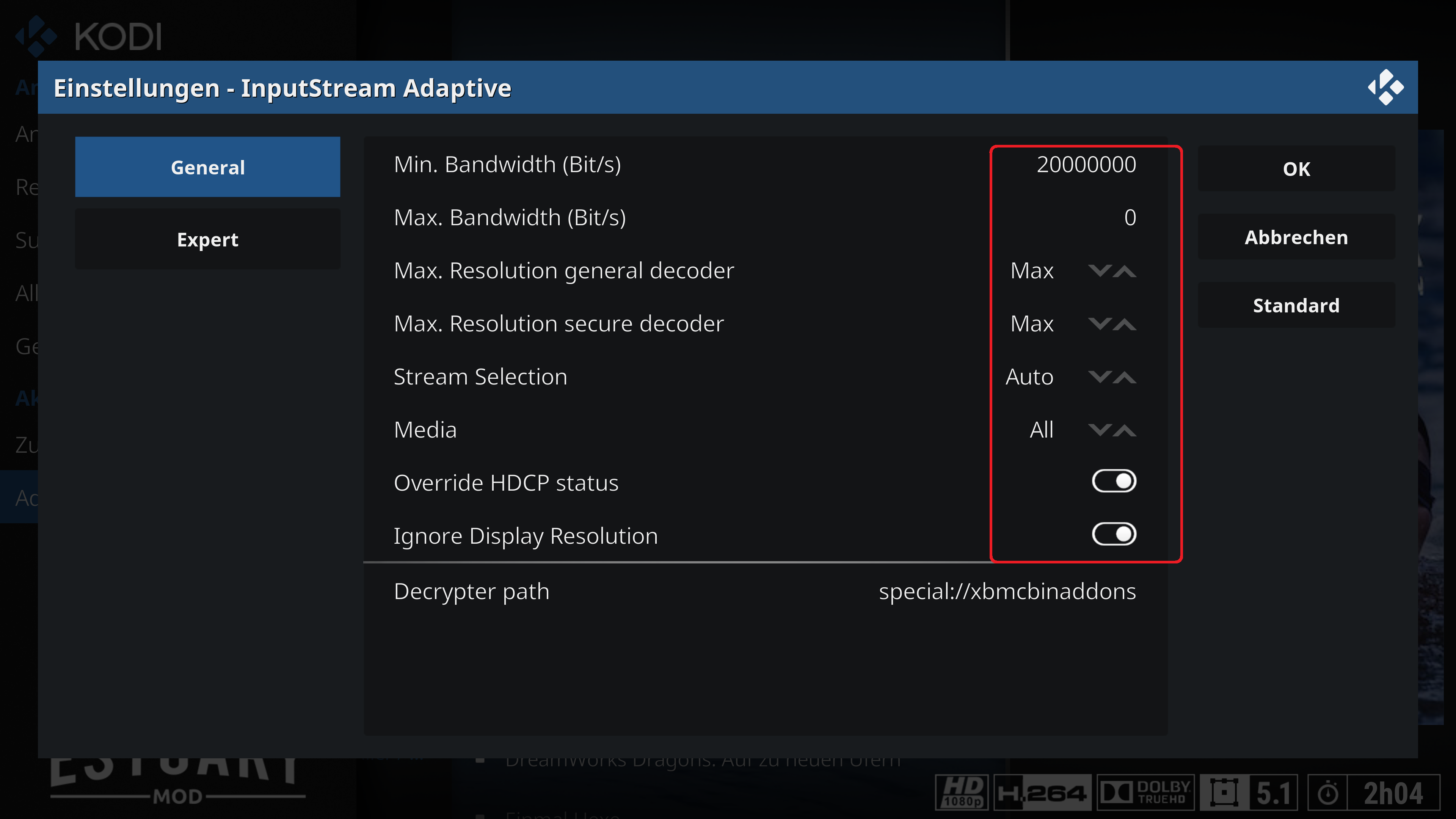
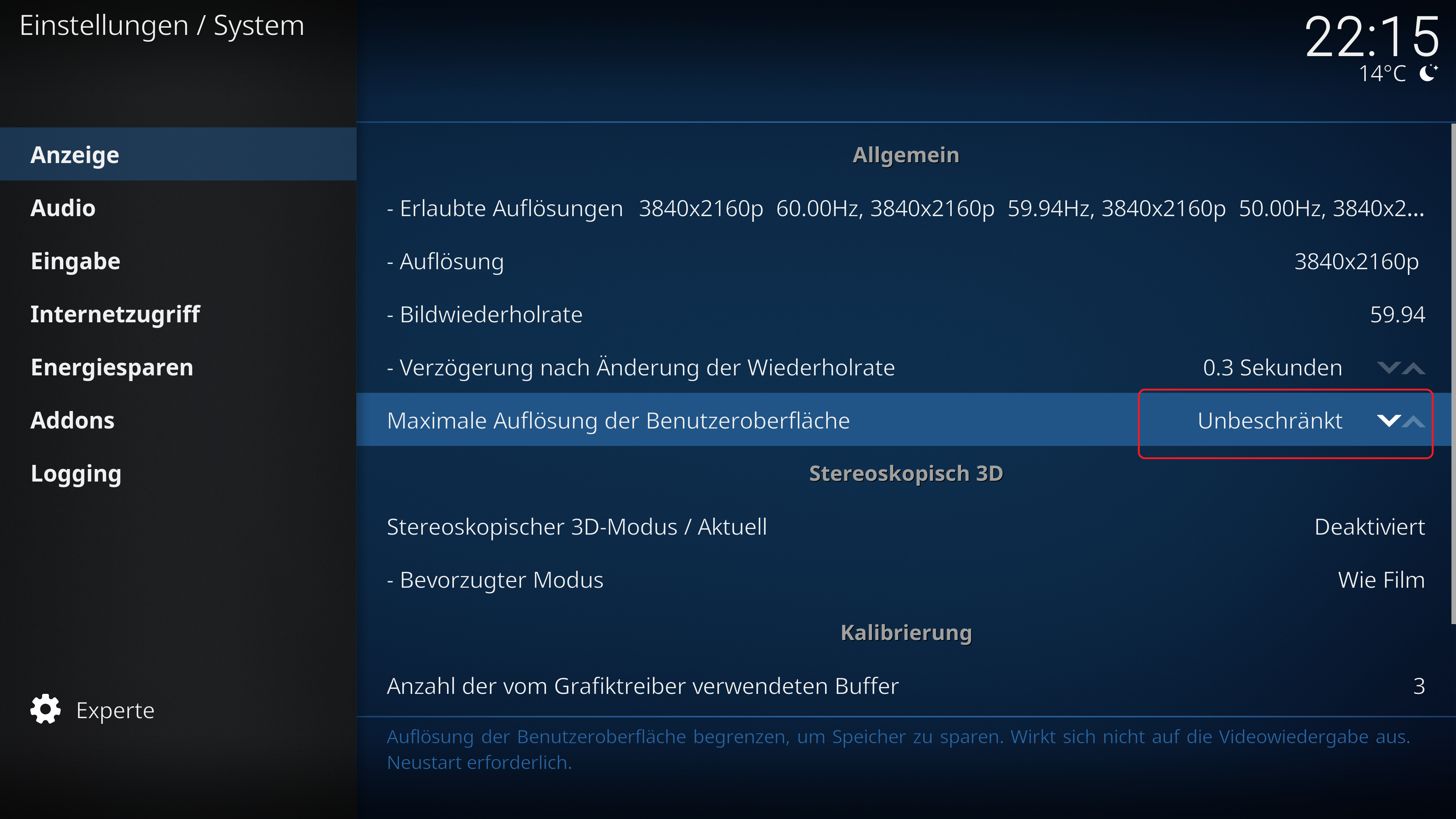
M2k80
on 20 Oct 2019
on the first pic, hdr should be enabled too, if your tv can handle it
M2k80
on 20 Oct 2019
@M2k80 I'm not sure what was really going on, since I had pretty much all of those settings enabled except the ignore display resolution and the min bandwidth. Double checked some Kodi settings too, and now the 4k and Dolby digital is working without problem. Thx for the pics!
racerbasi
on 23 Oct 2019
someone can tell me if by using this esn:
NFANDROID2-PRV-SHIELDANDROIDTV-NVIDISHIELD=ANDROID=TV
or else:
NFANDROID2-PRV-SHIELDANDROIDTV-NVIDISHIELD
4k is working?
CastagnaIT
on 25 Oct 2019
someone can tell me if by using this esn:
NFANDROID2-PRV-SHIELDANDROIDTV-NVIDISHIELD=ANDROID=TV
or else:
NFANDROID2-PRV-SHIELDANDROIDTV-NVIDISHIELD
4k is working?
what file is the esn saved in the addon settings if it is easy to add remove I am wiling to try
Dnkhatri
on 25 Oct 2019
if you change manually by editing the settings file
this cause wrong behaviour of addon, could potentially not make the right requests to the server
CastagnaIT
on 25 Oct 2019
I am using the complete and long esn
Dnkhatri notifications@github.com schrieb am Fr., 25. Okt. 2019, 15:19:
someone can tell me if by using this esn:
NFANDROID2-PRV-SHIELDANDROIDTV-NVIDISHIELD=ANDROID=TV
or else:
NFANDROID2-PRV-SHIELDANDROIDTV-NVIDISHIELD
4k is working?what file is the esn saved in the addon settings if it is easy to add
remove I am wiling to try—
You are receiving this because you were mentioned.
Reply to this email directly, view it on GitHub
https://github.com/CastagnaIT/plugin.video.netflix/issues/152?email_source=notifications&email_token=ABO2NVGGSX3AZ2UGUGLSEBLQQLW4PA5CNFSM4IJUCTQKYY3PNVWWK3TUL52HS4DFVREXG43VMVBW63LNMVXHJKTDN5WW2ZLOORPWSZGOECIKKZY#issuecomment-546350439,
or unsubscribe
https://github.com/notifications/unsubscribe-auth/ABO2NVD4NY3A7I7MO5BVCFLQQLW4PANCNFSM4IJUCTQA
.
M2k80
on 25 Oct 2019
@M2k80 i need to know if is working by using one of the two esn mentionated before
CastagnaIT
on 25 Oct 2019
With file editing the settings I got 4k in both. Do i need to enter manually.
Dnkhatri
on 25 Oct 2019
do not modify the esn manually by editing file!!
break the configuration with the server make wrong request
these tests are not useful
CastagnaIT
on 25 Oct 2019
@CastagnaIT NFANDROID2-PRV-SHIELDANDROIDTV-NVIDISHIELD=ANDROID=TV works with 4K.
For sure you can edit settings.xml manually, but you'll have to erase msl_data.json ( for asciidisco addon ) and restart kodi after editing.
Best is to edit / erase when kodi is not running.
peak3d
on 25 Oct 2019
thanks so now can understand what kind of changes to do to fix the automatic esn generation
CastagnaIT
on 25 Oct 2019
Since everything is resolved, it's time to close the issue
CastagnaIT
on 11 Nov 2019
@CastagnaIT but autodetection of ESN is still not working
Since everything is resolved, it's time to close the issue
M2k80
on 11 Nov 2019
better explained with examples
CastagnaIT
on 11 Nov 2019
shield on pie will be autodetected with NFANDROID2-PRV-T-L3-NVIDIASHIELD=ANDROID=TV" but it should be NFANDROID2-PRV-SHIELDANDROIDTV-NVIDISHIELD=ANDROID=TV
so you still need to enter the esn manually to get it working.
kodi 18.4 latest nightly and Netflix plugin 0.15.8
deleted folder userdata\addon_data\plugin.video.netflix and started kodi and configured the plugin, stream start with SD quality - checked automaticly set esn and its NFANDROID2-PRV-T-L3-NVIDIASHIELD=ANDROID=TV - changed it manualy to NFANDROID2-PRV-SHIELDANDROIDTV-NVIDISHIELD=ANDROID=TV - 4k working again.
so autodetection is still not working
M2k80
on 11 Nov 2019
i need you save the list of configuration taken from the command "getprop" (with e.g. material terminal) in a file and send this to me
CastagnaIT
on 12 Nov 2019
hey, send you an email with my getprop
M2k80
on 12 Nov 2019
ro.nrdp.modelgroup is missing in your device
are you using custom rom or rooted?
CastagnaIT
on 12 Nov 2019
none of both, i am completely stock. and the problem with not working autodetection is for all shield since pie update.
just did a look at my huawei p30 pro and there this entry is missing too
M2k80
on 12 Nov 2019
do you can send me the getprop from huawei p30 pro?
and write also the ESN that working on p30
CastagnaIT
on 12 Nov 2019
the esn of the P30 is generated exactly the P30 has no "tv" in "characteristics"
I could give it a try in this way, but i don't know if it could work with other devices,
you'd have to make a comparison
so, taken the ro.product.model and remove all spaces in order to obtain the missing text
NFANDROID2-PRV-SHIELDANDROIDTV-NVIDISHIELD=ANDROID=TV
before taken from ro.nrdp.modelgroup
CastagnaIT
on 12 Nov 2019
before breaking others, wouldnt it be easier to hardcode the esn for the shield on pie and greater, so if it detect pie and nvidia shield, esn will be fixed set to this NFANDROID2-PRV-SHIELDANDROIDTV-NVIDISHIELD=ANDROID=TV and for all others the detection stays like it is?
M2k80
on 12 Nov 2019
it would be the easiest way but if possible we need to better understand the situation
CastagnaIT
on 12 Nov 2019
The asciidisco master branch has an "enhanced" esn detection, which handles the empty modelgroup.
https://github.com/asciidisco/plugin.video.netflix/blob/master/resources/lib/NetflixSession.py#L2115
peak3d
on 12 Nov 2019
yes basically is same thing that i described above
but it's wrong implemented
breaks esn generation into L3 devices
CastagnaIT
on 12 Nov 2019
L3 devices with modelgroup not set?
Question is if there is a correct implementation without having DRM level on hand at the time esn is generated
peak3d
on 12 Nov 2019
https://github.com/asciidisco/plugin.video.netflix/commit/a459b04402accfc4b0cb18c3b770b828e76e2212#diff-e2a92efc40c3d710b84e78cca2e8dfbfR2110
in line 2110 check if there is the model in my smartphone the model exists
so instead to use T-L3- append the model name
CastagnaIT
on 12 Nov 2019
i can change the code in this way:
esn = ('NFANDROID2-PRV-' if has_product_characteristics_tv else 'NFANDROID1-PRV-')
if has_product_characteristics_tv :
   if nrdp_modelgroup:
         esn += nrdp_modelgroup + '-'
   else:
        esn += model.replace(' ', '').upper() + '-'
else:
    esn += 'T-L3-'
this way should be more suitable
CastagnaIT
on 12 Nov 2019
Makes sense. B.t.w. there is an intent xchange of ESN for devices, where netflix is pre-installed. One fires an intent to the netflix app, and the app fires then an intent with the full esn. Unfortunately there is no kodi python api for this.
peak3d
on 12 Nov 2019
that would be great yes...in this case we can't interface directly
CastagnaIT
on 12 Nov 2019
I'll look at this next, there are some other things in the pipeline first.
peak3d
on 12 Nov 2019
Exactly...
I don't know if you've seen
i have added a comment to
https://forum.kodi.tv/showthread.php?tid=348495
CastagnaIT
on 12 Nov 2019
Related issues
 ezar
·
17Comments
ezar
·
17Comments
 jakermx
·
16Comments
jakermx
·
16Comments
 DanilosTeam
·
17Comments
DanilosTeam
·
17Comments
 bogdanszmyd
·
8Comments
bogdanszmyd
·
8Comments
 eyalgm
·
7Comments
eyalgm
·
7Comments
Most helpful comment
I'm confident that there will be a solution in the near future.