Plugin.video.netflix: KeyError in msl_handler.py when trying to play movie
Hello,
As suggested here https://github.com/peak3d/inputstream.adaptive/issues/282 I'm posting this error after trying the daily build as of today.
edited as @Smeulf comment:
I hope this is the relevant error: TypeError: 'NoneType' object has no attribute ['__getitem__']
Relevant error: msl_handler.py", line 353, in _decrypt_chunks decrypted_payload = decrypted_payload[1]['payload']
Here are the logs: http://ix.io/1MDq
 aleprovencio
All 47 comments
HI.
The error you're pointing is not the revelent one. That first error is because it's a movie, so no episode is following. It's catched as expected.
Here you have an error in msl_handler.py line 353. Unfortunately this is a part of the addon I'm not yet familliar with, so you'll have to wait until @CastagnaIT can have a look, sorry.
Thanks for the report.
 Smeulf
on 24 Jun 2019
Smeulf
on 24 Jun 2019
YEp, the errror you are pointing is Next Up related, the real issue is while decrypting MSL resonses, My opinion is that you update he AddOn, but you kept the old settings files or you did not reboot after update it,
Please delete the COOKIE file, msl_data.json, manifest.json and manifest.mpd, disable Up Next by now, then use default skin and finally reboot and try again.
Please share your findings
 jakermx
on 24 Jun 2019
jakermx
on 24 Jun 2019
@jakermx, thanks for helping me out. I'm using the daily build version as suggested by @CastagnaIT, you mean upgrading to which version?
aleprovencio
on 24 Jun 2019
@aleprovencio
for this problem i need more data,
please install this test version, run addon (with kodi debug info enbled) repeat the operations that cause the problem and post a new log
plugin.video.netflix_TEST.zip
 CastagnaIT
on 24 Jun 2019
CastagnaIT
on 24 Jun 2019
done, here you go: http://ix.io/1MKO
aleprovencio
on 25 Jun 2019
thank you but need other test with this new test2,
Unfortunately i was not able to decode the data
[plugin.video.netflix_TEST2.zip]
sorry mistake
CastagnaIT
on 25 Jun 2019
Done use this and post the log
plugin.video.netflix_TEST3.zip
CastagnaIT
on 25 Jun 2019
thanks, here the logs: http://ix.io/1MMm
aleprovencio
on 25 Jun 2019
"INSUFFICICENT_MATURITY" says the log...
But that's good to know how it behaves in this case.
If you're the owner of the account, you should take a look on your profile settings and unlock the maturity level
Smeulf
on 25 Jun 2019
@CastagnaIT does that also means results for categories and search are not filtered by maturity? It shouldn't even be visible if a maturity restriction has been configured.
Smeulf
on 25 Jun 2019
@Smeulf, if you're talking about the parental control, I had not set a PIN until now. I tried setting one up but leaving all content as allowed, ran the tests again and it doesn't work either.
aleprovencio
on 26 Jun 2019
On NF website, select manage profile, then edit your profile with the pen.
You should see 'allowed tv shows and movies', and you can select the maturity level here. I bet it's not set to 'all maturity levels' but to a lower value.
It's not directly related to the pin code.
Smeulf
on 26 Jun 2019
Ha OK I missed that, but yes, it is already set to all maturity levels. In addiction I'm able to watch this tested movie on the netflix web or the TV app for instance.
aleprovencio
on 26 Jun 2019
Looks like you have 4 profiles defined on NF. Are you sure you're using the right one with Kodi ? If I'm correct you're using 'Xand' profile.
Maybe that's a dumb question, but it worth to ensure ^^
Smeulf
on 26 Jun 2019
Don't worry about asking any questions :)
You're correct, I have 3 profiles and the additional kids profile that netflix creates, and yes, I'm using the 'Xand' one.
aleprovencio
on 26 Jun 2019
Well, for now, I'm running out of idea...
First, let's get some time to @CastagnaIT to fix the error. Then maybe he can tell what's going on.
NF says it's related to parental control, there's a help link in the logs. But if you're telling me you can see this video with the same profile on some other devices, that's very strange to me... Thanks for all the details!
Smeulf
on 26 Jun 2019
hi
yes is parental control it looks like netflix thinks your profile is set to a lower level age
try to switch to 'teen' enter, play a video, exit, swith to normal, retry...
nothing can be done at the addon level
I did some cleaning now if it happens again the error popup should appear correctly
CastagnaIT
on 26 Jun 2019
It's so strange, I still can't manage it to work, Here's what I have done:
- Changed the 'Xand' profile to a lower level age, played a movie (via web), put the maturity level back
- Created a new profile with 'all maturity level' set
Both do play the movie via web but not with the addon.
Crazy! Please help!
aleprovencio
on 26 Jun 2019
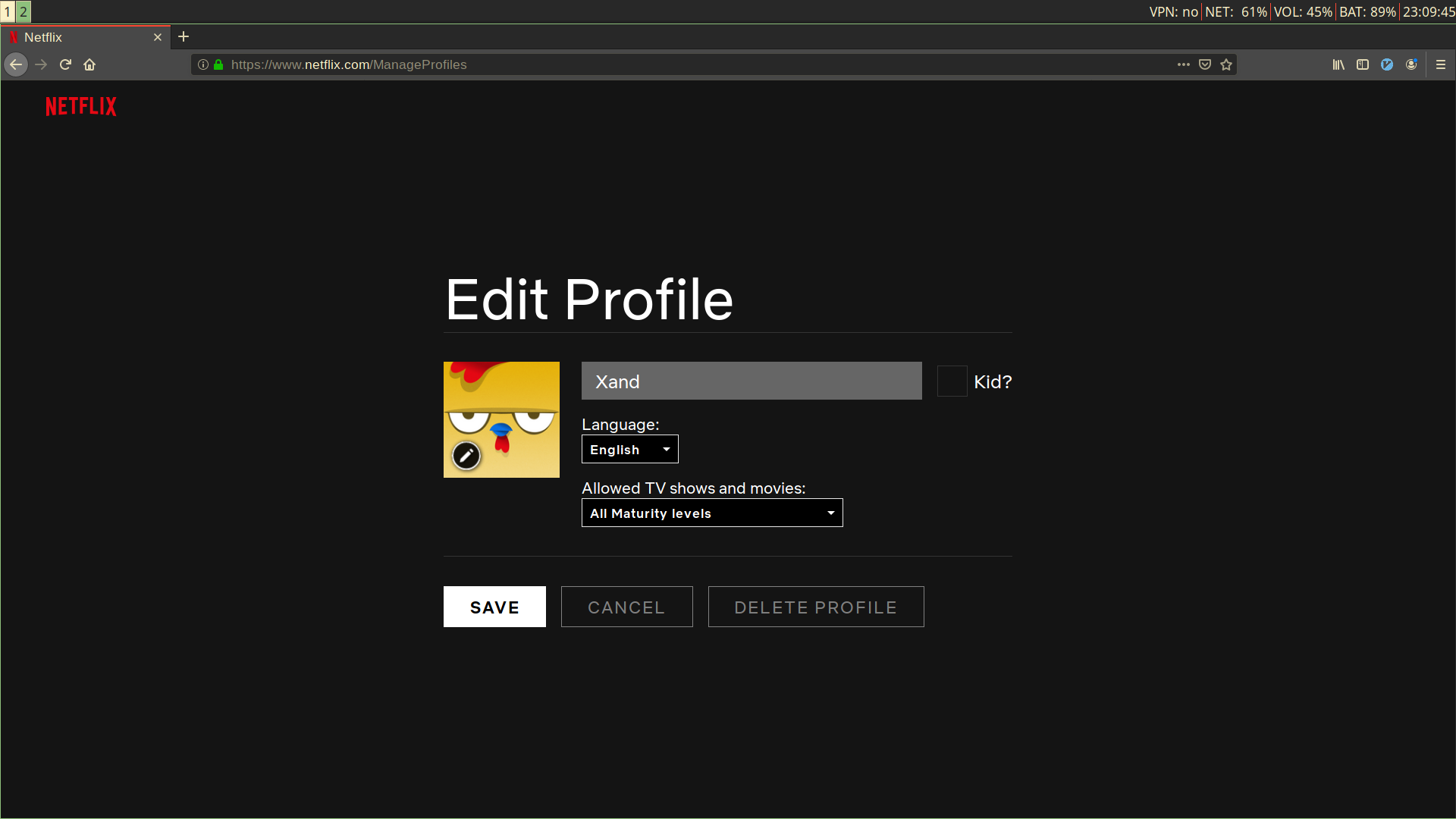
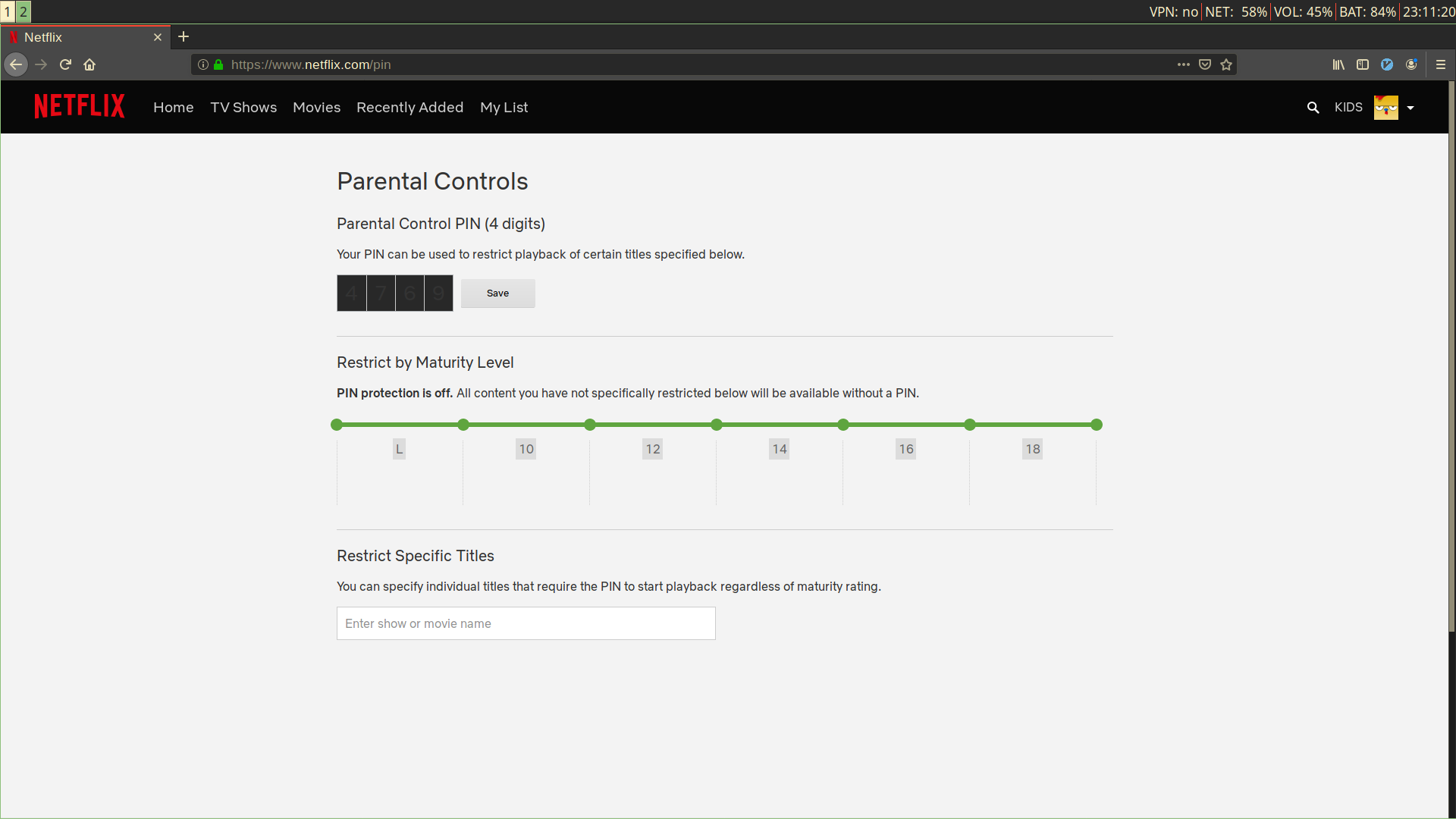
Can you please post screen capture of:
- your profile settings
- your parental management control settings (you can blur the pin code/any personal data if you want, or change the pin before posting)
And can you give us the English name of the movie you're trying to watch?
I wish to try to reproduce the issue with the exact same settings you use.
Parental control can also limit access by name. Please ensure you didn't add it to that list.
Smeulf
on 27 Jun 2019
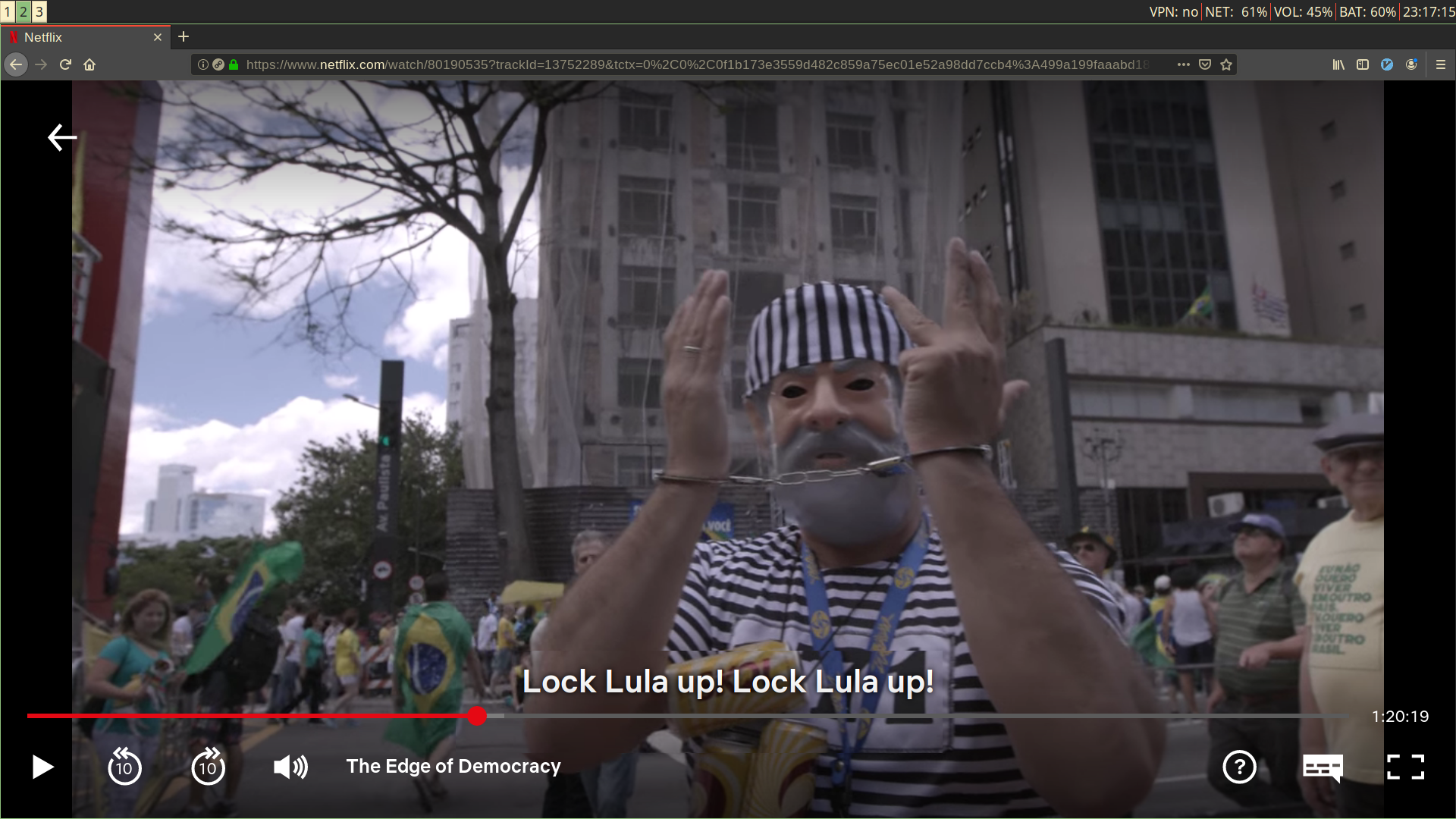
Sure. I've changed the language to English, this is me watching the tested movie on netflix web:
aleprovencio
on 27 Jun 2019
Thanks. It's making me crazy too... Here it's rated 13+ so your settings looks good.
If you don't use the Kodi library export, you still can try to remove the add-on, ensure plugin.video.netflix folder is deleted in userdata/addons_data or delete it manually, and reinstall the addon.
It will flush all settings for the add-on. I'm not sure it helps but it worth a try regarding the situation.
Smeulf
on 27 Jun 2019
Hello @Smeulf, done that but issue stays.
I've noticed that I can watch the available movies when logged in with the kids profile. :/
aleprovencio
on 28 Jun 2019
Well, I'm really sorry but I don't know what to say...
Smeulf
on 28 Jun 2019
Thanks for trying anyway. :)
Taking a close look on the second picture I posted above, I noticed that on the left side of the profile "angry bird" icon there is a "kids" text.
Do you know what is this or if it is somehow related to the problem?
aleprovencio
on 28 Jun 2019
I don't think so. It's just a shortcut for the kids profile, I have the same.
Smeulf
on 28 Jun 2019
Hello @Smeulf, done that but issue stays.
I've noticed that I can watch the available movies when logged in with the kids profile. :/
explains better
how do you play a movie available in normal profile from a kid profile?
CastagnaIT
on 29 Jun 2019
Sorry about not being clear enough @CastagnaIT.
What I meant is the other way around: I can watch all (at least what I have tested) the movies available on kids profile. With some exceptions I've also noticed (i.e. Heal 2017), I am not able to watch all other movies.
Where can I find out the maturity level of a given movie?
aleprovencio
on 30 Jun 2019
I just found out how to find the maturity levels. Heal (2017) is not recommended for minors under 10yrs, and Edge of Democracy for minors under 12yrs.
This takes me to the conclusion that while accessing Netflix via this addon, all of my profiles, whether new or old ignore the maturity and PIN settings, forcing it to an Older kid (10yrs old) profile, so I'm not able to watch movies that have Teens or Mature content.
If this is of any help, here are the logs for Heal (2017), which does work. http://ix.io/1Nwq
Any help remains kindly appreciated.
aleprovencio
on 2 Jul 2019
@aleprovencio did you enabled PIN code in the addon?
If in Netflix you kept pin protection off, than you don't need the PIN to be enabled in the addon. You should then disable it and try again.
Smeulf
on 2 Jul 2019
The PIN was as default disabled, @Smeulf. Anyways, just in case, I just did the test enabling/disabling this setting both on netflix web and addon but unfortunately leading to no good.
Thanks again.
aleprovencio
on 2 Jul 2019
try install this test version, open netflix using the normal profile not Kid, so put a new log
it is strange that you are the only one having this problem, the only thing that comes to mind is a particular configuration of your profiles that cause some type of unexpected behavior then with this test maybe... i can understand something more
plugin.video.netflix_TEST1.zip
CastagnaIT
on 2 Jul 2019
@aleprovencio maybe you can also try to disable "Test participation" on your account...
I don't have the same levels of maturity, mine are only "All", "7+", "13+" and "16+", but maybe it's country related.
Smeulf
on 2 Jul 2019
I don't know what is happening but I can't login with my credentials anymore, even after uninstalling answering yes to erase settings and rebooting. Is there other things I must remove for it to work?
aleprovencio
on 3 Jul 2019
I don't know it's very strange...
if you have also confirmed the removal of the settings there should be nothing else.
if web access still works, the problem is elsewhere
are you sure you were connected to the internet after you re-installed the addon?
CastagnaIT
on 3 Jul 2019
yes, other things from do kodi connect :(
I can't think of anything for now...Will keep trying
aleprovencio
on 6 Jul 2019
This is just crazy, I just reinstalled LibreELEC from scratch, put on language/timezone settings, installed inputstream/rtmp and then installed the zip you provided and...can't login.
I always receive an email from netflix telling me there's a new access to its account.
And netflix web is still fine.
Summing this up with the main issue, I'm starting to think there's problem with my account on netflix and i might delete and create a new one.
aleprovencio
on 11 Jul 2019
Changing your ESN and deleting the COOKI file, should resolv the issue.
Manifest Loadinng Proccess does not involves Profile ID or Token, it is based on ESN, once the ESN is logged and is associatted with a Profile, it will do anything with the ESN, and since the cooke is set to never expire, it will ask anything to Netflix as the original user, in order to fis this, COOkIE needs to be renewed and I would suggest, set ESN as NFCDH-01-PROFILE_TKN_ID.
jakermx
on 17 Jul 2019
The Issue you posted on inputstreamadaptive was locale_id related, then you update your version twice, and the error changed, may I ask... did you uninstall with setttings delete before install the new versions and the TEST versions?...if not, please uninstall, click on yes with asked for delete settings, then reboot your system, install the lasted master build or daily one, and then try again....deleting settings does what I am suggesting.
jakermx
on 17 Jul 2019
Thanks for trying, @jakermx .
I've changed ESN, but since this is a new installation on a fresh LibreELEC there were no cookie files to delete.
I still can't login, its maybe related to #126.
About your last comment, the error actually did not change, it got just more evident after some adjustments on the plugin's test source. I've always followed the procedure you described on doing new installs, OK.
aleprovencio
on 17 Jul 2019
Did you got a lot of login emails from Netflix during this troblueshooting?
If yes, i recommend you to go Settings PAge and click on disconnect all devices... then wait about 2 hours and try login from Netflix.
Could you share your last log please.
jakermx
on 18 Jul 2019
Hello @jakermx,
first of all thanks for your time and sorry about taking so long for me to do new tests, I couldn't get to my kodi box until now.
One more time I reinstalled LibreELEC and this addon from this repository from scratch. I followed your advice to disconnect all my devices, and it worked fine, I can login again now. And yes, I was receiving emails from Netflix.
The parental control issue stays, I only can watch movies for kids. Here are the logs for a movie I can't watch: http://ix.io/1P59
Take note this is latest version from repo, not one of the 'test' versions provided on this thread.
aleprovencio
on 21 Jul 2019
do this:
open netflix page with Google Chrome
login and stop it, in the page of profile selection
Press F12 key to open dev page,
in the html code press CTRL+F to open search box
copy paste:
EFC3PECLRVDDJJNAJVHEDY537A
go down to a big text that starts with netflix.reactContext, then
right click on the big text to show the context menu and select "Copy Element"
then paste such as "link" same you do with log
CastagnaIT
on 21 Jul 2019
here you go @CastagnaIT http://ix.io/1P6v
aleprovencio
on 21 Jul 2019
Hello @jakermx and @CastagnaIT, still no clues about this? You think I should delete my netflix account start a new one?
aleprovencio
on 1 Aug 2019
sorry unfortunately i didn't have enough time to check maybe over the weekend
CastagnaIT
on 1 Aug 2019
your main profile "Lucas" is marked "kids" this can be the cause
CastagnaIT
on 2 Aug 2019
OMG it works !!!
I never knew there was a main profile account, but if it ever existed I would presume it was my profile since it was the first created. Somehow netflix has put my nephew's (child) account as the main one, and this way I could not access movies with higher maturity levels from any profile from this addon (but could from netflix web and other). Maybe this deserve a Readme/FAQ entry?
Anyways, this was such a long standing issue for me and you just nailed it @CastagnaIT, thank you so much! I must not forget @jakermx and @Smeulf who also borrowed a lot of their time trying to help me with this, thank you!
aleprovencio
on 9 Aug 2019
Related issues
 DanilosTeam
·
17Comments
Smeulf
·
7Comments
jakermx
·
16Comments
DanilosTeam
·
17Comments
Smeulf
·
7Comments
jakermx
·
16Comments
 gary9872
·
3Comments
gary9872
·
3Comments
 ezar
·
17Comments
ezar
·
17Comments