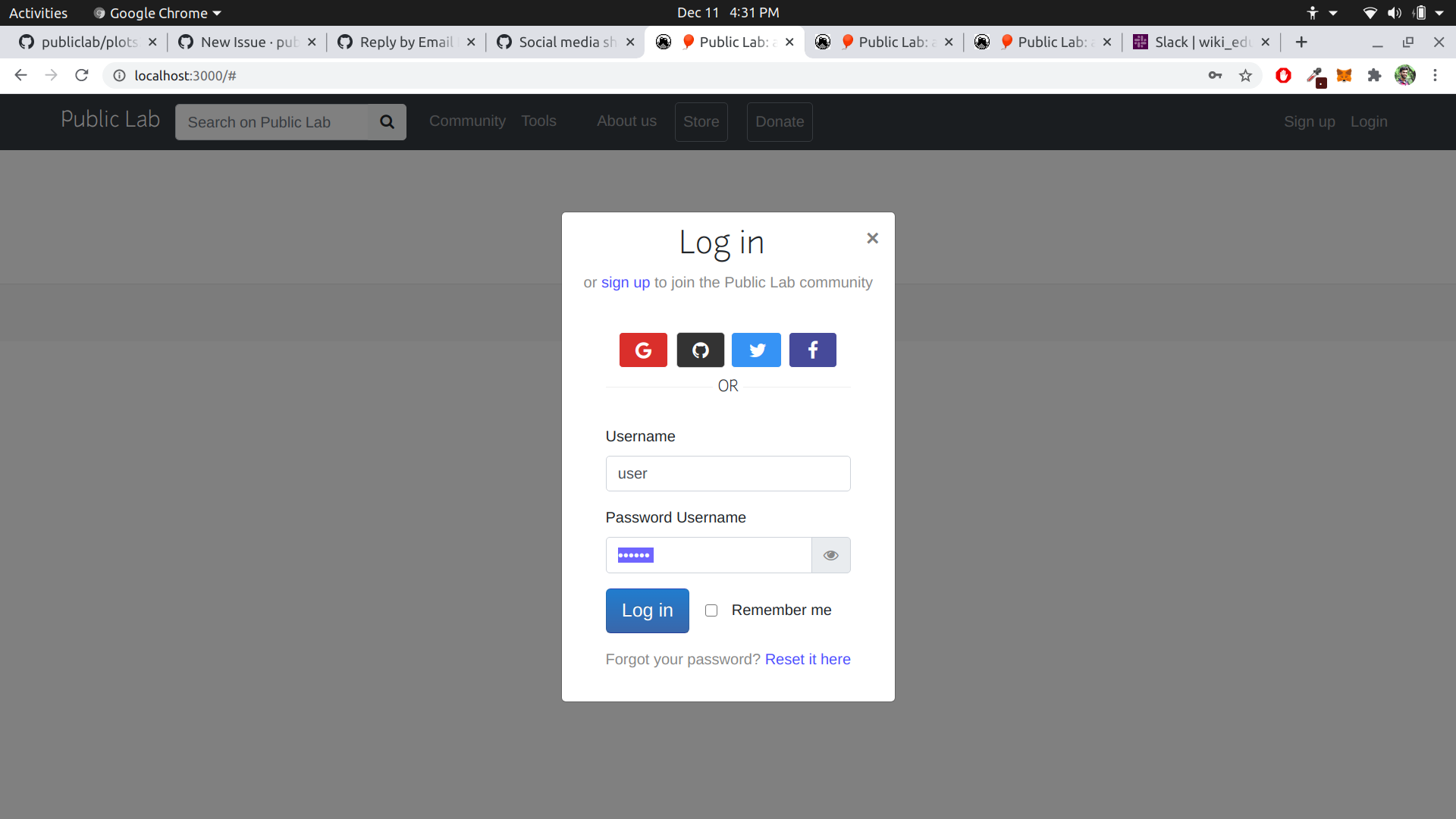
Plots2: Wrong Password Label in Login Page
Hi, this is a first-timers-only issue. This means we've worked to make it more legible to folks who either haven't contributed to our codebase before, or even folks who haven't contributed to open source before.
If that's you, we're interested in helping you take the first step and can answer questions and help you out as you do. Note that we're especially interested in contributions from people from groups underrepresented in free and open source software!
We know that the process of creating a pull request is the biggest barrier for new contributors. This issue is for you 💝
If you have contributed before, consider leaving this one for someone new, and looking through our general help wanted issues. Thanks!
🤔 What you will need to know.
Nothing. This issue is meant to welcome you to Open Source :) We are happy to walk you through the process.
📋 Step by Step
[ ] 🙋 Claim this issue: Comment below. If someone else has claimed it, ask if they've opened a pull request already and if they're stuck -- maybe you can help them solve a problem or move it along!
[ ] 📝 Update the file $FILENAME in the
$REPOrepository (press the little pen Icon) and edit the line and remove this line
See this page for some help in taking your first steps!
Below is a "diff" showing in red (and a -) which lines to remove, and in green (and a +) which lines to add:
$DIFF
[ ] 💾 Commit your changes
[ ] 🔀 Start a Pull Request. There are two ways how you can start a pull request:
If you are familiar with the terminal or would like to learn it, here is a great tutorial on how to send a pull request using the terminal.
You can also edit files directly in your browser and open a pull request from there.
- [ ] 🏁 Done Ask in comments for a review :)
Please keep us updated
💬⏰ - We encourage contributors to be respectful to the community and provide an update within a week of claiming a first-timers-only issue. We're happy to keep it assigned to you as long as you need if you update us with a request for more time or help, but if we don't see any activity a week after you claim it we may reassign it to give someone else a chance. Thank you in advance!
If this happens to you, don't sweat it! Grab another open issue.
Is someone else already working on this?
🔗- We encourage contributors to link to the original issue in their pull request so all users can easily see if someone's already started on it.
👥- If someone seems stuck, offer them some help! Otherwise, take a look at some other issues you can help with. Thanks!
🤔❓ Questions?
Leave a comment below!
 gauravahlawat81
All 17 comments
Thanks for opening your first issue! This space is protected by our Code of Conduct - and we're here to help.
Please follow the issue template to help us help you 👍🎉😄
If you have screenshots or a gif to share demonstrating the issue, that's really helpful! 📸
Do join our Gitter channel for some brainstorming discussions.
![welcome[bot] picture](https://avatars.githubusercontent.com/in/4141?v=4&s=40) welcome[bot]
on 11 Dec 2020
welcome[bot]
on 11 Dec 2020
@jywarren Can you review this issue ?
gauravahlawat81
on 11 Dec 2020
Hi @gauravahlawat81 thanks for opening this up...you might be right, I also think it should only be Password
 RuthNjeri
on 11 Dec 2020
RuthNjeri
on 11 Dec 2020
Thanks you both, yeah its a bug... @gauravahlawat81 would you like to work on this? I am also okay with converting it to a first-timer issue
Looks like this floating label is what causing the prob, removing it may do the trick
Thanks again
 cesswairimu
on 31 Dec 2020
cesswairimu
on 31 Dec 2020
Yeah @cesswairimu , please convert it into FTO. Thanks !
gauravahlawat81
on 31 Dec 2020
Done..thanks
cesswairimu
on 31 Dec 2020
@YuvalOS could you maybe like to work on this?
cesswairimu
on 10 Jan 2021
yes please :)
 YuvalOS
on 10 Jan 2021
YuvalOS
on 10 Jan 2021
Go ahead, thanks
cesswairimu
on 10 Jan 2021
Well I am bit stuck.. how do I start? I tried to open either $FILENAME or plots2/app/views/user_sessions/_form.html.erb mentioned above.
$FILENAME just take me to the main repository with no issues opened, and I also can't edit the _form.html.erb - in the instructions it says: ( _press the little pen Icon_ ) but when I try to press it highlighted: "you must be on a brunch to make or propose changes to this file".
So what do I need to do?
YuvalOS
on 10 Jan 2021
Hey @YuvalOS did you fork the plots2 repo and setup your development environment ?
gauravahlawat81
on 10 Jan 2021
Or maybe you could try editing from your fork https://www.github.com/YuvalOS/plots2/tree/main/app%2Fviews%2Fuser_sessions%2F_form.html.erb
cesswairimu
on 10 Jan 2021
Actually I haven't forked yet.
@cesswairimu how come I see this fork? I didn't do it myself
YuvalOS
on 10 Jan 2021
And regarding fixing the issue -
Do I just need to removed the marked line (line 35)?
or replace it with another one?
YuvalOS
on 10 Jan 2021
Yes, just removing it. Thanks
cesswairimu
on 10 Jan 2021
Hi @cesswairimu, I've just committed. Did I do it right?
Next time I want to edit code via development environment. Do you have guys a link to a guide which explain how to setup one?
YuvalOS
on 10 Jan 2021
Hey @YuvalOS sorry for the late reply..... seems like you submitted the Pull request on your repo...you need to create one on publiclab/plots2...you can use this link and just click on Create pull request button. Thanks
cesswairimu
on 17 Jan 2021
Related issues
 milaaraujo
·
3Comments
milaaraujo
·
3Comments
 ebarry
·
3Comments
RuthNjeri
·
3Comments
ebarry
·
3Comments
RuthNjeri
·
3Comments
 keshavsethi
·
3Comments
keshavsethi
·
3Comments
keshavsethi
·
3Comments
keshavsethi
·
3Comments