Plots2: Selection of the center grid in "Choose your Location" map picker is not working
Please describe the problem (or idea)
What happened just before the problem occurred?
Excitedly, i clicked the new "Add Location" button to add latitude and longitude to the London page:
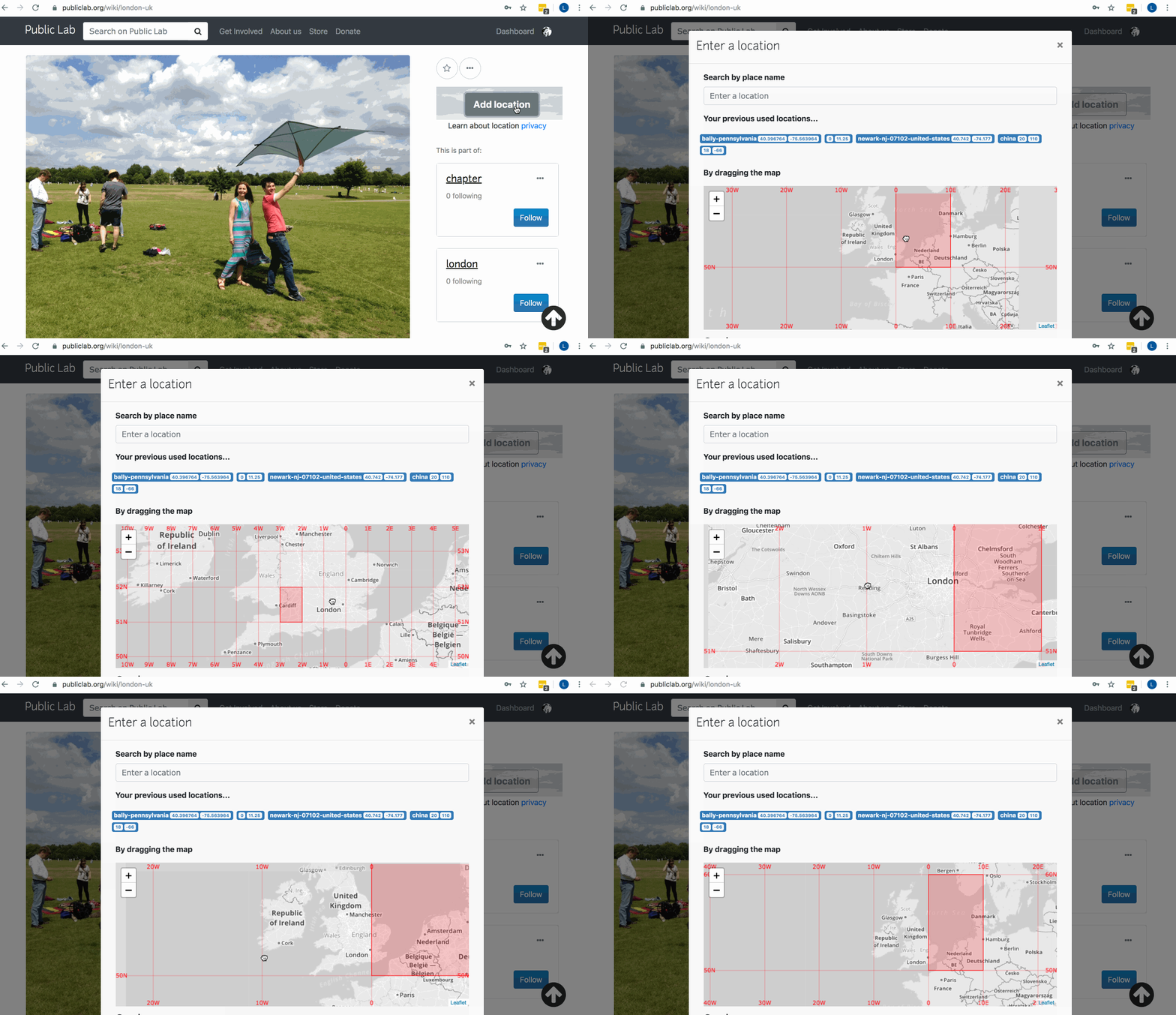
In the map picker, i was unable to choose the square for London. I feel that there is something broken about the selection of the centered grid square that one wishes to choose for location...see my trouble picking London in the gif below:
What did you expect to see that you didn't?
I expected to be able to slide the map area for London into the center of the picker, and have it highlight in red.
Please show us where to look
https://publiclab.org/wiki/london-uk --> "Add Location" button in upper right sidebar
Thank you!
 ebarry
All 9 comments
let me try it out
 susanreenesaa
on 11 Nov 2019
susanreenesaa
on 11 Nov 2019
How's it going @susanreenesaa ?
ebarry
on 14 Nov 2019
@ebarry. Still stuck but I am working on it.
I started with the search bar, the one (search bar) that I got from the leaflet notes that I have read so far, is fixed or located in the map div so I am trying to see how I can get it out of the map div so that it appears like the one in the page. (search bar above the map).
so if you have any content that is helpful, I will be grateful. thanks
susanreenesaa
on 18 Nov 2019
@ebarry. I tried it out today and the ADD LOCATION button is no longer a link (it does not render the map anymore. when clicked nothing happens). so do I have to do the whole thing from scratch?
susanreenesaa
on 18 Nov 2019
HI @susanreenesaa , i see what you are saying -- the Location button has some odd behavior. I had to click it twice to get the interface to open. That may be an additional bug that you could report in a new issue?
Once I got the interface open by clicking a second time, i panned around the grid lines and have some new observations to report: the problem with the red highlight "skipping" over certain areas seems to be happening to certain longitudes, namely between 1W and 0 degrees longitude. Is there perhaps a math error involved?
CC @sagarpreet-chadha to advise as well. Thank you!
ebarry
on 19 Nov 2019
Just wondering (we really should document in a separate issue) if the
2-clicks-to-open issue could just be the page finishing loading? If you
wait a good while then click, does it open the first time?
Your observation about London being very near 0 longitude is really key
here! That is almost certainly related as shown in your gif, and we should
maybe move this to https://github.com/publiclab/leaflet-blurred-location for
follow-up. The algorithm to draw the boxes is there and probably is not set
up for the special case of a box where one longitude is ~359 and the other
~0. Thanks!
 jywarren
on 19 Nov 2019
jywarren
on 19 Nov 2019
the add location button does not open the map at all so currently, I am not working on the issue because I have no access to the map(popup map). unless if I have to recreate the code?
susanreenesaa
on 21 Nov 2019
Hey the map should open --- yes @jywarren is right it takes time for JS to get load.
 sagarpreet-chadha
on 21 Nov 2019
sagarpreet-chadha
on 21 Nov 2019
Closing this in favor of #213 but if there is another bug that can be disambiguated from that one, please re-open and add info! Thank you!
jywarren
on 3 Dec 2019
Related issues
 keshavsethi
·
3Comments
keshavsethi
·
3Comments
keshavsethi
·
3Comments
keshavsethi
·
3Comments
 milaaraujo
·
3Comments
milaaraujo
·
3Comments
 bronwen9
·
3Comments
bronwen9
·
3Comments
 shapironick
·
3Comments
shapironick
·
3Comments
Most helpful comment
Just wondering (we really should document in a separate issue) if the
2-clicks-to-open issue could just be the page finishing loading? If you
wait a good while then click, does it open the first time?
Your observation about London being very near 0 longitude is really key
here! That is almost certainly related as shown in your gif, and we should
maybe move this to https://github.com/publiclab/leaflet-blurred-location for
follow-up. The algorithm to draw the boxes is there and probably is not set
up for the special case of a box where one longitude is ~359 and the other
~0. Thanks!