Plots2: [inline maps only now] current Max Zoom Level not enough to show entire country
_NOTE: original issue solved, now considering extending this to inline maps._
Hello!!!!!
@sagarpreet-chadha i was hoping to connect on this idea :)
In our inline maps, precision (number of digits after the decimal) determines the zoom level that the map loads on, but India (and other countries) are so big, you can't chop off any more digits. So here's what publiclab.org/india looks like:
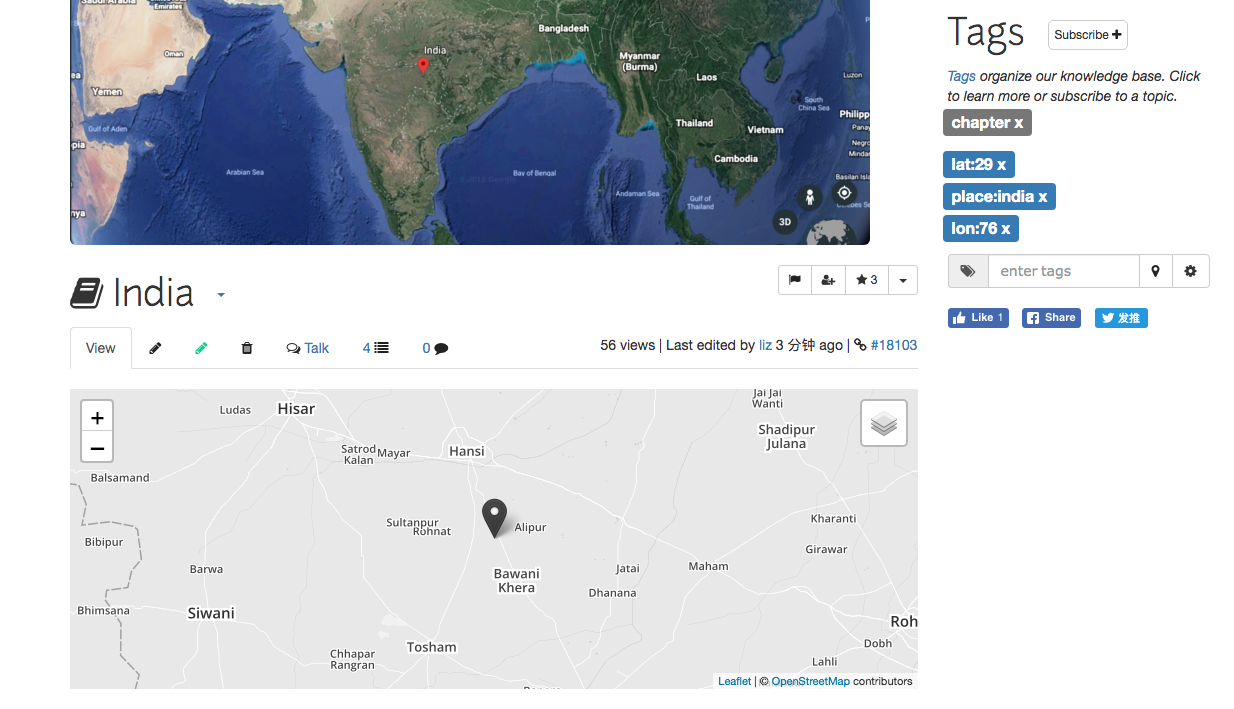
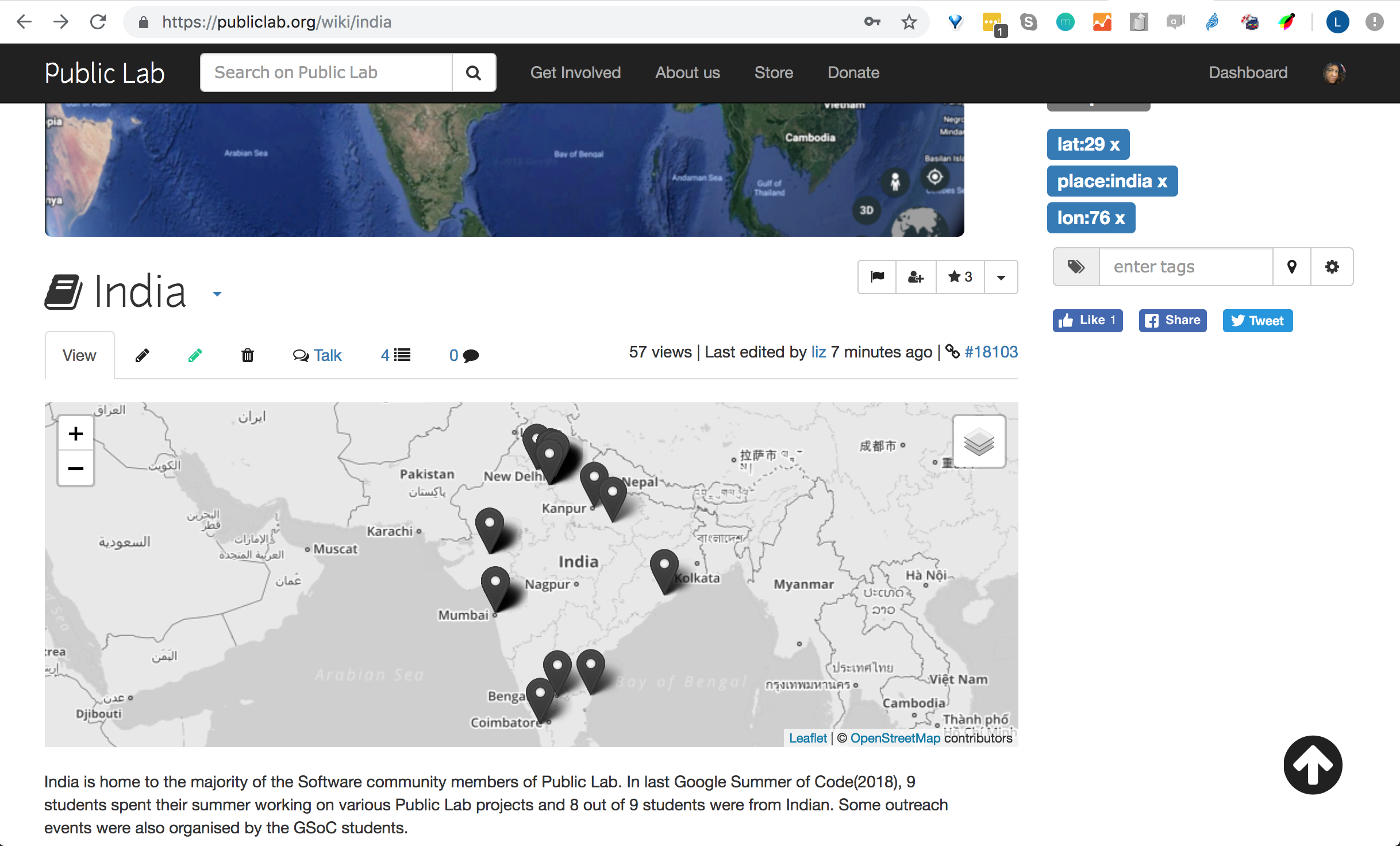
This screenshot shows the zoom level that corresponds to 00. precision. So we need to think of an edge case for how to over-ride the zoom. Maybe zoom:____ could be an override powertag
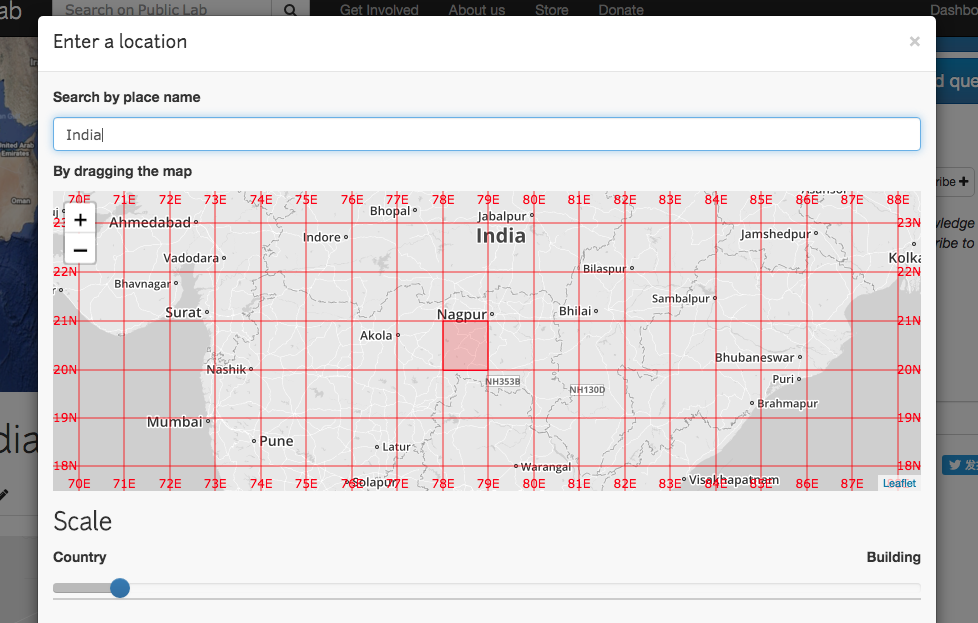
How awesome will it be to figure this out and have the map of india load awesomely at this zoom that shows the entire country and right away shows all these people!!!
Thanks!
What do you think?
 ebarry
All 21 comments
this is awesome
On Thu, May 9, 2019 at 2:12 PM Liz Barry notifications@github.com wrote:
Hello!!!!!
@sagarpreet-chadha https://github.com/sagarpreet-chadha i was hoping to
connect on this idea :)In our inline maps, precision (number of digits after the decimal)
determines the zoom level that the map loads on, but India (and other
countries) are so big, you can't chop off any more digits. So here's what
publiclab.org/india looks like:
[image: image-2]
https://user-images.githubusercontent.com/161439/57476226-12d8b980-7264-11e9-89c4-ab9632a83cd4.pngThis screenshot shows the zoom level that corresponds to 00. precision.
So we need to think of an edge case for how to over-ride the zoom. Maybe
zoom:____ could be an override powertag[image: screen_shot_2019-05-09_at_2 04 22_pm]
https://user-images.githubusercontent.com/161439/57476302-43205800-7264-11e9-8d9a-d1289f25ea76.pngHow awesome will it be to figure this out and have the map of india load
awesomely at this zoom that shows the entire country and right away shows
all these people!!!
[image: Screen Shot 2019-05-09 at 2 06 47 PM]
https://user-images.githubusercontent.com/161439/57476330-516e7400-7264-11e9-98fc-780c509fbb49.pngThanks!
What do you think?—
You are receiving this because you are subscribed to this thread.
Reply to this email directly, view it on GitHub
https://github.com/publiclab/plots2/issues/5695, or mute the thread
https://github.com/notifications/unsubscribe-auth/AAAF6J6ZZ3T22Z52D2BQS2TPURSQFANCNFSM4HL4ZR7Q
.
 jywarren
on 9 May 2019
jywarren
on 9 May 2019
Hi @ebarry , thanks for pointing out this issue 😄 .
So let me explain how zoom is calculated currently (then we can discuss what other algorithm we should use) :
- So
latitudevalue is in float is converted to string and its length is calculated and then6is added to this value .
For example in our case : 29 ---> 29.0 ---> "29.0" ---> length : 4 (including decimal) ---> zoom : 4+6 =10
Proposed algorithm :
Zoom level | if precision range is | Human-readable placename
--|----|---
0 | [0] | planet
3 | [1] | country
4 | [2,4] | country , state
5 | [5,6] | country , state , province
6 | [7,8] | country , state , province , region
11 | [9,10] | neighbourhood
13 | >=11 | Exact Block
And use this as standardization across plots2 maps and will add this to readme as well . What do you think ?
 sagarpreet-chadha
on 10 May 2019
sagarpreet-chadha
on 10 May 2019
Hi @sagarpreet-chadha , i'm just reading this comment now -- so sorry!
I understand what you are saying but i am not sure how to evaluate it! if you think it is an improvement, then great, let's do it! @jywarren what do you think?
ebarry
on 14 Nov 2019
No problem @ebarry :)
Well now looking again at this problem, i think the best algorithm to solve this is to hardcode the zoomlevel according to precision. In this way we can have the view of map we want. Let's hear from @jywarren about this!
sagarpreet-chadha
on 14 Nov 2019
So, we really want the zoom level you're seeing while selecting a location to be the one shown on the map. I believe the method @sagarpreet-chadha has mentioned is from the blurred-location system so that should be correct! Is that right, Sagarpreet?
However, there may be some slight differences even so, because the pixel size of the map in the location modal is not necessarily the same pixel size of the displayed map. But it seems pretty good.
The other option here, which we could ALSO do, is to use this kind of zoom:10 tag to /override/ the zoom for a lead map. This won't work for an inline map, of course, because that's not run from the page's tags! But for a lead map like on https://publiclab.org/india, this could work.
jywarren
on 16 Nov 2019
Note there is some oddity between the tag place and place:india and the lead image. We need to do a little debugging so these work smoothly, and that place/place:____ do the same thing (place is the correct behavior).
jywarren
on 16 Nov 2019
Yes, i like the idea of zoom:XX tag idea to give extended functionality to
people.
On Sat, 16 Nov 2019, 06:44 Jeffrey Warren, notifications@github.com wrote:
Note there is some oddity between the tag place and place:india and the
lead image. We need to do a little debugging so these work smoothly, and
that place/place:____ do the same thing (place is the correct behavior).—
You are receiving this because you were mentioned.
Reply to this email directly, view it on GitHub
https://github.com/publiclab/plots2/issues/5695?email_source=notifications&email_token=ADSCRRIM6MUSQPJ5GL4Y4ODQT5CQHA5CNFSM4HL4ZR72YY3PNVWWK3TUL52HS4DFVREXG43VMVBW63LNMVXHJKTDN5WW2ZLOORPWSZGOEEHFPLY#issuecomment-554588079,
or unsubscribe
https://github.com/notifications/unsubscribe-auth/ADSCRRIEQY2SKEHQIFPF6K3QT5CQHANCNFSM4HL4ZR7Q
.
sagarpreet-chadha
on 16 Nov 2019
Hey @nstjean ,
We have manual zoom override tag “zoom:____” now, right?
Can you add this zoom power tag here: https://publiclab.org/wiki/power-tags.
Thanks!
sagarpreet-chadha
on 1 Jan 2020
Yes choosing a location now adds a zoom level automatically, and it can be added manually if someone wants to! I know the map at /post/ and /map/ both use the zoom tag, but I'm not sure inline maps or lead maps do. We'll need to check that!
 nstjean
on 1 Jan 2020
nstjean
on 1 Jan 2020
No we donot have for inline maps. We should work on this next :)
Thanks for the update!
sagarpreet-chadha
on 1 Jan 2020
I notice that documentation has the lat and lon tags mentioned only here:
place with lat:____ and lon:______ tags, will add your page to the map on the Places page
Should we add them to the list?
nstjean
on 1 Jan 2020
Added zoom to the sidebar maps in https://github.com/publiclab/plots2/pull/7078
nstjean
on 1 Jan 2020
That sounds awesome.
On Wed, Jan 1, 2020 at 1:42 PM Natalie St Jean notifications@github.com
wrote:
I notice that documentation does not have the lat and lon tags mentioned
only here:
place with lat:____ and lon:______ tags, will add your page to the map on
the Places page
Should we add them to the list?—
You are receiving this because you were mentioned.
Reply to this email directly, view it on GitHub
https://github.com/publiclab/plots2/issues/5695?email_source=notifications&email_token=AAAF6JYV323WJSY666FPQO3Q3TPILA5CNFSM4HL4ZR72YY3PNVWWK3TUL52HS4DFVREXG43VMVBW63LNMVXHJKTDN5WW2ZLOORPWSZGOEH5KH2Y#issuecomment-570074091,
or unsubscribe
https://github.com/notifications/unsubscribe-auth/AAAF6J4O65UJVTX6Y2JTVKDQ3TPILANCNFSM4HL4ZR7Q
.
jywarren
on 2 Jan 2020
I've added lat, lon and zoom:
https://publiclab.org/wiki/power-tags#General+power+tags
lat:__ and lon:__ -- will add a location to your note and add a map to the content sidebar. This can also be set in your profile as your user location.
zoom:__ with lat:__ and lon:__ -- will override the location map zoom to the specified value. Must be between 1 (world) and 18 (building). Also works on your user location for the map on your profile page.
nstjean
on 6 Jan 2020
Awesome! So should this be closed now? Can you double check in stable.publiclab.org in any case? Thanks!
jywarren
on 7 Jan 2020
Works great in the sidebar map!

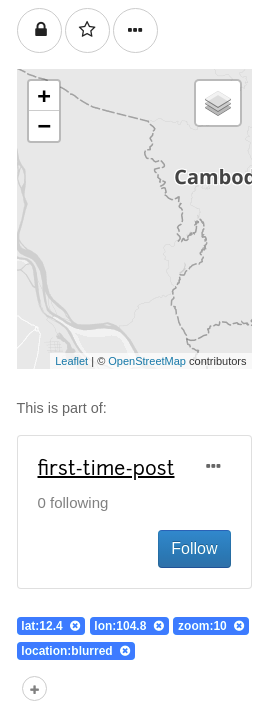
I think the only thing we don't have yet is a zoom override for the inline maps, so I don't know if you want to close this yet!
nstjean
on 7 Jan 2020
Oh ok let's keep this open then!
On Tue, Jan 7, 2020, 11:03 AM Natalie St Jean notifications@github.com
wrote:
Works great in the sidebar map!
[image: FireShot Capture 177 - 🎈 Public Lab_ Test Page - stable publiclab
org]
https://user-images.githubusercontent.com/49460529/71909045-2747bb80-313d-11ea-927b-296e923ea6ec.png[image: FireShot Capture 179 - 🎈 Public Lab_ Test Page - stable publiclab
org]
https://user-images.githubusercontent.com/49460529/71909051-2b73d900-313d-11ea-8978-315cbd9a0625.pngI think the only thing we don't have yet is a zoom override for the inline
maps, so I don't know if you want to close this yet!—
You are receiving this because you were mentioned.
Reply to this email directly, view it on GitHub
https://github.com/publiclab/plots2/issues/5695?email_source=notifications&email_token=AAAF6J4WT4RBUZUFABI72YLQ4SRT3A5CNFSM4HL4ZR72YY3PNVWWK3TUL52HS4DFVREXG43VMVBW63LNMVXHJKTDN5WW2ZLOORPWSZGOEIJLGFA#issuecomment-571650836,
or unsubscribe
https://github.com/notifications/unsubscribe-auth/AAAF6J7H2P2ZTACZKZHNPWLQ4SRT3ANCNFSM4HL4ZR7Q
.
jywarren
on 7 Jan 2020
I'll rename this for clarity, thanks. Original issue solved.
jywarren
on 27 Jan 2020
Hi :smile:, this issue has been automatically marked as stale because it has not had recent activity. Don't worry you can continue to work on this and ask @publiclab/reviewers to add "work in progress" label :tada: . Otherwise, it will be closed if no further activity occurs in 5 days -- but you can always re-open it if you like! :100: Thank you for your contributions :raised_hands: :balloon:.
![stale[bot] picture](https://avatars.githubusercontent.com/in/1724?v=4&s=40) stale[bot]
on 7 Oct 2020
stale[bot]
on 7 Oct 2020
Oh, we definitely need to see this through, and we're almost there! Great work so far on the sidebar maps, let's also fix the inline map display 😃
ebarry
on 7 Oct 2020
Just summarizing this relatively complex last step; inline maps are driven by inline short codes like this:
[map:layers:content:44.5:-90.1:fracTrackerMobile,aqicnLayer,openaq,toxicReleaseLayer,skyTruth]
(docs at https://publiclab.org/wiki/inline-maps)
...where the map is described in type (layers) type of content (all content, or 'content' as opposed to 'people') latitude, longitude, and layers fracTrackerMobile,aqicnLayer,openaq,toxicReleaseLayer,skyTruth. So we would have to develop a new short code that also has a space for zoom level.
That might look like:
[map:layers:content:44.5:-90.1:9:fracTrackerMobile,aqicnLayer,openaq,toxicReleaseLayer,skyTruth]
(where we've fixed the zoom level at 9)
We would need to make changes to the following methods:
that's: notes_map, notes_map_by_tag, people_map, layers_map, and tag_layers_map. We could start with just one, if that makes sense -- which one would be the priority? Let's say, what is a page where we'd want to use this and what type of map (from these options) do we want to show there? Thanks!
jywarren
on 9 Mar 2021
Related issues
 divyabaid16
·
3Comments
divyabaid16
·
3Comments
 grvsachdeva
·
3Comments
grvsachdeva
·
3Comments
![first-timers[bot] picture](https://avatars.githubusercontent.com/in/4832?v=4&s=40) first-timers[bot]
·
3Comments
first-timers[bot]
·
3Comments
 milaaraujo
·
3Comments
grvsachdeva
·
3Comments
milaaraujo
·
3Comments
grvsachdeva
·
3Comments