Plots2: edit comment text-box to contain text to be edited
Hi, this is a first-timers-only issue. This means we've worked to make it more legible to folks who either haven't contributed to our codebase before, or even folks who haven't contributed to open source before.
If that's you, we're interested in helping you take the first step and can answer questions and help you out as you do. Note that we're especially interested in contributions from people from groups underrepresented in free and open source software!
We know that the process of creating a pull request is the biggest barrier for new contributors. This issue is for you 💝
If you have contributed before, consider leaving this one for someone new, and looking through our general help wanted issues. Thanks!
🤔 What you will need to know.
Nothing. This issue is meant to welcome you to Open Source :) We are happy to walk you through the process.
📋 Step by Step
[ ] 🙋 Claim this issue: Comment below. If someone else has claimed it, ask if they've opened a pull request already and if they're stuck -- maybe you can help them solve a problem or move it along!
[ ] 📝 Update the file $FILENAME in the
$REPOrepository (press the little pen Icon) and edit the line as shown below.
See this page for some help in taking your first steps!
This is a little refactor to the comment section.
On clicking the edit icon as shown in the GIF below, it would be right for the edit text-box to contain text that is to be edited rather than have an empty text box as though creating a new comment.
The placeholder text is also a bit misleading, seems that placeholder text belongs to 'reply to this comment' text-box.
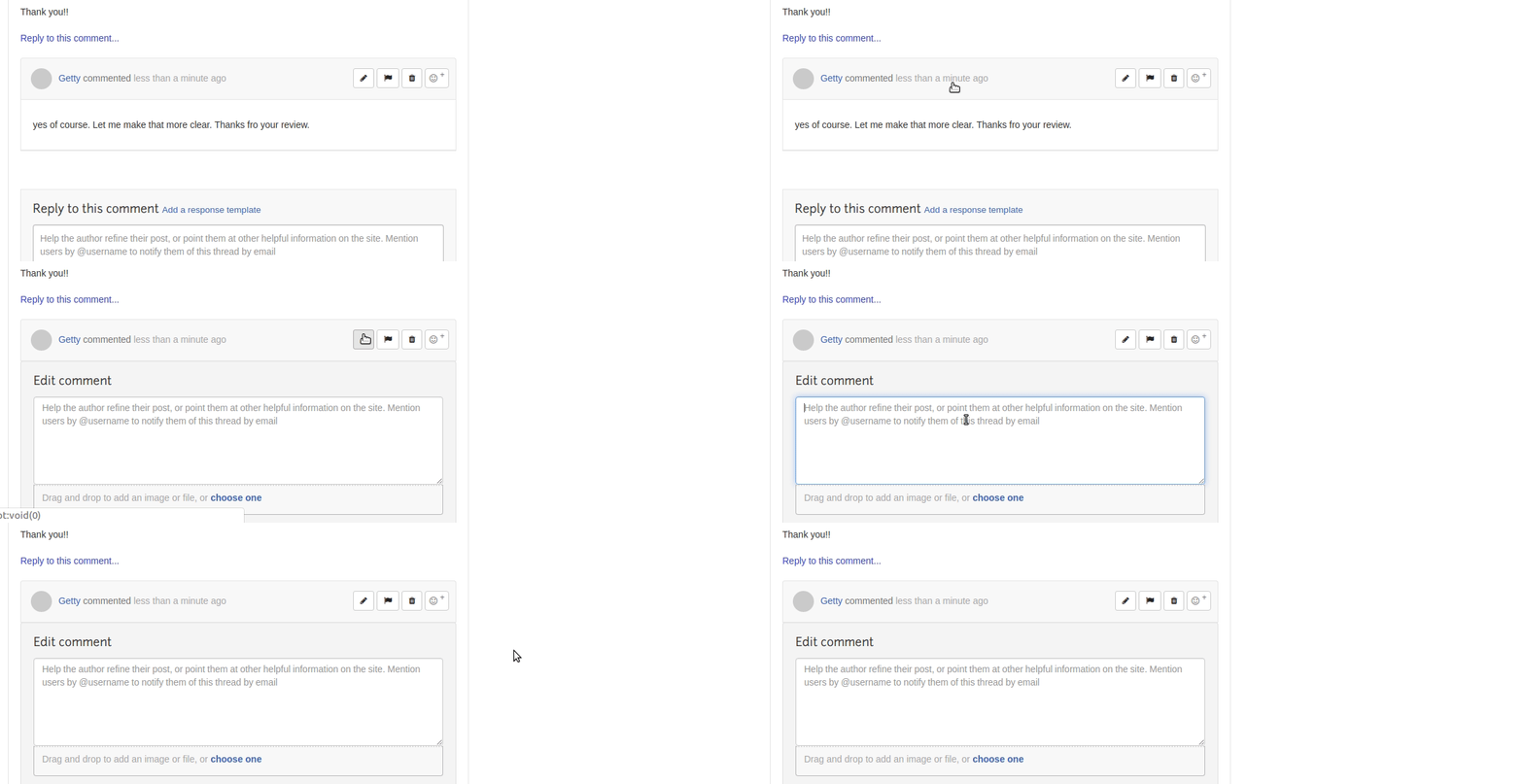
The target controller in this case would be the Comment Controller, specifically the update action: https://github.com/publiclab/plots2/blob/master/app/controllers/comment_controller.rb#L108
And the target view would be: https://github.com/publiclab/plots2/blob/master/app/views/comments/_edit.html.erb
[ ] 💾 Commit your changes
[ ] 🔀 Start a Pull Request. There are two ways how you can start a pull request:
If you are familiar with the terminal or would like to learn it, here is a great tutorial on how to send a pull request using the terminal.
You can also edit files directly in your browser and open a pull request from there.
- [ ] 🏁 Done Ask in comments for a review :)
Please keep us updated
💬⏰ - We encourage contributors to be respectful to the community and provide an update within a week of claiming a first-timers-only issue. We're happy to keep it assigned to you as long as you need if you update us with a request for more time or help, but if we don't see any activity a week after you claim it we may reassign it to give someone else a chance. Thank you in advance!
If this happens to you, don't sweat it! Grab another open issue.
Is someone else already working on this?
🔗- We encourage contributors to link to the original issue in their pull request so all users can easily see if someone's already started on it.
👥- If someone seems stuck, offer them some help! Otherwise, take a look at some other issues you can help with. Thanks!
🤔❓ Questions?
Leave a comment below!
 GettyOrawo
All 14 comments
Thanks for opening your first issue! This space is protected by our Code of Conduct - and we're here to help.
Please follow the issue template to help us help you 👍🎉😄
If you have screenshots or a gif to share demonstrating the issue, that's really helpful! 📸
Do join our Gitter channel for some brainstorming discussions.
![welcome[bot] picture](https://avatars.githubusercontent.com/in/4141?v=4&s=40) welcome[bot]
on 31 Mar 2019
welcome[bot]
on 31 Mar 2019
I've realised that if we reload the page, then it works okay... but on the first edit it doesn't.

GettyOrawo
on 31 Mar 2019
@GettyOrawo , Update the issue template to follow this
https://github.com/publiclab/plots2/blob/master/.github/first-timers-issue-template.md
Its just easier for newcomers to follow and get started :)
 ananyaarun
on 31 Mar 2019
ananyaarun
on 31 Mar 2019
I'd like to try and give this a try. Can I give it a shot?
 kylebess9
on 1 Apr 2019
kylebess9
on 1 Apr 2019
Thanks @ananyaarun . I have updated it. Is that better?
GettyOrawo
on 1 Apr 2019
Yes !! Thanks a lot :)
ananyaarun
on 1 Apr 2019
Hey @kylebess9 sure! are you available to work on this? if so feel free to ask for all the help you need.
GettyOrawo
on 1 Apr 2019
I am available. I will start working on it today. If I need any help, should I just comment here?
edit - I just read the part where questions should be posted below. Thank you!
kylebess9
on 1 Apr 2019
That's perfect, thank you!
On Mon, Apr 1, 2019, 4:41 PM kylebess9 notifications@github.com wrote:
I am available. I will start working on it today. If I need any help,
should I just comment here?—
You are receiving this because you are subscribed to this thread.
Reply to this email directly, view it on GitHub
https://github.com/publiclab/plots2/issues/5318#issuecomment-478739320,
or mute the thread
https://github.com/notifications/unsubscribe-auth/AABfJ7gi5nPmpAiMy7esYJ4L3kbbR2Ahks5vcm72gaJpZM4cUTzg
.
 jywarren
on 2 Apr 2019
jywarren
on 2 Apr 2019
Hey @GettyOrawo, thanks for opening the issue, but we consider first-timers issue one, where we also provide the solution code snippet to the first-timer or that requires basic HTML change.
Could you please add the code which can solve the issue? Thanks!
 grvsachdeva
on 4 Apr 2019
grvsachdeva
on 4 Apr 2019
So the issue seems to appear when you post and remain on the page and request to edit the posted comment. The comment box does not seem to remember or pull the original comment. However, when you refresh or return to the page, the edit box works just fine and shows the comment that is to be edited. Can this issue still be solved through the comment controller? I'm new to this project so I'm not 100% sure about everything. I would love some help or insight into possible solutions.
I'll keep digging around and learning more about the project. Thank you for the opportunity to grow as a programmer!
kylebess9
on 5 Apr 2019
Hey @kylebess9, the comment addition on page without happens due to AJAX and at that time this script is run https://github.com/publiclab/plots2/blob/master/app/views/comments/create.js.erb so if you inspect the difference between the normal comment which is rendered at the time of page load and this one, you might hit the solution.
Seeing in comment_controller will surely provide you the inside view and some more clarity. Thanks!
grvsachdeva
on 6 Apr 2019
I wonder if it relates to this textarea command on line 7! Would you like to try removing that to see?
From the blame view, it seems like an old line of code. I'd bet it was originally meant to empty the comment input box so that once you post your comment, you no longer see what you typed in the comment posting form.
But it's so non-specific - looks like it clears /all/ textareas, not just the one you'd just typed your comment into! Perhaps we need to target it at the very specific box you had just filled out, using a unique ID or classname. @kylebess9 do you have a copy of the site running locally? This may help you test it out!
jywarren
on 8 Apr 2019
Also -- just wanted you to know that we usually include exact step-by-step lines of code to change when posting a first-timers-only post. So don't feel bad if this one is pretty tough, it's a bit more complex than what we usually put up for first-timers. But we can help you through it!
If you'd like to try another that's a bit simpler first, that's also fine, and we can help you find one! Just tell us what you'd like to do. Thanks so much!!! And thanks to @GettyOrawo for posting this one!!!
jywarren
on 8 Apr 2019
Related issues
![first-timers[bot] picture](https://avatars.githubusercontent.com/in/4832?v=4&s=40) first-timers[bot]
·
3Comments
first-timers[bot]
·
3Comments
 RuthNjeri
·
3Comments
RuthNjeri
·
3Comments
 ebarry
·
3Comments
ebarry
·
3Comments
 keshavsethi
·
3Comments
keshavsethi
·
3Comments
 shapironick
·
3Comments
shapironick
·
3Comments