Plots2: Fix Pluralization Conditionals
First Time?
This is a first-timers-only issue. This means we've worked to make it more legible to folks who either haven't contributed to our codebase before, or even folks who haven't contributed to open source before.
If that's you, we're interested in helping you take the first step and can answer questions and help you out as you do. Note that we're especially interested in contributions from people from groups underrepresented in free and open source software!
We know that the process of creating a pull request is the biggest barrier for new contributors. This issue is for you 💝
If you have contributed before, consider leaving this one for someone new, and looking through our general help wanted issues. Thanks!
🤔 What you will need to know.
Nothing. This issue is meant to welcome you to Open Source :) We are happy to walk you through the process.
The problem
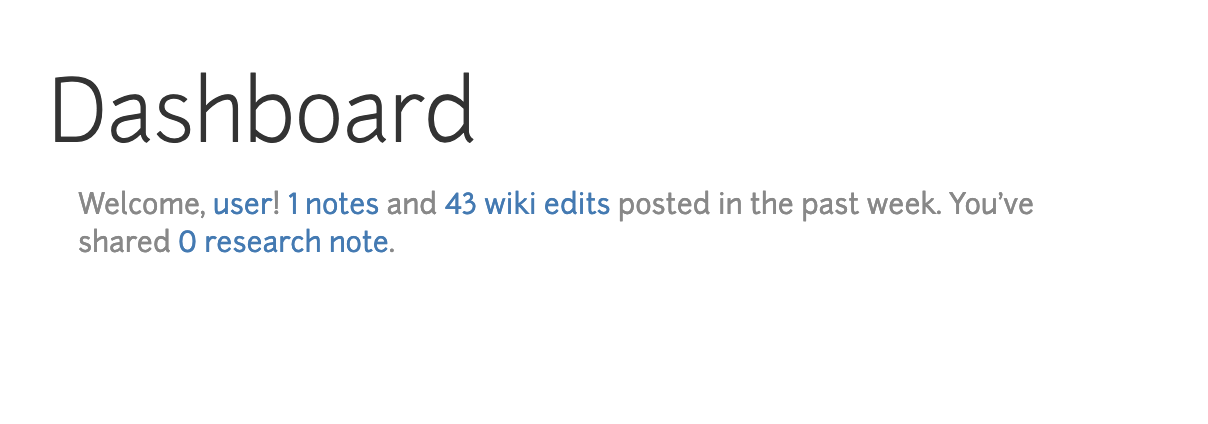
As shown below, the pluralization rules we have in place are incorrect. We want 1 _note_ and 0 research _notes_.
Solution
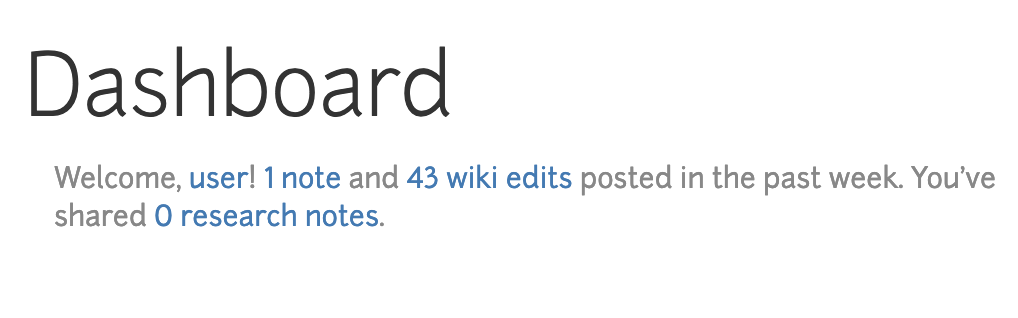
The pluralization should look like this:
This is a simple one -- let's change the following code:
1) In the below code, change the <= 1 to just be === 1. We don't want to include 0 in that conditional. This will change 0 research note to 0 research notes
2) The below code is missing a condition all together:
We want to change the first half of the line (the entire <a></a> element) to look like this:
<a href="/notes/recent"><%= @note_count %> <% if @note_count === 1 %> <%= t('dashboard._header.note') %><% else %> <%= t('dashboard._header.notes') %><% end %></a>
this will update 1 notes to instead say 1 Note.
3) Why is the Note capitalized? While in the first fix we were dealing with _header.research_note, in the second we have _header.note
Checking in the en.yml file, we find that: under, _header, there is a notes but no note:
add a note: "note" key-value pair right below notes: "notes"
Thanks!!
Step by Step
- [ ] Claim this issue with a comment here, below, and ask any clarifying questions you need
- [ ] Fork the repository and set it up locally following the main repo README instructions https://github.com/publiclab/plots2
- [ ] Create a new feature branch with a unique name descriptive to the issue
- [ ] Try to fix the issue following the steps above, but even before you're done, you can:
commit your changes to your branch and start a pull request (see contributing to Public Lab software) but mark it as "in progress" if you have questions or if you haven't finished - [ ] Reference this issue in your pull request body
- [ ] Once you submit your pull request, an additional checklist will be provided for getting it merged
Please keep us updated
💬⏰ - We encourage contributors to be respectful to the community and provide an update within a week of claiming a first-timers-only issue. We're happy to keep it assigned to you as long as you need if you update us with a request for more time or help, but if we don't see any activity a week after you claim it we may reassign it to give someone else a chance. Thank you in advance!
If this happens to you, don't sweat it! Grab another open issue.
💬 Get help
If you need any help - here are some options:
- Comment below
- Join our gitter chat at https://gitter.im/publiclab/publiclab
 sashadev-sky
All 12 comments
currently claimed by @Aarabhi2017
sashadev-sky
on 16 Mar 2019
@Aarabhi2017 Hi, just checking if you're working on this or if you've gotten stuck on this at all. Usually we give about a week for some sort of update so if I don't get a reply back in 24 hours or so I might need to reassign this. Please let me know!
sashadev-sky
on 25 Mar 2019
reassigning to @themonster2015!
sashadev-sky
on 27 Mar 2019
reassigning to @themonster2015!
Thanks. I just completed it and submitted a pull request.
 themonster2015
on 27 Mar 2019
themonster2015
on 27 Mar 2019
@themonster2015 Thank you for your help! I don't see your PR. Can you please reference this issue on the top line of your PR description so it is linked here? You just put a # and the issue num (5104) after.
sashadev-sky
on 27 Mar 2019
@themonster2015 Thank you for your help! I don't see your PR. Can you please reference this issue on the top line of your PR description so it is linked here? You just put a
#and the issue num (5104) after.
Hi. Sorry this is my first time contributing and I don't know if I submitted the pull request the correct way or not. Below is the screenshot of the branch I submitted. I tried searching but couldn't find it in the pull request tab now.

themonster2015
on 27 Mar 2019
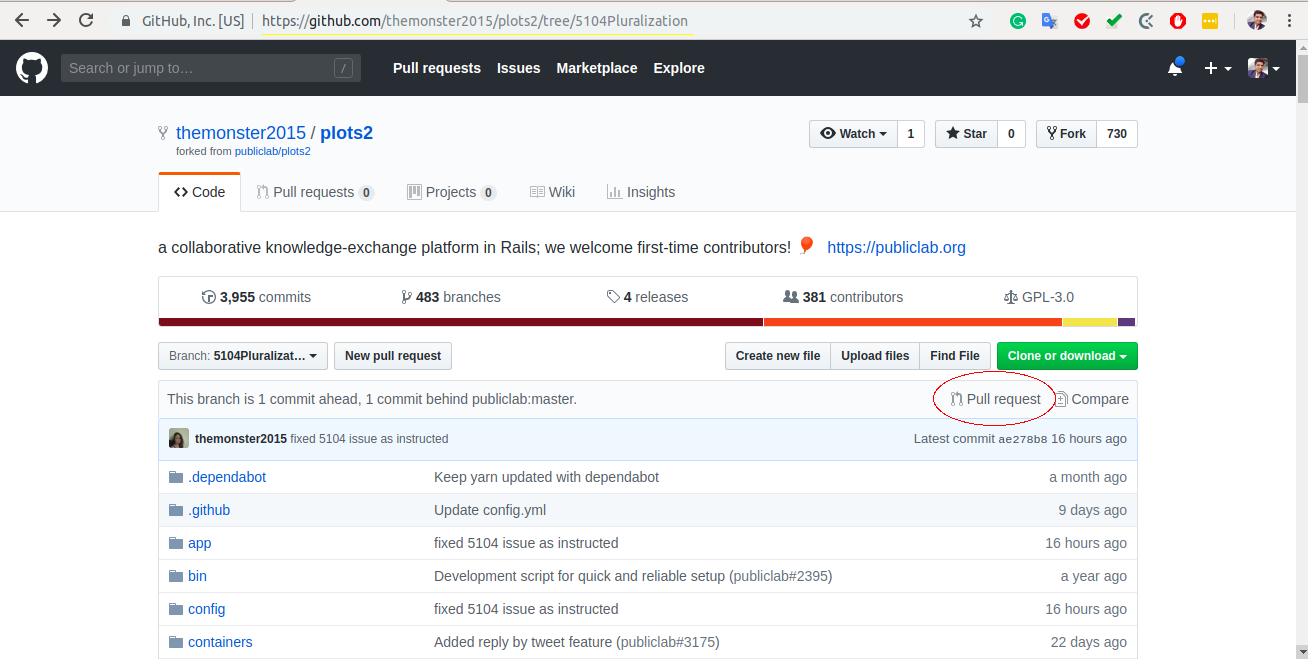
Hey @themonster2015, you have pushed your branch to the remote. You just need to raise a Pull request by visiting your branch and clicking on Pull Request button. See below for ref. :point_down:
 grvsachdeva
on 27 Mar 2019
grvsachdeva
on 27 Mar 2019
Hey @themonster2015, you have pushed your branch to the remote. You just need to raise a Pull request by visiting your branch and clicking on Pull Request button. See below for ref. 👇
thanks so much for your instructions! I just did it.
themonster2015
on 27 Mar 2019
@themonster2015 Thank you!! I will look over it now :)
sashadev-sky
on 28 Mar 2019
Reassigned to @ar03
sashadev-sky
on 16 Apr 2019
@sashadev-sky I have made the changes, do I commit them to my local repo and then raise a PR?
 ar03
on 16 Apr 2019
ar03
on 16 Apr 2019
@ar03 Yes thank you! Make sure you made your changes on a new branch, and then push to that branch git push origin <branch_name>. Then when you visit the plots2 main repo page you will see an option to create a PR.
sashadev-sky
on 16 Apr 2019
Related issues
grvsachdeva
·
3Comments
 keshavsethi
·
3Comments
keshavsethi
·
3Comments
 milaaraujo
·
3Comments
milaaraujo
·
3Comments
 ebarry
·
3Comments
ebarry
·
3Comments
![first-timers[bot] picture](https://avatars.githubusercontent.com/in/4832?v=4&s=40) first-timers[bot]
·
3Comments
first-timers[bot]
·
3Comments
Most helpful comment
thanks so much for your instructions! I just did it.