Hi, this is a first-timers-only issue. This means we've worked to make it more legible to folks who either haven't contributed to our codebase before, or even folks who haven't contributed to open source before.
If that's you, we're interested in helping you take the first step and can answer questions and help you out as you do. Note that we're especially interested in contributions from people from groups underrepresented in free and open source software!
We know that the process of creating a pull request is the biggest barrier for new contributors. This issue is for you 💝
If you have contributed before, consider leaving this one for someone new, and looking through our general help wanted issues. Thanks!
🤔 What you will need to know.
Nothing. This issue is meant to welcome you to Open Source :) We are happy to walk you through the process.
📋 Step by Step
[ ] 🙋 Claim this issue: Comment below. If someone else has claimed it, ask if they've opened a pull request already and if they're stuck -- maybe you can help them solve a problem or move it along!
[ ] 📝 Update .
The tags goes out of alignment. It would be better if the whole Tags section will be aligned.
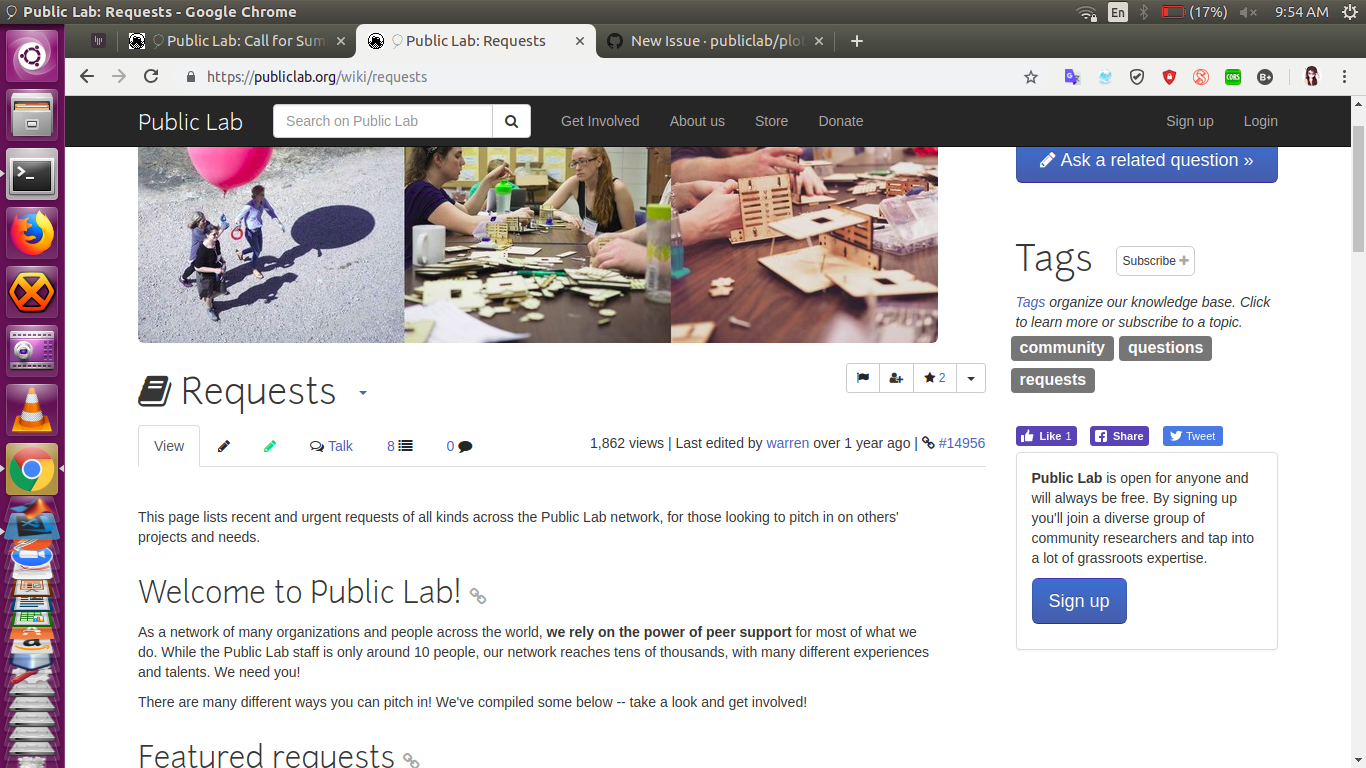
The marked portion is below
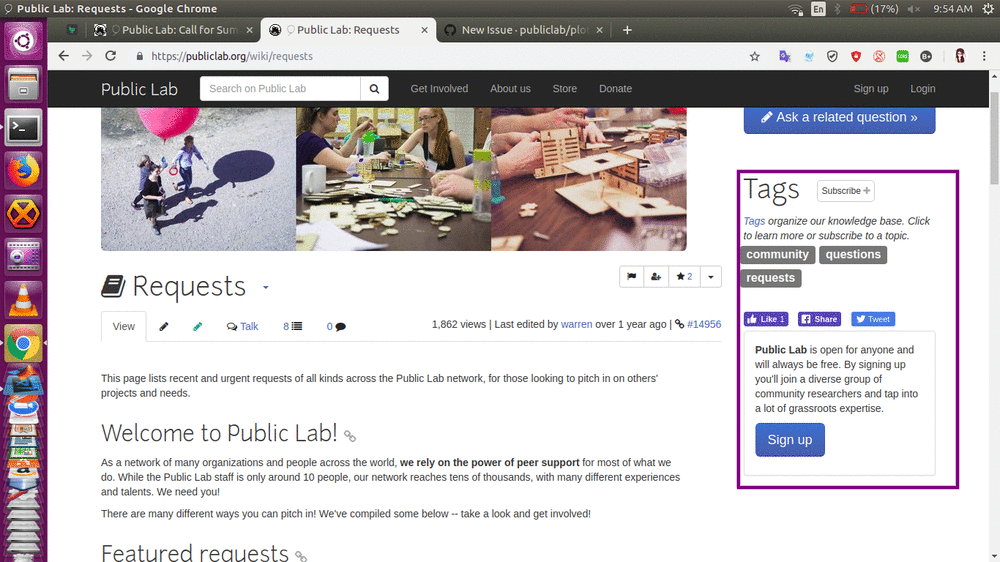
Update will be done in plots2/app/views/tag/_tagging.html.erb
[ ] 💾 Commit your changes
[ ] 🔀 Start a Pull Request. There are two ways how you can start a pull request:
If you are familiar with the terminal or would like to learn it, here is a great tutorial on how to send a pull request using the terminal.
You can also edit files directly in your browser and open a pull request from there.
- [ ] 🏁 Done Ask in comments for a review :)
🤔❓ Questions?
Leave a comment below!
Is someone else already working on this?
We encourage you to link to this issue by mentioning the issue # in your pull request, so we can see if someone's already started on it. If someone seem stuck, offer them some help! Otherwise, take a look at some other issues you can help with. Thanks!
(This issue was created by First-Timers-Bot.)
 CleverFool77
All 39 comments
@GettyOrawo you were looking for an issue, right? You can start with this one. Thanks!
 grvsachdeva
on 11 Mar 2019
grvsachdeva
on 11 Mar 2019
hey I'm new to open source. Can I work on this issue?
 richa031
on 11 Mar 2019
richa031
on 11 Mar 2019
Hi i am new to open source and an Outreachy applicant can i work be assigned this issue to work on?
 Jenniline
on 11 Mar 2019
Jenniline
on 11 Mar 2019
@GettyOrawo Are you still working on this issue. If yes, then you can open a draft PR or you ask for help in group if you came across some problem or If not, then there is no problem. As opensource is always a place where another can start from where you've left and we can assign a different contributor for this.
CleverFool77
on 14 Mar 2019
hello @CleverFool77 I am an outreachy applicant and excited to work on this issue. How can I start contributing ?
 vaarigupta
on 19 Mar 2019
vaarigupta
on 19 Mar 2019
Hi @vaarigupta Are you assigned to this issue ?
CleverFool77
on 20 Mar 2019
If you are interested.
- I've added the file where the update is needed plots2/app/views/tag/_tagging.html.erb
- Here, you can check the margin /padding of the section and align it.
I hope it helps. :smile:
CleverFool77
on 20 Mar 2019
@Priyak5 you can start with this issue. Thanks!
grvsachdeva
on 20 Mar 2019
@gauravano okay , thank you.
 Priyak5
on 20 Mar 2019
Priyak5
on 20 Mar 2019
Is there any way to open _tagging.html.erb file alone to check the changes made in the code? I have been trying to look for a solution online but coudn't find one.
Can anyone help me with this ?
Thank you!
Priyak5
on 23 Mar 2019
Hi @Priyak5 Do you mean the changes of lines of code you did ?
If yes, I wanted to ask you what editor you are using.
For me, I would say..I use vscode. So it shows the changes I did .
CleverFool77
on 23 Mar 2019
Hi @CleverFool77 I meant I want to preview the web page after the chnages are done, I am unable to do that. Do you know anything?
Thank you!
Priyak5
on 23 Mar 2019
Hi @Priyak5 ,
After you did the local changes, you can run the project using passenger start.
After that , your server will run and at there you can see the changes.
CleverFool77
on 23 Mar 2019
I am having problems while installation, so I wanted to run the file alone. Can you help me with passenger start ? Thank you @CleverFool77
Priyak5
on 23 Mar 2019
I don't think that you can run the file alone. How about starting with installation first :) .What problems you are facing ?
I'll try to give my best in help.
CleverFool77
on 23 Mar 2019
Error loading the 'mysql2' Active Record adapter. Missing a gem it depends on? mysql2 is not part of the bundle. Add it to your Gemfile. (LoadError)
Hey @CleverFool77 ,I am getting this error when I passenger start.
Priyak5
on 23 Mar 2019
Hi @Priyak5. Is your repo in sync with the latest commit. Coz I guess this error was resolved few days earlier.
And did you do bundle install or bundle install --without production ?
CleverFool77
on 23 Mar 2019
How do I sync with the latest commit ? I did bundle install
Priyak5
on 23 Mar 2019
Fetch the upstream and then you can rebase it
CleverFool77
on 23 Mar 2019
And I'm not sure about this, but mysql gem was in the production one. So we should go for command bundle install --without production I guess.
CleverFool77
on 23 Mar 2019
Thank you @CleverFool77 , but I am still getting the mysql2 error on passenger start.
Priyak5
on 23 Mar 2019
After deleting gemfile.lock..We can try this command again..I guess.
CleverFool77
on 23 Mar 2019
The same error again. Thank you for your help @CleverFool77 !
Priyak5
on 23 Mar 2019
No Problem @Priyak5 I'll try my best to help. Here you go.
This is what I did. But this won't be a good method but it works .
Refork the project and and it should be in sync with current latest commit.
try installation again but with the command of without production.
I guess this will work. COz this always works with me ;p
CleverFool77
on 23 Mar 2019
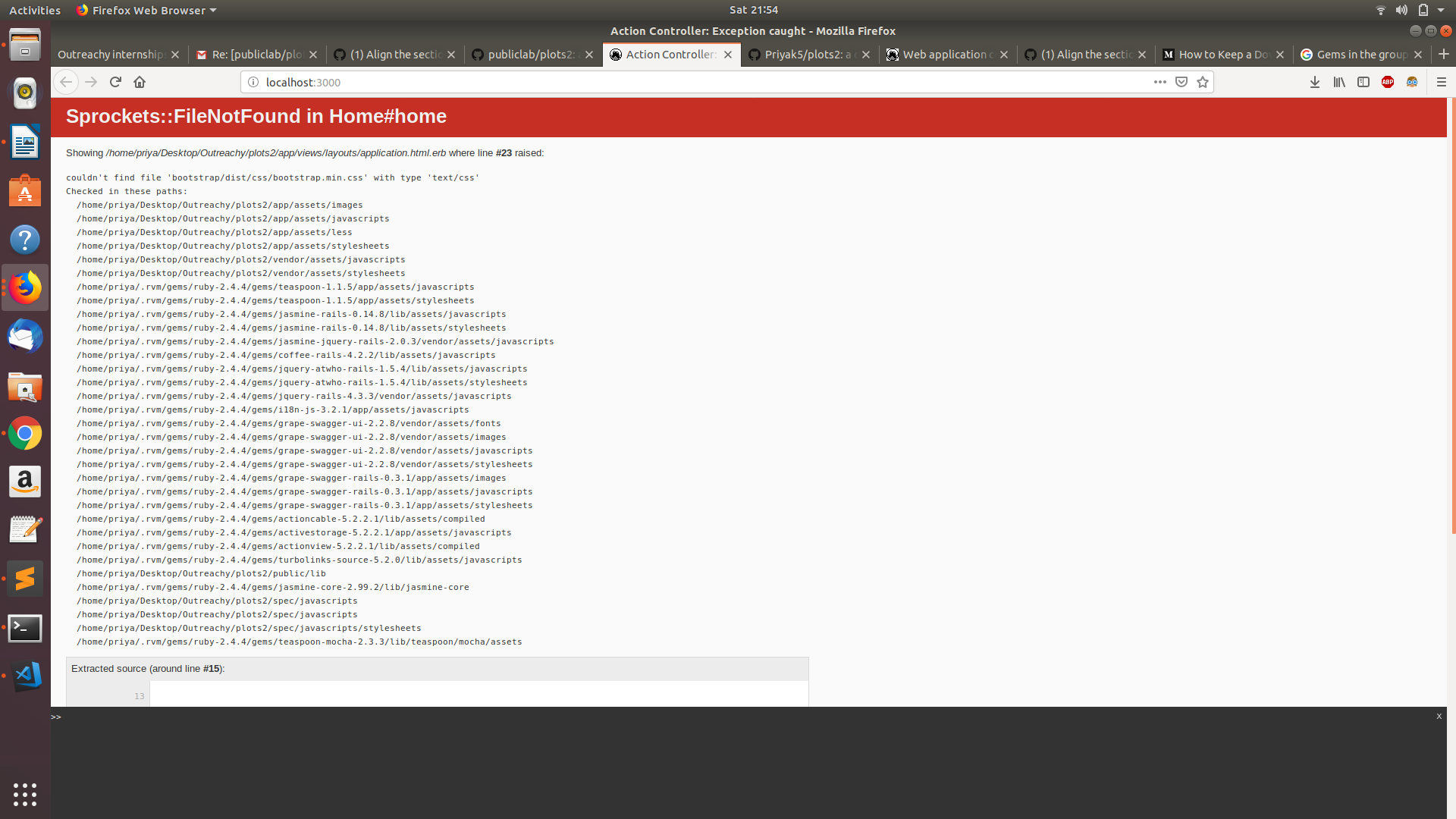
I tried your method but now I am getting a new error. Any idea what this is ? ;_;
Priyak5
on 23 Mar 2019
After what command you got this?
You did yarn install ?
CleverFool77
on 23 Mar 2019
It worked. Thank you soooo much @CleverFool77
Priyak5
on 23 Mar 2019
Oh greaaaaattttttt..Congrats @Priyak5 :tada: :tada:
Now on the rails :nerd_face:
CleverFool77
on 23 Mar 2019
@CleverFool77 Thanks alot!!
I am facing a problem in alignment, when tags are created they are aligned and when deleted from rows other than the first row are deleted correctly, when a tag from 1st row is deleted the alignment is not correct. Any idea why?
I used alignment in the div tag.
Priyak5
on 23 Mar 2019
HI @Priyak5 Can I have screenshot of the change you did ?
CleverFool77
on 23 Mar 2019
@CleverFool77 the screenshot of the webpage or code snippet ?
Priyak5
on 23 Mar 2019
Both of them would be great. @Priyak5
CleverFool77
on 23 Mar 2019
Hey, @CleverFool77
I made divisions using the div tag to see the alignment.
The screenshots have border,which I added just for checking purpose.
When I remove all tags excluding the one in the first row the alignment of tag goes wrong.


Priyak5
on 24 Mar 2019
Hi @Priyak5 I'm travelling right now. So can't understand it clearly from the image. Can I have screenshot of code. And in the image, it looks like you have aligned them. But actually if you'll look closer, you'll realise that they are not aligned.
The div in every section makes it bit thicker. So here tag title is aligned to inner part of that black border. Whereas the tags below is aligned to outer part of black border.
Due to thickness of div line you added, they look they are aligned to one line. But in actual, that's three divs.
CleverFool77
on 24 Mar 2019
hey @CleverFool77 sorry to disturb you again and again


Priyak5
on 24 Mar 2019
hi @Priyak5 .
Before the screenshot, Did you try this ?
And in the image, it looks like you have aligned them. But actually if you'll look closer, you'll realise that they are not aligned.
The div in every section makes it bit thicker. So here tag title is aligned to inner part of that black border. Whereas the tags below is aligned to outer part of black border.
Due to thickness of div line you added, they look they are aligned to one line. But in actual, that's three divs.
CleverFool77
on 25 Mar 2019
Hello @CleverFool77 @gauravano !
Is this issue still in progess? If yes, I would be happy to work on it 😄
 MoretS
on 26 Sep 2020
MoretS
on 26 Sep 2020
Hi @MoretS,
The UI has changed now as you can see - https://publiclab.org/wiki/requests. So, I guess this issue in not valid anymore. @cesswairimu @jywarren please confirm.
Although, I can see an issue with the alignment of Social Sharing pills at end of sidebar. (From this page - https://publiclab.org/wiki/name-your-project-here)
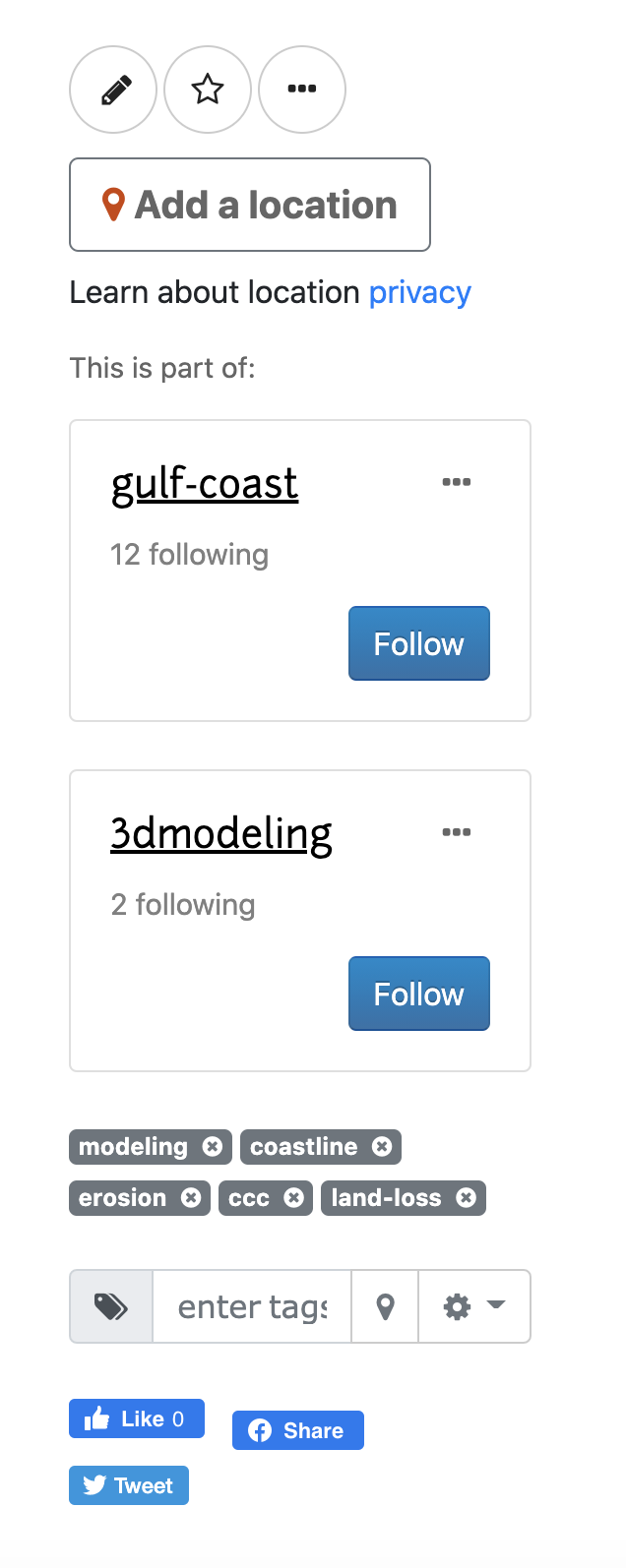
Have opened a issue regarding this - https://github.com/publiclab/plots2/issues/8431. if you want, you can claim it and start working on it :)
Thanks!
grvsachdeva
on 27 Sep 2020
That's right, thank you @gauravano -- moving over to #8431 then! Thanks all!
 jywarren
on 11 Oct 2020
jywarren
on 11 Oct 2020
Related issues
![first-timers[bot] picture](https://avatars.githubusercontent.com/in/4832?v=4&s=40) first-timers[bot]
·
3Comments
first-timers[bot]
·
3Comments
 noi5e
·
3Comments
noi5e
·
3Comments
 RuthNjeri
·
3Comments
grvsachdeva
·
3Comments
grvsachdeva
·
3Comments
RuthNjeri
·
3Comments
grvsachdeva
·
3Comments
grvsachdeva
·
3Comments