Plots2: Link login modal to 'Ask related question'
Hi, this is a first-timers-only issue built off #4132 . This means we've worked to make it more legible to folks who either haven't contributed to our codebase before, or even folks who haven't contributed to open source before.
If that's you, we're interested in helping you take the first step and can answer questions and help you out as you do. Note that we're especially interested in contributions from people from groups underrepresented in free and open source software!
We know that the process of creating a pull request is the biggest barrier for new contributors. This issue is for you 💝
If you have contributed before, consider leaving this one for someone new, and looking through our general help wanted issues. Thanks!
🤔 What you will need to know.
Nothing. This issue is meant to welcome you to Open Source :) We are happy to walk you through the process.
📋 Step by Step
[ ] 🙋 Claim this issue: Comment below. If someone else has claimed it, ask if they've opened a pull request already and if they're stuck -- maybe you can help them solve a problem or move it along!
[ ] 📝 Update the file
app/views/sidebar/_question.html.erbin theplots2repository (press the little pen Icon) and edit the line as shown below.
See this page for some help in taking your first steps!
Below is a "diff" showing in red (and a -) which lines to remove, and in green (and a +) which lines to add:
- <a rel="tooltip" title="Ask question<% if @tagnames %> about <%= (@tagnames.uniq.collect {|x| x.gsub(/[\w-]+:/, '') }).join(',') %><% end %>" data-placement="bottom" href="/post<%= '?tags=' + @tagnames.uniq.join(',') if @tagnames %>&template=question&redirect=question" class="btn btn-primary btn-lg btn-block"><i class="fa fa-question-circle fa-white"></i> Ask related question »</a>
+ <a rel="tooltip" title="Ask question<% if @tagnames %> about <%= (@tagnames.uniq.collect {|x| x.gsub(/[\w-]+:/, '') }).join(',') %><% end %>" data-placement="bottom" href="/post<%= '?tags=' + @tagnames.uniq.join(',') if @tagnames %>&template=question&redirect=question" class="btn btn-primary btn-lg btn-block requireLogin"><i class="fa fa-question-circle fa-white"></i> Ask related question »</a>
[ ] 💾 Commit your changes
[ ] 🔀 Start a Pull Request. There are two ways how you can start a pull request:
If you are familiar with the terminal or would like to learn it, here is a great tutorial on how to send a pull request using the terminal.
You can also edit files directly in your browser and open a pull request from there.
- [ ] 🏁 Done Ask in comments for a review :)
🤔❓ Questions?
Leave a comment below!
Is someone else already working on this?
We encourage you to link to this issue by mentioning the issue # in your pull request, so we can see if someone's already started on it. If someone seem stuck, offer them some help! Otherwise, take a look at some other issues you can help with. Thanks!
 oorjitchowdhary
All 9 comments
I'll do this one! Thank you
 londonolson
on 29 Dec 2018
londonolson
on 29 Dec 2018
Thanks @londonolson!
 grvsachdeva
on 30 Dec 2018
grvsachdeva
on 30 Dec 2018
Thanks @londonolson!
I think I completed it but let me know if I messed up. This is my first time working with github for anything beyond downloading an apk once. I want to get to the point of contributing a ton to open source projects.
londonolson
on 30 Dec 2018
Hi @londonolson.. Open up a pull request to show us your changes..
If you've any doubts.. Ping anyone of us
Welcome to Github and Public Lab!
oorjitchowdhary
on 30 Dec 2018
Hi @londonolson.. Open up a pull request to show us your changes..
If you've any doubts.. Ping anyone of usWelcome to Github and Public Lab!
I chose publiclab/plots2 to as the base and londonolson/plots2 as the head fork and it says that publiclab:master is up to date with all commits from londonolson:master. Am I doing something wrong with that? Thank you for being so understanding of a beginner
londonolson
on 30 Dec 2018
Oh I see..
So you where have you made the changes? If you've created a new branch for the changes, then keep the head fork as londonolson/plots2:branch_name..
If you haven't created any branches and your master is up to date.. Then it means you haven't done the changes or the changes aren't pushed to the Github repository..
Just tell me where have you made the changes? On the website directly? Or through the terminal?
I'll guide you from there
oorjitchowdhary
on 30 Dec 2018
Oh I see..
So you where have you made the changes? If you've created a new branch for the changes, then keep the head fork as londonolson/plots2:branch_name..If you haven't created any branches and your master is up to date.. Then it means you haven't done the changes or the changes aren't pushed to the Github repository..
Just tell me where have you made the changes? On the website directly? Or through the terminal?
I'll guide you from there
I clicked the pen icon and made the changes that way. Following the "Step by Step" on this page. On the website directly.
londonolson
on 30 Dec 2018
Okay..
So
- click the pen icon..
- do the changes as mentioned here
- navigate down to the button
propose file changeand press that - It'll open a page
comparing changes - If you've changed anything, it'll show something like this
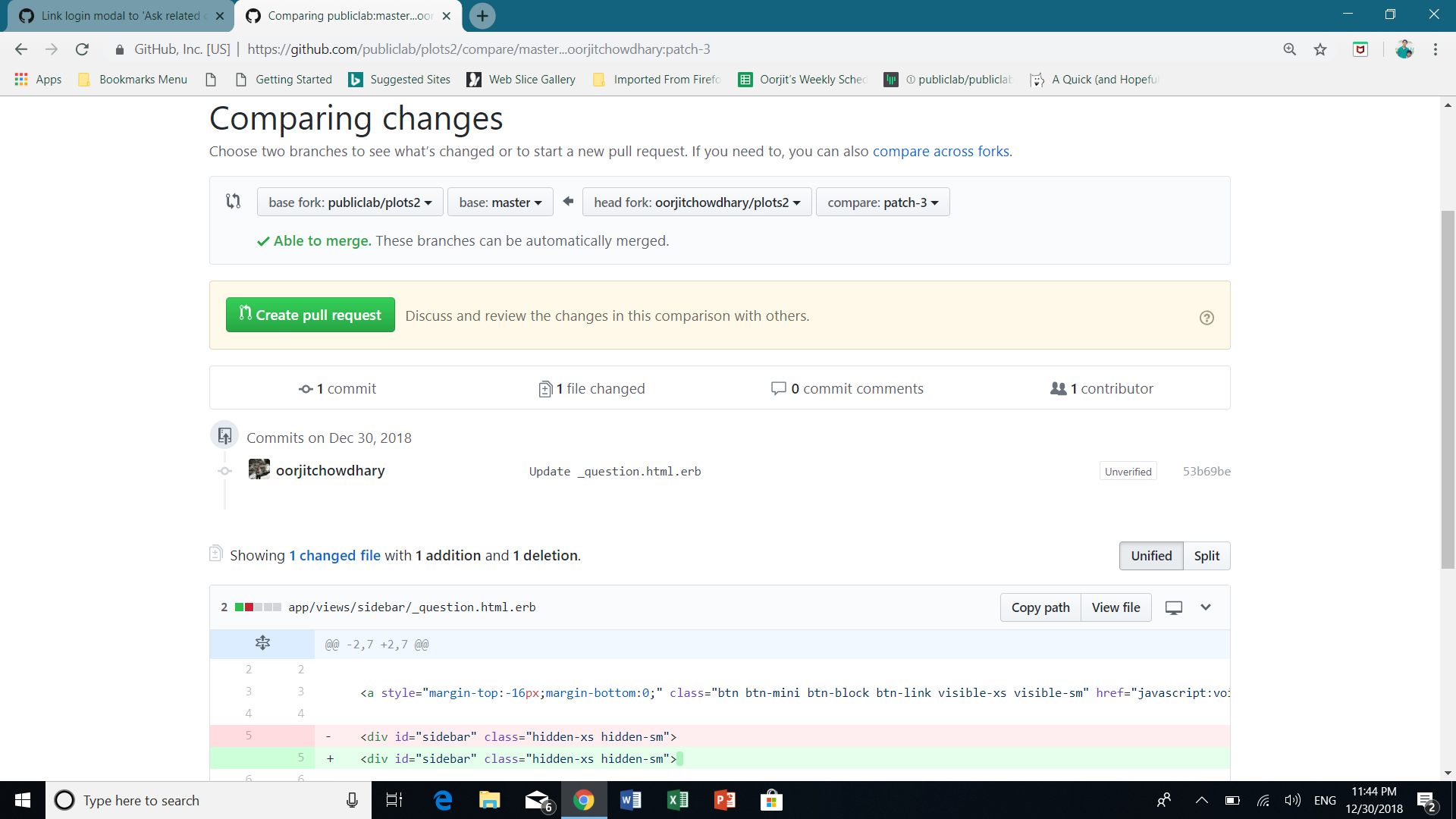
- review your changes and click on
create pull request
Through this, you should be able to open up a pull request successfully!
oorjitchowdhary
on 30 Dec 2018
Okay..
So
- click the pen icon..
- do the changes as mentioned here
- navigate down to the button
propose file changeand press that- It'll open a page
comparing changes- If you've changed anything, it'll show something like this
- review your changes and click on
create pull requestThrough this, you should be able to open up a pull request successfully!
Thank you! Last time I missed step 6 but I think I did it right this time. Here's a link to my pull request.
https://github.com/publiclab/plots2/pull/4466
londonolson
on 30 Dec 2018
Related issues
 bronwen9
·
3Comments
grvsachdeva
·
3Comments
bronwen9
·
3Comments
grvsachdeva
·
3Comments
 noi5e
·
3Comments
noi5e
·
3Comments
 keshavsethi
·
3Comments
keshavsethi
·
3Comments
keshavsethi
·
3Comments
keshavsethi
·
3Comments
Most helpful comment
I'll do this one! Thank you