Plots2: Missing comment icon in blog page
Hi, this is a first-timers-only issue. This means we've worked to make it more legible to folks who either haven't contributed to our codebase before, or even folks who haven't contributed to open source before.
If that's you, we're interested in helping you take the first step and can answer questions and help you out as you do. Note that we're especially interested in contributions from people from groups underrepresented in free and open source software!
We know that the process of creating a pull request is the biggest barrier for new contributors. This issue is for you :gift_heart:
If you have contributed before, consider leaving this one for someone new, and looking through our general help wanted issues. Thanks!
:thinking: What you will need to know.
Nothing. This issue is meant to welcome you to Open Source :) We are happy to walk you through the process.
This will added comment icon in blog page which is not present. For reference I have provided the URL where the issue is and screen-shot below.
URL https://publiclab.org/blog
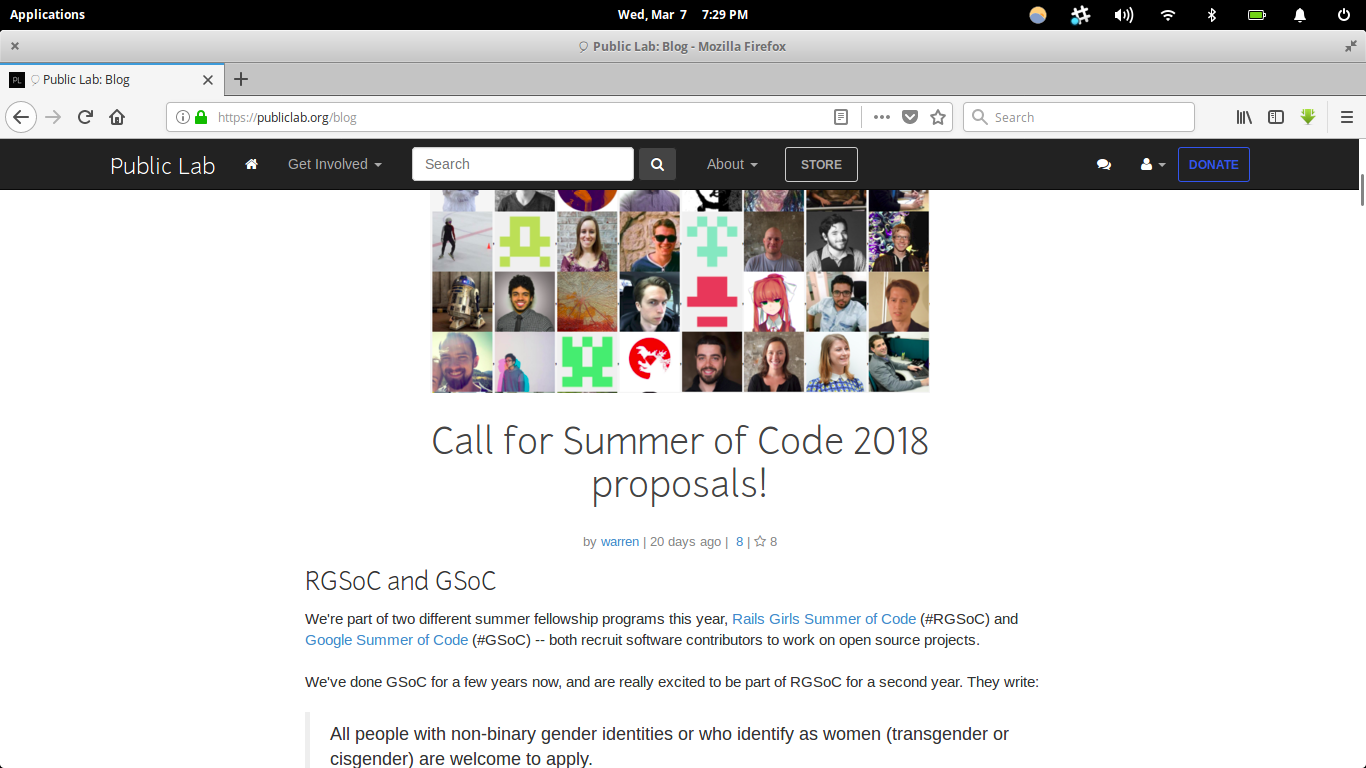
How to solve for new contributors
<i style="color:#888;" class="fa fa-comment-alt"></i>
Just replace alt with o from app/views/tag/blog.html.erb file in the codebase and this will fix the issue.
:clipboard: Step by Step
[ ] :raising_hand_woman: Claim this issue: Comment below. If someone else has claimed it, ask if they've opened a pull request already and if they're stuck -- maybe you can help them solve a problem or move it along!
[ ] :memo: Update the file app/views/tag/blog.html.erb in the plots2 repository so as to do the required changes.
See this page for some help in taking your first steps!
[ ] :floppy_disk: Commit your changes
[ ] :twisted_rightwards_arrows: Start a Pull Request. There are two ways how you can start a pull request:
If you are familiar with the terminal or would like to learn it, here is a great tutorial on how to send a pull request using the terminal.
You can also edit files directly in your browser and open a pull request from there.
- [ ] :checkered_flag: Done Ask in comments for a review :)
:thinking: :question: Questions?
Leave a comment below!
Is someone else already working on this?
We encourage you to link to this issue by mentioning the issue # in your pull request, so we can see if someone's already started on it. If someone seem stuck, offer them some help! Otherwise, take a look at some other issues you can help with. Thanks!
(This issue was created by @amitsin6h)
 amitsin6h
All 14 comments
hi @amitsin6h please see the first-timer-issue template we follow and edit accordingly.For reference see issues #2429 .Thanks.
 grvsachdeva
on 7 Mar 2018
grvsachdeva
on 7 Mar 2018
@Gauravano done. Thanks :+1:
amitsin6h
on 7 Mar 2018
Awesome !!!
grvsachdeva
on 7 Mar 2018
I would like to work this issue. Thanks.
 oulongwen
on 7 Mar 2018
oulongwen
on 7 Mar 2018
That would be great
On Mar 7, 2018 10:04 PM, "oulongwen" notifications@github.com wrote:
I would like to work this issue. Thanks.
—
You are receiving this because you are subscribed to this thread.
Reply to this email directly, view it on GitHub
https://github.com/publiclab/plots2/issues/2437#issuecomment-371198010,
or mute the thread
https://github.com/notifications/unsubscribe-auth/AVkX0a04r_DDadPdGRR0LlIWecJJgC9eks5tcAv8gaJpZM4Sggi4
.
 ViditChitkara
on 7 Mar 2018
ViditChitkara
on 7 Mar 2018
@oulongwen great, let me know if you need any help
amitsin6h
on 7 Mar 2018
Hi this is great everyone! @amitsin6h i'll add you to reviewers group if you'd like! :-) 👍
 jywarren
on 7 Mar 2018
jywarren
on 7 Mar 2018
@jywarren sure :+1:
amitsin6h
on 7 Mar 2018
Hi @amitsin6h I submitted my PR and it failed the required tests. Could you please take a look and let me know where I did wrong? Thanks.
oulongwen
on 7 Mar 2018
hello @amitsin6h ! I'd like to work on this issue
 RajuKalidindi
on 10 Mar 2018
RajuKalidindi
on 10 Mar 2018
@oulongwen are you working on it or I assign it to @RajuKalidindi
amitsin6h
on 10 Mar 2018
@amitsin6h I have already submitted a PR #2442 for this issue. Somehow the test would not pass. I am waiting for further guidance on how to fix it. Thanks.
oulongwen
on 10 Mar 2018
@oulongwen Just close the PR that you have made and try to submit new PR you wont face any test
failed issues.
Go for it :+1:
On Mar 10, 2018 5:56 PM, "oulongwen" notifications@github.com wrote:
@amitsin6h https://github.com/amitsin6h I have already submitted a PR
2442 https://github.com/publiclab/plots2/pull/2442 for this issue.
Somehow the test would not pass. I am waiting for further guidance on how
to fix it. Thanks.—
You are receiving this because you were mentioned.
Reply to this email directly, view it on GitHub
https://github.com/publiclab/plots2/issues/2437#issuecomment-372026014,
or mute the thread
https://github.com/notifications/unsubscribe-auth/AMTuakubjTNLy5Y4_vAKjbictOQk_6uHks5tc8aIgaJpZM4Sggi4
.
amitsin6h
on 10 Mar 2018
@amitsin6h The problem has already been solved and all the tests are passed. Thanks for your help.:thumbsup:
oulongwen
on 10 Mar 2018
Related issues
grvsachdeva
·
3Comments
 milaaraujo
·
3Comments
grvsachdeva
·
3Comments
milaaraujo
·
3Comments
grvsachdeva
·
3Comments
![first-timers[bot] picture](https://avatars.githubusercontent.com/in/4832?v=4&s=40) first-timers[bot]
·
3Comments
first-timers[bot]
·
3Comments
 divyabaid16
·
3Comments
divyabaid16
·
3Comments