Plots2: Confusion in icons of answers and comments in publiclab.org/questions
Hi, this is a first-timers-only issue. This means we've worked to make it more legible to folks who either haven't contributed to our codebase before, or even folks who haven't contributed to open source before.
If that's you, we're interested in helping you take the first step and can answer questions and help you out as you do. Note that we're especially interested in contributions from people from groups underrepresented in free and open source software!
We know that the process of creating a pull request is the biggest barrier for new contributors. This issue is for you 💝
If you have contributed before, consider leaving this one for someone new, and looking through our general help wanted issues. Thanks!
🤔 What you will need to know.
Nothing. This issue is meant to welcome you to Open Source :) We are happy to walk you through the process.
📋 Step by Step
[ ] 🙋 Claim this issue: Comment below. If someone else has claimed it, ask if they've opened a pull request already and if they're stuck -- maybe you can help them solve a problem or move it along!
[ ] 📝 Update the file https://github.com/publiclab/plots2/blob/master/app/views/dashboard/_node_meta.html.erb in the plots2 repository (press the little pen Icon) and edit the line as shown below. See this page for some help in taking your first steps!
[ ] 💾 Commit your changes
[ ] 🔀 Start a Pull Request. There are two ways how you can start a pull request:
PROBLEM :
There is a confusion between the icons of answers and comments of a question as they are similar - looking .
SOLUTION :
On hovering the icon , a tooltip should be shown (as in image)

STEPS :
This line should be replaced with :
<a href="<%= node.path(:question) %>#answers" title="Answers"><i class="fa fa-comments-o" style="color: #DAA583;"></i> <%= node.answers.length %></a>
Similarly for other icons can be done .
PublicLab link :
https://publiclab.org/questions
Thank you!
Your help makes Public Lab better! We deeply appreciate your helping refine and improve this site.
To learn how to write really great issues, which increases the chances they'll be resolved, see:
https://publiclab.org/wiki/developers#Contributing+for+non-coders
 sagarpreet-chadha
All 15 comments
Looks great! I've marked it as a first-timers-only issue and let's keep an ear out for people asking to work on it! Thanks!
 jywarren
on 27 Oct 2017
jywarren
on 27 Oct 2017
Hello! Please could I claim this issue? 🖐 I can take a look this evening!
 mbrien12
on 27 Oct 2017
mbrien12
on 27 Oct 2017
Yes @mbrien12...you may work on it ! Thank you !
sagarpreet-chadha
on 27 Oct 2017
Hi @sagarpreet-chadha I have been able to setup fine and have local-host running, but when I created a new branch to make the change in I get an error which I can't figure it out. When I go back to master, it runs again but I presume best to make change into a new branch?
Do you have any suggestions of what I can try? Here's the error...
 E 2017-10-27 22:22:43.2314 25267/T5 age/Cor/SecurityUpdateChecker.h:362 ]: Security update check failed: Problem with the SSL CA cert (path? access rights?) while connecting to https://securitycheck.phusionpassenger.com:443/v1/check.json ; this might happen if the nss backend is installed for libcurl instead of GnuTLS or OpenSSL. If the problem persists, you can also try upgrading or reinstalling Passenger (next check in 24 hours)
[ E 2017-10-27 22:22:43.3981 25267/T5 Crypto.cpp:988 ]: Finding Passenger Cert failed: The specified item could not be found in the keychain.
App 25282 stdout:
Connecting to database specified by database.yml
App 25282 stdout: Not running mysql today.
App 25296 stdout:


Started HEAD "/" for 127.0.0.1 at 2017-10-27 22:22:49 -0200
Processing by HomeController#home as HTML
Completed 500 Internal Server Error in 5.2ms

ArgumentError (undefined class/module Node):
  app/controllers/home_controller.rb:12:in `home'
Resolved 👆 by re-installing Passenger in the branch, but getting an error when try and push the change.
I've tried...
git push --set-upstream origin master
git push --set-upstream origin michelle/icons-tooltip-1740
git push origin master
And get message...
fatal: unable to access 'https://github.com/publiclab/plots2.git/': The requested URL returned error: 403
How should I push it?
mbrien12
on 28 Oct 2017
Ah, maybe remove origin? That's a reference to the main publiclab
repository, not your copy. But I'm not sure about the syntax for
michelle/... Is michelle how you've named your remote fork?
On Oct 27, 2017 8:46 PM, "Michelle Brien" notifications@github.com wrote:
Resolved 👆 by re-installing Passenger in the branch, but getting an error
when try and push.
I've tried...
git push --set-upstream origin master
git push --set-upstream origin michelle/icons-tooltip-1740
git push origin master
And get message...
fatal: unable to access 'https://github.com/publiclab/plots2.git/': The
requested URL returned error: 403
How should I push it?
—
You are receiving this because you commented.
Reply to this email directly, view it on GitHub
https://github.com/publiclab/plots2/issues/1740#issuecomment-340127477,
or mute the thread
https://github.com/notifications/unsubscribe-auth/AABfJ3xrIYUei4wfwK5OGs8co83F16r4ks5swnlJgaJpZM4QJeNV
.
jywarren
on 28 Oct 2017
I created a new branch from master called michelle/icons-tooltip-1740, made the change there and now trying to push the new branch up so can do a PR. Have tried removing origin and stack overflow suggestions on push commands but keep getting...
remote: Permission to publiclab/plots2.git denied to mbrien12.
Do I need specific permission?
Also are there any particular PR conventions I should follow? I couldn't see any on the Readme so went with best guess of new branch named with my name, change and issue number.
Thanks for your help with this! Will keep trying in the meantime
mbrien12
on 28 Oct 2017
I have been looking at this again tonight but still no luck.
To summarise steps taken:
- Setup machine as per readme steps
- Made change in new local branch called "michelle/icons-tooltip-1740"
- Then keep getting the same error when I try and push this branch to the repo in order to do a PR. Following syntax of
git push <remotename> <branchname>as recommended here https://help.github.com/articles/pushing-to-a-remote/
The error:
remote: Permission to publiclab/plots2.git denied to mbrien12.
I have double checked with remote -v and it is pointing to this repo. I think am doing something very basic wrong, any ideas on what could be?
mbrien12
on 14 Nov 2017
Hi, @mbrien12 -- i'm so sorry for my slow response; we had an event two weeks ago and then I've been in meetings and travel since, so I'm just catching up now.
I believe the error is because you're pushing to @publiclab's branch, and not your own. If you push using:
git push https://github.com/mbrien12/plots2 your-branch-name
you'll open a new remote branch for yourself, then you can go to https://github.com/publiclab/plots2 and it'll prompt you to open a new PR. You can also set up your local Git set up to use an alias for https://github.com/mbrien12/plots2 - such as "origin" -- here's some documentation: https://help.github.com/articles/adding-a-remote/ (it's fine to push to the URL instead of a named branch, but naming your branch can just make the command shorter and easier to type).
Hope that helps, and thanks SO MUCH for your help on this issue; we're really grateful for your assistance.
jywarren
on 14 Nov 2017
I think perhaps originally you may have cloned @publiclab's remote branch, where if you do this for another project, you might want to fork it first and then clone from your own remote branch. Make sense?
jywarren
on 14 Nov 2017
There's also no "correct" process here and are multiple ways to approach branch and remote setup. But this is just how I usually do it so I hope that's helpful!
jywarren
on 14 Nov 2017
Thanks for your help, I started again by forking it and I've now been able to to push properly and it let's me submit a PR. 🎉
However, have run into another problem now! After running the raker there are quite a few errors. I thought at first it was because the Gemfile had seemed to update some of the version, so reverted back and still have same errors. E.g.

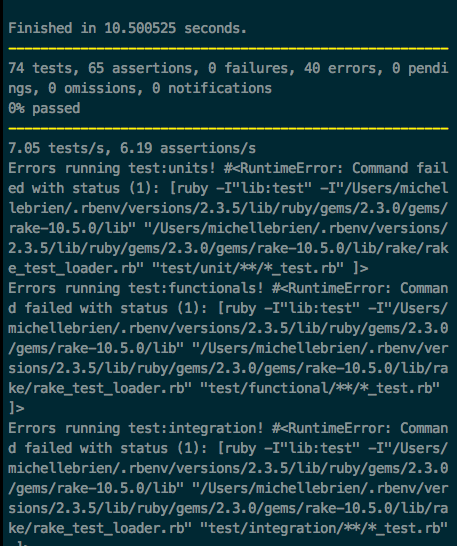
My branch is here https://github.com/mbrien12/plots2/tree/michelle/icons-1740 but haven't PR'd yet as says rake needs to pass completely. Any suggestions on how to resolve?
mbrien12
on 15 Nov 2017
Yes, sorry for that -- we have a fix going in soon, but this is due to config/sunspot.yml having disabled: false set -- if you set it to disabled: true for tests, those errors will go away. Thank you!!!
jywarren
on 15 Nov 2017
Ok PR here https://github.com/publiclab/plots2/pull/1778 let me know if any changes needed?
mbrien12
on 15 Nov 2017
fantastic -- we'll let the tests run and i'll check in soon! Thank you so
much!!!
On Tue, Nov 14, 2017 at 4:04 PM, Michelle Brien notifications@github.com
wrote:
Ok PR here #1778 https://github.com/publiclab/plots2/pull/1778 let me
know if any changes needed?—
You are receiving this because you commented.
Reply to this email directly, view it on GitHub
https://github.com/publiclab/plots2/issues/1740#issuecomment-344441871,
or mute the thread
https://github.com/notifications/unsubscribe-auth/AABfJ-LLHun0l0gyHgyCSNw_kf2WK2c3ks5s2ip6gaJpZM4QJeNV
.
jywarren
on 15 Nov 2017
Related issues
 divyabaid16
·
3Comments
divyabaid16
·
3Comments
 ebarry
·
3Comments
ebarry
·
3Comments
 keshavsethi
·
3Comments
keshavsethi
·
3Comments
keshavsethi
·
3Comments
keshavsethi
·
3Comments
 milaaraujo
·
3Comments
milaaraujo
·
3Comments