Plots.jl: Installation of package plots fails
All 36 comments
Seems like a https://github.com/JuliaIO/FFMPEG.jl issue.
cc: @asinghvi17
 daschw
on 11 Sep 2019
daschw
on 11 Sep 2019
Ok, but how to fix it?
 rolfdstoll
on 11 Sep 2019
rolfdstoll
on 11 Sep 2019
@daschw could you translate the error thrown by Download? Something to do with a certificate? Might have to retry the build.
From google translate, it looks like the lock function could not find a certificate. This looks more and more like a curl issue...if you can, try setting ENV["LD_LIBRARY_PATH"] = "" (to use system curl)?
 asinghvi17
on 11 Sep 2019
asinghvi17
on 11 Sep 2019
Not really, I was looking for the error code on google, and found e.g. https://stackoverflow.com/questions/54938026/curl-unknown-error-0x80092012-the-revocation-function-was-unable-to-check-r
Ah, by translate you really meant translate to English. :grin: I was reading it rather as if I could make sense of it, sorry. But the translation is given in the SO question.
daschw
on 11 Sep 2019
The same happens to me.

I already tried:
] build FFMPEG and restart Julia and try again
but it didn’t work, not even installing FFMPEG.jl sepparately.
 aerdely
on 14 Sep 2019
aerdely
on 14 Sep 2019
What's the output of ]status FFMPEG?
asinghvi17
on 15 Sep 2019
@asinghvi17
pkg> status FFMPEG
Status C:\Users\aerde\.juliapro\JuliaPro_v1.2.0-1\environments\v1.2\Project.toml
[c87230d0] FFMPEG v0.2.2
aerdely
on 15 Sep 2019
 mkborregaard
on 18 Sep 2019
mkborregaard
on 18 Sep 2019
@daschw any idea why we get this? Plots should not try to install ffmpeg I believe? (or it should, but it doesn't). Is there some change in the build step that calls on our tests?
mkborregaard
on 18 Sep 2019
I think after moving FFMPEG to BinaryProvider, we decided it's ok to depend on it...
Can you try: add FFMPEG#sd-download; build FFMPEG
 SimonDanisch
on 18 Sep 2019
SimonDanisch
on 18 Sep 2019
Ah sorry, haven't been following the developments closely enough then.
mkborregaard
on 18 Sep 2019
I think after moving FFMPEG to BinaryProvider, we decided it's ok to depend on it...
Can you try:add FFMPEG#sd-download; build FFMPEG
Thanks, that helped. I could install plots now
rolfdstoll
on 18 Sep 2019
This fix is on the newest tagged version... If that version doesn't work, there is an additional improvement on FFMPEG#master
SimonDanisch
on 26 Sep 2019
I think after moving FFMPEG to BinaryProvider, we decided it's ok to depend on it...
Can you try:add FFMPEG#sd-download; build FFMPEG
I had exactly the same problem as aerdely (screenshot with precompiling Plots), I tried and this happened:

Any idea what should I do here? I'm stuck on it for a few hours at least, I'm new to Julia. Thank you in advance.
 TeeKay18
on 5 Oct 2019
TeeKay18
on 5 Oct 2019
The branch sd-download doesn't exist anymore after PR https://github.com/JuliaIO/FFMPEG.jl/pull/16 has been merged, use master instead.
 giordano
on 5 Oct 2019
giordano
on 5 Oct 2019
Didn't work either.
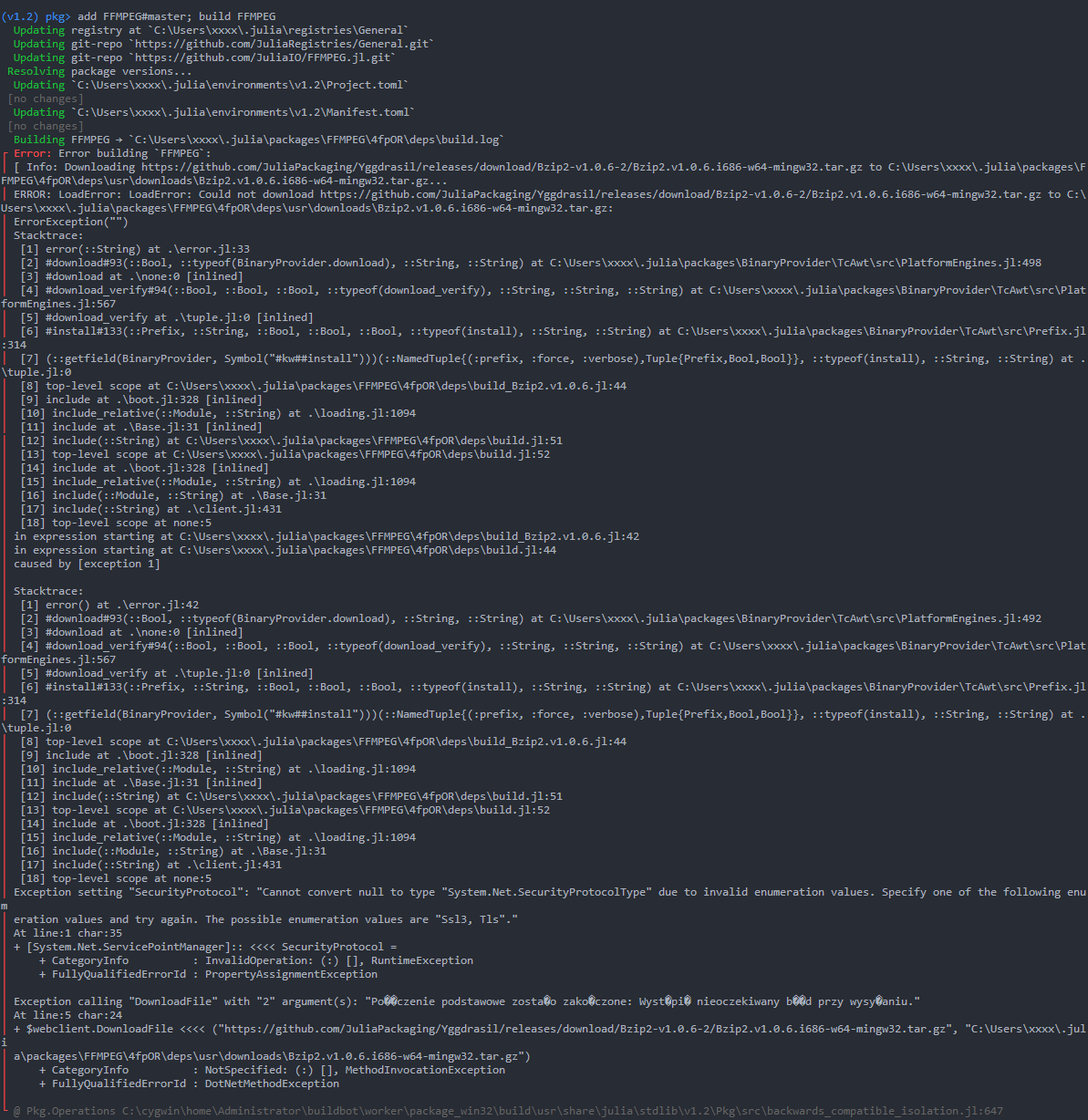
Edit: Down where it's written "Połączenie podstawowe zostało zakończone: Wystąpił nieoczekiwany błąd przy wysyłaniu", it means sth like "Basic connection was ended: An unexpected error happened during the sending process."
TeeKay18
on 5 Oct 2019
The error you get at the end looks like this: https://stackoverflow.com/questions/49140930/powershell-script-fails-during-remote-execution-but-works-locally
giordano
on 5 Oct 2019
See also this thread on discourse: https://discourse.julialang.org/t/problems-with-codeczlib/10124
giordano
on 5 Oct 2019
After updating Powershell to version 5.1 from 2.0 (I'm on Windows 7 SP1, 32 bit), I got exactly the same error as user kongdd in this topic: (his log under writing "Thanks in advance!")
https://github.com/JuliaIO/FFMPEG.jl/issues/12
What seems to have finally done the job is this:
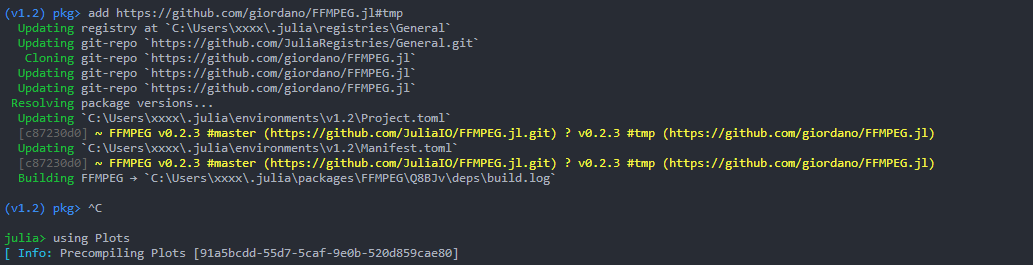
"using Plots" doesn't make an error anymore.
For now, thanks very much for your help @giordano :) If anything wrong happened later I will ask but at the moment everything's fine.
TeeKay18
on 5 Oct 2019
I don't see any error in this screenshot. Edit: sorry, I misread the post, now I see that it works for you with my fork!
giordano
on 5 Oct 2019
Yes, it definitely works with that fork, you've done a great job. I've also successfully made my first simple plot in Julia and that was my main goal here :)
TeeKay18
on 5 Oct 2019
@giordano 's fork worked for me, also.
aerdely
on 6 Oct 2019
I still have the problem. Adding everything master doesn't work
Edit:
]add https://github.com/giordano/FFMPEG.jl#tmp
works!
 aminya
on 13 Oct 2019
aminya
on 13 Oct 2019
It still doesn't work for me, even after ]add https://github.com/giordano/FFMPEG.jl#tmp . Any solutions?
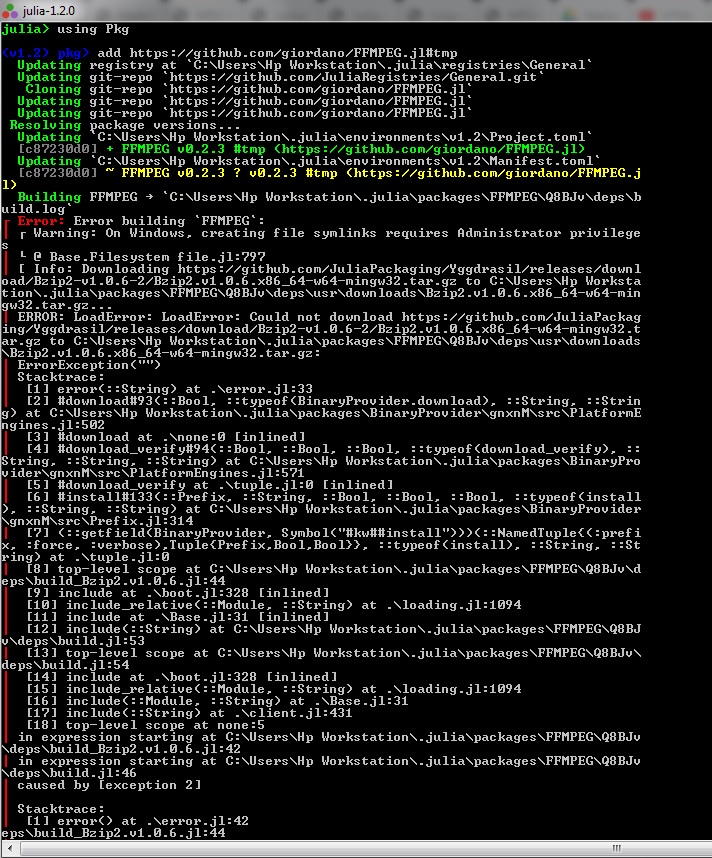
 VasilijeBursac
on 29 Oct 2019
VasilijeBursac
on 29 Oct 2019
@VasilijeBursac I should have fixed it. Try to update:
]update
@giordano Thank you! It still doesn't work. If I have done something wrong, tell me, because I started using Julia yesterday, so I am still getting used to it.
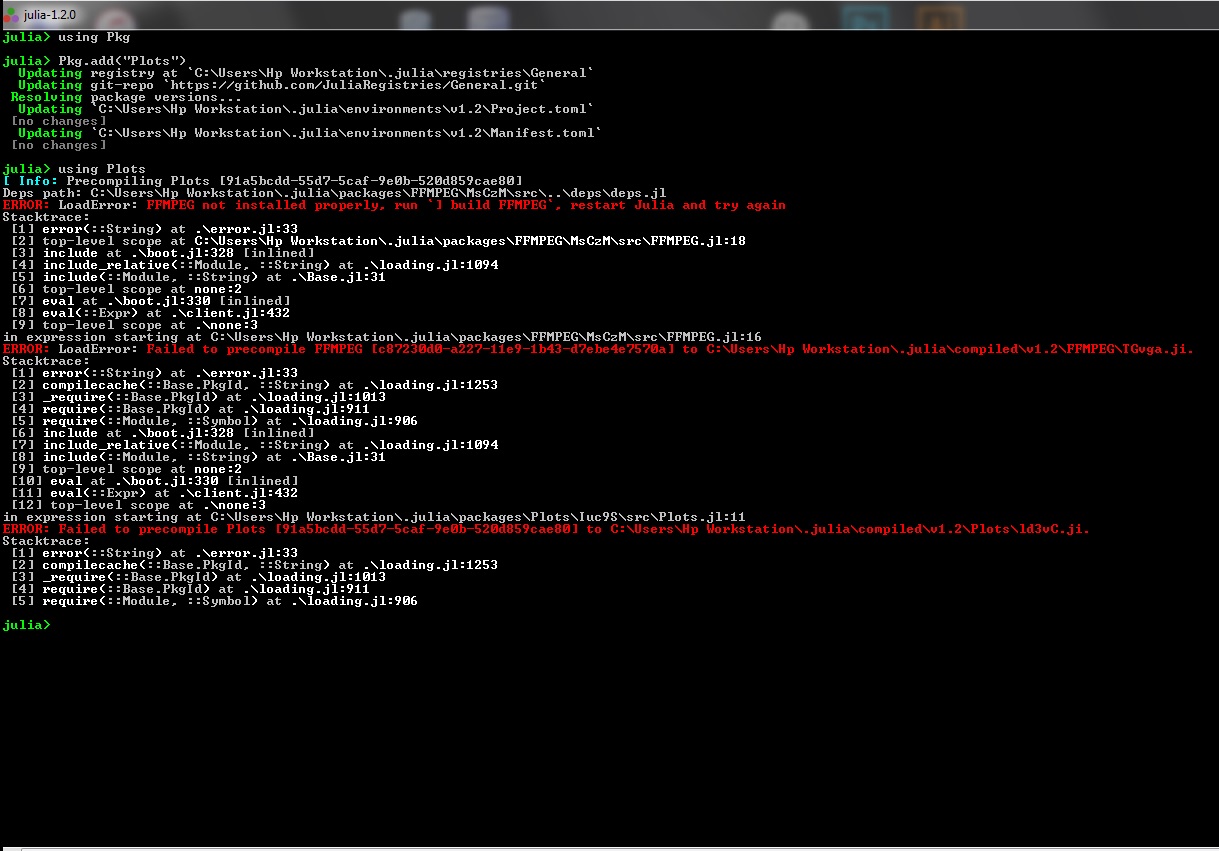
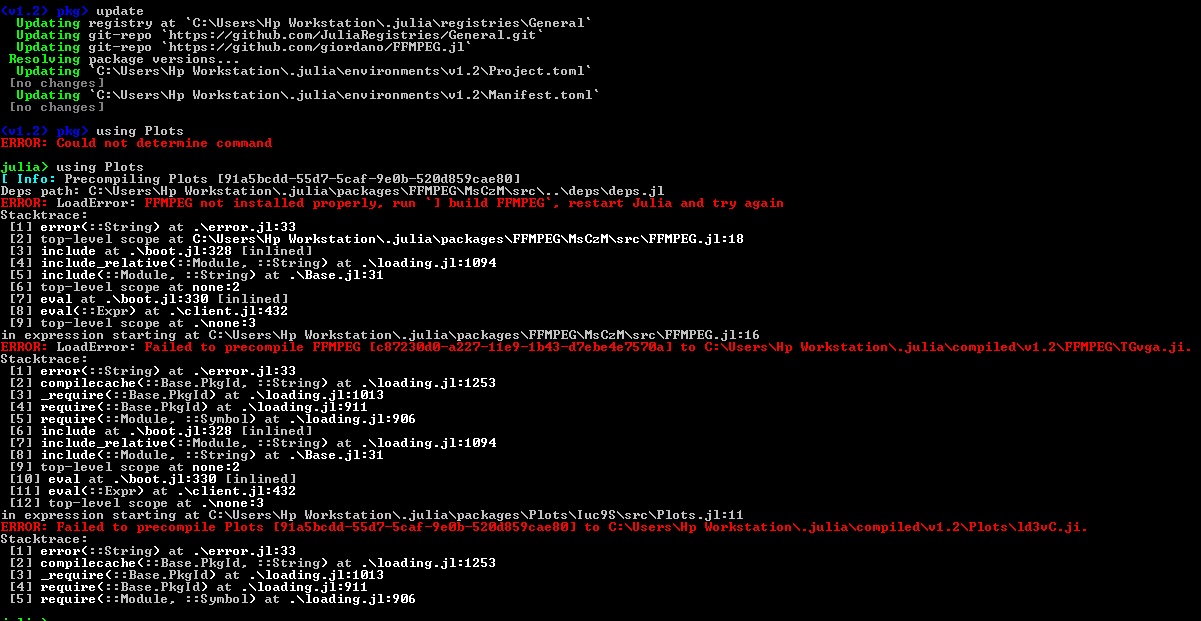
VasilijeBursac
on 29 Oct 2019
It's all right 🙂 In the package manager mode (the one you enter with ], run the command
build FFMPEG
I'm sorry about this mess, we're in the process of improving user experience about installing binary dependencies like ffmpeg, this should get much smoother in the next few weeks
giordano
on 29 Oct 2019
@giordano No problem, I completely understand you.
I'm sorry for bothering you, but I keep getting the error...
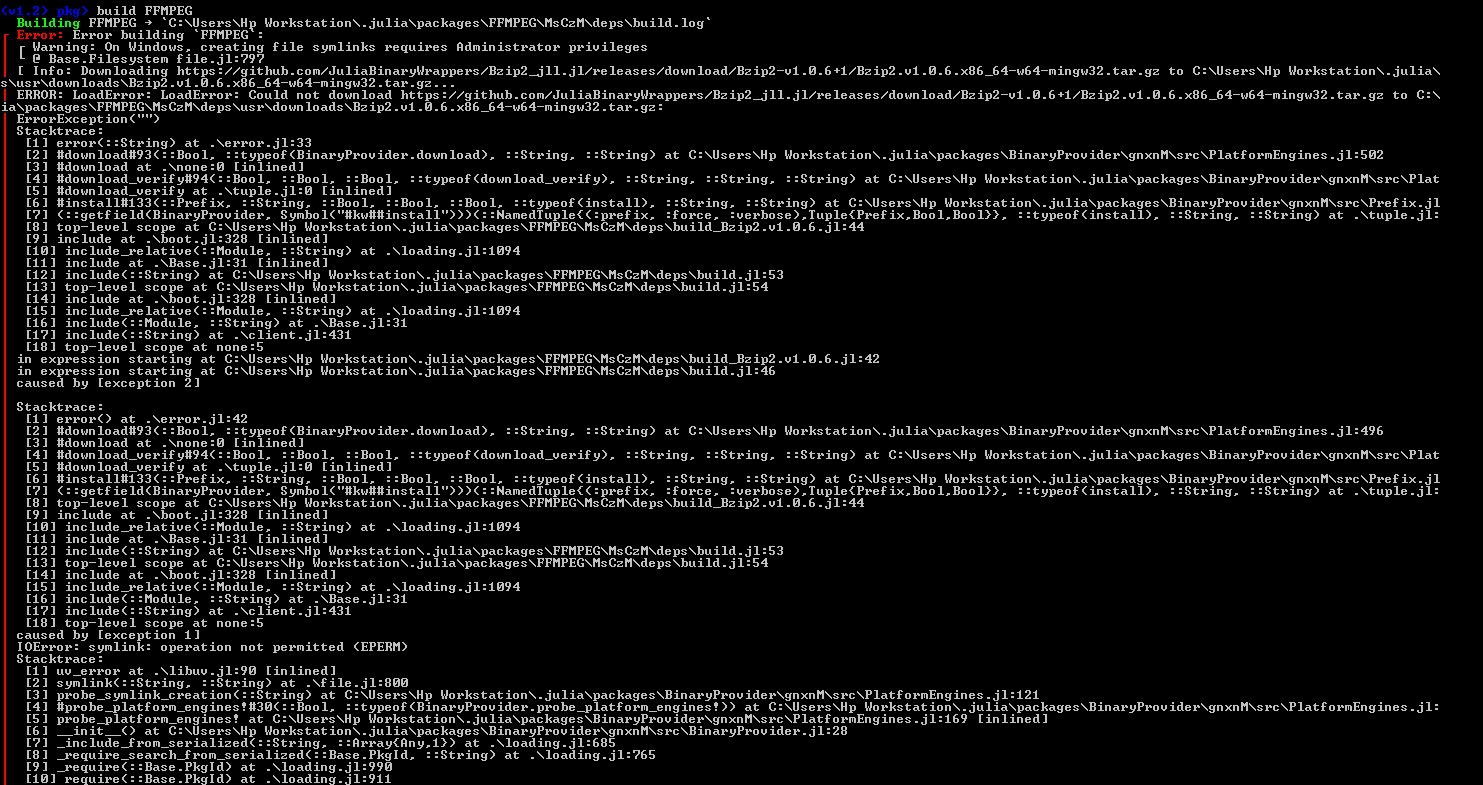
VasilijeBursac
on 29 Oct 2019
Could you please copy here the error message rather than posting screenshots? It makes it easier for use to help you having the plain-text (for example to try and see what's wrong with the download)
giordano
on 29 Oct 2019
Sure! Sorry
Error: Error building `FFMPEG`:
┌ Warning: On Windows, creating file symlinks requires Administrator privileges
└ @ Base.Filesystem file.jl:797
[ Info: Downloading https://github.com/JuliaBinaryWrappers/Bzip2_jll.jl/releases/download/Bzip2-v1.0.6+1/Bzip2.v1.0.6.x86_64-w64-mingw32.tar.gz to C:\Users\Hp Workstation\.julia\
usr\downloads\Bzip2.v1.0.6.x86_64-w64-mingw32.tar.gz...
ERROR: LoadError: LoadError: Could not download https://github.com/JuliaBinaryWrappers/Bzip2_jll.jl/releases/download/Bzip2-v1.0.6+1/Bzip2.v1.0.6.x86_64-w64-mingw32.tar.gz to C:\
\packages\FFMPEG\MsCzM\deps\usr\downloads\Bzip2.v1.0.6.x86_64-w64-mingw32.tar.gz:
ErrorException("")
Stacktrace:
 [1] error(::String) at .\error.jl:33
 [2] #download#93(::Bool, ::typeof(BinaryProvider.download), ::String, ::String) at C:\Users\Hp Workstation\.julia\packages\BinaryProvider\gnxnM\src\PlatformEngines.jl:502
 [3] #download at .\none:0 [inlined]
 [4] #download_verify#94(::Bool, ::Bool, ::Bool, ::typeof(download_verify), ::String, ::String, ::String) at C:\Users\Hp Workstation\.julia\packages\BinaryProvider\gnxnM\src\Plat
 [5] #download_verify at .\tuple.jl:0 [inlined]
 [6] #install#133(::Prefix, ::String, ::Bool, ::Bool, ::Bool, ::typeof(install), ::String, ::String) at C:\Users\Hp Workstation\.julia\packages\BinaryProvider\gnxnM\src\Prefix.jl
 [7] (::getfield(BinaryProvider, Symbol("#kw##install")))(::NamedTuple{(:prefix, :force, :verbose),Tuple{Prefix,Bool,Bool}}, ::typeof(install), ::String, ::String) at .\tuple.jl:
 [8] top-level scope at C:\Users\Hp Workstation\.julia\packages\FFMPEG\MsCzM\deps\build_Bzip2.v1.0.6.jl:44
 [9] include at .\boot.jl:328 [inlined]
 [10] include_relative(::Module, ::String) at .\loading.jl:1094
 [11] include at .\Base.jl:31 [inlined]
 [12] include(::String) at C:\Users\Hp Workstation\.julia\packages\FFMPEG\MsCzM\deps\build.jl:53
 [13] top-level scope at C:\Users\Hp Workstation\.julia\packages\FFMPEG\MsCzM\deps\build.jl:54
 [14] include at .\boot.jl:328 [inlined]
 [15] include_relative(::Module, ::String) at .\loading.jl:1094
 [16] include(::Module, ::String) at .\Base.jl:31
 [17] include(::String) at .\client.jl:431
 [18] top-level scope at none:5
in expression starting at C:\Users\Hp Workstation\.julia\packages\FFMPEG\MsCzM\deps\build_Bzip2.v1.0.6.jl:42
in expression starting at C:\Users\Hp Workstation\.julia\packages\FFMPEG\MsCzM\deps\build.jl:46
caused by [exception 2]

Stacktrace:
 [1] error() at .\error.jl:42
 [2] #download#93(::Bool, ::typeof(BinaryProvider.download), ::String, ::String) at C:\Users\Hp Workstation\.julia\packages\BinaryProvider\gnxnM\src\PlatformEngines.jl:496
 [3] #download at .\none:0 [inlined]
 [4] #download_verify#94(::Bool, ::Bool, ::Bool, ::typeof(download_verify), ::String, ::String, ::String) at C:\Users\Hp Workstation\.julia\packages\BinaryProvider\gnxnM\src\Plat
 [5] #download_verify at .\tuple.jl:0 [inlined]
 [6] #install#133(::Prefix, ::String, ::Bool, ::Bool, ::Bool, ::typeof(install), ::String, ::String) at C:\Users\Hp Workstation\.julia\packages\BinaryProvider\gnxnM\src\Prefix.jl
 [7] (::getfield(BinaryProvider, Symbol("#kw##install")))(::NamedTuple{(:prefix, :force, :verbose),Tuple{Prefix,Bool,Bool}}, ::typeof(install), ::String, ::String) at .\tuple.jl:
 [8] top-level scope at C:\Users\Hp Workstation\.julia\packages\FFMPEG\MsCzM\deps\build_Bzip2.v1.0.6.jl:44
 [9] include at .\boot.jl:328 [inlined]
 [10] include_relative(::Module, ::String) at .\loading.jl:1094
 [11] include at .\Base.jl:31 [inlined]
 [12] include(::String) at C:\Users\Hp Workstation\.julia\packages\FFMPEG\MsCzM\deps\build.jl:53
 [13] top-level scope at C:\Users\Hp Workstation\.julia\packages\FFMPEG\MsCzM\deps\build.jl:54
 [14] include at .\boot.jl:328 [inlined]
 [15] include_relative(::Module, ::String) at .\loading.jl:1094
 [16] include(::Module, ::String) at .\Base.jl:31
 [17] include(::String) at .\client.jl:431
 [18] top-level scope at none:5
caused by [exception 1]
IOError: symlink: operation not permitted (EPERM)
Stacktrace:
 [1] uv_error at .\libuv.jl:90 [inlined]
 [2] symlink(::String, ::String) at .\file.jl:800
 [3] probe_symlink_creation(::String) at C:\Users\Hp Workstation\.julia\packages\BinaryProvider\gnxnM\src\PlatformEngines.jl:121
 [4] #probe_platform_engines!#30(::Bool, ::typeof(BinaryProvider.probe_platform_engines!)) at C:\Users\Hp Workstation\.julia\packages\BinaryProvider\gnxnM\src\PlatformEngines.jl:
 [5] probe_platform_engines! at C:\Users\Hp Workstation\.julia\packages\BinaryProvider\gnxnM\src\PlatformEngines.jl:169 [inlined]
 [6] __init__() at C:\Users\Hp Workstation\.julia\packages\BinaryProvider\gnxnM\src\BinaryProvider.jl:28
 [7] _include_from_serialized(::String, ::Array{Any,1}) at .\loading.jl:685
 [8] _require_search_from_serialized(::Base.PkgId, ::String) at .\loading.jl:765
 [9] _require(::Base.PkgId) at .\loading.jl:990
 [10] require(::Base.PkgId) at .\loading.jl:911
 [11] require(::Module, ::Symbol) at .\loading.jl:906
 [12] include at .\boot.jl:328 [inlined]
 [13] include_relative(::Module, ::String) at .\loading.jl:1094
 [14] include(::Module, ::String) at .\Base.jl:31
 [15] include(::String) at .\client.jl:431
 [16] top-level scope at none:5
Exception setting "SecurityProtocol": "Cannot convert null to type "System.Net.SecurityProtocolType" due to invalid enumeration values. Specify one of the following enumeration v

ossible enumeration values are "Ssl3, Tls"."
At line:1 char:35
+ [System.Net.ServicePointManager]:: <<<< SecurityProtocol =
    + CategoryInfo          : InvalidOperation: (:) [], RuntimeException
    + FullyQualifiedErrorId : PropertyAssignmentException

Exception calling "DownloadFile" with "2" argument(s): "The underlying connection was closed: An unexpected error occurred on a send."
At line:5 char:24
+ $webclient.DownloadFile <<<< ("https://github.com/JuliaBinaryWrappers/Bzip2_jll.jl/releases/download/Bzip2-v1.0.6+1/Bzip2.v1.0.6.x86_64-w64-mingw32.tar.gz", "C:\Users\Hp Workst

EG\MsCzM\deps\usr\downloads\Bzip2.v1.0.6.x86_64-w64-mingw32.tar.gz")
    + CategoryInfo          : NotSpecified: (:) [], MethodInvocationException
    + FullyQualifiedErrorId : DotNetMethodException

@ Pkg.Operations C:\cygwin\home\Administrator\buildbot\worker\package_win64\build\usr\share\julia\stdlib\v1.2\Pkg\src\backwards_compatible_isolation.jl:647
@VasilijeBursac it looks like you have issues similar to those in https://discourse.julialang.org/t/problems-with-codeczlib/10124, mentioned also above. Try upgrading powershell, as suggested in the post marked as solution
giordano
on 29 Oct 2019
@giordano Thank you very much! I upgraded powershell, and the error is gone! Problem solved!
VasilijeBursac
on 29 Oct 2019
You're welcome! I'm glad you were able to fix that.
The hope is that in the the future we'll be able to use a reliable pure-julia client for download, to eliminate all differences on different platforms, see https://github.com/JuliaLang/julia/issues/27043
giordano
on 29 Oct 2019
@giordano It's nice to hear that! Keep up the great work!
VasilijeBursac
on 29 Oct 2019
The hope is that in the the future we'll be able to use a reliable pure-julia client for download, to eliminate all differences on different platforms, see JuliaLang/julia#27043
@VasilijeBursac But that future isn't near future. Base.download isn't used much. The issue is open since 2018. So stick to current solutions (BinaryProvider) instead of waiting for that.
aminya
on 30 Oct 2019
@aminya Sure! Thanks for advice!
VasilijeBursac
on 30 Oct 2019
Related issues
 Krastanov
·
3Comments
Krastanov
·
3Comments
 crstnbr
·
3Comments
crstnbr
·
3Comments
 tbenst
·
3Comments
tbenst
·
3Comments
 SebastianM-C
·
4Comments
SebastianM-C
·
4Comments
 ereday
·
3Comments
ereday
·
3Comments
Most helpful comment
It's all right 🙂 In the package manager mode (the one you enter with
], run the commandI'm sorry about this mess, we're in the process of improving user experience about installing binary dependencies like ffmpeg, this should get much smoother in the next few weeks