Plots.jl: gr contour sometimes shrinks plot
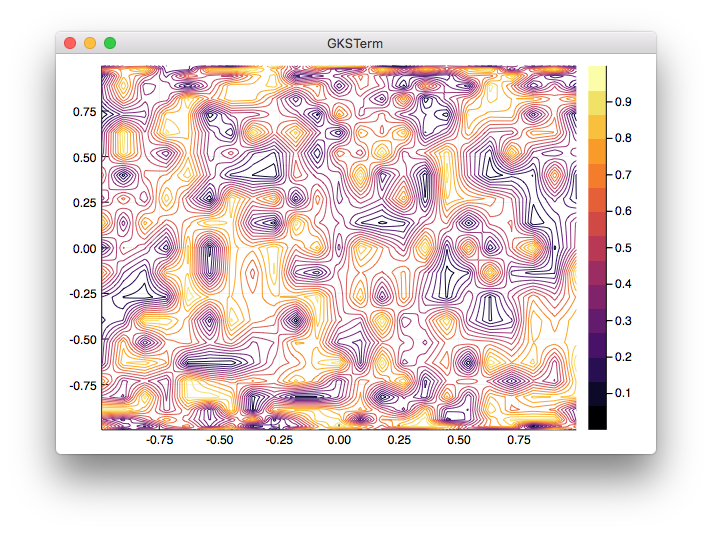
This code fails in a weird way, by shrinking the plot:
y=[-0.997669
 -0.979084
 -0.942261
 -0.887885
 -0.81697
 -0.730836
 -0.631088
 -0.519584
 -0.398401
 -0.269797
 -0.136167
  0.0
  0.136167
  0.269797
  0.398401
  0.519584
  0.631088
  0.730836
  0.81697
  0.887885
  0.942261
  0.979084
    0.997669]
gr()
contour(linspace(-0.99,0.99,23),y,rand(23,23))
 dlfivefifty
All 16 comments

dlfivefifty
on 26 Jul 2016
I can reproduce. Interesting to note that if you add fill=true then it works as expected. The difference in the calls is this:
            if series[:fillrange] != nothing
                GR.surface(x, y, z, GR.OPTION_CELL_ARRAY)
            else
                GR.contour(x, y, h, z, 1000)
            end
@jheinen any idea what's going on?
 tbreloff
on 26 Jul 2016
tbreloff
on 26 Jul 2016
@tbreloff , GR.contour() never requires OpenGL, but GR.surface() probes for hardware acceleration. Unfortunately, the test seems to fail - we have to improve this ...
 jheinen
on 26 Jul 2016
jheinen
on 26 Jul 2016
@jheinen what does hardware acceleration have to do with this example? To clarify, the problem is that the call to GR.contour seems to draw in a shrunken part of the screen.
tbreloff
on 26 Jul 2016
@tbreloff , sorry, forget the last comment. I'll try to reproduce the problem soon ...
jheinen
on 26 Jul 2016
Unfortunately, this is a restriction of GR's internal contour algorithm, which only supports regular grids. In the above example, the grid is rectilinear (see y component).
You can use meshgrid and gridit to create a regular grid which can then be passed to the contour routine, but I think, this is not a good solution:
x, y = meshgrid(x, y)
x, y, z = gridit(vec(x), vec(y), vec(z), 50, 50)
contour(x,y,z)
The problem is on my radar and I'll try to find a better solution ... (or modify the existing algorithm)
jheinen
on 27 Jul 2016
I can still reproduce this issue
 mkborregaard
on 6 Nov 2017
mkborregaard
on 6 Nov 2017
Just fixed in https://github.com/jheinen/gr/commit/fa3570affed1130ecf02e19d8e01b23dddce94be - CI build is running and new runtime will be available soon ...
jheinen
on 6 Nov 2017
ENV["GRDIR"]=""; Pkg.build("GR")
import GR; GR.version()
"0.27.0.post10"
... should fix it
jheinen
on 6 Nov 2017
Great @jheinen! I'm closing this now.
@dlfivefifty Feel free to reopen if you encounter any issues.
 daschw
on 6 Nov 2017
daschw
on 6 Nov 2017
I still get the error - my GR version is "0.27.0" - was it somehow not completely rebuilt?
mkborregaard
on 6 Nov 2017
Oh, same here ...
How do we get to "0.27.0.post10"?
daschw
on 6 Nov 2017
Are you using GR master?
jheinen
on 6 Nov 2017
Yes, I think so, I will check later ...
daschw
on 6 Nov 2017
I'm on master, and also did a fresh Pkg.checkout("GR") before rebuilding.
mkborregaard
on 6 Nov 2017
Just checked I could reproduce the issue then I did
Pkg.checkout("GR")
ENV["GRDIR"]=""
Pkg.build("GR")
and now the issue is fixed for me.
 apalugniok
on 17 Jan 2018
apalugniok
on 17 Jan 2018
Related issues
tbreloff
·
45Comments
 rolfdstoll
·
36Comments
rolfdstoll
·
36Comments
 SimonDanisch
·
30Comments
tbreloff
·
46Comments
tbreloff
·
75Comments
SimonDanisch
·
30Comments
tbreloff
·
46Comments
tbreloff
·
75Comments