Plotly.py: FigureWidget updates are slow
Or, better put, slower than Bokeh.
I am trying to make an interactive version of the Gapminder example based on this one using Bokeh, and I find that the updates are a little bit slow. Here is the notebook:
https://nbviewer.jupyter.org/gist/Juanlu001/4698ebb7f825c24fe3356b5e3de33fc3
(the widget is at the bottom but the callback doesn't work)
This is the callback:
def update_year(change):
    year = change['new']
    df = data_per_year(year)

    for group_name, subdf in df.groupby("Group"):
        scs[group_name].x = subdf["Fertility"]
        scs[group_name].y = subdf["Life expectancy"]
        scs[group_name].marker.size = np.sqrt(subdf["Population"].fillna(1) / np.pi) / 200
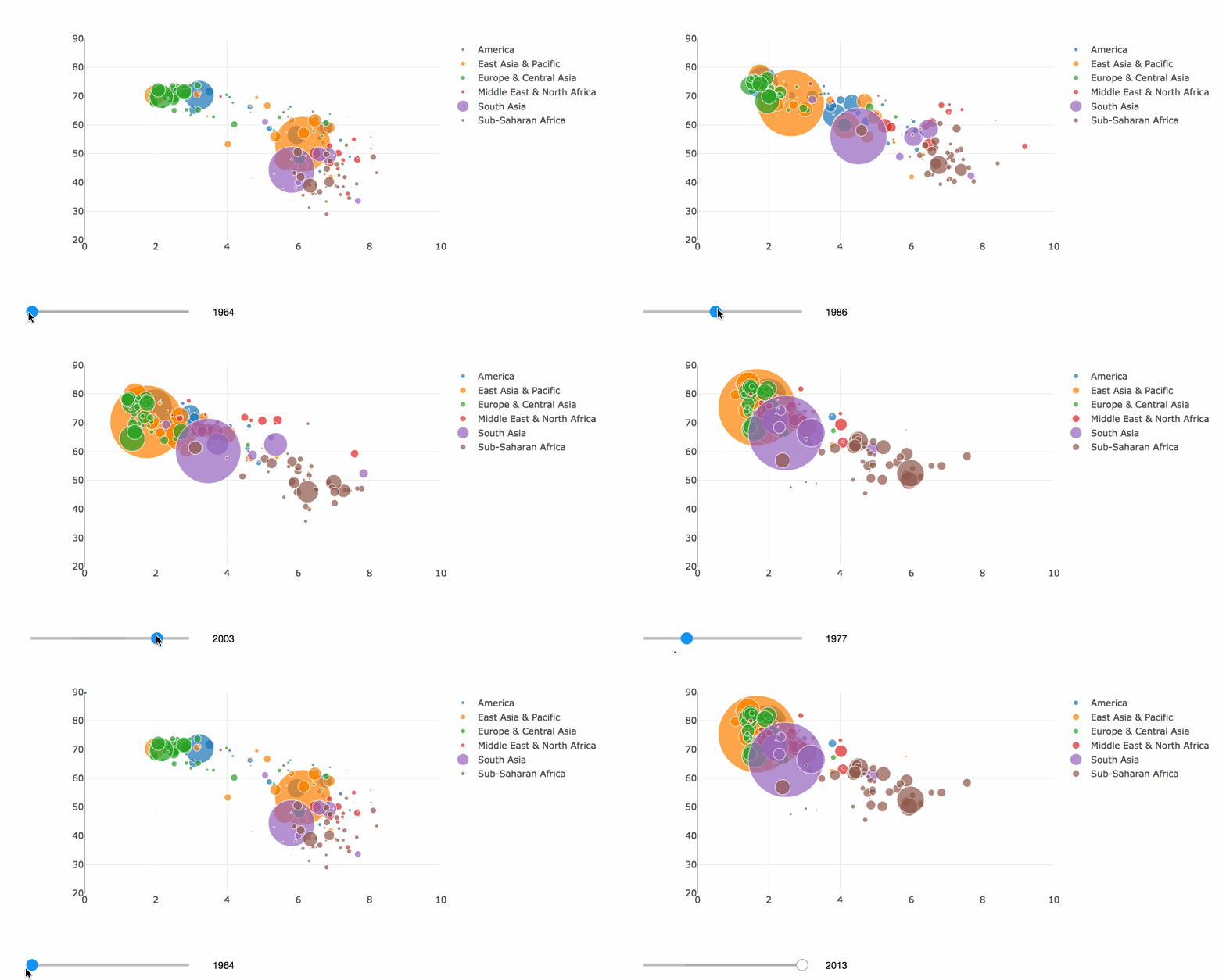
And this is the result:

 astrojuanlu
All 2 comments
Hi @Juanlu001 ,
Thanks for taking the time to bring this up. What's happening here is that FigureWidget automatically sends each update to the front end as it occurs, whereas bokeh (as I understand it) waits to send the updates until you call push_notebook. So in your example each time update_year is called, 18 updates are sent to the JavaScript side, one for each trace for each property. that's why you see the staggered updates. What you want to do in this case is use the batch_update context manager so that all of the updates are batched up and sent as a single message to the JavaScript side.
def update_year(change):
    year = change['new']
    df = data_per_year(year)

    with fig.batch_update():
        for group_name, subdf in df.groupby("Group"):
            scs[group_name].x = subdf["Fertility"]
            scs[group_name].y = subdf["Life expectancy"]
            scs[group_name].marker.size = np.sqrt(subdf["Population"].fillna(1) / np.pi) / 200

Here are some other variants that you might like to try. I like to fix the axis ranges in situations like this to make it easier to perceive the movement of the markers.
fig = go.FigureWidget()
fig.layout.yaxis.range = [20, 90]
fig.layout.xaxis.range = [0, 10]
...

And, at least on my computer, this is fast enough that it still works well with the continuous_update property of the slider to True
slider = IntSlider(
    min=min(years),
    max=max(years),
    continuous_update=True
)

Or, you could even animate the transitions using the batch_animate context manager. To support animation, you need to set the ids property of the scatter traces to something that uniquely identifies each point. The 'ID' column works nicely for this. Also, set continuous_update back to False in this case.
fig = go.FigureWidget()
fig.layout.yaxis.range = [20, 90]
fig.layout.xaxis.range = [0, 10]
scs = {}
for group_name, subdf in df.groupby("Group"):
    sc = fig.add_scatter(
        x=subdf["Fertility"],
        y=subdf["Life expectancy"],
        ids=subdf["ID"],
        mode='markers',
        marker={
            'size': np.sqrt(subdf["Population"].fillna(1) / np.pi) / 200
        },
        text=subdf.index,
        name=group_name,
    )
    scs[group_name] = sc

slider = IntSlider(
    min=min(years),
    max=max(years),
    continuous_update=False
)

def update_year(change):
    year = change['new']
    df = data_per_year(year)
    with fig.batch_animate(duration=750, easing='cubic-in-out'):
        for group_name, subdf in df.groupby("Group"):
            scs[group_name].x = subdf["Fertility"]
            scs[group_name].y = subdf["Life expectancy"]
            ids=subdf["ID"],
            scs[group_name].marker.size = np.sqrt(subdf["Population"].fillna(1) / np.pi) / 200
Hope that helps!
 jonmmease
on 27 Nov 2018
jonmmease
on 27 Nov 2018
Hope that helps!
What a humble way of concluding such a superb answer :)
fig.batch_update is fast enough to enable the continuous update, and fig.batch_animate is just awesome.
I see these tricks are documented in some of the notebooks:
https://plot.ly/python/figurewidget-app/
So this is definitely a non-issue. Thanks a lot! Loving plotly more and more :heart:
astrojuanlu
on 27 Nov 2018
Related issues
astrojuanlu
·
4Comments
 ghtmtt
·
5Comments
ghtmtt
·
5Comments
 dhirschfeld
·
4Comments
jonmmease
·
3Comments
dhirschfeld
·
4Comments
jonmmease
·
3Comments
 ivirshup
·
3Comments
ivirshup
·
3Comments
Most helpful comment
Hi @Juanlu001 ,
Thanks for taking the time to bring this up. What's happening here is that
FigureWidgetautomatically sends each update to the front end as it occurs, whereas bokeh (as I understand it) waits to send the updates until you callpush_notebook. So in your example each timeupdate_yearis called, 18 updates are sent to the JavaScript side, one for each trace for each property. that's why you see the staggered updates. What you want to do in this case is use thebatch_updatecontext manager so that all of the updates are batched up and sent as a single message to the JavaScript side.Here are some other variants that you might like to try. I like to fix the axis ranges in situations like this to make it easier to perceive the movement of the markers.
And, at least on my computer, this is fast enough that it still works well with the
continuous_updateproperty of the slider toTrueOr, you could even animate the transitions using the
batch_animatecontext manager. To support animation, you need to set theidsproperty of the scatter traces to something that uniquely identifies each point. The'ID'column works nicely for this. Also, setcontinuous_updateback toFalsein this case.Hope that helps!