Plotly.js: Text does not show up on bars with empty area
If a bar does not have any width or height, text does not show up, even when {textposition: 'outside'} is set.
 eivindjahren
All 7 comments
Confirmed, thanks for the report @eivindjahren!
 alexcjohnson
on 17 Oct 2018
alexcjohnson
on 17 Oct 2018
The relevant lines are https://github.com/plotly/plotly.js/blob/d5ebb50a727821f6705d72182d7822d0097e8a41/src/traces/bar/plot.js#L78-L85 as it removes a bar group if the associated bar is empty so text is never attached to it.
However, changing this behavior to for instance
var text = getText(trace, i);
if(!isNumeric(x0) || !isNumeric(x1) ||
        !isNumeric(y0) || !isNumeric(y1) ||
        ((x0 === x1 || y0 === y1) && !text)) {
    bar.remove();
    return;
}
breaks a lot of tests.
eivindjahren
on 25 Oct 2018
Perhaps we should do like barpolar does and draw invalid bars with a blank path
instead of removing them?
 etpinard
on 25 Oct 2018
etpinard
on 25 Oct 2018
Still doesn't show the text for default textposition, which is "auto". Setting {textposition: "outside"} explicitly fixed it for me.
 weilu
on 25 Oct 2019
weilu
on 25 Oct 2019
@etpinard Issue still occurs for bar charts within subplots, where label text doesn't appear for traces with 0 height. The issue can be recreated with this:
chart = make_subplots(rows=2, cols=1)

chart.append_trace(
    go.Bar(
        x=['a','b','c','d'],
        y=[2, 4, 0, 4],
        hoverinfo=["y"],
        text=['a text','b text','c text','d text'],
        textposition="outside"
        ),
    row=2, col=1
    )

chart.append_trace(
    go.Bar(
        x=['a','b','c','d'],
        y=[0, 0, 0, 1],
        hoverinfo=["y"],
        text=['a text','b text','c text','d text'],
        textposition="outside"
        ),
    row=2, col=1
    )

chart.append_trace(
    go.Bar(
        x=['a','b','c','d'],
        y=[0, 5, 3, 1],
        hoverinfo=["y"],
        text=['a 2','b 2', 'c 2', 'd 2'],
        textposition="outside"
        ),
    row=1, col=1
    )

chart.update_layout(
        barmode="stack", showlegend=False, xaxis=dict(showticklabels=False))
 alb-erandelcastillo
on 26 Nov 2019
alb-erandelcastillo
on 26 Nov 2019
Hi, I am puting labels with the total value of the each bar.
with {textposition: "auto"}, I had this result:

When I change that value by "outsite", I get this:
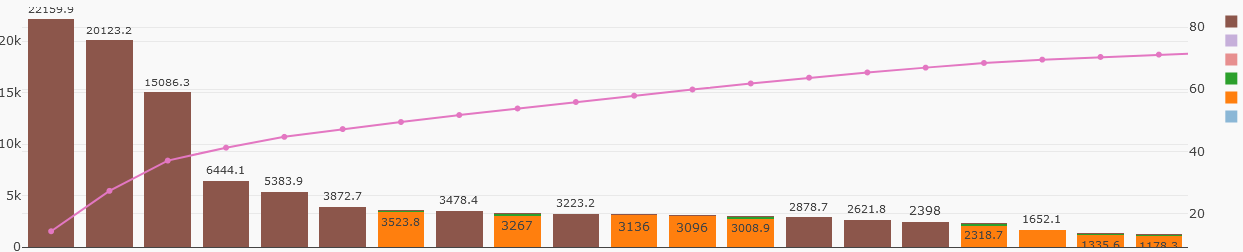
I really apreciate that when I put {textposition: "outside"} zero values are visibles. But my question is : Is there any option to do that the textposition would be always in the bar's top? I was reading the reference: https://plot.ly/python/reference/#bar-textposition and there is only 4 options to this parameter ("inside" | "outside" | "auto" | "none" ) .
I also tried adding annotations in the plot's layer, and thats works, but with annotations is slower. because of that I am trying to put the labels when I define the data of the chart instead add annotations in the layer.
Thanks for your attention.
 mangel2095
on 14 Dec 2019
mangel2095
on 14 Dec 2019
@mangel2095
Thanks for using plotly.
I think you should be able to achieve that by using textposition: 'outside' in every bar trace in your graph.
We appreciate if you use https://community.plot.ly/ for questions like this in future.
 archmoj
on 14 Dec 2019
archmoj
on 14 Dec 2019
Related issues
 hashimmoosavi
·
3Comments
hashimmoosavi
·
3Comments
 jonmmease
·
3Comments
jonmmease
·
3Comments
 nicolaskruchten
·
3Comments
nicolaskruchten
·
3Comments
 tim-sauchuk
·
3Comments
etpinard
·
3Comments
tim-sauchuk
·
3Comments
etpinard
·
3Comments