Plotly.js: Traces inside rangeslider do not stack vertically for stacked subplots
Here's an example:

The rangeslider here should have its own 5 "subplots" so that the traces are ordered vertically in the same way.
This is going to very nice combined with vertical line hover spanning subplots:
https://github.com/plotly/plotly.js/issues/2155
 jackparmer
All 5 comments
So should it _always_ do that? (not obvious to me)
 etpinard
on 20 Nov 2017
etpinard
on 20 Nov 2017
etpinard
on 20 Nov 2017
etpinard
on 20 Nov 2017
So should it always do that? (not obvious to me)
The only case I can see for not doing it is if the y axis ranges for all of the subplots are the same, so maybe it should be optional.
jackparmer
on 20 Nov 2017
I feel like the range slider should always mirror exactly the y layout of the subplots it's controlling - seems like it would be nonintuitive to see traces overlaid there but not on the main plot.
The only case I can see where you might not want the y ranges in the range slider to match what's on the main plot is if we implement autorange to visible data (see https://github.com/plotly/plotly.js/issues/1876#issuecomment-314913229) - then you might want the range slider to keep the full y autorange (because that's the visible data there) even as the main plot zooms in to smaller y ranges.
 alexcjohnson
on 27 Nov 2017
alexcjohnson
on 27 Nov 2017
I have another example to add, this time with histograms. Consider this arrangement made with the iris dataset (using R & plotly):
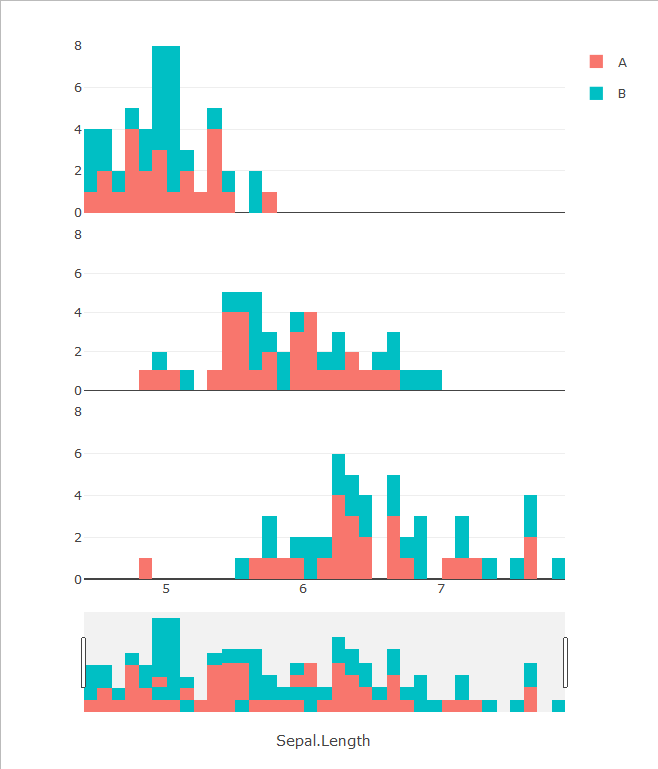
The rangeslider below shows a weird mix between the subplots. In fact, if you examine it closely, it's just the superposition of the three plots, resulting in this kind of things:

Compare this to the same data in one stacked histogram:

IMO, the rangeslider for the multiple stacked-histogram plot should look either like the one in the last example or simply a histogram of the whole dataset with just one color.
Even when there's only 1 color, the histogram shown in the rangeslider should stack the bars of the subplot instead of simply putting one over the others.
 jumanbar
on 16 Jan 2019
jumanbar
on 16 Jan 2019
Related issues
 deecay
·
3Comments
deecay
·
3Comments
 WG-
·
3Comments
WG-
·
3Comments
 pynklu
·
3Comments
etpinard
·
3Comments
pynklu
·
3Comments
etpinard
·
3Comments
 tim-sauchuk
·
3Comments
tim-sauchuk
·
3Comments