Playnite: Uninstalled Cover Darken Not Working
I have enabled the Darken uninstalled games option for my library, the covers for uninstalled games appear no darker or brighter than covers for installed titles.
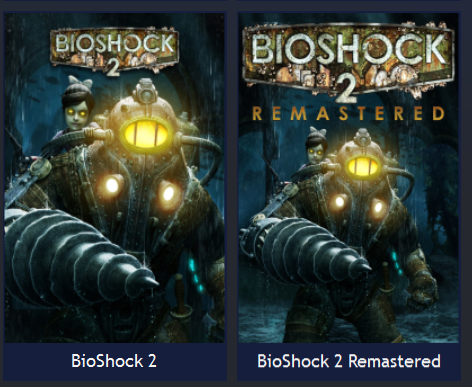
_(Seen left: BioShock 2 is uninstalled, but is not noticeably darker than BioShock 2: Remastered)_
Diagnostic package ID: df6aab7d-ae86-4149-a1ca-c8dfa1705eae
 MrMendelli
All 11 comments
Can't reproduce. Are you using custom theme?
 JosefNemec
on 16 Apr 2020
JosefNemec
on 16 Apr 2020
I checked the diag. package and you are using SteamNite theme. This means that the theme doesn't respect the config value and that theme must be fixed.
JosefNemec
on 16 Apr 2020
Well, why aren't themes overwritten for this feature? It's a global Playnite setting, so the theme being different shouldn't matter. I also believe this happens regardless of what theme I use, I will have to confirm this.
MrMendelli
on 16 Apr 2020
We just can't inject new elements to unknown themes to enforce new features. Views can be completely reworked by the theme and we could break it.
I always put together list of changes that need to be made when new feature is added and it requires theme file update. Then it's up to theme creators if they update it or not, I can't force to do so.
JosefNemec
on 16 Apr 2020
I also forgot to mention. If theme doesn't change affected file (in this example Grid item style files) and is also properly packaged via Toolbox tool (not just manually by dumping all xaml files into archive), then those new features are inherited and will work.
JosefNemec
on 16 Apr 2020
Interesting, I assumed that control of the UI was more restrictive with themes. I will take this into consideration going forward, thank you for your insight on the matter.
MrMendelli
on 16 Apr 2020
Hi I am having a similar issue where the grid view in the default desktop view is not darkening when the item is uninstalled on steam.
https://imgur.com/a/rTYiRky
 sjgold
on 23 Jun 2020
sjgold
on 23 Jun 2020
@sjgold Do you have the feature enabled in application settings? It 100% works with default theme.
JosefNemec
on 23 Jun 2020
I believe so...
https://imgur.com/a/cvaSTgs
sjgold
on 23 Jun 2020
Ok this is weird maybe I don't understand whats going on or there is a deeper issue check this out. Its showing I have 0 games uninstalled but thats not the case i just uninstalled a bunch of games from steam.
https://imgur.com/a/t23fv39
sjgold
on 23 Jun 2020
You need to have import of uninstalled games enabled, otherwise install state won't be synced properly (or you have to initiate uninstallation from Playnite, not Steam).
JosefNemec
on 23 Jun 2020
Related issues
 lapo-luchini
·
4Comments
JosefNemec
·
5Comments
lapo-luchini
·
4Comments
JosefNemec
·
5Comments
 iiviigames
·
3Comments
iiviigames
·
3Comments
 AntoinevdHorst
·
4Comments
JosefNemec
·
5Comments
AntoinevdHorst
·
4Comments
JosefNemec
·
5Comments