Playnite: Importing Playstation library
I would love to be able to import my Playstation library. I'm not sure how your current method of importing works, but if it uses some kind of data scrapping method, then I believe Playstation could be added.
Users can login to the playstation store website and list all the games they 'own' in their account on this page: https://store.playstation.com/en-au/download/list
 XN1TE
XN1TE
All 18 comments
I'm not sure what "play" activity you could perform on such games.
 mirh
on 5 May 2018
mirh
on 5 May 2018
You wouldn't be able to have any play activity on these games. At least not automatic tracking. Obviously only PC games can benifit from a "play" activity feature. But I don't think playnite should be limited to only allowing us to manage our PC games. I want a video game library manager that lets me manage my games on all platforms.
XN1TE
on 6 May 2018
I'm not sure what kind of "managing" activity could be performed on something totally outside of your resident platform either.
mirh
on 6 May 2018
For me managing means:
- Cataloging the games I own.
- Organizing them into categories, for the purpose of knowing which ones I have played, beaten, or want to play next.
I guess these two activities sum up the bulk of the managing, but I can imagine others.
If you game on many different platforms it is very convenient to have a games library manager where you can catalog and categorize your entire games library in one place.
XN1TE
on 6 May 2018
I totally get why people are interested in this even that you can't actually launch the games. This will be possible after #523 is implemented.
 JosefNemec
on 7 May 2018
JosefNemec
on 7 May 2018
I want to second this.
I find the detailed view and CSV export feature very usefull and reliable to manage a game collection, and that would totally apply to console games too, so Playstation as well.
It would allow to use Playnite as game collection / game backlog tool, even if it is not it's main purpose, without relying on specialized websites.
In reply to
mirh commented on 6 May 2018
I'm not sure what kind of "managing" activity could be performed on something totally outside of your resident platform either.
I'd also like to point the fact that it is possible to stream games you own, so it would be possible to add Playstation games in Playnite and systematically open Playstation Remote App for Playstation games, while tracking time in Playnite UI.
May I open a separate issue for asking integration of Playstation Remote App for Playstation games in lieu of game shortcuts for this platform, as soon as it gets implemented?
 simonporte
on 9 Jan 2019
simonporte
on 9 Jan 2019
I don't know what's currently technically feasible to implement in relation to PlayStation ecosystem, so for now lets keep everything related to it in this issue.
JosefNemec
on 10 Jan 2019
Just want to pop in and add another voice of support for this feature. 😊😊
Would love to have my entire video game collection/library visible in one place!
 ghost
on 26 Mar 2019
ghost
on 26 Mar 2019
I really want this too, even if I can't interact with the game at all. More than once I've accidentally bought a game on Steam that I already owned on Playstation. I want one place I can go to to check whether I own a game!
 Ecnassianer
on 14 Apr 2019
Ecnassianer
on 14 Apr 2019
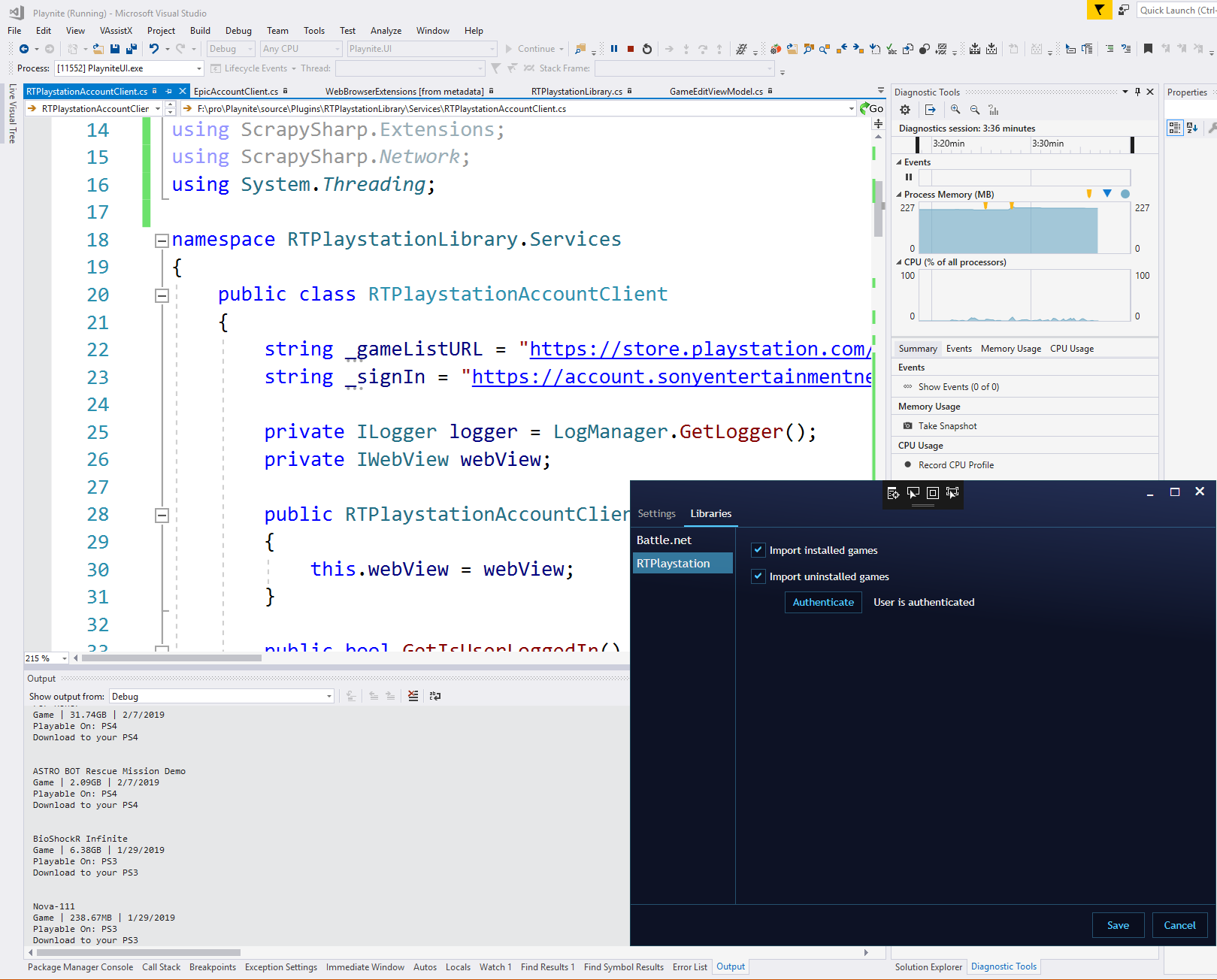
I tried to write a PS importer yesterday but only got as far as listing the first 24 games. I don't see an easy way to scrape the Playstation site.
Using https://store.playstation.com/en-au/download/list works, it does seem to load all the game data somewhere, then creates/deletes elements for the data as you click the next and prev buttons. (you can kill the internet connection after the initial load and all my 500+ games can be flipped through, without images loading of course)
I can see the current page data in the elements but I can't figure out where the game data is directly loaded from/to. (is it stored in a weird binary way so text searches don't work?) So I tried to programmatically click the next button and re-read as a test with a hacked in Eval function (using EvaluateScriptAsync) as a test:
webView.EvalString("document.getElementsByClassName('paginator-control__next paginator-control__arrow-navigation')[0].click();");
This javascript works in a browser to click the next button, but it's not working in the WebView - after waiting 4 seconds and re-reading the data nothing has changed. Maybe webviews don't work like I thought and you can't dynamically change and read data.
Anyway, I know nothing about web stuff so probably someone else could figure this out in five seconds, let me know if you wanna share notes.
 SethRobinson
on 24 Jun 2019
SethRobinson
on 24 Jun 2019
Download list is not a good source since it won't list your disc games. Pulling from achievement list would be better. Also scraping from the web page should be always the last resort, better check first if that page doesn't use some API you could call directly.
JosefNemec
on 24 Jun 2019
Thanks for the reply.
According to https://psnprofiles.com I have trophies for around 250 of my 500 games (many I received via Playstation plus subscription and have never been played) so unless I'm missing something that wouldn't be a complete solution. I'll see what data I can get though.
As far as web scraping being a bad solution, I'm in 100000% agreement. But it seems to be the only way to get the purchased game list at the moment?
If anyone knows of a hidden API/etc to get at the game list directly without ugly web scraping, please chime in.
SethRobinson
on 24 Jun 2019
I mean, if you just play your retail game offline, of course there can't be an "independent" way to assess it.
Either you scrape the manually exported save games list, or probably trophies are the best way to get it.
And they *do* seem to be tracking play time then, but it doesn't seem exposed anywhere but an old dismissed website and the weekly newsletter.
mirh
on 24 Jun 2019
Moving on, but I put my Playstation games to JSON scraper chrome extension here in case it's useful for anybody else working on this later or there is a way to import games via a generic json format.
SethRobinson
on 4 Jul 2019
I'll think about adding simple import from JSON source for future versions. In theory if the source uses the same model as our GameInfo then it should be fairly easy to implement.
JosefNemec
on 10 Jul 2019
I have tried to add manually my PS4 library. Using "Insert" key is relatively easy and the automated downloaded of metadata helps. My plan was set these manually added games to run "Remote Play PS4" but I have a main difficulty: You can't set a action for a selected group of games.
If we finally managed to import the PS4 library, it would be nice to be able to easily configure to start at least remote play.
 Gonchitaro
on 29 Aug 2019
Gonchitaro
on 29 Aug 2019
Preface: I have no idea what I'm talking about. That said, would PSDLE's offer any useful insight here?
 athleticsfan
on 4 Mar 2020
athleticsfan
on 4 Mar 2020
Done in devel8.
JosefNemec
on 2 Aug 2020
Related issues
JosefNemec
·
3Comments
 operamaniac
·
4Comments
operamaniac
·
4Comments
 Ianuarius
·
4Comments
JosefNemec
·
5Comments
Ianuarius
·
4Comments
JosefNemec
·
5Comments
 Filipe3xF
·
6Comments
Filipe3xF
·
6Comments
Most helpful comment
For me managing means:
I guess these two activities sum up the bulk of the managing, but I can imagine others.
If you game on many different platforms it is very convenient to have a games library manager where you can catalog and categorize your entire games library in one place.