Player.js: NotAllowedError: play() failed because the user didn't interact with the document first
There seems to be an odd issue with triggering the play api by user clicks. It's acting like an autoplay issue but playback is after user clicks. The play element is on top of the iframe so not clicking the embedded player.
The error received is.
NotAllowedError: play() failed because the user didn't interact with the document first
Any ideas ?
 danrossi
All 22 comments
@danrossi this is an issue specific to jsfiddle and codepen like services.
On those test pages they wrap the user defined test content in an iframe which doesn't have the allow="autoplay" which prevents the play() action from happening.

Also the Vimeo player iframe has to have the allow="autoplay" attribute.
You can see on the api demo page this doesn't have this problem if you press the custom play button on the top right. https://player.vimeo.com/api/demo
Hope this helps.
 luwes
on 21 Feb 2019
luwes
on 21 Feb 2019
Please don't just automatically close. It was just a basic example I had to setup. I don't configure like this. The api generates that attribute it is not autoplay because its user click triggering play ? Autoplay is in fact working when muted not playing with user clicks. I added that attribute and its still happening.
Yours is likely working because of same domain.
This is not happening with youtube.
danrossi
on 22 Feb 2019
Same config but autoplay. This is working. https://jsfiddle.net/danrossi303/kohdg29c/5/
danrossi
on 22 Feb 2019
player.js:2 Uncaught (in promise) NotAllowedError: play() failed because the user didn't interact with the document first. https://goo.gl/xX8pDD
    at https://player.vimeo.com/api/player.js:2:8670
    at Array.forEach (<anonymous>)
    at b (https://player.vimeo.com/api/player.js:2:8644)
    at e (https://player.vimeo.com/api/player.js:2:10391)
Same thing on another fiddle platform.
 danrossi
on 22 Feb 2019
danrossi
on 22 Feb 2019
With muted enabled it will work with user clicks only. This is a recent problem someone alerted me to.
danrossi
on 22 Feb 2019
Do you have a test page with a Youtube example?
luwes
on 22 Feb 2019
I know it doesn't really make sense, autoplay is not the same as a user clicking to play but the wrapper iframes of those services do make a difference in the behavior with the Vimeo player as you can see in this recordit http://recordit.co/lWZNUZAYsy
Note that the wrapper iframe is not the Vimeo player iframe, it's another iframe they use to automatically reload the test code when you "save" or "run" the codepen or fiddle.
These wrapper iframes don't have that allow="autoplay" attribute.
luwes
on 22 Feb 2019
I'm making some external examples now. Is that the same on codepen ?
danrossi
on 23 Feb 2019
Sorry mate I don't know what is going on but my implementation similar isn't working and I have the autoplay property configured. These barebones demos outside of jsfiddle is.
http://207.148.87.89/player/vimeo.html
http://207.148.87.89/player/youtube.html
These changes in Chrome are getting counter productive. I narrowed it down to a badly configured Iframe. I dynamically create the iframe as using the generated one using a div tag causes problems. But I was using a protocoless url. See this
http://207.148.87.89/player/vimeo2.html
Sorry about that. The iframe must be https regardless if loaded on http.
danrossi
on 23 Feb 2019
Basically needs to be this
player.src = "https://player.vimeo.com/video/309741585";
not this
player.src = "//player.vimeo.com/video/309741585";
danrossi
on 23 Feb 2019
According to Youtube looks like extra params are needed for futureproofing other restrictions ?
Adding this for good measure
el.setAttribute("allow", "accelerometer; autoplay; encrypted-media; gyroscope; picture-in-picture");
I have this issue as well.
This seems to be occurring on Chrome (v72.0.3626.109) only for two different websites of mine. Also, note: I use a custom play button and overlay over the video iframe. On clicking the custom play button, it triggers my overlay to disappear and play() to fire.
It looks like their autoplay policy was updated on February 12th, 2019. A change in their policy may be affecting play() being trigger-able.
https://developers.google.com/web/updates/2017/09/autoplay-policy-changes
EDIT:
Adding allow="autoplay" to the iframe got it working on Chrome again! 💃
 joshiefishbein
on 2 Mar 2019
joshiefishbein
on 2 Mar 2019
My problem is I needed to load the player in the iframe via https. Even under http. Don't ask why.
danrossi
on 3 Mar 2019
Is there a hook to get to the iframe to use setAttribute? I have the same problem NOT in a online editor.
https://careers.daugherty.com/culture/
What's really weird is videos that I append to the page play just fine, the video that is on the page onload is the one that's being penalized. Is there a js hook I should be aware of or should I make an edit to a function? wp_video_shortcode is putting the video on the page.
 downtroden
on 5 Mar 2019
downtroden
on 5 Mar 2019
@danrossi this is an issue specific to jsfiddle and codepen like services.
On those test pages they wrap the user defined test content in an iframe which doesn't have theallow="autoplay"which prevents theplay()action from happening.
Also the Vimeo player iframe has to have the
allow="autoplay"attribute.
You can see on the api demo page this doesn't have this problem if you press the custom play button on the top right. https://player.vimeo.com/api/demoHope this helps.
thanks
 ichuyi
on 2 Jan 2020
ichuyi
on 2 Jan 2020
@luwes
I know it doesn't really make sense, autoplay is not the same as a user clicking to play but the wrapper iframes of those services do make a difference in the behavior with the Vimeo player
Seems a bit strange to me, I have to say. I just hope that the player doesn't change something later on, and starts auto-playing those iframes with autoplay turned on, when the only reason to set this flag is to allow programatic play...
 gingerlime
on 10 Jan 2020
gingerlime
on 10 Jan 2020
Guys, using allow="autoplay" seems to be more a workaround rather a real solution. It also makes some browser block this iframe which isn't desirable at all. Are you guys actively working on fixing this?
 joker-777
on 15 Jan 2020
joker-777
on 15 Jan 2020
I am aware that this error isn't Vimeo specific. It's a browser thing - to stop people from doing annoying stuff. But I think we're following the rules:
My project uses
<video-background>
  <iframe id='video-outlet' src='https://player.vimeo.com/video/400744064?controls=false&loop=true' width='640' height='480' frameborder='0' webkitallowfullscreen mozallowfullscreen allowfullscreen></iframe>
</video-background>

and has a little loading/title screen on top of the iframe. The text in the middle triggers play on-click. This is a user interaction.
var $videoOutlet = document.querySelector('#video-outlet');
var backgroundPlayer = new Vimeo.Player($videoOutlet);

document.addEventListener('click', function(event) {

  // site enter button
  if ( event.target.matches('.click-suggestion') ) {
    document.querySelector('.branding').classList.add('fly-away');
    backgroundPlayer.play();
  }

});
Some (seems like most) of the time - it works as expected - but in other cases / it just stalls - and when I check the console:
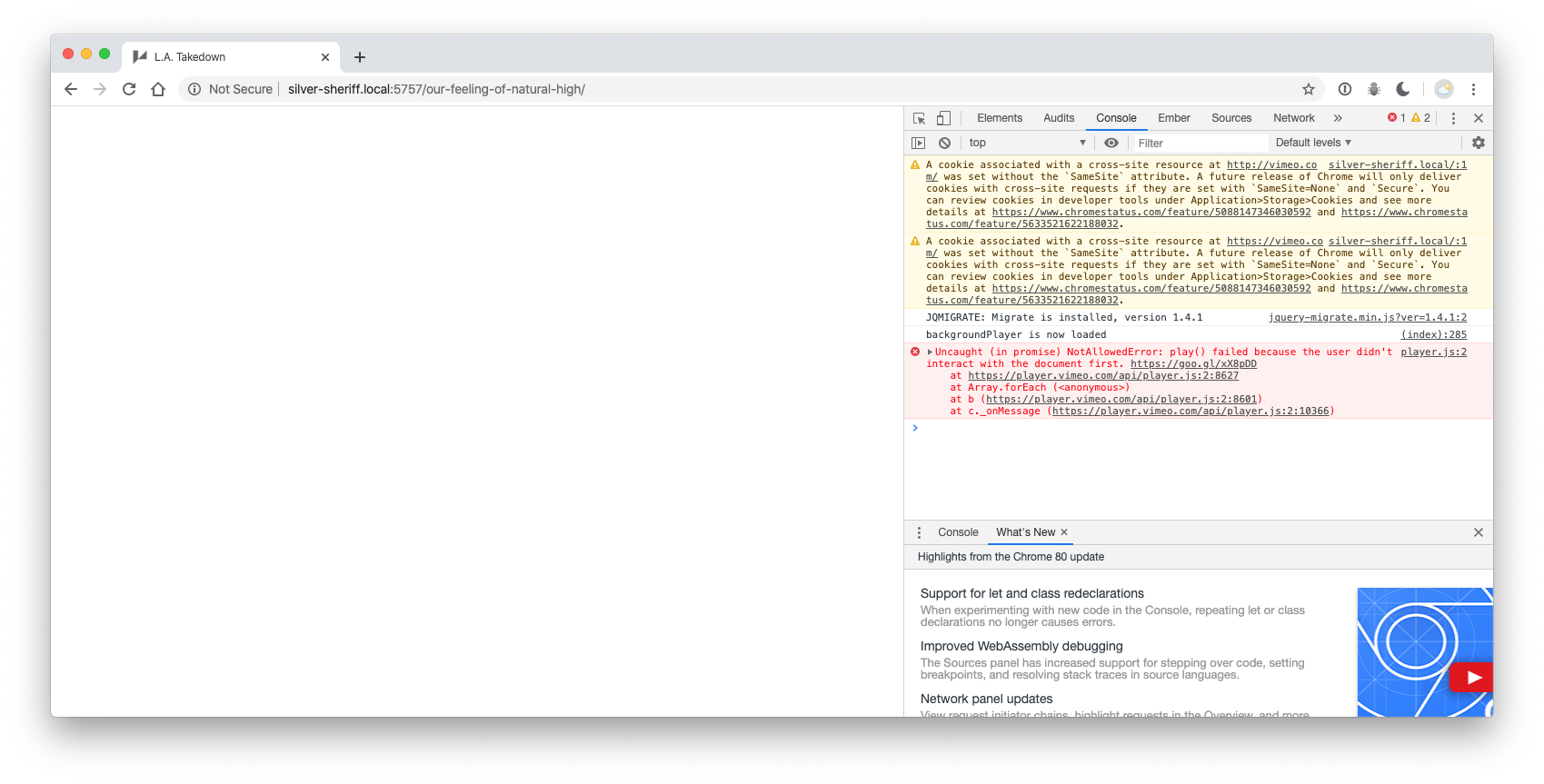
I'll have the real site up soon - and so, I can check if it's an HTTP/HTTPS thing as suggested in this thread, but I'm curious what is causing this intermittently.
full error
player.js:2 Uncaught (in promise) NotAllowedError: play() failed because the user didn't interact with the document first. https://goo.gl/xX8pDD
at https://player.vimeo.com/api/player.js:2:8627
at Array.forEach (
at b (https://player.vimeo.com/api/player.js:2:8601)
at c._onMessage (https://player.vimeo.com/api/player.js:2:10366)
 sheriffderek
on 26 Mar 2020
sheriffderek
on 26 Mar 2020
Here's a live site of the one pointed out just above. https://latakedown.com I haven't got an error since it was live / so, that's great - but I'd love to have some clarity on what makes it tell me that locally. Here's the error - in case someone knows. : )

sheriffderek
on 29 Mar 2020
For some reason / I skimmed over the "autoplay" setting discussion because / it can't _really_ autoplay - so, I just expected that to no longer have any effect and was on its way to being deprecated. After getting this error on the live site / and counting out _the http vs https issue_ - I tried the autoplay setting - and it appears to avoid the error.
I made a minimum example here - and it seems to be consistent:
https://github.com/sheriffderek/vimeo-autoplay-example
: )
sheriffderek
on 29 Mar 2020
adding the autoplay worked for me
 struthy
on 25 Aug 2020
struthy
on 25 Aug 2020
Related issues
 mitchtabian
·
3Comments
mitchtabian
·
3Comments
 macliems
·
7Comments
macliems
·
7Comments
 woluweb
·
4Comments
luwes
·
5Comments
woluweb
·
4Comments
luwes
·
5Comments
 paulmolluzzo
·
5Comments
paulmolluzzo
·
5Comments
Most helpful comment
I have this issue as well.
This seems to be occurring on Chrome (v72.0.3626.109) only for two different websites of mine. Also, note: I use a custom play button and overlay over the video iframe. On clicking the custom play button, it triggers my overlay to disappear and
play()to fire.It looks like their autoplay policy was updated on February 12th, 2019. A change in their policy may be affecting
play()being trigger-able.https://developers.google.com/web/updates/2017/09/autoplay-policy-changes
EDIT:
Adding
allow="autoplay"to the iframe got it working on Chrome again! 💃