Player.js: Feature Request: Hiding controls on iFrames
Summary
I am aware of the background video feature. However, it is not what we need because
1) It will loop
2) It will be muted.
I am looking for ways to only hide controls.
Currently, there is a hack to mimic this experience, but it would be much cleaner to have hide control functionality in iframe api.
Another current alternative is to disable forcing same-origin policy, and directly access the controls of HTML5 player
Hacked Behavior
https://jsfiddle.net/s4h4o52z/1/
Also, a popular 3rd party:
(I do not own/develop for plyr.io)
https://plyr.io/#vimeo
 fredlee0109
All 18 comments
I am in need of this as well.
We're playing the video automatically in the background (background=true) and when the user clicks on the video the video goes back to the start and the volume is turned up but we also want controls to be enabled again. But I can't find if this is possible?
I think there should be a another option to hide/show controls outside background.
I.e. setControls=true/false.
 PatrikElfstrom
on 30 Jan 2018
PatrikElfstrom
on 30 Jan 2018
@PatrikElfstrom Here, I just created a jsfiddle for you. See if you can utilize it: https://jsfiddle.net/s4h4o52z/1/
fredlee0109
on 30 Jan 2018
We're also looking for a way to do this for our player. We tried using background=true however it with that enabled we seem to lose the ability to control the playback rate and volume.
 nburt
on 6 Feb 2018
nburt
on 6 Feb 2018
@fredlee0109 Thanks but we ended up just using Plyr.
PatrikElfstrom
on 6 Feb 2018
Also curious to know Vimeo's stand on Plyr's attempt at hiding controls, even though it is against Vimeo's ToS
"2.2.4. You will not alter, remove, replace, or mask any aspect of the Vimeo Player (including the playbar, logo, and like, embed, and share features) without Vimeo’s prior written consent."
https://developer.vimeo.com/guidelines/terms
fredlee0109
on 20 Feb 2018
YouTube has controls=0 option, that turn off the player controls, only logo (which is also link to Youtube video) is showed. Something similar would be nice. The volume of all videos (YouTube + Video) are managed by own script. We are trying to build "video timeline" like facebook and this is our last obstacle.
 jelen07
on 11 Apr 2018
jelen07
on 11 Apr 2018
I agree. This would be a highly desirable feature. I have been waiting to integrate Vimeo in a WordPress plugin of mine but can't with the lack of the controls parameter.
 blakewilson
on 27 Apr 2018
blakewilson
on 27 Apr 2018
I also agree. This controls feature is very important for me. I'm creating a slideshow for a client and I need it for a cleaner look. I also use custom controls for YouTube and MP4 players.
 lucamezzatesta
on 11 May 2018
lucamezzatesta
on 11 May 2018
The feature mentioned on this thread is very valuable and I also vote there is a need for it.
Has anything happened since this discussion occurred earlier this year?
Later: I received an update from Vimeo support saying that if you use Background=True and Muted=False, that you can achieve the desired effect.
The code snippet is:
<iframe src="https://player.vimeo.com/video/76979871?background=1&muted=0" width="500" height="281" frameborder="0" webkitallowfullscreen mozallowfullscreen allowfullscreen></iframe>
I tried this with their JS player by setting the options variable passed into the player constructor, and that worked:
        var vimeo_options = {
            background: true,
            muted: false
        };
        player = new Vimeo.Player(id, vimeo_options );
 benjaminenorton
on 1 Nov 2018
benjaminenorton
on 1 Nov 2018
@PatrikElfstrom Here, I just created a jsfiddle for you. See if you can utilize it: https://jsfiddle.net/s4h4o52z/1/
Has anyone been able to use this method on a non full width video? I haven't been able to modify it so that it works inside an arbitrary container of any width.
 ADavidLiu
on 16 Jan 2019
ADavidLiu
on 16 Jan 2019
@benjaminenorton @PatrikElfstrom - any updates on this? I need video quality and controls... so I need to be able to disable controls and still allow users to change their playback quality, or I need to be able to set video quality with an external player (such as plyr.js)
Does anyone know anything about whether or not Vimeo is planning to do anything like this?
 jbhorsewriter7
on 11 Mar 2019
jbhorsewriter7
on 11 Mar 2019
@jbhorsewriter7 : I haven't heard of anything new. I was able to get my own project moving forward by disabling the Vimeo controls (as I wrote in a previous post) and writing my own controls around the video entire. It is a lot of work. An example of the outcome is here: https://www.pitchhub.com/#introduction.
Sorry but the source is proprietary, so I am just linking to show the outcome of a "do it yourself" effort.
benjaminenorton
on 11 Mar 2019
@benjaminenorton The only concern with your suggestion to use background = true, muted = false, is that it will autoplay the video. For users on Chrome (not sure about other browsers), since this update https://developers.google.com/web/updates/2017/09/autoplay-policy-changes, there are strict rules on when a video can be autoplayed.
You can get a clearer idea of when I'm saying by just visiting this embeded iframe src directly: https://player.vimeo.com/video/76979871?background=1&muted=0 , where you will see the video is paused by Chrome, and the user is unable to play the video since there are no transport controls.
fredlee0109
on 12 Mar 2019
@fredlee0109 : you are absolutely correct about the Chrome limitation (don't play a video with audio unless the user interacts with the screen).
I think we all have to be fine with that limitation, and the objective of this thread is to remove the Vimeo controls.
What I had to do in my own JavaScript code, interfacing to Vimeo's JavaScript player:
- I always pass
mutedas false, so the browser will detect - My app has an option to autoplay (true/false), passed into Vimeo's
autoplayoption. Of course it won't actually autoplay if the user hasn't interacted with the screen - use the
player.on()function to detect "play", "pause," and "timeupdate" events, then manage the state of the video-overlay buttons accordingly. i.e. if the video is stopped by the browser you will get a "pause" event, then your code can display the play button.
benjaminenorton
on 14 Mar 2019
I recently went back through this and confirmed what is actually required to get the Vimeo player to start in background mode (autoplay, audio off), then turn the audio on and pause the Video. Here is a working snippet.
In the example below, replace _this2 with your proper context and player with your Vimeo JS player.
Before this runs, initialize a boolean state variable:
_this2._vimeoState.waiting_for_first_pause_not_autoplay = false;
Then add an event handler for the timedupate event:
    // Trigger audio on, to overcome background mode.
    this._player.on('timeupdate',  forceVimeoStartNoNativeControls );
The main function:
    /**
     * The Vimeo player starts in background mode in order to disable the native controls.
     *
     * Background mode forces mute to be active.
     *
     * This function sets the audio volume to 1, then tries to pause the player.
     *
     * After the player is paused, the time position is reset to the beginning (not autoplay)
     *
     * Unfortunately this must be done during 'timeupdate' rather than "ready()", so some of the video might play.
     *
     * Have also observed that it will not always work on the first 'timeupdate', so multiple events might be needed
     *
     */
    function forceVimeoStartNoNativeControls( ) {
    {

        // Make sure this situation is not already handled
        if ( _this2._vimeoState.waiting_for_first_pause_not_autoplay ) {
          _this2._player.setVolume(1).then( () => {
            // Force pause
            _this2._player.pause().then( () => {

              _this2._player.getPaused().then( (paused ) => {
                if (paused ) {
                  // A successful pause has occurred

                  // Force to start
                  _this2._player.setCurrentTime(0.0).then(() => {

                    // Pause again
                    _this2._player.pause().then( () => {
                      _this2._vimeoState.waiting_for_first_pause_not_autoplay = false;

                    });
                  });
                } // Paused
              });
            });

          });

        } // waiting_for_first_pause_not_autoplay

      }
    }
As a temporary work around, you can also disable mute, autoplay, and looping by adding additional parameters to your embed code:
<iframe src="https://player.vimeo.com/video/76979871?background=1&muted=0&autoplay=0&loop=0" width="500" height="281" frameborder="0" webkitallowfullscreen mozallowfullscreen allowfullscreen></iframe>
(note that you will need to use the JS API to start playback)
 danaburger
on 9 Apr 2019
danaburger
on 9 Apr 2019
Thanks for everyones feedback. This feature has been added for Plus, PRO, Business, Premium members and is now supported via URL param (https://github.com/vimeo/player.js#embed-options).
Example https://player.vimeo.com/video/76979871?controls=0
When using this parameter, the play bar and UI will be hidden. To start playback for your viewers, you'll need to either enable autoplay or use our player SDK to start and control playback (keyboard controls will continue to allow control of the player).
 fisherinnovation
on 30 Apr 2019
fisherinnovation
on 30 Apr 2019
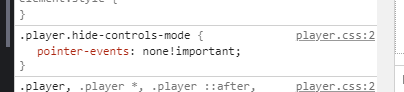
pointers-events could be set to auto in case of 360 videos, so the users could pan around to interact. Does it make sense @fisherinnovation?
Related to #287
Thanks for your great work!
 tiagovignatti
on 30 Jul 2019
tiagovignatti
on 30 Jul 2019
Related issues
 simpson77
·
6Comments
simpson77
·
6Comments
 tmaximini
·
4Comments
tmaximini
·
4Comments
 startupmasters
·
5Comments
startupmasters
·
5Comments
 KennedyTedesco
·
7Comments
KennedyTedesco
·
7Comments
 JohnnyWalkerDesign
·
4Comments
JohnnyWalkerDesign
·
4Comments
Most helpful comment
YouTube has
controls=0option, that turn off the player controls, only logo (which is also link to Youtube video) is showed. Something similar would be nice. The volume of all videos (YouTube + Video) are managed by own script. We are trying to build "video timeline" like facebook and this is our last obstacle.