Play-games-plugin-for-unity: Authenticate false with "Authentication canceled"
When I run my game, Google Play Games Services showing over the game but it just close after a few seconds. Note that my game is published as an internal test and connected with Google Play App which also published.
First, Here's I tried to solve my problem:
- Checked Signing certifications and SHA-1 certificate
- Checked tester email is valid (both Google Play Tester and internal tester and confirmed both exists)
- Saved Games are enabled.
- Removing EnableSavedGames() doesn't affect at all
- Downgrade to 0.9.50.
- Reimport
But none of them worked.
Here's the code I'm trying:
PlayGamesClientConfiguration config = new PlayGamesClientConfiguration.Builder().EnableSavedGames().Build();
PlayGamesPlatform.InitializeInstance(config);
PlayGamesPlatform.DebugLogEnabled = true;
PlayGamesPlatform.Activate();

Social.localUser.Authenticate((bool success) => {
    print("Authentication: " + success);
    m_Authenticated = success;

    if(success) {
        onSuccess();
    }
    else {
        onFailed();
    }
});
When I run Social.localUser.Authenticate, it always returns false. Here's the message from Logcat:
04-29 02:52:11.572: I/Unity(8301): SystemInfo CPU = ARM64 FP ASIMD AES, Cores = 8, Memory = 3537mb
04-29 02:52:11.573: I/Unity(8301): SystemInfo ARM big.LITTLE configuration: 4 big (mask: 0xf0), 4 little (mask: 0xf)
04-29 02:52:11.573: I/Unity(8301): ApplicationInfo me.modernator.stickWarfareBloodStrike version 0.2 build 313578f6-2337-4c63-ba3e-6cf5cd3f0f2a
04-29 02:52:11.573: I/Unity(8301): Built from '2019.1/staging' branch, Version '2019.1.0f2 (292b93d75a2c)', Build type 'Release', Scripting Backend 'il2cpp', CPU 'arm64-v8a', Stripping 'Enabled'
04-29 02:52:11.743: D/Unity(8301):  GL_EXT_debug_marker GL_ARM_rgba8 GL_ARM_mali_shader_binary GL_OES_depth24 GL_OES_depth_texture GL_OES_depth_texture_cube_map GL_OES_packed_depth_stencil GL_OES_rgb8_rgba8 GL_EXT_read_format_bgra GL_OES_compressed_paletted_texture GL_OES_compressed_ETC1_RGB8_texture GL_OES_standard_derivatives GL_OES_EGL_image GL_OES_EGL_image_external GL_OES_EGL_image_external_essl3 GL_OES_EGL_sync GL_OES_texture_npot GL_OES_vertex_half_float GL_OES_required_internalformat GL_OES_vertex_array_object GL_OES_mapbuffer GL_EXT_texture_format_BGRA8888 GL_EXT_texture_rg GL_EXT_texture_type_2_10_10_10_REV GL_OES_fbo_render_mipmap GL_OES_element_index_uint GL_EXT_shadow_samplers GL_OES_texture_compression_astc GL_KHR_texture_compression_astc_ldr GL_KHR_texture_compression_astc_hdr GL_KHR_texture_compression_astc_sliced_3d GL_KHR_debug GL_EXT_occlusion_query_boolean GL_EXT_disjoint_timer_query GL_EXT_blend_minmax GL_EXT_discard_framebuffer GL_OES_get_program_binary GL_OES_texture_3D GL_EXT_texture_storage GL_EXT_multisampled_render_
04-29 02:52:11.743: D/Unity(8301): to_texture GL_OES_surfaceless_context GL_OES_texture_stencil8 GL_EXT_shader_pixel_local_storage GL_ARM_shader_framebuffer_fetch GL_ARM_shader_framebuffer_fetch_depth_stencil GL_ARM_mali_program_binary GL_EXT_sRGB GL_EXT_sRGB_write_control GL_EXT_texture_sRGB_decode GL_EXT_texture_sRGB_R8 GL_EXT_texture_sRGB_RG8 GL_KHR_blend_equation_advanced GL_KHR_blend_equation_advanced_coherent GL_OES_texture_storage_multisample_2d_array GL_OES_shader_image_atomic GL_EXT_robustness GL_EXT_draw_buffers_indexed GL_OES_draw_buffers_indexed GL_EXT_texture_border_clamp GL_OES_texture_border_clamp GL_EXT_texture_cube_map_array GL_OES_texture_cube_map_array GL_OES_sample_variables GL_OES_sample_shading GL_OES_shader_multisample_interpolation GL_EXT_shader_io_blocks GL_OES_shader_io_blocks GL_EXT_tessellation_shader GL_OES_tessellation_shader GL_EXT_primitive_bounding_box GL_OES_primitive_bounding_box GL_EXT_geometry_shader GL_OES_geometry_shader GL_ANDROID_extension_pack_es31a GL_EXT_gpu_shader5 GL_OES_gpu_shader5 GL_EXT_texture
04-29 02:52:11.743: D/Unity(8301): _buffer GL_OES_texture_buffer GL_EXT_copy_image GL_OES_copy_image GL_EXT_shader_non_constant_global_initializers GL_EXT_color_buffer_half_float GL_EXT_color_buffer_float GL_EXT_YUV_target GL_OVR_multiview GL_OVR_multiview2 GL_OVR_multiview_multisampled_render_to_texture GL_KHR_robustness GL_KHR_robust_buffer_access_behavior GL_EXT_draw_elements_base_vertex GL_OES_draw_elements_base_vertex GL_EXT_protected_textures GL_EXT_buffer_storage
04-29 02:52:14.635: I/Unity(8301):
04-29 02:52:14.635: I/Unity(8301): (Filename: ./Runtime/Export/Debug/Debug.bindings.h Line: 48)
04-29 02:52:14.688: E/Unity(8301): Unable to find internal function `UnityEngine.Jobs.TransformAccessArray::GetSortedToUserIndex`
04-29 02:52:14.688: E/Unity(8301):
04-29 02:52:14.688: E/Unity(8301): (Filename: ./Runtime/Burst/Burst.cpp Line: 348)
04-29 02:52:14.688: E/Unity(8301): Unable to find internal function `UnityEngine.Jobs.TransformAccessArray::GetSortedTransformAccess`
04-29 02:52:14.688: E/Unity(8301):
04-29 02:52:14.688: E/Unity(8301): (Filename: ./Runtime/Burst/Burst.cpp Line: 348)
04-29 02:52:14.688: E/Unity(8301): Unable to find internal function `UnityEngine.Jobs.TransformAccess::GetRotation`
04-29 02:52:14.688: E/Unity(8301):
04-29 02:52:14.688: E/Unity(8301): (Filename: ./Runtime/Burst/Burst.cpp Line: 348)
04-29 02:52:14.688: E/Unity(8301): Unable to find internal function `UnityEngine.Jobs.TransformAccess::GetPosition`
04-29 02:52:14.688: E/Unity(8301):
04-29 02:52:14.688: E/Unity(8301): (Filename: ./Runtime/Burst/Burst.cpp Line: 348)
04-29 02:52:14.688: E/Unity(8301): Unable to find internal function `UnityEngine.Jobs.TransformAccess::SetPosition`
04-29 02:52:14.688: E/Unity(8301):
04-29 02:52:14.688: E/Unity(8301): (Filename: ./Runtime/Burst/Burst.cpp Line: 348)
04-29 02:52:14.688: E/Unity(8301): Unable to find internal function `UnityEngine.Jobs.TransformAccess::SetRotation`
04-29 02:52:14.688: E/Unity(8301):
04-29 02:52:14.688: E/Unity(8301): (Filename: ./Runtime/Burst/Burst.cpp Line: 348)
04-29 02:52:14.731: I/Unity(8301): Starting Auth with token client.
04-29 02:52:14.731: I/Unity(8301): GooglePlayGames.Android.AndroidClient:Authenticate(Boolean, Action`1)
04-29 02:52:14.731: I/Unity(8301): PlayGamesManager:SignIn(PlayGamesCallback, PlayGamesCallback)
04-29 02:52:14.731: I/Unity(8301): StickWarfare.Scene.<Start>d__1:MoveNext()
04-29 02:52:14.731: I/Unity(8301): UnityEngine.SetupCoroutine:InvokeMoveNext(IEnumerator, IntPtr)
04-29 02:52:14.731: I/Unity(8301):
04-29 02:52:14.731: I/Unity(8301): (Filename: ./Runtime/Export/Debug/Debug.bindings.h Line: 48)
04-29 02:52:14.741: W/Unity(8301): !!! [Play Games Plugin DLL] 04/29/20 2:52:14 +09:00 WARNING: Creating new PlayGamesPlatform
04-29 02:52:14.741: W/Unity(8301): System.Action:Invoke()
04-29 02:52:14.741: W/Unity(8301): GooglePlayGames.OurUtils.PlayGamesHelperObject:Update()
04-29 02:52:14.741: W/Unity(8301):
04-29 02:52:14.741: W/Unity(8301): (Filename: ./Runtime/Export/Debug/Debug.bindings.h Line: 48)
04-29 02:52:14.743: I/Unity(8301):  [Play Games Plugin DLL] 04/29/20 2:52:14 +09:00 DEBUG: Activating PlayGamesPlatform.
04-29 02:52:14.743: I/Unity(8301): System.Action:Invoke()
04-29 02:52:14.743: I/Unity(8301): GooglePlayGames.OurUtils.PlayGamesHelperObject:Update()
04-29 02:52:14.743: I/Unity(8301):
04-29 02:52:14.743: I/Unity(8301): (Filename: ./Runtime/Export/Debug/Debug.bindings.h Line: 48)
04-29 02:52:14.744: I/Unity(8301):  [Play Games Plugin DLL] 04/29/20 2:52:14 +09:00 DEBUG: PlayGamesPlatform activated: GooglePlayGames.PlayGamesPlatform
04-29 02:52:14.744: I/Unity(8301): System.Action:Invoke()
04-29 02:52:14.744: I/Unity(8301): GooglePlayGames.OurUtils.PlayGamesHelperObject:Update()
04-29 02:52:14.744: I/Unity(8301):
04-29 02:52:14.744: I/Unity(8301): (Filename: ./Runtime/Export/Debug/Debug.bindings.h Line: 48)
04-29 02:52:14.746: I/Unity(8301):  [Play Games Plugin DLL] 04/29/20 2:52:14 +09:00 DEBUG: Creating platform-specific Play Games client.
04-29 02:52:14.746: I/Unity(8301): System.Action:Invoke()
04-29 02:52:14.746: I/Unity(8301): GooglePlayGames.OurUtils.PlayGamesHelperObject:Update()
04-29 02:52:14.746: I/Unity(8301):
04-29 02:52:14.746: I/Unity(8301): (Filename: ./Runtime/Export/Debug/Debug.bindings.h Line: 48)
04-29 02:52:14.747: I/Unity(8301):  [Play Games Plugin DLL] 04/29/20 2:52:14 +09:00 DEBUG: Creating Android IPlayGamesClient Client
04-29 02:52:14.747: I/Unity(8301): System.Action:Invoke()
04-29 02:52:14.747: I/Unity(8301): GooglePlayGames.OurUtils.PlayGamesHelperObject:Update()
04-29 02:52:14.747: I/Unity(8301):
04-29 02:52:14.747: I/Unity(8301): (Filename: ./Runtime/Export/Debug/Debug.bindings.h Line: 48)
04-29 02:52:22.386: I/Unity(8301): Returning an error code.
04-29 02:52:22.386: I/Unity(8301): GooglePlayGames.Android.<>c__DisplayClass18_0:<Authenticate>b__0(Int32)
04-29 02:52:22.386: I/Unity(8301): System.Action`1:Invoke(T)
04-29 02:52:22.386: I/Unity(8301): System.Action`1:Invoke(T)
04-29 02:52:22.386: I/Unity(8301): System.Reflection.MonoMethod:Invoke(Object, BindingFlags, Binder, Object[], CultureInfo)
04-29 02:52:22.386: I/Unity(8301): UnityEngine.AndroidJavaProxy:Invoke(String, Object[])
04-29 02:52:22.386: I/Unity(8301): UnityEngine._AndroidJNIHelper:InvokeJavaProxyMethod(AndroidJavaProxy, IntPtr, IntPtr)
04-29 02:52:22.386: I/Unity(8301):
04-29 02:52:22.386: I/Unity(8301): (Filename: ./Runtime/Export/Debug/Debug.bindings.h Line: 48)
04-29 02:52:22.422: I/Unity(8301): Authentication: False
04-29 02:52:22.422: I/Unity(8301): <>c__DisplayClass8_0:<SignIn>b__0(Boolean)
04-29 02:52:22.422: I/Unity(8301): System.Action`1:Invoke(T)
04-29 02:52:22.422: I/Unity(8301): System.Action`2:Invoke(T1, T2)
04-29 02:52:22.422: I/Unity(8301): GooglePlayGames.<>c__DisplayClass37_0:<Authenticate>b__0(SignInStatus)
04-29 02:52:22.422: I/Unity(8301): System.Action`1:Invoke(T)
04-29 02:52:22.422: I/Unity(8301): System.Action`1:Invoke(T)
04-29 02:52:22.422: I/Unity(8301): System.Action:Invoke()
04-29 02:52:22.422: I/Unity(8301): GooglePlayGames.OurUtils.PlayGamesHelperObject:Update()
04-29 02:52:22.431: I/Unity(8301):
04-29 02:52:22.431: I/Unity(8301): (Filename: ./Runtime/Export/Debug/Debug.bindings.h Line: 48)
04-29 02:52:22.586: I/Unity(8301):  [Play Games Plugin DLL] 04/29/20 2:52:22 +09:00 DEBUG: Invoking user callback on game thread
04-29 02:52:22.586: I/Unity(8301): System.Action:Invoke()
04-29 02:52:22.586: I/Unity(8301): GooglePlayGames.OurUtils.PlayGamesHelperObject:Update()
04-29 02:52:22.586: I/Unity(8301):
04-29 02:52:22.586: I/Unity(8301): (Filename: ./Runtime/Export/Debug/Debug.bindings.h Line: 48)
04-29 02:52:22.587: I/Unity(8301):  [Play Games Plugin DLL] 04/29/20 2:52:22 +09:00 DEBUG: Authentication canceled
04-29 02:52:22.587: I/Unity(8301): System.Action:Invoke()
04-29 02:52:22.587: I/Unity(8301): GooglePlayGames.OurUtils.PlayGamesHelperObject:Update()
04-29 02:52:22.587: I/Unity(8301):
04-29 02:52:22.587: I/Unity(8301): (Filename: ./Runtime/Export/Debug/Debug.bindings.h Line: 48)
Only I can see from logcat is: "Authentication canceled", but there is no any related message so don't know what I have to do. I already searched about this but couldn't find any related solutions.
Using Unity 2019.1.0f2 and Play Games for Unity 0.9.64.
 rico345100
All 23 comments
What do you see on the device? Do you see the banner for the user name and level? Do you have the google play services account created for the user on the phone? If you see the username and level on the banner, it may have actually worked.
Sometimes even if the callback says it failed, it may succeed.
I have a workaround like this for 0.9.64:
(incomplete code, you need to adapt a bit for your case):
        PlayGamesPlatform.Instance.Authenticate((success, message) =>
        {
            if (success)
            {
                AuthenticationSuccessful();
            }
            else
            {
                // Don't give up yet...
                StartCoroutine(WaitForAuthenticationCoroutine());
            }
        }, true);
....
    private const float AuthenticationWaitTimeSeconds = 10;

    private IEnumerator WaitForAuthenticationCoroutine()
    {
        var startTime = Time.realtimeSinceStartup;

        while (!Social.localUser.authenticated)
        {
            if (Time.realtimeSinceStartup - startTime > AuthenticationWaitTimeSeconds)
            {
                // X seconds have passed and we are still not authenticated, time to give up.
                break;
            }

            yield return null;
        }

        if (Social.localUser.authenticated)
        {
            AuthenticationSuccessful();
        }
        else
        {
            AuthenticationFailed();
        }
    }
 firtinapd
on 30 Apr 2020
firtinapd
on 30 Apr 2020
What do you see on the device? Do you see the banner for the user name and level?
No, I see the Google Play banner is shown, but no player name and icon banner popped up.
Do you have the google play services account created for the user on the phone?
Yes, I checked my account is correct hundreds of times. This is not the first time I'm making Unity game with this plugin. I used the same account every project and tested it with the same account also. But this never happened.
Sometimes even if the callback says it failed, it may succeed.
That sounds exactly should not happen. If that's true, how do I trust callback from authentication and proceed with other steps? Of course, you show the way how to solve it, but man that's really hard to believe.
I'm temporarily fixed this issue by change certification digital fingerprints to uploading certification, not an app-signing certification because I saw some people solved with this approach. Most people said use app-signing certification but it won't work for me. Why?
rico345100
on 1 May 2020
I have the same problem.
I done what he tried too but not succeded, neither your temporary fix didn't not worked for me.
I have same silly Google Play Animation. and exact same log output no errors just says it's canceled.
 harunuysali07
on 4 May 2020
harunuysali07
on 4 May 2020
Same problem here. Any advices how to fix this?
 Vukiz
on 4 May 2020
Vukiz
on 4 May 2020
So the problem was with Api console project configuration. After I changed SHA-1 key in console to one I'm subscribing my Unity Game it worked fine.
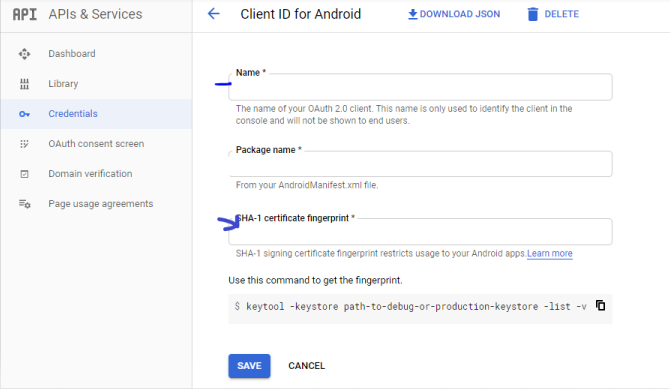
Vukiz
on 5 May 2020
I tried this with both my SHA-1 certificates on Google Play Console :

I tried them one each time :

I tried : This either
Still same on when I download my app on Google Play or Direct build to my phone.
harunuysali07
on 5 May 2020
I have the same problem.. and no solution :'(
 Jokod
on 7 May 2020
Jokod
on 7 May 2020
So the problem was with Api console project configuration. After I changed SHA-1 key in console to one I'm subscribing my Unity Game it worked fine.
Which one did you used Upload Certificate or App Signing Certificate ?
harunuysali07
on 7 May 2020
I have exactly the same problem, but it works on my phone and it doesn't works on some others.
I have no settings differences between the ones working and the ones not working.
I have no clue how to fix this...
EDIT : My leaderboard worked on my phone, then I have uninstalled the game and installed back, and now, I have that error on my phone (Authantication Canceled). Maybe it can be a possible line of approach for debbugging.
 BenDevelopment
on 2 Jun 2020
BenDevelopment
on 2 Jun 2020
Ok I've fixed this problem.
The Google Play Game Service API has to know if your application is allowed to use it.
The common way to authorize your application is to add you application SHA1 signature to the API and Service Credentials (ID clients OAuth 2.0) :
https://console.developers.google.com/apis/credentials
BUT :
Once you upload you app bundle to your Google Play Console, Google re-sign you application (ONLY IF YOU HAVE ENABLED "App signing by Google Play")!
So the authorization doesn't match your previous signature (the one you added when you have build with Unity).
The solution is to add the new SHA1 (the one created by Google during the "App signing by Google Play") to the Google Play Game Service Credentials.
You can find the new SHA1 in your application console:

Add this SHA1 here:


You don't have to remove the SHA1 used to sign your app in your Unity build, you can allow both.
PLEASE ADD THIS TO THE DOCUMENTATION
BenDevelopment
on 9 Jun 2020
Thank you for the above comment, I did not realise you could add multiple SHAs to the app configuration, this will improve our testing and deployment process significantly!
firtinapd
on 9 Jun 2020
One note for the above comment:
After you add the new SHA, you need to go to the game services config for your game ( https://play.google.com/apps/publish/#GameListPlace ) and select the game, select the "Publishing" tab, then publish your changes. Otherwise GPS will not recognize the difference. Forgetting this made me waste a few hours 🤦
firtinapd
on 25 Jun 2020
Good day!
I'm having a similar problem.
I want to setup Play Games as an auth provider for a Firebase project. I followed this guide https://firebase.google.com/docs/auth/unity/play-games
The Play Games auth step always returns false and the error message is Setting result error status code to: 16
Logcat errors
2020-06-29 17:52:06.724 24703-24703/com.indium.droid E/SignInRequest: Setting result error status code to: 16
2020-06-29 17:52:06.848 24703-24841/com.indium.droid E/Unity: PlayGames auth failed. Authentication canceled
    UnityEngine.DebugLogHandler:LogFormat(LogType, Object, String, Object[])
    UnityEngine.Logger:Log(LogType, Object)
    UnityEngine.Debug:LogError(Object)
    Droid.Intergration.GPGIntergration:AuthCallback(Boolean, String)
    System.Action`2:Invoke(T1, T2)
    GooglePlayGames.<>c__DisplayClass37_0:<Authenticate>b__0(SignInStatus)
    System.Action`1:Invoke(T)
    GooglePlayGames.<>c__DisplayClass38_0:<Authenticate>b__2(SignInStatus)
    System.Action`1:Invoke(T)
    GooglePlayGames.Android.<>c__DisplayClass21_0`1:<InvokeCallbackOnGameThread>b__0()
    System.Action:Invoke()
    GooglePlayGames.OurUtils.PlayGamesHelperObject:Update()

    (Filename: ./Runtime/Export/Debug/Debug.bindings.h Line: 35)
I then tried to setup a new project through Google Play Console -> Game Services -> Add game without firebase (Not using other Google API tab) and this configuration worked fine.
I guess it's not a problem of this plugin but rather some error in Firebase <-> Play Games integration. I would like to know what this Setting result error status code to: 16 means so I can maybe report this to Firebase support.
Thanks in advance.
 vorberohus
on 29 Jun 2020
vorberohus
on 29 Jun 2020
Hello!
I am currently integrating a Google Play Games plugin for unity. I faced the same problem as described above. I tried almost everything from different forums. I started the OAuth consent screen verification process. Finally I finished with recreating project in google play services and in Google API console. But the problem hasn't gone away.
Here is the information about my new Game Sevices and API projects:
I created the alpha release. My app is using Google app signing. So the app is signed with production certificate. The SHA-1 certificate has entered correctly in the credentials menu.


The project and OAuth client were automatically generated using the Google Play Services menu options in the Google Play Console.

The name field is filled in the OAuth consent screen:

Information in the GPG settings in unity was set correctly:

I am not using the ProGuard.
I added my account to the testers


I am still continue getting the following error messages in the logcat:

Here is the initialization code:
PlayGamesClientConfiguration config = new PlayGamesClientConfiguration.Builder().RequestServerAuthCode(false).Build();
PlayGamesPlatform.InitializeInstance(config);
_instance = PlayGamesPlatform.Activate();
PlayGamesPlatform.DebugLogEnabled = true;
Please help me :(
 vladislav1muhlisov
on 19 Jul 2020
vladislav1muhlisov
on 19 Jul 2020
Yo guys, make sure that you have installed google play services in android studio SDK Manager. After I did it, rebuild unity project — all works fine.

 Nrjwolf
on 26 Jul 2020
Nrjwolf
on 26 Jul 2020
Ok I've fixed this problem.
The Google Play Game Service API has to know if your application is allowed to use it.
The common way to authorize your application is to add you application SHA1 signature to the API and Service Credentials (ID clients OAuth 2.0) :
https://console.developers.google.com/apis/credentialsBUT :
Once you upload you app bundle to your Google Play Console, Google re-sign you application (ONLY IF YOU HAVE ENABLED "App signing by Google Play")!
So the authorization doesn't match your previous signature (the one you added when you have build with Unity).
The solution is to add the new SHA1 (the one created by Google during the "App signing by Google Play") to the Google Play Game Service Credentials.You can find the new SHA1 in your application console:
Add this SHA1 here:
You don't have to remove the SHA1 used to sign your app in your Unity build, you can allow both.
PLEASE ADD THIS TO THE DOCUMENTATION
You are save my Life time
 dhtpdud
on 29 Jul 2020
dhtpdud
on 29 Jul 2020
Yo guys, make sure that you have installed google play services in android studio SDK Manager. After I did it, rebuild unity project — all works fine.
Thank you, bro!!! It works now!
vladislav1muhlisov
on 31 Jul 2020
好的,我已经解决了这个问题。
Google Play游戏服务API必须知道是否允许您的应用程序使用它。
授权应用程序的常用方法是将应用程序SHA1签名添加到API和服务凭据(ID客户端OAuth 2.0):https :
//console.developers.google.com/apis/credentials但是:
将应用程序包上传到Google Play控制台后,Google会对您的应用程序重新签名(只有在您启用“通过Google Play进行应用程序签名”的情况下)!
因此,授权与您之前的签名(使用Unity构建时添加的签名)不匹配。
解决方案是将新的SHA1(由Google在“ Google Play进行应用签名”期间创建的SHA1)添加到Google Play游戏服务凭据中。您可以在应用程序控制台中找到新的SHA1:
在此处添加此SHA1:
您不必删除在Unity构建中用于对应用程序进行签名的SHA1,可以两者都允许。
请将此添加到文档中
好的,我已经解决了这个问题。
Google Play游戏服务API必须知道是否允许您的应用程序使用它。
授权应用程序的常用方法是将应用程序SHA1签名添加到API和服务凭据(ID客户端OAuth 2.0):https :
//console.developers.google.com/apis/credentials但是:
将应用程序包上传到Google Play控制台后,Google会对您的应用程序重新签名(只有在您启用“通过Google Play进行应用程序签名”的情况下)!
因此,授权与您之前的签名(使用Unity构建时添加的签名)不匹配。
解决方案是将新的SHA1(由Google在“ Google Play进行应用签名”期间创建的SHA1)添加到Google Play游戏服务凭据中。您可以在应用程序控制台中找到新的SHA1:
在此处添加此SHA1:
您不必删除在Unity构建中用于对应用程序进行签名的SHA1,可以两者都允许。
请将此添加到文档中
Ok I've fixed this problem.
The Google Play Game Service API has to know if your application is allowed to use it.
The common way to authorize your application is to add you application SHA1 signature to the API and Service Credentials (ID clients OAuth 2.0) :
https://console.developers.google.com/apis/credentialsBUT :
Once you upload you app bundle to your Google Play Console, Google re-sign you application (ONLY IF YOU HAVE ENABLED "App signing by Google Play")!
So the authorization doesn't match your previous signature (the one you added when you have build with Unity).
The solution is to add the new SHA1 (the one created by Google during the "App signing by Google Play") to the Google Play Game Service Credentials.You can find the new SHA1 in your application console:
Add this SHA1 here:
You don't have to remove the SHA1 used to sign your app in your Unity build, you can allow both.
PLEASE ADD THIS TO THE DOCUMENTATION
I think it's r that you said Google will re-sign for you, I still have this problem, but when I look at the signature through APK, SHA-1 in APK is the same as SHA-1 in the application signature certificate in Google PLAY Console, so I'm not sure if I need to go to the Google APIs Console for OAuth Settings.I'm sorry that my Poor English may bring inconvenience to your reading. Thank you
 beginner-lang
on 11 Sep 2020
beginner-lang
on 11 Sep 2020
For me, this issue was caused by the package name being changed by Unity itself.
In "Project Settings-->Player-->Android-->Other Settings-->Identification", there's a new checkbox "Override Default Package Name" which is not automatically selected.
In my case this changed the package name to the default, which is derived from company name, e.g. com.[COMPANY].[APP]
To fix, I simply checked the checkbox and replaced the derived value with my actual package name.
 cynewulf1
on 28 Sep 2020
cynewulf1
on 28 Sep 2020
I have lost days to this issue and still can't remedy it after trying everything in this thread.
Mine also says it returned with the error code "Canceled".
 CoreyHendrey
on 15 Oct 2020
CoreyHendrey
on 15 Oct 2020
I had the same issue and my mistake was that I had put the wrong client ID in the Google Play Games setup inside Unity. I had put the client ID that I had found in the Google Play Console (Play Games Services > Setup and management > Configuration) when the correct one was the client ID of the web client that was in the credentials in the google cloud console: https://console.cloud.google.com/apis/credentials
 Guillogika
on 19 Nov 2020
Guillogika
on 19 Nov 2020
I had the same issue and my mistake was that I had put the wrong client ID in the Google Play Games setup inside Unity. I had put the client ID that I had found in the Google Play Console (Play Games Services > Setup and management > Configuration) when the correct one was the client ID of the web client that was in the credentials in the google cloud console: https://console.cloud.google.com/apis/credentials
Doing this helped me resolve my issues. Although, I did try other things, changing the client ID to the web client ID on the cloud console is definitely going to be a step in the right direction for anyone.
 chrisatbluebirdstudios
on 25 Nov 2020
chrisatbluebirdstudios
on 25 Nov 2020
My problem was that I had the wrong SHA-1 certificate fingerprints entered.
The app was using a different SHA-1 to the one shown in the developer console and the one in the keystore. On failing to authenticate the actual SHA-1 used was written to logcat:
** To help you debug, here is the information about this app...
Creating a new OAuth client ID using the SHA-1 from the log message solved the problem for me.
 pjsmith43
on 31 Jan 2021
pjsmith43
on 31 Jan 2021
Related issues
 cataHHH
·
4Comments
cataHHH
·
4Comments
 marcus13345
·
3Comments
marcus13345
·
3Comments
 YogendraChauhan
·
4Comments
YogendraChauhan
·
4Comments
 parkJeongOck
·
4Comments
parkJeongOck
·
4Comments
 bibbis
·
4Comments
bibbis
·
4Comments
Most helpful comment
I have lost days to this issue and still can't remedy it after trying everything in this thread.
Mine also says it returned with the error code "Canceled".