Platformio-vscode-ide: PermissionError: [Errno 13] Permission denied
%23 Description of problem
Leave a comment...
BEFORE SUBMITTING, PLEASE SEARCH FOR DUPLICATES IN
%23 Configuration
VSCode: 1.39.2
PIO IDE: v1.9.0
System: Windows_NT, 10.0.17763, x64
%23 Exception
Error: Could not create PIO Core Virtual Environment. Please create it manually -> http://bit.ly/pio-core-virtualenv
 Error: Virtualenv Create: Traceback (most recent call last):
  File "C:\Users\krame\.platformio\.cache\tmp-20496A01p7j7qCCSu\virtualenv-16.7.5\virtualenv.py", line 2632, in <module>
    main()
  File "C:\Users\krame\.platformio\.cache\tmp-20496A01p7j7qCCSu\virtualenv-16.7.5\virtualenv.py", line 870, in main
    symlink=options.symlink,
  File "C:\Users\krame\.platformio\.cache\tmp-20496A01p7j7qCCSu\virtualenv-16.7.5\virtualenv.py", line 1156, in create_environment
    install_python(home_dir, lib_dir, inc_dir, bin_dir, site_packages=site_packages, clear=clear, symlink=symlink)
  File "C:\Users\krame\.platformio\.cache\tmp-20496A01p7j7qCCSu\virtualenv-16.7.5\virtualenv.py", line 1526, in install_python
    shutil.copyfile(executable, py_executable)
  File "C:\Users\krame\.platformio\python37\lib\shutil.py", line 121, in copyfile
    with open(dst, 'wb') as fdst:
PermissionError: [Errno 13] Permission denied: 'C:\\Users\\krame\\.platformio\\penv\\Scripts\\python.exe'

Using base prefix 'C:\\Users\\krame\\.platformio\\python37'
New python executable in C:\Users\krame\.platformio\penv\Scripts\python.exe

    at t.value (c:\Users\krame\.vscode\extensions\platformio.platformio-ide-1.9.0\node_modules\platformio-node-helpers\dist\index.js:1:31671)
 Denkra
All 15 comments
I second it. It fails during VS.Code launch with the same permission denied. :( Few weeks ago everything was ok( for more than 1 year).
 krukhlis
on 18 Oct 2019
krukhlis
on 18 Oct 2019
Here is mine:

krukhlis
on 18 Oct 2019
Do you have antivirus tools in a system?
 ivankravets
on 18 Oct 2019
ivankravets
on 18 Oct 2019
Yes, I do. I have Avast. But I have already tried to disable my AV and restart VS.Code -- it fails once again with the same issue. :( And what is surprising me -- VS.Code version is the same as it used to be, Python is the same as it used to be. But somehow my lovely Platform.IO is crashing now. :(
krukhlis
on 18 Oct 2019
- Stop Avast
- Remove
C:\Users\krame\.platformio\penvfolder - Restart VSCode.
ivankravets
on 18 Oct 2019
I've tried to follow your recommendation. The problem is it will allow me to remove everything from .platformio, beside c:\Users\KRU\.platformio\penv\Scripts
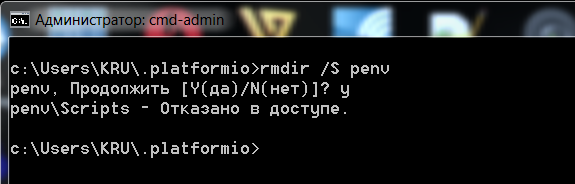
When I try to remove it -- Windows says permission denied. Wtf, this is the folder of my Windows user under my Windows user home. And my Windows user is local admin.
I've tried to remove it from CMD running as Admin, but total fail:
krukhlis
on 18 Oct 2019
Avast blocked it. Try to restart machine and remove this folder.
ivankravets
on 18 Oct 2019
Oh, yes! After reinstall I had to disable Avast before any re-attempts to remove the folder. After that removal was successful. And when I started VS.Code -- PlatformIO was successfuly installed. The only problem is all my platforms, boards and libraries are gone now. I need to download them once again. :(
krukhlis
on 18 Oct 2019
The only problem is all my platforms, boards and libraries are gone now. I need to download them once again. :(
Sorry for this :( You need only remove ~/.platformio/pevn folder, not whole .platformio. In any case, you no need to worry when you remove .platformio folder. All declarations should be done in platformio.ini using platform and lib_deps options. In this case, you will have 100% reproducible working environment on any machine.
ivankravets
on 18 Oct 2019
Offtopic: Wow, Either I've missed it before, but it looks like you have added "Devices" page, where one can see all available COM-ports and their usage!!! That's definetly highly demanded feature -- otherwise you need to go to Device manager and check it by yourself. Thanks guys. Awesome!
krukhlis
on 18 Oct 2019
but it looks like you have added "Devices" page,
Do you mean PIO Home > Devices?
ivankravets
on 18 Oct 2019
Yeh, exactly. Few months ago( maybe 4-6 months) I was asking for such functionality. But people were complaining it's hard to implement because of the different nature/interface API of com ports under different operational systems. Which is confusing to me -- because even in ugly Arduino IDE this is available almost starting from first version.
krukhlis
on 18 Oct 2019
But people were complaining it's hard to implement because of the different nature/interface API
Where did you ask that? This feature was added to PlatformIO 5 years ago :)
ivankravets
on 18 Oct 2019
This feature was added to PlatformIO 5 years ago :)
Either it was not visible in Win 7 PlatformIO for VS.Code, either I finally need to go to optometrist for glasses( :) ). Anyway, that's exactly what I was waiting as part of essential features upgrades. And now I can enjoy it.
@ivankravets Thanks for your prompt help with this issue. The only thing that concerns me now is why Avast has decided suddenly to ban PlatformIO installer/python, etc -- they co-exist on my machine for a long time. And the author of this issue(@Denkra ) has faced it today as well( I don't even know if he has the same Avast/Antivirus root cause). Weird. :(
krukhlis
on 18 Oct 2019
PlatformIO is a fully open source and is written in Python. VSCode just wraps PlatformIO Core (CLI) and call platformio.exe which is actually a Python script. Avast and some other strange antivirus tools think that we are a virus and do something bad. You can actually exclude ~/.platformio folder from AVast and it should work.
So, the final scheme looks like: VSCode > Node.JS > Python > PlatformIO Core sources.
ivankravets
on 19 Oct 2019
Related issues
 tovine
·
4Comments
tovine
·
4Comments
 XBrav
·
7Comments
XBrav
·
7Comments
 baget
·
8Comments
baget
·
8Comments
 GeorgeFlorian
·
3Comments
GeorgeFlorian
·
3Comments
 chall3ng3r
·
6Comments
chall3ng3r
·
6Comments
Most helpful comment
Where did you ask that? This feature was added to PlatformIO 5 years ago :)