Platformio-vscode-ide: ImportError: DLL load failed: The specified module could not be found
Description of problem
Leave a comment...
BEFORE SUBMITTING, PLEASE SEARCH FOR DUPLICATES IN
Configuration
VSCode: 1.31.1
PIO IDE: v1.6.0
System: Windows_NT, 10.0.17763, x64
Exception
Error: Traceback (most recent call last):
  File "<string>", line 1, in <module>
  File "<string>", line 38, in <module>
  File "<string>", line 38, in <module>
  File "<string>", line 18, in load_module
  File "<string>", line 9, in <module>
  File "C:\Users\milo4\.platformio\packages\contrib-pysite\twisted\internet\serialport.py", line 87, in <module>
    from twisted.internet._win32serialport import SerialPort
  File "C:\Users\milo4\.platformio\packages\contrib-pysite\twisted\internet\_win32serialport.py", line 19, in <module>
    import win32file, win32event
ImportError: DLL load failed: The specified module could not be found.

    at P.Promise (C:\Users\milo4\.vscode\extensions\platformio.platformio-ide-1.6.0\node_modules\platformio-node-helpers\dist\index.js:1:14992)
    at ChildProcess.h (C:\Users\milo4\.vscode\extensions\platformio.platformio-ide-1.6.0\node_modules\platformio-node-helpers\dist\index.js:1:5916)
    at ChildProcess.emit (events.js:182:13)
    at ChildProcess.cp.emit (C:\Users\milo4\.vscode\extensions\platformio.platformio-ide-1.6.0\node_modules\cross-spawn\lib\enoent.js:34:29)
    at maybeClose (internal/child_process.js:961:16)
    at Process.ChildProcess._handle.onexit (internal/child_process.js:248:5)
 TaniaAG
All 10 comments
I faced the same problem yesterday. I fixed by installing the required modules(pywin32 and PySerial). Since platformio using its own python 2.7 located in ~/.platformio/penv or C:\User\your-username\.platformio\penv, We have to install the missing modules using their copy of python which can be done by using these commands:
> cd C:\Users\your-username\.platformio\penv
> python.exe -m pip install PySerial pywin32
 samoooop
on 15 Feb 2019
samoooop
on 15 Feb 2019
had the same issue @samoooop directions fixed for me!
 vitormhenrique
on 21 Feb 2019
vitormhenrique
on 21 Feb 2019
What is your Python version and architecture? Do you use Python x32 for Windows amd64?
 ivankravets
on 23 Feb 2019
ivankravets
on 23 Feb 2019
What is your Python version and architecture? Do you use Python x32 for Windows amd64?
Yes I am using Windows AMD64 but python x64
I got similar issue starting PlatformIO in VSCode ⬇️
Error: Traceback (most recent call last):
  File "<string>", line 1, in <module>
  File "<string>", line 38, in <module>
  File "<string>", line 38, in <module>
  File "<string>", line 18, in load_module
  File "<string>", line 9, in <module>
  File "C:\Users\LeoJh\.platformio\packages\contrib-pysite\twisted\internet\serialport.py", line 87, in <module>
    from twisted.internet._win32serialport import SerialPort
  File "C:\Users\LeoJh\.platformio\packages\contrib-pysite\twisted\internet\_win32serialport.py", line 19, in <module>
    import win32file, win32event
ImportError: DLL load failed: �Ҳ���ָ����ģ�顣

    at P.Promise (C:\Users\LeoJh\.vscode\extensions\platformio.platformio-ide-1.6.0\node_modules\platformio-node-helpers\dist\index.js:1:14992)
    at ChildProcess.h (C:\Users\LeoJh\.vscode\extensions\platformio.platformio-ide-1.6.0\node_modules\platformio-node-helpers\dist\index.js:1:5916)
    at ChildProcess.emit (events.js:182:13)
    at ChildProcess.cp.emit (C:\Users\LeoJh\.vscode\extensions\platformio.platformio-ide-1.6.0\node_modules\cross-spawn\lib\enoent.js:34:29)
    at maybeClose (internal/child_process.js:961:16)
    at Process.ChildProcess._handle.onexit (internal/child_process.js:248:5)
My configuration is:
VSCode: 1.31.1
PIO IDE: v1.6.0
System: Win10, amd64
⚠️ Before the first time I installed PlatformIO in this computer, I have Anaconda installed and I added it to the path . The version of python added to the path is 3.7.0.
My Solution is:
I supoose this issue happens because the PlatformIO installer did not check if the pip it calls is for python2 or python3 since after the installation of PlatformIO I found a few packages are added to my anaconda root environment ( Python3.7.0 ). In the meanwhile, the exception I got seems like indicating that I am lack of some python2 packages.
So I removed the Python3.7.0 from the path, deleted all PlatformIO files in User\your-username\.platformio and User\your-username\.vscode\extensions\platformio.platformio-ide-1.6.0, then installed PlatformIO in VSCode again. Fortunately it works. 😄
Hope this do help you guys.
BTW, PlatformIO is so fantastic! I can know kick the bunch of IDEs away 😏 @ivankravets Thanks you and your team's great work ❤️
 LeoJhonSong
on 23 Feb 2019
LeoJhonSong
on 23 Feb 2019
@LeoJhonSong thank you so much for the kind words and explanation. Maybe, issue is linked with Anaconda? Could you remove it from PATH and leave only official Python 2?
ivankravets
on 23 Feb 2019
@ivankravets I suppose it is because of pip but not Anaconda. I tried again with Anaconda , even python.exe (3.7.0 ) added to path but pip is not. it still works. 😏
LeoJhonSong
on 23 Feb 2019
Every time when you do Python modifications, you need to remove User\your-username\.platformio\penv folder. It will automatically pick up the valid Python based on your PATH.
You actually check that in developer console +> VSCode > Help > Toggle Developer Tools > Console.
Try to remove penv folder and open Console, you will see what installer does.
ivankravets
on 23 Feb 2019
@ivankravets really sorry for late reply. We are both right, I find conda and pip both matter 🤣
But as I see it, the point is still pip.
I tested two situations:
conda and pip are both added to PATH(Totally Failed)conda and pip are both removed from PATH(Successfully Installed!)
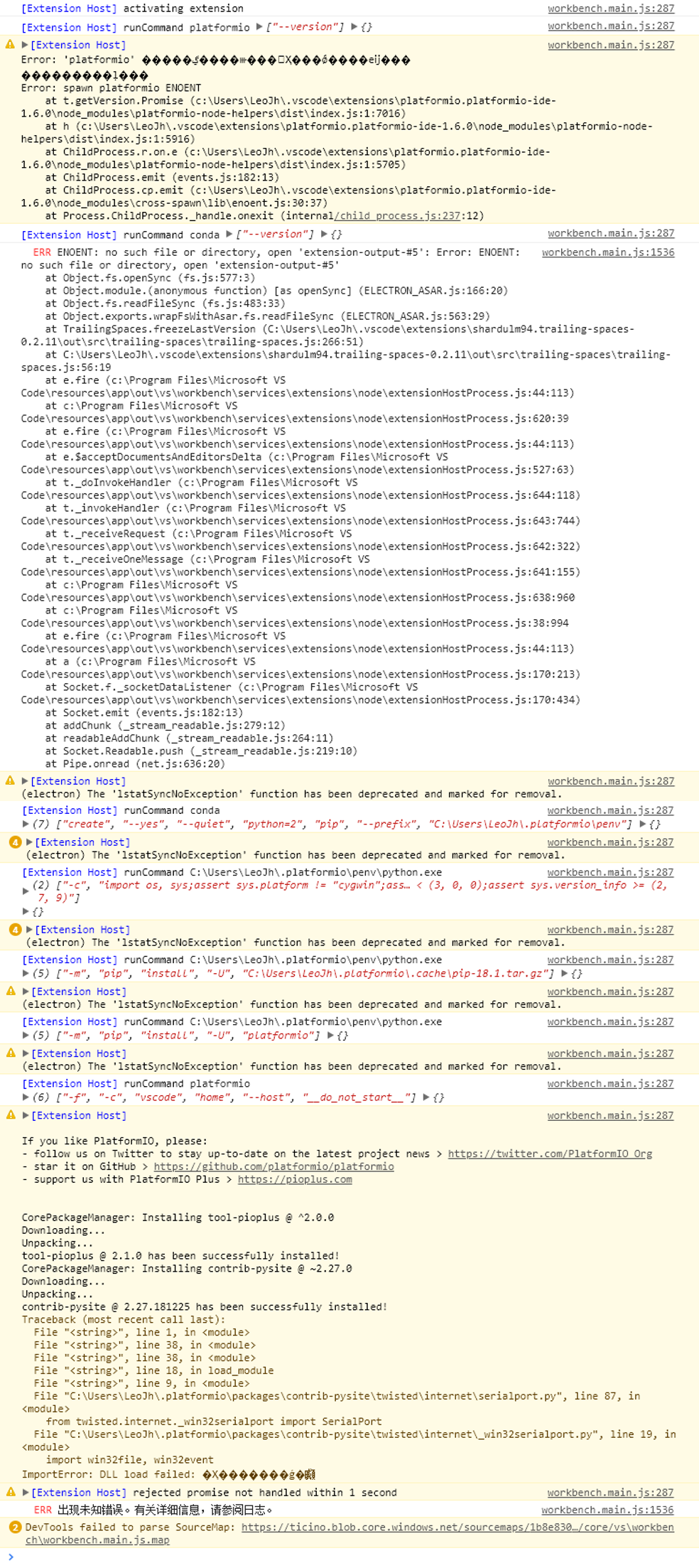
Here is the log of what happened when I start installing PlatformIO in VSCode:
with conda and pip
without conda without pip
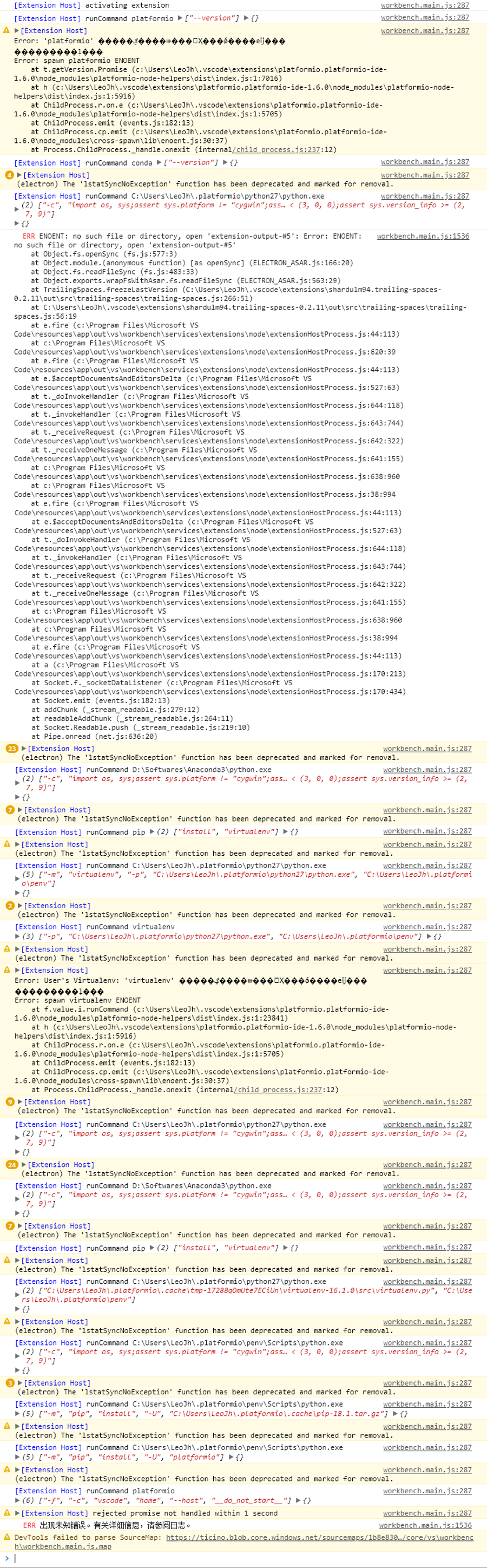
So It seems to me that the installer goes like this:
try to find conda
- [YES]build python environment in User\your-username.platformiopenv and find
pip
- [YES]pip install platformio
- [NO]install
pipfrom User\your-username.platformio.cache and pip install platformio
- [NO]find
virtualenv
- [YES]build python environment in User\your-username.platformiopenv and find
pip - [YES]pip install platformio
- [NO]install
pipfrom User\your-username.platformio.cache and pip install platformio - [NO]try pip install virtualenv
- [SUCCEED]build python environment in User\your-username.platformiopenv and pip install platformio
- [FAILED]install
virtualenvfrom User\your-username.platformio.cache and build python environment in User\your-username.platformiopenv then installpipfrom User\your-username.platformio.cache and pip install platformio finally pip install platformio
- [YES]build python environment in User\your-username.platformiopenv and find
the version of python is checked every time a python.exe is called, but it seems that the version of pip is never checked. So I think keep an eye on pip's version is the point. 😄
LeoJhonSong
on 23 Feb 2019
I faced the same problem yesterday. I fixed by installing the required modules(pywin32 and PySerial). Since platformio using its own python 2.7 located in
~/.platformio/penvorC:\User\your-username\.platformio\penv, We have to install the missing modules using their copy of python which can be done by using these commands:> cd C:\Users\your-username\.platformio\penv > python.exe -m pip install PySerial pywin32
Thank you! It worked for me :)
TaniaAG
on 27 Feb 2019
Should be fixed in the latest release.
ivankravets
on 30 May 2019
Related issues
 jenokizm
·
3Comments
jenokizm
·
3Comments
 GeorgeFlorian
·
3Comments
GeorgeFlorian
·
3Comments
 exocode
·
8Comments
exocode
·
8Comments
 tovine
·
4Comments
tovine
·
4Comments
 EnviousD
·
6Comments
EnviousD
·
6Comments