Platformio-vscode-ide: "mitaki28.vscode-clang" extension conflicts with "ms-vscode.cpptools"
Temporary solution
Please disable/uninstall mitaki28.vscode-clang and vsciot-vscode.vscode-arduino extensions for PlatformIO workspaces.
VSCode > Menu > View > Extensions > Enabled > Icon near extension ⚙️ > Uninstall
You can change a board and serial port using platformio.ini and board/upload_port options:
- https://docs.platformio.org/en/latest/projectconf/section_env_general.html#board
- https://docs.platformio.org/en/latest/projectconf/section_env_upload.html#upload-port
VSCode prompt 'Arduino.h' file not found ,But it can still compile
 yelvlab
All 35 comments
Could you try to rebuild a project C/C++ IntelliSense index? VSCode Menu > Tasks > Run Task... > PlatformIO: Rebuild C/C++ Project Index
 ivankravets
on 14 Jun 2018
ivankravets
on 14 Jun 2018
Please reopen if you still need help
ivankravets
on 20 Jun 2018
I have this problem and the task "Rebuild C/C++ Project Index" does not exists.
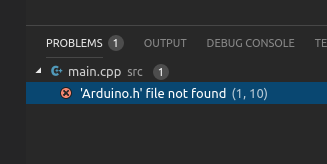
"Go to definition" works OK.
 zgoda
on 10 Jul 2018
zgoda
on 10 Jul 2018
@zgoda do you see PlatformIO IDE Toolbar on the bottom panel?
ivankravets
on 10 Jul 2018
Yes but this task does not exist on the list of tasks.
zgoda
on 10 Jul 2018
VSCode > Help > Toggle Developer Tools.
Do you see any errors? Try to restart VSCode.
ivankravets
on 10 Jul 2018
  ERR Cannot read property 'dispose' of undefined: TypeError: Cannot read property 'dispose' of undefined
    at delay.then.then (/home/jazg/.vscode/extensions/mitaki28.vscode-clang-0.2.2/out/src/diagnostic.js:44:35)
    at <anonymous>
This is the only error I see. Restarting VSC does not help, the problem reappears as soon as I save the document.
zgoda
on 10 Jul 2018
Please open PIO IDE Terminal and type pio init --ide vscode. Does it work?
ivankravets
on 10 Jul 2018
Yes, this is what "Rebuild IntelliSense Index" task does. But this does not change anything.
zgoda
on 10 Jul 2018
Try to disable other extensions and check if it works without them. Maybe, some extension conflicts with PIO.
Also, try to create a simple empty project and check if it works.
ivankravets
on 10 Jul 2018
This one was an offender https://marketplace.visualstudio.com/items?itemName=mitaki28.vscode-clang
zgoda
on 10 Jul 2018
Thanks! I'll try to reproduce this issue by installing that extension.
ivankravets
on 10 Jul 2018
I can't reproduce this issue with that extension. Let's wait maybe someone will provide more info.
@yelvlab do you also have this extension https://marketplace.visualstudio.com/items?itemName=mitaki28.vscode-clang?
P.S: Temporary, you can disable that extension for PIO workspaces.
ivankravets
on 10 Jul 2018
@ivankravets yes,I have
yelvlab
on 11 Jul 2018
This issue may be related.
zgoda
on 11 Jul 2018
See updated solution in the original comment https://github.com/platformio/platformio-vscode-ide/issues/118#issue-332266163
P.S: We can't help here. mitaki28.vscode-clang overrides ms-vscode.cpptools's IntelliSense provider, as result, you see these errors. It seems for me that you can manually configure mitaki28.vscode-clang as described in their docs and disable ms-vscode.cpptools. Nevertheless, I don't see any benefit from mitaki28.vscode-clang.
ivankravets
on 11 Jul 2018
I use it elsewhere, certainly not in PIO projects. Disabling it in PIO workspaces seems an acceptable workaround.
zgoda
on 12 Jul 2018
I don't know how to disable/uninstall the offending components. Can you be clearer?
 alnitak1000
on 21 Nov 2018
alnitak1000
on 21 Nov 2018
VSCode > Menu > View > Extensions > Enabled > Icon near extension ⚙️ > Uninstall
ivankravets
on 21 Nov 2018
So it still doesn't work. I have the Arduino 0.2.23 extension, C/C++ 0.20.1, Platformio IDE 1.4.6, and C++ intellisense 0.2.2 installed and still get the error message that the intellisense won't work. I tried uninstalling the C++ intellisense extension, also, but that doesn't make any difference. This on Mac OS x 10.13.6
alnitak1000
on 25 Nov 2018
Please uninstall Arduino extension and install C/C++ extension. Restart VSCode, wait a few seconds while VSCode builds index.
ivankravets
on 25 Nov 2018
That seemed to work, although the board and serial ports no longer show up
in the status bar
On Sun, Nov 25, 2018 at 4:54 AM Ivan Kravets notifications@github.com
wrote:
Please uninstall Arduino extension and install C/C++ extension. Restart
VSCode, wait a few seconds while VSCode builds index.—
You are receiving this because you commented.
Reply to this email directly, view it on GitHub
https://github.com/platformio/platformio-vscode-ide/issues/118#issuecomment-441428299,
or mute the thread
https://github.com/notifications/unsubscribe-auth/AFufyQrrKqbBdEFoW1EQP7AQWsgk50gHks5uymjbgaJpZM4UnX3Z
.
alnitak1000
on 26 Nov 2018
Ха-ха.
 JuriBurakov
on 29 Nov 2018
JuriBurakov
on 29 Nov 2018
@alnitak1000 these board and serial ports switchers are from arduino extension. We don't depend on them and they mislead PlatformIO users. You can change board and serial port using platformio.ini and board/upload_port options:
ivankravets
on 29 Nov 2018
Great, thanks, that is helpful.
On Thu, Nov 29, 2018 at 8:23 AM Ivan Kravets notifications@github.com
wrote:
@alnitak1000 https://github.com/alnitak1000 these board and serial
ports switchers are from arduino extension. We don't depend on them and
they mislead PlatformIO users. You can change board and serial port using
platformio.ini and board/upload_port options:-
https://docs.platformio.org/en/latest/projectconf/section_env_general.html#board
-
https://docs.platformio.org/en/latest/projectconf/section_env_upload.html#upload-port—
You are receiving this because you were mentioned.
Reply to this email directly, view it on GitHub
https://github.com/platformio/platformio-vscode-ide/issues/118#issuecomment-442831988,
or mute the thread
https://github.com/notifications/unsubscribe-auth/AFufyZlq8RNyRo9P42XThlE2XzZLeVHbks5uz9_lgaJpZM4UnX3Z
.
alnitak1000
on 29 Nov 2018
Visual studio code 1.38.1 and PlatformIO on Windows 10
M5StickC on COM port 10 BAUD 115200
Working with M5StickC and followed the starting above instructions. The code compiled successfully and now have an issue with uploading the code to M5StickC.
A fatal error occurred: Timed out waiting for packet header
* [upload] Error 2
I have no issues when using Arduino IDE 1.8.10
 rwp908
on 22 Sep 2019
rwp908
on 22 Sep 2019
Finally had to modify the code to get M5StickC for MStickC_Slot to run.
The code here https://github.com/vcraftjp/M5StickC_Slot requires some modification but now it works great. Spent 5 hours to make it work.
rwp908
on 23 Sep 2019
So who holds responsibility for this error right now? Microsoft or PlatformIO? I see that Microsoft feels that the only solution is to disable part of PlatformIO. But I also see that no FIX has been implemented by either side. Are there any plans to resolve or are we waiting to see who flinches first?
 rflulling
on 19 Oct 2019
rflulling
on 19 Oct 2019
We asked Microsoft Team to help us here. They confirmed the issue but there is no feedback from their side :( I'll try to ping them again.
ivankravets
on 19 Oct 2019
still having issue
 rbiernath
on 1 May 2020
rbiernath
on 1 May 2020
We asked Microsoft Team to help us here. They confirmed the issue but there is no feedback from their side :( I'll try to ping them again.
Any luck with that? Been 7 months now.
 jay-ramani
on 22 May 2020
jay-ramani
on 22 May 2020
We asked Microsoft Team to help us here. They confirmed the issue but there is no feedback from their side :( I'll try to ping them again.
Any update? We still have this issue.
 devoh747
on 20 Jun 2020
devoh747
on 20 Jun 2020
Not to beat a dead horse. But the last time I saw a change to VSC that resulted in something being broken, it was deliberate a a competitive move to muscle in on a product they wanted out. I think they have done this a couple times now since I have been on VSC.
It seems I have been to this topic before.
So in reference, the Arduino module that they still advertise in VSC. You cannot enable wit without conflict. As best I can tell the change to the code was NOT an accident. This effected both Arduino and PIO. If I recall correctly.
I don't expect to ever see this FIXED. Least not by any measure we know.
rflulling
on 20 Jun 2020
Is this issue resolved? I still face the include error when trying to include Arduino.h file. Have added everything in my include path as well. Please can someone help here? Can provide any relevant details further!
 Nikhita-Rajasekhar
on 21 Sep 2020
Nikhita-Rajasekhar
on 21 Sep 2020
I was able to ignore the conflict message, use the build button at the bottom of the VSC, and there were no more errors that includes were invalid.
Extensions installed:
C/C++ IntelliSense v1.1.3
GitHub Pull Requests and Issues v0.21.2
PlatformIO v2.2.1
Arduino v0.3.4
PlatformIO core 5.0.3
Visual Studio Code Details:
Version: 1.51.1 (user setup)
Commit: e5a624b788d92b8d34d1392e4c4d9789406efe8f
Date: 2020-11-10T23:34:32.027Z
Electron: 9.3.3
Chrome: 83.0.4103.122
Node.js: 12.14.1
V8: 8.3.110.13-electron.0
OS: Windows_NT x64 10.0.19042
Just ignore the conflict message, it's only intended to mislead you. Everything works fine. Remember the 80s when MS put those DOS errors in to steal business? Same thing here.
 thewhiterabbit
on 8 Dec 2020
thewhiterabbit
on 8 Dec 2020
Related issues
 Zukatomo
·
7Comments
Zukatomo
·
7Comments
 chall3ng3r
·
6Comments
chall3ng3r
·
6Comments
 EnviousD
·
6Comments
EnviousD
·
6Comments
 chenjingyuanku
·
8Comments
chenjingyuanku
·
8Comments
 leobel96
·
7Comments
leobel96
·
7Comments
Most helpful comment
We asked Microsoft Team to help us here. They confirmed the issue but there is no feedback from their side :( I'll try to ping them again.