Platformio-vscode-ide: PlatformIO buttons not showing on VSCode
Solution
PLEASE OPEN PLATFORMIO PROJECT!!!. HOME ICON > Open Project.
Newbie here, sorry :D I think I messed up with my vscode workplace and now the PIO buttons disappeared from my interface. There are only 4 buttons on the bottom bar: Errors, Warnings, Infos and PlatformIO: Home. When I clink the home button a pop-up error message saying "Running the contributed command:'platformio-ide.showHome' failed." Can anyone help me on it?

 rafael-mq
All 36 comments
You need to open PIO Project or create a new one.
 ivankravets
on 22 May 2018
ivankravets
on 22 May 2018
Hello, after last update I don't see the status bar pio icons.. Project is open. In Atom it works fine but I'm already addict on VSC + Platformio. Any idea?
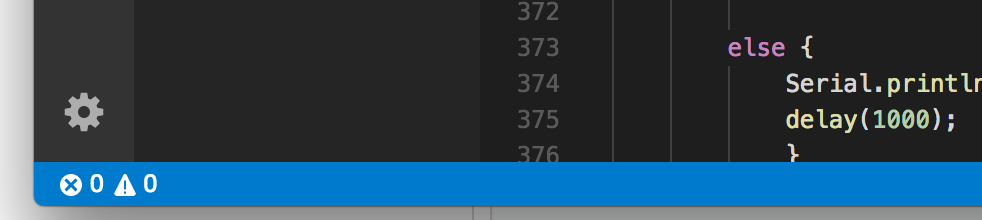
... later tonight: now it is displaying. Platformio was doing some other update, I have a very slow 3G internet.
 gosouth
on 3 Jun 2018
gosouth
on 3 Jun 2018
Could you try uninstall and install extension again?
ivankravets
on 3 Jun 2018
Hello Ivan, thanks for your prompt response. I uninstalled it and noticed that the Extension C/C++ from Microsoft was installing very slow. Statusbar was at his minimum while downloading this MS extension. For very slow internet connection some message in the status bar would be nice.
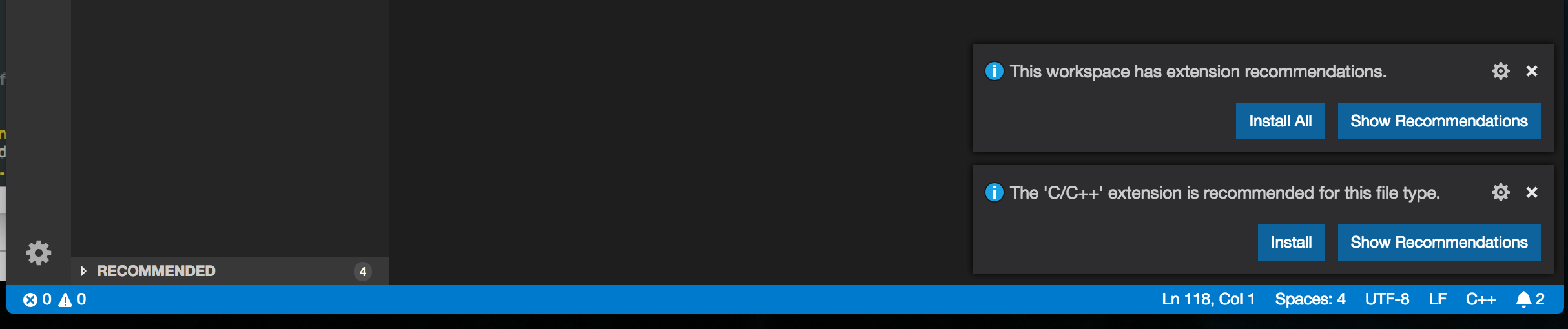
Now it is working fine!!
gosouth
on 3 Jun 2018
Hello,
I have the same problem, but I don't have any installation to wait for.

I can't open PIO Home and I can't use the commands from Command Palette.

 IamPhytan
on 1 Feb 2019
IamPhytan
on 1 Feb 2019
Could you provide console output from VSCode > Help > Toggle Developers Tool > Console?
ivankravets
on 2 Feb 2019
I finally solved this problem.
I needed to :
- Uninstall Platformio-IDE
- Reload VS Code
- Close and reopen VS Code
- Install Platformio-IDE
- Reload to activate
I think my problem was the fact that PlatformIO Core wasn't updated and upgraded.
IamPhytan
on 2 Feb 2019
Great! Happy coding with PlatformIO!
ivankravets
on 2 Feb 2019
I have the same problem as @gosouth. You are unable to work with PlatformIO if you have slow internet connection and vscode is downloading updates. This is an issue.
 DmitryMaksakov
on 9 May 2019
DmitryMaksakov
on 9 May 2019
same issue here 4.0.3 was installed without my permission and now I try since 5h to make it work.
=> I even try now the portable version and have the same issue
I can't understand that an update is done without my permission. I wanted to change 1 line of code, a work of 2 min and end up in a desaster because the environment is not working.
=> I tried ll steps above and do not see the buttons to compile (yes it is a platformio project and yes it still works on my 2 other computers)
mainThreadExtensionService.ts:65 [[object Object]]i.default.isFileSync is not a function
mainThreadExtensionService.ts:66 TypeError: i.default.isFileSync is not a function
    at Object.t.isPIOProject (c:\Users\IBM_ADMIN\.vscode\extensions\platformio.platformio-ide-1.9.1\node_modules\platformio-node-helpers\dist\index.js:1:4689)
    at map.filter.e (c:\Users\IBM_ADMIN\.vscode\extensions\platformio.platformio-ide-1.9.1\dist\extension.js:1:13675)
    at Array.filter (<anonymous>)
    at c (c:\Users\IBM_ADMIN\.vscode\extensions\platformio.platformio-ide-1.9.1\dist\extension.js:1:13658)
    at Object.t.getActivePIOProjectDir (c:\Users\IBM_ADMIN\.vscode\extensions\platformio.platformio-ide-1.9.1\dist\extension.js:1:12547)
    at Object.activate (c:\Users\IBM_ADMIN\.vscode\extensions\platformio.platformio-ide-1.9.1\dist\extension.js:1:2810)
    at t.activate (c:\Users\IBM_ADMIN\.vscode\extensions\platformio.platformio-ide-1.9.1\dist\extension.js:1:1684)
    at Function._callActivateOptional (c:\Users\IBM_ADMIN\Desktop\VSC\resources\app\out\vs\workbench\services\extensions\node\extensionHostProcess.js:667:613)
    at Function._callActivate (c:\Users\IBM_ADMIN\Desktop\VSC\resources\app\out\vs\workbench\services\extensions\node\extensionHostProcess.js:667:264)
    at Promise.all.then.n (c:\Users\IBM_ADMIN\Desktop\VSC\resources\app\out\vs\workbench\services\extensions\node\extensionHostProcess.js:666:404)
2
 lobocobra
on 20 Oct 2019
lobocobra
on 20 Oct 2019
Same issue at 1.9.1, after reinstalling
VSCode:
Version: 1.39.2
Commit: 6ab598523be7a800d7f3eb4d92d7ab9a66069390
Date: 2019-10-15T15:33:40.634Z
Electron: 4.2.10
Chrome: 69.0.3497.128
Node.js: 10.11.0
V8: 6.9.427.31-electron.0
OS: Linux x64 5.0.0-32-generic snap
console.ts:137 [Extension Host] (node:21870) [DEP0005] DeprecationWarning: Buffer() is deprecated due to security and usability issues. Please use the Buffer.alloc(), Buffer.allocUnsafe(), or Buffer.from() methods instead.
t.log @ console.ts:137
console.ts:137 [Extension Host] rejected promise not handled within 1 second: TypeError: i.default.isFileSync is not a function
t.log @ console.ts:137
console.ts:137 [Extension Host] stack trace: TypeError: i.default.isFileSync is not a function  at Object.t.isPIOProject (/home/kirill/.vscode/extensions/platformio.platformio-ide-1.9.1/node_modules/platformio-node-helpers/dist/index.js:1:4689)    at map.filter.e (/home/kirill/.vscode/extensions/platformio.platformio-ide-1.9.1/dist/extension.js:1:13675) at Array.filter (<anonymous>)   at c (/home/kirill/.vscode/extensions/platformio.platformio-ide-1.9.1/dist/extension.js:1:13658)    at Object.t.getActivePIOProjectDir (/home/kirill/.vscode/extensions/platformio.platformio-ide-1.9.1/dist/extension.js:1:12547)  at Object.activate (/home/kirill/.vscode/extensions/platformio.platformio-ide-1.9.1/dist/extension.js:1:2810)   at t.activate (/home/kirill/.vscode/extensions/platformio.platformio-ide-1.9.1/dist/extension.js:1:1684)    at Function._callActivateOptional (/snap/code/18/usr/share/code/resources/app/out/vs/workbench/services/extensions/node/extensionHostProcess.js:667:613)    at Function._callActivate (/snap/code/18/usr/share/code/resources/app/out/vs/workbench/services/extensions/node/extensionHostProcess.js:667:264)    at Promise.all.then.n (/snap/code/18/usr/share/code/resources/app/out/vs/workbench/services/extensions/node/extensionHostProcess.js:666:404)
t.log @ console.ts:137
mainThreadExtensionService.ts:65 [[object Object]]i.default.isFileSync is not a function
$onExtensionRuntimeError @ mainThreadExtensionService.ts:65
mainThreadExtensionService.ts:66 TypeError: i.default.isFileSync is not a function
    at Object.t.isPIOProject (/home/kirill/.vscode/extensions/platformio.platformio-ide-1.9.1/node_modules/platformio-node-helpers/dist/index.js:1)
    at map.filter.e (/home/kirill/.vscode/extensions/platformio.platformio-ide-1.9.1/dist/extension.js:1)
    at Array.filter (<anonymous>)
    at c (/home/kirill/.vscode/extensions/platformio.platformio-ide-1.9.1/dist/extension.js:1)
    at Object.t.getActivePIOProjectDir (/home/kirill/.vscode/extensions/platformio.platformio-ide-1.9.1/dist/extension.js:1)
    at Object.activate (/home/kirill/.vscode/extensions/platformio.platformio-ide-1.9.1/dist/extension.js:1)
    at t.activate (/home/kirill/.vscode/extensions/platformio.platformio-ide-1.9.1/dist/extension.js:1)
    at Function._callActivateOptional (/snap/code/18/usr/share/code/resources/app/out/vs/workbench/services/extensions/node/extensionHostProcess.js:667)
    at Function._callActivate (/snap/code/18/usr/share/code/resources/app/out/vs/workbench/services/extensions/node/extensionHostProcess.js:667)
    at Promise.all.then.n (/snap/code/18/usr/share/code/resources/app/out/vs/workbench/services/extensions/node/extensionHostProcess.js:666)
 sleeply4cat
on 20 Oct 2019
sleeply4cat
on 20 Oct 2019
Same issue here:
Version: 1.39.2
Commit: 6ab598523be7a800d7f3eb4d92d7ab9a66069390
Date: 2019-10-15T15:33:00.827Z
Electron: 4.2.10
Chrome: 69.0.3497.128
Node.js: 10.11.0
V8: 6.9.427.31-electron.0
OS: Darwin x64 18.7.0
mainThreadExtensionService.ts:65 [[object Object]]i.default.isFileSync is not a function
$onExtensionRuntimeError @ mainThreadExtensionService.ts:65
_doInvokeHandler @ rpcProtocol.ts:398
_invokeHandler @ rpcProtocol.ts:383
_receiveRequest @ rpcProtocol.ts:299
_receiveOneMessage @ rpcProtocol.ts:226
_protocol.onMessage.e @ rpcProtocol.ts:101
fire @ event.ts:580
fire @ ipc.net.ts:453
_receiveMessage @ ipc.net.ts:733
_socketDisposables.push._socketReader.onMessage.e @ ipc.net.ts:592
fire @ event.ts:580
acceptChunk @ ipc.net.ts:239
_register._socket.onData.e @ ipc.net.ts:200
t @ ipc.net.ts:28
emit @ events.js:182
addChunk @ _stream_readable.js:283
readableAddChunk @ _stream_readable.js:264
Readable.push @ _stream_readable.js:219
onStreamRead @ internal/stream_base_commons.js:94
mainThreadExtensionService.ts:66 TypeError: i.default.isFileSync is not a function
    at Object.t.isPIOProject (/Users/dickswart/.vscode/extensions/platformio.platformio-ide-1.9.1/node_modules/platformio-node-helpers/dist/index.js:1)
    at map.filter.e (/Users/dickswart/.vscode/extensions/platformio.platformio-ide-1.9.1/dist/extension.js:1)
    at Array.filter (<anonymous>)
    at c (/Users/dickswart/.vscode/extensions/platformio.platformio-ide-1.9.1/dist/extension.js:1)
    at Object.t.getActivePIOProjectDir (/Users/dickswart/.vscode/extensions/platformio.platformio-ide-1.9.1/dist/extension.js:1)
    at Object.activate (/Users/dickswart/.vscode/extensions/platformio.platformio-ide-1.9.1/dist/extension.js:1)
    at t.activate (/Users/dickswart/.vscode/extensions/platformio.platformio-ide-1.9.1/dist/extension.js:1)
    at Function._callActivateOptional (/Applications/Visual Studio Code.app/Contents/Resources/app/out/vs/workbench/services/extensions/node/extensionHostProcess.js:667)
    at Function._callActivate (/Applications/Visual Studio Code.app/Contents/Resources/app/out/vs/workbench/services/extensions/node/extensionHostProcess.js:667)
    at Promise.all.then.n (/Applications/Visual Studio Code.app/Contents/Resources/app/out/vs/workbench/services/extensions/node/extensionHostProcess.js:666)
 DickSwart
on 20 Oct 2019
DickSwart
on 20 Oct 2019
Same here:
Version: 1.39.2 (user setup)
Commit: 6ab598523be7a800d7f3eb4d92d7ab9a66069390
Date: 2019-10-15T15:35:18.241Z
Electron: 4.2.10
Chrome: 69.0.3497.128
Node.js: 10.11.0
V8: 6.9.427.31-electron.0
OS: Windows_NT x64 10.0.18362
console.ts:137 [Extension Host] activating extension
console.ts:137 [Extension Host] starting language server
console.ts:137 [Extension Host] (node:19508) [DEP0005] DeprecationWarning: Buffer() is deprecated due to security and usability issues. Please use the Buffer.alloc(), Buffer.allocUnsafe(), or Buffer.from() methods instead.
t.log @ console.ts:137
console.ts:137 [Extension Host] rejected promise not handled within 1 second: TypeError: i.default.isFileSync is not a function
t.log @ console.ts:137
console.ts:137 [Extension Host] stack trace: TypeError: i.default.isFileSync is not a function  at Object.t.isPIOProject (c:\Users\Boris\.vscode\extensions\platformio.platformio-ide-1.9.1\node_modules\platformio-node-helpers\dist\index.js:1:4689)  at map.filter.e (c:\Users\Boris\.vscode\extensions\platformio.platformio-ide-1.9.1\dist\extension.js:1:13675)   at Array.filter (<anonymous>)   at c (c:\Users\Boris\.vscode\extensions\platformio.platformio-ide-1.9.1\dist\extension.js:1:13658)  at Object.t.getActivePIOProjectDir (c:\Users\Boris\.vscode\extensions\platformio.platformio-ide-1.9.1\dist\extension.js:1:12547)    at Object.activate (c:\Users\Boris\.vscode\extensions\platformio.platformio-ide-1.9.1\dist\extension.js:1:2810) at t.activate (c:\Users\Boris\.vscode\extensions\platformio.platformio-ide-1.9.1\dist\extension.js:1:1684)  at Function._callActivateOptional (c:\Users\Boris\AppData\Local\Programs\Microsoft VS Code\resources\app\out\vs\workbench\services\extensions\node\extensionHostProcess.js:667:613) at Function._callActivate (c:\Users\Boris\AppData\Local\Programs\Microsoft VS Code\resources\app\out\vs\workbench\services\extensions\node\extensionHostProcess.js:667:264) at Promise.all.then.n (c:\Users\Boris\AppData\Local\Programs\Microsoft VS Code\resources\app\out\vs\workbench\services\extensions\node\extensionHostProcess.js:666:404)
t.log @ console.ts:137
mainThreadExtensionService.ts:65 [[object Object]]i.default.isFileSync is not a function
$onExtensionRuntimeError @ mainThreadExtensionService.ts:65
mainThreadExtensionService.ts:66 TypeError: i.default.isFileSync is not a function
    at Object.t.isPIOProject (c:\Users\Boris\.vscode\extensions\platformio.platformio-ide-1.9.1\node_modules\platformio-node-helpers\dist\index.js:1:4689)
    at map.filter.e (c:\Users\Boris\.vscode\extensions\platformio.platformio-ide-1.9.1\dist\extension.js:1:13675)
    at Array.filter (<anonymous>)
    at c (c:\Users\Boris\.vscode\extensions\platformio.platformio-ide-1.9.1\dist\extension.js:1:13658)
    at Object.t.getActivePIOProjectDir (c:\Users\Boris\.vscode\extensions\platformio.platformio-ide-1.9.1\dist\extension.js:1:12547)
    at Object.activate (c:\Users\Boris\.vscode\extensions\platformio.platformio-ide-1.9.1\dist\extension.js:1:2810)
    at t.activate (c:\Users\Boris\.vscode\extensions\platformio.platformio-ide-1.9.1\dist\extension.js:1:1684)
    at Function._callActivateOptional (c:\Users\Boris\AppData\Local\Programs\Microsoft VS Code\resources\app\out\vs\workbench\services\extensions\node\extensionHostProcess.js:667:613)
    at Function._callActivate (c:\Users\Boris\AppData\Local\Programs\Microsoft VS Code\resources\app\out\vs\workbench\services\extensions\node\extensionHostProcess.js:667:264)
    at Promise.all.then.n (c:\Users\Boris\AppData\Local\Programs\Microsoft VS Code\resources\app\out\vs\workbench\services\extensions\node\extensionHostProcess.js:666:404)
$onExtensionRuntimeError @ mainThreadExtensionService.ts:66
notificationsAlerts.ts:38 Error: command 'platformio-ide.showHome' not found
    at Proxy._tryExecuteCommand (commandService.ts:80)
    at r.then.i (commandService.ts:73)
    at process._tickCallback (internal/process/next_tick.js:68)
onDidNotificationChange @ notificationsAlerts.ts:38
 sivar2311
on 20 Oct 2019
sivar2311
on 20 Oct 2019
Seems to be an issue with 1.9.1.
Fix for now is to roll back to 1.9.0. This can be done through the extensions tab and clicking the cog icon next to platformIO. Then click "Install another version..." then select 1.9.0.
 erhmeh
on 20 Oct 2019
erhmeh
on 20 Oct 2019
Sorry for the issue. 1.9.2 is out.
ivankravets
on 20 Oct 2019
I can't install the new version:
Version: 1.39.2 (user setup)
Commit: 6ab598523be7a800d7f3eb4d92d7ab9a66069390
Date: 2019-10-15T15:35:18.241Z
Electron: 4.2.10
Chrome: 69.0.3497.128
Node.js: 10.11.0
V8: 6.9.427.31-electron.0
OS: Windows_NT x64 10.0.18362
Error: Could not create PIO Core Virtual Environment. Please create it manually -> http://bit.ly/pio-core-virtualenv Error: Virtualenv Create: Traceback (most recent call last): File "C:\Users\Ordsu72\.platformio\.cache\tmp-15384efYyQndJsBaZ\virtualenv-16.7.5\virtualenv.py", line 2632, in <module> main() File "C:\Users\Ordsu72\.platformio\.cache\tmp-15384efYyQndJsBaZ\virtualenv-16.7.5\virtualenv.py", line 870, in main symlink=options.symlink, File "C:\Users\Ordsu72\.platformio\.cache\tmp-15384efYyQndJsBaZ\virtualenv-16.7.5\virtualenv.py", line 1156, in create_environment install_python(home_dir, lib_dir, inc_dir, bin_dir, site_packages=site_packages, clear=clear, symlink=symlink) File "C:\Users\Ordsu72\.platformio\.cache\tmp-15384efYyQndJsBaZ\virtualenv-16.7.5\virtualenv.py", line 1526, in install_python shutil.copyfile(executable, py_executable) File "C:\Users\Ordsu72\.platformio\python37\lib\shutil.py", line 121, in copyfile with open(dst, 'w...
 Ordsu72
on 20 Oct 2019
Ordsu72
on 20 Oct 2019
What is your system Python? Try to remove all broken Pythons and restart VSCode
ivankravets
on 20 Oct 2019
I have no other Python installation on my machine just in the .platformio folder.
After removing the Python27 and Python37 folders from the .platformio and copied a new one (Python27) from another machine the installation can be finished.
Thank you for your advice.
Ordsu72
Ordsu72
on 20 Oct 2019
same issue here. just started this morning.
 jhoughjr
on 8 Dec 2019
jhoughjr
on 8 Dec 2019
Can't build due to no button for it. Is there an other way of building, so that one can use a workaround for now?
 Recrera
on 11 Oct 2020
Recrera
on 11 Oct 2020
@Recrera you can run "pio run" at the command line.
But me too - the button just went away. I've been using platformio happily for a year and just treid all the work arounds without success this bug is back.
 geeksville
on 16 Oct 2020
geeksville
on 16 Oct 2020
Same issue on Ubuntu linux. After upgdate buttons are gone.
Yesterday updated VSC on my windows laptop and got same result. By some help could restore, but can't remember, how :(.
 Urmaz
on 19 Oct 2020
Urmaz
on 19 Oct 2020
Please check an output in VSCode / Help / Developers tools / Console
ivankravets
on 20 Oct 2020
@Urmaz see the new bug I just opened with clear steps to reproduce the bug and to bring the button back.
geeksville
on 20 Oct 2020
Please check an output in VSCode / Help / Developers tools / Console
[Extension Host] Congratulations, your extension "C compiler" is now active!
console.ts:137 [Extension Host] activating extension
console.ts:137 [Extension Host] starting language server
console.ts:137 [Extension Host] (node:30089) [DEP0005] DeprecationWarning: Buffer() is deprecated due to security and usability issues. Please use the Buffer.alloc(), Buffer.allocUnsafe(), or Buffer.from() methods instead.
t.log @ console.ts:70
log.ts:197 ERR Error: No authentication provider 'microsoft' is currently registered.
at E.getSessions (authenticationService.ts:471)
at async e.getAccounts (userDataSyncWorkbenchService.ts:203)
at async e.update (userDataSyncWorkbenchService.ts:188)
at async e.initialize (userDataSyncWorkbenchService.ts:159)
at async e.waitAndInitialize (userDataSyncWorkbenchService.ts:142)
log.ts:191 WARN Settings Sync: Accounts are not initialized
console.ts:137 [Extension Host] runCommand /usr/bin/python3 Array(2) Object
console.ts:137 [Extension Host] runCommand /usr/bin/python3 Array(8) Object
console.ts:137 [Extension Host] Found compatible PlatformIO Core 5.0.1 -> /home/urmas/.platformio/penv/bin/platformio
console.ts:137 [Extension Host] PIO Core State Object
console.ts:137 [Extension Host] runCommand /home/urmas/.platformio/penv/bin/python Array(10) Object
webviewElement.ts:150 [Embedded Page] A cookie associated with a cross-site resource at http://127.0.0.1/ was set without the SameSite attribute. A future release of Chrome will only deliver cookies with cross-site requests if they are set with SameSite=None and Secure. You can review cookies in developer tools under Application>Storage>Cookies and see more details at https://www.chromestatus.com/feature/5088147346030592 and https://www.chromestatus.com/feature/5633521622188032.
DevTools failed to load SourceMap: Could not load content for file:///usr/share/code/resources/app/node_modules.asar/semver-umd/lib/semver-umd.js.map:
DevTools failed to load SourceMap: Could not load content for file:///usr/share/code/resources/app/node_modules.asar/tas-client-umd/lib/tas-client-umd.js.map:
DevTools failed to load SourceMap: Could not load content for file:///usr/share/code/resources/app/node_modules.asar/vscode-textmate/release/main.js.map:
DevTools failed to load SourceMap: Could not load content for file:///usr/share/code/resources/app/node_modules.asar/xterm/lib/xterm.js.map:
DevTools failed to load SourceMap: Could not load content for file:///usr/share/code/resources/app/node_modules.asar/xterm-addon-unicode11/lib/xterm-addon-unicode11.js.map:
DevTools failed to load SourceMap: Could not load content for file:///usr/share/code/resources/app/node_modules.asar/xterm-addon-search/lib/xterm-addon-search.js.map:
DevTools failed to load SourceMap: Could not load content for file:///usr/share/code/resources/app/node_modules.asar/node-pty/lib/index.js.map:
DevTools failed to load SourceMap: Could not load content for file:///usr/share/code/resources/app/node_modules.asar/node-pty/lib/unixTerminal.js.map:
DevTools failed to load SourceMap: Could not load content for file:///usr/share/code/resources/app/node_modules.asar/node-pty/lib/terminal.js.map:
DevTools failed to load SourceMap: Could not load content for file:///usr/share/code/resources/app/node_modules.asar/node-pty/lib/eventEmitter2.js.map:
DevTools failed to load SourceMap: Could not load content for file:///usr/share/code/resources/app/node_modules.asar/node-pty/lib/utils.js.map:
Urmaz
on 20 Oct 2020
@Urmaz please reset PlatformIO IDE settings in VSCode to the default. Click on that icon described below and check wat did you change.

ivankravets
on 20 Oct 2020
Set to default. Buttons still missing. Log:
[Extension Host] Congratulations, your extension "C compiler" is now active!
console.ts:137 [Extension Host] activating extension
console.ts:137 [Extension Host] starting language server
console.ts:137 [Extension Host] (node:526) [DEP0005] DeprecationWarning: Buffer() is deprecated due to security and usability issues. Please use the Buffer.alloc(), Buffer.allocUnsafe(), or Buffer.from() methods instead.
t.log @ console.ts:70
console.ts:137 [Extension Host] runCommand /usr/bin/python3 Array(2) Object
console.ts:137 [Extension Host] runCommand /usr/bin/python3 Array(8) Object
DevTools failed to load SourceMap: Could not load content for file:///usr/share/code/resources/app/node_modules.asar/semver-umd/lib/semver-umd.js.map:
DevTools failed to load SourceMap: Could not load content for file:///usr/share/code/resources/app/node_modules.asar/xterm/lib/xterm.js.map:
DevTools failed to load SourceMap: Could not load content for file:///usr/share/code/resources/app/node_modules.asar/xterm-addon-unicode11/lib/xterm-addon-unicode11.js.map:
DevTools failed to load SourceMap: Could not load content for file:///usr/share/code/resources/app/node_modules.asar/xterm-addon-search/lib/xterm-addon-search.js.map:
DevTools failed to load SourceMap: Could not load content for file:///usr/share/code/resources/app/node_modules.asar/node-pty/lib/index.js.map:
DevTools failed to load SourceMap: Could not load content for file:///usr/share/code/resources/app/node_modules.asar/node-pty/lib/unixTerminal.js.map:
DevTools failed to load SourceMap: Could not load content for file:///usr/share/code/resources/app/node_modules.asar/node-pty/lib/terminal.js.map:
DevTools failed to load SourceMap: Could not load content for file:///usr/share/code/resources/app/node_modules.asar/node-pty/lib/eventEmitter2.js.map:
DevTools failed to load SourceMap: Could not load content for file:///usr/share/code/resources/app/node_modules.asar/node-pty/lib/utils.js.map:
DevTools failed to load SourceMap: Could not load content for file:///usr/share/code/resources/app/node_modules.asar/tas-client-umd/lib/tas-client-umd.js.map:
DevTools failed to load SourceMap: Could not load content for file:///usr/share/code/resources/app/node_modules.asar/vscode-textmate/release/main.js.map:
console.ts:137 [Extension Host] Found compatible PlatformIO Core 5.0.1 -> /home/urmas/.platformio/penv/bin/platformio
console.ts:137 [Extension Host] PIO Core State {core_version: "5.0.1", python_version: "3.7.9", core_dir: "/home/urmas/.platformio", cache_dir: "/home/urmas/.platformio/.cache", penv_dir: "/home/urmas/.platformio/penv", …}
console.ts:137 [Extension Host] runCommand /home/urmas/.platformio/penv/bin/python (10) ["-m", "platformio", "-c", "vscode", "home", "--port", 8010, "--shutdown-timeout", 3600, "--no-open"] {}
webviewElement.ts:150 [Embedded Page] A cookie associated with a cross-site resource at http://127.0.0.1/ was set without the SameSite attribute. A future release of Chrome will only deliver cookies with cross-site requests if they are set with SameSite=None and Secure. You can review cookies in developer tools under Application>Storage>Cookies and see more details at https://www.chromestatus.com/feature/5088147346030592 and https://www.chromestatus.com/feature/5633521622188032.
Urmaz
on 20 Oct 2020
Please read docs about how to use PlatformIO IE for VSCode:
I'm not sure that I understand which buttons do you mean.
ivankravets
on 20 Oct 2020
I mean, that build and upload buttons are missing after vscode update. Now
it happened to Ubuntu, but the same thing happened two days ago, when I
updated VSC on win laptop.
T, 20. oktoober 2020 13:33 Ivan Kravets notifications@github.com kirjutas:
Please read docs about how to use PlatformIO IE for VSCode:
I'm not sure that I understand which buttons do you mean.
—
You are receiving this because you were mentioned.
Reply to this email directly, view it on GitHub
https://github.com/platformio/platformio-vscode-ide/issues/111#issuecomment-712757196,
or unsubscribe
https://github.com/notifications/unsubscribe-auth/AC4JOLSAQXMTSNJYAZAUQBDSLVRQXANCNFSM4FAUR3VA
.
Urmaz
on 20 Oct 2020
Bar on normal VSC:

Bar without upload and build buttons:

Urmaz
on 20 Oct 2020
Please don't spam. I asked to read the docs https://docs.platformio.org/en/latest/integration/ide/vscode.html
See comment from 2018 year https://github.com/platformio/platformio-vscode-ide/issues/111#issue-324503257
ivankravets
on 20 Oct 2020
@Urmaz see the new bug I just opened with clear steps to reproduce the bug and to bring the button back.
It's not same case for me. Buttons disapeared with VSC update. Tried to disable all extensions, Uninstall PIO, Python, but it didn't help.
Urmaz
on 20 Oct 2020
Please don't spam. Your installation looks OK. I see HOME icon and it means that everything is OK.
YOU WILL NOT SEE BUILD ICONS until you open the project in VSCode. platformio.ini file MUST MUST MUST MUST MUST MUST MUST MUST MUST MUST MUST MUST MUST MUST be in the root of the project.
ivankravets
on 20 Oct 2020
Of course I opened the existing project and platformio.ini is in the root of the project. It all worked before VSC update. I have a lot of projects there (Arduino, MiniCore, ESP8266) and no one shows "build" and "upload" (and also Serial monitor and Clean buttons) if I open those projects.
Urmaz
on 20 Oct 2020
ivankravets
on 20 Oct 2020
Got buttons back. From terminal line entered: "pio settings reset"
Urmaz
on 20 Oct 2020
Related issues
 jenokizm
·
3Comments
jenokizm
·
3Comments
 chenjingyuanku
·
8Comments
chenjingyuanku
·
8Comments
 exocode
·
8Comments
exocode
·
8Comments
 tovine
·
4Comments
tovine
·
4Comments
 LaBus3
·
7Comments
LaBus3
·
7Comments