Platformio-vscode-ide: In VS Code: Unable to open 'PIO Home': Cannot read property 'theme' of undefined.
After a fresh install of VS Code and Plaformio-IDE on W10,
when clicking on the PlatformIO Home button I get:
"Unable to open 'PIO Home': Cannot read property 'theme' of undefined."
I tried to uninstall, reboot and reinstall several times, still the same...
 jetpathar
All 24 comments
Temporary workaround:
- in .vscode\extensions\platformio.platformio-ide-0.13.0\lib\home.js
replace lines,
 return
      <html>
      <body style="margin: 0; padding: 0; height: 100%; overflow: hidden; background-color: ${theme === 'light' ? '#FFF' : '#1E1E1E'}">
        <iframe src="${pioNodeHelpers.home.getFrontendUri(params.host, params.port, { start, theme })}"
          width="100%"
          height="100%"
          frameborder="0"
          style="border: 0; left: 0; right: 0; bottom: 0; top: 0; position:absolute;" />
      </body>
      </html>
    ;
with lines from previous version of this file
return `
  <html>
  <body style="margin: 0; padding: 0; height: 100%; overflow: hidden; background-color: #fff">
    <iframe src="http://${ params.host }:${ params.port}?start=/${ uri.authority }" width="100%" height="100%" frameborder="0" style="border: 0; left: 0; right: 0; bottom: 0; top: 0; position:absolute;" />
  </body>
  </html>
`;
Then restart vscode.
 viordash
on 3 Mar 2018
viordash
on 3 Mar 2018
Hi viordash,
Thank you so much for your fast reply, it works, I search on the web for one hour
and I didn't find anything about my problem and you fixed it right away !
Cheers !
jetpathar
on 4 Mar 2018
In my case, after returning back the changes also continue to work. Apparently something produced registration and the system works even after reinstallation. Tested on Win 8.1 and Win 10
viordash
on 4 Mar 2018
Same problem.
Unable to open 'PIO Home': Cannot read property 'theme' of undefined
Solution works
 VladimirAkopyan
on 4 Mar 2018
VladimirAkopyan
on 4 Mar 2018
same problem here,
workaround works:
I copied the file home.js (you find it in the user directory)
Modified the lines mentioned above
started Visual Studio Code
PIO Home launches
closed Visual Studio Code
copied back the home.js file (revert any changes)
Visual Studio Code is running anyway
Please fix asap, getting started at clean installation with crazy error will made almost all people switch to another IDE...
 rselec
on 4 Mar 2018
rselec
on 4 Mar 2018
Im having the same problem and want to try this fix but I'm unable to find the home.js file to change it. How did you open it?
 dylanlrrb
on 4 Mar 2018
dylanlrrb
on 4 Mar 2018
Sory for the issue. We've just fixed it quickly and released 0.13.1. Please update the extension.
 ivankravets
on 5 Mar 2018
ivankravets
on 5 Mar 2018
@dylanlrrb does it work for you now?
ivankravets
on 5 Mar 2018
I have followed above instruction except that my platformIO folder is 0.13.2.
But unfortunately, the home page still cannot be opened. There has no error but keep showing the blank screen for loading.
I'm working behind proxy, and login is required. I have entered the proxy login when vs.code started, is there any other changes required? But it works fine before the upgrade.
P.S. after waiting for few minute, the PIO home page closed automatically, and the following error was show in the Welcome page:
Unable to open 'PIO Home': An unknown error occurred. Please consult the log for more details..
 Super169
on 12 Mar 2018
Super169
on 12 Mar 2018
@Super169 could you try to open PIO IDE Terminal and type pio home --port 8888. Do you see any errors?
ivankravets
on 12 Mar 2018
Hello I have same problem in 0.14.0 version, and I have lost terminal
 alexgalstyan
on 23 Mar 2018
alexgalstyan
on 23 Mar 2018
@alexgalsyan VSCode > Tasks > Run > PlatformIO: Upgrade PIO Core. Retsart IDE.
Or, remove ~/.platformio/packages folder and restart IDE.
ivankravets
on 23 Mar 2018
I hade "remove ~/.platformio/packages folder and restart IDE.". this not help
alexgalstyan
on 23 Mar 2018
@alexgalsyan Please open PIO IDE Terminal and provide pio --version.
ivankravets
on 23 Mar 2018
how can I open ?! I have lost my Platform IO terminal shortcuts
alexgalstyan
on 23 Mar 2018
version of Platform IO IDE 0.14.0
alexgalstyan
on 23 Mar 2018
VSCode > View > Command Palette > Terminal
ivankravets
on 23 Mar 2018
command 'platformio-ide.newTerminal' not found
alexgalstyan
on 23 Mar 2018
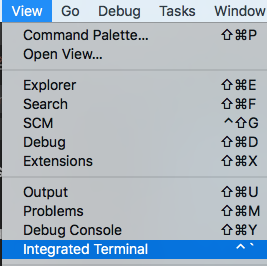
ivankravets
on 23 Mar 2018
PS C:\Users\G_Aleksandr> pio --version
pio : The term 'pio' is not recognized as the name of a cmdlet, function, script file, or operable program. Check the spelling of the name, or if a path was included, ve
rify that the path is correct and try again.
At line:1 char:1
- pio --version
- ~~~
- CategoryInfo : ObjectNotFound: (pio:String) [], CommandNotFoundException
- FullyQualifiedErrorId : CommandNotFoundException
alexgalstyan
on 23 Mar 2018
Please remove C:\Users\G_Aleksandr\.platformio folder and restart IDE. Does it work now? It seems that you have some problems with VSCode/Extension.
ivankravets
on 23 Mar 2018
I have Delete .platformio folder and vscode/extensions platformio.platformio-ide-0.14.0 after reinstall
reopen IDE
Platform IO IDE from VSCode extension add again
Problems same, if you need fix this issue I can gave you my TeamViewer ID
Its edited. After all this do VSCode ask for reload PlatformIO. After reloading all is back well !!!! Thank for your helps :)
alexgalstyan
on 23 Mar 2018
I can gave you my TeamViewer ID
Please, [email protected]
ivankravets
on 23 Mar 2018
Sorry I have missed your suggestion above.
The problem has been solved after I have uninstalled PlatformIO IDE, and delete the .PlatformIO folder, then reinstall PlatformIO IDE.
But there has problem whenever there has update on PlatformIO, and I have reinstalled PlatformIO IDE again today due to update issue.
Super169
on 26 Mar 2018
Related issues
 jenokizm
·
3Comments
jenokizm
·
3Comments
 rkruetli
·
6Comments
rkruetli
·
6Comments
 EnviousD
·
6Comments
EnviousD
·
6Comments
 exocode
·
8Comments
exocode
·
8Comments
 DJManas
·
9Comments
DJManas
·
9Comments
Most helpful comment
Temporary workaround:
replace lines,
with lines from previous version of this file
Then restart vscode.