Platformio-core: First build often fails after changing platformio.ini
Solution
See https://github.com/platformio/platformio-core/issues/2972
Please convert INO files to CPP https://docs.platformio.org/en/latest/faq.html#convert-arduino-file-to-c-manually
Configuration
Operating system: Windows 10
PlatformIO Version (platformio --version): 4.0.3
Platform: Arduino (ESP8266 to be exact)
Editor/IDE: VS-Code
Description of problem
When changing the platformio.ini file, and save it, a test is run to create a
At the end of this test, the file is deleted.
If you start a build while this test has not yet finished, then the .ino.cpp file is gone by the time the compile run is ready for processing this file.
This is what happens if you don't save the file yet but just hit the 'build' task to run.
It will save all open (unsaved) files and start building.
This save triggers the test run also.
Steps to Reproduce
- Make changes in platformio.ini Don't save yet
- Start compile
- Compile fails, since
setup()norloop()is found
 TD-er
TD-er
All 11 comments
Is this issue related to PIO Core? Do you mean that VSCode does not save automatically before build?
 ivankravets
on 6 Sep 2019
ivankravets
on 6 Sep 2019
Well I didn't know exactly what part of PIO it should be.
It also happens with Atom, so it is not just VS code.
TD-er
on 7 Sep 2019
Steps to Reproduce
Hm, if you didn't save a file how compiler should find setup/loop?
ivankravets
on 8 Sep 2019
The IDE (Atom/VScode does save the file when it is running a task.
TD-er
on 8 Sep 2019
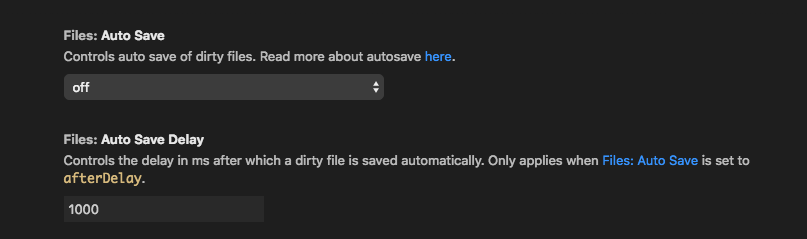
This option is turned off by default. See
ivankravets
on 8 Sep 2019
They are not auto saved, as in saved per interval (that would be rather annoying and resource consuming)
But as soon as you run a PIO task, the files are saved.
That's some useful feature :)
But this build fail also may happen if you save all and thus changed the platformio.ini on disk and immediately start to build.
It does generate the .ino.cpp file as a test, but also deletes it.
So by the time the core lib has been compiled, it cannot find the setup() and loop() anymore and thus fails the build.
TD-er
on 8 Sep 2019
Thanks! You gave me an idea. The issue is not linked with VS Code autosaving. The problem is that after "saving" of platformio.ini PlatformIO IDE extension rebuilds C/C++ project index. This is an issue. I will think about how to resolve it.
ivankravets
on 8 Sep 2019
Just for my understanding, was this a "core" issue?
TD-er
on 8 Sep 2019
@TD-er More an issue with the platformio/platformio-vscode-ide extension. As Ivan said... when the platformio.ini is saved. the extension immediately rebuilds the C/C++ project index ... aka.... PlatformIO: IntelliSense Index Rebuild... Now, AFAIK... this issue is no more... as it 'seems' that when you bash the build button on an unsaved platformio.ini... that the rebuild happens, and then the build happens... i.e. it does appear to block or queue... Yes? No? Small furry creature from Alpha Centauri?
 pfeerick
on 31 Oct 2019
pfeerick
on 31 Oct 2019
I reproduced this issue last time. It's only related when Arduino INO file is used. There is a race condition when PlatformIO Build System and Project Index Builder convert INO to CPP. We will work on good fix for this case.
ivankravets
on 1 Nov 2019
Described here https://github.com/platformio/platformio-core/issues/2972#issuecomment-713647848
ivankravets
on 21 Oct 2020
Related issues
 maxgerhardt
·
4Comments
maxgerhardt
·
4Comments
 simonvanderveldt
·
3Comments
simonvanderveldt
·
3Comments
 HamzaHajeir
·
5Comments
HamzaHajeir
·
5Comments
 nirkons
·
4Comments
nirkons
·
4Comments
 Teo-CD
·
3Comments
Teo-CD
·
3Comments
Most helpful comment
Thanks! You gave me an idea. The issue is not linked with VS Code autosaving. The problem is that after "saving" of platformio.ini PlatformIO IDE extension rebuilds C/C++ project index. This is an issue. I will think about how to resolve it.