Platformio-core: Debug by CLion
How I can debug by CLion after import project?
 Nullfati
All 24 comments
I show people how to debug stuff in CLion in this tutorial: https://community.platformio.org/t/debugging-stm32-and-esp32-targets-in-an-ide/4048
Specifics depend on your used board and debugger though.
But yeah it would be nice to have PlatformIO auto-setup a target like this in the CLion IDE :)
 maxgerhardt
on 11 Mar 2019
maxgerhardt
on 11 Mar 2019
We depend on https://youtrack.jetbrains.com/issue/CPP-15727
@anastasiak2512 could you help here?
 ivankravets
on 14 Mar 2019
ivankravets
on 14 Mar 2019
@maxgerhardt
Thank you for the info, it's helpful for me.
Yeah, it would be nice builtin to PlatformIO feature "debug by CLion".
Wait when JetBrains fix a bug.
Nullfati
on 16 Mar 2019
Great news this is a work in progress. I logged in to JetBrains YouTrack and upvoted the issue. I noticed nobody else had done it before me so @Nullfati maybe you could do so also?
 ristomatti
on 1 Jul 2019
ristomatti
on 1 Jul 2019
@ivankravets Doesn't look very promising. It seems Ilia Motornyi changed the JetBrains' YouTrack issue from _In progress_ to _Open_ and also changed the "Kanban board state" from _Develop_ to _Not on board_...
ristomatti
on 9 Oct 2019
We work on that together with CLIon Team and @nexoscp.
When we have some news, we will post here.
Sorry for the delay.
ivankravets
on 11 Oct 2019
Awesome, thanks for the update! I had hard time believing they'd dismiss the opportunity to support PlatformIO but luckily that was not the case after all.
ristomatti
on 12 Oct 2019
Hi all,
There is a piece of good news here. We are so happy to present the first MVP of the PlatformIO plugin for CLion. Big thanks to @JetBrains CLion Team, especially to @elmot for his amazing work.
This is not the final release. We just want to get some feedback and would be thankful if you help us to build a list with the most important features.
Demo
ESP-32

RISC-V
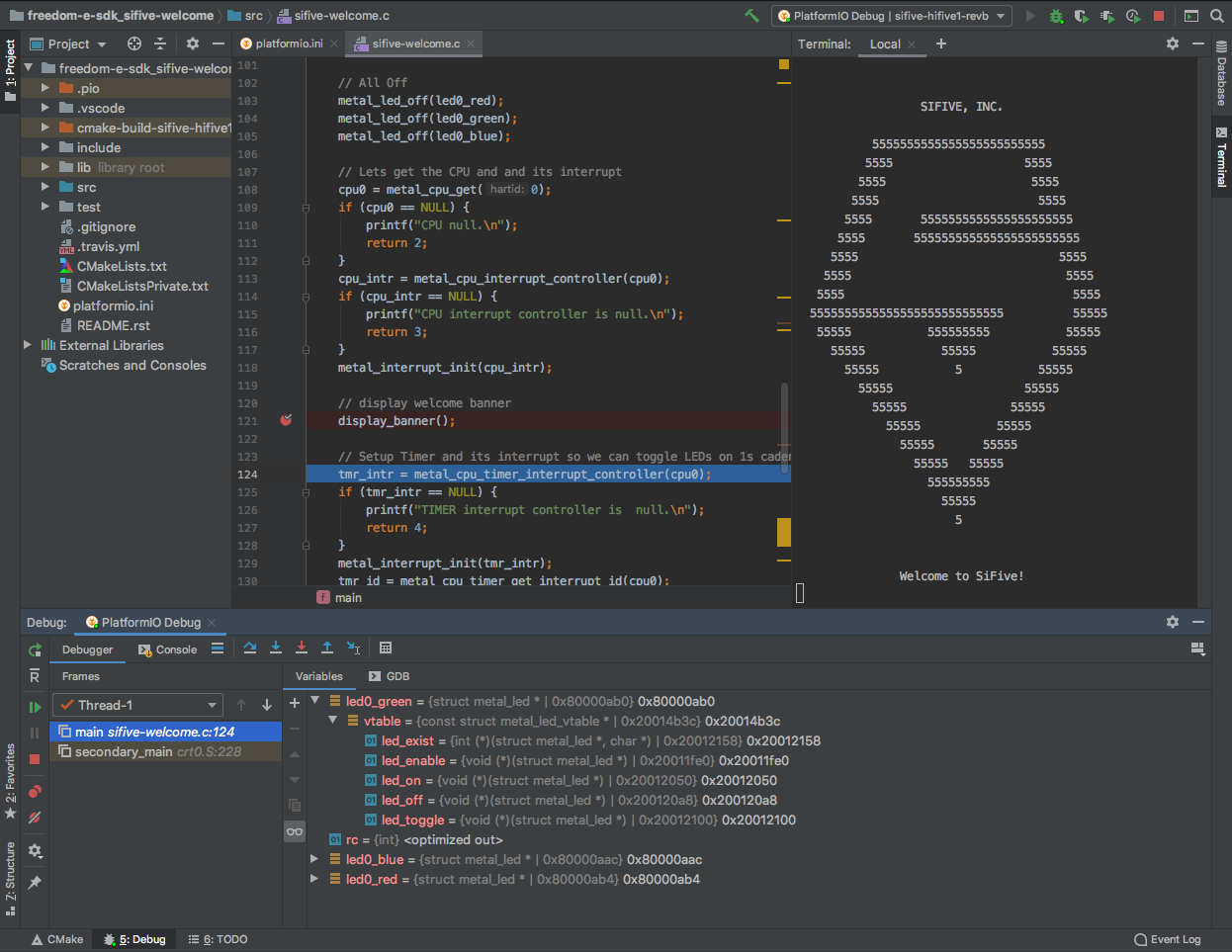
How to try it?
See official documentation https://docs.platformio.org/en/latest/integration/ide/clion.html
ivankravets
on 6 Nov 2019
@ivankravets, could you please share the latest plugin version and PlatformIO Core (dev) reference / setup instruction?
 sskorol
on 13 Jan 2020
sskorol
on 13 Jan 2020
@sskorol see updated instruction above. It is a little bit complicated, this is a 0.0.3 version of PlatformIO CLion plugin. It depends on a special branch of PIO Core which has not been merged yet into the develop. We will do this when a public version of Plugin will be available.
If you have any questions, I would be glad to help.
Does it work for you?
ivankravets
on 13 Jan 2020
@ivankravets it works in CLion 2019.3.2 (there's no EAP available right now).
I've successfully tested only "upload" configuration yet, as I have only ESP8266 available right now.
What I'd really love to see in this plugin:
- pio project type support (create / import);
- dependency management screen (similar to VSCode);
- built-in serial monitor (I don't like an existing CLion plugin);
- pio ini syntax highlighting and autocompletion;
- some descriptions for built-in run/debug configurations.
And thanks for your effort!
sskorol
on 14 Jan 2020
@sskorol thanks for the feedback!
dependency management screen (similar to VSCode);
Do you mean PIO Home?
built-in serial monitor (I don't like an existing CLion plugin);
Did you try to open a separate terminal window and type pio device monitor?
pio ini syntax highlighting and autocompletion;
1) You need to install INI plugin in CLion
2) There is platformio.ini UI, it has not been released yet. But! If you installed the latest dev-version of PIO Core, it's ready for you. Open CLion terminal and type pio home, navigate to PIO Home > Projects
some descriptions for built-in run/debug configurations.
Could you provide more details?
ivankravets
on 14 Jan 2020
@ivankravets yes, I meant PIO Home. Just tried pio home. See it in a browser now.
Device monitor works via CLI as well. But a general improvement for these 2 features would be adding some icons or tabs into IDE, similar to VSCode:

This panel is quite convenient. So it would be nice to minimize CLI interactions by creating some UI components at the bottom-left of the screen in CLion:

In terms of .ini highlighting: I have a corresponding plugin installed. But it still seems like a plain text style:

Moreover, autocompletion for all the reserved PIO options would really help. Probably, it's also possible to automatically check which platforms and boards are installed and show some suggestions.
Regarding run/debug configuration:

When I click any of the existing configuration, I see exactly the same settings to the right. So it seems a bit confusing. I can differentiate them only by name. For me it would make a perfect sense to display the underlying commands + references to the official documentation. Or just a couple of sentences about what does a corresponding configuration actually do.
Btw, the following command mentioned in the above instruction doesn't work:
pio run -b uno --ide clion
I used this one:
pio init -b nodemcuv2 --ide clion
And it'd be really nice to automate it via "New/Import Project" in CLion.
sskorol
on 14 Jan 2020
Btw, the following command mentioned in the above instruction doesn't work:
Sorry, this is my mistake, fixed!
And it'd be really nice to automate it via "New/Import Project" in CLion.
Yes, there is a progress on this. We will back soon here with updates.
ivankravets
on 14 Jan 2020
Can we have a link to the repo under which this is being developed/released for future reference?
 SJ-Innovation
on 1 Mar 2020
ivankravets
on 2 Mar 2020
SJ-Innovation
on 1 Mar 2020
ivankravets
on 2 Mar 2020
@ivankravets btw, I noticed a weird behaviour, when it's required to upload a code via OTA. Run/debug configuration is inactive in IDE. Seems like it becomes available only when a required device is connected directly to the USB port. So it might be useful to check if ota upload protocol is available in the paltform.io config, and allow building a project in this case.
sskorol
on 6 Mar 2020
@sskorol could you provide a screenshot? It should work. Does it work from CLI?
ivankravets
on 7 Mar 2020
@ivankravets that might be related to multiple PIO core conflicts. I had to uninstall everything. But I'm not able to install it again via pip. Seems like the following release was removed: https://github.com/platformio/platformio-core/archive/release/issue-2201-new-clion.zip
Can you share it again? And I'll double check.
sskorol
on 10 Mar 2020
Finally, we did this! An official PlatformIO for CLion is out! Thanks, JetBrains Team, for their work!
Please follow this documentation:
There are some known issues. Nevertheless, they are not blocker and we provided temporary solutions for them.
We would be thankful for any feedback.
ivankravets
on 14 Mar 2020
Hi There
Thanks for your work. I installed CLion, VSCode and PIO, 2 days ago.
I am a happy user of IntelliJ IDEs (PyCharm, Android Studio, PHPStorm) and I find that Arduino IDE is so bad... that I was writing my programs on EditPlus or Sublime then compile/upload with Arduino IDE...
So the couple CLion-PIO is something great!
I wrote a tutorial in french today: https://baghli.blogspot.com/2020/05/clion-et-pateformio-au-lieu-darduino-ide.html
to encourage Arduino/ESP community to use CLion-PIO
The main issues I had:
- I Couldn't install the PIO utilities from CLion alone. I had to first install them with VSCode
- Same for the Platforms and tools (Espressif, AVR...), but I found that if I add to the path the PIO scripts, then CLion can found the PIO utility and install them like VSCode
- Debug is not working (tried on ESP32 for Arduino)
- Syntax highlighting of Arduino, Lib function and names (String, uint8_t, SoftwareSerial, U8g2,...) doesn't work, though the programs compile and upload well. It seems that CLion doesn't found them in its search path. I tried to add them to the CMakeLists, so far without success. For me, it is very important, since I want to clic on a function to go directly to its definition in the c:\Users\xxx.platformio\lib\yyyy
So if you and CLion team can fix this ASAP, it would be great.
Thanks
 blotfi
on 1 May 2020
blotfi
on 1 May 2020
I Couldn't install the PIO utilities from CLion alone.
There is a ticket about that https://youtrack.jetbrains.com/issue/CPP-19412
Same for the Platforms and tools (Espressif, AVR...), but I found that if I add to the path the PIO scripts, then CLion can found the PIO utility and install them like VSCode
There is a ticket about custom PIO location
https://youtrack.jetbrains.com/issue/CPP-18368
Debug is not working (tried on ESP32 for Arduino)
Is it physically possible on that platform?
Syntax highlighting of Arduino, Lib function and names (String, uint8_t, SoftwareSerial, U8g2,...) doesn't work, though the programs compile and upload well. It seems that CLion doesn't found them in its search path. I tried to add them to the CMakeLists, so far without success. For me, it is very important, since I want to clic on a function to go directly to its definition in the
Sounds strange. What is your main file name? Should be something.cpp to express that the code is C++ but not pure C or .ino sketch. Yo may also watch my demo https://www.youtube.com/watch?v=Kz5NQiji9YU&t=5025s
 elmot
on 15 May 2020
elmot
on 15 May 2020
Hi elmot
for syntax highlinting, I solved the problem
see : https://youtrack.jetbrains.com/issue/CPP-20192
it seems that we must not use MSVC but MinGW, otherwise CLion will not parse correctly the libraries
blotfi
on 15 May 2020
Ah, ok, that was you.
elmot
on 15 May 2020
Related issues
 malachib
·
3Comments
malachib
·
3Comments
 HamzaHajeir
·
5Comments
maxgerhardt
·
4Comments
HamzaHajeir
·
5Comments
maxgerhardt
·
4Comments
 zindy
·
6Comments
zindy
·
6Comments
 424778940z
·
5Comments
424778940z
·
5Comments
Most helpful comment
Hi all,
There is a piece of good news here. We are so happy to present the first MVP of the
PlatformIO plugin for CLion. Big thanks to @JetBrains CLion Team, especially to @elmot for his amazing work.This is not the final release. We just want to get some feedback and would be thankful if you help us to build a list with the most important features.
Demo
ESP-32
RISC-V
How to try it?
See official documentation https://docs.platformio.org/en/latest/integration/ide/clion.html