Platformio-core: ZephyrProject integration
Hi,
I have been playing with https://www.zephyrproject.org/ recently.
Seems like they are developing really fast.
A lot of SOC supported, especially bluetooth / bluetooth mesh is very promising.
It would be great addition to Platformio.
Please consider adding Zephyr support.
Thanks.
 leodesigner
All 144 comments
Same comment as @leodesigner.
 jracle
on 4 Sep 2018
jracle
on 4 Sep 2018
I talk a bit with various chipset vendors and it seems that Zephyr is the platform they are interested in supporting. So I would expect growth in the number of people interested in Zephyr. So I think it would be well worth it.
 borud
on 7 Jan 2019
borud
on 7 Jan 2019
To be a bit more specific: we work a lot with Nordic Semiconductor and their new nRF91 chipset for LTE-M and NB-IoT. Their recommended RTOS is Zephyr. In the telco industry there is a lot of interest in this chipset. Both because it is fairly powerful (dual core, includes a GPS, TrustZone etc) and because Nordic has an approach to developers that is much friendlier than most chipset makers.
Managing a Zephyr toolchain leaves something to be desired in terms of ease of setup and use, and I really like how Platformio has solved this for the platforms and frameworks I have tested.
borud
on 6 Feb 2019
I had a good talk at Embedded World 2019 with @nashif, who leads Zephyr project. We plan to back to this issue in the next weeks.
 ivankravets
on 4 Mar 2019
ivankravets
on 4 Mar 2019
@ivankravets @nashif This is really good news! (We're in releasing a NB-IoT / LTE-M module soon and we really want to use Zephyr. The awkward setup of Zephyr is going to be a major stumbling block for our customers, so it would be extremely useful to have something like Platformio to manage the framework)
borud
on 7 Mar 2019
@ivankravets Glad to hear you are moving forward with Zephyr integration. Let us know if you have any questions!
Off-topic (sorry for hijacking the thread):
@borud Curious as to what you find "awkward" about Zephyr and its build system (no sarcasm here, genuinely interested). We've made great efforts to ensure that the build and configuration system is completely cross-platform (Windows, macOS, Linux) and to rely only on CMake, Python and a few other tools. We are always looking to make things simpler for the users (out new tool, "west" is one step towards a better experience for example). Since this is rather off topic here feel free to open an enhancement issue in our GitHub repo. All feedback welcome.
 carlescufi
on 7 Mar 2019
carlescufi
on 7 Mar 2019
@carlescufi Hi! Thanks for the question. I'll try to clarify.
Making it cross platform is just the first step towards making a piece of software easy to approach. To make it palatable for a larger audience it has to be simple to set up and then maintain as well. Embedded programming has been its own special place for decades, but it is about to get overrun by more mainstream developers that have been taught to have high expectations. If Zephyr is going to keep its promising position just as the embedded development scene is exploding, I think it has to understand these new users.
Traditionally anything that involves cross compilers tends to be pretty horrific to set up and maintain. It isn't unusual to find developers who have set up multiple cross compilers that get into weird conflicts with each other and then you just have to help them clean out everything and start over. Or that developers try multiple recipes for setting up their development environment before finding one that actually works on their machine.
We develop MCU + NB-IoT/LTE-M modules that go into other companies' products. Since we need to support users that are new to Zephyr I actually asked a few developers on my team who are not experienced embedded developers to write some tutorials to familiarize themselves with Zephyr.
It turned out that just getting it set up was a problem so we needed to do a tutorial for that. (Since very few of the recipes that could be found on the net didn't work for one reason or another. Including the official guide). This isn't what users expect. They expect to be able to say brew install zephyr or apt install zephyr and the toolchain is installed. Developers then expect that whatever gets installed contains tools to manage cross compiler toolchains and even libraries etc.
Arduino was pretty early on to adopt the idea that you install the dependencies in a somewhat sandboxed fashion that doesn't interfere with the software installed on the system. And while Arduino isn't a professional tool, this is something they did better than most of the professionals: it requires no effort to install and fire up.
It requires extremely little effort to maintain both new cross compilation toolchains and libraries. The way Arduino does this is somewhat akin to the way MacOS manages applications as well: put everything under an application directory so that it becomes trivial to manage and doesn't interfere with the rest of the system. (Being an old-fashioned UNIX-geek, I can see how this might rub purists the wrong way, but after 30 years of trying lots of ways I've become old and pragmatic and less patient with purists :-)).
Now, I would imagine that you want to mostly focus on getting things to just work across platforms and not worry too much about what you might see as wrapping or spit and polish. Which is why I think Platformio might be a good match for Zephyr. It lets you focus on what you care about, and it offers developers the experience they have come to expect.
Even the way Platformio is installed makes it easy for users. Usually I avoid Python-based applications because it is the versioning gift that keeps on giving. To quote George in John Steinbeck's novel "Of Mice and Men": _"Whatever we ain't got, that's what you want."_ However, Platformio is no further away than a simple brew install platformio – and that makes me forget that it is written in the most application user-hostile language I know of :-)
borud
on 19 Mar 2019
@borud Curious as to what you find "awkward" about Zephyr and its build system
It turned out that just getting it set up was a problem so we needed to do a tutorial for that. (Since very few of the recipes that could be found on the net didn't work for one reason or another. Including the official guide).
Maybe sharing this tutorial is the simplest way to answer @carlescufi 's question and help the Zephyr project by reporting the issues.
I don't know about macOS and Windows but for Linux users the official instructions seem to work pretty seamlessly
The way Arduino does this is somewhat akin to the way MacOS manages applications as well: put everything under an application directory
I'm pretty sure the main reason Arduino is easy to use out of the box is not so much about where its installer copies its files but more about the number of them it bundles - not the least its own Java runtime.
Drawing the line between what's bundled versus what's expected is a question as old as ~DLL hell~ shared libraries and has never been a simple one. Bundling reduces the number of things that can go wrong and definitely helps with the "out of the box experience" but it also increases the maintenance burden (e.g.: what do you mean by "urgent security fix"?) and generally reduces flexibility. Software as usual.
 marc-hb
on 19 Mar 2019
marc-hb
on 19 Mar 2019
@marc-hb you look from SDK's provider point of view. Try to be in end developer role where you have 10 boards, different vendors, different IDEs and different SDKs, different build systems, different configurations. It's very difficult to manage multi-board projects. Also, you lose a lot of time switching between different development environments (IDE, CLI, etc).
Let's take a look at docs for ESP32 => https://docs.zephyrproject.org/latest/boards/xtensa/esp32/doc/esp32.html
A developer should manually install some detached ESP-IDF b2ff235bd00 version. What is more, need to export it globally in the system which conflicts with other ESP components which depends on ESP_IDF_PATH. This is just a small example.
I agree, using long installation tutorials is not bad for developers who finally stopped on some specific framework/OS and plan to use it for the next months/years. Nevertheless, for quick prototyping or just to "plug & play", these long steps tutorials are not the best candidates.
but it also increases the maintenance burden (e.g.: what do you mean by "urgent security fix"?) and generally reduces flexibility.
SDK providers can maintain PlatformIO integration in pair with their own build tools. In this case, the end SDK's developers can use any version of the SDK with confidence. See example how Espressif team maintains integration of their Arduino cores with PlatformIO Build System:
- https://github.com/esp8266/Arduino/blob/master/tools/platformio-build.py
- https://github.com/espressif/arduino-esp32/blob/master/tools/platformio-build.py
It can look so funny but this 1 platformio-build.py file is actually the whole integration bridge :)
it would be good to have the same "bridge" for Zephyr.
ivankravets
on 20 Mar 2019
@marc-hb you look from SDK's provider point of view.
No I'm not. I'm comparing two types of developers/projects: 1. Just like you, the developer busy getting 10 completely different projects up and running as fast as possible without any idea of what (obsolete/buggy/insecure/etc.) software is involved behind the scenes cause life is too short. 2. The opposite type of high-quality project with a list of reputable, tracked, maintainable and maintained dependencies totally under the developer's control. The sort of project approach I wish were used to pilot planes, trains or cars.
If platformio can help with both ends of the spectrum then awesome! Most solutions seem to be much narrower.
@borud Curious as to what you find "awkward" about Zephyr and its build system
marc-hb
on 20 Mar 2019
I think you could say that an awkward setup where you will have to make lots of workarounds for conflicts that might arise from having tools installed globally is more tolerable for developers that can amortise the cost – but it still isn't ideal. It is still cost.
Not too long ago some people from my team visited a vendor who has chosen Zephyr as their primary framework for their chipset. It was supposed to be a quick workshop on how to use their chipset, but in reality it ended up being limited to "how to get Zephyr up and running". Some of the participants had prepared by trying to install Zephyr ahead of time, only to find that it was somehow installed wrong (I didn't get the details on what happened there), so they had to do it over again.
So what does this mean? Is the chipset vendor useless? Are the people who took part in the workshop useless? Is this common?
What I admire about Arduino is that they did what was necessary to solve the problem without getting too dogmatic about it: if the runtime is a pain in the ass: embed it. If system wide cross compiler toolchains tend to screw each other: isolate them and bring your own – or even, be able to fetch them when needed (as you can with the espressif SDK and compiler).
Now, is it the role of Zephyr to care about the developers? Perhaps not. I'd love to see more love for the developer by reducing pages and pages of install instructions reduced down to a single install command that installs something that acts like a good neighbor and keeps to itself and has tools to manage itself.
I think Platformio could save the Zephyr project a lot of work. And it would make Zephyr a lot more pleasant to work with.
borud
on 23 Mar 2019
So what does this mean? Is the chipset vendor useless? Are the people who took part in the workshop useless? Is this common?
No one can tell until specific facts are shared.
If no detail is shared back we can just tell open-source is probably not the right fit for these people.
marc-hb
on 28 Mar 2019
Firm platformio supporter here. The reason: 1) clone a project, 2) type pio run, 3) done. Toolchains get installed as needed, libraries get installed as needed, and pio tells me when there are updates. It fits a pattern which suits me more and more: {apt,brew,pio} {update,upgrade}. I don't know in which category this puts me, all I know is it lets me focus all my energy on the project itself, not the tooling.
I hope that Zephyr will be available in the same way one day. It looks like a _very_ interesting project.
 jcw
on 24 May 2019
jcw
on 24 May 2019
@marc-hb I'm not going to ask people to detail every step they needed to go through to get a toolchain for zephyr set up on their computers, including every gotcha they had to resolve along the way to get a functioning setup. The fact that this process took several hours (the better part of a day) to do should at least suggest that you may want to go out into the field, do some user research and figure out what developers have to go through to get an environment set up by quietly observing them.
I doubt anyone telling you about this will have any productive effect when your firmly held belief is that it's not a problem. Observing new users in the wild is really the only viable option - and before you dismiss them as idiots: they are the very people you depend on for success and growth. It isn't a good idea to call them idiots.
If that sounds harsh, that's sad, but in open source the key to success is to ensure you don't get your head too far up your own ass. If you harbour illusions that it is okay to be a primadonna I have a friend that did a lot of this type of work for one of the world's most popular open source projects who might be able to coach you a bit on what it takes to reach large audiences. Zephyr is still a project that addresses a tiny audience. Stop being too full of yourself.
borud
on 24 May 2019
The reason: 1) clone a project, 2) type pio run, 3) done
"Done", really? How about applying a security or bug fix without upgrading everything? Using a different, vendor toolchain?
marc-hb
on 24 May 2019
you may want to go out into the field, do some user research and figure out what developers have to go through to get an environment set up by quietly observing them.
This is of course on the table and I hoped and literally asked you above to contribute.
your firmly held belief is that it's not a problem. ... It isn't a good idea to call them idiots.
I don't know who has the firmest held beliefs but I know who is writing without reading.
One of the most amusing beliefs is that I'm more than just a Zephyr luser.
... idiots ... up your ass ... harbour illusions... primadonna ... coach you a bit ... tiny audience ... full of yourself
Wow, having a bad day? If not then sorry but I'll unfortunately have to pass on your coaching offer; for non-technical reasons. There seems to be very different ways to do open-source. But thanks! It's been a pleasure.
marc-hb
on 24 May 2019
How about applying a security or bug fix without upgrading everything?
This is not a problem of end developer. PlatformIO has decentralized architecture and in theory, semiconductor companies and SDK provides should be responsible for maintaining development platforms. This is actually where we move now. PlatformIO provides interfaces for both:
- Developers can declare dependencies in their project using semantic versioning and automatic updates feature
- Vendors maintain dev/platforms, work on bug and security fixes, provide technical support. See a list of public dev/platforms => https://github.com/topics/platformio-platform
For example, Espressif team personally maintains integration with PlatformIO. So, their customers can use not only stable versions of their SDKs, but also staging => http://docs.platformio.org/en/latest/platforms/espressif32.html#using-arduino-framework-with-staging-version
Using a different, vendor toolchain?
Do you have any issues with that?
ivankravets
on 24 May 2019
Do you have any issues with that?
No, I'm just asking you to detail and confirm how awesome is PlatformIO. I thought it was clear I don't know it.
marc-hb
on 24 May 2019
No, I'm just asking you to detail and confirm how awesome is PlatformIO. I thought it was clear I don't know it.
Thanks! Currently, we use GCC in all open source development platforms. We would like to an option with IAR or ARM compiler. The problem here that these companies don't allow 3rd parties to redistribute their tools. So, the only solution is to pay them for their IDE even if you don't use it and later override in PlatformIO Buil System toolchain binaries.
We had a similar issue with Segger J-Link. Previously, developers manually installed their GDB server and did configuration. However, a few months ago we received permissions from Segger company and PlatformIO Package Manager automatically installs J-Link GDB Server and it is very easy to do 1-click debugging or programming. No need to worry with extra steps or if something is not well configured.
I hope we will see official support for IAR and ARM compiler within PlatformIO soon.
Sorry for these issues.
ivankravets
on 24 May 2019
(I was merely trying to say that convenience sells - even with OSS, where the currency is eyeballs)
jcw
on 24 May 2019
Hi, is there anyone working on this at the moment?
 ntavish
on 28 Jun 2019
ntavish
on 28 Jun 2019
Hi, is there anyone working on this at the moment?
Yes, something great is coming in the next days 😊
ivankravets
on 6 Nov 2019
Yes, something great is coming in the next days
keep us posted :)
 nashif
on 6 Nov 2019
nashif
on 6 Nov 2019
Hey all,
We have a piece of good news. We've finally added support for Zephyr RTOS and would be glad to get some feedback. It was the most complicated integration for the last 6 years :) We even did some changes to our PlatformIO Core Build API. So, the only latest development version of PlatformIO Core will be compatible with Zephyr. All our efforts were directed on keeping the same workflow which we have with other frameworks (ARM mbed, ESP-IDF, Arduino, etc.). It means that we are still fully independent from operating system and IDE. No need to install any software, make, cmake, ninja, toolchains, different Python packages, other system-related tools.
Integration
We did pure native integration and PlatformIO build system will be used. It's based on top of SCons and is super fast and smart. You can use Python language to control and extend the build process using Advanced Scripting or quick shortcuts with build_*** options for platformio.ini.
The source code is here https://github.com/platformio/zephyr/tree/v2.0-branch/scripts/platformio
It actually parses Zephyr CMake configuration and constructs PlatformIO build environment. This is a good solution because of no need to do any changes to default Zephyr tools, scripts, and source code.
P.S: Thanks, @valeros, for the great professional work on this! 👍
Supported IDE and OS
You have a choice between 10+ different IDEs and all popular operating systems (Windows, macOS, Linux 32/64, Linux ARMv6+). Any combination of IDE+OS provides the same reproducibility with ZERO changes.
Supported dev/platforms
Currently, 3 development platforms are Zephyr-enabled:
- https://github.com/platformio/platform-nordicnrf52
- https://github.com/platformio/platform-ststm32
- https://github.com/platformio/platform-sifive
Support for other dev/platforms and boards will be added next week.
How to try it?
- You need to have the latest development version of PlatformIO Core. If you use CLI, just run
pio upgrade --dev. Or, open PlatformIO IDE for VSCode, click on "terminal icon" on the bottom toolbar and run the same commandpio upgrade --dev. It should be 4.1.1-b1 or above. - You will need to use a development version of dev/platform mentioned above.
Project Examples
See projects with zephyr- prefix:
- https://github.com/platformio/platform-nordicnrf52/tree/develop/examples
- https://github.com/platformio/platform-ststm32/tree/develop/examples
- https://github.com/platformio/platform-sifive/tree/develop/examples
You can open/import any project and try it. The only change which you need to do is switching platform to development version:
[env:nrf52_board]
platform = https://github.com/platformio/platform-nordicnrf52.git
framework = zephyr
board = ...

[env:stm32_board]
platform = https://github.com/platformio/platform-ststm32.git
framework = zephyr
board = ...

[env:sifive_board]
platform = https://github.com/platformio/platform-sifive.git
framework = zephyr
board = ...
Configuration
We will provide soon extra information in our documentation on how to configure Zephyr RTOS within the PlatformIO project. In short, you can use any example from Zephyr repository with small changes:
- Create
zephyrfolder in the root of PlatformIO project and move here all related Zephyr's files (CMakeLists.txt, prj.conf, sample.yaml) - Edit relative source paths in CMakeLists.txt, see example here https://github.com/platformio/platform-nordicnrf52/blob/develop/examples/zephyr-ble-beacon/zephyr/CMakeLists.txt#L7
The rest configuration should be done in CMakeLists.txt. It's the same when you use the official Zephyr build tools.
Demo
Below are a few demos from different IDEs with PIO Unified Debugger and SiFive HiFive1 Rev B board:
PlatformIO IDE for VSCode

CLion with PlatformIO plugin

Old-school Eclipse
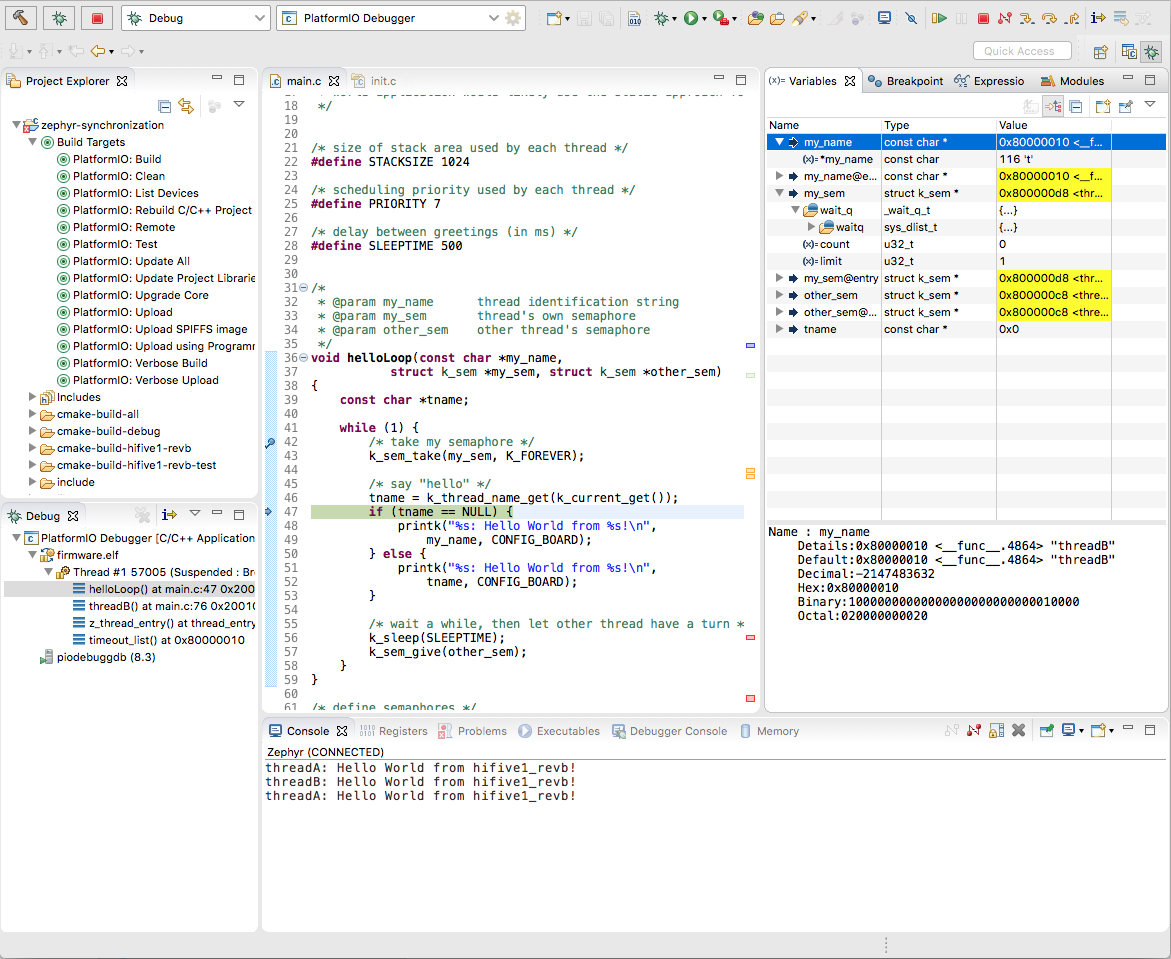
Your feedback is very important to us.
ivankravets
on 17 Nov 2019
This is great! I'll test with https://docs.electronut.in/ (nRF52840)
ntavish
on 17 Nov 2019
It was the most complicated integration for the last 6 years :) We even did some changes to our PlatformIO Core Build API.
Can you summarize what differences made it the "most complicated for the last 6 years" and why it was easier to change some PIO API(s) than fix Zephyr directly? Thanks!
marc-hb
on 17 Nov 2019
Platform ST STM32 is mentioned twice in the list of supported platforms. One link is to PlatformIO site, one to GitHub repo.
 me21
on 17 Nov 2019
me21
on 17 Nov 2019
Thanks a lot for your great work, @valeros and @ivankravets. It's really awesome that Zephyr support is now there.
I tested it in a project that's currently being migrated from mbed to zephyr, so it has files for both frameworks in the src directory (might be a bit confusing). My tests for the Zephyr integration can be found in the following branch: https://github.com/LibreSolar/bms-firmware/tree/pio-zephyr
As I have custom board definitions for the Zephyr project, I generated the .json file needed by platformio in boards subdirectory in addition to the Zephyr board definition. This worked very well.
Below some findings and issues I could not solve yet:
1. Libary dependencies
It seems like PlatformIO performs some checks in the Zephyr Makefile before installing library dependencies. In my case, these tests fail if the external library ThingSet was not yet downloaded. I might be doing it wrong, but I added the files from .pio/libdeps/my-lib as include_directories and target_sources to CMakeLists.txt.
Solution: Build once using mbed (different pio env) and include the libraries downloaded during mbed build.
I'm sure there is a more elegant way. Is it possible to integrate files from libraries automatically to the build without adding it to CMakeLists.txt?
2. Newlib nano
It seems like PlatformIO uses newlib nano as default, but Zephyr integrates other libc files in addition to that. I got following compilation error:
Compiling .pio/build/bms-8s50-ic/zephyr/arch__arm__core__cortex_m/cortex_m/reset.S.o
arm-none-eabi-gcc: fatal error: /home/martin/.platformio/packages/toolchain-gccarmnoneeabi/bin/../lib/gcc/arm-none-eabi/8.2.1/../../../../arm-none-eabi/lib/nano.specs: attempt to rename spec 'link' to already defined spec 'nano_link'
compilation terminated.
Tried to deactivate LIBC in my CMakeLists.txt, but it didn't make a difference.
A solution was to add build_unflags = -specs=nano.specs to platformio.ini.
Now it compiles, but gives linker errors that e.g. printf and malloc are not found.
3. Compiler warnings
I got compiler warnings "cc1plus: warning: command line option '-Wno-pointer-sign' is valid for C/ObjC but not for C++". Adding also -Wno-pointer-sign to build_unflags solved this.
Instructions to reproduce described issues:
Build environment bms-8s50-ic in branch linked above.
 martinjaeger
on 18 Nov 2019
martinjaeger
on 18 Nov 2019
Can you summarize what differences made it the "most complicated for the last 6 years" and why it was easier to change some PIO API(s) than fix Zephyr directly? Thanks!
@marc-hb Yes, I can. Actually, there is no problem with Zephyr. This was the first CMake-based integration for us. We support over 20 different frameworks and even if they use Cmake, we just do native integration using a build script with hardcoded source paths, flags, and options. The Zephyr is a more complicated project. It's not about a few source files or a 1-stage build process (which is classic). It is based on a 2-stage build process where we build pre-firmware and later using it generate other source files and build the final firmware. Again, no problem here, just an interesting use case for us. Here is a source code how does it look with SCons.
We didn't want to do "hard-coded" integration which very often requires significant modification between framework minor releases. In a case with Zephyr and CMake we decided to use CMake File API. It's an excellent solution for us which gives us a clear picture of the build files and flags related to them. However, there is a big problem here. Cmake does not provide information about custom targets declared via add_custom_target.
This took us some time. We reverse-engineered ninja build process and replicated the same with SCons. This is not a good idea but is not a bad as a temporary solution. Maybe it makes sense to contact @Kitware CMake team and ask them if they can add information about custom targets to File API.
Another solution is to have an intermediary "protocol/format" between Zephyr and PlatformIO where we will know more about custom targets and how to run them.
P.S: I'm not an electronic or an embedded engineer. I came to "embedded" from the Web world. This is actually why I founded PlatformIO. 6 years ago I was shocked at how is complex the Embedded world. That is why I tried to fix it a little bit. Today, we have PlatformIO. What do I mean here...
Can someone explain to me, why do we need YET ANOTHER build system with YET ANOTHER syntax and interpreter? I understand that embedded engineers like complex things (make, cmake, ninja, etc, the same philosophy with declared nodes and trees). How about other developers? I see a lot of complaints about CMake and their syntax. They even do not allow to change CMakeList.txt to something another. Why? We have CLIon IDE which depends on CMakeList.txt and Zephyr which also uses it via CMake. As a workaround, we moved Zephyr's configuration files to zephyr folder in the PlatformIO project.
Now I understand why SCons is still popular. Over 15 years! Very powerful API, super fast, no need to learn yet another interpreter! Combines generator and build system. No extra dependencies to make, cmake or system operating software. Just amazing Python! Python is very easy for using. A lot of over users, who are high-level developers (Java, C#, Python, JS), do interesting things with PlatformIO Advanced Scripting. They don't learn "yet another complex syntax, they just use PlatformIO, resolve own tasks and have MVP in the days, not weeks or months.
No need to go so far, even Zephyr uses Python internally and CMake is used just like a caller.
P.S.S: This just my own opinion and I'm not sure that it has any value. I don't like complex things. I used a lot of them for the last 15 years. The success is in simplicity, in approach where we can save time and other valuable resources (money, efforts, nerves, etc.). This is a small part of why PlatformIO is popular today.
I don't know all the technical details about Zephyr and how it is cool. What I actually like is its unified approach to everyone, transparency, a truly open source where everyone can contribute (the same Linux philosophy which has great adoption). This is actually what we miss today. Mbed, FreeRTOS, etc are fully proprietary and try to promote their products/services. They never think about developers/customers.
We would be glad to help Zephyr Project with more simplified approach to how to use its power and build amazing products in a short time using any OS, IDE, and do not worry with Cmake, Ninja, and other system-related things. If developers are limited with PlatformIO, they can easily migrate to native tools including "west-cli" or extend functionality using CMake declaration (we support this way, it the same for us and "west").
ivankravets
on 18 Nov 2019
Thanks @ivankravets for sharing the additional details, experience and perspective, really appreciated.
Can someone explain to me, why do we need YET ANOTHER build system with YET ANOTHER syntax and interpreter?
Because they all suck. From https://mesonbuild.com/Design-rationale.html (and others)
A software developer's most important tool is the editor. If you talk to coders about the editors they use, you are usually met with massive enthusiasm and praise. [...] The second most important tool, even more important than the compiler, is the build system. Those are pretty much universally despised.
But the main issue with build systems is actually... C.
Even though build systems are "universally despised", language designers eventually realized their importance and many recent languages provide a build system "for free". However it was too late for C.
The "translation unit" is another, old age problem unique to C. It forces every build system that want to support C well to care about weird complexities like precompiled headers or LTO.
Last and main build issue with C: fragmentation. Nothing comes close. Partly because of its age again, mainly because it's low-level. Because it's low-level, C generally can't rely on a layer of indirection abstracting portability issues away like most other languages can. In fact C is typically central to that abstraction layer itself.
https://dwheeler.com/autotools/
Note, however, that the autotools don't just build software, they detect various features to make it much easier to build software that ports to a wide variety of systems. Sure, you should use standard interfaces, but sometimes there's no standard interface or the interface has serious bugs/limitations. [...] Some of the autotools issues are fundamental to their goals. Their goal is to make it easy to build a system, using the native tools, and there are variations in the native tools. In the longer term, forcing native tools to get fixed (so that people don’t have to work around their bugs) and getting their functionality updated (so that people don’t have to work around their limitations) would help best in the long term.
From https://mesonbuild.com/Design-rationale.html again:
Must not add complexity due to obsolete platforms
https://youtu.be/7THzO-D0ta4?t=1465 (slides unfortunately missing from https://github.com/CppCon/CppCon2017/tree/master/Presentations )
marc-hb
on 18 Nov 2019
@marc-hb Thanks for the answer. I do not have so much experience with CMake. What is the reason that people do business logic using normal programming languages? For example, you use Python, Greenwaves (GAP) also use Python. So, CMake is again useless and a limited tool that can actually be used as a declarative instrument for code building? You can't resolve here business tasks? I still do not understand its benefit over make or ninja for the which CMake generates project. Is the main reason just to use it as a unified declarative bridge to other real build systems (make/ninja)?
ivankravets
on 19 Nov 2019
@ivankravets
This took us some time. We reverse-engineered ninja build process and replicated the same with SCons. This is not a good idea but is not a bad as a temporary solution. Maybe it makes sense to contact @Kitware CMake team and ask them if they can add information about custom targets to File API.
Both ninja and CMake are open source, so you shouldn't need to reverse engineer, the source code is available for you to inspect. Regarding changes to the File API, that's also something that anyone can submit a patch for.
carlescufi
on 19 Nov 2019
@carlescufi "We reverse-engineered ninja build process", I mean "build process", not ninja engine.
Regarding changes to the File API, that's also something that anyone can submit a patch for.
Good, we hope someone will make it. We can actually leave the current implementation with hard-coded SCons hooks for CMake's "add_custom_target" and gather more feedback.
/cc @bradking , @billhoffman
ivankravets
on 19 Nov 2019
I'm not sure what you mean by "business logic". This answer maybe? https://mesonbuild.com/FAQ.html#why-is-meson-not-just-a-python-module-so-i-could-code-my-build-setup-in-python
The other question is easy to answer:
I still do not understand its benefit over make or ninja for the which CMake generates project.
https://ninja-build.org/manual.html#_philosophical_overview
Where other build systems are high-level languages, Ninja aims to be an assembler...
Build systems have two very distinct functions and phases: 1. System discovery and system-specific, once-off build configuration. 2. Dependency graph, recurring incremental build. Ninja focuses on 2 and 2 only. Unless something went wrong, humans never look at ninja code.
Make can do 1 only in the simplest cases, so autotools and CMake only use it for 2.
marc-hb
on 19 Nov 2019
I see, thanks! Now I understand why you need these 2 tools. Also, understand very well why we don't use other tools and only SCons. It seems it covers 1, 2 and gives developers freedom where they can do what they want using Python language.
This is actually what we did. We do not use SCons as a build system via their SConscript mechanism. Instead of it, we just build our own build system for our needs reusing SCons Build API which internally resolves 1+2 which you described above.
Could you try this PlatformIO + Zephyr Integration? I would be thankful for your feedback. I see you are so experienced in these build process.
ivankravets
on 19 Nov 2019
Hi @ martinjaeger! Thanks for the report!
It seems like PlatformIO performs some checks in the Zephyr Makefile before installing library dependencies. In my case, these tests fail if the external library ThingSet was not yet downloaded. I might be doing it wrong, but I added the files from .pio/libdeps/my-lib as include_directories and target_sources to CMakeLists.txt.
Indeed, CMake is launched before resolving dependencies and therefore if you specify library sources in CMakeLists.txt file CMake won't be able to find them. You'd better specify only sources that are located in src folder and then libraries will be added automatically.
It seems like PlatformIO uses newlib nano as default, but Zephyr integrates other libc files in addition to that. I got following compilation error:
Please run pio update, it should be fixed in the latest zephyr package.
I got compiler warnings "cc1plus: warning: command line option '-Wno-pointer-sign' is valid for C/ObjC but not for C++". Adding also -Wno-pointer-sign to build_unflags solved this.
That's also should be fixed in the latest zephyr package.
 valeros
on 20 Nov 2019
valeros
on 20 Nov 2019
Thanks! Tried it out, but building fails immediately with following error message:
Verbose mode can be enabled via `-v, --verbose` option
CONFIGURATION: https://docs.platformio.org/page/boards/ststm32/bms8s50ic_l452cx.html
PLATFORM: ST STM32 5.7.0 #fa55b07 > Libre Solar BMS8S50IC L452Cx
HARDWARE: STM32L452RET6 80MHz, 64KB RAM, 256KB Flash
DEBUG: Current (stlink) On-board (stlink) External (blackmagic, jlink)
PACKAGES: toolchain-gccarmnoneeabi 1.80201.181220 (8.2.1), framework-zephyr 1.20000.191120 (2.0.0), framework-zephyr-hal-ststm32 0.0.190619, tool-cmake 3.15.5, tool-dtc 1.4.7, tool-ninja 1.7.1, tool-gperf 3.0.4
Reading CMake configuration...
KeyError: 'framework-zephyr-hal-stm32':
  File "/home/martin/.platformio/penv/lib/python3.7/site-packages/platformio/builder/main.py", line 151:
    env.SConscript("$BUILD_SCRIPT")
  File "/home/martin/.platformio/packages/tool-scons/script/../engine/SCons/Script/SConscript.py", line 605:
    return _SConscript(self.fs, *files, **subst_kw)
  File "/home/martin/.platformio/packages/tool-scons/script/../engine/SCons/Script/SConscript.py", line 286:
    exec(compile(scriptdata, scriptname, 'exec'), call_stack[-1].globals)
  File "/home/martin/.platformio/platforms/ststm32@src-15e0e87f41a00aa2f9602f71367ac29c/builder/main.py", line 98:
    target_elf = env.BuildProgram()
  File "/home/martin/.platformio/packages/tool-scons/script/../engine/SCons/Environment.py", line 224:
    return self.method(*nargs, **kwargs)
  File "/home/martin/.platformio/packages/framework-zephyr/scripts/platformio/platformio-build-pre.py", line 23:
    env.ProcessProgramDeps()
  File "/home/martin/.platformio/packages/tool-scons/script/../engine/SCons/Environment.py", line 224:
    return self.method(*nargs, **kwargs)
  File "/home/martin/.platformio/penv/lib/python3.7/site-packages/platformio/builder/tools/platformio.py", line 107:
    env.BuildFrameworks(env.get("PIOFRAMEWORK"))
  File "/home/martin/.platformio/packages/tool-scons/script/../engine/SCons/Environment.py", line 224:
    return self.method(*nargs, **kwargs)
  File "/home/martin/.platformio/penv/lib/python3.7/site-packages/platformio/builder/tools/platformio.py", line 328:
    SConscript(env.GetFrameworkScript(f), exports="env")
  File "/home/martin/.platformio/packages/tool-scons/script/../engine/SCons/Script/SConscript.py", line 668:
    return method(*args, **kw)
  File "/home/martin/.platformio/packages/tool-scons/script/../engine/SCons/Script/SConscript.py", line 605:
    return _SConscript(self.fs, *files, **subst_kw)
  File "/home/martin/.platformio/packages/tool-scons/script/../engine/SCons/Script/SConscript.py", line 286:
    exec(compile(scriptdata, scriptname, 'exec'), call_stack[-1].globals)
  File "/home/martin/.platformio/platforms/ststm32@src-15e0e87f41a00aa2f9602f71367ac29c/builder/frameworks/zephyr.py", line 30:
    "platformio", "platformio-build.py"), exports="env")
  File "/home/martin/.platformio/packages/tool-scons/script/../engine/SCons/Script/SConscript.py", line 668:
    return method(*args, **kw)
  File "/home/martin/.platformio/packages/tool-scons/script/../engine/SCons/Script/SConscript.py", line 605:
    return _SConscript(self.fs, *files, **subst_kw)
  File "/home/martin/.platformio/packages/tool-scons/script/../engine/SCons/Script/SConscript.py", line 286:
    exec(compile(scriptdata, scriptname, 'exec'), call_stack[-1].globals)
  File "/home/martin/.platformio/packages/framework-zephyr/scripts/platformio/platformio-build.py", line 746:
    codemodel = get_cmake_code_model()
  File "/home/martin/.platformio/packages/framework-zephyr/scripts/platformio/platformio-build.py", line 206:
    run_cmake()
  File "/home/martin/.platformio/packages/framework-zephyr/scripts/platformio/platformio-build.py", line 179:
    "framework-zephyr-hal-" + PLATFORMS_WITH_EXTERNAL_HAL[platform_name]),
  File "/home/martin/.platformio/penv/lib/python3.7/site-packages/platformio/managers/platform.py", line 345:
    version = self.packages[name].get("version", "")
I saw during update (assuming you meant pio update and not pio run update) that some packages including above mentioned framework-zephyr-hal-stm32 are "Detached". Is this expected?
martinjaeger
on 20 Nov 2019
@martinjaeger Please run pio update again to pull the latest changes of ststm32 platform.
Thanks!
valeros
on 20 Nov 2019
Great, it compiles and is linked fine now :)
Question for my understanding: Do you link against newlib-nano by default? If I keep the previously added build_unflags for newlib-nano, the generated binary is larger than with the default settings. If yes, is this only valid for zephyr or also for other frameworks? I'm asking as we are using this custom script as a workaround to enable newlib-nano for mbed.
martinjaeger
on 20 Nov 2019
@martinjaeger We use flags based on CMake project configuration that CMake generates for us. If newlib-nano is enabled in Zephyr project then it will be used in PlatformIO project as well. It's only valid for Zephyr, so other frameworks are responsible for their own flags.
valeros
on 20 Nov 2019
Since now there is [...]\.platformio\packages\framework-zephyr as ZEPHYR_BASE, the fact that ZephyrProject needs what they call west-installation, only having framework-zephyr is not enough since there is an west init -l framework-zephyr and then west update need before being able to properly use it from PlatformIO, details here, building a project which uses zephyr modules, spoiler:
part1:
[...] fatal error: stat_mgmt/stat_mgmt.h: No such file or directory
 #include "stat_mgmt/stat_mgmt.h"
          ^~~~~~~~~~~~~~~~~~~
compilation terminated.
Compiling .pio\build\development\[...]]
part2:
framework-zephyr\include/mgmt/buf.h:11:10: fatal error: cbor_encoder_writer.h: No such file or directory

*****************************************************************************
* Looking for cbor_encoder_writer.h dependency? Check our library registry!
*
* CLI  > platformio lib search "header:cbor_encoder_writer.h"
* Web  > https://platformio.org/lib/search?query=header:cbor_encoder_writer.h
*
*****************************************************************************

 #include "cbor_encoder_writer.h"
          ^~~~~~~~~~~~~~~~~~~~~~~
compilation terminated.
Folder structure needs to be something like:
.west\
modules\
tools\
zephyr\
- How will this be handled, since currently only framework-zephyr exists (efectively ZEPHYR_BASE without west installation around it)?
- Additionally assuming that one wants to use different than original zephyr remote URL, could that be configurable from within PlatformIO or? e.g.:
west init -m https://github.com/zephyrproject-rtos/zephyr --mr v1.15.0
 n3rd4i
on 21 Nov 2019
n3rd4i
on 21 Nov 2019
Zephyr can be built/used without west as far as I know, see also here. I guess PlatformIO does what west would normally do in the background.
martinjaeger
on 21 Nov 2019
So then how do I update the zephyr "modules" which are needed for my project to compile in PlatformIO?
As previously stated, this was done by simply doing: west init, west update, then I could build my project normally.
n3rd4i
on 21 Nov 2019
This kind of works, there are some open-questions that I've found so far:
- could the version of the zephyr platform be specified, say
v2.0.1-rc.1?
- in west this can be done with
west init --mr v2.0.1-rc.1
- in west this can be done with
- There are "modules" which are already ported to PlatformIO way, e.g.:
- for example if version of zephyr is RC1, like specified above, the "module" needs also to be in sync with that version.
westalready takes care of that
n3rd4i
on 23 Nov 2019
could the version of the zephyr platform be specified, say v2.0.1-rc.1 ?
There is no difference for PlatformIO Zephyr or Mbed. They are frameworks and are packaged with versions. If there is a pre-built package in our CDN, you can use it with http://docs.platformio.org/en/latest/projectconf/section_env_platform.html#platform-packages
Please note that we don't support beta software. Only, stable releases. If merge our scripts with Zephyr main code, it will be possible and you could use as:
[env:blackpill_f103c8]
platform = ststm32
framework = zephyr
board = blackpill_f103c8
platform_packages =
  framework-zephyr @ https://github.com/zephyrproject-rtos/zephyr.git#v2.0.1-rc.1
So then how do I update the zephyr "modules" which are needed for my project to compile in PlatformIO?
We work on adding support for this. @valeros will back here soon with updates.
ivankravets
on 25 Nov 2019
platform_packages =
framework-zephyr @ https://github.com/zephyrproject-rtos/zephyr.git#v2.0.1-rc.1
Question about the platform_packages url type, both of the following are not currently supported? e.g.:
[email protected]:zephyrproject-rtos/zephyr.git#v2.0.1-rc.1ssh://[email protected]:zephyrproject-rtos/zephyr.git#v2.0.1-rc.1
This could be useful to use the git installed [ssh] keys, instead of providing user/password combination. Will this be a feature in the future?
n3rd4i
on 26 Nov 2019
@ivankravets
I have already Zephyr native environment up and running on my windows machine. Now I'm testing this new Zephyr integration into platformIO with VScode plugin (BTW thanks a lot for trying to make our life easier !).
When trying to build the zephyr example project, I run into this:
PackageManager: Installing tool-ninja @ ~1.7.0
Error: Could not find a version that satisfies the requirement '~1.7.0' for your system 'windows_amd64'
The terminal process terminated with exit code: 1
Even though ninja is already supported. From a PIO terminal:
$ ninja --version
1.9.0
Any idea what I have missed ?
 LMESTM
on 26 Nov 2019
LMESTM
on 26 Nov 2019
Hi @LMESTM! That's probably a system-wide program. I assume you're using ststm32 platform? Could you please try to update your platform via pio update? Thanks!
valeros
on 26 Nov 2019
@valeros
I assume you're using
ststm32platform?
yes indeed
Could you please try to update your platform via
pio update? Thanks!
Done and I confirm this worked fine !
I thought I had done this already previously but well ... ! Thank you :-)
LMESTM
on 26 Nov 2019
This could be useful to use the git installed [ssh] keys, instead of providing user/password combination. Will this be a feature in the future?
@n3rd4i, see docs http://docs.platformio.org/en/latest/userguide/platforms/cmd_install.html#git
ivankravets
on 26 Nov 2019
During further testing I realized that my custom library placed in the lib directory is not compiled, even if I add the source and header files manually to CMakeLists.txt. This leads to a linker error at the end of the build process.
A library dynamically loaded from the internet is compiled and linked fine.
Which parts of CMakeLists.txt are actually considered and which not?
martinjaeger
on 26 Nov 2019
@martinjaeger we documented this in docs http://docs.platformio.org/en/latest/frameworks/zephyr.html#zephyr-modules
ivankravets
on 26 Nov 2019
This could be useful to use the git installed [ssh] keys, instead of providing user/password combination. Will this be a feature in the future?
@n3rd4i, see docs http://docs.platformio.org/en/latest/userguide/platforms/cmd_install.html#git
After updating with the platformio.ini file:
platform_packages =
    framework-zephyr @ https://github.com/zephyrproject-rtos/zephyr.git#v2.0.0
I get the following error:
Verbose mode can be enabled via `-v, --verbose` option

warning: Calling missing SConscript without error is deprecated.
Transition by adding must_exist=0 to SConscript calls.
CONFIGURATION: https://docs.platformio.org/page/boards/nordicnrf52/nrf52_dk.html
Missing SConscript 'C:\users\Andrei\.platformio\packages\framework-zephyr\scripts\platformio\platformio-build-pre.py'
PLATFORM: Nordic nRF52 3.8.0 #5e9fc85 > Nordic nRF52-DK
HARDWARE: NRF52832 64MHz, 64KB RAM, 512KB Flash
File "C:\users\Andrei\.platformio\platforms\nordicnrf52\builder\main.py", line 157, in <module>
DEBUG: Current (jlink) On-board (cmsis-dap, jlink) External (blackmagic, stlink)
PACKAGES: tool-sreccat 1.164.0 (1.64), framework-zephyr 7c0ec43, tool-cmake 3.15.5, tool-ninja 1.9.0, framework-zephyr-hal-nordic 0.0.191028, toolchain-gccarmnoneeabi 1.80201.190214 (8.2.1), tool-dtc 1.4.7

warning: Ignoring missing SConscript 'C:\users\Andrei\.platformio\packages\framework-zephyr\scripts\platformio\platformio-build.py'
File "C:\users\Andrei\.platformio\platforms\nordicnrf52\builder\frameworks\zephyr.py", line 30, in <module>
LDF: Library Dependency Finder -> http://bit.ly/configure-pio-ldf
LDF Modes: Finder ~ chain, Compatibility ~ soft
Found 0 compatible libraries
Scanning dependencies...
No dependencies
Building in release mode
Compiling .pio\build\development\src\main.o
src\main.c:9:10: fatal error: zephyr/types.h: No such file or directory
 #include <zephyr/types.h>
          ^~~~~~~~~~~~~~~~
compilation terminated.
*** [.pio\build\development\src\main.o] Error 1
================================================================================================== [FAILED] Took 53.09 seconds ==================================================================================================
But if I just remove this change in the platformio.ini, it works:
; platform_packages =
;     framework-zephyr @ https://github.com/zephyrproject-rtos/zephyr.git#v2.0.0
- PlatformIO: Clean
- PlatformIO: Build:
[SUCCESS] Took 32.80 seconds
Hi @n3rd4i ! Why do you need to override framework-zephyr? We use the same branch for our package. Anyway, you also need our build scripts from here since they've not been added to the official repository yet.
valeros
on 27 Nov 2019
Using Home: 3.1.0-beta.5, Core 4.1.1b5, while trying to include a zephyr module I get an error that looks like the module is not being built even if the path is correctly specified? not sure what I am missing, log details:
Normal build: here
Verbose build here
Project folder structure
├───.pio
│   ├───build
│   └───libdeps
│       └───development
├───.vscode
├───include
├───lib
├───src
├───test
└───zephyr
    └───tinycbor
        ├───examples
        ├───src
        ├───tests
        │   ├───cpp
        │   ├───encoder
        │   ├───parser
        │   └───tojson
        ├───tools
        │   ├───cbordump
        │   └───json2cbor
        └───zephyr
CMakeLists.txt
# Additional modules
set(ZEPHYR_MODULES
    ${ZEPHYR_MODULES}
    zephyr/tinycbor
)

# Standard Zephyr application boilerplate.
include($ENV{ZEPHYR_BASE}/cmake/app/boilerplate.cmake NO_POLICY_SCOPE)
Hi @n3rd4i ! Thanks for reporting. I think you need something like this:
# Additional modules
set(ZEPHYR_MODULES
    ${ZEPHYR_MODULES}
    "${CMAKE_CURRENT_SOURCE_DIR}/tinycbor"
)

# Standard Zephyr application boilerplate.
include($ENV{ZEPHYR_BASE}/cmake/app/boilerplate.cmake NO_POLICY_SCOPE)
I've updated the tinycbor module (in CMakeLists.txt) as suggested, now I see a different error, I've attached the log here like:
1.
  The target name "T:__platformio-nordic-example__zephyr__tinycbor" is
  reserved or not valid for certain CMake features, such as generator
  expressions, and may result in undefined behavior.
-
2.
  Cannot specify sources for target
  "T:__platformio-nordic-example__zephyr__tinycbor" which is not built by
  this project.
-
3.
  Cannot specify link libraries for target
  "T:__platformio-nordic-example__zephyr__tinycbor" which is not built by
  this project.
That's strange, could you please upload somewhere a minimal example to reproduce the issue?
valeros
on 2 Dec 2019
That's strange, could you please upload somewhere a minimal example to reproduce the issue?
I've created this repo for testing:
Be sure to use branch: feature/zephyr_modules
I've forgot to mention that I've copied: modules\lib\tinycbor from a west installation over 2.0.0 release zephyr into project zephyr folder, like in the project structure shown above
n3rd4i
on 2 Dec 2019
Hmm, I cannot reproduce your issue, there is definitely something wrong with the target name (Looks like : symbol is not allowed). What version of tinycbor is used?
valeros
on 2 Dec 2019
- I'm using Windows.
- I'm using tinycbor from zephyr 2.0.0
- Using west this build works as intended.
n3rd4i
on 2 Dec 2019
Could you please archive your project (including zephyr folder with tinycbor) and upload somewhere?
valeros
on 2 Dec 2019
ok, its the same as the repo just included the tinycbor as explained above:
http://ge.tt/3i7baqz2
n3rd4i
on 2 Dec 2019
@n3rd4i Since you have west installed, could you please try to compile a project that's located on another drive? For example if Zephyr installed on drive C: try to build a project on drive T:, something like this:
west build -p auto -b nrf52_pca10040 T:\\path\\to\\project
Thanks!
valeros
on 3 Dec 2019
IMO there is not point in doing this since "ZEPHYR_BASE" is set accordingly (installed on C: drive), so running:
west build -p auto -b nrf52_pca10040 T:\\path\\to\\project
C:\> west build -p auto -b nrf52_pca10040 t:\my_zephyr_project
Traceback (most recent call last):
  File "c:\python35\lib\runpy.py", line 193, in _run_module_as_main
    "__main__", mod_spec)
  File "c:\python35\lib\runpy.py", line 85, in _run_code
    exec(code, run_globals)
  File "C:\Python35\Scripts\west.exe\__main__.py", line 7, in <module>
  File "c:\python35\lib\site-packages\west\main.py", line 583, in main
    args.handler(args, unknown)
  File "c:\python35\lib\site-packages\west\main.py", line 334, in ext_command_handler
    command.run(args, unknown, topdir, manifest=manifest)
  File "c:\python35\lib\site-packages\west\commands\__init__.py", line 118, in run
    self.do_run(args, unknown)
  File "c:\zephyrproject\zephyr\scripts\west_commands\build.py", line 135, in do_run
    self._setup_build_dir()
  File "c:\zephyrproject\zephyr\scripts\west_commands\build.py", line 231, in _setup_build_dir
    source_dir=source_dir, app=app)
  File "C:\zephyrproject\zephyr\scripts/west_commands\build_helpers.py", line 95, in find_build_dir
    default = _resolve_build_dir(default, guess, cwd, **kwargs)
  File "C:\zephyrproject\zephyr\scripts/west_commands\build_helpers.py", line 39, in _resolve_build_dir
    kwargs['source_dir'] = os.path.relpath(source_dir, cwd)
  File "c:\python35\lib\ntpath.py", line 574, in relpath
    path_drive, start_drive))
ValueError: path is on mount 't:', start on mount 'C:'
In turn running the west build from T: drive works as intended, provided ZEPHYR_BASE is on C:
T:\> west build -p auto -b nrf52_pca10040 t:\my_zephyr_project
<BUILDING SUCCESS>
Hello guys, i try to build with
CONFIG_USE_SEGGER_RTT=y
in prj.conf
There is this commit: https://github.com/zephyrproject-rtos/zephyr/commit/e7db7daa0a6506e7c520c7518fa32e85b2444f56#diff-83134d60af9f4377623e7608506da40a
This moves segger out of zephyr, and zephyr build system manages this with their west build utility. However it is missing from the platformio framework package, and somehow platformio does not use west and does not collect this lib. This is important for every ARM Cortex-M* devs, as it is much better to log though RTT than use your only UART :)
I get this error message:
C:\Users\szundi\.platformio\packages\framework-zephyr\subsys\logging\log_backend_rtt.c:12:10: fatal error: SEGGER_RTT.h: No such file or directory
Can you please fix this? It would be nice :)
My workaround is to simply copy the rtt and systemview folders from https://github.com/zephyrproject-rtos/segger to the platformio-framework-zephyr folder /ext/debug/ folder and copy the lines from the CMakeLists.txt. I may feel that this is not the best to implement here, just FYI this "works".
 szundi
on 8 Dec 2019
szundi
on 8 Dec 2019
@n3rd4i Sorry for the late reply, recently we've updated Zephyr to v2.1 and also improved the build logic for zephyr modules, so at least that issue with the different drives should be fixed. Just update the upstream version of the platform via pio update.
Hi @szundi ! That probably also should be fixed, could you please retry with the latest upstream version of the platform, e.g.:
[env:nrf52_board]
platform = https://github.com/platformio/platform-nordicnrf52.git
framework = zephyr
board = ...
I'm trying to build a basic OpenThread example with ZephyrRTOS and a nRF52840 board. I can build basic examples with Bluetooth and serial communication, but when adding OpenThread L2 overlays I get a bunch of issues when compiling.
First I was getting an error on mbedTLS lib with a supposedly empty or missing quotes on MBEDTLS_CONFIG_FILE directive , so it was throwing an error when including on the files. So I changed on all files on ~/.platformio/packages/framework-zephyr-mbedtls folder from #include MBEDTLS_CONFIG_FILE to #include "config-tls-generic.h"
After that now I'm getting this error when compiling the OpenThread lib. I tried putting manually this file openthread-config-generic.h, but no matter what I do, it never finds the file, so I basically hit a dead end.
~/.platformio/packages/framework-zephyr/subsys/net/l2/openthread/openthread.c:30:10: fatal error: openthread-config-generic.h: No such file or directory
Also I had to download west tool and set up it on the ~/.platformio/packages/framework-zephyr folder, so west can download the external projects ( mbedtls and openthread for example ).
I'm open to suggestions on how to solve that.
My prf.conf
# Generic networking options
CONFIG_NETWORKING=y
CONFIG_NET_UDP=y
CONFIG_NET_TCP=y
CONFIG_NET_IPV6=y
CONFIG_NET_IPV4=y
CONFIG_NET_SOCKETS=y
CONFIG_NET_SOCKETS_POSIX_NAMES=y
CONFIG_NET_SOCKETS_POLL_MAX=4
CONFIG_NET_CONNECTION_MANAGER=y

# Serial uart output
CONFIG_SERIAL=y
CONFIG_UART_CONSOLE=y
CONFIG_USB=y
CONFIG_USB_UART_CONSOLE=y
CONFIG_UART_CONSOLE_ON_DEV_NAME="CDC_ACM_0"

# Kernel options
CONFIG_MAIN_STACK_SIZE=2048
CONFIG_ENTROPY_GENERATOR=y
CONFIG_TEST_RANDOM_GENERATOR=y
CONFIG_INIT_STACKS=y

# Logging
CONFIG_NET_LOG=y
CONFIG_LOG=y
CONFIG_NET_STATISTICS=y
CONFIG_PRINTK=y

# Network buffers
CONFIG_NET_PKT_RX_COUNT=16
CONFIG_NET_PKT_TX_COUNT=16
CONFIG_NET_BUF_RX_COUNT=80
CONFIG_NET_BUF_TX_COUNT=80
CONFIG_NET_CONTEXT_NET_PKT_POOL=y

# IP address options
CONFIG_NET_IF_UNICAST_IPV6_ADDR_COUNT=3
CONFIG_NET_IF_MCAST_IPV6_ADDR_COUNT=4
CONFIG_NET_MAX_CONTEXTS=10

# Network shell
CONFIG_NET_SHELL=y

# The addresses are selected so that qemu<->qemu connectivity works ok.
# For linux<->qemu connectivity, create a new conf file and swap the
# addresses (so that peer address is ending to 2).
CONFIG_NET_CONFIG_SETTINGS=y
CONFIG_NET_CONFIG_MY_IPV6_ADDR="2001:db8::2"
CONFIG_NET_CONFIG_PEER_IPV6_ADDR="2001:db8::1"
CONFIG_NET_CONFIG_MY_IPV4_ADDR="192.0.2.2"
CONFIG_NET_CONFIG_PEER_IPV4_ADDR="192.0.2.1"


# ------ Overlay Open Thread -------

CONFIG_CPLUSPLUS=y

# CONFIG_BT=n

# Disable TCP and IPv4 (TCP disabled to avoid heavy traffic)
CONFIG_NET_TCP=n
CONFIG_NET_IPV4=n

CONFIG_NET_IPV6_NBR_CACHE=n
CONFIG_NET_IPV6_MLD=n
CONFIG_NET_CONFIG_NEED_IPV6=y
CONFIG_NET_CONFIG_NEED_IPV4=n
CONFIG_NET_CONFIG_MY_IPV4_ADDR=""
CONFIG_NET_CONFIG_PEER_IPV4_ADDR=""

CONFIG_SYSTEM_WORKQUEUE_STACK_SIZE=2048
CONFIG_NET_TX_STACK_SIZE=2048
CONFIG_NET_RX_STACK_SIZE=5120
CONFIG_SHELL_STACK_SIZE=3072

CONFIG_NET_L2_OPENTHREAD=y
CONFIG_OPENTHREAD_DEBUG=y
CONFIG_OPENTHREAD_L2_DEBUG=y
CONFIG_OPENTHREAD_L2_LOG_LEVEL_INF=y

CONFIG_OPENTHREAD_CHANNEL=15

CONFIG_NET_CONFIG_MY_IPV6_ADDR="fdde:ad00:beef::1"
CONFIG_NET_CONFIG_PEER_IPV6_ADDR="fdde:ad00:beef::2"

# Thread by default registers quite a lot addresses.
CONFIG_NET_IF_UNICAST_IPV6_ADDR_COUNT=6
CONFIG_NET_IF_MCAST_IPV6_ADDR_COUNT=8

# Other OpenThread dependencies (flash for OT persistent storage)
CONFIG_FLASH=y
CONFIG_FLASH_PAGE_LAYOUT=y
CONFIG_MPU_ALLOW_FLASH_WRITE=y

CONFIG_REBOOT=y

# mbedTLS tweaks
# CONFIG_MBEDTLS_SSL_MAX_CONTENT_LEN=768

# A sample configuration to enable Thread Joiner, uncomment if needed
CONFIG_OPENTHREAD_JOINER=y
CONFIG_OPENTHREAD_JOINER_AUTOSTART=y
CONFIG_MBEDTLS_HEAP_SIZE=8192

# ------ End Overlay Open Thread -------
platformio.ini
[env:nrf52840]
platform = https://github.com/platformio/platform-nordicnrf52.git
board = nrf52840_dk
framework = zephyr
board_build.zephyr.variant = nrf52840_pca10059
I use this script to flash the .hex file generated by Platformio to my nRF52840 dongle, passing as extra argument the serial port of the dongle when in DFU mode.
# Convert hex to package
nrfutil pkg generate --hw-version 52 --sd-req=0x00 --application .pio/build/nrf52840/firmware.hex --application-version 1 firmware.zip

# Send to device via DFU
nrfutil dfu usb-serial -pkg firmware.zip -p $1
And my main.c file is basically the same from the echo client sample from Zephyr.
 alvarowolfx
on 22 Dec 2019
alvarowolfx
on 22 Dec 2019
Hi @alvarowolfx ! Thanks for your report! Unfortunately, OpenThread module is not supported at the moment due to several issues related to imperfect build logic implemented with the help of an external build system that we cannot replicate using our build system. If I'm not mistaken, there is some effort being put into porting this build logic to native CMake files so we hope that with the next release of Zephyr framework we will be able to compile this module as well.
First I was getting an error on mbedTLS lib with a supposedly empty or missing quotes on MBEDTLS_CONFIG_FILE directive , so it was throwing an error when including on the files.
That should be fixed in the latest framework package.
Also I had to download west tool and set up it on the ~/.platformio/packages/framework-zephyr folder, so west can download the external projects ( mbedtls and openthread for example )
Since Zephyr v2.1 all modules are now standalone packages that are downloaded together with the main framework package, so it shouldn't be an issue if you are using the latest version of nordicnrf52 platform.
Sorry for the inconvenience.
valeros
on 24 Dec 2019
so it shouldn't be an issue if you are using the latest version of nordicnrf52 platform.
Please do not forget to run pio update if you built a project before.
@nashif @carlescufi do we have any ETA for the next Zephyr release? We plan to announce initial support for Zephyr in all our supported dev/platform next week.
P.S: Have anyone tried to compile successfully OpenThread-based project on Windows using west?
ivankravets
on 25 Dec 2019
Is platformio going to support the fresh and the LTS zephyr versions too?
Sent with GitHawk
szundi
on 25 Dec 2019
@szundi We will do this from a Zephyr release when we have full integration. Currently, there is no release that we can fully integrate. Zephyr has a complicated build workflow and depends on ton of different external tools. This makes the problems for us if want to automate this.
ivankravets
on 25 Dec 2019
@szundi We will do this from a Zephyr release where we will have full integration. Currently, there is no release that we can fully integrate. Zephyr has a complicated build workflow and depends on ton of different externals tools. This makes the problems for us if want to automate this.
@ivankravets perfect anyway ;)
Sent with GitHawk
szundi
on 25 Dec 2019
Did you try the current integration? Does it work for you?
ivankravets
on 25 Dec 2019
Did you try the current integration? Does it work for you?
@ivankravets just that before I wrote. Should I have a bit of time, I retest it later.
Sent with GitHawk
szundi
on 25 Dec 2019
I tried it on my mac this time, but installing platformio itself failed (newest updated Catalina) with pyocd 0.16.1 has requirement pyyaml<5.0,>=4.2b1, but you'll have pyyaml 3.13 which is incompatible. Retrying on windows when I arrived home from family trips 😄
szundi
on 25 Dec 2019
so it shouldn't be an issue if you are using the latest version of nordicnrf52 platform.
Please do not forget to run
pio updateif you built a project before.@nashif @carlescufi do we have any ETA for the next Zephyr release? We plan to announce initial support for Zephyr in all our supported dev/platform next week.
P.S: Have anyone tried to compile successfully OpenThread-based project on Windows using west?
In the zephyr wiki there is an overview of the planed milestones:
zephyr - program management
 str4t0m
on 26 Dec 2019
str4t0m
on 26 Dec 2019
Did you try the current integration? Does it work for you?
Installed platformio updates:
platformio update
Please wait while upgrading PlatformIO...
Updating contrib-piohome                 @ 3.1.0-beta.6   [3.1.0-beta.8]
Uninstalling contrib-piohome @ 3.1.0-beta.6:    [OK]
CorePackageManager: Installing contrib-piohome @ 3.1.0-beta.8
contrib-piohome @ 3.1.0-beta.8 has been successfully installed!
Updating tool-scons                      @ 3.30101.0      [3.30102.0]
Uninstalling tool-scons @ 3.30101.0:    [OK]
CorePackageManager: Installing tool-scons @ 3.30102.0
Downloading  [####################################]  100%
tool-scons @ 3.30102.0 has been successfully installed!
PlatformIO has been successfully upgraded to 4.1.1b6!


******************************************************************************************************************************
If you like PlatformIO, please:
- follow us on Twitter to stay up-to-date on the latest project news > https://twitter.com/PlatformIO_Org
- star it on GitHub > https://github.com/platformio/platformio
- support us with PlatformIO Plus > https://pioplus.com
******************************************************************************************************************************

Updating contrib-piohome                 @ 3.1.0-beta.8   [Up-to-date]
Updating contrib-pysite                  @ 2.37.191017    [Up-to-date]
Updating tool-pioplus                    @ 2.6.1          [Up-to-date]
Updating tool-unity                      @ 1.20403.0      [Up-to-date]
Updating tool-scons                      @ 3.30102.0      [Up-to-date]

Platform Manager
================
Platform Espressif 32
--------
Updating espressif32                     @ 1.11.1         [Up-to-date]
Updating toolchain-xtensa32              @ 2.50200.80     [Up-to-date]
Updating framework-espidf                @ 3.30300.190916 [Up-to-date]
Updating tool-esptoolpy                  @ 1.20600.0      [Up-to-date]

Platform Nordic nRF52
--------
Updating nordicnrf52                     @ a5d262f        [b581443]
git version 2.23.0.windows.1
remote: Enumerating objects: 26, done.
remote: Counting objects: 100% (26/26), done.
remote: Compressing objects: 100% (7/7), done.
remote: Total 17 (delta 13), reused 14 (delta 10), pack-reused 0
Unpacking objects: 100% (17/17), done.
From https://github.com/platformio/platform-nordicnrf52
   a5d262f..b581443  develop    -> origin/develop
Fetching submodule builder/frameworks/arduino
Updating a5d262f..b581443
Fast-forward
 boards/adafruit_cplaynrf52840.json      |  6 ++--
 boards/adafruit_feather_nrf52840.json   |  6 ++--
 boards/adafruit_itsybitsy_nrf52840.json |  7 +++--
 boards/adafruit_metro_nrf52840.json     |  6 ++--
 boards/nano33ble.json                   |  7 +++--
 builder/main.py                         |  6 ++--
 platform.json                           | 56 +++++++++++++++++++++++++++++++--
 platform.py                             |  6 ++--
 8 files changed, 82 insertions(+), 18 deletions(-)
Updating tool-sreccat                    @ 1.164.0        [Up-to-date]
Updating tool-openocd                    @ 2.1000.190707  [Up-to-date]
Updating tool-jlink                      @ 1.65200.0      [Up-to-date]
Updating tool-bossac-nordicnrf52         @ 1.10866.191129 [Up-to-date]
Updating tool-cmake                      @ 3.15.5         [Up-to-date]
Updating tool-dtc                        @ 1.4.7          [Up-to-date]
Updating tool-ninja                      @ 1.9.0          [Up-to-date]
Uninstalling framework-zephyr @ 1.20000.191203:         [OK]
Uninstalling framework-zephyr-hal-nordic @ 0.0.191028:  [OK]
Uninstalling toolchain-gccarmnoneeabi @ 1.80201.190214:         [OK]
PackageManager: Installing framework-zephyr @ ~1.20100.0
Downloading  [####################################]  100%
Unpacking  [####################################]  100%
framework-zephyr @ 1.20100.191224 has been successfully installed!
PackageManager: Installing framework-zephyr-hal-nordic @ ~0.20100.191028
Downloading  [####################################]  100%
framework-zephyr-hal-nordic @ 0.20100.191028 has been successfully installed!


Library Manager
===============
Library Storage: C:\Users\szundi\.platformio\lib
Did not compile, does not found west module for some reason. Last time it started the zephyr compilation process. In the meantime I installed zephyr itself, it compiles well, but I think it does not matter as platformio uses pyenv. For some reason it cries about .git but it is there and it is a branch, so I don't understand this, why? I should mention that I am trying to compile with a custom board, board dir is in the zephyr subfolder. This code compiles perfectly with zephyr itself (doing the dev on zephyr directly now). I hope this helps. The compile log:
> Executing task in folder btnose2: C:\Users\szundi\.platformio\penv\Scripts\platformio.exe run <

Processing development (platform: https://github.com/platformio/platform-nordicnrf52.git; framework: zephyr; board: btnose)
------------------------------------------------------------------------------------------------------------------------------
Verbose mode can be enabled via `-v, --verbose` option
CONFIGURATION: https://docs.platformio.org/page/boards/nordicnrf52/btnose.html
PLATFORM: Nordic nRF52 3.8.0 #b581443 > Nordic nRF52-DK
HARDWARE: NRF52832 64MHz, 64KB RAM, 512KB Flash
DEBUG: Current (jlink) On-board (cmsis-dap, jlink) External (blackmagic, stlink)
PACKAGES:
 - framework-zephyr 1.20100.191224 (2.1.0)
 - framework-zephyr-civetweb 0.20100.190807 (2.1.0)
 - framework-zephyr-fatfs 0.20100.190522 (2.1.0)
 - framework-zephyr-hal-nordic 0.20100.191028 (2.1.0)
 - framework-zephyr-libmetal 0.20100.190530 (2.1.0)
 - framework-zephyr-littlefs 0.20100.190811 (2.1.0)
 - framework-zephyr-lvgl 0.20100.190812 (2.1.0)
 - framework-zephyr-mbedtls 0.20100.191006 (2.1.0)
 - framework-zephyr-mcumgr 0.20100.190528 (2.1.0)
 - framework-zephyr-mipi-sys-t 0.20100.191024 (2.1.0)
 - framework-zephyr-nffs 0.20100.190523 (2.1.0)
 - framework-zephyr-open-amp 0.20100.190612 (2.1.0)
 - framework-zephyr-openthread 0.20100.191024 (2.1.0)
 - framework-zephyr-segger 0.20100.190421 (2.1.0)
 - framework-zephyr-tinycbor 0.20100.191016 (2.1.0)
 - tool-cmake 3.15.5
 - tool-dtc 1.4.7
 - tool-ninja 1.9.0
 - tool-sreccat 1.164.0 (1.64)
 - toolchain-gccarmnoneeabi 1.80201.190214 (8.2.1)
Reading CMake configuration...
-- git describe failed: fatal: not a git repository (or any of the parent directories): .git;
   BUILD_VERSION is left undefined
-- Selected BOARD btnose
-- Configuring incomplete, errors occurred!

Zephyr version: 2.1.0
Traceback (most recent call last):

  File "<string>", line 1, in <module>

ModuleNotFoundError: No module named 'west'

CMake Error at C:/Users/szundi/.platformio/packages/framework-zephyr/cmake/host-tools.cmake:26 (message):
  Unable to import west.version from
  'C:/Users/szundi/.platformio/penv/Scripts/python.exe'
Call Stack (most recent call first):
  C:/Users/szundi/.platformio/packages/framework-zephyr/cmake/app/boilerplate.cmake:443 (include)
  CMakeLists.txt:3 (include)


================================================= [FAILED] Took 1.50 seconds =================================================
The terminal process terminated with exit code: 1
Hi @szundi thanks for the report. Is west installed globally in your system? Could you please upload somewhere a minimal example to reproduce this error?
valeros
on 26 Dec 2019
Hi @szundi thanks for the report. Is
westinstalled globally in your system? Could you please upload somewhere a minimal example to reproduce this error?
Sure, here it is: https://github.com/szundi/btnose/tree/piobuildtest
Yes, it is globally available as I did the zephyr install guide and everything works perfectly. My zephyr build of this same code:
c:\Users\szundi\work\btnose>west build
-- west build: build configuration:
       source directory: c:\Users\szundi\work\btnose
       build directory: c:\Users\szundi\work\btnose\build
       BOARD: UNKNOWN
WARNING: This looks like a fresh build and BOARD is unknown; so it probably won't work. To fix, use --board=<your-board>.
Note: to silence the above message, run 'west config build.board_warn false'
-- west build: generating a build system
C:/Users/szundi/work/btnose
Zephyr version: 2.1.99
-- Found PythonInterp: C:/Python38/python.exe (found suitable version "3.8.0", minimum required is "3.4")
-- Selected BOARD btnose
-- Found west: C:/Python38/Scripts/west.exe (found suitable version "0.6.3", minimum required is "0.6.0")
-- Loading C:/Users/szundi/work/btnose/boards/arm/btnose/btnose.dts as base
Devicetree configuration written to C:/Users/szundi/work/btnose/build/zephyr/include/generated/generated_dts_board.conf
Parsing Kconfig tree in c:/Users/szundi/zephyrproject/zephyr/Kconfig
Loaded configuration 'C:/Users/szundi/work/btnose/boards/arm/btnose/btnose_defconfig'
Merged configuration 'C:/Users/szundi/work/btnose/prj.conf'
Configuration saved to 'C:/Users/szundi/work/btnose/build/zephyr/.config'
-- The C compiler identification is GNU 9.2.1
-- The CXX compiler identification is GNU 9.2.1
-- The ASM compiler identification is GNU
-- Found assembler: C:/gnuarmemb/bin/arm-none-eabi-gcc.exe
-- Cache files will be written to: C:\Users\szundi\AppData\Local/.cache/zephyr
CMake Warning at C:/Users/szundi/zephyrproject/zephyr/CMakeLists.txt:28 (message):
  ZEPHYR_BASE doesn't match CMAKE_CURRENT_SOURCE_DIR

    ZEPHYR_BASE              = c:/Users/szundi/zephyrproject/zephyr
    PWD                      =
    CMAKE_CURRENT_SOURCE_DIR = C:/Users/szundi/zephyrproject/zephyr

  You may be using a mix of symbolic links and real paths which causes subtle
  and hard to debug CMake issues.


-- Configuring done
-- Generating done
-- Build files have been written to: C:/Users/szundi/work/btnose/build
-- west build: building application
[167/172] Linking C executable zephyr\zephyr_prebuilt.elf
Memory region         Used Size  Region Size  %age Used
           FLASH:       60720 B       512 KB     11.58%
            SRAM:       15844 B        64 KB     24.18%
        IDT_LIST:         184 B         2 KB      8.98%
[172/172] Linking C executable zephyr\zephyr.elf
@szundi We actually don't need west, so in the latest version of the build script we simply ignore it. Could you please run pio update in your terminal window (this command will update framework-zephyr package) and try to compile your project again?
valeros
on 27 Dec 2019
@szundi We actually don't need
west, so in the latest version of the build script we simply ignore it. Could you please runpio updatein your terminal window (this command will updateframework-zephyrpackage) and try to compile your project again?
Hello, you can see the whole log of platformio update in my previous post.
Edit:
So brand new! Nice! 😄 I quickly realized my mistake. But same error with this update, it even installed new gcc when building.
Platform Nordic nRF52
--------
Updating nordicnrf52                     @ b581443        [Up-to-date]
Updating framework-zephyr                @ 1.20100.191224 [1.20100.191226]
Uninstalling framework-zephyr @ 1.20100.191224:         [OK]
PackageManager: Installing framework-zephyr @ 1.20100.191226
Downloading  [####################################]  100%
Unpacking  [####################################]  100%
framework-zephyr @ 1.20100.191226 has been successfully installed!
Build:
> Executing task in folder btnose2: C:\Users\szundi\.platformio\penv\Scripts\platformio.exe run <

Processing development (platform: https://github.com/platformio/platform-nordicnrf52.git; framework: zephyr; board: btnose)
------------------------------------------------------------------------------------------------------------------------------

PackageManager: Installing toolchain-gccarmnoneeabi @ ~1.80201.0
Downloading  [####################################]  100%
Unpacking  [####################################]  100%
toolchain-gccarmnoneeabi @ 1.80201.190214 has been successfully installed!
Verbose mode can be enabled via `-v, --verbose` option
CONFIGURATION: https://docs.platformio.org/page/boards/nordicnrf52/btnose.html
PLATFORM: Nordic nRF52 3.8.0 #b581443 > Nordic nRF52-DK
HARDWARE: NRF52832 64MHz, 64KB RAM, 512KB Flash
DEBUG: Current (jlink) On-board (cmsis-dap, jlink) External (blackmagic, stlink)
PACKAGES:
 - framework-zephyr 1.20100.191226 (2.1.0)
 - framework-zephyr-civetweb 0.20100.190807 (2.1.0)
 - framework-zephyr-fatfs 0.20100.190522 (2.1.0)
 - framework-zephyr-hal-nordic 0.20100.191028 (2.1.0)
 - framework-zephyr-libmetal 0.20100.190530 (2.1.0)
 - framework-zephyr-littlefs 0.20100.190811 (2.1.0)
 - framework-zephyr-lvgl 0.20100.190812 (2.1.0)
 - framework-zephyr-mbedtls 0.20100.191006 (2.1.0)
 - framework-zephyr-mcumgr 0.20100.190528 (2.1.0)
 - framework-zephyr-mipi-sys-t 0.20100.191024 (2.1.0)
 - framework-zephyr-nffs 0.20100.190523 (2.1.0)
 - framework-zephyr-open-amp 0.20100.190612 (2.1.0)
 - framework-zephyr-openthread 0.20100.191024 (2.1.0)
 - framework-zephyr-segger 0.20100.190421 (2.1.0)
 - framework-zephyr-tinycbor 0.20100.191016 (2.1.0)
 - tool-cmake 3.15.5
 - tool-dtc 1.4.7
 - tool-ninja 1.9.0
 - tool-sreccat 1.164.0 (1.64)
 - toolchain-gccarmnoneeabi 1.80201.190214 (8.2.1)
Reading CMake configuration...
-- git describe failed: fatal: not a git repository (or any of the parent directories): .git;
   BUILD_VERSION is left undefined
-- Selected BOARD btnose
-- Configuring incomplete, errors occurred!

Zephyr version: 2.1.0
Traceback (most recent call last):

  File "<string>", line 1, in <module>

ModuleNotFoundError: No module named 'west'

CMake Error at C:/Users/szundi/.platformio/packages/framework-zephyr/cmake/host-tools.cmake:26 (message):
  Unable to import west.version from
  'C:/Users/szundi/.platformio/penv/Scripts/python.exe'
Call Stack (most recent call first):
  C:/Users/szundi/.platformio/packages/framework-zephyr/cmake/app/boilerplate.cmake:443 (include)
  CMakeLists.txt:6 (include)
@szundi Strange, but I cannot reproduce this behavior even with west globally installed. I'm not sure how CMake is able to find west even though we don't use the default %PATH% variable. Could you please run where west in the terminal window?
valeros
on 27 Dec 2019
@valeros
Microsoft Windows [Version 10.0.17763.914]
(c) 2018 Microsoft Corporation. Minden jog fenntartva.

C:\Users\szundi>where west
C:\Python38\Scripts\west.exe

C:\Users\szundi>echo %PATH%
C:\Python38\Scripts\;C:\Python38\;C:\Program Files\............
But why is it interesting? Platformio should not use anything that is installed to anywhere to maintain its independence from the local context as much as possible. Or is it the zepyhr build system that is called by platformio?
I cannot remember precisely what I have done exactly, but this is a Windows system, I installed python and all the stuff very recently according to the "by-then-latest" zephyr getting started guide. I even uninstalled every python and reinstalled everything.
szundi
on 27 Dec 2019
We’re happy to announce initial support for Zephyr Project, a scalable real-time operating system (RTOS) supporting multiple hardware architectures, optimized for resource-constrained devices, and built with safety and security in mind.
You can finally use PlatformIO and its professional 1-Click solutions (PIO Unified Debugger, PIO Unit Testing) without dependencies to 3rd party tools or build systems. Everything works out-of-the-box. All famous operating systems (Windows, macOS, Linux) and over 10+ popular IDEs are ready to make you happy these holidays.
Happy New Year! :yellow_heart: :christmas_tree: :santa:
ivankravets
on 30 Dec 2019
@marc-hb, @nashif, @carlescufi what is key difference between Zephyr and FreeRTOS? I would be thankful if some of you help Reddit community https://www.reddit.com/r/embedded/comments/ehmzpz/platformio_announces_official_support_for_zephyr/fckc9u1/?utm_source=share&utm_medium=web2x
ivankravets
on 30 Dec 2019
I've noticed that CMakeLists.txt directive target_include_directories is not honored:
- while compiling with
PIO.
src\main.c:18:10: fatal error: some_header.h: No such file or directory
- using
westinstead, the same folder structure works as intended.
The example only shows how to handle sources but does not mention about external headers?
While building with verbose it seems that -Iinclude -Isrc are do not contain any additional [relative/absolute] paths. Maybe this is not intended?
I'm using version: Home 3.1.0-rc.1, Core 4.1.1b7
n3rd4i
on 3 Jan 2020
Hi @n3rd4i ! Could you please run pio update and try again? Does it work better now?
valeros
on 3 Jan 2020
Hi @n3rd4i ! Could you please run
pio updateand try again? Does it work better now?
It seems now that problem is fixed. 😀
I see the next one. The actual function is not compiled, but in CMakeLists.txt it is described to recursively populate the source files *.c:
set(SOME_FOLDER ${CMAKE_CURRENT_LIST_DIR}/../..)

FILE(GLOB_RECURSE MY_SOURCES "${SOME_FOLDER}/src/src_file_*.c")
FILE(GLOB_RECURSE MY_HEADERS "${SOME_FOLDER}/src/hdr_file_*.h")

target_sources(app PRIVATE ../src/main.c)

target_sources(app PRIVATE ${MY_SOURCES})
target_include_directories(app PRIVATE ${MY_HEADERS})
Resulted error:
Linking .pio\build\development\firmware-pre.elf
Memory region         Used Size  Region Size  %age Used
           FLASH:      232723 B       512 KB     44.39%
c:/users/andrei/.platformio/packages/toolchain-gccarmnoneeabi/bin/../lib/gcc/arm-none-eabi/8.2.1/../../../../arm-none-eabi/bin/ld.exe: .pio\build\development\src\main.o: in function `main':
            SRAM:       44668 B        64 KB     68.16%
c:\project/src/main.c:23: undefined reference to `function1'
        IDT_LIST:         136 B         2 KB      6.64%
c:/users/andrei/.platformio/packages/toolchain-gccarmnoneeabi/bin/../lib/gcc/arm-none-eabi/8.2.1/../../../../arm-none-eabi/bin/ld.exe: c:\project/src/main.c:27: undefined reference to `function2'
collect2.exe: error: ld returned 1 exit status
*** [.pio\build\development\firmware-pre.elf] Error 1
========================= [FAILED] Took 47.93 seconds =========================
Side comment, this works with west
n3rd4i
on 3 Jan 2020
That's probably the point where our build logic differs from CMake. PlatformIO build system provides additional features such as src_filter, src_dir, etc and that's why we need to process source files separately from CMakeLists.txt. In a nutshell, PlatformIO only builds project dependencies and all the files from src folder if nothing else is specified, whereas the files specified using target_sources are used only for generating build configurations. So in order to make this project somewhat compatible you need to move these src_file_*.c files to src folder or use src_filter to set additional files or folders.
BTW, are you sure it's a good idea to specify header files in target_include_directories command? Looks like this command accepts only include directories.
valeros
on 3 Jan 2020
target_include_directories is only for directories (i.e. -I flags). MY_HEADERS should be added to target_sources as they are part of the source.
 billhoffman
on 3 Jan 2020
billhoffman
on 3 Jan 2020
I'm now getting a linker error in my project because of undefined references to memcpy, snprintf etc. Didn't have this error before. And this does not happen when building with west directly.
I have the impression that it's quite hard to get full compatibility with original west build if PlatformIO uses a different build system and parses CMakeLists.txt manually.
Would it make sense to have something like a zephyr-native framework in the future where PlatformIO just calls west if it is installed on the system?
martinjaeger
on 3 Jan 2020
@valeros @billhoffman because I was in a hurry I've forgot to include critical component to the CMakeLists.txt file, here is the corrected version, in which the header folders are parsed correctly:
set(SOME_FOLDER ${CMAKE_CURRENT_LIST_DIR}/../..)

FILE(GLOB_RECURSE MY_SOURCES "${SOME_FOLDER}/src/src_file_*.c")
FILE(GLOB_RECURSE MY_HEADERS "${SOME_FOLDER}/src/hdr_file_*.h")

# new added parsing
set (MY_INCLUDE_DIRS "${SOME_OTHER_FOLDER}/include")

foreach (_headerFile ${MY_HEADERS})
 get_filename_component(_dir ${_headerFile} PATH)
 list (APPEND MY_INCLUDE_DIRS ${_dir})
endforeach()

list(REMOVE_DUPLICATES MY_INCLUDE_DIRS)
# end new added parsing

target_sources(app PRIVATE ../src/main.c)

target_sources(app PRIVATE ${MY_SOURCES})
target_include_directories(app PRIVATE ${MY_INCLUDE_DIRS}) # fixed here
This looks more like the real CMakeLists.txt in which the build is successfully with west
Ideally I need to be able to make this file be compatible with both build systems:
westor plainCMake/Ninjabuild systemPlatformIO
If this is not supported this means I would need to find some other solution.
n3rd4i
on 4 Jan 2020
@martinjaeger
I'm now getting a linker error in my project because of undefined references to memcpy, snprintf etc. Didn't have this error before. And this does not happen when building with west directly.
Could you please run pio update. That should be fixed in the latest package.
Would it make sense to have something like a zephyr-native framework in the future where PlatformIO just calls west if it is installed on the system?
It might seem like a reasonable way, but in my opinion, it's still a double-edged sward, since we will have similar issues with reimplementing PlatformIO build environment but in CMake.
valeros
on 6 Jan 2020
@n3rd4i
It might be a good idea to reorganize the structure of project so it can be build using PlatformIO and just adjust native CMakeLists.txt so you'll be able to build your project using both build systems.
valeros
on 6 Jan 2020
@valeros Thanks a lot, it works again :)
martinjaeger
on 6 Jan 2020
It might be a good idea to reorganize the structure of project so it can be build using PlatformIO and just adjust native CMakeLists.txt so you'll be able to build your project using both build systems.
@valeros The parts cannot go into src folder because are generic components, which are used across multiple projects. So they are out of project tree. Just copying them will create synchronization issues.
If PlatformIO does not support such parsing from CMakeLists.txt directly, like west does, I don't know how to fix this by reorganize the structure of project, I can think that it could be workarounded with:
- making symlink/junction [linux/windows] with the sources, into the expected
srcfolder, from out-of-tree folder (not sure howgitfor each OS_type handles this type of files)
- this also means the
west/CMakeLists.txtbuild type needs to be updated to use the files in this way (removing the not-parsed-by-PlatformIOparts)
- this also means the
- using divergent build system:
- keep using
CMakeLists.txtforwestlike build - manually editing
platformio.iniwithsrc_filterfromCMakeLists.txtforPlatformIObuild
- keep using
- Or this could be potentially fixed in
PlatformIO, by parsing theCMakeLists.txtand pick-up these folders and make a newplatformio_cached.iniwith updatedsrc_filterwhich later, this is the configuration that will be used for building.
Not sure what could be the best way to approach this?
n3rd4i
on 7 Jan 2020
@n3rd4i I'm not completely sure about your project structure, but I finally moved my generic components into git submodules and added a CMakeLists.txt to each of them.
The submodules are located in the lib folder and also contain a library.json file so that PlatformIO recognizes them as a library. In the main CMakeLists.txt I include them with add_subdirectory(../lib/my-lib build/my-lib). This works fine for west as well as platformio.
martinjaeger
on 7 Jan 2020
@martinjaeger what is the content of library.json for your example?
n3rd4i
on 7 Jan 2020
If you follow above mentioned link to the repository you will find all the files and the linked git submodules.
martinjaeger
on 7 Jan 2020
@ivankravets please take a look at our release schedule here:
https://github.com/zephyrproject-rtos/zephyr/wiki/Program-Management#actual-and-planned-milestone-dates
carlescufi
on 9 Jan 2020
@marc-hb, @nashif, @carlescufi what is key difference between Zephyr and FreeRTOS? I would be thankful if some of you help Reddit community https://www.reddit.com/r/embedded/comments/ehmzpz/platformio_announces_official_support_for_zephyr/fckc9u1/?utm_source=share&utm_medium=web2x
@ivankravets sorry I didn't see this earlier. I see that there are already a few valid responses on that reddit thread, so I won't add any for now.
carlescufi
on 9 Jan 2020
@carlescufi Thanks or the info! Let's wait what will we have in 2.2 release. I hope it will allow us to provide better integration. I see you have already started porting make/custom logic to CMake for some components. This is what we really need.
We need FULL information about ALL files from a build process to provide integration with our tools (isolated building, debugging, unit testing, code inspection, etc).
Currently, CMake does not provide the whole information because of some Zephyr components are not part of its generation process.
ivankravets
on 11 Jan 2020
Is debugging supposed to work with Zephyr? Tried it out in VS Code, but the bar for controlling debugging (play button, stop, steps, etc.) just disappears again after a few seconds. The build happens and succeeds, but nothing seems to be uploaded (LED on ST-Link does not blink).
Tried with mbed using the same hardware and similar firmware and it worked without problems.
martinjaeger
on 16 Jan 2020
@martinjaeger could you provide a simple project configuration? What is your platformio.ini? I have a few STM32 boards and can try it.
ivankravets
on 16 Jan 2020
Yes, will try to upload a minimum example project tomorrow.
martinjaeger
on 16 Jan 2020
Sorry for the delay. So I tested it with the L073 Nucleo and the zephyr-blink example. It does not start the debugger as described above.
The only thing I changed in the example was to add the following to platformio.ini:
[platformio]
default_envs = nucleo_l073rz
Is there another way to select the environment you want to use for debugging, BTW?
martinjaeger
on 20 Jan 2020
Hi @martinjaeger ! I tried a simple blink project with nucleo_l053r8 and everything works just fine. Did you see anything in the debug console? Were there any error messages?
Is there another way to select the environment you want to use for debugging, BTW?
default_envs is the best option at the moment.
valeros
on 20 Jan 2020
Thanks for checking. No, I didn't see anything in the console. Also the orange OpenGDB output didn't appear. Tried to run pio debug -v for more verbose output, but that seems to do the build for debug only and does not start the debugger in VS code.
Anything else that I could check? Is there a way to see error outputs when launching the debugger?
martinjaeger
on 20 Jan 2020
Maybe debug session in CLI mode will be more informative, just run this command in the terminal window:
pio debug --interface=gdb -x .pioinit
This helped to solve the problem, @valeros. GDB had an issue with libncurses 5, which I was able to fix now. Just very strange that debugging with mbed worked, but not with Zephyr. Anyway, problem solved. Thanks again!
martinjaeger
on 21 Jan 2020
Will this compiles ?
https://github.com/zephyrproject-rtos/zephyr/blob/master/samples/bluetooth/scan_adv/src/main.c
Sorry if i already sent this message!
 tcpipchip
on 16 Feb 2020
tcpipchip
on 16 Feb 2020
You should try it out, but normally anything that can be built with normal Zephyr can also be built with PlatformIO. You just need to adjust the paths CMakeLists.txt as described in PlatformIO docs.
However, there may be some issues because of different Zephyr versions. PlatformIO uses v2.1 in its internal packages at the moment, whereas the main Zephyr repository is short before releasing v2.2. This changed/broke some APIs, e.g. for the GPIO.
Interesting question for me: Is there a way to update the package used by PlatformIO to the current development version of Zephyr or will the packages only be updated after each new Zephyr release?
martinjaeger
on 16 Feb 2020
Thank you so much! Yes, works on zephyr! I included the BME280!
I will test soon on U-blox modules
tcpipchip
on 16 Feb 2020
Interesting question for me: Is there a way to update the package used by PlatformIO to the current development version of Zephyr or will the packages only be updated after each new Zephyr release?
Sorry, we currently stopped the integration process of Zephyr RTOS. Not all things are covered in CMake that makes problems for us (a lot of things are called by different tools, make, etc., that are not reflected in CMake generator environemnt). Let's wait for the v2.2 release. We will check if these moments are fixed and will post updates here.
ivankravets
on 16 Feb 2020
But, will that example work ? It uses a 2.1 version!
tcpipchip
on 16 Feb 2020
@valeros please comment.
ivankravets
on 16 Feb 2020
@tcpipchip I see no reason why it shouldn't work.
valeros
on 16 Feb 2020
Nice! I will test on platformio this week!
tcpipchip
on 16 Feb 2020
Sorry, we currently stopped the integration process of Zephyr RTOS. Not all things are covered in CMake that makes problems for us (a lot of things are called by different tools, make, etc., that are not reflected in CMake generator environemnt). Let's wait for the v2.2 release. We will check if these moments are fixed and will post updates here.
Very sad to hear that. The PIO support was one of the main reasons I decided to port our firmware to Zephyr, as it makes the firmware accessible to less experienced users of the open source community.
But I understand that Zephyr has quite a complicated build system. Anyway, the PIO integration finally worked very well for. Would be sad to just drop Zephyr support again, as I think it will be the upcoming IoT RTOS.
martinjaeger
on 17 Feb 2020
Can you verify what i did wrong ?
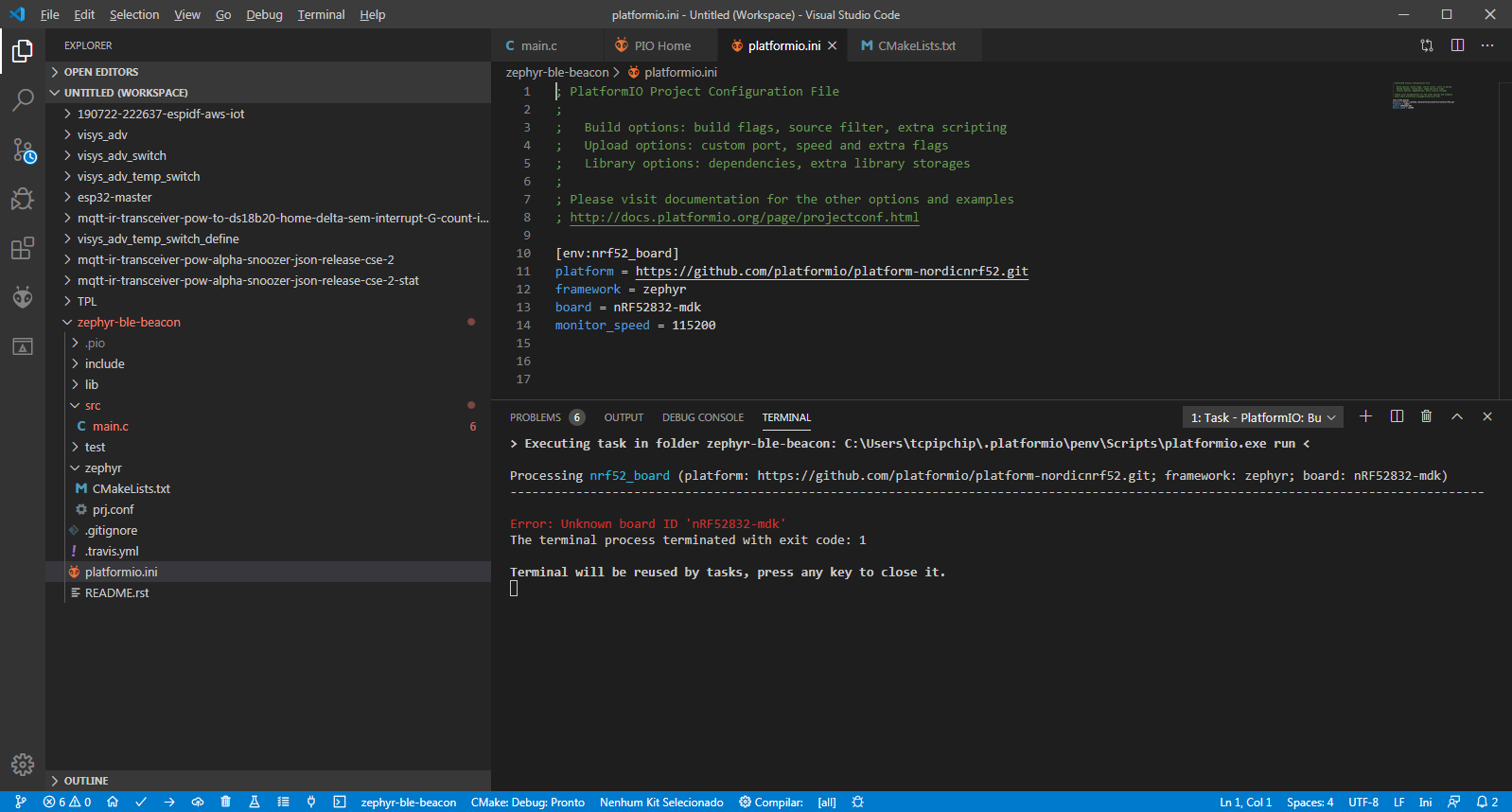
tcpipchip
on 17 Feb 2020
Very sad to hear that... Would be sad to just drop Zephyr support again
Sorry, I didn't say "drop". I said "stopped" 😊 We can't move further and depend on updates from the Zephyr project side.
It was a really interesting technical task for us where we got again a confirmation that PlatformIO is a universal and unique tool for embedded development. We already reused this experience for ESP-IDF 4.0 which is also switched to CMake. We plan to create a separate repository soon where will put this "PlatformIO-CMake" bridge and everyone will be able to contribute and it does not matter which operating system he will use.
Our goal is to provide an interface where developers can easily use CMake-based frameworks with PlatformIO.
ivankravets
on 17 Feb 2020
@tcpipchip see https://docs.platformio.org/en/latest/boards/nordicnrf52/nrf52832_mdk.html
It should be
board = nrf52832_mdk
Hi ! :(

tcpipchip
on 17 Feb 2020
Please open PlatformIO IDE Terminal and run
pio update
It looks like you have outdated dev-platform.
ivankravets
on 17 Feb 2020
Hi @ivankravets
Can you verify if you compiles this ?
https://github.com/zephyrproject-rtos/zephyr/blob/master/samples/bluetooth/scan_adv/src/main.c
Here got the following error, looks that is not recognizing
bt_le_scan_start
On Zephyr works

tcpipchip
on 17 Feb 2020
Looks like your project is not properly configured. Are you sure you're using the correct prj.conf file? You can copy it from the zephyr example.
Since the discussion in this topic mostly concerns generic questions about the integration of Zephyr framework, please next time open an issue in an appropriate repository (e.g, https://github.com/platformio/platform-nordicnrf52).
valeros
on 17 Feb 2020
Very sad to hear that... Would be sad to just drop Zephyr support again
Sorry, I didn't say "drop". I said "stopped" We can't move further and depend on updates from the Zephyr project side.
It was a really interesting technical task for us where we got again a confirmation that PlatformIO is a universal and unique tool for embedded development. We already reused this experience for ESP-IDF 4.0 which is also switched to CMake. We plan to create a separate repository soon where will put this "PlatformIO-CMake" bridge and everyone will be able to contribute and it does not matter which operating system he will use.
Our goal is to provide an interface where developers can easily use CMake-based frameworks with PlatformIO.
Thanks, that sounds good! ESP-IDF also seems to have other similarities with Zephyr, as it uses Kconfig aswell. Would be nice to have some sort of integration with Kconfig in the future so that different configurations could be chosen depending on the selected PIO env.
martinjaeger
on 17 Feb 2020
Getting good progress @valeros and @ivankravets
I am compiling that example!
Btw,about
https://github.com/platformio/platform-nordicnrf52/tree/develop/examples,
have you to NRF51 ?
And where are the DTS and config files for me to define my GPIOs, for example, to I2C ?
tcpipchip
on 18 Feb 2020
@tcpipchip
This topic is not the right place for such questions.
Examples for nrf51 are located here https://github.com/platformio/platform-nordicnrf51/tree/develop/examples
And where are the DTS and config files for me to define my GPIOs, for example, to I2C ?
These files are project-specific, so you need to create them manually.
valeros
on 18 Feb 2020
@valeros and @ivankravets
Running 100% my ZEPHYR project on LINUX, i2c ad bme280 works!
On platformio i can only compile 100% if i disable the I2C and BME280!
Can you help me to make the I2C+BME280 libs compiles ?

Thank you so much!
tcpipchip
on 19 Feb 2020
@tcpipchip Please open an issue in the repository of the platform you're using. Also attach somewhere a simple project to reproduce the issue and specify what version of Zephyr framework you're using when compiling your project without PlatformIO. Thanks.
valeros
on 19 Feb 2020
@valeros
Hi, i am so sorry! You had alerted me to create a new topic!
I will do tomorrow and put in the github the Zephyr Platformio project! Thanks to help me!!!!
Platformio is fantastic!
tcpipchip
on 19 Feb 2020
Sorry, we currently stopped the integration process of Zephyr RTOS. Not all things are covered in CMake that makes problems for us (a lot of things are called by different tools, make, etc., that are not reflected in CMake generator environemnt). Let's wait for the v2.2 release. We will check if these moments are fixed and will post updates here.
Zephyr v2.2 was just released. Would be great if you could check if the difficulties with PIO integration were resolved. If you need someone for further testing, I'd be happy to do that.
martinjaeger
on 10 Mar 2020
Hi @martinjaeger ! We've updated Zephyr to v2.2.0, but I'd be great if you could test it with your projects before release, for example.:
[env:nucleo_l073rz]
platform = https://github.com/platformio/platform-ststm32.git
board = nucleo_l073rz
framework = zephyr
excelent NEWS :)
Btw, i did a blog about Zephyr
https://zephy-platformio.blogspot.com/2020/03/nina-b112-zephyr-platformio.html
tcpipchip
on 1 Apr 2020
@tcpipchip Thanks, great article! We will socialize it soon!
ivankravets
on 1 Apr 2020
Yes, working on NINA B112 :)
Thanks!
tcpipchip
on 1 Apr 2020
I did a quick test of 2.2 with the official blinky example on disco_l475vg_iot01a and it also works fine.
 DesktopMan
on 1 Apr 2020
DesktopMan
on 1 Apr 2020
This is nice!
tcpipchip
on 1 Apr 2020
Thanks, everyone for your help! 😊
We have finally updated all dev-platforms with support for Zephyr 2.2.0. See the announcement here https://community.platformio.org/t/support-for-zephyr-2-2-0/12804
We are going to close this issue. If you have any issues with PlatformIO + Zephyr, please report to https://community.platformio.org/
We will also submit our PR to official Zephyr's documentation where developers be able to use Zephyr RTOS without any issues related to the installation of required packages and tools. The only requirement is the Python interpreter (Zephyr depends on Python 3.5+).
You can also mix different Zephyr versions working on the same project. Just declare a custom build environment and specify a version of the dev-platform. PlatformIO will do the rest for you.
Happy coding with PlatformIO and Zephyr RTOS! ❤️
ivankravets
on 1 Apr 2020
I can also confirm that it works :) Thanks a lot, PlatformIO is awesome!
martinjaeger
on 2 Apr 2020
:)
tcpipchip
on 2 Apr 2020
Related issues
 andig
·
5Comments
andig
·
5Comments
 gianiaz
·
4Comments
gianiaz
·
4Comments
 malachib
·
3Comments
malachib
·
3Comments
 microbug
·
4Comments
microbug
·
4Comments
 maxgerhardt
·
4Comments
maxgerhardt
·
4Comments
Most helpful comment
Hi, is there anyone working on this at the moment?