Platformio-atom-ide: Platformio-ide installer hanging on Atom Dependencies after Atom 1.39 update
It seems that issue was fixed. Please reopen if you still experience it.
_Originally posted by @ivankravets in https://github.com/platformio/platformio-atom-ide/issues/2059#issuecomment-443012151_
--
Having issues downloading the platformio-ide. Hangs forever on "Atom Dependencies" (see referenced issue). Tried uninstalling Atom and reinstalling, but it immediately attempts to install the package again. Thus I am unable to use Atom at all. This happened after updating to Atom 1.39.
I did also try using apm install build to fix the issue as described in the referenced issue, but no luck. Help!
 NewcDukem
All 38 comments
I too have the same problem during a clean install.
I tried uninstalling it based on the Link but it didn't help.
 NiOsY
on 24 Jul 2019
NiOsY
on 24 Jul 2019
I've regained use of Atom thankfully by uninstalling and deleting the ~/.atom folder under users. Attempted to reinstall _platformio-ide-terminal_ and _platformio-ide_ but neither will install at all now. Luckily it doesn't freeze during the _Atom Dependencies_ step anymore which is nice.
NewcDukem
on 24 Jul 2019
Same issue here.
apm install build also gets stuck and does nothing
 MarinVukosav
on 25 Jul 2019
MarinVukosav
on 25 Jul 2019
temngo el mismo problema de newduckem, ayuda
 humcarl
on 26 Jul 2019
humcarl
on 26 Jul 2019
I am having the same problem as those above. It gets stuck while installing on the Atom dependencies step of the install.
 Joshuas193
on 26 Jul 2019
Joshuas193
on 26 Jul 2019
seems there is a problem with PlatformIO IDE Terminal.
edit ~/.atom/packages/platformio-ide/lib/config.js and comment out
export const ATOM_DEPENDENCIES = {
...
  /*'platformio-ide-terminal': {
    requirements: '>=2.5.0'
  },*/
 dadyday
on 26 Jul 2019
dadyday
on 26 Jul 2019
apm install busy-signal has solved the problem for me
MarinVukosav
on 26 Jul 2019
apm install busy-signal has solved the problem for me
Did you do this before attempting to install platformio-ide, or during when it's frozen in installation?
NewcDukem
on 26 Jul 2019
I uninstalled everything, then installed Atom 1.38.2
and then tried to install Platformio, but it got stuck on Dependencies again.
In the background there was an Atom notification, blue square pop-up in the top right corner that said something like "busy-signal dependency not installed ..."
and then with that command in cmd it worked (while the frozen installation was going on)
MarinVukosav
on 26 Jul 2019
la solucion es ir a usarios y eliminar todos los archivos de atom y luego
volver a instalar atom
http://www.avg.com/email-signature?utm_medium=email&utm_source=link&utm_campaign=sig-email&utm_content=webmail
Libre
de virus. www.avg.com
http://www.avg.com/email-signature?utm_medium=email&utm_source=link&utm_campaign=sig-email&utm_content=webmail
<#DAB4FAD8-2DD7-40BB-A1B8-4E2AA1F9FDF2>
El vie., 26 jul. 2019 a las 13:06, Marin Vukosav (notifications@github.com)
escribió:
I uninstalled everything, then installed Atom 1.38.2
and then tried to install Platformio, but it got stuck on Dependencies
again.
In the background there was an Atom notification, blue square pop-up in
the top right corner that said something like "busy-signal dependency not
installed ..."
and then with that command in cmd it worked (while the frozen installation
was going on)—
You are receiving this because you commented.
Reply to this email directly, view it on GitHub
https://github.com/platformio/platformio-atom-ide/issues/2233?email_source=notifications&email_token=AHIB2U7GLQ3MVM56WSSODUTQBM4LLA5CNFSM4IGMO72KYY3PNVWWK3TUL52HS4DFVREXG43VMVBW63LNMVXHJKTDN5WW2ZLOORPWSZGOD25KHVQ#issuecomment-515548118,
or mute the thread
https://github.com/notifications/unsubscribe-auth/AHIB2U2GXT3V4K43TGO6PKLQBM4LLANCNFSM4IGMO72A
.
--
966823484
Humberto Carlos Dominguez Nieto
Diseñador Gráfico Publicitario
humcarl
on 26 Jul 2019
This doesn't solve the original issue though. _Platformio-ide_ and _terminal_ do not work with Atom 1.39.0.
NewcDukem
on 26 Jul 2019
eso si es cierto
El vie., 26 jul. 2019 a las 13:27, Dave (notifications@github.com)
escribió:
This doesn't solve the original issue though. Platformio-ide and
terminal do not work with Atom 1.39.0.—
You are receiving this because you commented.
Reply to this email directly, view it on GitHub
https://github.com/platformio/platformio-atom-ide/issues/2233?email_source=notifications&email_token=AHIB2UY52PUBCZMWUWJ2DR3QBM6YFA5CNFSM4IGMO72KYY3PNVWWK3TUL52HS4DFVREXG43VMVBW63LNMVXHJKTDN5WW2ZLOORPWSZGOD25LYXY#issuecomment-515554399,
or mute the thread
https://github.com/notifications/unsubscribe-auth/AHIB2UY3YSBPFO3BSBCSJFTQBM6YFANCNFSM4IGMO72A
.
--
966823484
Humberto Carlos Dominguez Nieto
Diseñador Gráfico Publicitario
humcarl
on 26 Jul 2019
Just tried to install _platformio-ide_ again, then while installation hangs, input apm install build and apm install busy-signal but still hangs on Atom Dependencies. Hmm...
NewcDukem
on 26 Jul 2019
In the config.js file in the platformio there's a line export const ATOM_DEPENDENCIES =... I just copied every dependency listed there and installed with apm install. They all worked except for build. The list I got was:
'busy-signal' 'platformio-ide-terminal' 'platformio-ide-debugger' 'autocomplete-clang' 'linter-ui-default' 'intentions' 'linter' 'linter-gcc' 'language-ini' 'tool-bar' 'file-icons' 'build-platformio' 'build'
_Originally posted by @stibinator in https://github.com/platformio/platformio-atom-ide/issues/2059#issuecomment-414883209_
I manually installed everything on @stibinator 's list. The only package that gave me a problem was apm install platformio-ide-terminal. Whereas everything else completed install.
Overall, the platformio-ide install is still hanging on Atom Dependencies.
NewcDukem
on 26 Jul 2019
I see in platformio-atom-ide readme.md that "build failing". What does this mean?
I use Windows version of Atom, how can I install of platformio-ide early version for example 2.4.0 ?
I noticed any version of Atom always installs the latest platformio-ide.
NiOsY
on 26 Jul 2019
I ran into this issue on macOS Mojave when upgrading to Atom 1.39.
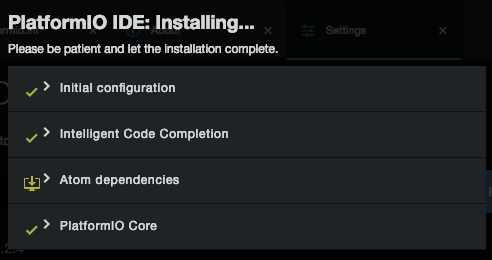
I uninstalled PlatformIO and tried to reinstall it again, but no luck. I disabled the platformio-ide-terminal dependency per @dadyday's solution, and everything worked except for the terminal.
I tried reinstalling the platformio-ide-terminal package using apm install platformio-ide-terminal, but ran into the following error:
> [email protected] install /private/var/folders/rx/_k3qrh3d1xv9_jh_ynz9ntsr0000gn/T/apm-install-dir-119626-12485-tvn0hd.5omj/node_modules/platformio-ide-terminal/node_modules/node-pty-prebuilt
> prebuild-install || node scripts/install.js


prebuild-install WARN install No prebuilt binaries found (target=3.1.10 runtime=electron arch=x64 libc= platform=darwin)
gyp ERR! configure error
gyp ERR! stack Error: Python executable "/Applications/Atom.app/Contents/Resources/app/apm/bin/python-interceptor.sh" is v3.7.3, which is not supported by gyp.
gyp ERR! stack You can pass the --python switch to point to Python >= v2.5.0 & < 3.0.0.
gyp ERR! stack     at PythonFinder.failPythonVersion (/Applications/Atom.app/Contents/Resources/app/apm/node_modules/npm/node_modules/node-gyp/lib/configure.js:501:19)
gyp ERR! stack     at PythonFinder.<anonymous> (/Applications/Atom.app/Contents/Resources/app/apm/node_modules/npm/node_modules/node-gyp/lib/configure.js:483:14)
gyp ERR! stack     at ChildProcess.exithandler (child_process.js:267:7)
gyp ERR! stack     at emitTwo (events.js:126:13)
gyp ERR! stack     at ChildProcess.emit (events.js:214:7)
gyp ERR! stack     at maybeClose (internal/child_process.js:925:16)
gyp ERR! stack     at Socket.stream.socket.on (internal/child_process.js:346:11)
gyp ERR! stack     at emitOne (events.js:116:13)
gyp ERR! stack     at Socket.emit (events.js:211:7)
gyp ERR! stack     at Pipe._handle.close [as _onclose] (net.js:554:12)
gyp ERR! System Darwin 18.6.0
gyp ERR! command "/Applications/Atom.app/Contents/Resources/app/apm/bin/node" "/Applications/Atom.app/Contents/Resources/app/apm/node_modules/npm/node_modules/node-gyp/bin/node-gyp.js" "rebuild" "--build_v8_with_gn=false"
gyp ERR! cwd /private/var/folders/rx/_k3qrh3d1xv9_jh_ynz9ntsr0000gn/T/apm-install-dir-119626-12485-tvn0hd.5omj/node_modules/platformio-ide-terminal/node_modules/node-pty-prebuilt
gyp ERR! node -v v8.9.3
gyp ERR! node-gyp -v v3.7.0
gyp ERR! not ok
npm WARN enoent ENOENT: no such file or directory, open '/private/var/folders/rx/_k3qrh3d1xv9_jh_ynz9ntsr0000gn/T/apm-install-dir-119626-12485-tvn0hd.5omj/package.json'
npm WARN apm-install-dir-119626-12485-tvn0hd.5omj No description
npm WARN apm-install-dir-119626-12485-tvn0hd.5omj No repository field.
npm WARN apm-install-dir-119626-12485-tvn0hd.5omj No README data
npm WARN apm-install-dir-119626-12485-tvn0hd.5omj No license field.

npm ERR! code ELIFECYCLE
npm ERR! errno 1
npm ERR! [email protected] install: `prebuild-install || node scripts/install.js`
npm ERR! Exit status 1
npm ERR!
npm ERR! Failed at the [email protected] install script.
npm ERR! This is probably not a problem with npm. There is likely additional logging output above.
I have no idea if this is related to the Atom upgrade, but following the solution here worked for me. Looks like gyp was using Python 3 instead of Python 2. I have both Python 3 and Python 2.7 installed with Homebrew and the command npm config set python python2.7 made it so I could install platformio-ide-terminal again.
 iicky
on 26 Jul 2019
iicky
on 26 Jul 2019
Hmm, I'm indisposed for a day or two now. Anyone else with Windows wanna give iicky's solution a try?
NewcDukem
on 26 Jul 2019
My solution are:
- install python 2.7.13 manually (with add to path)
- restart windows
- install version 1.38.2 of Atom because the versions above contain some major changes
- install platformio-ide
Done :)
------------------my other problem--------
platformio made several errors while compiling "...\firmware.elf section .text' will not fit in region iram1_0_seg' - the solution is the lower version of platformio
pip uninstall platformio
pip install platformio==3.6.7
NiOsY
on 27 Jul 2019
I have the same problem with it hanging out and I curse myself for forgetting to turn off "Automatically Update" ......... the same problem about the time last year when Atom updated.
 PGlyre
on 29 Jul 2019
PGlyre
on 29 Jul 2019
Same Problem here...
 lgritsch
on 29 Jul 2019
lgritsch
on 29 Jul 2019
I noticed the line gyp ERR! node -v v8.9.3 and sobefore going into Atom to install Platformio I updated my node to v12.17.0 and when I tried apm install platformio-ide-terminal it worked. (I had already previously apm installed the other packages as listed by @NewcDukem.
 samach123
on 29 Jul 2019
samach123
on 29 Jul 2019
I noticed the line gyp ERR! node -v v8.9.3 and sobefore going into Atom to install Platformio I updated my node to v12.17.0 and when I tried apm install platformio-ide-terminal it worked. (I had already previously apm installed the other packages as listed by @NewcDukem.
This worked with Atom 1.39.0/1 or 1.38.2?
NewcDukem
on 30 Jul 2019
I was able to get everything working with 1.38.2 again, but not 1.39.0 or 1.39.1
NewcDukem
on 30 Jul 2019
I noticed the line gyp ERR! node -v v8.9.3 and sobefore going into Atom to install Platformio I updated my node to v12.17.0 and when I tried apm install platformio-ide-terminal it worked. (I had already previously apm installed the other packages as listed by @NewcDukem.
This worked with Atom 1.39.0/1 or 1.38.2?
Atom v1.39.1
samach123
on 31 Jul 2019
Depends on https://github.com/daviwil/node-pty-prebuilt/issues/21
/CC @daviwil
 ivankravets
on 31 Jul 2019
ivankravets
on 31 Jul 2019
Please help. I dont know what happened. I just woke up and suddenly I saw a rebuild failed then I tried reinstalling platformio-ide-terminal and this error appeared.
_Installing “[email protected]” failed.Hide output…
[email protected] install C:\Users\PMEAppData\Local\Tempapm-install-dir-119631-11424-3dcqqe.n5dvsnode_modulesplatformio-ide-terminalnode_modulesnode-pty-prebuilt
prebuild-install || node scripts/install.js
C:\Users\PMEAppData\Local\Tempapm-install-dir-119631-11424-3dcqqe.n5dvsnode_modulesplatformio-ide-terminalnode_modulesnode-pty-prebuilt>if not defined npm_config_node_gyp (node "C:\Users\PMEAppData\Localatomapp-1.39.1\resourcesappapmnode_modules\npmnode_modules\npm-lifecyclenode-gyp-bin\....node_modulesnode-gypbinnode-gyp.js" rebuild --build_v8_with_gn=false ) else (node "C:\Users\PMEAppData\Localatomapp-1.39.1\resourcesappapmnode_modules\npmnode_modulesnode-gypbinnode-gyp.js" rebuild --build_v8_with_gn=false )
prebuild-install WARN install No prebuilt binaries found (target=3.1.10 runtime=electron arch=x64 libc= platform=win32)
gyp ERR! configure error
gyp ERR! stack Error: Can't find Python executable "C:\ProgramDataAnaconda3\python.EXE", you can set the PYTHON env variable.
gyp ERR! stack at PythonFinder.failNoPython (C:\Users\PMEAppData\Localatomapp-1.39.1\resourcesappapmnode_modules\npmnode_modulesnode-gyp\lib\configure.js:492:19)
gyp ERR! stack at PythonFinder.
gyp ERR! stack at C:\Users\PMEAppData\Localatomapp-1.39.1\resourcesappapmnode_modules\npmnode_modules\graceful-fs\polyfills.js:284:29
gyp ERR! stack at FSReqWrap.oncomplete (fs.js:152:21)
gyp ERR! System Windows_NT 10.0.17134
gyp ERR! command "C:\Users\PME\AppData\Local\atom\app-1.39.1\resources\app\apm\bin\node.exe" "C:\Users\PME\AppData\Local\atom\app-1.39.1\resources\app\apm\node_modules\npm\node_modules\node-gyp\bin\node-gyp.js" "rebuild" "--build_v8_with_gn=false"
gyp ERR! cwd C:\Users\PMEAppData\Local\Tempapm-install-dir-119631-11424-3dcqqe.n5dvsnode_modulesplatformio-ide-terminalnode_modulesnode-pty-prebuilt
gyp ERR! node -v v8.9.3
gyp ERR! node-gyp -v v3.7.0
gyp ERR! not ok
npm WARN enoent ENOENT: no such file or directory, open 'C:\Users\PMEAppData\Local\Tempapm-install-dir-119631-11424-3dcqqe.n5dvs\package.json'
npm WARN apm-install-dir-119631-11424-3dcqqe.n5dvs No description
npm WARN apm-install-dir-119631-11424-3dcqqe.n5dvs No repository field.
npm WARN apm-install-dir-119631-11424-3dcqqe.n5dvs No README data
npm WARN apm-install-dir-119631-11424-3dcqqe.n5dvs No license field.
npm ERR! code ELIFECYCLE
npm ERR! errno 1
npm ERR! [email protected] install: prebuild-install || node scripts/install.js
npm ERR! Exit status 1
npm ERR!
npm ERR! Failed at the [email protected] install script.
npm ERR! This is probably not a problem with npm. There is likely additional logging output above.
npm ERR! A complete log of this run can be found in:
npm ERR! C:\Users\PME.atom.apm_logs\2019-07-31T08_42_52_805Z-debug.log_
 rlcayaco
on 31 Jul 2019
rlcayaco
on 31 Jul 2019
Sounds like https://github.com/daviwil/node-pty-prebuilt hasn't had time to update the prebuilt files to be compatible with the latest Atom. I am new and just completed getting my build platform up and running and had my first project due this week. I had not reboot or restarted my atom setups until today, wish I too had turned off automatic updates :(. Well team not impress by the Atom/PlatformIO setup now. Guess back to VS....
 benhadad
on 1 Aug 2019
benhadad
on 1 Aug 2019
They say Atom version 1.38.2 is working fine. Have you tried that?
On Thu, Aug 1, 2019, 11:59 AM benhadad notifications@github.com wrote:
Sounds like https://github.com/daviwil/node-pty-prebuilt hasn't had time
to update the prebuilt files to be compatible with the latest Atom. I am
new and just completed getting my build platform up and running and had my
first project due this week. I had not reboot or restarted my atom setups
until today, wish I too had turned off automatic updates :(. Well team not
impress by the Atom/PlatformIO setup now. Guess back to VS....—
You are receiving this because you commented.
Reply to this email directly, view it on GitHub
https://github.com/platformio/platformio-atom-ide/issues/2233?email_source=notifications&email_token=AKJAMAXKQIWTCSUZ5EO3443QCJNTXA5CNFSM4IGMO72KYY3PNVWWK3TUL52HS4DFVREXG43VMVBW63LNMVXHJKTDN5WW2ZLOORPWSZGOD3JHMDI#issuecomment-517109261,
or mute the thread
https://github.com/notifications/unsubscribe-auth/AKJAMATSVW2MXSBAOKBHEA3QCJNTXANCNFSM4IGMO72A
.
rlcayaco
on 1 Aug 2019
It happend me the same issue with the last version of atom. I installed this time the 1.38.1 version and it worked
 Erokawa
on 1 Aug 2019
Erokawa
on 1 Aug 2019
I dont know what happened but Atom just wont open. I tried reinstalling it
now it wont let me install its giving me errors.
On Thu, Aug 1, 2019, 8:09 PM Erokawa notifications@github.com wrote:
It happend me the same issue with the last version of atom. I installed
this time the 1.38.1 version and it worked—
You are receiving this because you commented.
Reply to this email directly, view it on GitHub
https://github.com/platformio/platformio-atom-ide/issues/2233?email_source=notifications&email_token=AKJAMAUKRWS62CMEUI4PTM3QCLG63A5CNFSM4IGMO72KYY3PNVWWK3TUL52HS4DFVREXG43VMVBW63LNMVXHJKTDN5WW2ZLOORPWSZGOD3KLYXA#issuecomment-517258332,
or mute the thread
https://github.com/notifications/unsubscribe-auth/AKJAMASQK6ZALCSCL3DLPI3QCLG63ANCNFSM4IGMO72A
.
rlcayaco
on 1 Aug 2019
See https://github.com/platformio/platformio-atom-ide-terminal/pull/753 for solution awaiting @ivankravets merge and release
 the-j0k3r
on 1 Aug 2019
the-j0k3r
on 1 Aug 2019
I guess I will just wait for it to get updated and fixed.
rlcayaco
on 2 Aug 2019
seems there is a problem with PlatformIO IDE Terminal.
edit ~/.atom/packages/platformio-ide/lib/config.js and comment outexport const ATOM_DEPENDENCIES = { ... /*'platformio-ide-terminal': { requirements: '>=2.5.0' },*/
This was useful for me, thanks
 jorgedepaz
on 4 Apr 2020
jorgedepaz
on 4 Apr 2020
We have just released a new version 2.7.0, please upgrade.
Please note that we HIGHLY recommend moving to PlatformIO IDE for VSCode which resolves tons of issues and brings a lot of new features.
ivankravets
on 13 Jun 2020
There are still problems installing "PlatformIO IDE" on macOS Catalina v10.15.7.
I tried to uninstall and install again however the "Atom dependencies" is still hanging... i left it for a few hours with no result.
Any ideas how to fix this?
 hjalmer
on 12 Nov 2020
hjalmer
on 12 Nov 2020
Hi, I had the same problem. I've deactivated my antivirus set and reinstalled Atom and it's working now.
 Krzysztof-acopotrzeba
on 14 Nov 2020
Krzysztof-acopotrzeba
on 14 Nov 2020
I tried all the solutions here. Nothing worked. Atom still hanged and all tries to install platform-ide-terminal manually as well. I switched to vscode, to be able to work
 willdmo
on 27 Nov 2020
willdmo
on 27 Nov 2020
I have the same problem. I guess I'm going to switch to VSCODE
 abdelrahmandakak
on 5 Dec 2020
abdelrahmandakak
on 5 Dec 2020
Related issues
 expert3411
·
8Comments
expert3411
·
8Comments
 stelgenhof
·
10Comments
stelgenhof
·
10Comments
 dsjstc
·
6Comments
dsjstc
·
6Comments
 cristianszwarc
·
6Comments
cristianszwarc
·
6Comments
 nooitaf
·
9Comments
nooitaf
·
9Comments
Most helpful comment
seems there is a problem with PlatformIO IDE Terminal.
edit ~/.atom/packages/platformio-ide/lib/config.js and comment out