Platformio-atom-ide-terminal: Blinking cursor/no output: Terminal is not responding
- [x] I have reset Atom to defaults prior to submitting report.
- [ ] I have not reset Atom to defaults prior to submitting report.
Description
The terminal only displays the terminal cursor on a blank screen. I have tried to uninstall and reinstall the package and even atom it's self, and restarting the machine after each install. I have installed platformio-ide 2.3.1, and nodejs as some would advise from the community, but still got the same issue. Please see below are the snapshots of the ide and the config file.
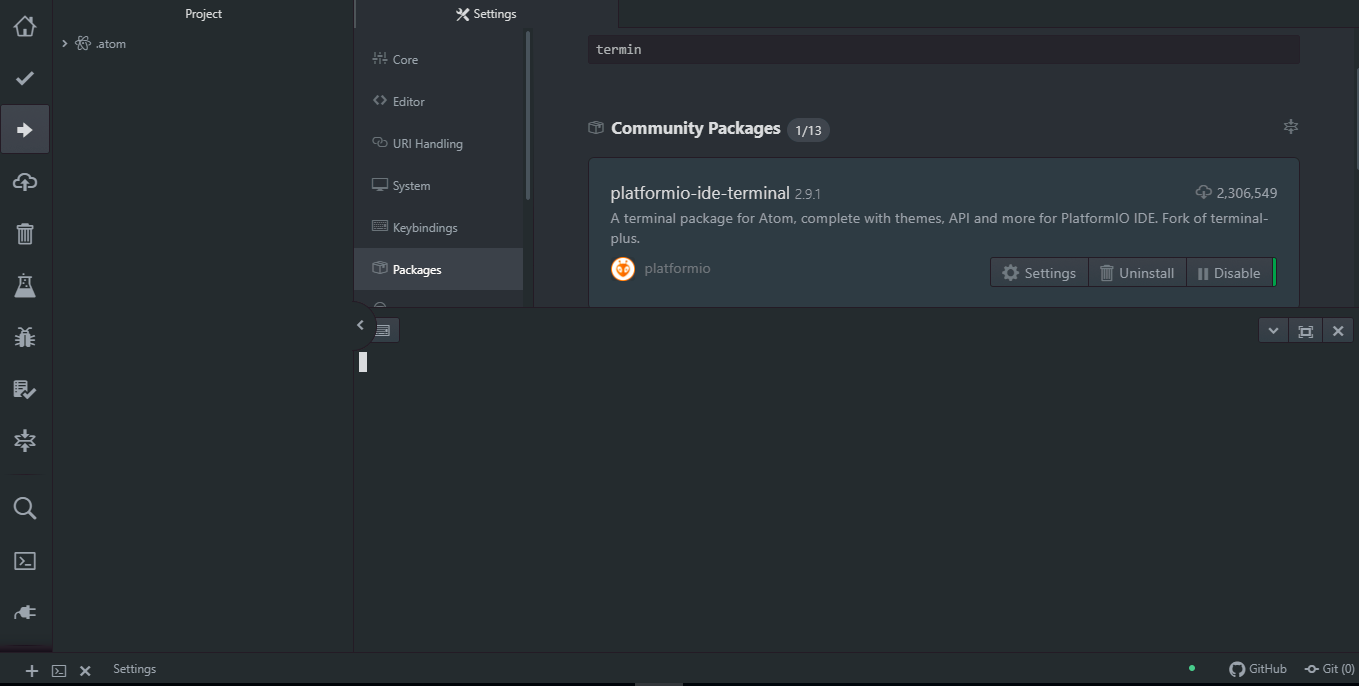

Steps to reproduce
- Open up atom ide and click on file -> settings
- Click on "install", search and install "platformio-atom-ide-terminal"
- Click on the added "+" icon on the bottom left corner of the ui, and observe.
Expected behavior:
Expecting it display the cmd/powershell console window content, with the current directory as default.
Actual behavior:
Only displays a console cursor, with nothing else.
Reproduces how often:
Always
Versions
> atom --version

> apm --version

OS name and version:
Windows 10
Platformio-ide-terminal version:

Additional Information
 12xman
All 131 comments
Thank you for opening this report.
These types issues cant be duplicated, Ive tried over and over and cannot, it works flawlessly here, its quite difficult to find out whats the cause is with reports such as yours, never mind fix it.
From some experience the culprit usually is something in the Install is conflicting with Atom/Platformio terminal. What though is again a fishing expedition.
The easiest way to have it fixed, is to have a virgin OS install, where Atom has never been installed before, and no other software actually exists and install Atom + platformio terminal.
Thats is safest bet to get it to work because Atom may leave folders behind even after uninstall in various paths..
I would recommend 64-bit Windows 10 pro 1803 and nothing else but Atom + platformio-ide-terminal.
That said, since platformio-atom-ide-terminal 2.9.0 f64888d is using node-pty-prebuilt instead of the unmaintained and outdated pty.js. This is good news for stability and compatibility and fixed many many issues.
If you cant get it to work, your best bet is to switch to vscode, or help implement #426
 the-j0k3r
on 4 Mar 2019
the-j0k3r
on 4 Mar 2019
Merging duplicate issue #669 opened by @qeithva
below is issue details transplanted.
- [x] I have reset Atom to defaults prior to submitting report.
- [ ] I have not reset Atom to defaults prior to submitting report.
Description
clean atom install + platformio-ide-terminal
press + sign to open terminal
terminal never comes back to prompt but remains blinking
cmd and powershell are working normally on its own
Steps to reproduce
- install AtomSetup-x64.exe
- install plaformio-ide-terminal
3.press + sign
Expected behavior:
prompt should occur either powershell or cmd
Actual behavior:
prompt never comes
only blinking cursor
Reproduces how often:
10X
100% each time not working
Versions
C:\Users\Owner>apm --version
apm 2.1.3
npm 6.2.0
node 8.9.3 x64
atom 1.34.0
python 3.5.2
git 2.16.2.windows.1
visual studio
C:\Users\Owner>atom --version
Atom : 1.34.0
Electron: 2.0.16
Chrome : 61.0.3163.100
Node : 8.9.3
apm --version
OS name and version:
windows 10 home (1803)
Platformio-ide-terminal version: 2.9.1
Additional Information
tried to delete .atom many times
no luck
the-j0k3r
on 5 Mar 2019
Merging duplicate issue #669 opened by @ayushgupta321
below is issue details transplanted.
- [x] I have reset Atom to defaults prior to submitting report.
- [ ] I have not reset Atom to defaults prior to submitting report.
Description
The terminal does not seem to work. A blinking cursor appears ,but I cannot write anything.
Steps to reproduce
- Install platform-atom-ide-terminal
- Click on + icon at the bottom
Expected behavior:
I expected the Windows PowerShell to open. I even changed the override to cmd.exe(with the correct path) ,yet nothing seems to change
Actual behavior:
Blinking Cursor appears ,cannot type anything.
Reproduces how often:
100%
Versions
> atom --version
Atom    : 1.34.0
Electron: 2.0.16
Chrome  : 61.0.3163.100
Node    : 8.9.3
> apm --version
apm  2.1.3
npm  6.2.0
node 8.9.3 x64
atom 1.34.0
python 3.6.6
git
visual studio
OS name and version:
Platformio-ide-terminal version:
2.9.1
Additional Information

the-j0k3r
on 6 Mar 2019
Right click on console window -> clear
close and re-open terminal session. It works.
 PrathyushTuraga
on 7 Mar 2019
PrathyushTuraga
on 7 Mar 2019
Merging duplicate issue #671 opened by @vishaldeep24
below is issue details transplanted.
- [x] I have reset Atom to defaults prior to submitting report.
- [ ] I have not reset Atom to defaults prior to submitting report.
Description
I installed platformio-ide-terminal and restarted atom but no terminal is coming up. Neither powershell or cmd is coming up. i uninstalled the package and resinstalled it again still nothing worked.
Just a cusor is blinking if you press any key nothing happens.
Steps to reproduce
- open Atom
- Install platformio-ide-terminal package
- Try opening the terminal
Expected behavior:
Powershell terminal should start.
Actual behavior:
Nothing happens but a white cursor keeps blinking.
Reproduces how often:
Everytime same thing happens.
Versions
> atom --version
atom 1.34.0 x64
> apm --version
apm 2.1.3


md5-24ac65a35af79d2c5b17a0beb333e3d6


> atom --version

Atom    : 1.34.0
Electron: 2.0.16
Chrome  : 61.0.3163.100
Node    : 8.9.3

> apm --version

apm  2.1.3
npm  6.2.0
node 8.9.3 x64
atom 1.34.0
python 3.6.6
git 2.15.1.windows.2
visual studio 2015
OS name and version: Windows 10 Home 1809
Platformio-ide-terminal version: 2.9.0
Additional Information
Me too reports
Anyone else facing this exact issue and posting "me too" reports here, please copy and paste this into the reply field and provide the requested information.
Thank you.
the-j0k3r
on 8 Mar 2019
@16273849 @PrathyushTuraga @vishaldeep24 @ayushgupta321 @qeithva @12xman please test the following.
PrathyushTuraga commented a day ago
Right click on console window -> press clear -> close and re-open terminal session. It works.
the-j0k3r
on 8 Mar 2019
This does not help.
 qeithva
on 8 Mar 2019
qeithva
on 8 Mar 2019
No it didn't work
 vishaldeep24
on 8 Mar 2019
vishaldeep24
on 8 Mar 2019
A few things I suggest trying.
Disable GPU rendering in Atom.
1) see https://flight-manual.atom.io/hacking-atom/sections/debugging/#check-if-your-gpu-is-causing-the-problem
- in an external terminal run the commands above, then restart Atom and retry.
2) Try with python 2.7 instead of 3.6.6? (node-pty-prebuilt install scripts doesnt suport python 3.x.x
- uninstall python 3.6.6 install 2.7
- uninstall platformio-ide-terminal via apm and reinstall via apm.
3) Also if you have a virtual machine to test with Windows 10 pro (just a trial install of the OS will do for testing purposes.)
- Install Atom 1.34.0 and then platformio-ide-terminal 2.9.1 via apm again with python 2.7
On another note, the most failures are coming from reports of WIndows 10 home, please test as above with windows 10 pro 64-bit.
Please report back with full results.
the-j0k3r
on 8 Mar 2019
When I open electron (chromium) dev tools (Ctrl+Shift+I) and go to console I was able to see errors related to platformio-atom-ide-terminal.
I made the dev tools pop out in a separate window, selected console tab and pressed the "New terminal" button in atom.
This immediately produced the following view.

I am on linux, Atom v1.34.0
 L1Q
on 11 Mar 2019
L1Q
on 11 Mar 2019
@L1Q Thank you for reaching out with this report.
If you read the top errors, they are for pty.js which platformio-ide-terminal >2.9.0 no longer uses, so Im unsure what exactly you are reporting but its unrelated to current platformio-ide-terminal 2.9.1.
Platformio-ide-terminal now uses node-pty-prebuilt, so I think you need to investigate your side whats going on. Then please follow https://flight-manual.atom.io/hacking-atom/sections/debugging/#reset-to-factory-defaults
Then reinstall platformio-ide-terminal 2.9.1 via apm in a terminal.
the-j0k3r
on 11 Mar 2019
Thank you! Updating to 2.9.1 fixed it for me.
L1Q
on 11 Mar 2019
Glad to ear it.
the-j0k3r
on 11 Mar 2019
Same problem here. Updated/Reinstall doesn't help.
I'm using atom 1.35.1, and terminal 2.9.1 on Windows 10 Education version, x64. Here are the screenshots:


I also tried L1Q's develop mode, no errors found, just this:

Not sure if this helps.
I also tried reset atom to factory defaults as well, no luck.
 AdamZHANG123
on 13 Mar 2019
AdamZHANG123
on 13 Mar 2019
@AdamZHANG123 see https://github.com/platformio/platformio-atom-ide-terminal/issues/668#issuecomment-470893810
L1Q issue was unrelated to this anyway.
the-j0k3r
on 13 Mar 2019
me too
 ychuckt8
on 21 Mar 2019
ychuckt8
on 21 Mar 2019
@ychuckt8 me too reports must also fill in the issue template
Copy and paste the template located at https://raw.githubusercontent.com/platformio/platformio-atom-ide-terminal/master/.github/ISSUE_TEMPLATE.md and fill in all fields. Logs / Errors / other information should be added at the bottom in the Notes portion of the issue template.
Thank you for understanding.
the-j0k3r
on 21 Mar 2019
Just in case someone missed it, heres a list of things to try.
https://github.com/platformio/platformio-atom-ide-terminal/issues/668#issuecomment-470893810
Ive installed Atom + this package in 5 different OS's including macOS, Windows 10 pro, Ubuntu, Fedora, Arch Linux they all work fine, no errors and no failures to start.
the-j0k3r
on 27 Mar 2019
I have exactly the same, in Windows 10 64 bits. I am trying to do a clean uninstall, deleting the users/xxx/.atom folders as well. It's still happening. Interestingly, previously I got C++ errors when launchign the terminal. Now it just stalls.
I am getting tired and am likely to set up a whole new ATOM environment on Linux.
 xavalex
on 7 Apr 2019
xavalex
on 7 Apr 2019
I forced upgraded an old VM of Windows pro 1803 to 1809 and which had Atom 1.28 + platformio-ide-terminal 2.8.3 everything was working fine with that Atom 1.28.
Upon upgrading atom to 1.36 andplatformio-ide-terminal to 2.9.1 I am now getting nothing on terminal (not even cursor) until I actually press enter. SO if you get this press enter... SO it seem after loading the lot chokes until some key is pressed.
I am using https://atom.io/packages/block-cursor so Ill try removing that and seeing though Im happy to press a key to get terminal unstuck.
Another issue that will get solved by implementing #426
My other VM with Atom 1.36 and Platformio-ide-terminal 2.9.1 and Windows 1803 is still working flawlessly though and Im in no rush to upgrade it, despite loving the new all dark look of Windows 1809.
Edit: Yes Ive done https://github.com/platformio/platformio-atom-ide-terminal/issues/668#issuecomment-470893810
the-j0k3r
on 12 Apr 2019
1.open cmd
2.apm uninstall platformio-ide-terminal
3.apm install platformio-ide-terminal
4.open atom
everything should work fine.. Cheers!
 palnatimahesh
on 12 Apr 2019
palnatimahesh
on 12 Apr 2019
Platformio-ide-terminal will not work properly in Windows 10 1809 (pro/enterprise), You need to press enter to get a prompt as it fails to properly FULLY load. Fully reinstalled Windows from default.
So @palnatimahesh that basic troubleshooting step wont work either nor will anything else in https://github.com/platformio/platformio-atom-ide-terminal/issues/668#issuecomment-470893810
the-j0k3r
on 13 Apr 2019
I found out that enabling a shell override incompatible shell will duplicate this bug report.
Can everyone with the blinking cursor paste their config.cson platformio-ide-terminal portion only? And their actual VERSION for the OS. just Windows 10 is not enough.
Broken AKA. Blinking cursor
"platformio-ide-terminal":
    core:
      shell: "C:\\Program Files\\Git\\git-bash.exe"
or
shell: "C :\\WINDOWS\\system32\\cmd.exe"
Needs pressing Enter to show prompt. (you can press any key though its not as clean)
"platformio-ide-terminal":
    core:
      shell: "C:\\Windows\\System32\\WindowsPowerShell\\v1.0\\powershell.exe"
or
shell: "C:\\Program Files\\Git\\git-cmd.exe"
Workaround for pressing enter (Windows Powershell only)
Create a Powershell profile with contents
Clear-Host
Place that at very top of the profile before any other lines if you already have a profile.
Mine is for current user and current host only i.e.
C:\Users\<username>\Documents\WindowsPowerShell\Microsoft.PowerShell_profile.ps1
Hopefully if everyone replies with this information we can get somewhere for a workaround.
NOTE: Also In Windows 10 1809 Even Visual Studio Code built in terminal is equally broken and requires pressing enter when using powershell to actually show any prompt.
- DO NOT USE WINDOWS 10 1809, latest known working is 1709, 1803
the-j0k3r
on 13 Apr 2019
OK some more information and tips
The best working shell so far to use in Windows 10 - 1809 with platformio-ide-terminal is BAsh, which is shipped with Git located in C:\Program Files\Git\bin\bash.exe.
You wont experience the blinking cursor issue or the powershell loading hungup described in post above.
To Setup do the following:
1) Edit your Atom .config.cson
2) Find the line shell: "C:\\Windows\\System32\\WindowsPowerShell\\v1.0\\powershell.exe" Or whatever you have set it to prefix an # in front of it (commenting it out.
3) Create a new shell line below as shell: "C:\\Program Files\\Git\\bin\\bash.exe" (ensure it looks like screenshot)

4) Save the config.cson and reopen any terminal with platformio-ide-terminal.
Now rejoice.

Its still not perfect it will error out when running apm -v but its better than totally broken.
That Prompt is a modified version of the C:\Program Files\Git\etc\profile.d\git-prompt.sh Code located at https://gist.github.com/the-j0k3r/e1b9a250e26f3bc206e42111e571a8ae
Just make a backup of original by renaming it and copy that over as the original file or whatevr method youre more comfortable with.
the-j0k3r
on 13 Apr 2019
changed to use "C:\Program Files\Git\bin\bash.exe" and it works now.
Thanks.
ychuckt8
on 14 Apr 2019
To correct errors, paths when using git-bash or bash see https://github.com/atom/apm/issues/725#issuecomment-482937789
the-j0k3r
on 14 Apr 2019
I have this problem. However, I realized that what causes it is my anti-virus (Mcafee). I deactivated the scan in real time, and it worked. Even, it's annoying, because every time I start the atom, I need to disable the anti-virus.
 Everton747
on 17 Apr 2019
Everton747
on 17 Apr 2019
have this problem. However, I realized that what causes it is my anti-virus (Mcafee)
YMMV, You have what Windows version? 1809?
the-j0k3r
on 18 Apr 2019
@the-j0k3r
My compliments. This is the first time I see a relevant remark related to this problem.
Yes it seems related to McAfee in my case. I disabled all and restarted atom and now the terminal shows up. However not aways consistent but for sure McAfee is blocking something in Atom in my case.
I have Windows Home 10 1803
qeithva
on 18 Apr 2019
My compliments. This is the first time I see a relevant remark related to this problem.
Experience has taught me many software's interfere where they shouldn't causing issues.
This is why Ive also made the comment several times that many issues (like this issue) are likely linked to 3rd party software, Ive even asked people to test a virgin OS install. that means vanilla not loaded with mcafee or other things,
Yet, only now you seem to find this relevant. Interesting.
the-j0k3r
on 18 Apr 2019
have this problem. However, I realized that what causes it is my anti-virus (Mcafee)
YMMV, You have what Windows version? 1809?
No, 1803. Windows 10 Education
Everton747
on 22 Apr 2019
I have this problem. However, I realized that what causes it is my anti-virus (Mcafee). I deactivated the scan in real time, and it worked. Even, it's annoying, because every time I start the atom, I need to disable the anti-virus.
it works for me !!! thanks !! i tried many methods and i never thought it would be mcafee...
by the way, my windows version is 1809 @the-j0k3r
 SadCreeper
on 23 Apr 2019
SadCreeper
on 23 Apr 2019
I can confirm that I can also use Bash after turning my McAfee's Real-Time scanning off (and after setting Bash as the desired shell).
To keep it on, gotta whitelist the protected file, that would be:
C:\Users\
 ManuelZ
on 24 Apr 2019
ManuelZ
on 24 Apr 2019
This is all I have to say about mcaffee https://www.ghacks.net/2019/04/19/add-mcafee-products-to-the-list-of-security-products-that-dont-play-well-with-latest-windows-patches/
My two cents, uninstall it. Windows has a pretty robust antivirus solution, no need for a second solution. Though in WIndows 1809, Not having any 3rd party except atom and this project still results in issues already documented above.
If you choose to keep it, please consider making some better bug reports with Mcafee or Microsoft...
I have now marked this as external, meaning all indicates this issue is caused by 3rd party software like Mcaffee or Windows 1809, we cant fix either, only find ways around them.
Thank you to those who confirmed the issues.
Edit:
To keep it on, gotta whitelist the protected file, that would be:
C:\Users
.atom\packages\platformio-ide-terminal\node_modules\node-pty-prebuiltbuild\Release\winpty-agent.exe
I would exclude C:\Users<YOUR_USER_NAME>.atom\packages\ or the actual complete Atom directory, other packages may have similar dependencies depending on what user has installed not to speak of Atom and its dependencies, anyone thats looked into them knows what web of confusion they are.
the-j0k3r
on 24 Apr 2019
Another Windows 10 1809 workaround for Powershell no cursor or cursor blinking.
Add -Nologo to platformio-ide-terminal Shell Arguments field.


For good measure also added a folder exclusion to Microsoft Windows Defender.

And a fully responsive and working terminal within Atom via platformio-ide-terminal
the-j0k3r
on 24 Apr 2019
I can confirm that I can also use Bash after turning my McAfee's Real-Time scanning off (and after setting Bash as the desired shell).
To keep it on, gotta whitelist the protected file, that would be:C:\Users
.atom\packages\platformio-ide-terminal\node_modules\node-pty-prebuiltbuild\Release\winpty-agent.exe
Works for me!! Thanks!
Everton747
on 25 Apr 2019
I have this problem. However, I realized that what causes it is my anti-virus (Mcafee). I deactivated the scan in real time, and it worked. Even, it's annoying, because every time I start the atom, I need to disable the anti-virus.
thank u.
 parthparashar
on 28 Apr 2019
parthparashar
on 28 Apr 2019
This is all I have to say about mcaffee https://www.ghacks.net/2019/04/19/add-mcafee-products-to-the-list-of-security-products-that-dont-play-well-with-latest-windows-patches/
My two cents, uninstall it. Windows has a pretty robust antivirus solution, no need for a second solution. Though in WIndows 1809, Not having any 3rd party except atom and this project still results in issues already documented above.
If you choose to keep it, please consider making some better bug reports with Mcafee or Microsoft...
I have now marked this as external, meaning all indicates this issue is caused by 3rd party software like Mcaffee or Windows 1809, we cant fix either, only find ways around them.
Thank you to those who confirmed the issues.
Edit:
To keep it on, gotta whitelist the protected file, that would be:
C:\Users.atom\packages\platformio-ide-terminal\node_modules\node-pty-prebuiltbuild\Release\winpty-agent.exe I would exclude
C:\Users<YOUR_USER_NAME>.atom\packages\or the actual complete Atom directory, other packages may have similar dependencies depending on what user has installed not to speak of Atom and its dependencies, anyone thats looked into them knows what web of confusion they are.
This worked just fine. Thanks!
xavalex
on 9 May 2019
I got the spinner but no WSL bash prompt. I do not use McAfee, there is no reason to use it. My system has the very latest Windows 10 updates & upgrades.
I tried adding an exclusion for C:\Users<YOUR_USER_NAME>.atom to Windows Security / Virus & threat protection / Virus & threat protection settings / Manage settings / Exclusions / Add or Remove exclusions / Add an exclusion.
I tried setting the path to:
C:\\Windows\\sysnative\\bash.exeC:\\Windows\\system32\\bash.exeC:\\Windows\\sysnative\\wsl.exeC:\\Windows\\system32\\wsl.exe
This path worked: C:\\Windows\\system32\\bash.exe
I then removed the virus scanning exclusion and discovered it did not make a difference. I don't want a malicious Atom plugin destroying my system.
 mslinn
on 1 Jul 2019
mslinn
on 1 Jul 2019
@mslinn Thank you for reaching out to us on this issue.
I tried adding an exclusion for C:\Users
.atom to Windows Security / Virus & threat protection / Virus & threat protection settings / Manage settings / Exclusions / Add or Remove exclusions / Add an exclusion.
I tried setting the path to:
C:\Windows\sysnative\bash.exe
C:\Windows\system32\bash.exe
C:\Windows\sysnative\wsl.exe
C:\Windows\system32\wsl.exe
This path worked: C:\Windows\system32\bash.exe
Good to hear this. =)
I don't want a malicious Atom plugin destroying my system.
Certainly not,, no one would want that. MacAfee is clearly being too aggressive, nothing this project can do about it, in any case the reports are here. However whoever owns MacAfee and experiences such issues like this, should report it to them, its up to them and or you to fix the issue best you can and workarounds are documented with thanks to feedback like yours.
If you're unsure if any plugin/software Atom related its opensource everything related is, you can audit the its source code and know what you run in your system. And you are free to implement any security precautions you see fit, its your system. =)
Also and unrelated to above this project is based on term.js which is unmaintained for 4 years for this project to fully support WSL we would need to use xterm.js see #426 so any issue here can only be solved by that implementation.
Thanks for your feedback, others if they use bash on Windows can read your findings.
PS
Speaking of security is WSL actually that secure?, re: Bashware. I certainly dont run it not for that reason though, virtualization is still my goto solution and will be for the foreseeable future and regards bash on Windows Im happy with the packaged with Git, WSL fills no gap here, =)
the-j0k3r
on 1 Jul 2019
@the-j0k3r Works fine with WSL, no issues, unsure why you say otherwise. You can learn more about WSL, which is a major effort for Microsoft, here: https://docs.microsoft.com/en-us/windows/wsl/faq
mslinn
on 1 Jul 2019
@mslinn see https://github.com/platformio/platformio-atom-ide-terminal/issues/435, if you have other reports that contradict that, please post your findings in detail in that ticket.
I dont need WSL, Im aware what it is ;), thanks anyway for posting links to its docs.
the-j0k3r
on 1 Jul 2019
Same problem. McAfee here
 NormanEdance
on 5 Jul 2019
NormanEdance
on 5 Jul 2019
@NormanEdance there are documented solutions above, feel free to review them and implement which one works.
the-j0k3r
on 5 Jul 2019
Thanks This is sorted out by making McAfee not look at Platformio.
On Fri, Jul 5, 2019 at 8:08 AM the-j0k3r notifications@github.com wrote:
@NormanEdance https://github.com/NormanEdance there are documented
solutions above, feel free to review them and implement which one works.—
You are receiving this because you commented.
Reply to this email directly, view it on GitHub
https://github.com/platformio/platformio-atom-ide-terminal/issues/668?email_source=notifications&email_token=AD2C3ZGIVMFF22NWWKOA5IDP53XM5A5CNFSM4G3O4JY2YY3PNVWWK3TUL52HS4DFVREXG43VMVBW63LNMVXHJKTDN5WW2ZLOORPWSZGODZIXLSA#issuecomment-508655048,
or mute the thread
https://github.com/notifications/unsubscribe-auth/AD2C3ZEMB46OIPYYQEIXSZTP53XM5ANCNFSM4G3O4JYQ
.
--
Xavier Alexandre
xavalex
on 7 Jul 2019
I tried to using git bash, but it didn't work well.
After install npm, it works fine!
And at each step when I follow above them, I restart my pc, every time
my windows is 10 edu, 1903
 halimess
on 20 Jul 2019
halimess
on 20 Jul 2019
Hi!
Same problem here with a fresh install of Arch linux. Just installed atom and platformio-ide-terminal and a cursor is just blinking. Same thing is happening with all of the terminal plugins. Is there a linux terminal that is required by this plugin?
 richardMeggyes
on 22 Jul 2019
richardMeggyes
on 22 Jul 2019
@richardMeggyes You will need to provide more information, fill in the issue template [](and) post it in a reply on this issue.
Same thing is happening with all of the terminal plugins. Is there a linux terminal that is required by this plugin?
The information requested will help in ascertain the answer. But in short NO,
Thanks
the-j0k3r
on 22 Jul 2019
Had the same problem on Manjaro 18.0.4 with Atom 1.38.2 and package version 2.9.1. The package is said to be incompatible due to being built with node 46 against the client's node 69.

Upon rebuilding the package and reloading Atom, the problem persists. A look at dev tools tells the same story.

Nuking the .atom and .config/Atom folders does not solve the issue.
 FoxtrotFaux
on 27 Jul 2019
FoxtrotFaux
on 27 Jul 2019
@FoxtrotFaux yes, node-pty-prebuit 0.7.6 max node ABI is 57 which should be good against Atoms 1.38.2 node version, however node-pty-prebuit 0.7.6 has to have prebuilt modules for your OS, It maybe missing.
Looking at https://github.com/daviwil/node-pty-prebuilt/releases/tag/v0.7.6 the assets say Linux should be having prebuilt binaries there, so some conflict or something else?
If the workaround posted further up on this thread dont work for you, Im not sure what to recommend, since Arch based tends to be bleeding edge, so it could be a case of conflicts with system libs, no way for me to know until Im able to duplicate that.
Also if youre using anything like flatpak to Install Atom, I suggest you look at a direct installation instead.
the-j0k3r
on 27 Jul 2019
I've run into this same issue FYI, same as @FoxtrotFaux this is on macOS btw
 matt3224
on 27 Jul 2019
matt3224
on 27 Jul 2019
@matt3224 are you sure its the same issue and not issue #700 with Atom 1.39.0? Cause everyone will have that issue making this one pale in comparison.
If its #700 you have workarounds reported to work on #707 in various OS.
the-j0k3r
on 28 Jul 2019
I've run into this same issue FYI, same as @FoxtrotFaux this is on macOS btw
 AlABarazi
on 30 Jul 2019
AlABarazi
on 30 Jul 2019
me too reports are a dime a dozen, unhelpful without any actionable information. I run Atom in various OS and this issue only appeared in windows 1809 which was quickly resolved with a workaround, newer Windows builds of 1809 dont have the same issue anymore then when I noticed it.
Linux this never happened nor darwin, so it has to be something you have installed that causes a conflict.
the-j0k3r
on 30 Jul 2019
Hi, ive run into this on my macbook now too but its a little different. It works on atom 1.39.1 stable and 1.40.0 beta but shows the blinking cursor in the nightly 1.41.0 (i am of course aware that i should expect bugs in the nightly), i thought it was interesting though as it works/doesnt work on the same machine.
Happy to provide info btw just unsure what would be useful
macOS 10.14.6
node 12.6.0
atom stable 1.39.1
atom beta 1.40.0-beta1
atom nightly 1.41.0-nightly3
matt3224
on 30 Jul 2019
Yes see #707 solution #3
the-j0k3r
on 30 Jul 2019
anybody can help ? same issue here,
Windows OS Build 1902:


Terminal only blinking with Cursor,
Expected a command prompt terminal at bottom panel in Atom Editor.
no response at all.
 hweikong
on 5 Aug 2019
hweikong
on 5 Aug 2019
@hweikong see https://github.com/platformio/platformio-atom-ide-terminal/issues/760 it has 2 workarounds posted, its up to you to decide which solution to apply in meanwhile the issue is not resolved.
Thanks for your understanding.
the-j0k3r
on 5 Aug 2019
Duplicate of #668 same issue occurred Blinking cursor/no output: Terminal is not responding
os - windows 10 x64
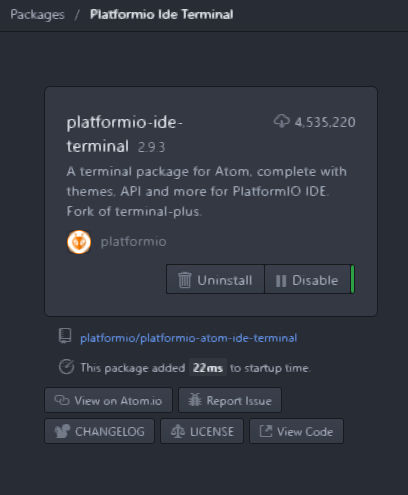
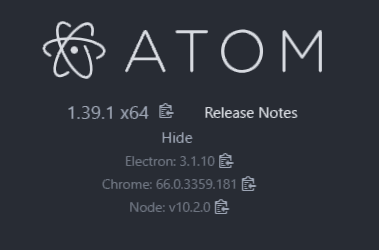

Terminal only blinking with Cursor,
Expected a command prompt terminal at bottom panel in Atom Editor.
no response at all.
Earlier version of platformio-ide-terminal 2.9.2 was working perfectly.
kindly help in this regard
 techie-mks
on 7 Aug 2019
techie-mks
on 7 Aug 2019
@hweikong see #760 it has 2 workarounds posted, its up to you to decide which solution to apply in meanwhile the issue is not resolved.
Thanks for your understanding.
Thanks the-j0k3r.
Workaround #1 is working for me at this moment.
Appreciate....!
hweikong
on 8 Aug 2019
@techie-mks see #760 for solutions, its unrelated to this issue.
the-j0k3r
on 8 Aug 2019
@the-j0k3r
I have the same problem(only the cursor is blinking ).
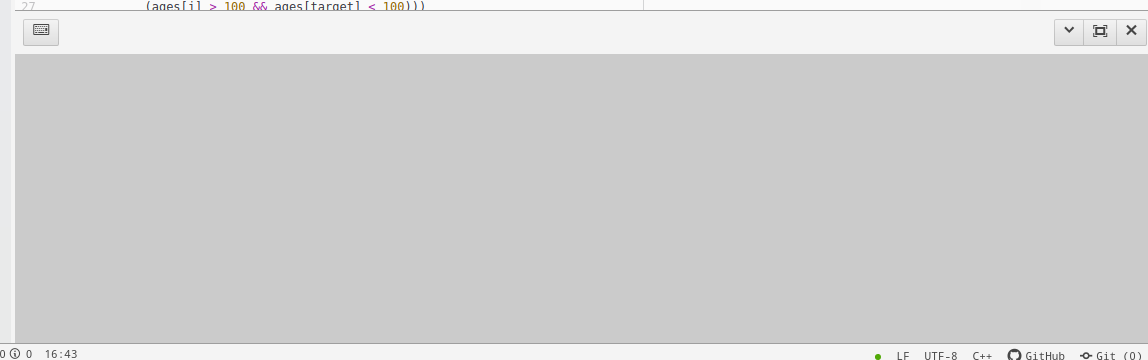
I install this package through linux command "git clone xxx.git" and "npm install" . When I type this command "npm install", The following text appearing:
audited 316 packages in 1.52s
found 2 vulnerabilities (1 moderate, 1 high)
run npm audit fix to fix them, or npm audit for details
I type the above prompt message , and command "npm audix fix", which is not usefull for me and some new message appear:
up to date in 0.48s
fixed 0 of 2 vulnerabilities in 316 scanned packages
2 vulnerabilities required manual review and could not be updated
In order to access some details message, i type "npm audit" and these message are:

the picture above focus the jquery(required 2.1.4 by space-pen package) package dependency of space-pen.So I don't know why the picture above list a "Patched in >=3.4.0 " and "Pathced in >=3.0.0"? and Is there any connection between " only the cursor is blinking" and "the picture above promot message"?
The following is my pc information:
ubuntu16.04
apm --version:
apm 2.4.2
npm 6.2.0
node 10.2.1 x64
atom 1.40.0
python 2.7.12
git 2.7.4
Thank you very much for your above answers.
 saber
on 21 Aug 2019
saber
on 21 Aug 2019
@saber its unrelated to this. See https://github.com/platformio/platformio-atom-ide-terminal/issues/770 and more specifically https://github.com/atom/atom/issues/19780
the-j0k3r
on 21 Aug 2019
@the-j0k3r Thanks your suggestion!
saber
on 22 Aug 2019
I can reproduce this in Fedora and Windows.. I had thought it was a set XTERM= sort of thing
 asdf23
on 16 Sep 2019
asdf23
on 16 Sep 2019
I can reproduce this in Fedora and Windows...
@asdf23 Please copy the issue template. and fill in details and reply inline in this issue with that information, as much detail and extra information as possible please. Each dif OS requires its own requested info in issue template.
Just saying Fedora and Windows is too vague,
I had thought it was a set XTERM= sort of thing
Can you elaborate? Each platform uses its own default terminal each OS is different.
Also whats up with https://github.com/platformio/platformio-atom-ide-terminal/issues/788#issue-494003257 ? All solutions should also be posted here, thx.
the-j0k3r
on 16 Sep 2019
- [x] I have reset Atom to defaults prior to submitting report.
- [ ] I have not reset Atom to defaults prior to submitting report.
Description
same as OP
Steps to reproduce
- Install Atom
- Install platformio
- Toggle Terminal
Expected behavior:
working terminal
Actual behavior:
only cursor, no terminal interaction
Reproduces how often:
100%, reboots, updates, everyhing
Versions
> atom --version
Atom    : 1.33.0
Electron: 2.0.11
Chrome  : 61.0.3163.100
Node    : 8.9.3
> apm --version
apm  2.1.2
npm  6.2.0
node 8.9.3 x64
atom 1.33.0
python 2.7.16
git 2.20.1
OS name and version:
Linux 5.0.0-31-generic - Ubuntu
Distributor ID: Ubuntu
Description: Ubuntu 19.04
Release: 19.04
Codename: disco
Platformio-ide-terminal version: 2.9.4
Additional Information
just blinking cursor, no terminal, no serial monitor
tested workarounds above and they do not work
 Thijxx
on 15 Oct 2019
Thijxx
on 15 Oct 2019
@Thijxx
Atom 1.33.0? With this Atom old atom version with electron 2.x stick to [email protected]
[email protected] supports only current production of Atom currently 1.40.1 though it may work in beta Atom builds. with electron 3.x and 4.x
Either upgrade Atom or downgrade platformio-ide-terminal
To downgrade platformio-ide-terminal open a terminal and type.
apm uninstall platformio-ide-terminal
then
apm install [email protected]
Restart Atom.
the-j0k3r
on 15 Oct 2019
Thanks @the-j0k3r
I had same error (blinking cursor and nothing more)
What I did to solve it:
apm uninstall platformio-ide-terminal
apm install platformio-ide-terminal (with 2.9.1 that wouldn't work)
 johnmarcc
on 25 Oct 2019
johnmarcc
on 25 Oct 2019
@johnmarcc
Its possible that:
If your Atom recently upgraded to 1.41.0 that has electron 4.2.7 and previous Atom 1.40.1 had electron 3.10.0.
While since [email protected] node-pty-prebuilt-multiarch supports electron 3.x, 4.x and 5.x, because it was installed into an Atom version with electron 3.x and now platformio-ide-terminal needs to be reinstalled or the platformio-ide-terminal node_modules located at .atom\packages\platformio-ide-terminal removed and reinstalled like so.
1) Close Atom
2) Navigate to .atom\packages\platformio-ide-terminal
3) Delete the node_modules folder
4) Open a terminal and type apm i and press Enter
Open Atom and platformio-ide-terminal should be working also.
Meanwile platformio-ide-terminal 2.10.0 has been released and supports hiding the terminal toolbar + it also supports live load of terminals preset themes.
So thanks to @mattlyons0 our community and project user who contributed those much needed improvements to the project.
So that means if anyone's Atom upgrades to 1.41.0 after upgrade your platformio-ide-terminal to 2.10.0 for the corresponding node-pty-prebuilt-multiarch binary for electron 4.x is installed and issue bypassed.
Note if your Atom install is very old with Electron 2.x you need platformio-ide-terminal 2.9.0 as newer platformio-ide-terminal no longer supports that old electron version so its likely you will have blincking cursor, if you install a bad combination of Atom + platformio-ide-terminal.
No one supports electron 2.x not even electron supports it and next its 3.x which is already deprecated.
the-j0k3r
on 26 Oct 2019
Incredibly, this still does not work without deactivating McAfee for the Platformio files. Unless anyone else has a more permanent solution?
xavalex
on 8 Dec 2019
@xavalex read https://github.com/platformio/platformio-atom-ide-terminal/issues/668#issuecomment-486009587 and https://github.com/platformio/platformio-atom-ide-terminal/issues/668#issuecomment-486092715
I maintain Windows 10 has a better antivirus solution built in which is not a resource hog and is optimized to work with OS while McAfee seems to have issues working with Windows 10 as reported previously, if it still doesn't work, then McAfee doesn't care, it seems its an easy permanent solution is to do away with McAfee, its also cheaper since the built in Windows solution is not only better but its free.
the-j0k3r
on 9 Dec 2019
this package is great! and work fine in Mac. Now I switch to CentOS 7.7, it happened the same problem for atom 2.10.0. Please help me.
 hulalalb
on 12 Dec 2019
hulalalb
on 12 Dec 2019
@hulalalb Atom 2.10.0?
Install Atom 1.41.0 and platformio-ide-terminal 2.10.0 earlier atom versions require earlier platformio-ide-terminal versions.
the-j0k3r
on 12 Dec 2019
@the-j0k3r
Thanks for quickly respondin, and sorry for the typos. The Atom version I installed by Yum is 1.41.0 x64 and platformio-ide-termina version is 2.10.0.
hulalalb
on 13 Dec 2019
It should work, try uninstalling and reinstalling platformio-ide-terminal. If that doesnt work, make sure youre NOT using a sanboxed Atom install like via flatpak or similar. Else no idea.
Please Copy and paste the template located at https://raw.githubusercontent.com/platformio/platformio-atom-ide-terminal/master/.github/ISSUE_TEMPLATE.md and fill in all fields. Logs / Errors / other information should be added at the bottom in the Notes portion of the issue template.
With this information it should give a better clew. Else no idea.
the-j0k3r
on 13 Dec 2019
Having been through the same experience, I would like to add that it would probably help to remove all terminal-in-tab packages if present, not only platformIO.
 iapapistas
on 3 Jan 2020
iapapistas
on 3 Jan 2020
I did this is both win10 and win7... And it worked fine.
- Install apm install atom-ide-terminal (use cmd or powershell)
- Open terminal from atom (+ sign). Right click on the terminal (black area) then clear it.
I struggled a lot to find out a way to make this working. This method worked for me.
 omega2016
on 12 Jan 2020
omega2016
on 12 Jan 2020
@hulalalb Atom 2.10.0?
Install Atom 1.41.0 and platformio-ide-terminal 2.10.0 earlier atom versions require earlier platformio-ide-terminal versions.
FWIW,
I have atom 1.41 installed on 3 machines running an up-to-date Centos 7. All have the blinking cursor problem. It only goes away when I uninstall platformio-ide-terminal 2.10.0 package and install version 2.9.0 via apm. OK as a (hopefully temporary) workaround for me.
 yganwork
on 21 Feb 2020
yganwork
on 21 Feb 2020
+1
i have the same problem,
just a blinking cursor
System : Linux/Debian
Atom : 1.44
Platformio-ide-terminal : 2.10.0
On the other hand, i ran VirtualMachine, install Atom there + platormio-ide-terminal and it works.
It is not my expertise to say why it may like that. Maybe it is connected to cross dependency with other packages likeweis something completely else. I hope we will solve it.
I am quite new to this environment, so if you want to get more get informations, like non-core packages - and you probably will - please indicate short path, how to get this info. Thanks
@hulalalb Atom 2.10.0?
Install Atom 1.41.0 and platformio-ide-terminal 2.10.0 earlier atom versions require earlier platformio-ide-terminal versions.FWIW,
I have atom 1.41 installed on 3 machines running an up-to-date Centos 7. All have the blinking cursor problem. It only goes away when I uninstall platformio-ide-terminal 2.10.0 package and install version 2.9.0 via apm. OK as a (hopefully temporary) workaround for me.
How to install old version?
https://github.com/platformio/platformio-atom-ide-terminal/releases/tag/v2.9.4
here is release, but switching content of the folder brings issues, errors, bugs, and terminal still blinks
 harmonicus
on 7 Mar 2020
harmonicus
on 7 Mar 2020
Maybe it is connected to cross dependency with other packages likeweis something completely else. I hope we will solve it.
This is a long way around.
To test install Atom ONLY + terminal ensure it works
Then add your other 3rd party packages one by one until it breaks. Then you know where to start looking for issues.
But thats not related to this package, As you noted yourself.
On the other hand, i ran VirtualMachine, install Atom there + platormio-ide-terminal and it works.
I can corroborate this in 3 OS, Windows, Linux, macOS.
However I no longer use this package,
I use https://github.com/bus-stop/terminus or https://github.com/bus-stop/x-terminal
terminus is a direct fork at v2.10.0 of this project and re-written in JavaScript instead of coffescript with a few added bug fixes.
x-terminal is a fork of atom-xterm and is xterm.js based unlike terminus or this. Check it out.
the-j0k3r
on 7 Mar 2020
Hey,
i purged Atom, deleted /home/.atom directory,
download Atom again, install packages, with 'Platformio-ide-terminal' as the first one,
and now terminal works.
harmonicus
on 7 Mar 2020
Right click on console window -> clear
close and re-open terminal session. It works.
it worked for me Thank You...!!!
 dishantraut
on 2 Apr 2020
dishantraut
on 2 Apr 2020
@Thijxx
Atom 1.33.0? With this Atom old atom version with electron 2.x stick to [email protected]
[email protected] supports only current production of Atom currently 1.40.1 though it may work in beta Atom builds. with electron 3.x and 4.x
Either upgrade Atom or downgrade platformio-ide-terminal
To downgrade platformio-ide-terminal open a terminal and type.
apm uninstall platformio-ide-terminalthen
apm install [email protected]Restart Atom.
its work for me thanks
 dilujan
on 18 Apr 2020
dilujan
on 18 Apr 2020
if you have new version 2.10.0, downgrade to version 2.9.3:
apm uninstall platformio-ide-terminal
apm install [email protected]
and it works!
 molven04
on 22 May 2020
molven04
on 22 May 2020
if you have new version 2.10.0, downgrade to version 2.9.3:
apm uninstall platformio-ide-terminal
apm install [email protected]and it works!
Confirmed, working after downgrade.
 dstan82
on 23 May 2020
dstan82
on 23 May 2020
Tried to downgrade to 2.9.3 but Atom 1.47 does not allow you to use it and reports a bug. You are forced to update.
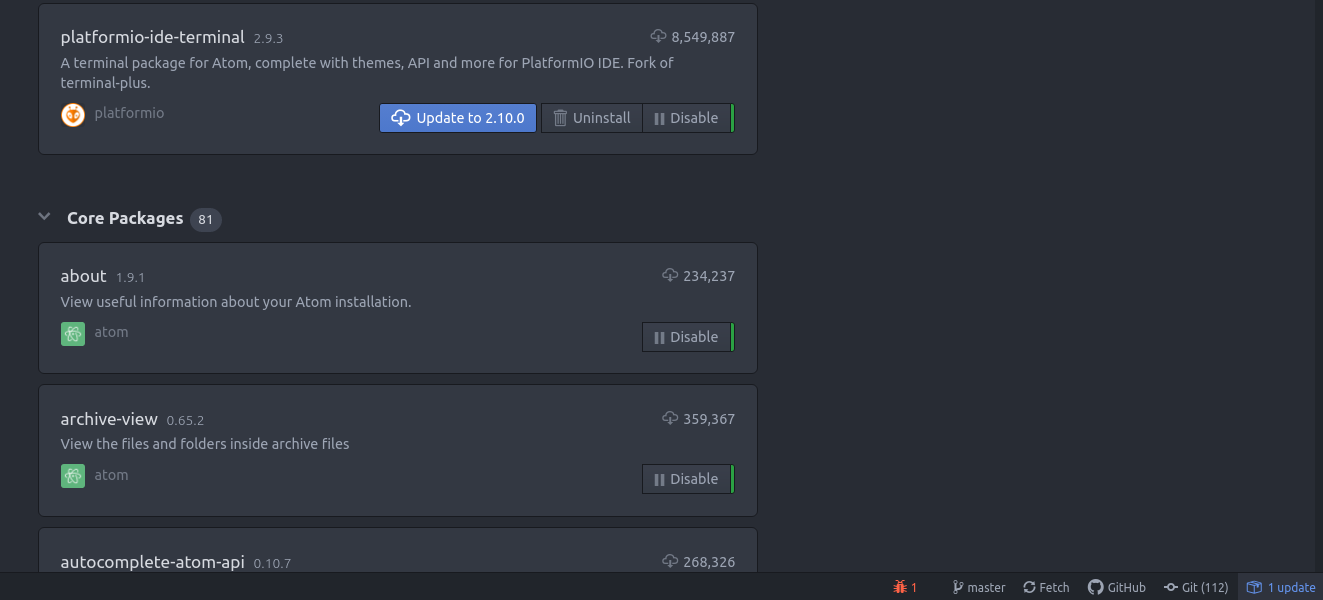
 rpalloni
on 23 May 2020
rpalloni
on 23 May 2020
Try use https://github.com/bus-stop/terminus with minimum Atom 1.41.0 and above only.
the-j0k3r
on 23 May 2020
if you have new version 2.10.0, downgrade to version 2.9.3:
apm uninstall platformio-ide-terminal
apm install [email protected]and it works!
I'm on atom 1.47 on ubuntu 18.04.4, and downgrading to [email protected] solved this issue.
Edit : added ubuntu version
 JeSuisUnCaillou
on 27 May 2020
JeSuisUnCaillou
on 27 May 2020
@JeSuisUnCaillou Did not work for ubuntu 20.04 with only python3, npm install failed
Python executable "/usr/share/atom/resources/app/apm/bin/python-interceptor.sh" is v3.8.2, which is not supported by gyp
 polmonso
on 27 May 2020
polmonso
on 27 May 2020
Python executable "/usr/share/atom/resources/app/apm/bin/python-interceptor.sh" is v3.8.2, which is not supported by gyp
Thats right,apm needs python2 still and Ubuntu 20.04 dropped support for python2.
So this is an apm issue, they could upgrade node-gyp etc newer versions support python 3, you only recourse is to install python2 and ensure ENV paths are set.
the-j0k3r
on 28 May 2020
Uninstall the terminal and reinstall, it worked just fine for me
 vicaschende
on 30 May 2020
vicaschende
on 30 May 2020
'apm' is not recognized as an internal or external command,
operable program or batch file.
It is showing like that, what should I do?
 Maruthi-97
on 1 Jun 2020
Maruthi-97
on 1 Jun 2020
Uninstall the terminal and reinstall, it worked just fine for me
That didn't work for me
 mrmaxguns
on 2 Jun 2020
mrmaxguns
on 2 Jun 2020
Try use https://github.com/bus-stop/terminus with minimum Atom 1.41.0 and above only.
terminus worked for me
 julibeg
on 5 Jun 2020
julibeg
on 5 Jun 2020
Also requires python <3.0.0
polmonso
on 5 Jun 2020
I had the same problem, installing the 2.9.1 version worked for me, thanks!
 rayonnunes
on 7 Jun 2020
rayonnunes
on 7 Jun 2020
I had the same problem, installing the 2.9.1 version worked for me, thanks!
That works only on very old Atom versions.
the-j0k3r
on 7 Jun 2020
Another one here with the same problem. I have latest Atom (1.47.0) and latest platformio-ide (2.10).
I've seen a lot of fixes that work for some people and not for others. Any general solution for this? :( I was so happy with the terminal, it was working like a charm a week ago, can't really recall what changed, I thouched nothing If I'm not wrong..
 jpm92
on 7 Jun 2020
the-j0k3r
on 7 Jun 2020
jpm92
on 7 Jun 2020
the-j0k3r
on 7 Jun 2020
@jpm92 #668 (comment)
That one works indeed, thanks!
jpm92
on 7 Jun 2020
I had the same problem, installing the 2.9.1 version worked for me, thanks!
That works only on very old Atom versions.
I'm using the version 1.48.0 of atom running on Linux Mint 19.3 XFCE. Tried to switch to terminus,
#668 (comment) and also worked.
rayonnunes
on 14 Jun 2020
I use Xubuntu 20.04 and had the same problem. I tried reinstalling platformio-ide-terminal but it did not work because apm needed Python 2. I thus installed terminus and it seems to work perfectly.
 aRI0U
on 16 Jun 2020
aRI0U
on 16 Jun 2020
- I get a blank terminal window with a blinking cursor.
- Happens every time.
- Have tried uninstalling/reinstalling from within atom. Have tried uninstalling/reinstalling via command line. Problem remains
- Linux 5.6.15-1-MANJARO KDE.
- Atom installed via package manager.
- platformio-ide-terminal 2.10.0
$ atom --version
Atom    : 1.47.0
Electron: 5.0.13
Chrome  : 73.0.3683.121
Node    : 12.0.0

$ apm --version
apm  2.5.0
npm  6.14.5
node 14.3.0 x64
atom 1.47.0
python 3.8.3
git 2.27.0
Other terminal packages:
-terminal-plus also not working
-termination working
 bassamanator
on 16 Jun 2020
bassamanator
on 16 Jun 2020
a trick comment:
my first install of atom was using chocolatey installer.
any of you did use an external installer like me?
maybe this procedure could be related to this bug.
 jovancosta
on 17 Jun 2020
jovancosta
on 17 Jun 2020
terminus works on 20.04 without python2
polmonso
on 18 Jun 2020
Python2 is only needed when there are no node-pty prebuilt modules for the electron version Atom ships with. That's an APM issue which node-gyp (used to rebuilt modules) at current version does not support python3. APM should update the node-gyp version to one that supports python3, but that will break backward compatibility. I doubt anything that affects a large segment of users will be done away with.
the-j0k3r
on 18 Jun 2020
I am using zsh shell on Ubuntu 20.04 LTS. Can attest to downgrade to version 2.9.3 working in my situation.
 HunterKohler
on 18 Jul 2020
HunterKohler
on 18 Jul 2020
Same problem here : (
Linux Ubuntu 18.04
Atom 1.49.0
plataformio-atom-ide
2.10.0

 gustavobertolino
on 9 Aug 2020
gustavobertolino
on 9 Aug 2020
Please try https://github.com/bus-stop/terminus
Fork of platformio-atom-ide-terminal
https://github.com/platformio/platformio-atom-ide-terminal/issues/872#issuecomment-658743370
 pranavwani
on 15 Aug 2020
pranavwani
on 15 Aug 2020
Try use https://github.com/bus-stop/terminus with minimum Atom 1.41.0 and above only.
Thank you, thank you thank you thank you. This fixed the "cursor only" problem for me (atom 1.50 platformio 2.10).
Feels amazing after nearly a month of copy pasting into a separate terminal.
 EvanJo
on 2 Sep 2020
EvanJo
on 2 Sep 2020
I'm using atom 1.5.0 on Win10 Home and was hitting this issue. By uninstalling then reinstalling platformio-ide-terminal, the newest terminal release 2.10 worked like a charm.
Oct 22, 2020 -- on my Ubuntu Linux 18.04, platform-ide-terminal did not work for me. using platform-atom-ide-terminal worked for a few weeks, then stopped working. Error says I need to recompile a library used by node.js. Tried that and hit other errors, so I switched to "terminus" by bus-stop (got the terminus package in Atom by going to Edit->Preferences->Install). All's working now. Thanks "bus-stop"!!
 dennis39784
on 7 Sep 2020
dennis39784
on 7 Sep 2020
I ha the same problem on Ubuntu 20.04 with atom 1.51.0 and apm 2.5.0 and none of the proposed fixes worked for me. I ended up using atom-ide-terminal which is a fork of PlatformIO IDE. Worked like a charm!
 vahid-dan
on 15 Sep 2020
vahid-dan
on 15 Sep 2020
This saved mylife thank you
Try use https://github.com/bus-stop/terminus with minimum Atom 1.41.0 and above only.
 youssame
on 27 Sep 2020
youssame
on 27 Sep 2020
It's unacceptable that a plugin with 10 million downloads is so problematic. I struggled all day. Finally I solved my problem with https://github.com/bus-stop/terminus. goodbye platformio. Thank you "terminus"
 muzozt67
on 2 Oct 2020
muzozt67
on 2 Oct 2020
goodbye platformio. Thank you "terminus"
@muzozt67 Since terminus would not exist without platformio-atom-ide-terminal because its a fork of this project.
Also #543 which is fair warning this project causes issues with specific setups. None however are ever bug or problem free.
Free as in free beer, is also the price of both.
the-j0k3r
on 2 Oct 2020
Reinstall Atom many times... same issue as of October 2020 with Win10 Home 64bit, Atom 1.52 and Platformio 2.10. Sorry to say that this is looking more like a MS solution if y'all are suggesting to install much older versions of software...I'm not an expert so not worth the trouble for me...will revisit in a few weeks
 solarenergynow08
on 15 Oct 2020
solarenergynow08
on 15 Oct 2020
@solarenergynow08 https://github.com/platformio/platformio-atom-ide-terminal/issues/668#issuecomment-699559536
the-j0k3r
on 15 Oct 2020
This has been running just fine, and then it stopped, per this issue. I had to uninstall the package and re-install it to get it to work again. As a side note, on my work dev pc, I had to run Atom as administrator to get the terminal to work.
 DougHuras
on 18 Oct 2020
DougHuras
on 18 Oct 2020
Please try https://github.com/bus-stop/terminus
Fork of
platformio-atom-ide-terminal
#872 (comment)
Solved my problem, thank you so much!
 alissamunerato
on 18 Oct 2020
alissamunerato
on 18 Oct 2020
I am also experiencing the same issue as of 21.10.20. Tried clearing and closing terminal with no success.
 JackMcJackJack
on 21 Oct 2020
JackMcJackJack
on 21 Oct 2020
Same issue here, I'm using Windows 10
From atom --version
Atom : 1.52.0
Electron: 6.1.12
Chrome : 76.0.3809.146
Node : 12.4.0
From apm --version
apm 2.5.2
npm 6.14.8
node 12.4.0 x64
atom 1.52.0
python 2.7.18
git 2.28.0.windows.1
visual studio
Tried to uninstall, but install again fails. Tried Terminus, but it simply freezes Atom when I open it, so no luck there either.
 Majubs
on 21 Oct 2020
Majubs
on 21 Oct 2020
I'm running Atom/platformio (specs below), and suffering also with platformio-ide-terminal hanging with a blinking cursor. Terminus is installed and works when manually opened.
I noticed at the same time that platformio-ide-terminal broke, many of the platformio menu options also failed (e.g., Platformio home icon >> Libraries >> updates will list the libraries that can be updated but the update button is disabled).
Anyone know if this is related to platformio-ide-terminal breaking? If so, any way to force the platformio plugin to point to Terminus? I searched but couldn't find anything on this
Atom : 1.52.0
Electron: 6.1.12
Chrome : 76.0.3809.146
Node : 12.4.0
apm --version
apm 2.5.2
npm 6.14.8
node 12.4.0 x64
atom 1.52.0
python 3.7.7
git
visual studio
 neilsheps
on 26 Oct 2020
neilsheps
on 26 Oct 2020
Anyone know if this is related to platformio-ide-terminal breaking? If so, any way to force the platformio plugin to point to Terminus? I searched but couldn't find anything on this
You dont use both, pick a terminal and thats it.
the-j0k3r
on 26 Oct 2020
Please try https://github.com/bus-stop/terminus
I can confirm that this works beautifully.
 tobyink
on 28 Oct 2020
tobyink
on 28 Oct 2020
Tobyink, thej0k3r - my question was around other Platformio functionality. I have Terminus working quite happily right now - i press the "+" button, it opens a terminal, and it works just fine.
Around the same time that platformio-ide-terminal broke, all kinds of stuff like updating libraries, listing libraries, listing packages also broke. Maybe (I'm guessing) when I try to list packages or whatever, it runs a terminal shell in the background (which doesn't work now) and normally the IDE would normally pipe those results.
So, getting Terminus to work as a standalone terminal doesn't help me here. Any suggestions on getting the other functionality to work, or is it somehow unrelated? Anything helps...
neilsheps
on 29 Oct 2020
or is it somehow unrelated? Anything helps...
Beside you uninstall and reinstall platformio-ide-terminal via external terminal while atom is closed.
If that doesnt work try same for terminus, without having both terminals installed at same time just in case.
the-j0k3r
on 29 Oct 2020
Yes!
uninstall platformio-ide-terminal via apm and reinstall via apm.
After trying everything, that actually did the trick somehow... Question is how long it will keep working, because last time it just stopped working after restarting Atom (no updates that I was aware of)
The error that I caught relates to conpty.node:
<embedded>:14 Cannot find module '../build/Debug/conpty.node'
Require stack: ...\.atom\packages\platformio-ide-terminal\node_modules\node-pty-prebuilt-multiarch\lib\windowsPtyAgent.js
 TrySpace
on 13 Nov 2020
TrySpace
on 13 Nov 2020
Also fixed the issue by switching to: https://github.com/bus-stop/terminus
 agrrh
on 3 Dec 2020
agrrh
on 3 Dec 2020
Got a fix: https://github.com/bus-stop/terminus
 hemraj4545
on 10 Dec 2020
hemraj4545
on 10 Dec 2020
Fixed in https://github.com/platformio/platformio-atom-ide-terminal/releases/tag/v2.10.1
Please update to the latest version.
 ivankravets
on 12 Dec 2020
ivankravets
on 12 Dec 2020
Related issues
 alexmylonas
·
3Comments
alexmylonas
·
3Comments
 televators
·
4Comments
televators
·
4Comments
 sergei3000
·
4Comments
sergei3000
·
4Comments
 p0slaney-19
·
4Comments
p0slaney-19
·
4Comments
 EdgarUstian
·
4Comments
EdgarUstian
·
4Comments
Most helpful comment
Try use https://github.com/bus-stop/terminus with minimum Atom 1.41.0 and above only.