Platformio-atom-ide-terminal: Use with iTerm2
- Mac OS X 10.11.5
- Atom and PlatformIO latest version.
Hello there, I don't use the default Mac Terminal, I use iTerm2, is there any way I can use platform-ode-terminal with iTerm2 instead of the default mac terminal?
Thanks,
Tiago
 tiferrei
All 33 comments
Sorry, what do you mean? Which type of shell do you use in iTerm2?
See http://osxdaily.com/2012/03/21/change-shell-mac-os-x/ and "Change a User Default Login Shell in Mac OS X"
 ivankravets
on 23 May 2016
ivankravets
on 23 May 2016
No, I really meant to change the terminal emulator to iTerm, the default os x terminal doesn’t behave very well with zsh and its themes, so everything appears as bad as in the default terminal, not like in iTerm.
tiferrei
on 23 May 2016
Open system terminal and type chsh -s /bin/zsh. Restart Mac.
ivankravets
on 23 May 2016
But that still only changes the shell, I don't want to change the shell, it already is zsh on both, but terminal doesn't know how to properly present the theme I'm using, and iTerm does, consequently, platform-ide-terminal also doesn't because I suppose uses the Terminal, how can I do it so it uses iTerm?
tiferrei
on 23 May 2016
Sorry, I don't understand what do you mean. Please provide screenshots.
ivankravets
on 23 May 2016
I believe I can explain what @tiferrei means. Here's a screenshot comparing Terminal and iTerm 2, with Terminal on the left and iTerm 2 on the right:

iTerm 2 perfectly renders the colors of the dracula theme, while Terminal looks like garbage. That different is reflected in platformio-atom-ide-terminal, with platformio's colors being a little brighter than Terminal:

The colors aren't even close. Those are supposed to be pastels, and the arrow is meant to be purple but it's instead rendered as a deep blue. This is despite using the dracula platformio theme... or any theme, for that matter.
I think what he's assuming is that platformio is just running an instance of Terminal inside of Atom and would like it to run an instance of iTerm 2 instead, but that's not the case. However, the platformio terminal emulation does render colors almost as badly as Terminal from my experience. They seem to be overwritten with the theme selected in the package preferences ignored.
 with-heart
on 25 May 2016
with-heart
on 25 May 2016
I'm glad I found this issue. I have the same exact problem. I was using terminal-plus and found out they don't support zsh themes. I was finding a way to change the font for the terminal, gone to the original repo [terminal-plus], and it seems like it's deprecated now.
This is how it looks like in terminal-plus

This is how it looks like in iterm2

I believe it's because it's using "Meslo font" for power line. If there is a way to set custom font for the terminal inside atom, it could be rendered correctly.
 the-c0d3r
on 27 May 2016
the-c0d3r
on 27 May 2016
If it doesn't support zsh themes, that would explain why all of the themes
listed in the package settings don't work for me. I had thought about that
possibility and then forgot. If I get a chance later, I'll switch back to
bash to see how it looks and report back.
On Fri, May 27, 2016 at 8:17 AM the-c0d3r [email protected] wrote:
I'm glad I found this issue. I have the same exact problem. I was using
terminal-plus and found out they don't support zsh themes. I was finding a
way to change the font for the terminal, gone to the original repo
[terminal-plus], and it seems like it's deprecated now.This is how it looks like in terminal-plus
[image: Imgur]
https://camo.githubusercontent.com/f1f2abef2d71239797c3e1dfa9da9c8bb7a5f32a/687474703a2f2f692e696d6775722e636f6d2f4c3855674978532e706e67This is how it looks like in iterm2
[image: Imgur]
https://camo.githubusercontent.com/390ef4689753fe5f278cc880a6cc8584ab50f6e1/687474703a2f2f692e696d6775722e636f6d2f335151435778342e706e67I believe it's because it's using "Meslo font" for power line. If there is
a way to set custom font for the terminal inside atom, it could be rendered
correctly.—
You are receiving this because you commented.
Reply to this email directly, view it on GitHub
https://github.com/platformio/platformio-atom-ide-terminal/issues/33#issuecomment-222131739,
or mute the thread
https://github.com/notifications/unsubscribe/AB3TwN9XcS0ct5sJthFjhSO1dR1krJwlks5qFuC9gaJpZM4IkmZk
.
with-heart
on 27 May 2016
I use exactly the same config as @the-c0d3r and I'm having the same problem as well
 luisfontes
on 28 May 2016
luisfontes
on 28 May 2016
Yes, @the-c0d3r and @lionize explained exactly what I meant.
tiferrei
on 5 Jun 2016
You can configure font and colors through the package settings.
 dmytrokyrychuk
on 5 Jun 2016
dmytrokyrychuk
on 5 Jun 2016
@orgkhnargh Thank you. I should have thought of that. Did a grep -rnw '.' -e 'fontFamily:' and found the file called terminal-plus.coffee under lib. Edited the default value for fontFamily. And it works.

the-c0d3r
on 5 Jun 2016
@orgkhnargh That does work. What is the theme setting supposed to do?
with-heart
on 5 Jun 2016
@the-c0d3r I'm glad that it works, but that's not exactly what you were supposed to do. Preferable way to manage settings is to use the settings GUI. To open the settings tab you may either use:
Edit - Preferencesmenu entrycmd+,hotkey- search for "Settings View: Open" entry in the command palette
From there you can navigate to a packages list via button on the left, search for a particular package and finally navigate to its settings.
@lionize A theme here is a bunch of css rules. It it not related in any way to those zsh themes you're talking about.
dmytrokyrychuk
on 5 Jun 2016
The root cause of this issue is the ANSI colors. The default values are just awful, IMO. And because they're handled separately from the theming, it's not obvious where to go to fix it.
Once I figured that out, I went in and manually set each ANSI color value in platformio-atom-ide-terminal to match the values in my preferred iTerm2 profile and only THEN updated my stylesheet. Now my terminal in Atom looks virtually identical to my iTerm (see screenshot below), and I'm happy as a clam.
But it was a PITA to do it that way.
It seems to me that the right way to solve this problem is to handle the ANSI colors as properties of the theme, exactly the way iTerm2 does it. iTerm2 even supports direct import/export of .itermcolors files, which are essentially just XML docs listing the ANSI color values along with the various other colors they use.
I guess the big question is: how feasible would it be to refactor the theming-related code to handle this? Perhaps even to import from .itermcolors files?

 paul-howard
on 13 Jun 2016
paul-howard
on 13 Jun 2016
@paul-howard Take a look at #30
dmytrokyrychuk
on 13 Jun 2016
@orgkhnargh Not exactly the same issue (accessing theme data already in Atom vs. importing color data from an external source), but I agree they're closely related and should probably be addressed in a closely coordinated fashion.
@joshmedeski Have you been able to make any progress on using Atom themes' color data in the terminal package? What do you think about the feasibility of incorporating the 16 ANSI colors directly into the terminal package's theming code?
paul-howard
on 13 Jun 2016
@paul-howard This project didn't make it to the top of my priority list yet, so I haven't done the full research to figure out if this is a viable solution. It would be cool to convert a .itermcolors file into a theme for the plugin, but it makes more sense to me to match Atom's color scheme (which is my upcoming project).
I would rather spend more time on matching Atom's theme than trying to convert an itermcolors theme.
If there is use for both features I don't mind letting someone else helping!
 joshmedeski
on 14 Jun 2016
joshmedeski
on 14 Jun 2016
OK, cool. No worries, @joshmedeski.
I was just thinking that, if any significant changes were going to be made to the theming system, it would be nice if all the colors were wrapped up in one place. It seems to me that the ANSI color values are at least as important as the cursor/text/background colors, but for some reason the theming system as it currently stands can't access them directly.
I have no idea how big a job it would be to make that happen, but once it's done, writing a parser to import .itermcolors files should be a piece of cake. (It would probably also make the job of mirroring the Atom theme easier as well.)
Ping me when you get a chance to start--maybe I could pitch in.
paul-howard
on 14 Jun 2016
May I ask a simple question? How can I use iTerm2 in Platformio-ide-term? What shold I designate in Settings > Core > Shell Override?
I tried "/Applications/iTerm.app" and "/Applications/iTerm", which didn't work.
And error message,"failed.: No such file or directory" or "execvp(3) failed.: Permission denied" just appeared.
Any advise must be appreciated.
 getufkka
on 7 Jan 2017
getufkka
on 7 Jan 2017
@getufkka You cannot use iTerm2 in platformio-ide-terminal. You can specify a shell to run in platformio-ide-terminal using the Shell Override setting. iTerm2 is not a shell, it is a terminal emulator (just like platformio-ide-terminal), those are different things. Here is a brief explanation of differences between the two: http://askubuntu.com/a/111149.
dmytrokyrychuk
on 7 Jan 2017
The font name suggested by @the-c0d3r works fine for me:

Very simple to set:
Settings -> Packages

 darthpelo
on 3 Apr 2017
darthpelo
on 3 Apr 2017
Thanks @darthpelo, that works for me! :)
 abstiagomarek
on 27 Apr 2017
abstiagomarek
on 27 Apr 2017
edit /Users/ligang/.atom/packages/platformio-ide-terminal/lib/platformio-ide-terminal.coffee,
find font famliy

edit default setting, then restart your atom
 BlandLi
on 22 May 2017
BlandLi
on 22 May 2017
Meslo LG M DZ for Powerline . i set this font its works well
 sureshamk
on 17 Jul 2017
sureshamk
on 17 Jul 2017
Hi, if you want have look like iterm2 salaried-dark do this
~/.atom/packages/platformio-ide-terminal/cat` styles/themes/solarized-dark.less
.solarized-dark {
background-color: #002833;
color: #839496;
::selection {
background-color: #93a1a1;
}
.terminal-cursor {
background-color: #839496;
}
}
Replace Menu->atom->config
"platformio-ide-terminal":
ansiColors:
normal:
black: "#003541"
red: "#dc322f"
green: "#859901"
yellow: "#b58901"
blue: "#268bd2"
magenta: "#d33682"
cyan: "#2aa198"
white: "#eee8d5"
zBright:
brightBlack: "#002833"
brightRed: "#cb4b16"
brightGreen: "#586e75"
brightYellow: "#657b83"
brightBlue: "#839496"
brightMagenta: "#6c6ec6"
brightCyan: "#93a1a1"
brightWhite: "#fdf6e3"
core:
scrollback: 10000
iconColors:
blue: "#0433ff"
style:
fontFamily: "Meslo LG M DZ for Powerline"
fontSize: "12"
theme: "solarized-dark"
toggles:
runInsertedText: false
 serhiireva
on 27 Oct 2017
serhiireva
on 27 Oct 2017
@the-c0d3r fixed this error
just open your iterms2 font settings and fill in the fontname
open Atom Settings
Open Config Folder
go to packages/platformio-ide-terminal/lib/platformio-ide-terminal.coffee
fill in the font name in Font Family default as described above
and you're ready to go ; )
 Justinemmerich
on 23 Nov 2017
Justinemmerich
on 23 Nov 2017
thanks @darthpelo , now it's display normally!
 TilKai2016
on 7 Aug 2018
TilKai2016
on 7 Aug 2018
I've just got the same, but with Source Code Pro.
For future peoples, you need to use 'SourceCodePro+Powerline+Awesome Regular'.
Single quotes are important!
Got it from this comment.
 ilukashin
on 9 Aug 2019
ilukashin
on 9 Aug 2019
FYI, you may use any fonts that are patched to show those special powerline icons/glyphs, one which I normally use is a font under NerdFonts Github collections. Sauce Code Pro Nerd Font and Iosevka NerdFont and SF Mono being my favorite, however the latter is owned by apple, you may have to patch it yourself or get it from this repo.
The solution is just a simple font change and it has been 3 years, shouldn't this be closed already? I don't even use vscode or atom anymore.
the-c0d3r
on 23 Aug 2019
Also here is a possible fix for Powerline Users! Install CascadiaPL.ttf from https://github.com/microsoft/cascadia-code/releases it has native Powerline ligatures, is maintained to professional standards is free as in free beer and opensource under SIL Open Font License 1.1.
You will also need to setup the terminal to use this CascadiaPL.ttf font, after which the issue should be gone.
However please notice that platformio-ide-terminal may also display other issues with Powerline type input modifiers mostly due to #426 so until there's xterm support nothing will improve in that front.
Any xterm additions are user contributed anyone can contribute via pr to this project or to my fork upstream at https://github.com/bus-stop/terminus which is now completely written in JavaScript.
Hope this helps.
 the-j0k3r
on 16 Dec 2019
the-j0k3r
on 16 Dec 2019
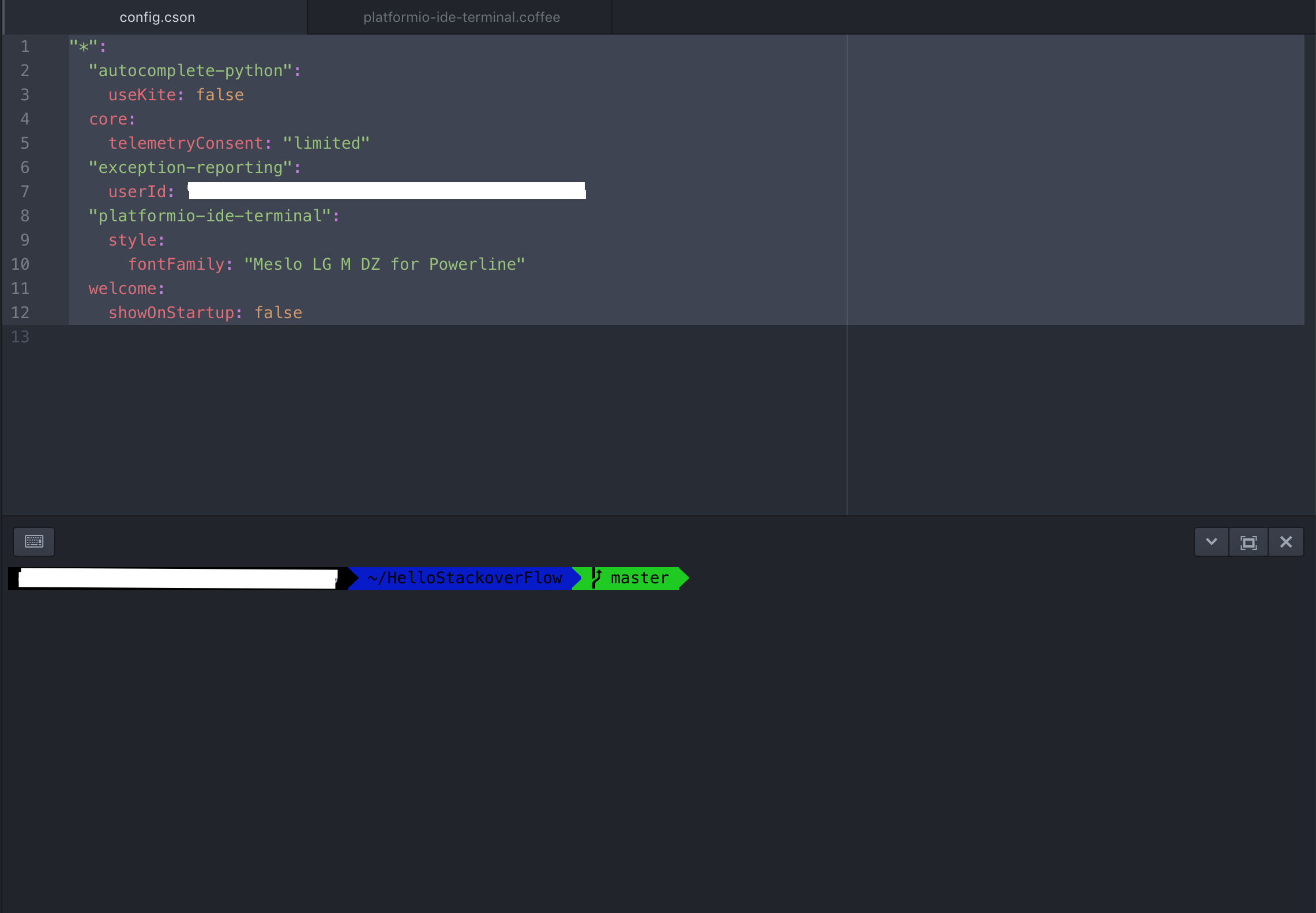
I was start to search around with @BlandLi 's answer, thanks to him but I've set a font before and any other fonts from Meslo LG is not working well with the iTerm2 Agnostic theme. So I've opened config.cson then there is a file like below.
"*":
  "autocomplete-python":
    useKite: false
  core:
    telemetryConsent: "limited"
  "exception-reporting":
    userId: "myUserId"
  "platformio-ide-terminal":
    style:
      fontFamily: "Meslo LG M DZ for Powerline"
  welcome:
    showOnStartup: false
Here is the result file for me. I've set its font correctly as iTerm use.
 eliakorkmaz
on 11 Jan 2020
eliakorkmaz
on 11 Jan 2020
I would try with Microsoft's Cascadia Code Look here for releases and read the notes,
Also try to setup Atom itself with same font Cascadia Code` and no font defined within the terminal, since in this case the terminal font settings, fallsback to the fonts setup in Atom.
Have a go and let us know =)
the-j0k3r
on 11 Jan 2020
Related issues
 jbrodriguez
·
4Comments
jbrodriguez
·
4Comments
 colorwin
·
5Comments
colorwin
·
5Comments
 0ski
·
5Comments
0ski
·
5Comments
 alexmylonas
·
3Comments
alexmylonas
·
3Comments
 fusion809
·
3Comments
fusion809
·
3Comments
Most helpful comment
I'm glad I found this issue. I have the same exact problem. I was using terminal-plus and found out they don't support zsh themes. I was finding a way to change the font for the terminal, gone to the original repo [terminal-plus], and it seems like it's deprecated now.
This is how it looks like in terminal-plus

This is how it looks like in iterm2

I believe it's because it's using "Meslo font" for power line. If there is a way to set custom font for the terminal inside atom, it could be rendered correctly.