The idea is to create a complete life-cycle diagram for ngrx that depicts the structure of ngrx workings. This would include dispatching actions, reducing state, effects triggered, selectors re-triggered.
This diagram would give the developers more in-depth understanding on how ngrx works and also helps to form a mental model before implementing them into their projects.
source: from a conversation with @WesleyGrimes on twitter
I would be willing to submit a PR for the docs :heart:
[ x] Yes (Assistance is provided if you need help submitting a pull request)
[ ] No
 agugan
All 23 comments
For reference, this was the original diagram that I had put together, which was a twist on what @timdeschryver had put together.
The issue with this diagram as @brandonroberts stated, is that it doesn't make it clear that effects receive actions AFTER state has been updated. This ensures that effects receive the latest state value.
We need to have a diagram similar to the below that illustrates this more clearly.
My Original Diagram:

Also, my diagram isn't branded or "pretty". I was just trying to get rough concepts across.
I know @jordanpowell88 has been working on a really nice looking branded diagram, maybe we could use that as a starting point.
Jordan's rough draft:

 wesleygrimes
on 28 Jun 2019
wesleygrimes
on 28 Jun 2019
Like @wesleygrimes mentioned, I am fairly new to ngrx but would happy to create the branded diagram to assist other newbies on the lifecycle flow of ngrx. Is the above diagram accurate? What changes need to be made?
 jordanpowell88
on 28 Jun 2019
jordanpowell88
on 28 Jun 2019
This is what I've been using myself:

 alex-okrushko
on 29 Jun 2019
alex-okrushko
on 29 Jun 2019
That’s pretty slick @alex-okrushko. I love the way it shows the flow of actions. The only thing I would say is it is still a little unclear that actions hit the reducer first so that state is updated before effects run. Correct?
wesleygrimes
on 29 Jun 2019
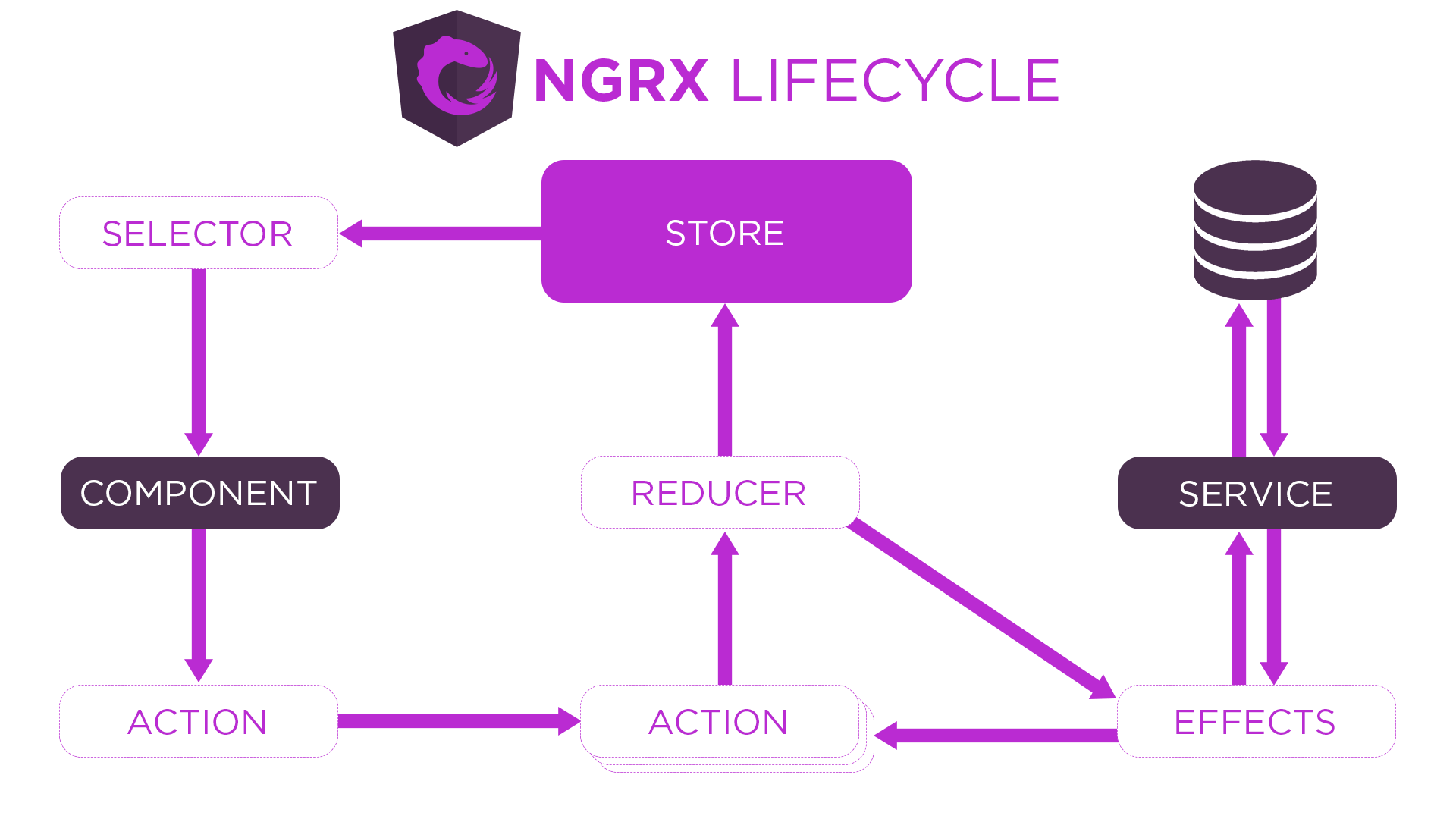
@wesleygrimes do you think this is more clear?
jordanpowell88
on 2 Jul 2019
@jordanpowell88 It looks promising . Since it is not compulsory to call new action from the dispatched action, is there any way to describe that? Developers might get confused because of that.
I would like to suggest this:
From Action1 -> Reducer and then Effects -> Action2 -> Reducer
What do you think?
agugan
on 3 Jul 2019

@wesleygrimes I agree with you. I believe this seams more readable to me.
jordanpowell88
on 3 Jul 2019
Looking better! Can you make the line dotted from reducer to effects? This shows you don’t have to have effects as they are optional.
wesleygrimes
on 3 Jul 2019
@jordanpowell88 thanks for working on this! There should be 3 distinct boundaries IMO that we should nail down before iterating on the diagram more.
- Interaction with UI Components - Selecting Data from, and Dispatching Actions to the Store
- Interaction with State - Actions to State Changes (Reducer being mentioned as an implementation detail)
We could have a diagram just for managing state itself without effects.
- Interaction with External Resources - Actions to Effects after passing through the reducers, optionally causing state change, and triggering external async tasks. This is the one that is still unclear in the diagram.
The boundary for Effects should be separated as Wes mentioned.
The Diagram should be more specific as in "State Management Lifecycle"
 brandonroberts
on 3 Jul 2019
brandonroberts
on 3 Jul 2019
@brandonroberts I am not clear with point 2.
Interaction with State - Actions to State Changes (Reducer being mentioned as an implementation detail)
Should we demonstrate the state changes?
Also for this
Interaction with External Resources - Actions to Effects after passing through the reducers, optionally causing state change, and triggering external async tasks. This is the one that is still unclear in the diagram.
I am thinking we can have two flows one with effects - { dispatch : false }, and one with { dispatch: true },
So Summarizing, we will have 3 diagrams.
- UI Interaction with state changes demonstration (no effects)
- UI Interaction with state changes demonstration (with effects with dispatch: false)
- UI Interaction with state changes demonstration (with effects with dispatch: true)
Is this a right way to go?
agugan
on 8 Jul 2019
I understand that their are multiple ways to demonstrate state changes in ngrx (with effects, no effects etc). As a new user to ngrx I understood the premise of the redux pattern but was uncertain as to what pieces ngrx added or removed from that pattern. I think as a new user, too many diagrams could be more confusing than helpful.
Is it possible to create one diagram that represents the "majority" of use cases people are using ngrx and notate that this is not the only way to use ngrx? I for one am a visual learner and believe a general diagram in the "Getting Started" section of the docs would have been valuable. In fact, it might have gotten me to jump on board sooner if I could have "seen" what ngrx in general was doing.
jordanpowell88
on 12 Jul 2019
Good points @jordanpowell88, I am thinking pie in the sky here, but what if we had a "base" diagram that showed the main parts of NgRx that are sort of "required", and then some type of button you click, or other tab that is like "here's NgRx with side-effects added into the mix". Almost like an interactive chart.
wesleygrimes
on 12 Jul 2019
@wesleygrimes I like the idea. I think we could find a way to do this if everyone is ok with this concept.
jordanpowell88
on 12 Jul 2019
@jordanpowell88 My idea was to let the developers know that these things are also possible with ngrx in a visual way. But thanks to your pointers, I see how it will be confusing for new developers. We can go with interactive idea as mentioned by @wesleygrimes .
agugan
on 22 Jul 2019

Here is an updated design based upon some of the feedback received. Thoughts?
jordanpowell88
on 25 Jul 2019
Here is an updated design based upon some of the feedback received. Thoughts?
This looks great @jordanpowell88, I think it more accurately reflects that effects are optional, and that they can in turn return new actions. Also good to show that the actions (action stream) is really the source in effects (in this example) and not the reducer.
wesleygrimes
on 25 Jul 2019
Here is an updated design based upon some of the feedback received. Thoughts?This looks great @jordanpowell88, I think it more accurately reflects that effects are optional, and that they can in turn return new actions. Also good to show that the actions (action stream) is really the source in effects (in this example) and not the reducer.
Thanks @wesleygrimes. I will work on adding this diagram to the docs and creating a PR
jordanpowell88
on 25 Jul 2019
I was making a presentation for a talk I am going to give at a local meetup and created this diagram ( inspired by a @toddmotto youtube video about NgRx). Let me know what you think.

 evgenyfedorenko
on 25 Jul 2019
evgenyfedorenko
on 25 Jul 2019
Nice work @jordanpowell88!
wesleygrimes
on 10 Aug 2019
Thanks @wesleygrimes
jordanpowell88
on 10 Aug 2019
@jordanpowell88 what app did you use to build this diagram? Could you share the template / original source file for the diagram? Would be nice to source that into the project in case we want to add more to it later, or create more specific diagrams for other parts of the docs that follow this style.
And if you are not comfortable sharing, that is TOTALLY OK too.
wesleygrimes
on 12 Aug 2019
@wesleygrimes I did it on Photoshop. You would need a licensed copy of it to make edits. Do you still want me to post it?
jordanpowell88
on 12 Aug 2019
That would be great! Thanks
wesleygrimes
on 12 Aug 2019
Related issues
 alvipeo
·
3Comments
alvipeo
·
3Comments
 gperdomor
·
3Comments
brandonroberts
·
3Comments
brandonroberts
·
3Comments
gperdomor
·
3Comments
brandonroberts
·
3Comments
brandonroberts
·
3Comments
 axmad22
·
3Comments
axmad22
·
3Comments
Most helpful comment
@wesleygrimes I agree with you. I believe this seams more readable to me.