Pkp-lib: Article landing page should adjust heading levels hierachy
Our accessibility audit recommended that we should fix the headings levels on articles landing page.
Currently we have <h1> for article title and <h3> for section headings, we should adjust the later to <h2> to follow a logic heading hierarchy.
For example, the abstract section looks like this:
<div class="item abstract">
<h3 class="label">Abstract</h3>
<p>Badges are digital representations of e ...</p>
</div>
This should be:
<section class="item abstract">
<h2 class="label">Abstract</h2>
<p>Badges are digital representations of e ...</p>
</section>
Also, we need adjust the content blocks as section with appropriate HTML tag <section> instead <div> as shown above.
 israelcefrin
All 22 comments
Are we changing <div> to <section> site-wide or just start with this articles landing page first?
 thinkbulecount2
on 13 Nov 2019
thinkbulecount2
on 13 Nov 2019
Hi @thinkbulecount2 , if you identify content blocks that should be adjusted you can file an issue to track it and let us know to review it.
At first moment, we intent to keep <div> elemensts for the semantic and structure purposes.
israelcefrin
on 13 Nov 2019
Hi @israelcefrin I made some changes here:
https://github.com/pkp/ojs/compare/master...thinkbulecount2:i5175_fix_h1_header?expand=1#diff-91eaa95f8172b06bd15727d9073c9b03
Does this look ok? Or do I go more granular for some of the <div>s -- when you say "content blocks" how granular/deep should that go?
thinkbulecount2
on 13 Nov 2019
Hi @thinkbulecount2 , from the Accessibility report , my understandig is that <section> should be used when you have a content block that requires a heading tag.
For instance, if <div class="item cover_image"> doesn't need or require a <hN> it is just structural and it is not necessary to change it to <section class="item cover_image">, otherwise, if it requires a heading tag to help the user to identify the inner content, change it.
That said, you can go as granular you think it is necessary, since your code follows this assumption. We don't meant to make a _divless_ HTML , but a semantic (and accessible) hard code.
Does it make sense to you?
israelcefrin
on 13 Nov 2019
Yup that makes sense, thanks @israelcefrin !!
thinkbulecount2
on 13 Nov 2019
@israelcefrin Do you think this looks better? Also cc @NateWr
thinkbulecount2
on 6 Dec 2019
I think that many of these <section> elements should have headings added to them, instead of having them converted to <div> elements. Take this for example:
                    <div class="item pubid">
                        <div class="label">
                            {$pubIdPlugin->getPubIdDisplayType()|escape}
                        </div>
                        <div class="value">
                            {if $pubIdPlugin->getResolvingURL($currentJournal->getId(), $pubId)|escape}
                                <a id="pub-id::{$pubIdPlugin->getPubIdType()|escape}" href="{$pubIdPlugin->getResolvingURL($currentJournal->getId(), $pubId)|escape}">
                                    {$pubIdPlugin->getResolvingURL($currentJournal->getId(), $pubId)|escape}
                                </a>
                            {else}
                                {$pubId|escape}
                            {/if}
                        </div>
                    </div>
In this case, change the <div> back to <section> and make the label a <h2> element:
                    <section class="item pubid">
                        <h2 class="label">
                            {$pubIdPlugin->getPubIdDisplayType()|escape}
                        </h2>
                        <div class="value">
                            {if $pubIdPlugin->getResolvingURL($currentJournal->getId(), $pubId)|escape}
                                <a id="pub-id::{$pubIdPlugin->getPubIdType()|escape}" href="{$pubIdPlugin->getResolvingURL($currentJournal->getId(), $pubId)|escape}">
                                    {$pubIdPlugin->getResolvingURL($currentJournal->getId(), $pubId)|escape}
                                </a>
                            {else}
                                {$pubId|escape}
                            {/if}
                        </div>
                    </section>
The same should be done throughout, except for the cover image which does not have any major content.
There are other cases where there is no label, but one should be added for screen readers. This is the case for primary galleys (which should be called "Downloads") and supplementary galleys (which should be called "Supplementary Files"):
                <section class="item galleys">
                    <h2 class="pkp_screen_reader">{translate key="..."}</h2>
                    <ul class="value galleys_links">
                        {foreach from=$primaryGalleys item=galley}
                            <li>
                                {include file="frontend/objects/galley_link.tpl" parent=$article publication=$publication galley=$galley purchaseFee=$currentJournal->getData('purchaseArticleFee') purchaseCurrency=$currentJournal->getData('currency')}
                            </li>
                        {/foreach}
                    </ul>
                </section>
 NateWr
on 10 Dec 2019
NateWr
on 10 Dec 2019
I have nothing to add over @NateWr message.
The idea is keep the content semantically correct and understandable. As Nate has said, if there isn' t a major content to describe, it is not a section and doesn't need a heading.
israelcefrin
on 10 Dec 2019
Thanks for the feedback @NateWr and @israelcefrin
In cases like where the <div> are nested, would both of them be changed to <section> or just the one directly above the <div class="label"> (that will be changed to a <h2>
<div class="item citation">
                  <div class="sub_item citation_display">
                      <div class="label">
thinkbulecount2
on 11 Dec 2019
Good question. I think it depends on the content, but in the case here (issue and section?) I'd recommend giving each "subitem" its own <section> and <h2>. :+1:
NateWr
on 11 Dec 2019
Gotcha!
thinkbulecount2
on 11 Dec 2019
@NateWr do you mind taking a look?
thinkbulecount2
on 11 Dec 2019
thinkbulecount2
on 11 Dec 2019
Hi @thinkbulecount2 and @NateWr , I've reviewed the landing page and I'm not sure which PR to comment, for the moment I will add here my comments but I can add directly to the PR if you like. For this review I used Voice Over because it is built-in with MacOS. Apple systems have a good support for Accessibility and Assistive Technologies, however, it is not perfect. As a first human interaction tool it has a lot of options to run testings like a real disabled user though.
This is regarding heading levels hierarchy on a article landing page:
Author Biographies bellow the abstract
Authors and their affiliation could be an UL list or a DT/DD list.
For example, using a list, the screen reader will announce how much items/authors a article has.
We should use the same structure that we are using in authors list above the _Abstract_ section
Galleys
We should add a Heading for Galleys. Screenreader users usually navigate through Headings in a page and using _Voice Over_ it is possible to overlook the galleys.
Issue Section
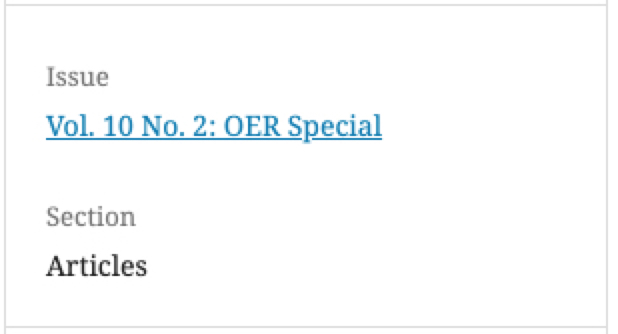
The heading "_Section_" should be a Heading level 3 (H3) instead level 2 (H2), because it is a child of the Heading level 2 "Issue".
Sidebar
The _Information_ block in the sidebar has no heading. It should be, at least, a heading level 2.
Also, the last block on sidebar should include a Heading like "Copyright" or "Disclaimer". Otherwise, it seems to make part OR be content of _Section / Articles_ previous heading.
israelcefrin
on 10 Apr 2020
Thanks for testing @israelcefrin!
- Author Biographies bellow the abstract: I've filed that as a separate issue at https://github.com/pkp/pkp-lib/issues/5726.
- Galleys: Good catch!
- Issue Section: I'm not sure what the "Section" text is that you're referring to. But maybe this has already been addressed? In my copy of the
masterbranch, the issue table of contents shows each section (Articles, Reviews) in a<h2>. If you are finding something different, can you describe in a little more detail in a separate issue? Then we can schedule it to get addressed separately. - Sidebar (information): I think the "Information" block was addressed here: https://github.com/pkp/pkp-lib/issues/5176. Is this the site-wide info block (For Librarians, etc) that you're talking about?
- Sidebar (Copyright): Good catch!
So, @thinkbulecount2, there's just a couple more things to do for this issue:
- [ ] Add headings for the galley sections. I'd recommend "Download" for the primary galleys and "Other Files" for the supplementary galleys. These headings should be hidden.
- [ ] Add a heading to the licensing block on the article details page. I think this should be "License".
NateWr
on 14 Apr 2020
Hi @NateWr
Issue Section: I'm not sure what the "Section" text is that you're referring to.
Is the Section heading in sidebar. It is currently the same level than "Issue" heading, even though it is a child element from a hierarchy perspective. See the image below:
Add headings for the galley sections. I'd recommend "Download" for the primary galleys and "Other Files" for the supplementary galleys.
Since both sections are meant to download manuscript files I would suggest "Download full-text files" and "Download additional files" hidden headings. It can make it clear what exactly each section will provide. Considering it will be perceivable only for screen readers we can make it clearer for a better understanding and it won't clutter the visual layout.
israelcefrin
on 14 Apr 2020
Is the Section heading in sidebar. It is currently the same level than "Issue" heading, even though it is a child element from a hierarchy perspective.
Ah I see. Are you sure that Section is a child heading of Issue? That may not be the case for journals that are doing continuous publishing. It also wouldn't be true if a journal chose other ways to group their articles in the table of contents. It seems to me a common convention but not necessarily a strict relationship.
I would suggest "Download full-text files" and "Download additional files" hidden headings
I'm not sure that "full-text files" is clear to the average user. Also, it doesn't really work in cases where the journal may be publishing a photo collection, video or recording.
I looked at a few places and they say "Download PDF" (PlosOne, Sage) or "Downloads" (eLife). I think "Downloads" is probably best at covering all the possible use-cases for us -- although some of them may not be downloads in the strict sense of the term (eg - HTML galleys).
In terms of supplementary files, I think Additional Files or Other Files could work. Or Additional Downloads or Other Downloads?
NateWr
on 15 Apr 2020
That may not be the case for journals that are doing continuous publishing.
You are right, that makes sense. I was just thinking about regular cases of NUmber/Volume edition.
Regarding the download labelling, my only concern is making it clear that is possible to have 2 different download sections. Usually, screen readers users skim the page through headings to check the content outline quickly. So, letting it clear what is the difference between these 2 sections could help these users.
I've visited PlosOne using VoiceOver and they don't use Headings for downloading section. It is inside a section announced as Complementary. It takes a loooooong time to get there without using Heading skimming and is not possible check other download links using keyboard only. Maybe they are in the middle of the Accessibility process just like us.
israelcefrin
on 15 Apr 2020
Should additional files be nested under the main download? Should it be:
<h2>Downloads</h2>
<a>PDF</a>
<a>HTML</a>
<h3>Additional Files</h3>
<a>Transcript</a>
<a>Research data</a>
PR: https://github.com/pkp/ojs/pull/2748
cc: @NateWr
thinkbulecount2
on 14 May 2020
These PRs are ready for merge once the tests pass:
https://github.com/pkp/pkp-lib/pull/5875
https://github.com/pkp/ojs/pull/2752
https://github.com/pkp/omp/pull/815
https://github.com/pkp/ops/pull/26
NateWr
on 14 May 2020
Merged!
NateWr
on 18 May 2020
Related issues
 mtub
·
6Comments
mtub
·
6Comments
 mhvezina
·
7Comments
mhvezina
·
7Comments
 asmecher
·
3Comments
asmecher
·
3Comments
asmecher
·
3Comments
asmecher
·
3Comments
 ajnyga
·
7Comments
ajnyga
·
7Comments