Pixi.js: Export Bitmap Font with bmGlymp (XML / FNT / PNG)
I have a problem with the format provided by bmGlymp and PIXI documentation.
The example _https://pixijs.io/examples/#/text/bitmap-text.js_ works perfectly, but bmGlymp doesn't export an XML + PNG, as in the example, but rather an FNT + PNG. I am not able to find any documentation or example for loading FNT + PNG, someone can help me? Thanks!
Best,
Dario
 rodighiero
All 9 comments
If you use Sparrow/Starling format that will generate an XML-based format that Pixi understand.
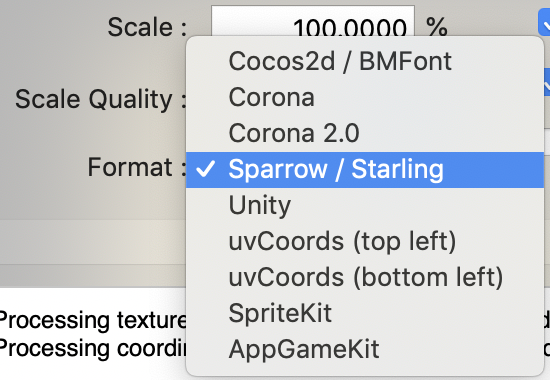
The upcoming version of Pixi will support the cocos2d/BMFont format as well.
 bigtimebuddy
on 6 Jun 2020
bigtimebuddy
on 6 Jun 2020
Hi bigtimebuddy,
What misled me was the export in FNT.
I converted it into an XML and it worked out!
Thank you very much for your help.
Best,
Dario
rodighiero
on 6 Jun 2020
I have another annoying problem related to Webpack, which requires to manage all the external files for the build. It seems that the _loader.add_ cannot digest the XML as a string (previously imported). is there a workaround since this code is not working? — Thanks a lot.
   s.app.loader.add('Arial', arial)
        .load(onAssetsLoaded)
P.S. _arial_ is a string containing the XML content
rodighiero
on 6 Jun 2020
I am testing this, but I am quite lost
const arial = new PIXI.BitmapFontLoader(arialXML, arialPNG)
This is a duplicate of other issues (e.g. #5134), please make sure you search closed issues before opening a new one. It will save us and you time.
I believe you're looking for this API to pass in the XML and textures to create the font. This is exactly what BitmapFontLoader does if you take a look at the source code (if you're curious).
http://pixijs.download/release/docs/PIXI.BitmapText.html#.registerFont
bigtimebuddy
on 6 Jun 2020
I cannot use the load because of Webpack, but I have the data I need by importing them as this works:
PIXI.BitmapText.registerFont(arialXML, arialPNG)
This was working with external loading, but with the new command _registerFont_ it doesn't work anymore
const txt = new PIXI.BitmapText(string, style)
Are you sure arialXML is not a string (buffer or url) and is, in fact, an XMLDocument? Also arialPNG needs to be a PIXI.Texture not the url path (e.g. PIXI.Texture.from(arialPNG))
This is why it's important to provide an example of the problem. There's so much info left out of your comment. What you're trying to do _is_ possible, but the easiest way to help is to provide a repo, codepen, or some other artifact.
bigtimebuddy
on 7 Jun 2020
It works now, thanks for your perseverance with me! For my instance of Webpack, I noticed that d3.js XML parsing works fine — js native doesn't for me — and PNG has to be imported directly. I copy and paste an abridged version of my code; full one, if needed, is available at the GitHub repository. If you are curious to see results, my network visualization based on PIXI is here on GitHub.
Important: I used bmGlyph for exporting the font with the format "Sparrow / Staling" whose output is a PNG file and an FNT file. I changed FNT into XML — I don't know if that was necessary, but I lost some time with it.
Thanks again!
import arialDataXML from './arial.xml'
import arialDataPNG from './arial.png'

Promise.all([
    d3.xml(arialDataXML)

]).then(([arialXML]) => {

    initPixi()

    const arialPNG = PIXI.Texture.from(arialDataPNG)
    const arial = PIXI.BitmapText.registerFont(arialXML, arialPNG)

})
Good luck!
bigtimebuddy
on 7 Jun 2020
Related issues
 MRVDH
·
3Comments
MRVDH
·
3Comments
 Makio64
·
3Comments
Makio64
·
3Comments
 finscn
·
3Comments
finscn
·
3Comments
 SebastienFPRousseau
·
3Comments
SebastienFPRousseau
·
3Comments
 readygosports
·
3Comments
readygosports
·
3Comments