Pixi.js: Is it possible to connect a large number of lines or erase to a specific point?
Hi there.
This is not a problem, but a question.
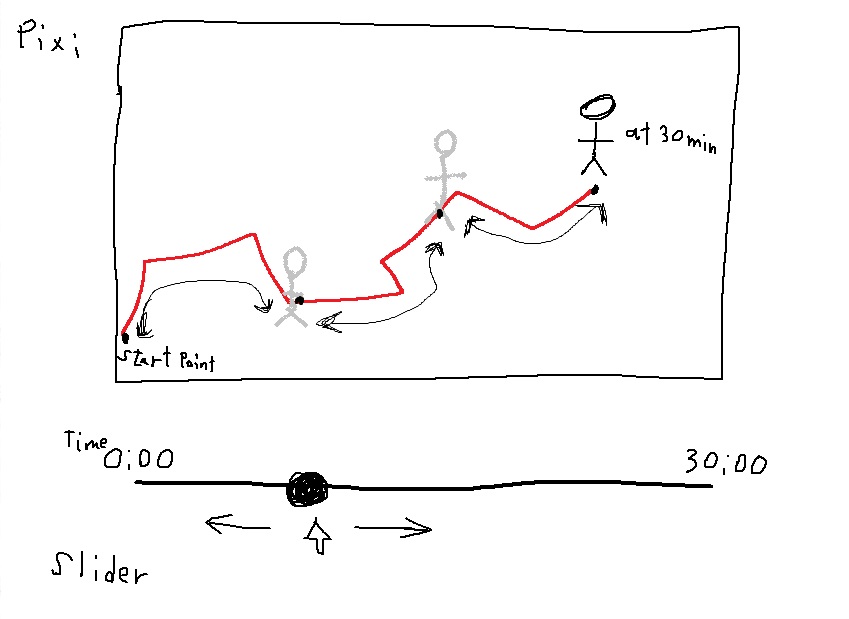
I'm creating an app that uses a map to show a line that shows what people have passed through.
Draw multiple people (about 100 people) on one side.
You can set the time by moving the slider and connect the line from 0 seconds to the set time.
The data it holds is an array of {x, y}.
It is arranged in tenths of a second increments.
(For example, if the data is from "0 seconds to 30 minutes", there is an array of 18,000 per person in length.)
I tried to connect the lineTo() of new PIXI.Graphics() several times to make this happen.
However, it is also possible to turn back time by moving the slider.
If you connect a line to a Graphics object with lineTo(), you can make more lines, but you can't make them go back to an arbitrary line.
So I came up with a way to create a number of new PIXI.Graphics(), connect the object to the time, and display the objects up to the time set by the slider.
But this would require creating 18000 objects * 100 people of Graphics objects.
It's easy to imagine that this will obviously have an impact on performance even before it's implemented.
I can only think of a way to use Pixi this way.
Will you help me?
I don't know if it exists, but is it possible to give a name to, say, lineTo() and then remove it with that name?
Thank you.
pixi.js version: 5.2.1
Browser & Version: Latest chrome version
OS & Version: Windows 10
 KagiJPN
All 18 comments
Connect the starting point to the current point at regular intervals.
If you use a slider to advance time, the line will increase.
Turn back time with a slider. It goes back to the point in time where it was returned, and the line above that time disappears.
KagiJPN
on 7 Apr 2020
However, the lines themselves are very short and very numerous.
That's because it updates the point in 0.1 second increments.
KagiJPN
on 7 Apr 2020
Impossible in pure implementation, possible with changing GraphicData inside GraphicsGeometry.
It store all graphics data builded from comands as point values.
But it is internal API without public documentation, but u can use it.
Looks to:
https://github.com/pixijs/pixi.js/blob/dev/packages/graphics/src/GraphicsGeometry.ts#L72
U should call invalidate after mutate of graphics data for rebuilding graphics.
 eXponenta
on 7 Apr 2020
eXponenta
on 7 Apr 2020
Hello, @eXponenta.
I was just wondering, does this not exist in the MASTER branch? What's new?
I am very intrigued by GraphicData.
However, not knowing how to use it is very unsettling.
If you don't mind, could you please tell me what data you have and how to use it?
Thank you.
KagiJPN
on 8 Apr 2020
I will always be waiting for help.
KagiJPN
on 9 Apr 2020
I see it in master too: https://github.com/pixijs/pixi.js/blob/master/packages/graphics/src/GraphicsGeometry.js#L207
In dev all those files are converted to typescript , dev build is here: pixijs.download/dev/pixi.js
could you please tell me what data you have and how to use it?
However, not knowing how to use it is very unsettling.
The best advice about that - use chrome devtools to figure out which variables in your app graphics graphicsData correspond to which things.
Place a breakpoint somewhere after finishPoly() is called (or maybe endFill) and look inside "graphics.graphicsData" through "watch" feature.
Learning how to debug library in runtime, how to "figure out" internal structure of things like graphicsData is a good time investment! You are using Javascript, it has all the info in runtime, means you dont have to beg for other people time for info that you can easily see after a minute of debugging.
Also, it means you will see actual detailed info, when people you ask can easily make mistake in details. Imagine you ask him about certain internals of pixi only for those intenals to be changed in next version, or for him to make silly mistake that you cant fix because you are not able to use devtools.
Asking "what is variable X means , I saw it in my app runtime and failed to change it" is totally fine, we love to help with hacks! Asking "guys tell me how to debug it" is also fine. Please convert your request in that form.
 ivanpopelyshev
on 9 Apr 2020
ivanpopelyshev
on 9 Apr 2020
Here, found an old invalidate() examples, just when it was first implemented:
https://www.pixiplayground.com/#/edit/LP7TfzH7XSAQ3G02WZ_Mb
https://www.pixiplayground.com/#/edit/JwIW3ToNCG1AYloElAoRm
26 July 2019
https://www.html5gamedevs.com/topic/9374-change-the-style-of-line-that-is-already-drawn/
ivanpopelyshev
on 9 Apr 2020
@ivanpopelyshev
I understand.
If I'm doing research and there's something I don't understand, can I ask questions again?
KagiJPN
on 9 Apr 2020
Of couse! just be more specific. We can pump you with info for specific questions, we always put extra ;)
ivanpopelyshev
on 10 Apr 2020
Hi. @ivanpopelyshev
I implemented this to increase and decrease the lines.
I understand that this is not optimal coding.
This is because it is assumed that it is faster to manipulate "graphics.graphicsData" directly without using moveTo, lineTo, etc.
However, I still don't fully understand Pixi, so I couldn't let it optimize.
However, I was able to implement it, so I'd like you to review it once.
Under the comment "Here's what we're reviewing from here on out" is the main implementation.
https://jsfiddle.net/takeshi1234/yjstLrw8/
I'm assuming that I'm drawing lines for 30 people, but it's lighter than I expected. I really feel that PixiJS is excellent.
I would ideally like to do a line drawing for 100 people. There is quite a bit of lag in the current implementation.
I want to perform a little better.
Thank you.
KagiJPN
on 10 Apr 2020
I see the progress.
Just one small notice:
for (let i = 0; i < oldNow - now; i++) {
    graphicsArr[j].graphics.geometry.graphicsData.splice(now - 1 - i, 1)
    graphicsArr[j].graphics.geometry.invalidate();
}
you may invalidate() once, no need to do it after every change. Here it is: https://github.com/pixijs/pixi.js/blob/7bd59cea0286a84f7272b7a66a1bd85cd0c1f1d6/packages/graphics/src/GraphicsGeometry.ts#L254
OK, now real problem:
                for (let i = 0; i < now - oldNow; i++) {
                    graphicsArr[j].graphics.moveTo(graphicsArr[j].location[now - 1 - i].x, graphicsArr[j].location[now - 1 - i].y)
                    graphicsArr[j].graphics.lineTo(graphicsArr[j].location[now - i].x, graphicsArr[j].location[now - i].y)
                }
you are spawning more graphicsData with each "moveTo". you should use moveTo only once when you start the line. Also using extra moveTo's mean that there wont be joints between lines.
On graphics shape (graphicsData.length = 1)
moveTo(1, 1)
lineTo(10,10);
lineTo(15,10);
Two graphics shapes (graphicsData.length = 2)
moveTo(1, 1)
lineTo(10,10);
moveTo(10,10);
lineTo(15,10);
^^ this has two graphicsData
That's what we are trying to avoid. Also using lineTo after something was already rendered on screen means that it will create extra shape too, because it finalized current shape on render!
That's why you have to change coords in graphicsData instead of using moveTo lineto if you dont want to increase number of shapes!
Yes, now I get what do you not understand. I recommend to look how actually moveTo lineTo work in Graphics class. Of course you'll have question couldn't it been easier? Yes, it could be if we limited Graphics to only one shape. Unfortunately, most people dont even think how it could possibly work, and if we force them to execute commands like 'new shape" or "alter last shape, add point" themselves, they will think its too hard. So, easy API and bad perf due to very obscure translation of API to actual drawing commands. Like in all other 2d renderers that have "graphics" element and dont have "Path" abstraction.
ivanpopelyshev
on 10 Apr 2020
@ivanpopelyshev
I did as I was told, debugging and doing my best.
What we have found is that the value of "points" has changed.
Create a graphicsData object in "graphics.geometry.graphicsData.push()"
    for (var i = 0; i < 100; i++) {
        let graphics = new PIXI.Graphics();
        graphics.lineStyle(4, getRandomColor());
        viewport.addChild(graphics);

        graphicsArr.push({
            graphics: graphics,
            location: getRondomLocations()
        })

        //graphics.moveTo(graphicsArr[i].location[0].x, graphicsArr[i].location[0].y)
        graphics.geometry.graphicsData.push(new PIXI.GraphicsData(new PIXI.Polygon(),new PIXI.LineStyle(),new PIXI.LineStyle()))
    }
Manipulate the "graphicsData[0].points" and "graphicsData[0].shape" points and call "invalidate()".
        for (var j = 0; j < 30; j++) {
            if (now > oldNow) {
                for (let i = 0; i < now - oldNow; i++) {
                    //graphicsArr[j].graphics.moveTo(graphicsArr[j].location[now - 1 - i].x, graphicsArr[j].location[now - 1 - i].y)
                    //graphicsArr[j].graphics.lineTo(graphicsArr[j].location[now - i].x, graphicsArr[j].location[now - i].y)
                    graphicsArr[j].graphics.geometry.graphicsData[0].points.push(graphicsArr[j].location[now - i].x)
                    graphicsArr[j].graphics.geometry.graphicsData[0].points.push(graphicsArr[j].location[now - i].y)
                    graphicsArr[j].graphics.geometry.graphicsData[0].shape.points.push(graphicsArr[j].location[now - i].x)
                    graphicsArr[j].graphics.geometry.graphicsData[0].shape.points.push(graphicsArr[j].location[now - i].y)
                }
                graphicsArr[j].graphics.geometry.invalidate();
                console.log(graphicsArr[j].graphics.geometry.graphicsData)
            } else if (now < oldNow) {
                for (let i = 0; i < oldNow - now; i++) {
                    graphicsArr[j].graphics.geometry.graphicsData[0].points.pop()
                    graphicsArr[j].graphics.geometry.graphicsData[0].points.pop()
                    graphicsArr[j].graphics.geometry.graphicsData[0].shape.points.pop()
                    graphicsArr[j].graphics.geometry.graphicsData[0].shape.points.pop()
                }
                graphicsArr[j].graphics.geometry.invalidate();
                console.log(graphicsArr[j].graphics.geometry.graphicsData)
            }
        }
I tried to implement it like this, but it doesn't work.
Any little bit of help would be greatly appreciated.
https://jsfiddle.net/takeshi1234/yjstLrw8/2/
Thank you.
KagiJPN
on 10 Apr 2020
Good, I see you've spent time on hacking and now I can help you by spending some time on it too :)
The problem is that you didnt specify proper lineStyle, you didnt pass whataver you created from graphics.lineStyle. Its easier to just add a polygon and then modify its points whenver you want.
https://jsfiddle.net/Hackerham/y7vbdpL6/14/
Other problems you might encounter: https://github.com/pixijs/pixi.js/wiki/v5-Hacks#removing-65k-vertices-limitation
You might specify "nativeLine:true" for line style if you didnt it yet. Default lineStyle is great for different lineWidth values but if you want just draw 1px lines its faster to do exactly that, and not try to convert them to rope of rectangle how pixi does it by default.
Usually for every such line there are many graphics, and not just one. 10k points per line is too much, invalidating that uploads 40k vertices buffer to gpu.
Its better to separate it too 100 or 1000 points per one graphics. To handle several graphics per plot its better to create your own class for handling single plot line, array is good for demo of single hack, but when you add more hacks it will make you insane.
At the same time you dont need graphics that dont fit in screen, so you might just switch them off (renderable=false) or even destroy.
Also for different level of scaling you might make separate versions of plot lines, or candles if you are into stonks :) No need to show 10k.
There's another hack I see - instead of just cutting the line, you can pass different size of line in geometry.draw() webgl function that is called from renderDirect function. You can override renderDirect and add an ability to override size there. - I suggest to make separate demo for that, just one plot and less code ;)
^^^^
SUMMARY:
That is why we dont have plot demo in pixijs examples. Line drawing looks like easy task but in fact, its not. PixiJS gives only baseline Graphics implementation that has not enough features for plots, and it doesnt have docs for people who want to abuse all small details of implementation.
The more issues like that, the closer is the moment where someone of us will just say "OK, that's enough" and makes plugin and article about plots.
ivanpopelyshev
on 10 Apr 2020
Btw, "divide one line to multiple graphics" is subjective thing, maybe not needed in your case. Whether one upload or drawcall is worse than multiple , i dont know for that case.
Also there's a problem in your demo with how you use FOR - i think we made wrong order somewhere. Try debug it on less number of points and use slider FAST, you'll see that wrong points are disappearing
ivanpopelyshev
on 10 Apr 2020
@ivanpopelyshev
OH, thank you so much for sharing so much detail!
You might specify "nativeLine:true" for line style if you didnt do it yet.
If this doesn't use a 1px line, the code should be fine as it is, right? Or can you perform a little better? (e.g. a 5px line).
10k points per line is too much, invalidating that uploads 40k vertices buffer to gpu.
I've checked here. This is supposed to be resolved in version 5.3.0, is that correct? I'm using JS.
At the same time you dont need graphics that dont fit in screen, so you might just switch them off (renderable=false) or even destroy.
Is this a setting that won't let you render off-screen?" I think it's similar to "visible = false". Where should this setting be to improve performance?
There's another hack I see - instead of just cutting the line, you can pass different size of line in geometry.draw() webgl function that is called from renderDirect function.
I want to do it so badly, really. But unfortunately I don't think I can implement it on my own.
Also there's a problem in your demo with how you use FOR - i think we made wrong order somewhere. Try debug it on less number of points and use slider FAST, you'll see that wrong points are disappearing
I was a fool. It was implemented in such a way that it would tie a line to a set value, and from there it would tie a line with a decreasing number of seconds. Thank you for sharing this with us.
https://jsfiddle.net/takeshi1234/37qsnmeo/6/
I tried to fix it. I also increased my performance by setting STEP to 100. Since this is an array that represents milliseconds, it is ticking in "0.1 seconds".
KagiJPN
on 11 Apr 2020
https://jsfiddle.net/takeshi1234/37qsnmeo/15/
Since then, I've thought a bit about performance.
This is because, in addition to lines, you have to display other objects, such as circles.
We thought that switching "renderable" might improve performance.
I thought that by setting "renderable = false", the rendering process could be cut off, although the object would be processed.
Would you mind reviewing what I think?
Thank you.
KagiJPN
on 12 Apr 2020
I didnt have time to review it yet. Maybe I wont before next week :(
ivanpopelyshev
on 15 Apr 2020
Thank you so much.
Thanks to you, we were able to implement it very fast.
I am so grateful.
This library is very, very nice.
I will continue to use it.
Thank you.
KagiJPN
on 19 Apr 2020
Related issues
 finscn
·
3Comments
finscn
·
3Comments
 softshape
·
3Comments
softshape
·
3Comments
 lunabunn
·
3Comments
lunabunn
·
3Comments
 gigamesh
·
3Comments
gigamesh
·
3Comments
 gaccob
·
3Comments
gaccob
·
3Comments