pixi.js 5.1.5 - "Cannot read property 'start' of undefined"
My working project stopped working after updating to pixi.[email protected]
Steps to reproduce:
- git clone https://[email protected]/dmitrydranitski/pixijs-5.1.1-5.1.5-update-bug.git
- cd into dir
- npm i
- npm run dev
- go to the url (https://localhost:8080 by default)
you should see the page
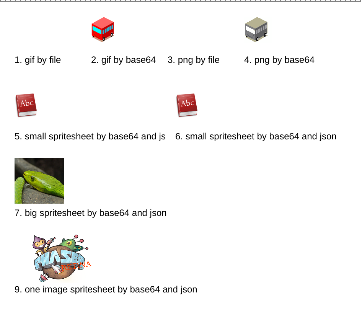
- Ctrl+C - stop the webpack-dev-server
- rm -rf node_modules
- npm i pixi.[email protected]
- npm run dev
- go to the url (https://localhost:8080 by default)
- The code is not working. I can not see the reason, seems like a bug?
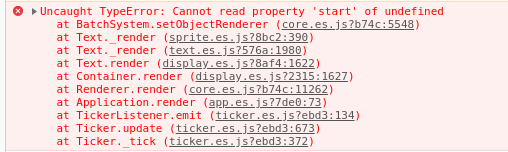
Thanks in advance for any help!
pixi.jsversion: 5.1.1 (working) - 5.1.5 (not working)- Browser & Version: Version 76.0.3809.100 (Official Build) (64-bit)
- OS & Version: Arch Linux
 dranitski
All 5 comments
Known bug. Two versions of pixi exist at the same time, renderers are registered in only one of them.
"Remove package.lock and node_modules" helps.
We have a number of threads in forums & here, all closed.
Personally, I dont know what to do about it, except "throw webpack away, use vanilla js!"
 ivanpopelyshev
on 15 Oct 2019
ivanpopelyshev
on 15 Oct 2019
"Remove package.lock and node_modules" helped. Thanks!
dranitski
on 15 Oct 2019
I run yarn remove pixi.js-legacy and fixed it. I think the pixi.js-legacy module messes up with the regular pixi. Or maybe the versions of pixi and pixi.js-legacy don't match. Didn't had time to investigate.
 stevemarksd
on 8 Dec 2019
stevemarksd
on 8 Dec 2019
This issue has been automatically marked as stale because it has not had recent activity. It will be closed if no further activity occurs. Thank you for your contributions.
![stale[bot] picture](https://avatars3.githubusercontent.com/in/1724?v=4&s=40) stale[bot]
on 7 Mar 2020
stale[bot]
on 7 Mar 2020
It happened again.
I had the following dependencies in my package.json:
"pixi-filters": "3.1.1",
"pixi.js": "5.2.2"
- New 5.2.3 pixi.js version has been released.
- I still have "pixi.js": "5.2.2" as a dependency.
- After
npm installsome pixi.js dependencies in package-lock.json are pointed to 5.2.3 some are still to 5.2.2.
Solution in my case:
- Update my pixi.js dependency to 5.2.3
- Clear node_modules and package-lock.json
- npm install
- Now all pixi.js dependencies are pointed to 5.2.3 versions, so there are no versions conflict now and issue is solved.
 hellmark1990
on 26 Apr 2020
hellmark1990
on 26 Apr 2020
Related issues
 Makio64
·
3Comments
Makio64
·
3Comments
 finscn
·
3Comments
finscn
·
3Comments
 samueller
·
3Comments
samueller
·
3Comments
 gigamesh
·
3Comments
gigamesh
·
3Comments
 readygosports
·
3Comments
readygosports
·
3Comments
Most helpful comment
"Remove package.lock and node_modules" helped. Thanks!