Pixi.js: InteractionManager: propagating click through transparent pixels
Expected Behavior
Looking for a way to propagate clicks/hover through an interactive sprite with transparency to another interactive sprite behind it.
Current Behavior
Clicks are captured by a big sprite with very large portions of transparency, in front of a smaller sprite.
Possible Solution
Overriding the onHit method of the interactive sprites to check if the point matches a fully transparent pixel or not, if the pixel is fully transparent it's not a match and I would expect a "click-through" effect.
Not sure how or where, has this been done before? Any tips? I'd like for the "change cursor on interactive hover" effect to work as well as clicks.
Steps to Reproduce
Render a big sprite with lots of transparency in front of a smaller sprite placed beneath the transparency, both sprites are interactive. The smaller sprite cannot be interacted with while it is rendered behind the larger sprite.
Environment
pixi.jsversion: _5.1.1_- Browser & Version: Chrome v76
OS & Version: Windows 10.
Running Example:
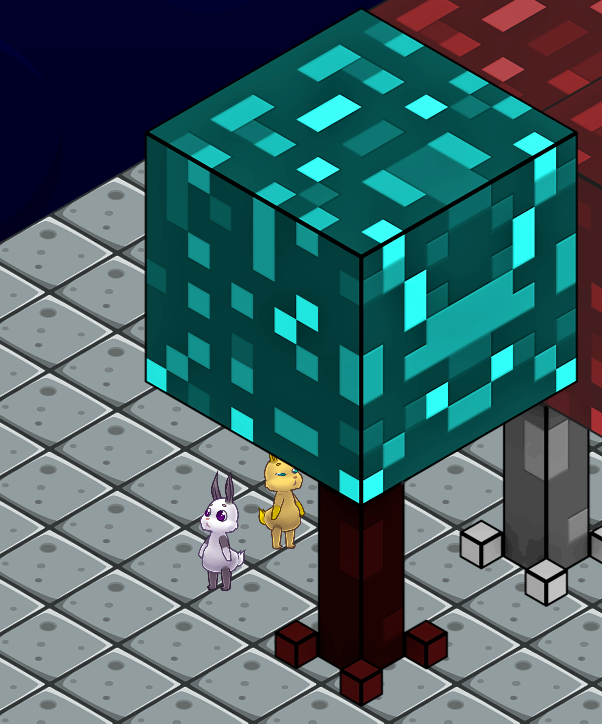
I'm the white bunny here, the tree and the yellow bunny are both interactive. Here the yellow bunny is rendered behind the tree and cannot be interacted with. If the yellow bunny is rendered in front of the tree the bunny can be interacted with.
 codingchili
All 5 comments
Have you tried using a hitArea for the Sprite? You can use this to define a polygon that you want to use for the interactive area. Will probably get better results than overriding stuff in interaction manager.
const tree = PIXI.Sprite.fromFrame('tree.png')
tree.hitArea = new PIXI.Polygon([])
 bigtimebuddy
on 18 Aug 2019
bigtimebuddy
on 18 Aug 2019
Use hitArea. If you need to define shapes for MANY sprites, use PhysicsEditor and plugin for it https://github.com/eXponenta/pixi-poly . It works by re-defining containsPoint: https://github.com/eXponenta/pixi-poly/blob/master/pixi-poly-importer/ShapedSprite.js#L11
Ultimate solution is here, the hack spawns 1-bit hit maps for sprites based on alpha: https://github.com/pixijs/pixi.js/wiki/v5-Hacks#pixel-perfect-interaction
 ivanpopelyshev
on 19 Aug 2019
ivanpopelyshev
on 19 Aug 2019
@bigtimebuddy No, I'm looking for something that will add the least amount of overhead per game asset. If I can avoid specifying hit areas I'll save a lot of time, I guess I could generate them from the images. Thanks for the suggestion.
@ivanpopelyshev I was trying to grab the pixel alpha using the renderer.extract.pixels(sprite) in hitArea#contains, but now I'm just getting 0s. Thanks for the links, the pixel-perfect hack is just what I'm looking for.
codingchili
on 19 Aug 2019
Wow it works perfectly! I'm using the getColorByPoint from the hitArea.contains and just check the alpha after the bounds are checked. I've been nervous about this for a while, so good to have it resolved.
Many thanks!
codingchili
on 19 Aug 2019
Hi,
I'm trying to use the Pixel perfect interaction technic but I encouter difficulties with Typescript integration.
I use the above example by @ivanpopelyshev (demo pixel perfect)
But when I try to add .getColorByPoint method to PIXI.Sprite.prototype I don't know where come from the colormap property of baseTex const.
I check the documentation for such a SPRITE.texture.baseTexture.colormap property without succes. I only find it in colorMapFilter class.
TS give me this error msg : Property "colormap" does not exist on type "BaseTexture"
Here is how I declare baseText :
const baseTex : PIXI.BaseTexture = this.texture.baseTexture;
Same problem with baseTex.resource.source (Property "source" does not exist on type "Resource")
Where coming from .colormap and .source property ? Another PIXI version or outside the main npm pixi v5 package ?
I'm using PIXI.js v5.3.0. I'm new on it (coming from Actioscript 3) Any help will be really appreciate.
 swiffysmith
on 10 Jul 2020
swiffysmith
on 10 Jul 2020
Related issues
 samueller
·
3Comments
samueller
·
3Comments
 Makio64
·
3Comments
Makio64
·
3Comments
 lucap86
·
3Comments
lucap86
·
3Comments
 neciszhang
·
3Comments
neciszhang
·
3Comments
 st3v0
·
3Comments
st3v0
·
3Comments
Most helpful comment
Use hitArea. If you need to define shapes for MANY sprites, use PhysicsEditor and plugin for it https://github.com/eXponenta/pixi-poly . It works by re-defining
containsPoint: https://github.com/eXponenta/pixi-poly/blob/master/pixi-poly-importer/ShapedSprite.js#L11Ultimate solution is here, the hack spawns 1-bit hit maps for sprites based on alpha: https://github.com/pixijs/pixi.js/wiki/v5-Hacks#pixel-perfect-interaction